
~eeeeett., '1 H-{6'~-H~-4ttf1ete
|
|
|
- Arthur Rivard
- il y a 10 ans
- Total affichages :
Transcription
1 ~eeeeett., '1 H-{6'~-H~-4ttf1ete European C ommission Delegation ~~;;~ street, NW ~ JANVIER '1W&Shin.gton, DO 2 -' - Message de Monsieur E. RACKENIERS COMMUNICATIONS ST INFO... 7 INFORMATIONS DU CENTRE DE CALCUL ARTICLES. Translation Centre for the bodies of the European Union La signature électronique SNet - les fondations INTRANET- Application architectures INTRANET - Application development tools Migration "Nouvelle plate-forme technologique" en site pilote à la DI D'autres questions/réponses sur le projet 11 Next Technological Platform" New information technologies applied to statistics SDTvista - vos originaux, nos traductions, des références intéressantes Chaîne des SIC Outils logistiques ORGANISATION TALEAUX DE ORD. udget informatique Ressources humaines Projets d'infrastructure Formation LISTE DES PRODUITS COMITES 1 GROUPES DE TRAVAIL CALENDRIER ~, ~ lj J C.E. 1 Direction Informatique 1 Unité Relations Utilisateurs et Cohérence Informatique Editeur: F.ROSSA JMO C2 / 82 1t fax: J~ J DOCUMENT INTERNE
2

3 Message du directeur général Ce n'est pas sans peine que je quitte la direction de l'informatique. Ensemble nous avons décentralisé la responsabilité et les services informatiques vers les différentes directions générales en vue de rapprocher ceux-ci des utilisateurs finaux. Nous souhaitons simplifier toujours davantage ces services depuis que l'informatique devient progressivement un outil de travail pour tout le monde. Une organisation décentralisée est complexe et peut-être pas toujours facile à gérer mais elle est tellement plus performante! Je suis confiant pour l'avenir. Les récentes promotions des principaux responsables de la direction démontrent clairement toute l'estime dans laquelle notre institution vous tient ainsi que notre Commissaire Erkki Liikanen. La Commission a par ailleurs nommé un de ses meilleurs Directeurs généraux à la tête de votre service. Un nouveau Directeur sera nommé début janvier. J'ai servi pendant 37 ans la Commission, institution attachante s'il en est, à la fois par sa fragilité politique et sa créativité européenne irremplaçable. Je lui ai consacré le meilleur de mon temps et de mon énergie mais, en retour, elle m'a permis de m'épanouir dans une vie professionnelle stimulante. J'y ai été heureux et la quitte reconnaissant. L'Europe se trouve devant un tournant important avec à l'horizon les nombreux élargissements vers les pays de 1' Est visant à y consolider la démocratie. Même si nos conditions de travail pourraient en être modifiées, n'oublions jamais que notre but à tous est de maintenir dans le monde cet îlot de paix qu'est l'europe. E. RACKENIERS 3
4 4

5 COMMUNICATIONS JANVIER 97 Question écrite E posée par Cristiana Muscardini (NI) à la Commission (25 juin 96) Objet: Capacité de rendement et efficacité du système d'information de l'union européenne considérant que les banques de données de l'ue sont divisées entre ordinateurs d'au moins trois marques différentes, ce qui représente trois systèmes d'utilisation différents et des systèmes de recherche hétérogènes, qui créent des difficultés aux opérateurs, considérant que la structure même des bases de données, compliquée et inadaptée, ne permet parfois pas de trouver un document, alors même que l'on en connaît la date d'émission et le numéro, considérant que l'interface utilisateurs de ces banques de données est plutôt primitive et ne permet pas d'utiliser aisément et efficacement les potentialités de l'ordinateur, considérant que le système d'identification de l'utilisateur (login) des cmmections sur réseau à commutation par paquets est différents de celui qui prévaut pour les connections Internet (par l'adresse Telnet Eurobase LU), considérant qu'il arrive même que deux mois s'écoulent entre la publication d'un document et son introduction dans la base de données, ce qui prive la recherche informatique de tout avantage par rapport à la recherche sur le document sur le papier, la Commission peut-elle dire: 1 si l'on a l'intention ou le projet d'uniformiser toutes les banques de données, en utilisant un type unique d'ordinateur et de système d'interrogation, ce qui permettrait d'utiliser une seule et même méthode de recherche; 2 si l'on a prévu ou si l'on est en train de réaliser une nouvelle interface permettant à l'utilisateur de la banque de données d'exploiter pleinement les potentialités de l'ordinateur sans être contraint de se souvenir de dizaines de commandes différentes; 3 si l'on a prévu l'intégration et l'unification entre l'accès RCP (SPN) et Internet et si, pour ce dernier, l'on a envisagé la réalisation d'une interface graphique; 4 si l'on a envisagé de vérifier le caractère complet et intégral des banques de données et d'abréger les délais séparant la publication des documents et leur introduction dans une base de données? Réponse donnée par M. Santer au nom de la Commission (13 septembre 1996) La Commission est consciente de la diversité actuelle des bases de données de la Communauté, telle que soulignée par l'honorable parlementaire. Cette diversité résulte non seulement des couvertures très variées des bases de diffusion (documentaires, statistiques, budgétaires) mais aussi des techniques disponibles au moment de la création de chaque base. Etant donné la diversité des données à gérer, en termes de quantité, de typologie et d'utilisation, une éventuelle unification ne pourra être mise en oeuvre que si les fonctionnalités propres à chaque base de données pourront être garanties. Compte tenu de cette situation, la Commission a entrepris de nombreux efforts depuis plusieurs années pour améliorer la convivialité des accès à ses bases de données. C'est ainsi que les bases Rapid, Info92, Eurocron, Eclas, Ted et, plus récemment Celex et Scad, ont été dotées d'interfaces d'interrogation par menu. Plus récemment, le phénomène Internet et les technologies sous-jacentes on permis d'entrevoir une harmonisation plus radicale des interfaces utilisateurs et une navigation plus facile d'une base à l'autre. La Commission y accorde la plus grande attention et a entrepris un premier ensemble de travaux dans ce sens. Par exemple, 5
6 COMMUNICATIONS JANVIER 97 des interfaces graphiques WWW ont été créées pour les bases Ted et Celex et sont actuellement testées; pour les autres bases les plus utilisées (Rapid, Info92, Scad), le développement de telles interfaces est en cours ou a été planifié. Les travaux sont cependant limités par, d'une part, les moyens qu'il est possible d'affecter à cette modernisation et, d'autre part, la nécessité de conserver le patrimoine de données accumulé depuis de nombreuses années dans les bases existantes. Dès lors, 1 L'harmonisation des interfaces d'interrogation est un objectif de la Commission, dont la mise en oeuvre sera progressive et devra tenir compte des caractéristiques propres des différents types de données diffusées; 2 L'un des objectifs de cette harmonisation sera d'éviter que l'utilisateur n'ait à connaître une grande variété de langages et de systèmes de recherche; 3 L'accès aux bases de données publiques sur les serveurs Eurobases et Echo est possible à travers les réseaux Internet (telnet) et PSDN indifféremment avec le même code d'accès (user-id). Dès que les interfaces graphiques mentionnées ci-dessus seront mises en service, l'accès aux bases concernées sera aussi possible à travers le WWW (connexion graphique via une adresse HTTP sur Internet); 4 La Commission s'efforce de garantir une couverture intégrale et une mise à jour rapide des bases de données. Les opportunités d'harmonisation réalisables maintenant sur l'internet constituent une occasion propice d'améliorer la couverture offerte par les bases actuelles pour mettre en valeur la complémentarité. C'est ainsi par exemple que: a) Le serveur Europa, en cours de construction, a pour ambition de couvrir l'ensemble des activités communautaires et d'assurer des passerelles vers les serveurs plus spécialisés; b) Les titres et références bibliographiques du Journal officiel sene C et L sont disponibles le jour même dans la base de données Abel, et le texte complet du Journal officiel séries (appels d'offres) est disponible en même temps dans la base de données Ted; c) La base de données Cele x reprend les documents publiés dans le Journal officiel en moyenne dix jours après leur publication, et les décisions de la Cour de justice en moyenne deux semaines après leur prononcé, c'est-à-dire avant même leur publication au Recueil de la jurisprudence. La vérification et l'intégration des documents manquants dans la base de données Celex est en cours de réalisation; d) Les communiqués de presse de la Commission et d'autres institutions paraissent tous les jours dans la base de données Rapid; e) Pour les aspects liés à la diffusion électronique de documents officiels, Europa devrait à terme être relié au serveur Eudor. Enfin, dans le cadre du programme Interchange of data between administration (IDA), et plus particulièrement du projet "système d'échange informatisé" législation (SEI-LEG), les institutions ont également entrepris un ensemble d'actions visant à réduire les délais qui séparent l'adoption d'un document sur support papier et la diffusion de la version électronique correspondante. Ces actions nécessiteront l'adoption de normes communes pour la production et la circulation des documents. 6

7 COMMUNICATIONS JANVIER 97 PRODUITS ORACLE INFO Enterprise Manager Jusqu'à présent il manquait dans les produits Oracle un outil d'administration central pour les instances Oracle installées au sein d'un parc informatique. Cette lacune était compensée par des produits annexes (Platinum par exemple). Oracle Enterprise Manager est un outil client/serveur à l'usage des Database Administrators (DA) Oracle, il recouvre d'une part des fonctionnalités de gestion avec tous les outils Manager (Standard et Extended) plus un système Jobs et Events et d'autre part des possibilités de tuning avec le Performance Pack (en option). Cette gestion s'effectue à partir du programme Console Manager avec lequel on définit tous les objets intervenant dans l'environnement Oracle. Oracle Enterprise Manager Standard est composé de différents modules: Instance Manager, Schema Manage, Security Manager, Storage Manager, SQL Worksheet, ackup/recovery Manager, Data Manager, et Replication Manager. Le Performance Pack est composé de Oracle Expert, Oracle Trace, Oracle Locks, Oracle Top Sessions, Oracle Tablespace Manager, Oracle Performance Manager. Oracle Enterprise Manager s'installe sur un environnement PC MS-Windows 95 ou Windows NT 3.51 (version 1.2) ou NT 4 (version 1.2.2), les données nécessaires à Oracle Enterprise Manager sont alors stockées dans une instance repository (version 7.3 obligatoire) locale ou distante. Dans le cas d'une repository locale une machine assez puissante est nécessaire (32 M RAM). La Console Manager doit être gérée avec une connection SQL *Net 2.3, et une version SQL *Net 2.x doit être présente sur toutes les machines clientes. Les premiers tests ont été effectués avec MS Windows 95 et 16M RAM plus une repository distante. Ils se son révélés concluants. Il faut utiliser Oracle Network Manager pour configurer correctement l'environnement Oracle devant être géré. L'utilisation d'oracle Names est également conseillé. Une fois ceci réalisé, la partie Manager d'oracle Enterprise, regroupant les fonctionalités courantes du DA est d'installation facile et son utilisation conviviale. La mise en place et le fonctionnement des Jobs et Events demande plus d'efforts car il faut également configurer les Agents côté machines clientes et serveurs. L'utilisation d'oracle Enterprise Manager est couverte contractuellement et recommandée par DI-ST, par contre la partie "Performance Pack" est payante et la DI négocie actuellement avec Oracle la possibilité de l'intégrer au contrat. Pour avoir plus d'information, contacter: M. G. JOULAIN (tél ). Oracle Names SQL *NET version 2 est maintenant de plus en plus utilisé dans les applications clientes devant se connecter à des instances bases de données Oracle serveur. Pour ce faire ces applications fournissent un "connect string" du type TNS:<alias>, cet "alias" référençant des fichiers paramètres installés sur le poste client (TNSNAMES.ORA, SQLNET.ORA). Les scripts préparés par DI-ST (disponibles à partir de Softline) permettent actuellement d'automatiser l'installation de SQL *NET version 2 sur les postes clients mais les "connect strings" doivent toujours être entrés manuellement dans les fichiers paramètres pour prendre en compte les "alias" de chaque instance base de données devant être accédée. ORACLE NAMES est un service permettant de centraliser sur une ou plusieurs machines (ou "nodes") serveur NAMES les adresses de connexion des différentes instances ORACLE implantées sur un réseau. Sur la ou les machines 7
8 COMMUNICATIONS JANVIER 97 serveur NAMES ORACLE NAMES un "process daemon" est à l'écoute des requêtes des applications clientes désirant se connecter à une instance Oracle via SQL *NET version 2.x. Cette connexion s'effectue alors via un "connect names" fourni par l'administrateur NAMES. Sur le poste client le fichier de configuration TNSNAMES.ORA disparait, seules les adresses du ou des serveurs NAMES indiqués dans le fichier SQLNET.ORA sont nécessaires. La complexité est reportée au niveau serveur où pour gérer ces "connect names" l'administrateur NAMES dispose quant à lui de l'outil ORACLE NETWORK MANAGER (application Windows 16 bits) avec lequel il doit définir toutes les possibilités de connections offertes par sa configuration. Cet outil permet de valider et de générer tous les fichiers de configurations à destination des serveurs ORACLE et des clients. Ce produit est recommandé par la DI car il permet d'automatiser complètement l'installation SQL *NET version 2, d'avoir une gestion centralisée et évolutive des différentes possibilités de connections et de rendre transparent aux clients l'accès aux serveurs Oracle. Des tests ont été réalisés à la DI pour étudier la migration vers ce produit et le document ST/OD(96)09 Oracle Names: Installation and testing"' est disponible. Pour toute question relative à ce produit contacter G. JOULAIN DI-ST tél Oracle et le multilinguisme La version Oracle server 7.3 est la première version à utiliser si r on veut avoir un "vrai" multilinguisme du côté serveur. Rappelons qu'oracle, pour les données stockées dans la base de donnés. utilise une représentation multibyte variable, compatible à Unicode, connue comme UTF8 dans laquelle un caractère peut être représenté sur 1, 2 ou 3 bytes le tout en gardant la compatibité avec les codes ASCII dits IS Le support de la représentation Unicode UCS2 (tous les caractères sur 2 bytes) est prévue pour la version Oracle 8. Du côté client, les solutions sont annoncées. Suite à la demande de la DI et aux contacts directs maintenus avec Oracle USA, Oracle est en train de nous livrer une version ~ spécifique Developer/2000 v 1.3 uniquement sur la plateforme Windows NT 4.0 et qui est "Unicode UCS-2 enabled". Cette version sera testée à la DI (nous acceptons des volontaires pour les tests!) et si les résultats sont positifs. les fonctionnalités ''unicode" seront intégrées dans les versions commerciales futures de Developer/2000. La tàçon dont cette fonctionnalité est implémentée est la suivante: le développeur définira un champ type texte (textitem) dans un form et lors de l'introduction d'information dans ce champ, 1 utilisateur pourra commencer à taper du texte en français. changer la langue en utilisant les fonctionnalités standard fournies par le Multilingual Support de NT et continuer à taper du grec. La conversion entre Unicode UCS2 utilisée par le client et la représentation UTF8 utilisée dans la base de données est assurée directement par le kernel Developer Pour avoir plus d'information et éventuellement participer aux test contacter: M. MARIN (tél )- M. RUIZ (tél ) Oracle ODC database drivers y now, everybody should be familiar with Open Database Connectivity, known as ODC. In short, ODC defines an API providing a data access standard. In theory, applications become database independent because they have one interface to talk to: the ODC Driver Manager. Next to these two components (Application and Driver Manager), a third component is necessary: the proprietary ODC Driver. Oracle has historically provided a 16-bit Windo\vs 3.x Oracle7 ODC Database Driver at no charge to its customers. In response to customer feedback, Oracle has expanded support of the Oracle7 ODC Driver to the Windows 95 and Windows NT (Intel) platforms. Note that Oracle does not provide 16 and 32-bit product versions, but has instead operating system related products. As a result specifie ODC drivers exist for Windows 3.x, Windows 95 and Windows NT. In addition, it is worth mentioning that ali Oracle ODC drivers require specifie SQL *Net 8
9 COMMUNICATIONS JANVIER 97 versions. In tenns of SQL *Net versions, you can apply the following rule: it needs at least version x or higher. If a higher version is available, you might need to additionally install Required Support Files of the actual required SQL *Net version x. To date, DI's recommended SQL *Net version for 16-bit platforms is This implies the use of ODC (please refer to ODC: Oracle Database Drivers for an overview of all different drivers, this document is available at DI). On 32-bit platforms SQL *Net version 2.3 is recommended in combination with Oracle ODC version l.OA on both Windows 95 and Windows NT platforms (note that these are two different product versions). Next to the Oracle ODC drivers, there exist drivers from third parties such as Intersolv, Visigenic, etc. We have tested drivers from Intersolv and Visigenic in comparison with the Oracle ones, and most of the time the results indicated a performance gain of a few percentages (1-3%) in favour of the third party drivers. The differences were definitely not immense enough to have any meaning. For more information, please contact: R. SELS (phone: 34517) PRODUITS MICROSOFT INFO Visual asic VS In the context of the current battle for imposing standards for Internet components and tools. Microsoft has added a new edition to Visual asic: the Creation Control Edition. This edition allows the creation of ActiveX controls ("OCX"). This new edition is only available in the version 5 of V, giving us a preview of sorne features of Visual asic 5, still in beta: - use of a new version of the Developer Studio, which is the common development environment for Visual C++, Visual Test, Visual J++ and Internet Developer Studio (InterDev). This Developer Studio defines new standards for the vi suai interface, present in Office 97, (such as icons on the menus. highlight of toolbar icons when the pointer moves over them). 1t allows you to edit severa! projects simultaneously, and is extensible with add-ins - creation of native 32-bit machine code (yes. real compilation) - allows creation of ActiveX controls, reusable in every development tool accepting OCX's and in Internet Explorer use of templates and wizards allowing creation of new controls, SOI, MDI or explorer-like applications, but also data forms and property sheets for your controls - possibility of declaring and using new events - enum types - new setup wizard allowing Internet Setup download of V applications This version is free, being part of Microsoft strategy to impose ActiveX as the standard for components on the Internet. The DI is currently evaluating the product, to define the framework of its usage in our architecture and development tools context. For more information, please contact: P. DAMAS (phone: 33497) PRODUITS POWERSOFT INFO Poweruilder 5.0 evaluation At the time you are reading this information the document ST/OD(96) 11 "Poweruilder 5 Enterprise Edition Evaluation" ts being distributed to the IRMs Here is an extract of conclusions and recommendations prepared by Dl that to be discussed with Inter-DG evaluation team: Conclusions o The development environment available in P5 is a step forward within continuity, keeping the same principles than previous versions (professional tool, team support, 9
10 COMMUNICATIONS JANVIER 97 object orientation, Windows integration, open architecture, database independence ). The new functionality' s have the right orientation: best integration with new Windows platforms, enforcing the use of 00 techniques, distributed objects (3-tier C/S architecture) and evolution to Internet. o There is no problem using run-time P4 16- bit with P5 16-bits or P5 32-bit concurrently on the same PC. ut it is not possible to deploy P5 16-bit and P5 32-bit applications on the same PC, because the DLL's share the same name. This implies P4 and P5 applications can be installed and executed simultaneously. o All our application migrations went seamless and easy producing only warnings which were caused by obsolete items and functions. One must only pay attention when migrating from 16 to 32-bit. Most of the problems or caused by API functionality associated with platforms. o Poweruilder developers will find the version 5 functionality richer than version 4 and easy to use. The performance of the development environment is equivalent to its ancestor but needs more memory ( especially when generating compiled application code). o According to our tests, run-time performance slightly improved requiring a bit less memory. est results were noted on a 32-bit platform using compiled code. o Concerning stability, P5 indicates to be as stable as P4. Running P5 using the second maintenance release (5.0.02) can be considered as reasonably stable and ready for application development and deployment. o Poweruilder Foundation Class (PFC) must be considered as an important element to improve and accelerate P application development. It is a very good example of a way to develop quality applications with Poweruilder. o We predict PFC will have a serious impact on today's set of Poweruilder libraries, public or private. Most of them will decide to rewrite them using PFC. This is already happening with sorne commercial class libraries. o One of the new, and interesting, new features of Poweruilder 5 are the distributed computing possibilities. Current implementation is not yet mature enough to already be useful in mission critical applications. It has limited possibilities (you can, for instance, have only synchronous links between a client and a server application) and shows the unreliability typical to first versions. o The same is true for Powersoft' s version control system called ObjectCycle. It offers distinctive version control features but lacks others. This makes ObjectCycle, for the moment, a non recommended tool to support critical projects. Recommendations Version to use - From strict developer's point of view P5 can be used without any hesitation, but do not forget that a client/server application needs to be deployed and on the right platform. In the context of the Commissions Next Technological Platform (NTP), the target is to develop and to deploy 32-bit applications. At that time the recommended version are P5 32-bit in combination with SQL *Net 32-bits. Use P5 16-bit on a 16-bit platform and P5 32-bit on 32-bit platform (in combination with SQL *Net 32-bit). We consider the second maintenance release (5.0.02) as reasonable stable and ready for application development and deployment. Additionally, on a 16-bit platform, don't use too much Windows 95 controls (ListView, TreeView,... )! There are not so weil integrated in the user environment, and if you use too many graphical objects, it is rapidly eating up GDI resource. This problem does not occur on a 32-bit platform because the GDI management changed dramatically. Development - Do not use P5's distributed objects for 10
11 COMMUNICATIONS JANVIER 97 production applications. ut do see them as a leaming and experimentation tool. We received information on next version of P5, P5.1 is due for the first half of 97, which will extend and stabilise this functionality. At that time, evaluation will point at the feasibility of this issue. - The current version of ObjectCycle is a non recommended version control system to support critical projects. Wait until the product becomes more stable. - When developing 32-bit applications, move y our initialisation file (ini files) usage to the registry. Consider the use of PFC when starting new Poweruilder projects. Migration Guidelines Currently in the Commission, a large number of Poweruilder 4 applications are running on the Windows bit platform. One important issue is how we are going to manage the stability and the usage of Poweruilder 5? The document discuss different scenarios need to be applied and will guide you in finding the best strategy conceming the use of P5. - When starting a new project and your deployment platform is 32-bits, do not hesitate in using P5 32-bit. Do not worry conceming P4 16-bit applications within 32-bit production environments. 32-bit platforms are the context of the ongoing Next Technology Platform project at the Commission. Y our 16-bit applications run without modification on these 32-bit platforms. - Long term projects where application development has already started, should consider migration towards P5 32-bit only if the application will be deployed on 32-bit platforms. - Short term projects reaching the final stage of development should remain on P4. This has the least impact on delivery dates. ut one can evaluate the migration and its impact. Depending on this result one can decide what to do. - A more difficult questions is what do I do if I am not sure what the deployment platform is going to be? In this case one can use P5 32-bit to develop having following restrictions in mind: Make your application platform independent. Retain a unique source code. A void having 16 and 32-bit application version in terms of source code, do of course generate 16 and 32-bit executables. Keep you GDI resources in mind and be moderate in the usage of Windows 95 specifie controls. 11
12 COMMUNICATIONS JANVIER 97 DMS 1996 Readers' Choice Winners DIVERS Each year, readers of the magazine "DMS tools & strategies for IS professional" (one the best in the domain of C/S and internet tools) vote for their favourite client/server database tools. Here you find the results for 1996 (DMS December 1996): category product Dataase Accounting SAP R/3 Database Application Development Database severs and Host DMSs Decision Support, OLAP Embedded Data/File Managers Parallel Query DMS Persona) Database for Windows Your Most favorite C/S database tool (any category) Poweruilder Oracle7 Infomaker SQL Anywhere (Ex- Watcom) Oracle7 Access Poweruilder and Delphi If we compare with our preferred product list..., in any case no vote was given from us. Product meeting "Outils de développement" Les outils de développement ont connu une période de stabilité (à 1' exception des versions successives des produits) ces derniers temps à la Commission. Ce "calme" est en train d'être brisée par le phénomène Intranet/Internet, ce qui risque de produire un impact important au niveau de développement d'applications. Dans ce contexte, un Product Meeting aura lieu le 20 février afin de faire le point sur leur utilisation actuelle à la Commission et de discuter la stratégie future concernant l'évolution des outils vers Internet/Intranet (en concertation avec les activités du Groupe Interne de Coordination Internet/Intranet.) 12

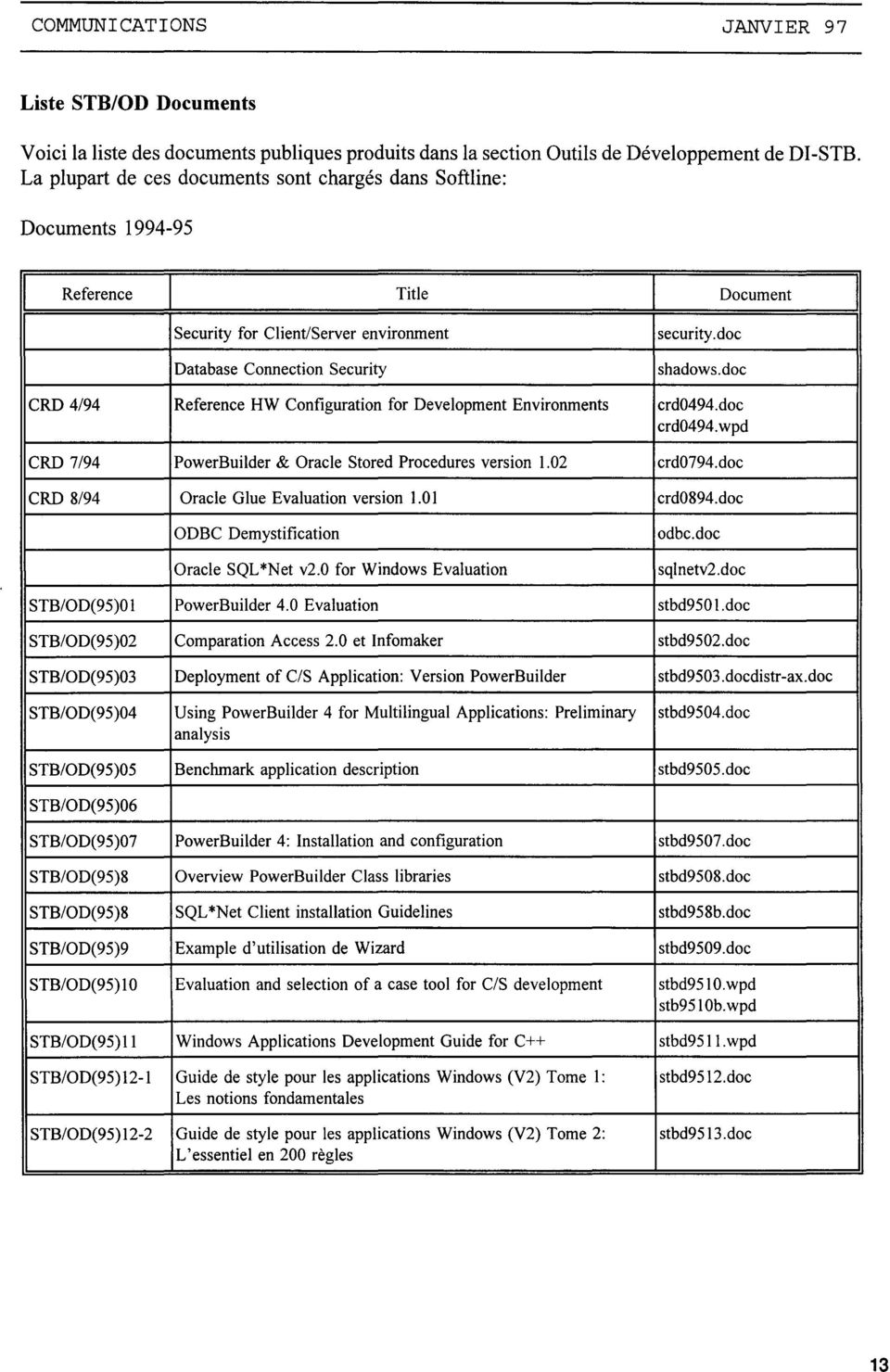
13 COMMUNICATIONS JANVIER 97 Liste ST/OD Documents Voici la liste des documents publiques produits dans la section Outils de Développement de DI-ST. La plupart de ces documents sont chargés dans Softline: Documents Reference 1 Title 1 Document 1 Security for Client/Server environment security. doc Database Connection Security shadows.doc CRD 4/94 Reference HW Configuration for Development Environments crd0494.doc crd0494.wpd CRD 7/94 Poweruilder & Oracle Stored Procedures version 1.02 crd0794.doc CRD 8/94 Oracle Glue Evaluation version 1.01 crd0894.doc ODC Demystification Oracle SQL*Net v2.0 for Windows Evaluation odbc.doc sqlnetv2.doc ST/00(95)01 Poweruilder 4.0 Evaluation stbd950 l.doc ST/00(95)02 Comparation Access 2.0 et Infomaker stbd9502.doc ST/00(95)03 Deployment of C/S Application: Version Poweruilder stbd9503.docdistr-ax.doc ST/00(95)04 Using Poweruilder 4 for Multilingual Applications: Preliminary stbd9504.doc analysis ST/00(95)05 enchrnark application description stbd9505.doc ST/00(95)06 ST/00(95)07 Poweruilder 4: Installation and configuration stbd9507.doc ST/00(95)8 Overview Poweruilder Class libraries stbd9508.doc ST/00(95)8 SQL *Net Client installation Guidelines stbd958b.doc ST/00(95)9 Example d'utilisation de Wizard stbd9509.doc ST/00(95)10 Evaluation and selection of a case tool for C/S development stbd9510.wpd stb9510b.wpd ST/00(95) 11 Windows Applications Development Guide for C++ stbd9511.wpd ST/00(95) 12-1 Guide de style pour les applications Windows (V2) Tome 1: stbd9512.doc Les notions fondamentales ST/00(95) 12-2 Guide de style pour les applications Windows (V2) Tome 2: stbd9513.doc L'essentiel en 200 règles 13
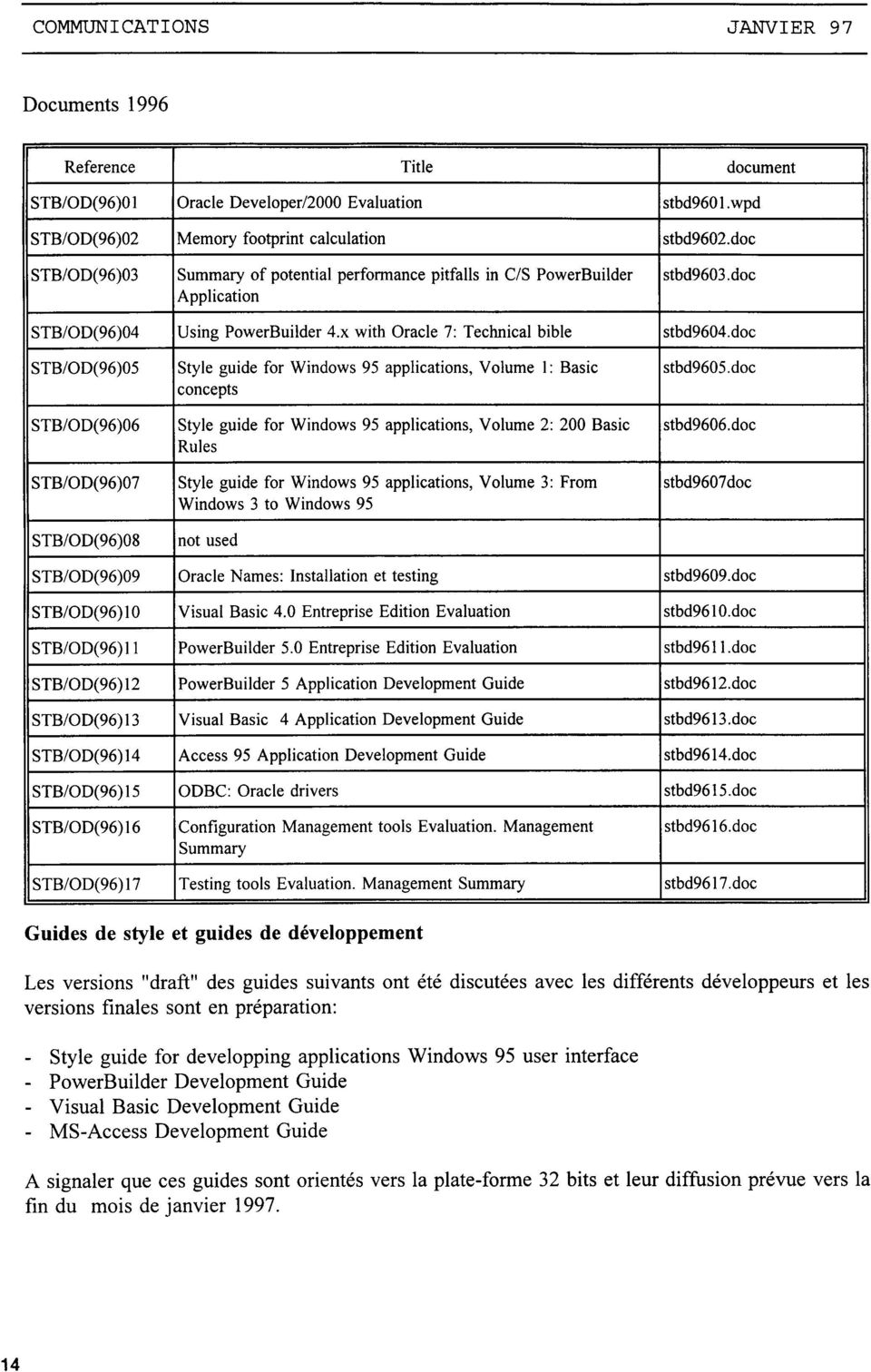
14 COMMUNICATIONS JANVIER 97 Documents 1996 Reference Title document ST/OD(96)01 Oracle Developer/2000 Evaluation stbd wpd ST/OD(96)02 Memory footprint calculation stbd9602.doc ST/OD(96)03 Summary of potential performance pitfalls in C/S Poweruilder stbd9603.doc Application ST/OD(96)04 Using Poweruilder 4.x with Oracle 7: Technical bible stbd9604.doc ST/OD(96)05 Style guide for Windows 95 applications, Volume 1: asic stbd9605.doc concepts ST/OD(96)06 Style guide for Windows 95 applications, Volume 2: 200 asic stbd9606. doc Ru les ST/OD(96)07 Style guide for Windows 95 applications, Volume 3: From stbd9607 doc Windows 3 to Windows 95 ST/OD(96)08 not used ST/OD(96)09 Oracle Names: Installation et testing stbd9609.doc ST/OD(96) 10 Visual asic 4.0 Entreprise Edition Evaluation stbd doc ST/OD(96)11 Poweruilder 5.0 Entreprise Edition Evaluation stbd96ll.doc ST/OD(96)12 Poweruilder 5 Application Development Guide stbd9612.doc ST/OD(96)13 Visual asic 4 Application Development Guide stbd9613.doc ST/OD(96)14 Access 95 Application Development Guide stbd9614.doc ST/OD(96)15 ODC: Oracle drivers stbd9615.doc ST/OD(96) 16 Configuration Management tools Evaluation. Management stbd9616.doc Summary ST/OD(96) 17 Testing tools Evaluation. Management Summary stbd9617.doc Guides de style et guides de développement Les versions "draft" des guides suivants ont été discutées avec les différents développeurs et les versions finales sont en préparation: - Style guide for developping applications Windows 95 user interface - Poweruilder Development Guide - Visual asic Development Guide - MS-Access Development Guide A signaler que ces guides sont orientés vers la plate-forme 32 bits et leur diffusion prévue vers la fin du mois de janvier
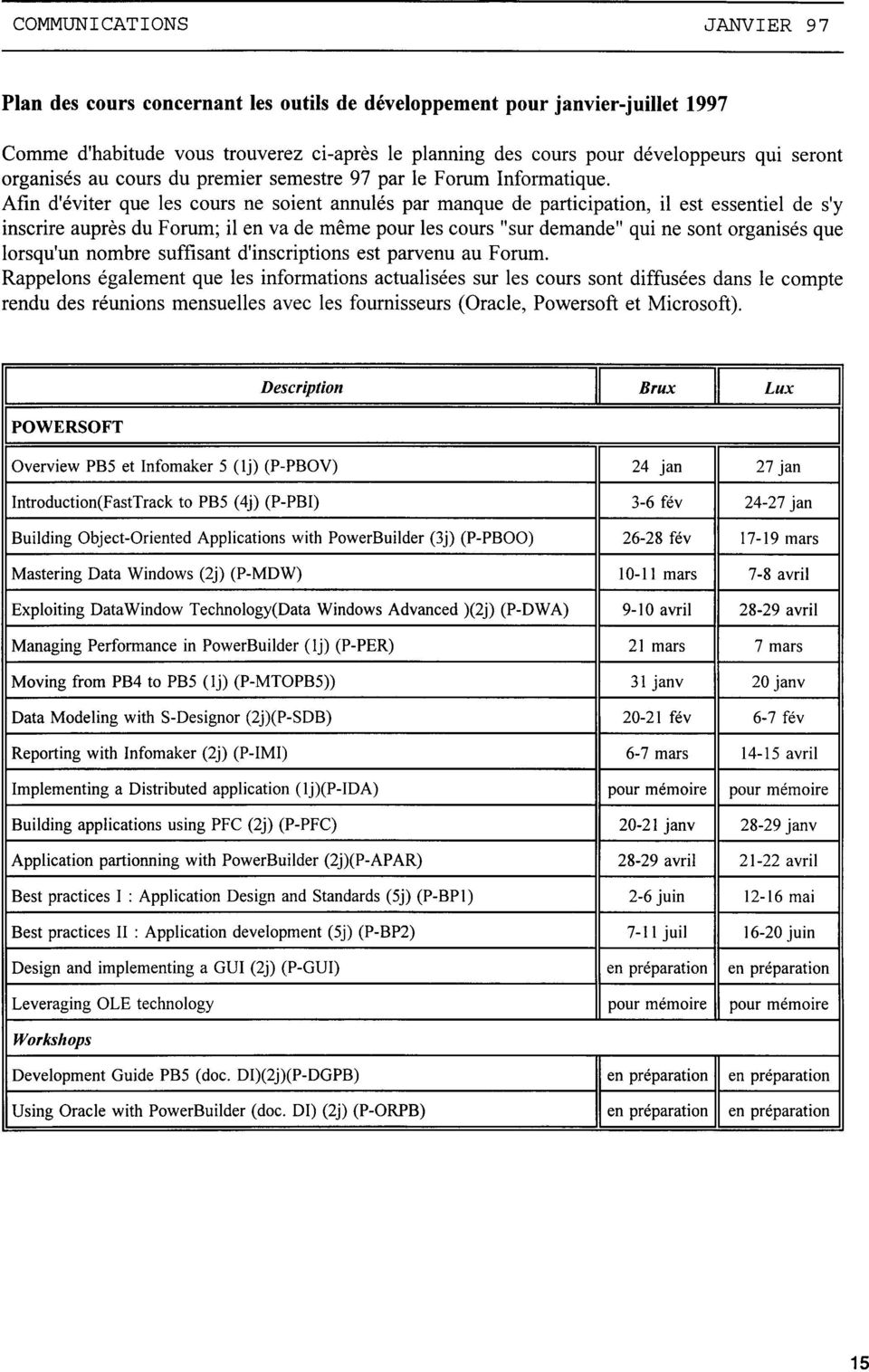
15 COMMUNICATIONS JANVIER 97 Plan des cours concernant les outils de développement pour janvier-juillet 1997 Comme d'habitude vous trouverez ci-après le planning des cours pour développeurs qm seront organisés au cours du premier semestre 97 par le Forum Informatique. Afin d'éviter que les cours ne soient annulés par manque de participation, il est essentiel de s'y inscrire auprès du Forum; il en va de même pour les cours "sur demande" qui ne sont organisés que lorsqu'un nombre suffisant d'inscriptions est parvenu au Forum. Rappelons également que les informations actualisées sur les cours sont diffusées dans le compte rendu des réunions mensuelles avec les fournisseurs (Oracle, Powersoft et Microsoft). 1 Description Il rux Il Lux 1 IPOWERSOFT 1 Overview P5 et Infomaker 5 (lj) (P-POV) 24 jan 27 jan Introduction(FastTrack to P5 (4j) (P-PI) 3-6 fév jan uilding Object-Oriented Applications with Poweruilder (3j) (P-POO) fév mars Mastering Data Windows (2j) (P-MDW) mars 7-8 avril Exploiting DataWindow Technology(Data Windows Advanced )(2j) (P-DWA) 9-10 avril avril Managing Performance in Poweruilder (lj) (P-PER) 21 mars 7 mars Moving from P4 to P5 (1j) (P-MT5)) 31 janv 20 janv Data Mode1ing with S-Designor (2j)(P-SD) fév 6-7 fév Reporting with Infomaker (2j) (P-IMI) 6-7 mars avril Implementing a Distributed application (lj)(p-ida) pour mémoire pour mémoire uilding applications using PFC (2j) (P-PFC) janv janv Application partionning with Poweruilder (2j)(P-APAR) avril avril est practices 1 : Application Design and Standards (5j) (P-P1) 2-6 juin mai est practices II : Application development (5j) (P-P2) 7-11 juil juin Design and implementing a GUI (2j) (P-GUI) en préparation en préparation Leveraging OLE technology pour mémoire pour mémoire Workshops Development Guide P5 (doc. Dl)(2j)(P-DGP) en préparation en préparation Using Oracle with Poweruilder (doc. DI) (2j) (P-ORP) en préparation en préparation 15
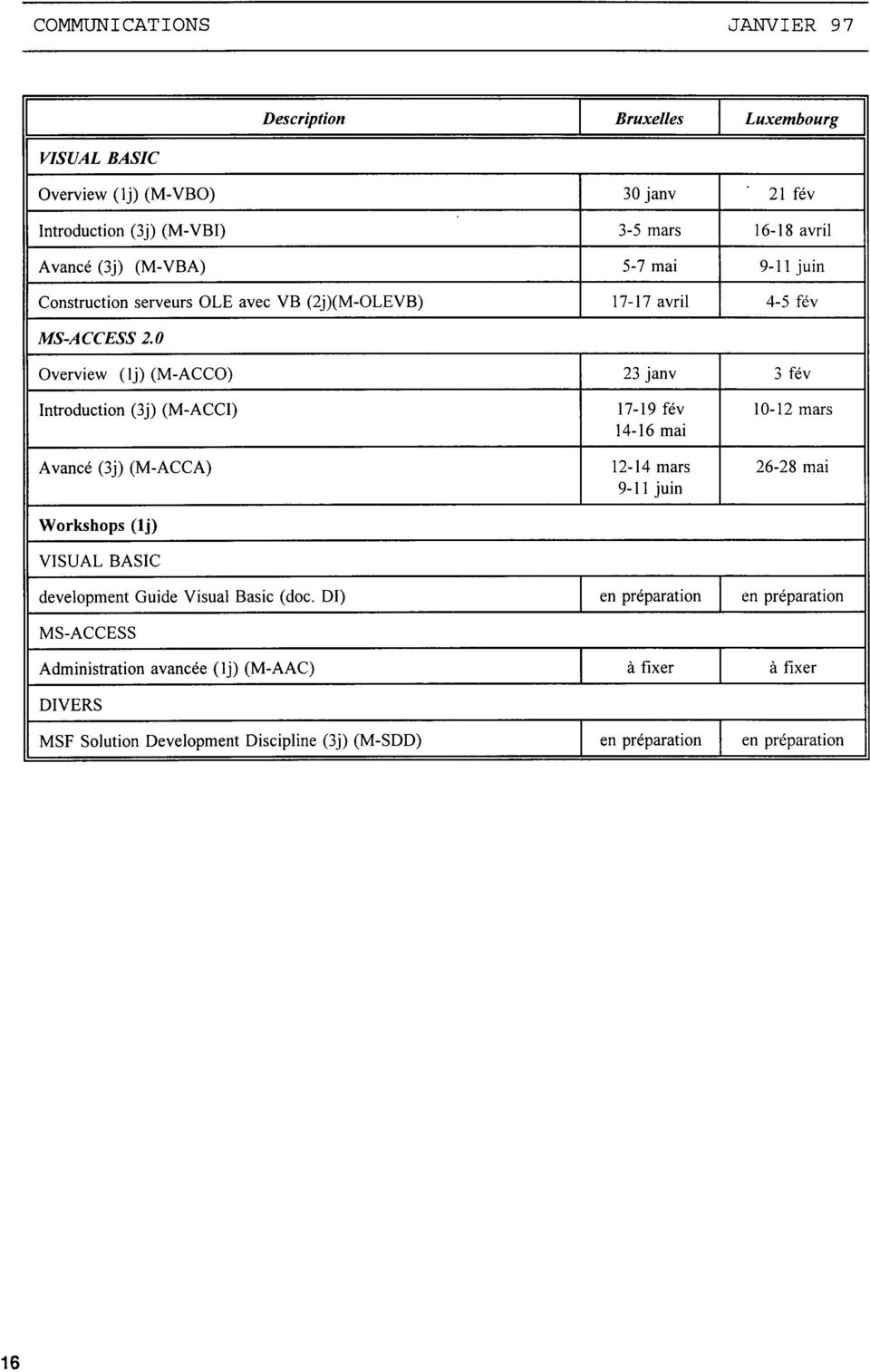
16 COMMUNICATIONS JANVIER 97 1 Description 1 ruxelles 1 Luxembourg 1 V/SUAL ASIC Overview (1j) (M-VO) 30 janv 21 fév Introduction (3j) (M-VI) 3-5 mars avril Avancé (3j) (M-VA) 5-7 mai 9-11 juin Construction serveurs OLE avec V (2j)(M-OLEV) avril 4-5 fév MS-ACCESS 2. 0 Overview (lj) (M-ACCO) 23 janv 3 fév Introduction (3j) (M-ACCI) fév mars mai Avancé (3j) (M-ACCA) mars mai 9-11 juin Workshops (lj) VISUAL ASIC development Guide Visual asic (doc. DI) en préparation en préparation MS-ACCESS Administration avancée (1j) (M-AAC) à fixer à fixer DIVERS MSF Solution Development Discipline (3j) (M-SDD) en préparation en préparation 16
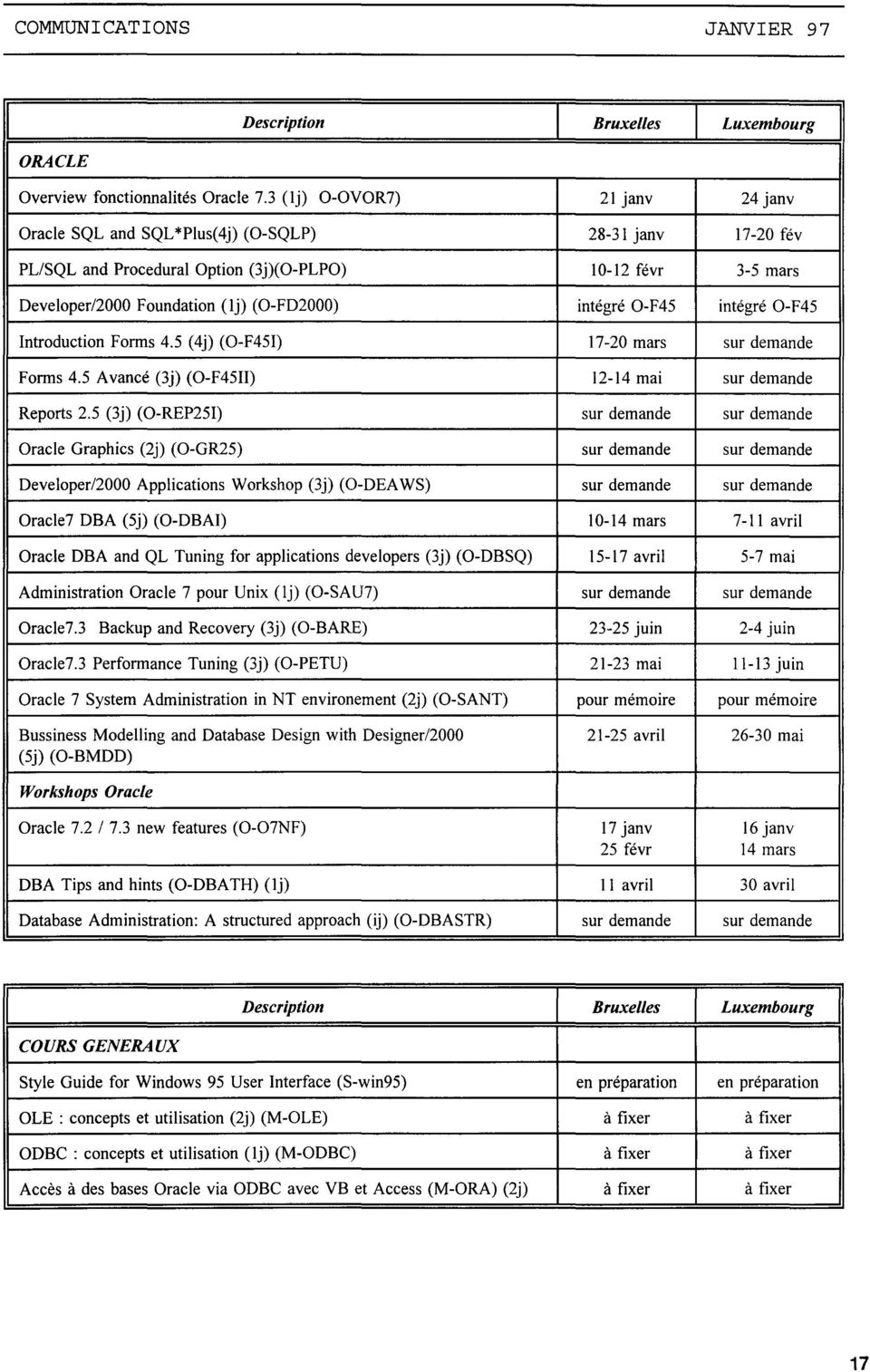
17 COMMUNICATIONS JANVIER 97 1 ORACLE Description 1 ruxelles 1 Luxembourg 1 Overview fonctionnalités Oracle 7.3 (1j) O-OVOR7) 21 janv 24 janv Oracle SQL and SQL *Plus( 4j) (0-SQLP) janv fév PLISQL and Procedural Option (3j)(O-PLPO) févr 3-5 mars Developer/2000 Foundation (lj) (O-FD2000) intégré O-F45 intégré 0-F45 Introduction Forms 4.5 (4j) (O-F451) mars sur demande Forms 4.5 Avancé (3j) (O-F4511) mai sur demande Reports 2.5 (3j) (O-REP251) sur demande sur demande Oracle Graphies (2j) (O-GR25) sur demande sur demande Developer/2000 Applications Workshop (3j) (0-DEA WS) sur demande sur demande Oracle7 DA (5j) (0-DAI) mars 7-11 avril Oracle DA and QL Tuning for applications developers (3j) (0-DSQ) avril 5-7 mai Administration Oracle 7 pour Unix (lj) (O-SAU7) sur demande sur demande Oracle7.3 ackup and Recovery (3j) (0-ARE) juin 2-4 juin Oracle7.3 Performance Tuning (3j) (0-PETU) mai ll-13juin Oracle 7 System Administration in NT environement (2j) (O-SANT) pour mémoire pour mémoire ussiness Modelling and Database Design with Designer/ avril mai (5j) (0-MDD) Workshops Oracle Oracle new features (0-07NF) 17 janv 16 janv 25 févr 14 mars DA Tips and hints (0-DATH) (lj) Il avril 30 avril Database Administration: A structured approach (ij) (0-DASTR) sur demande sur demande 1 Description 1 ruxelles 1 Luxembourg 1 COURS GENERAUX Style Guide for Windows 95 User Interface (S-win95) en préparation en préparation OLE : concepts et utilisation (2j) (M-OLE) à fixer à fixer ODC : concepts et utilisation (lj) (M-ODC) à fixer à fixer Accès à des bases Oracle via ODC avec V et Access (M-ORA) (2j) à fixer à fixer 17
18 1. ORDINATEURS Système Dtsponibilité on-line Charge (TINS) d'exploit. Nov trim. 96 Nov. 96 Déc. 95 à Nov. Moyenne 12 derniers 96 mots AMDAHL MVS 100,00 99,66 179, ,45 127,87 VM 100,00 99,90 52,94 640,14 53,35 UTS 99,73 99,62 61,88 972,8 81,07 ULL GCOS8 99,64 99,91 9,97 73,63 6,14 SNI S ,88 99,95 21,92 270,89 22,57 TOTAL 99,85 99,81 326, ,91 290,99 2. SYSTEMES D'INFORMATION (Consommation en TINS) Système Système Consom Nov.95 Moy trim. 3 trirn. Croissance d'information Nov 96 à Nov. 96 dern rno1s trirn EUROFARM MVS 92,76 415,64 34,64 45,70 91,68 100,64% COME XI UTS 61,71 965,71 80,48 133,55 269,25 101,61% SINCOM MVS 59,59 690,13 57,51 112,03 178,66 59,48% SYSLING MVS 17,10 212,48 17,71 56,96 51,46-9,66% CRON.SEC1 VM 11,73 99,29 8,27 5,78 8,16 41,28% IRENE VM 11,24 125,99 10,50 24,11 34,81 44,37% APPOLREG VM 11,21 86,57 7,21 17,06 18,36 7,61% ACIERD MVS 8,61 141,20 11,77 37,64 26,28-30,17% SYSPER S2000 7,32 80,72 6,73 13,31 19,27 44,81% CEL EX GCOS8 7,21 53,32 4,44 7,55 12,40 64,24% SYSIEN S2000 4,36 48,97 4,08 5,62 12,22 117,39% CARE VM 3,19 62,12 5,18 5,09 13,54 166,10% ECODG06 VM 2,80 10,63 0,89 2,51 3,80 51,25% COM-INDAN VM 2,79 37,59 3,13 32,98 12,05-63,48% DATANAL VM 2,29 5,79 0,48 0,00 1,77 COME XI VM 2,29 84,23 7,02 52,20 6,61-87,33% IDS S2000 1,99 30,61 2,55 9,00 6,84-23,98% PAIE S2000 1,89 23,08 1,92 3,18 5,21 63,61% TRAINS VM 1,60 6,24 0,52 0,87 1,97 125,77% EUROFAR-P VM 1,21 0,93 0,08 1,02 0,44-57,07% Autres applications 13,10 310,67 25,89 118,71 71,23-39,99% Total 326, ,91 290,99 684,87 846,01 23,53% 18

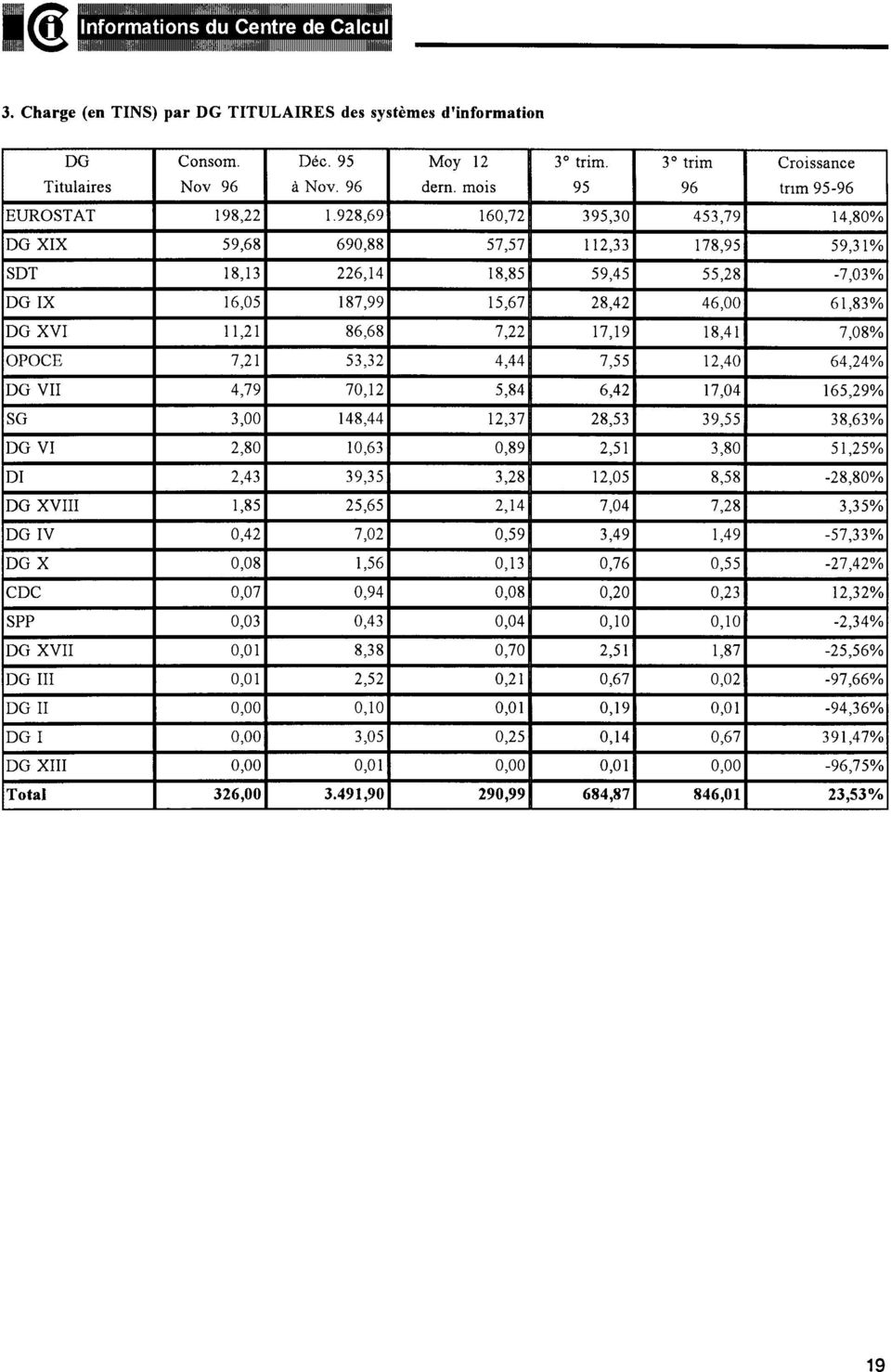
19 3. Charge (en TINS) par DG TITULAIRES des systèmes d'information DG Consom. Déc. 95 Moy 12 3 trim. 3 trim Croissance Titulaires Nov 96 à Nov. 96 dern. mois tnm EUROSTAT 198, ,69 160,72 395,30 453,79 14,80% DG XIX 59,68 690,88 57,57 112, ,95 59,31% SDT 18,13 226,14 18,85 59,45 55,28-7,03% DGIX 16,05 187,99 15,67 28,42 46,00 61,83% DG XVI Il,21 86,68 7,22 17,19 18,41 7,08% OCE 7,21 53,32 4,44 7,55 12,40 64,24% DG VII 4,79 70,12 5,84 6,42 17,04 165,29% SG 3,00 148,44 12,37 28,53 39,55 38,63% DG VI 2,80 10,63 0,89 2,51 3,80 51,25% DI 2,43 39,35 3,28 12,05 8,58-28,80% DG XVIII 1,85 25,65 2,14 7,04 7,28 3,35% DGIV 0,42 7,02 0,59 3,49 1,49-57,33% DGX 0,08 1,56 0,13 0,76 0,55-27,42% CDC 0,07 0,94 0,08 0,20 0,23 12,32% SPP 0,03 0,43 0,04 0,10 0,10-2,34% DG XVII 0,01 8,38 0,70 2,51 1,87-25,56% DG III 0,01 2,52 0,21 0,67 0,02-97,66% DG II 0,00 0,10 0,01 0,19 0,01-94,36% DG I 0,00 3,05 0,25 0,14 0,67 391,47% DG XIII 0,00 0,01 0,00 0,01 0,00-96,75% Total 326, ,90 290,99 684,87 846,01 23,53% 19
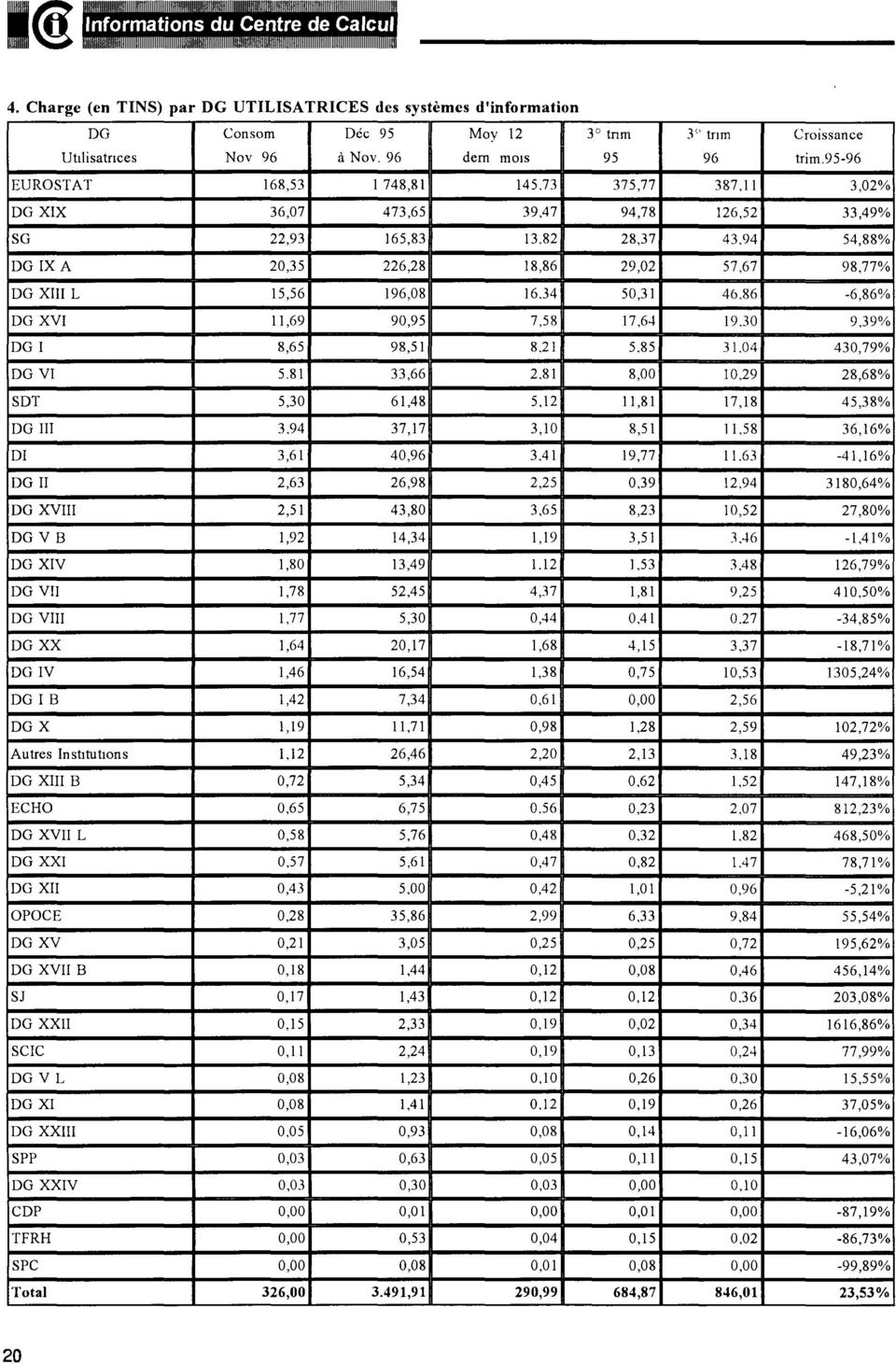
20 4. Charge (en TINS) par DG UTILISATRICES des systèmes d'information DG Con som Déc 95 Moy 12 3 tnm 3'' tnm Croissance Uttlisatnces Nov 96 à Nov. 96 de rn ffi OIS trim EUROSTAT 168, , , ,02% DG XIX 36,07 473,65 39,47 94,78 126,52 33,49% SG 22,93 165, , ,88% DG IXA 20,35 226,28 18,86 29,02 57,67 98,77% DG XIII L 15,56 196, , ,86% DG XVI 11,69 90,95 7,58 17, ,39% DG! 8,65 98, ,79% DG VI , ,00 10,29 28,68% SDT 5,30 61,48 5,12 Il,81 17,18 45,38% DG III ,17 3,10 8,51 11,58 36,16% DI 3,61 40,96 3,41 19, ,16% DG II 2,63 26,98 2,25 0,39 12, ,64% DG XVIII 2,51 43,80 3,65 8,23 10,52 27,80% DGV 1,92 14,34 1,19 3,51 3,46-1,41% DG XIV 1,80 13, ,53 3,48 126,79% DG VII 1,78 52,45 4,37 1,81 9,25 410,50% DG VIII 1,77 5,30 0,44 0, ,85% DGXX 1,64 20,17 1,68 4,15 3,37-18,71% DG IV 1,46 16,54 1,38 0,75 10, ,24% DG 1 1,42 7,34 0,61 0,00 2,56 DGX 1,19 11,71 0,98 1,28 2,59 102,72% Autres Institutions 1,12 26,46 2,20 2, ,23% DG XIII 0,72 5,34 0,45 0,62 1,52 147,18% ECHO 0,65 6, ,23 2,07 812,23% DG XVII L 0,58 5,76 0,48 0, ,50% DG XXI 0,57 5,61 0,47 0, ,71% DG XII 0,43 5,00 0,42 1,01 0,96-5,21% OCE 0,28 35,86 2,99 6,33 9,84 55,54% DGXV 0,21 3,05 0,25 0,25 0,72 195,62% DG XVII 0,18 1,44 0,12 0,08 0,46 456,14% SJ 0,17 1,43 0,12 0,12 0,36 203,08% DG XXII 0,15 2,33 0,19 0,02 0, ,86% SCIC 0,11 2,24 0,19 0,13 0,24 77,99% DGV L 0,08 1,23 0,10 0,26 0,30 15,55% DG XI 0,08 1, ,19 0,26 37,05% DG XXIII 0,05 0,93 0,08 0,14 0,11-16,06% SPP 0,03 0,63 0,05 0,11 0,15 43,07% DG XXIV 0,03 0,30 0,03 0,00 0,10 CDP 0,00 0,01 0,00 0,01 0,00-87,19% TFRH 0,00 0,53 0,04 0,15 0,02-86,73% SPC 0,00 0,08 0,01 0,08 0,00-99,89% Total 326, ,91 290,99 684,87 846,01 23,53% 20
21 ARTICLES JANVIER 97 Translation Centre for the bodies of the European Union The Translation Centre was established by Council Regulation (EC) N 2965/94 of 28 November 1994 setting up a Translation Centre for bodies of the European Union which came into effect on 14 December The Centre receives requests for translation (and the associated documents) by electronic mail from the various agencies. These requests are then managed by the Centre. The translation of the documents may be done in the Centre or forwarded to freelance translators or translation agencies, again by electronic mail. The translations completed by freelance translators are returned to the Centre for checking, prior to the complete set of translations being returned to the requester as a single batch. The computing environment of the Centre is based upon Windows NT servers and Windows NT workstations connected via a LAN. Currently, the servers and most workstations run Windows NT version Several workstations run Windows NT version 4, and the intention is to migrated the servers and all workstations to NT version 4 early in 1997 The minimum configuration of each workstation is Windows NT, Microsoft Office, Route 400 User Agent, a Terminal emulator (for accessing external databases e.g. Eurodicautom and Celex at the European Commission) and anti-virus software. Windows NT was selected because of its ability to provide a C2 security level computing environment for both the servers and the workstations. This is of prime importance for the Centre due to the fact that a certain amount of confidential data is processed. To provide electronic mail facilities, the Centre has one Route 400 MT A, and Microsoft Exchange on the second server. Microsoft Exchange is required at the Centre in order to communicate with one particular agency which needs this interface. Oracle is also installed on one server to run a database application for registering and tracking the state of each translation request. A third server is due to be installed in early 97 to provide the complete telecommunications system required by the Centre ( electronic mail, access to WWW, etc), together with software products to aid translation e.g. MultiTerm.. HAWES Centre de traduction lnformatics Architecture of the Translation Centre 1t12f.l6 Domain 1 Domain 2 Office AutomatiOn, Appl1ca\Jon, Dalabase& Route400 MTA Translater Workstatlons Translater workstauons ornee Automatron, ApphCOI:!IOn, MlcrosonEllchange Server Router LAN TCPMl Europeen comm.""' 21
22 ARTICLES JANVIER 97 LA SIGNATURE ÉLECTRONIQUE 22 La rmson d'être d'un document est de faire circuler et de préserver l'information. Depuis la nuit des temps, la façon la plus satisfaisante a été d'écrire ou d'imprimer sur du papier ou un support analogue. Si l'intégrité de ces documents devait être assurée, des mesures spéciales devaient être prises et la signature manuscrite était l'une des plus communément utilisées. L'usage de celle-ci est régi par la loi. Notamment, pour être valable, sur le plan légal, elle doit être tracée par le corps du signataire (les photocopies ou cachets ne sont pas valables) et être apposée sur chaque support original et indépendant (d'où le paraphe des pages d'un contrat). La signature a pour objectif d'identifier le signataire, de manifester sa volonté et de fournir la preuve du contenu du document. L'utilisation, de plus en plus fréquente, de l'électronique pour le stockage et l'échange d'informations impose une adaptation des techniques et des lois. Législation et réglementation. En ce qui concerne les lois, elles sont en cours d'adaptation. Dans un premier temps, celles-ci donnent la possibilité à deux entités qui veulent échanger de l'information par voie électronique, de conclure des accords, d'abord entre elles, puis, via des "notaires électroniques" (Tierce partie de confiance ou Trusted third party: TTP)). Aujourd'hui, la loi reconnaît ces accords. Dans le futur proche, elle régira directement l'utilisation d'une signature électronique de la même façon qu'une signature manuelle. La Commission, notamment les DG 3, 13 et 15, intervient également dans la mise en place des structures nécessaires au déploiement de la signature électronique en Europe. Technique de la signature électronique. En ce qui concerne les techniques, celles-ci doivent pouvoir satisfaire les critères décrits cidessus: identité, volonté et preuve. La signature électronique est réalisée de la façon suivante. Dans un premier temps, on fabrique une empreinte du document que l'on souhaite signer, à l'aide d'un algorithme appelé hashcoding. Celui-ci a la propriété de fabriquer une chaîne de caractères de longueur fixe, p.e. 64 octets, l'empreinte, image réduite du document, qui a pour particularité que deux documents différents ne peuvent pas donner la même empreinte. Cette dernière est ajoutée au document et envoyée avec lui. Le destinataire peut appliquer le même algorithme au document reçu et refabriquer l'empreinte. Toute modification de ce dernier aura pour effet de donner une empreinte différente de celle envoyée avec le document. Les algorithmes de hash-coding les plus connus sont: MD4, MD5, SHA. Utilisation de la cryptographie. L'empreinte prouve le contenu du document et est suffisante pour éviter les erreurs de transmission. Cependant, une personne malveillante peut modifier le document, recalculer et remplacer l'empreinte originale. Pour éviter cela, le signataire va chiffrer l'empreinte. Il faut préciser que ce type de chiffrement ne touche pas au contenu du document et n'en n'assure pas la confidentialité. Si cela est souhaité, il est nécessaire de chiffrer séparément le document, en général à l'aide d'un algorithme différent. De ce fait, les réglementations concernant le chiffrement sont plus souples pour ce qui concerne la signature. Le chiffrement de l'empreinte utilise un algorithme cryptographique asymétrique. Celuici est caractérisé par l'utilisation de 2 clés: l'une pour le chiffrement (S), l'autre pour le déchiffrement (P). Le déchiffrement à l'aide de la clé ayant servi au chiffrement est impossible. On peut citer comme algorithmes asymétriques: RSA qui est utilisé par la Commission, El Gama!, DSS, etc. Les processus de signature et de vérification sont montrés à la figure 1.
23 ARTICLES JANVIER 97 EMETTEUR Document RECEPTEUR Document mpreinte chiffré tranportée Calcule Empreinte Déchiffre empreinte transférée Compare Document les empremte calculée et transportée Signature vérifiée Afin de prouver l'origine et donc l'identité du signataire, la clé qui sert au chiffrement doit être, d'une part, tenue secrète, et, d'autre part, associée avec certitude au signataire. C'est l'usage exclusif de celle-ci qui va prouver l'identité du signataire de la même façon que l'acte de signer avec la main, associe physiquement la signature au signataire. Ceci est réalisé de différentes façons, mais l'une des plus sûres, est de placer la clé secrète sur une carte à puce. De plus, au moment de la création de la carte et de la génération de la clé, il est indispensable de s'assurer de l'identité du signataire. De cette façon, si on est sûr qu'un document a été signé par la clé secrète, alors on est sûr de l'identité du possesseur de la clé et donc de celle du signataire. Le processus de génération des clés est montré à la figure 2. gent de TIERCE PARTIE DE CONFIANCE Sécurité érifie l'identité Les Tierces parties de confiance (Trusted third parties) Pour vérifier l'utilisation de la clé secrète (S) lors de la signature, il suffit de déchiffrer l'empreinte en utilisant la clé publique (P) associee à la clé secrète ayant servi à la signature. Afin d'être sûr que la clé publique est 23
24 ARTICLES JANVIER 97 bien associée au signataire (USER), on a recours à une Tierce partie (TTP) en qui les partenaires ont confiance et qui certifie a qui appartient les clés publiques. Pour réaliser cette certification, lors de la génération du couple de clés secrète et publique, cette dernière est envoyée, par un canal sûr, à la Tierce partie qui va la stocker dans un certificat. Ce dernier est une chaîne de caractères, structurée selon la norme X509, qui contient, entre autres: l'identité du possesseur de la clé et la clé publique. Ceci peut être comparé, par exemple, au dépôt d'une signature manuscrite auprès d'une banque. Afin de s'assurer de l'authenticité de ce certificat, celui-ci est signé par la Tierce partie qui utilise sa propre clé secrète. Cette opération est montrée à la figure 3. TRUSTED THIRD PARTY (TTP) Certificat (X509)... 1 H-code w!/ l' Empremte certificat w RSA(STTP) / 1 ' User-id Clé publique (P) user Signature certificat STTP =Clé secrète du TTP hgure 3: Certijzcat Le certificat peut être obtenu par quiconque souhaite vérifier une signature. Ce dernier va d'abord vérifier l'authenticité du certificat grâce à la clé publique de l'autorité (PTTP), qui est connue de tous, en utilisant le même processus que pour les vérifications de signature. Ensuite, il va extraire, du certificat, la clé publique de l'émetteur du document, et va pouvoir vérifier la signature de celui-ci. Cette procédure suppose que l'autorité de certification (TTP) soit reconnue par les partenaires, que sa clé publique soit sûre, par exemple, diffusée via le journal officiel. La procédure, décrite ci-dessus et montrée à la figure 4, garantie l'authenticité de la signature électronique. 24
25 ARTICLES JANVIER 97 VERIFICATION PAR RECEPTEUR DU DOCUMENT 1 Obtention et vérification clé ubli ue Certificat (X509) lé publique de TTP (PTTP) Accès libre Calcule l'empreint H-code User-id Signature certificat RSA(PTTP) '------r---' Déchiffre l'empreinte 2 vérification de la si nature du document Document cf. figure 1 Services de sécurité associés à la signature électronique. La signature électronique peut être complétée par d'autres services de sécurité assurés par des Tierces parties de confiance. On peut citer: la non répudiation de l'expédition et de la réception par l'émission et le stockage d'accusés de réception datés et certifiés, le stockage des documents ou de leurs empreintes en vue de vérifications ultérieures en cas de contestations, l'anonymat, etc. La signature électronique à la Commission. La signature électronique est mise en oeuvre, à l'intérieur de la Commission, dans le cadre des projets: système de cartes à puce et sécurisation du courrier électronique. Sa première application se fera dans le cadre de SINCOM2. G. REMAUD S 25
26 ARTICLES JANVIER 97 SN et: les fondations 26 Dans 1' édition d'avril 96 du ulletin, nous avons présenté SNet, ses motivations et ses objectifs. En bref, SNet veut offrir aux utilisateurs un service réseau global. SNet s'appuie sur différentes solutions technologiques selon les possibilités du marché et les besoins des utilisateurs. SNet doit intégrer le changement et le traiter comme une réalité quotidienne. Ce sont des objectifs ambitieux. Pour les réussir, SNet doit s'appuyer sur des fondations saines. En d'autres mots, sur une architecture réseau cohérente, sur une infrastructure de gestion universelle, et sur une organisation des services consistante et en accord avec 1 'architecture. Une première analyse de la gestion du réseau et de 1' organisation des services a été effectuée en 1995 par la DI et la DG IX/C2. Cette étude a mis en évidence les dysfonctionnements liés au partage de responsabilités pour les équipements réseau entre la DG IX et la DI, en particulier, l'inexistence d'une gestion universelle du réseau et de ses ressources (l'infrastructure de gestion existante ne couvre que le réseau entre bâtiments). Nous pouvons même dire que la notion de service réseau n'existait pas et ne pouvait pas être mise en place dans ce contexte. Suite à l'analyse préliminaire, nous avons commencé la définition et le développement des procédures et outils nécessaires à la mise en place d'un centre de gestion des ''hubs", et la définition des ressources nécessaires au transfert de responsabilité des "hubs" de la DG IX/C2 vers la Dl. En parallèle, l'analyse de l'architecture réseau actuelle a montré que celle-ci: supporte difficilement les déménagements et les réorganisations, fréquents au sein de la Commission; ne permet pas une séparation claire et nette des responsabilités des différents services; est inadaptée aux nouvelles caractéristiques du trafic et aux besoins des utilisateurs (par exemple, le trafic local est de moins en moins prépondérant par rapport au trafic non local). Dans ce contexte, des développements importants ont été accomplis ces derniers mois. En particulier: la nouvelle architecture réseau a été présentée au séminaire informatique en septembre 1996 à Overijse; il s'agit d'une architecture en couches où les frontières entre les niveaux (infrastructure physique, infrastructure réseau et domaines logiques) sont maintenant bien distinctes, clairement identifiées. L'infrastructure réseau couvre maintenant le LAN et le W AN. le transfert de la responsabilité des hubs de la DG IX/C2 vers la DI est d'application depuis le premier janvier 97; le centre pilote de gestion des hubs est en place (9 bâtiments, 97 hubs de 6 types différents). Pour 1' année 1997, le travail au niveau des fondations de SNet portera sur deux volets majeurs: étendre la portée du centre de gestion à tous les bâtiments de la Commission; adapter les relations et les flux d'information entre les différents services de la DI, de la DG IX/C2 et des équipes IRM à la nouvelle situation et consolider les procédures, en visant une meilleure efficacité du service fourni aux utilisateurs (par exemple, les déménagements). La participation de tous les intéressés, en particulier les DG, dans ce processus est une condition essentielle à la réussite des objectifs. Margarida AECASIS DI/STD
27 ARTICLES JANVIER 97 Intranet: APPLICATION ARCHITECTURES This document is the first part of a longer article about the intranet. The goal is to give the reader a good idea of what impact the Internet is having on application architectures. The second part will introduce application developers to the emerging intranet application development tools. We have decided to spend a few lines summarizing old architectures in order to show that the intranet is but an evolution, and not the revolution sorne people daim. There is an incredible amount of things said about the Internet everyday, we hope that this article will help readers understand better which is the architectural framework into which precise technologies or products are built. APPLICATION ARCHITECTURES In the history of application architecture, we can see the evolution from monolithic, well controlled applications to dis tri buted, component-based applications, glued together with "middleware". - The business logic includes the r';lles of the application - The data access logic layer controls the databound rules, like integrity, etc. - The data access layer performs the data retrieval and storage for the application. We can partition an application in five different layers. Each layer is responsible for a different aspect of the application. Layers are themselves made of a set of interconnected components. Presentation... :... ' :.. _.._: ~..... Presentation o 0 Logic ,;... :..... ~~~i~~~s- ~~~:~~. _. 9, 1,./ ~... DataAccess,;;.;,;;..."f...'... s... Logic. ~ -~.~ - The presentation layer displays the application to the user. - The presentation logic layer describes the logical structure and the contents of the presentation. This layer should aim at supplying a platform independent "image" of the application. - MONOLITHIC ARCHITECTURES MONOLITHIC ON THE SERVER The first applications ran centrally on a mainframe. They often ran batches and even when they became interactive they used "dumb" terminais which displayed screen images sent by the central computer and submitted them again. Screens were text-based and the communication between the central computer and the terminais was optimised for each precise system. The computer vendor supplied all the technology from physical components to software protocols, maintenance, etc. This created vendor-dependent computer systems and therefore investment and development were long-term operations, and the word "migration" was rarely used. This architecture fits into centralised models, where information is available to every terminal, and applications are developed and managed centrally. Oracle forms character-based applications are an example of this architecture. Although they are often called 'legacy', the se applications are still today successfully running businesses. 27
28 ARTICLES JANVIER 97 of ali the information (even data not re ally needed) through networks which were not as fast as today and the coordination of local copies with the central database. This architecture, which is still valid for workgroups in small networks (5-10 users), had to evolve to allow bigger applications. 28 /l'ai nf rome MONOLITHIC ON THE WORKSTATION The apparition of Personal Computers in the 80s under-estimated by many (even the sta~dardiser, IM), brought about the creation of small personal database applications, running totally on the workstation. They were developed by the users themselves ( often in dase ), or by local teams of developers. These applications used local data, private to the workstation, and soon reached their limit: decentralisation of the information lead to redundancy, inconsistent updates or unavailability of the information. D Application 1 c:=j.._ô 1 Data ji \\ W o rkstat i or. MONOLITHIC ON THE WORKSTATION WITH FILE SERVERS The (r)evolution came through networks. W orkstations linked together could access centralised data file servers. Developing for this architecture was not easy, since the application developer had to manage low level aspects of the application, like locks on records to allow concurrency, etc. These mechanisms were often too complex for the average dase user. Another problem with this architecture was that the processing of the data was done in the workstation itself. This entailed the transmission CLIENT SERVER APPLICATIONS (2-TIERS) The encounter of two worlds: mainframes and PCs, united to build new applications! Data was centralised in a data server, with its own processing power. Client workstations send their requests in SQL (Structured Query Language) and retrieve only the relevant information. The first problem which was encountered when developing this kind of application was cultural. Developers coming from the server world often produced heavy and badly designed user interfaces, with optimised data access, whereas PC developers sent inefficient requests to the data server through a good user interface, appreciated by users. The task was complicated by middleware and network configuration, which should have been transparent, but were not. With the spreading of C/S applications programming languages evolved ( 4GLs!) and developers leamt to produce better applications. There is one big problem in client/server architectures conceming data validation. If validations are located in the user interface, so in the client, then anyone connecting directly to the database can compromise its integrity. If the validation is done in the server, then the user interaction is penalised, since data can only be checked once the user tries to update the main database, possibly a long time after the modification. Also C/S applications impose a different programming language for the client side and for the server side, which is far from being the ideal. Partitioning and distributing are the words...
29 ARTICLES JANVIER 97 Servers, SQL databases such as Oracle, TCP/IP networks, OLE/DCOM are common pieces allowing implementation of various distributed architectures. Datohase Engine Data D I 0 1 Datohase Serve r \ \1,0L,,~""' Set Client Wo rkstat ion Where will components of each partition reside? It is nowa deployment issue: the user interface, a personal SQL database, and the business services can all run on the client, or the business services and the SQL database may run on the same server, or you can have the user interface, business services and SQL database(s) running on three or more machines... All depends on the infrastructure and the needs. Client W o rkstat ion Do.to. Serv1ces DISTRIUTED APPLICATIONS Da.tQ. 8us1ness Servloes We have seen that an application can be split in five layers, let us consider the presentation and presentation logic as the "user services", and the data access and data access logic as the "data services". y clearly separating these three partltwns from the beginning of the development, the resulting application will be made of several components and each component belongs to one and only one partition. Middleware is used to connect the three partitions. Cl1ent Workstat1on One big advantage is that you can now reuse not only the data or sorne code, but truly encapsulated running services, containing rules that are common to the business. Application A User Serv1ces 8useness Ser1J1ces What is new now is that a few techniques have reached enough market share to be considered as de facto standards on which there is a more or less global consensus (of course, with fights between big constructors who want to impose their standard). Windows clients, Unix and NT The drawback is the increased complexity of the application, which is distributed in the network. Problems are more difficult to find: is it a local problem? Are all the servers available? Is my middleware correctly configured? Are all services running? 29
30 ARTICLES JANVIER 97 INTRANET ARCHITECTURE With the growth of the Internet a new evolution is taking place. What will the structure of applications be in the future? Internet cornes in two different flavours. The Internet itself (a world-wide network), and the priva te use of Internet technology in a local area network, usually called intranet. Consequently there are also two flavours ofworld Wide Web: The global WWW, and its deployment in a private intranet, which we may cali Enterprise Wide Web (EWW) 1 Here we shall discuss the impact of EWW s in the architecture of applications. EWWs allow to distribute the load between the client and the server better than C/S and monolithic approaches. Applications are distributed following an n-tier architecture. The presentation layer is placed at the client side, the data access layer in the data server(s) and the other three levels are centralised in the EWW server(s), or a combination of EWW and application servers. Client (browser) HTTP EWW Server(s) & Application Server( S) Middleware f~ii!.. '.. 0 ~ Presentation 0 Presentation Logic 0 0 usiness Services DataAccess Logic Data Access There are different degrees of standardization in each of the tier, as weil as in the communication between them. For historical reasons EWW s have more mature standards in the first and second tiers, with database integration technology just starting to emerge. We should de scribe each of the tiers separately, after that we shall see that there is a way of dynamically distributing individual components through the intranet. This will allow an application to execute certain elements at the EWW server and others will be run at the client si de. THE FIRST TIER The first tier does the presentation. The interest of having an intranet cornes from the fact that: - 1t is a universal client: The intranet browser is completely independent of the server. Ali browsers can display all standard HTML pages sent by all EWW servers. - There is a single interface: Since we have a unique client platform, users interact with a single product for all intranet applications. - rowsers have become so popular that there exist browser implementations for ali important operating systems, so nearly all computers can be a EWW client However this is not a panacea: - V endor-specifie extensions to HTML 3.2 are not universally supported. These extensions often provide powerful features which are lacking in standard HTML, but they cannot be displayed by all browsers. Also, as HTML evolves old browsers become obsolete, and cannot display the newest HTML tags. Sorne browsers can display extra formats, other than HTML. Which formats a browser supports depends on version and on the release. Typical extra formats are JPEG, GIF and X-itmap. - Sorne browsers can invoke other applications, called helper applications, which allow the viewing of certain formats. A helper application runs off-site, as a separate process and has its own window(s). All important browsers support helper applications. Using this feature we can, for instance, invoke MS Word from Netscape Navigator 2.0 in order to view a Word document retrieved from a document database. ut the common interface is lost, and only users who have the helper 30
31 ARTICLES JANVIER 97 application in their machines can actually view the documents, so the universal client is lost too. - In order to support extra formats within the browser, certain vendors propose plug-ins. A plug-in is a component which can be added to the browser, and it enables it to display extra formats within the browser itself. This keeps our browser as the common user interface to all applications. Plug-ins are stored and executed in the client, but they can be downloaded from the intranet the first time they are needed. Also updates to plug-ins can be downloaded from a plug-in server. One problem with plug-ins is that they need to be installed following browser-specific installation methods. Netscape Navigator 2.0 and Microsoft Internet Explorer 3.0 support the plug-in API, which allow intelligent plugins to install themselves. ut the main problem with plug-ins is that they are platform dependent 2 (they are extensions to browsers, after all). HTTP Communication between the EWW server and the client uses the Hyper Text Transport Protocol (HTTP). HTTP is a text-based protocol, which includes a content negotiation phase between the server and the client. This content negotiation relies on MIME types and subtypes. HTTP's addressing is based on Universal Resource Locators (URLs), which supply unique addresses for all the resources. HTTP is effectively the "glue" which binds browsers with EWW servers ( also called HTTP servers, in fact). The fact that it is character-based makes it rather inefficient, and an evolution into a binary protocol is likely to happen. It is a very important feature of HTTP that it is a connection-less protocol. This means that there is no state or connection information stored, so each new connection is completely independent. Connection-less protocols scale much better than connection-oriented ones, since the server does not have to keep track of every incoming connection. On the other hand, session information is necessary for implementing transactions. There are ways of mimicking variable persistence, but applications keeping information on a per-connection basis will suffer from the same scalability problems as C/S systems. In C/S systems the order of magnitude is in the order of a hundred connections, as a maximum for a server. If a EWW application is going to be used by thousands of users then it should be designed keeping in mind a connection-less paradigm, otherwise the EWW server will constitute a bottleneck. THE SECOND TIER The intranet application server contains all the "intelligence" in the application. This is a very important advantage of intranet applications over C/S ones. - Applications can be developed that are independent of the client platform. The same application that can be executed by a browser on an Apple Macintosh can be executed by a browser on a Windows NT machine, without using an emulator. - The fact that applications are kept centralized means that changes only affect application servers. This simplifies deployment, since there is no need to update all the clients every time there is a change in the application. However, there are a few other aspects which have to be mentioned: - Even though intranet applications are clientindependent, they can be server-dependent or server-independent too. There are currently three mechanisms to found EWW applications: Server-side includes, CGI scripts and proprietary APis. - Server-side includes are special HTML tags. The server must therefore scan all documents it transmits and calculate the value of these tags. This is extremely inefficient. Also, they are a security loop-hole for the server. They are to be avoided in any serious application. 31
32 ARTICLES JANVIER 97 - Common Gateway Interface (CGI) scripts are programs, compiled or interpreted, which are executed at the server-side and generate their output as an HTML page. They can be written in any programming language which allows writing to the standard output. CGI is supported by all server vendors, so applications which use this mechanism are server-independent. CGI scripts can be moved from one platform to another, but they have performance penalties: each call to a script creates a different process in the server. This can seriously increase the load. An optimised version of CGI, called FastCGI has been proposed by OpenMarket Inc. which uses persistent processes for scripts. This solves the performance problems, but it lacks the universality of CGI. Currently FastCGI is supported by very few EWW servers 3, so unless it is accepted by the main vendors it should be considered as a proprietary API for those servers which support it (therefore a limited portability), rather than the successor of CGI. - Certain vendors propose proprietary APis. These are more efficient than CGI scripts, but applications using them are tied to a server platform. They are the only alternative if performance is an issue, but they are more complex to use than CGI scripts and they limit the programming language which can be used. The two most important proprietary APis are Netscape's NSAPI and Microsoft's ISAPI. - The choice of one of these three mechanisms depends on the conditions of use. Server-side includes should be avoided for serious use of a EWW server. The choice between CGI scripts and proprietary APis is a trade-off between portability and performance. APis should be used whenever the demands on a system are too high to use CGI scripts. MIDDLEWARE FOR INTRANETS Middleware allows EWW servers to access different types of DMS through the same interface, and communication between the EWW and application servers (which are not EWW servers at the same time ). Through the use of middleware, applications can be kept databaseindependent. The most important influence on middleware for intranets cornes from Microsoft' s Open Database Connectivity (ODC). Sun's Java Database Connectivity (JDC) is an emerging rival for ODC. Of course in a context where only one vendor is present the use of the particular native driver could be convenient if performance is an issue. - ODC was developed for C/S systems where there are the same database connectivity needs as in intranets. lt provides a common API so that applications can access any relational database. Database vendors are then responsible for supplying drivers for their particular product. ODC has the advantage of being an established mechanism which is supported by all major DMS vendors. In the context of an intranet, it is used between the EWW server and the data server, rather than between the client and the server (as in first generation C/S applications), but the princip le is the same. - JDC is a library of Java classes for accessing relational databases. lt follows the same principle as ODC, and lets database vendors supply their own underlying native drivers. Database systems which do not have JDC native drivers yet can be accessed using ODC drivers through a JDC-ODC bridge. The problem then is that the amount of intermediate layers is too important, so it can be considered only as a temporary solution until JDC drivers are in the market. ODC and JDC compliance is an important aspect to be considered while evaluating application development tools, since it denotes the database technology which can be used in intranet applications. For specifie situations, in environrnents where the database technology is homogeneous, proprietary connectivity models can also be considered. Sorne form of middleware must be used if there 32
33 ARTICLES JANVIER 97 are application servers which are not EWW servers at the same time. There is no standard in this sector, since pure application servers do not exist in the Internet, but the products which were used in C/S systems are still valid, DCOM and CORA mainly. If all application servers are EWW servers, then HTTP can be used among them. THE THIRD TIER Data servers are standard DMSs from any vendor. The only requirement is that it supports the middleware in use. Since the middleware is chosen depending on the DMS rather than the opposite, this should not be a problem. Most database vendors have already ODC connectivity, and have announced JDC drivers for the near future. A dynamic intranet: downloading components Components from the EWW server can be downloaded to the client and executed there. At run-time, therefore, the system looks more similar to a distributed architecture than to a monolithic, EWW Server-centered, system. EWWServer The main advantage of this run-time distribution of the workload is that it allows application developers to decide the optimal location for the execution of each component. - This is a recent element of Web technology, so there is no clear standard at the moment. The main offers now available, it a more or less incipient state are: scripting languages (JavaScript and VScript), Java applets and ActiveX components. These are all vendor specifie, and depend on browser support for the particular technology. Without the appropriate browser adherence, components cannot be executed at the client side. - Scripting languages provide a simple means of downloading part of an application. The code to be executed is included in the HTML page using a <SCRIPT> </SCRIPT> tag pair. It is then executed by the browser like a standard program. The two most important offers currently are Microsoft's VScript and Netscape's JavaScript. oth of them canuse Java applets, and VScript can also use ActiveX controls. Scripts are very useful to execute local checks, like data validity, etc. at the client before anything is actually sent to the EWW server. Since scripts are downloaded with the HTML page, changes to the application take effect immediately without any need to update the clients. There are limitations on what actions a script can perform in the local machine, for security reasons. Like all scripting languages JavaScript and VScript have limitations in what they can do, so for certain uses it may be necessary to use applets or ActiveX controls. - Java applets are components which run on the Java virtual machine environment. This means that they can be downloaded to any platform and they can execute without recompiling them, provided the Java virtual machine is present. Java applets have the same advantages and disadvantages as stand-alone Java applications: They are platformindependent, but because they are interpreted they are slower than traditional languages. Just-in-time compilers can be used in order to improve the performance. There are also restrictions on the actions that the applet can perform on the local machine, as well as in the URLs which it can access, for security reasons. This means that any applet acting as a "client" within the application must have its "server" counterpart running in the same machine where the applet resides. This restricts the ability to partition an application, 33
34 ARTICLES JANVIER 97 but is necessary until a verification mechanism for Java applets is implemented. ActiveX is the component technology proposed by Microsoft 4 lt is based on its old OLE technology, therefore OLE components can be "recycled" as ActiveX. ActiveX components are platform specifie, but because they are compiled they run faster than scripts or applets. They must be installed on the client computer which means that non Windows clients have little support. They can be automatically downloaded from a server when they are first needed, and version control mechanisms ensure that the latest version is downloaded if it supersedes the local one. Windows clients canuse them from Internet Explorer but Netscape Navigator only supports ActiveX through a plug-in. One common problem for all of these methods is the non-persistence of browser-eww server connections. Once a new URL is loaded the old one is completely wiped. This presents problems in application development because there is a need for variable persistence. Mechanisms like transaction management need sorne form of persistence between screens. There are two ways currently used to mimic this: - Hidden HTML fields: When a page 1s downloaded it carries also the values for all the variables which need to be maintained. When the following page is loaded its URL is called with the hidden values as a parameter. The new URL, therefore, receives the information. This means that the variables must be sent from the client to the server, and back to the client for each URL access. - Cookies: Cookies are local variables which are stored in the client' s local disk. Wh en the variable is created it is written to disk, and successive URLs can read from the local disk. Cookies represent, however a security policy loophole, if we consider that the local disk is accessed by possibly external modules. The technology used for distributed components is quite new, but the need for one is clear. The different approaches target at different sectors. Each system must be carefully examined: a proprietary solution like ActiveX may be suitable in an intranet environment where all platforms support ActiveX. lt is not recommendable at this point, however, to use ActiveX if there are non-windows clients in the intranet. Java applets can be run on any platform, provided the Java Virtual Machine is present. Netscape Navigator 2.0 has support for Java applets, and Internet Explorer supports it from release 3.0. The scripting languages VScript and JavaScript also need browser support, but both Netscape Navigator 3.0 and Internet Explorer 3.0 provide it. IMPLICATIONS FOR DEVELMENT TOOLS The second part of this article can be found in "intranet: application development tools". P. A. DAMAS DI/ST Gartner Group terminology Diego EGUIDAZU stagiaire DI 1 S T 2 Platform-independent plug-ins could be built using platform-independent mechanisms like Java's virtual machine 3 At the time of writing this the only servers which supported FastCGI were Open Market Secure WebServer 2.0, NCSA http &nd Apache 1.0 and ActiveX has just been given away by Microsoft to the Open Software Foundation 34
35 ARTICLES JANVIER 97 Intranet: APPLICATION DEVELMENT TOOLS This document takes over where "Intranet: application architectures" stopped. Now that readers understand the main framework in an intranet, we think it is interesting to look at the new generation of application development tools. The speed at which everything happens in the Internet field will probably render our work on these application development tools obsolete or at least incomplete very fast, why bother then? We believe it is easier to get into a domain progressively than in just one big step. Application developers may find themselves in an intranet context in a not too distant future, and project leaders and evaluators may need to consider intranet solutions right now. This article provides a non-exhaustive entry point to sorne of the most interesting tools. IMPLICATIONS TOOLS FOR DEVELMENT The intranet architecture is not a revolution. It is not even fundamentally different from previous ones (see "Intranet: application architectures"). ut it combines a centralised approach with a distributed execution. Each system must be specifically tuned in order to avoid overloading the server or the network. A variable degree of client independence and server independence can be achieved, depending on the technology chosen. However in order to develop a complex application to fully exploit the potential of the EWW it is necessary to understand that web applications are document-based. They correspond to SDI in C/S jargon, as opposed to MDI. Hyperlinks are used in order to "move" inside the application. Therefore an application has to be conceived as a set of hyperlinked documents, often called pages. The difficulty of application design lies, then, in designing these pages. An application developer should typically design: - Static pages: these are HTML pages stored in the file system and sent to the browser. There is no processing done at the server side or at the client-side - Dynamic pages: HTML pages are generated "on the fly" by the server and sent to the client. The code used to build these pages, which typically includes accessing a database can rely on a variety of APis (CGI, ISAPI, NSAPI) and may have to be coded in different languages. - Active pages: Active pages have client-side components which are downloaded and executed locally. These may be based on Java, ActiveX or scripting languages (JavaScript, VScript). If necessary,session and transaction information storage mechanisms. - Variable persistence mechanisms: use of cookies or hidden fields, etc. It takes highly-trained staff to develop an application using ail of these programming contexts. The demands put on developers are certainly broader than traditional C/S development using 4GLs. Application development tools can provide a useful interface to alleviate the burden of the various platforms and provide a kinder leaming curve. However not all tools encompass all of the activities. We should identify the main areas so that comparisons between development tools can be made: - HTML support: WYSIWYG editing of HTML, proprietary extensions of HTML, inclusion of applets, ActiveX controls, etc. 35
36 ARTICLES JANVIER 97 and easy interface to invoke server-side components (CGI based, or proprietary APis) - Server scripts: Programming CGI scripts. NSAPI and ISAPI support. - Client scripts: Scripting languages, Java applets, ActiveX controls, other distributed components. Support for cookies. - Database connectivity: Middleware compatibility, data base access, constructing query-by-example fields, etc. - Application management: Application structure (HTML page tree ), verswn management, etc. Other general properties of application development tools are still valid in an intranet context, and so they should be taken into account: - Support for high-level, abstract models of the application - Support for RAD and prototyping - Debugging - Multiplatforms (intranet platforms, rather than vendors) There are sorne first attempts on the part of the main vendors to supply intranet application development tools. They are in a very primitive state, but they are released in order to position the product during the first stages of the technology. Vendors which have an established market in neighbouring areas, like Oracle and 4GL vendors often try to adapt their already existing products to an intranet context. In certain cases a finished product is not available yet, so we include the description of the intended functionality together with the announced release date. We have concentrated in current suppliers of the Commission, but other important vendors are also considered. As a remainder, the logical architecture of an intranet system is: EW W Serve r( s) 0 th er A ppl!catjon serve r( s) We will use this diagram to position different vendors. Note however that we will not talk about products which have not been adapted to encompass intranet applications in a significant manner. We will, for instance, include Oracle 7 in Oracle's diagram because it is an important part of the ir intranet strate gy, but we will not include Sybase as part of the PowerSoft solution. Note also that a vendor which covers more aspects than another is not necessarily more interesting, as this often implies proprietary extensions, proprietary middleware, etc. ORACLE Oracle proposes both Web server technology and application development tools. WESERVER Currently Oracle ships WebServer 2.x which provides, built at a higher level than NSAPI and ISAPI, a platform for application development. This layer, called Web Request roker, provides session and transaction management and routing to agents ( called cartridges by Oracle). Cartridges can be coded using Java, C/C++, PL/SQL or LiveHTML (server-side includes!). The broker shipped with WebServer 2.0 can only run on Oracle's WebServer. Even though the version shipped with WebServer 2.1 canuse the Netscape HTTP listener, Microsoft's IlS will not be supported until WebServer version 3.0. Other features announced for WebServer 3.0 include the possibility to store Web content in an Oracle 7 database instead of the file system, a proxy server and intelligent caching. There is no official release date for WebServer 3.0 yet. DEVELER/2000 Oracle intends to leverage its Developer/2000 tool to be used for web-application development. The main aim is to allow existing applications to run on the web unchanged. Using Designer/2000 existing applications could be reverse-engineered and regenerated to target a EWW architecture. Developer/2000 technical preview contemplates
37 ARTICLES JANVIER 97 two phases: in the first phase the client will not be a web client (a browser) and the server will not be a EWW server. Instead the user will download a Java applet which will act as the real client (the applet will execute inside the browser, but this is only because there are no other Java virtual machines other than browsers'). The EWW server will be used only to set up the connection between the applet running on the client and a modified version of Oracle's Developer/2000 runtime engine, which acts as the real application server. Once the connection is established all the dialogues are carried out as conventional Developer/2000 applications, based on a remote procedure cali (RPC) mechanism, rather than HTTP. asically this solution proposes downloading a client and using it to access a traditional application server, rather than having a real web architecture. Also, Java applet security constraints force the EWW server and the application server to coexist in the same machine. There is not support for any of the Web mechanisms to download components to clients, or for EWW server-side components (there is no EWW server, one may say!). This basic architecture is not supposed to change in a future second phase, which would try to solve network congestion by downloading a limited part of the validation to the client machine. There is no definite date for the release of either phase in Developer/2000. EWW Server(s) Oracle's offer Application server(s) ORLAND orland is pushing its compiler expertise into the EWW in different fronts. lt proposes to webenable C/S applications, deploy data-driven websites and develop Java applications. DEL PHI The Delphi Client/Server Suite 2.0 cornes with and ActiveX library which can give traditional C/S clients intranet/internet access. Also for the server side there is an interface which allows servers to link into the Microsoft ISAPI. The Delphi97 suite will extend these capabilities. This provides the bare minimum in order to internet-enable traditional C/S applications, but it does not make of Delphi 2.0 a web-oriented development tool. INTRAUILDER Intrauilder is a web application which allows for the easy publication of dynamic data. lt is structured in two parts: a designer used to define Forms/Reports, which can include JavaScript, Java applets and ActiveX controls, and a server. The server is in fact layered in three parts: a broker, agents and a D-connectivity layer(which works on native drivers and ODC). The broker provides session management and intelligent routing to the agents. The agents execute the designed forms or reports, accessing the D (through the third layer) and sending back to the broker HTML with (possibly) embedded JavaScript, applets or ActiveX controls. The broker passes this into the EWW server which executes the server-side JavaScript and passes the result and all the client-side JavaScript to the client. Client-side JavaScript is optional, so the output can be either standard HTML 2.0 or HTML with JavaScript, Java applets and Active X. Intrauilder is a web application for publishing to the Web, but it is not an application development tool in its broader sense. VISUAL JUILDER orland has announced a beta release of 37
38 ARTICLES JANVIER 97 Juilder in December 1996, and a final release in earl y Juilder is a general purpose Java development tool. It will provide support for JDC connectivity, the Java Development Kit 1.1 and Java components (Javaeans). It will be capable of producing Java applets as weil as stand alone Java applications. The Java just in time compiler AppAccelerator is already available with the orland C compiler and will presumably be shipped with Juilder as well. Juilder supplies a full development environment for the basic building blocks of a web-application, provided it is wholly in Java, but it lacks an application partition and distribution tool. orland hopes to combine Juilder with Open Environment's Entera in the near future in order to have a full multi-tier scalable environment. POWERUILDER Poweruilder 5.0 provides support for the web at different levels. There is a first web-enabling approach for traditional C/S applications through a browser OLE control. These allow C/S clients to access the Web from Poweruilder applications. The second approach is to allow standard web browsers to access Poweruilder Data Windows and windows through the use of plug-ins. It should be noted that certain restrictions apply to which windows can be seen in a browser, and that in order to execute windows, the Poweruilder run-time system should be installed in the client, thus defeating a bit the whole point of the EWW. POWERSOFT EWW Server(s) orland's offer Other Application server(s) The real web-application development approach cornes from the Internet Development Kit (IDK). It provides a set of basic services (Web.P) and "gateways" (we shall call them brokers, to keep a consistent terminology) to CGI, NSAPI and ISAPI. The brokers activate agents, which are standard Poweruilder distributed objects. The services provided in Web.P are very rudimentary ones, for HTML page definition and session management. Therefore, a true web application can be constructed using Poweruilder 5.0 (plus IDK) by coding agents using distributed Poweruilder and using the brokers provided, even though the formatting services in Web.P are still a bit crude. A true thin client can be achieved this way, with no need to deploy the Poweruilder run-time in every client. TIMA++ Powersoft has launched its Internet strategy along different lines: In the 4GL sector, the strategy is to push forward the Poweruilder distributed objects paradigm. In 3GLs a new version of Optima++ with Web support will be announced soon. In order to put together components to form an application, PowerSoft proposes Netlmpact Studio. Optima will be announced soon, probably in earl y A first release might be available, therefore, in the second quarter of It will presumably follow Poweruilder' s steps in providing web-enabling capabilities through the use of OCX controls, plus sorne true webapplication development. It can be expected to provide support for ActiveX controls, Java applets and JavaScript as downloadable 38
39 ARTICLES JANVIER 97 components and CGI, NSAPI and ISAPI interfaces. Optima will be able to generate C++ as before, or Java. It incorporates two-way wizards and visual and source code simultaneous editing. Optima++ will be a RAD product worth watching when it cornes out. NETIMPACT STUDIO Netlmpact Studio fills the gap between component building applications like Optima++, server-side component builders like Poweruilder, HTML editors, etc. necessary to build a complete application. lt is an "application builder", capable of corn bining different components from different sources into a single EWW application. It incorporates a dynamic execution server (Netlmpact Dynamo) for running SQLIODC and JavaScript from dynamic HTML pages. It supports ActiveX and Java, server-side JavaScript and the main EWW server vendor APis. Netimpact Studio is expected in beta in the last quarter of 1996 or early passive pages back to the EWW server, and a dispatcher, which can be duplicated for extra robustness. The dispatcher is responsible for routing the URL requests to page servers. As page servers can have multiple instances to improve performance a scoring algorithm is used to choose the least loaded. Page servers are agent processes which can run on a different machine, and which access a database, a legacy system or an OLE Automation server (thus another application). Page servers have page libraries associated with them. When a request arrives at a page server it opens the appropriate library. A library is composed oftemplate pages, data sources and OLE servers. Template pages are used to build the resulting HTML page using the data sources. Extra functionality can be added through the OLE objects which can encapsulate business rules. The resulting page is sent back to the dispatcher, the EWW server and eventually the client. Pages are also cached at the page server to improve performance. Software AG implements a solid architecture for accessing existing data sources and legacy systems. The fact that it allows to access OLE Automation servers built using other tools but provides no support for developing them shows that ixpress is more oriented towards opening existing systems to the web, than developing new applications. EWW Server(s) Other Application server(s) DMS DMS DMS DMS Powersoft's offer Middlew.rre SOFTWARE AG Software AG proposes a product, ixpress, for easy opening of legacy databases to the Web. Client EWW Server(s) Other Application server(s) IXPRESS It relies on a broker which is in fact divided into two different parts: an adapter, which redirects Software AG's offer 39
40 ARTICLES JANVIER 97 SYMANTEC Symantec proposes a family of Java RAD tools: its first product, Café, is shipping in its release 1.5. lts next product is called Visual Café, of which a second prerelease is available, though no date has been announced for a finished version. After Visual Café, Symantec has announced Visual Café Pro, an enhanced Visual Café with extra database connectivity. There is no official release date for Visual Café Pro, either. VISUAL CAFÉ PRO All of these tools, however, follow the same principle: They provide a fast, form-oriented development. Java applets and Java applications can be used as components for any form, and a repository (Object Library) of objects is available. The different components can be connected using visual techniques. There is a full two-way interaction between the visual tools and the source code. Changes done visually are reflected immediately in the source code and vice versa. There is a Java interpreter incorporated so that testing can be done easily. A full debugging environment is provided as well as a JIT compiler. Visual Café Pro will include JDC connectlvlty to databases, including local databases in workgroup models. The Café family provides an interesting Java RAD environment, with integrated testing and debugging possibilities. However, it lacks the tools for partitioning and distribution of intranet applications. O'REILL Y & ASSOCIA TES O'Reilly and Associates range among the first pioneers in web technology. The ir interest, however, is tumed towards web servers, rather than application development tools. They propose a Web server called WebSite already in version 1.1, and an interesting web traffic analyser, called Satisphere, announced for prompt release. O'Reilly & Associates' contribution to development tools cornes in the form of a basic HTML form designer tool, integrated with a CGI scripting wizard, called PolyForm. lt provides the basic means to build a prototype of an application running on CGI Client DMS Middleware Server(s) O'Reilly and Assoctates' oftèr scripts, and using standard HTML. SUN Other Application server(s) Sun bases its strategy around Sun's most fashionable product: Java, and its Java Development Kit (JDK), currently in its release 1.1. JDK is the foundation of all Java development applications, but it is not a tool. The two main application development tools are Java Workshop 1.0 and Ice-T. 40 EWW Server(s) Symantec's oftèr Other Application server(s) JAVA WORKSH Java WorkShop is a general purpose Java development environment, build entirely using
41 ARTICLES JANVIER 97 Java applets. This means that it is immediately portable to any platform which supports the Java virtual machine. Currently it needs a proprietary browser which is supplied with the product, because of the security restrictions imposed on applets by traditional web browsers. There are works undergoing to extend the virtual machine under Netscape Navigator to allow WorkShop to run on it too. WorkShop uses a VisualJava graphical user interface builder to allow rapid application development. An application developed by WorkShop is simply a set of applets, which can be executed at the client, or in the application server, provided there is a virtual machine in the server. Clearly the main weakness of W orkshop is its depende nee on a special browser for developing applications. ICE-T lee-t will be a product (it is announced but not released at this point) used to leverage existing C/S systems to be accessible from standard browsers. lee-t lets developers build and deploy client-side applets, used for accessing C/S applications, and server-side C/C++ libraries which must be linked into existing server applications to provide an entry point for the applet clients. oth parts together, communicating through RPC mechanisms will allow standard browsers, to access C/S application servers, through a proprietary middleware, rather than through the EWW server. asically the EWW server is used as an applet server for browsers, which communicate directly with the C/S server once they have the applet. The server must be linked with the generated C/C++ libraries to be accessible from the client. Server(s) Sun's offer Application server(s) IM- LOTUS The web strategy from IM has to two approaches: first to leverage the groupware capabilities of Lotus Notes to the web, and secondly to enhance the VisualAge family to produce intranet applications. LOTUS NOTES Lotus is trying to provide web capabilities by opening Notes. In a first time Lotus proposed InterNotes Web Publisher (currently in release 2.0) which allowed Notes server to be "bridged" from a standard Web server. The obvious disadvantage was that in order to use Lotus Notes as the cornerstone of an intranet, the whole Notes server infrastructure had to be deployed, the Web server had to be deployed and WebPublisher had to be installed too. This was only acceptable if Notes was already deployed, but not for new systems. Now Lotus proposes Domino (shipping in release 1.0, beta version). Domino is integrated with the Notes 4.5 server, and turns it into a Web server. This me ans that standard Notes databases, applications, documents, etc. can be accessed by Notes clients or by web browsers (there are limitations in the capabilities, however). In order to develop applications, then, the same Lotus Notes development tools can be used as before. This is a proprietary solution. VISUAL AGE IM has announced a new generation of its VisualAge family of products which will be targeted at intranet application development. There is no detailed technical guide or announced released date, but its aim is to provide an integrated set of tools following VisualAge's "visual construction from parts" paradigm. VisualAge will allow the development of CGI scripts with a visual design of the returned HTML page, the visual construction of Java applets and applications (with JDC support) and the building of an application integrating client-side and server-side components by using a "distributed builder" module. A certain interoperability with Lotus 41
42 ARTICLES JANVIER 97 Notes will be provided. VisualAge has very appealing characteristics, specially its distributed builder module for easy distribution of an application. tools from vendors which use the Netscape ONE platform. These include products from vendors like Symantec, Netübjects, NetDynamics and Netscape itself. Sorne of the other vendors, like Symantec, propose more powerful tools than Netscape's. DMS EWW Server(s) IM's offer Application server(s) ~EWW ~. :_." Server(s) Clients Other Application server(s) Netsape's offer NETSCAPE Netscape's strategy for application development tools and Web site management are organised around the Live Wire and Live Wire Pro products of the SuiteSpot 3.0 family. LIVEWIRE The Live Wire package has facilities for WYSIWYG editing of HTML pages, including embedded Java applets, JavaScript scripts and in-line plug:-ins. There is also a JavaScript compiler incorporated which allows to have client and server-side JavaScript modules. There is support for database connectivity from these compiled modules through native drivers (Oracle, Sybase and Informix) and through ODC. Live Wire has the minimum features needed to develop and deploy a EWW application, but it does not provide anything other than the raw functionality. Netscape has attacked the development tool market through a collaboration program, Netscape SuiteTools, which proposes a set of MICROSOFT Microsoft is clearly one of the main actors in the intranet market nowadays. It has structures its strategy around its ActiveX line, but it provides support for other standards like Java. In terms of development tools, Microsoft provides two kinds of tools: component building tools, used to code Java applets, ActiveX controls, etc. and application building tools, which allow to combine components into a distributed application. There are other tools for HTML editing, etc. but we shall not discuss them here. VISUAL J++ The component-building tools are the classic Microsoft Visual asic and Visual C++ with extra support to build ActiveX controls and a newcomer: Visual J++ for Java. Visual J Professional Edition provides a Java development platform with support for ActiveX controls inside HTML pages, wizards, a class browser, a component gallery and a graphical debugger. It follows the Developer Studio user interface found in Visual C++, so moving from Visual C++ to Visual J++ should be easy. 42
43 ARTICLES JANVIER 97 VISUAL INTERDEV ut the main attraction in the Microsoft offer cornes from its integrating tool Visual InterDev. Visual InterDev, released in beta recently, corresponds to what was previously known as "Internet Studio". lt provides a workspace for visual development of applications. There are integrated web-site management tools and database connectivity using ODC. Visual InterDev lets developers build distributed applications using components coming from Visual asic, Visual C++, Visual J++, Visual FoxPro, and others. Components can be serverside or client-side executable and be spread over several application servers, using DCOM to communicate. There are facilities for teamdevelopment built-in, and interoperability with FrontPage 97 allows for power users and developers to work together. lt is possible to deploy the applications using the application's site management tools. Microsoft Visual InterDev addresses the real problem of intranet architectures, which is that of distributed applications: the problem is not how to build the different components, but how to build and deploy the application, which is no longer a single block, across multiple servers. The integration with other component-oriented tools makes Visual InterDev a very interesting tool for serious application development in an intranet context. Clients Server(s) Application server(s) Microsoft's offer P. A. DAMAS DI/ST Diego EGUIDAZU stagiaire DI 1 ST 43
44 ARTICLES JANVIER 97 Compte-rendu et conclusions de la migration "Nouvelle plate-forme technologique" en site pilote à la Direction Informatique. Objectifs. Le projet, lancé suite à une demande de l'irm, visait à la mise en place d'une nouvelle CR (Configuration de Référence ureautique) basée sur une plate-forme technologique plus évoluée que WINDOWS 3.1. sur les PC et SCO sur les serveurs bureautiques et synchronisée au maximum avec l'évolution du marché. Les buts recherchés étaient: - Augmenter la productivité des outils informatiques. - Stabiliser les systèmes d'exploitation et de communication des postes de travail. - Simplifier, homogénéiser et moderniser l'environnement technique. Le projet pilote, concernant plus de 350 utilisateurs installés à xl et à Lux, devait permettre d'évaluer la faisabilité technique de la solution proposée par DI-ST et l'impact financier d'une telle migration. Stratégie adoptée. Tous les postes de travail personnels ont été migrés en W'95 sauf: quelques postes migrés en W/NT workstations (non repris dans ce rapport). - quelques postes restés en W'3.1. (essentiellement pour le développement des SIC). 15 % des postes ont une double configuration (W'3.1 et W'95) pour le support des autres DG. Les PC 486 SX ont été transformés en 486 DX2/50. La capacité mémoire de chaque PC à convertir a été élevée à 16 Mb RAM au mm1mum. Les serveurs bureautiques ont été migrés en WINDOWS NT Les serveurs de courrier électronique et SQL server sont restés en UNIX/SCO et sont accédés en mode client/serveur. PC-NFS a donc été retiré des PC. La configuration installée est celle proposée par DI-ST (CR W'95). Les disques des PC ont été remis à 0 avant l'installation de la nouvelle configuration. La configuration du poste de travail a été définie de façon à minimiser le dépaysement des utilisateurs lors de la migration afin de réduire la période d'adaptation et les besoins en formation. Opérations préliminaires. - Formation des techniciens (W/NT server et W'95). - Commande, configuration et mise en service des serveurs NT. - Formation des techniciens W'95 ( 4 jours par technicien). - Recensement des PC à migrer et des systèmes d'information. - Mise à niveau des PC (Min. 486 DX 16 Mb RAMet 1 HD de 500Mb). - Sensibilisation du management et information des utilisateurs. - Préparation d'un module de formation de 2 heures. - Etablissement d'un planning de migration tenant compte: - des périodes critiques dans les unités. - de la synchronisation XL-LUX par unité. des possibilités de formation in-house. 44
45 ARTICLES JANVIER 97 Configuration de référence bureautique W'95. La configuration actuelle reprend des logiciels 32 bits: W'95, Office 95, Netscape 2.0 et 16 bits: Netcon 3 (initialement 2.5), Wordperfect 5.2. Gusqu'au 31/07/97), Euroforms 4.21, RUA de Route , Terwinal 3.07, Les modules Calendar et Cardfile de W'3.1. Les systèmes d'information. Les systèmes d'informations utilisés à la DI ont été réinstallés sur les PC où ils étaient et tels qu'ils étaient avant la migration. Tant que tous les S.I. ne sont pas convertis, nous conservons, sur les PC, 2 générations d'outils d'interfaçage (ODC et sql*net en 16 et 32 bits). Mode opératoire. Chaque soir, les utilisateurs à migrer le lendemain étaient configurés sur le nouveau serveur. Les données leur appartenant et situées sur le serveur SCO étaient copiées sur le serveur NT. Les fichiers partagés par plusieurs utilisateurs G:) étaient copiés sur le serveur NT. Il était possible de les lire mais pas de les modifier jusqu'à la migration de tous les utilisateurs de ces fichiers. Ils étaient donc identiques sur les serveur SCO et NT. Après la migration de tous ces utilisateurs, la version seo du fichier était abandonnée puisque inutilisée. L'accès à la version NT était alors autorisé en lecture et écriture. La migration s'est faite dans les bureaux, sans déménagement des PC, par un technicien. L'installation pouvait se faire à partir du réseau, d'un CD-ROM ou d'un disque de 840 Mb portable, connecté à l'allumage du PC. La préférence a été donnée à l'emploi du disque portable pour limiter le trafic sur le réseau (Disque portable 80 %, réseau : 20 %, pas CD ROM). La migration s'est faite unité par unité, en synchronisation XL-LUX. Chaque utilisateur était invité à une séance de formation de 2 heures, au plus tard le jour de la migration de son PC. Leçons tirées de la migration. L'opération de migration a été réussie en respectant le planning. L'hétérogénéité du parc a induit une surcharge considérable de travail. Le temps nécessaire pour configurer un PC a diminué de moitié en 2 semaines. Les utilisateurs sont satisfaits de la nouvelles configuration. Les PC sont beaucoup plus stables. La formation a été suffisante pour un usage normal du PC. Performances: Un 486 DX 33 avec 16 Mb RAM est le strict minimum pout WINDOWS'95. En cas d'usage intensif, cela devient insuffisant. La configuration minimale pour W /NT WS est en cours d'évaluation. Les accès aux serveurs NT locaux et distants sont nettement plus rapides que vers seo. Help Desk: Les appels concernant des problèmes liés au système d'exploitation des PC ont beaucoup diminué. Gestion: La gestion des utilisateurs est beaucoup plus simple sur le serveur NT. Le fait de conserver les autres serveurs en seo nous fait perdre une grande partie de cet avantage. Il n'y a pas de problème pour partager les imprimantes entre NT et seo. J. erelot DI 1 IRM-Lux 45
46 ARTICLES JANVIER 97 D'autres questions/réponses sur le projet "Next Technological Platform" Une première sene de questions/réponses a été publié dans l'édition du ulletin informatique (page 20) du mois de Juillet 96. Win 95 ou Win NTW 4.0? Comme il a été dit à maintes reprises par l'équipe de projet, la vraie décision stratégique est "la migration d'un système d'exploitation 16 bits (Windows 3.x) vers un système d'exploitation 32 bits (API Win 32), et ceci d'autant plus que la migration Traitement de textes, qui se déroule à l'heure actuelle, a mis, encore plus en relief l'instabilité de la plate-forme actuelle (Win 3.x) Ceci étant dit, l'équipe de projet a des recommandations claires à faire: + Windows NTW 4.0 est le système d'exploitation recommandé à terme, pour le desktop. Ceci requiert un PC et des composants ayant réussi le processus de certification défini par Microsoft et réalisé par une société indépendante. La configuration minimale pour ce que le Gartner Group appelle "Simple Office Automation User" est un 486 DX 66 avec un minimum de 16 Mb RAM et 500 Mb disque, la mémoire étant le facteur majeur de la performance du système. Les PC sélectionnés lors de la dernière mise en concurrence (Pentium 166, 32Mb RAM, 1,2 Gb disque) sont des candidats idéaux pour Win NTW Pour les PC non certifiés ou de bas de gamme, les PC portables, Windows 95 est le système d'exploitation recommandé. + Les projets pilotes montrent que la coexistence de Win 95 et Win NTW 4.0 ne représente pas un empêchement majeur pour la gestion du parc. Du fait que les deux systèmes ont le même interface graphique, l'utilisateur ne sera pas affecté par la situation. En ce qui concerne les applicatifs, les logiciels bureautiques grand public tournent sans problème sur les deux environnements. Quelques différences ont été trouvées par l'équipe de projet pour certains logiciels très liés au système d'exploitation, mais les utilisateurs ne sont pas non plus affectés. + Au fur et à mesure que le parc PC se modernise, Win NTW 4.0 devrait se répandre de plus en plus. 46
47 ARTICLES JANVIER 97 Quand peut-on commencer la migration? L'objectif de l'équipe de projet est de présenter pour l'irm du mois de février 1997 le rapport final contenant les résultats obtenus, une analyse coûts/bénéfices et une stratégie de migration ainsi qu'une proposition de planning. L'équipe de projet prépare depuis quelques mois et ensemble avec les DG, tous les éléments nécessaires pour une migration réussie et ceci, depuis la formation des techniciens et les utilisateurs finals à la réalisation de projets et d'expériences pilotes. Pour le calendrier de migration, il ne faut pas oublier que la priorité a été donnée par l'irm à la migration vers Word 6. Celle-ci se déroule normalement et doit s'achever vers le mois de juillet Compte tenu de tout ceci, voici donc le calendrier prévu par l'équipe de projet: + Fin février 1997: Présentation du rapport final à l'irm + Fin avril 1997: Conclusions des expériences pilotes. Ajustement des configurations. + Fin mai 1977: Configuration finale client (Win 95, Win NTW 4.0) et serveur (Win NTS 4.0) + Fin juin 1997: Début de la formations des utilisateurs et premiers déploiements + Fin juillet 1997: Début officiel de la migration Fin septembre 1997: Fin de la migration. Office 95 ou Office 97? Depuis la première version de la Configuration de Référence, l'équipe de projet a travaillé avec la suite Office 95. Elle a l'avantage d'avoir le même format de fichier que Office 4.2, pour Word et Excel. Entretemps, Microsoft a annoncé la sortie de Office 97 pour le mois de janvier. Elle représente un changement majeur de version, ce qui comporte un changement de format, notamment pour Word et Excel, bien que Microsoft ait inclus dans le produit toute une série d'outils (convertisseurs, filtres, etc) destinés à faciliter la migration et 1' échange de documents. L'équipe de projet fera à partir du 15 janvier 1997, date officielle du lancement de Office 97, une étude comparative des deux produits, visant, plus que les nouveautés fonctionnelles, les aspects de compatibilité de format et des modes d'utilisation avec Office 4.2, ainsi que tous les aspects en rapport avec la configuration des PC (performance, space disque, user interface, installation, etc... ). Ces aspects seraient d'extême importance pendant toute la période de migration. Un product meeting est prévu pour la deuxième moitié de février pour présenter les résultats et avoir un débat de fond sur la matière et trouver un accord sur la version d'office à inclure dans la version finale de la Configuration de Référence. En ce qui concerne le support du multilinguisme, il est devenu clair que, tant dans la bureautique que dans les systèmes d'information, la plate-forme de base est Windows NTW 4.0, étant donné son support natif d'unicode. Win NTW 4.0 est en fait, la plate-forme cible choisie pour le multilinguisme par nos fournisseurs d'outils de développement (ORACLE et POWERSOFT) et, 47
48 ARTICLES JANVIER 97 ensemble avec Office 97, offre, en natif, toute la batterie multi-langue depuis longtemps demandée par la Commission au marché des logicels. Pour plus d'informations sur le sujet, contactez L. TOSSOUNIDIS ou J. MARIN de DIIST. Applications 16 bits ou 32 bits? Autant que possible, 1' équipe de projet incorpore dans chaque nouvelle version de la Configuration de Référence les versions 32 bits des produits figurant dans la classe "" de la liste officielle de produits. En tout état de cause, le fonctionnement des applications 16 bits en production est assuré, mais elles seront toujours une source potentielle de problèmes. Nous sommes en contact étroit avec les équipes concernées pour assurer que les mesures sont prises et qu'un planning de migration vers les 32 bits est proposé, dans la mesure où les contraintes opérationnelles et budgétaires le permettent. Pour de plus amples informations sur le sujet, vous pouvez contacter J. MARIN de DIIST. Comment va-t-on acheter des serveurs NT? Pour les besoins spécifiques des expériences pilotes, une mise en concurrence a été organisée par la DI en collaboration avec les DG présentes dans le Steering Committee du projet. Pour les acquisitions massives destinées à la production, un appel d'offres est en préparation visant la présentation du dossier à la CCAM du mois de juin ou juillet au plus tard. Pour plus de renseignements, contactez J.P. LAMOT de DIIST. Comment peut-on participer au développement du projet? Toutes les aides sont les bienvenues. L'équipe de projet travaille dans le but de trouver des solutions flexibles, qui, tout en ayant un noyau commun, soient facilement customisables par les DG. Participez donc aux tests de la configuration de référence, à 1 'évaluation des produits, lisez les "News Groups NTP" dans EuropaPlus, soyez en contact régulier avec l'équipe de projet... ON A ESOIN DE VOUS!!!!!. L'intention de l'équipe de projet est que les solutions mises en place soient perçues comme appartenant à la communauté informatique toute entière, sachant que l'objectif de la DI et des DG est de fournir un excellent service commun à nos utilisateurs et de supporter, à un coût raisonnable, le fonctionnement de la Commission. F. GARCIA MORÀN Chef du projet NTP DI/ST 48
49 ARTICLES JANVIER 97 New information technologies applied to statistics: Information Highways, Multimedia, Visualization Techniques, Computer Graphies and Signal Processing Eurostat has launched a number of projects to review cutting-edge and emerging information technologies, including multimedia, active documents, information highways, visualization techniques, computer graphies and image processing techniques and to evaluate, from a user's point ofview and on the basis of concrete applications, how they could help Eurostat fulfill its mission, which is to provide the European Union with a high quality statistical information service. The ultimate goal of this activity, launched in 1996, continued and expanded in 1997, is to create and maintain a reference center dedicated to applications ofthese technologies to statisticsrelated information. This center is progressively set up and new information technologies, starting with the Internet, are put at work to make it widely accessible beyond Eurostat, to all interested parties; it will ultimately comprise: an inventory of all relevant techniques and technologies, whether they have already been applied to statistics-related information or not; details on tests that have been conducted to apply these technologies to statistics-related information, including the evaluation of their suitability and user-acceptance; a system to collect additional contributions and feedback from potential users. The construction of such a focal point clearly implies that action be taken to create awareness on these technologies amongst statisticians and, more generally, amongst all parties who have an interest in statistics. The suitability and interest of selected technologies as an answer to wellidentified user needs clearly has to be both demonstrated, by the development of prototypes or any other appropriate mean, such as video, and assessed, by the controlled involvement of a number of users. Contributing to standardization activities, in particular to try and influence Internet-related developments (HTML, VRML, JAVA,... ) so that statistical requirements are taken into account, is also an essential part of the activity. While cutting-edge and emerging information technologies in general are closely monitored, particular attention is paid to their potential application to demains associated with priority themes for the European Union, such as distance-learning and Euro-Mediterranean cooperation. Results of past and on-going projects, especially those in the framework of SUPCOM or of other EU-funded research activities, are also obviously taken into account, so that possible synergies are exploited whenever appropriate. 49
50 ARTICLES JANVIER 97 Eurostat for Official European Statistics: Information rowser exit Relate to... Query by pointing: Show me ali themes AND publications., on ENVIRONMENT res tart JDbl'OWier ---- Environmental statistics ~ Europe's erwironment: statistical,_ compendium Pollution knows no frontiers 1be state of the erwironment in the FnnmP:>~n rnmmnnitv conttw:t ~ Script: select France on the map. More precisely, the following technologies have been or will be examined, demonstrated and assessed: bandwidth-intensive applications, such as audio-, data- and video-conferencing on the Internet, or audio- and video-broadcasting, that could facilitate and improve relations with information brokers, or, more generally, with Eurostat's correspondents; intelligent agents (knowbots), that could automatically retrieve information relevant to Eurostat on the one hand, and help Eurostat disseminate information on the other hand; real-time interactivity, supported by activecontents technology (e.g., JAVA, ActiveX,...), in order to allow for direct manipulation of data by end-users; virtual reality, as a way to improve the man-machine interface on the one hand, the understanding and visualization of information on the other hand; language processing technologies, that could facilitate the management and dissemination of statistics-related textual information, such as nomenclatures, methodologies and metadata. In practice, prospective studies and practical considerations are combined while carrying out this research, so that the following tasks are performed: precise identification of emerging technologies of potential interest to Eurostat and, more generally, to the European Statistical System; identification and selection of candidates for further experimentation of sorne of these technologies; definition of the methodology to be used for evaluating these technologies; development of prototypes, demonstrators, videos,..., as appropriate; tests on a representative sample of users and validation; drawing up of a strate gy, with con crete proposais to efficiently implement selected, successful technologies and to carry out future research activities in this field. 50
51 ARTICLES JANVIER 91 The success of these projects is very tightly linked to a dissemination of results as wide as possible, in order not only to get feedback and input from all interested parties, but also to facilitate the exploitation of results obtained. As a consequence, many different dissemination channels are used concurrently: r Web pages related to these activities have been set up on the Europa/Eurostat Internet server and will be regularly updated; they are built around the prototypes, demonstrators, videos, illustrating possible applications of selected technologies to the statistical activity; r surnmary reports, targeted at non'technical readers, will outline the various technologies considered, their potential impact on the statistical activity, the work performed to assess their suitability and the results obtained; r detailed reports, targeted at technical readers, will provide more comprehensive information, so that results can be fully exploited; r articles and conference papers will also provide additional, up-to-date information. In particular, results of this research are presented in the very first issue ofour new Research in Official Statistics journal. More detailed information and prototypes resulting of activities conductedin 1996, as part of the SUPCOM 95 programme, can be found on the Europa server: r Analyzing requirements for Internet information delivery I; r The color table case: an image synthesis technique applied to statistical data2; r Evaluation of the use of signal processing, image processing and data compression for the analysis of statistical data 3. It must however be stressed that access to parts of these mini-webs require the latest versions of Intemet browsers and additional plug-ins to be used. Indeed these developments are not primarily aimed at users inside the European Institutions and, consequently, do not have the purpose of being compatible with software in general use inside these Institutions. In any case, such a requirement could not be fulfilled as the very aim of these projects is to experiment with the latest technologies available. C. GUITTET Eurostat A-2 Erdy!&!!rr_!fu!!@re& rl l6l('l lslslftl I "t t-t Et t6tettut I t tcy-h!#.hbtre@ *l*lal e I lelsl,fi. l I u,r* t
52 ARTICLES JANVIER 97 SdTvista Tous vos originaux Toutes nos traductions Des références intéressantes Le Service de Traduction met en service les premiers éléments de sa nouvelle architecture de gestion documentaire, basée sur la technologie SearchTools et articulée autour d'une liaison client/serveur entre le poste de travail du traducteur/de la secrétaire et le Centre de Calcul. La première étape du projet SdTvista offre un outil performant de recherche textuelle et de visualisation (en mode bilingue synchronisé) des documents. EXPRESSION DES ESOINS Dans l'organisation générale de la Commission, le Service de Traduction intervient comme élément technique central dans le flux des documents, entre les services auteurs et les étapes de décision politique puis de publication. Le "débit" annuel de documents s'établit autour de demandes de traduction entrantes et plus de traductions, ce qui représente plus d'un million de pages chaque année, dans les onze langues officielles. Si les documents originaux et les documents de référence sont encore trop rarement fournis sous forme électronique par les demandeurs (situation en cours d'amélioration, grâce au projet Poetry), à l'inverse, toutes les traductions sont intégralement stockées pour réutilisation ultérieure. L'objectif est de stocker cinq années de travail du Service de Traduction. Ce stockage (50 Gbytes en augmentation constante) est crucial pour l'efficacité du Service. En effet, un tel stockage accélère le travail dans la mesure où il permet: de récupérer, en traitement de texte, d'anciennes traductions de textes similaires (Cut and Copy). - de procéder à des comparaisons (par Docucomp) et donc de détecter les documents identiques ou similaires, ce qui réduit sensiblement le travail de traduction. - d'y trouver de la terminologie précieuse. En effet, en complément à Eurodicautom (références terminologiques hors contexte), les textes du passé regorgent de trouvailles facilitant la traduction de termes ou de tournures parfois compliquées et qui plus est, dans leur contexte. - aux traducteurs, qui sont ou seront équipés du Translator's Workbench, d'utiliser des traductions antérieures comme matière première. Le Service de Traduction est en effet sur le point de procéder à l'installation de logiciels d'aide à la traduction du type mémoire de traduction à deux niveaux: un niveau central, qui s'appellera Euramis II (grand serveur multilingue en cours de développement) et un niveau local qui sera le Translator's Workbench de la société allemande Trados. Or, de tels outils de mémoire de traduction, basés sur la répétitivité des textes, ne sont utilisables qu'à condition de disposer de la version électronique des textes pertinents. APPROCHE DU PROLÈME Depuis longtemps, le Service de Traduction s'est attaché à fournir les moyens d'accès et de gestion adaptés à cette masse documentaire, dans les onze langues officielles, sur un pied d'égalité entre langues aussi parfait que possible. 52
53 ARTICLES JANVIER 97 Point de départ La structure de classement de nos documents est héritée de l'époque du traitement de texte Q Office et des serveurs Unix. Tous nos documents sont rangés dans des répertoires sur les serveurs Unix, organisés par type (originaux, traductions ou références), par service/dg demandeur, par langue et par année. Chaque document est ensuite identifié par son numéro de demande de traduction, son numéro de version, son numéro de partie (gros documents en plusieurs parties) et son format. Conserver cinq ans de travail documentaire équivaut à couvrir un minimum de quatre formats de traitement de textes et de tableurs différents (Q-Office, WordPerfect, Excel, Word for Windows). Migration bureautique Suite à la migration bureautique, les interfaces disponibles sous Q-Office ont été adaptées aux PC, différentes icônes permettant aux traducteurs et secrétaires de décharger les originaux et les références, de composer leurs traductions et de les mettre sur les serveurs bureautiques. Les méthodes de classement décrites plus haut ont été conservées. Les avantages de cette architecture sont: l'indépendance vis-à-vis du serveur pour le travail en cours (qui se réalise sur le PC) et la fiabilité pour la préservation des textes terminés (serveurs Unix et procédures de backup journalier). Les méthodes d'accès restant cependant exclusivement basées sur l'identification stricte du document (langue - DG - année - numéro), la recherche sur le contenu (indexation) n'était toujours pas possible. Pour pallier cet inconvénient, quelques expériences isolées ont été faites avec des outils PC comme Quickfinder ou ZYindex, mais ces expériences ont rapidement montré que ces outils avaient un impact pénalisant sur les serveurs et le réseau, ce qui explique qu'ils n'ont pas été diffusés à large échelle. Démarrage du projet En mars 1995, une étude dite "Serveur de documents" a été sous-traitée. Après une série d'interviews dans le Service, cette étude s'est traduite par une ébauche d'analyse fonctionnelle et a abouti à la recommandation d'utiliser SearchTools et sa boîte à outils pour commencer un développement. La première approche de la technologie SearchTools nous a été facilitée par l'utilisation du logiciel AIS, développé par le Conseil pour la gestion de ses documents. Un besoin urgent d'accès à des ressources documentaires en finnois et en suédois (toujours non couvert par Celex) se faisant sentir auprès des traducteurs des nouvelles langues, nous avons décidé d'installer le logiciel AIS en le personnalisant à cette fin. C'est ainsi que nous avons chargé au Centre de Calcul environ documents de l'acquis communautaire de 1952 à 1994, et ce dans quatre langues: anglais, finnois, français et suédois. La diffusion, qui a eu lieu en février 1996, a rencontré un franc succès, surtout grâce aux temps de réponse très courts et à la fonctionnalité d'ais qui permet d'afficher en mode synchronisé un document en deux langues. Des références terminologiques dans leur contexte peuvent ainsi être rapidement trouvées et aider à résoudre des difficultés de traduction. Par la même occasion, la technologie a été validée, ce qui a permis au Projet "Serveur de documents" de démarrer. Un comité de pilotage utilisateurs a été cree en mars et les développements ont commencé par une interface de recherche et de visualisation sur treize bases contenant chacune les documents dans une langue: SdTvista. Un premier prototype a été diffusé en juillet à un groupe de volontaires d'environ 200 personnes. Les bases contenaient alors un échantillon de documents de l'année en cours. Après intégration des commentaires et d'un fichier d'aide en ligne (développé par les utilisateurs eux-mêmes), la version finale va être diffusée dans les prochains jours: elle portera sur l'ensemble des bases chargées à l'heure actuelle, à savoir plus de documents dans toutes les langues, y compris le grec. 53
54 ARTICLES JANVIER 97 Les caractéristiques les plus appréciées par les utilisateurs sont la rapidité de réponse (généralement au-dessous de deux ou trois secondes), la visualisation bilingue synchrone, le déchargement des documents de la base dans le traitement de textes. Le développement se poursuit autour des outils d'alimentation et de gestion de ces bases qui totalisent actuellement environ 25 Gbytes sur la machine nile du Centre de Calcul. L'objectif d'alimenter les bases en temps réel, à atteindre dans le courant de 1' année 1997, se heurte à des défis tels que le traitement de 250 demandes de traduction à charger par jour, les formats variés des documents, l'utilisation en simultané par de nombreux clients,... INTÉGRATION INTERNE AU SERVICE DE TRADUCTION: QUELQUES MOTS Les travaux d'intégration dans la batterie d'outils offerts sur le PC des utilisateurs se poursuit, notamment par le remplacement des outils de déchargement de documents, des outils d'alimentation pour originaux et références et des outils de gestion des traductions en cours et archivées. L'intégration avec l'outil de gestion des demandes de traduction (WinSuivi) est prévue, ce qui permettra une initialisation correcte et en temps réel des notices associées aux documents. Comme pour les outils déjà existants, une intégration au traitement de textes sous forme de macros permettra 1' accès aux bases sans devoir changer d'application. SDTVISTA Les écrans ci-dessous montrent un échantillon des champs sur lesquels des recherches sont possibles. Chaque document possède une "carte d'identité" dont les champs peuvent être affichés ou faire l'objet d'une recherche. Le dernier écran présente une visualisation bilingue synchrone. Ci-J Releose Unrelease Vtrus :SJ Robert Electrontque fll <<U<... «<«<>«< <<,,. ~... M<<~~...:._,, < 1 ~:.,,,,... t:1 Mtcrosoft Vtsue.l aste 54
55 ARTICLES JANVIER 97. ',,-,' '-'~':(, ' :, :_, ": ~ nîle Mic:rosoftWord ':."',.'>,' ;-J ' '',: ' ; l < ~~-' ' STATISTIQUES DES REVENUS DANS DES PAYS NON MEMRES DE L'UE ET LEUR PERTINENCE POUR LES POLITIQUES AGRICOLES ET DE DEVELPEMENT RURAL DES ANNEES 90: EXPERIENCES DU CANADA RIAN DA VEY Division Économie Agricole ranche Politique Département Agriculture et industrie agro-ajimentaire du Canada Sir John Carling uilding Ottawa, Ontario EINKOMMENSSTATISTIKIN AUSSERHAL DER EU UND llire EDEUTUNG FÜR DIE AGRARPOLITIK UND DIE POLITIK DER ENTWICKLUNG DES LÂNDLICHEN RAUMS IN DEN NEUNZIGER JAHREN: ERFAHRUNGENAUSKANADA RIAN DA VEY* 55
56 ARTICLES JANVIER ET LA MISE SUR EURAPLUS Quand la généralisation de 1' outil de visualisation sera terminée au Service de Traduction, il est prévu de permettre également aux directions générales de consulter et de visualiser leurs documents. À cet effet, une interface simplifiée sera développée pour leur fournir un accès à travers l'intranet. Cet accès devrait oeuvrer dans le sens d'une meilleure coordination entre les directions générales et le Service de Traduction, en sensibilisant davantage ces dernières à l'importance qu'il y a à disposer des originaux et des références sous forme électronique, pour une plus grande facilité, efficacité, rationalisation et qualité du travail. CONCLUSIONS Nos objectifs se situent dans le droit fil d'une stratégie à plus long terme de promotion de 1 'utilisation d'outils linguistiques avancés. Plaque tournante de la communication au coeur de l'europe, le Service de Traduction veut relever le défi du multilinguisme dans la société de l'information et SdTvista est un outil qui peut l'aider dans cette tâche. Faciliter aux DG l'accès à nos traductions et autres documents (originaux, références), promouvoir auprès d'elles notre système de classification, les encourager à nous transmettre les dernières versions de leurs documents (p.e. révisions d'auteur), mais aussi leur fournir, ce faisant, des outils d'aide à la rédaction (un appel d'offres stocké chez nous peut ressembler étrangement à un appel d'offres qu'elles veulent lancer, ce qui leur fournira un excellent modèle), telle est 1' optique dans laquelle nous comptons travailler, car notre tâche n'est pas seulement de traduire, mais de favoriser la communication multilingue sous toutes ses facettes pour le plus grand bien du citoyen européen. Monique SCOTTINI- Fabrice DEART Service de Traduction 56
57 ARTICLES JANVIER 97 Chaîne des SIC Outils logistiques La chaîne SIC Outils Logistiques est composée actuellement de 5 SIC: SIC INVENTAIRE: gestion de l'inventaire des équipements informatiques (opérationnel en production) SIC HELP DESK: gestion du support (opérationnel en production) SIC ACQUISITION: gestion des acquisitions (opérationnelle à commercialiser) SIC MOILIER: gestion des biens mobiliers (en développement) SIC SCHEMA DIRECTEUR: préparation des schémas directeurs et suivi des activités (en développement) Les 3 premiers SIC constituent le package ELS (Equipement, Logistique, Support). La plate-forme technologique utilisée pour ces applications client-serveur est: pour le client: Visualbasic et MS-ACCESS (rapports) pour le serveur: Oracle ou MS-ACCESS (mono-utilisateur) pour l'échange client-serveur: ODC, SQL *NET Le Steering Committee "Outils logistiques" (dont 3 IRM) assure le suivi global du projet et fixe les orientations et priorités. Il se réunit 2 fois par an. Le chef du projet SYSLOG participe aux réunions afin d'assurer une cohérence commune des orientations et des développements. SUPPORT ET INSTALLATIONS INSTALLATIONS Le package ELS est installé dans presque toutes les DG de la C.E. ainsi qu'à la Cour des Comptes, la Cour de Justice, le Comité Economique et Social et le Comité des Régions (50 sites). Les agences d'alicante et de Turin utilisent également ELS. Les Ecoles Européennes analysent la possibilité d'utiliser ELS, pour gérer non seulement le mobilier mais aussi les bibliothèques. A noter également que DI/SSI (et bientôt DIISTD) utilise ELS pour la gestion du support. 38 sites sont opérationnels et 5 en running-in. Les 3 DG utilisant encore Assyst (DG 8, DG 16, SdT) ont un projet de migration vers ELS. L'objectif est que, fin mars 97, toutes les DG soient opérationnelles en ELS. SUPPORT Le support est entièrement sous-traité au forfait. Il couvre tous les sites de la Commission y compris les agences. Intranet, Internet et X400 sont intensivement utilisés afin de minimiser les déplacements sur site. Une réunion de coordination se tient tous les mois. Le SIC HELP DESK est utilisé pour suivre le support et produire les rapports mensuels d'activités. La distribution des nouvelles versions est réalisée par Intranet (Softline de la Dl). FORMATION ET DOCUMENTATION La formation est assurée aussi bien pour la gestion des équipements informatiques que pour la gestion du support. La documentation est disponible sous forme de manuel et via le menu HELP de l'application. 57
58 ARTICLES JANVIER 97 MODULES PÉRIPHÉRIQUES MODULE ELSNET Ce module permet d'intégrer les informations de Netcon (gestionnaire des configurations PC) et d'els en donnant une vue synthétique des informations "matériel" (type de CPU, vitesse du processeur, taille mémoire, espace disque,... ) présentes dans Netcon avec les informations administratives de ELS (utilisateur, localisation, informations financières,... ). Ce module est opérationnel. Une nouvelle version est en développement afin d'adapter ELSNET à la version 3 de Netcon. MODULE RAPPORTS STANDARDS Ce module propose aux IRM toute une série de rapports pour faciliter la gestion des équipements informatiques et du support. Les DG qui le souhaitent peuvent y intégrer leurs propres rapports. Ce module est opérationnel. INTÉGRATION AVEC LE SIC DONNÉES COMMUNES Afin de supprimer le double encodage des utilisateurs de l'informatique, une interface permet d'assurer la cohérence des informations entre ELS et le SIC Données communes. Cette interface est opérationnelle. MODULE DE CONSOLIDATION Il permet aux IRM de réconcilier les informations relatives à l'inventaire des équipements informatiques, présentes dans leur base ELS locale, avec celles de la DI et de transmettre à la DI le résultat des contrôles d'inventaire physique et des informations "matériel" de Netcon. Ce module est actuellement mis en production. HELP DESK ÉTENDU La DG 13-ruxelles a développé un module help desk, intégré aux SIC INVENTAIRE, afin de mieux contrôler les prestations effectuées dans le cadre d'une sous-traitance complète du support. Ce module, utilisé par la DG 13- et la DG la, intéresse d'autres DG. Le support de ce module fait déjà partie du contrat forfaitaire de support. La DI a décidé d'en réaliser le packaging. Il sera opérationnel en décembre 96. PROJETS EN COURS SIC MOILIER La DG 9 a décidé d'utiliser une version adaptée du SIC INVENTAIRE pour supporter la nouvelle politique de décentralisation de la gestion des biens mobiliers. C'est pourquoi, le SIC Mobilier est développé à partir du SIC INVENTAIRE. Une étroite collaboration avec les équipes de M. Rosin (DG 9.C.3) et M. Vantilborgh (DG 9.2) a permis de spécifier rapidement les adaptations nécessaires et les interfaces avec SYSIEN. Un prototype a été développé en 5 jours grâce aux solutions déjà utilisées pour le SIC INVENTAIRE. Il a permis de montrer l'interface utilisateur et de démontrer la fiabilité et la faisabilité des solutions proposées. Une première version a été présentée le 17 octobre à la DG 9 et à 5 Gestionnaires de iens Inventoriés (GI) et depuis, est installée dans 5 DG en charge des tests (DG 1, DG 9, DG 19, DG 22, Dl). La mise en production progressive est prévue pour début 97. SIC SCHEMA DIRECTEUR La première phase porte essentiellement sur - l'exploitation des informations présentes dans ELS et Netcon pour la production des annexes relatives aux matériels et logiciels et - la transmission vers la DI, sous format électronique, de ces informations afin de diminuer la charge d'encodage. Un prototype est en évaluation dans trois DG (DG 13-L, DG 21 et SJ) pour l'exercice schéma directeur 97. En 1997, des adaptations seront apportées afin de tenir compte des simplifications envisagées pour l'exercice 98. Le développement de ce SIC est réalisé en collaboration avec DIIRH et l'équipe SYSLOG. 58
59 ARTICLES JANVIER 97 COUR DES COMPTES La Cour des Comptes souhaite une extension des fonctionnalités de ELS afin de disposer d'un système d'information intégré, pour la gestion et l'administration de ses biens mobiliers. Les nouvelles fonctionnalités devraient permettre de remplacer SYSIEN et la comptabilité analytique (tenue de l'inventaire financier). Ce système d'information intégré sera utilisé tant par les gestionnaires des biens que par l'ordonnateur, le contrôleur financier et le service comptabilité. Les 3 fonctionnalités principales souhaitées sont: - la validation en lot des prix d'achat sur base de l'ordre de paiement; - le suivi administratif basé sur la signature électronique; - le calcul de la valeur bilantaire des biens compte tenu de la politique d'amortissement. Les investissements sont évalués à 20 Kécus. SUPPORT SSI SSI met actuellement en place une architecture permettant aux fournisseurs assurant le support des SIC, Adonis et SEI-LEG d'utiliser le même outil (SIC HELP DESK) et de répertorier toutes les actions de support dans une même base de données. Ceci permettra, entre autres, d'assurer un meilleur suivi et de faciliter la transmission d'informations. A terme, les DG pourront introduire directement leurs demandes de support et suivre pas à pas les différentes actions menées par les équipes techniques, qu'elles soient internes ou externes à la C.E.. Elles pourront également consulter la liste des bugs répertoriés et les améliorations prévues pour les versions ultérieures. ANALYSE DES COÛTS INVESTISSEMENTS RÉALISÉS Développement et documentation: - coût total depuis mars 1993: 350 Kécus o SIC INVENTAIRE: 200 Kécus o SIC HELP DESK: 100 Kécus o SIC ACQUISITIONS : 50 Kécus - coût par site: 350 Kécus 1 48 sites = 7.3 Kécus 1 site. Support et installations: Le support et les installations sont réalisés en sous-traitance forfaitaire. - Le coût annuel est de 80 Kécus 1 an. - Coût par site: (sur base de 40 sites pour la C.E.) 80 Kécus 1 40 sites = 2 Kécus 1 site 1 an. RÉUTILISATION DU SIC INVENTAIRE POUR LE SIC MOILIER Le SIC MOILIER est construit à partir du SIC INVENTAIRE. Ce nouveau SIC est destiné aux Gestionnaires des iens Inventoriés. Le coût total des adaptations nécessaires est de 40 Kécus. Le module existant sera réutilisé à concurrence de 90 %. Plus de 40 GI utiliseront ce SIC dès janvier 97. Le coût marginal du package par GI est donc de 40 Kécus 1 40 GI = 1 Kécus par GI. Les bénéfices réalisés sont importants: - les investissements du SIC INVENTAIRE sont réutilisés à 90 %: 200 Kécus * 90% = 180 Kécus. - les délais quoique très courts pourront être respectés; - toute l'infrastructure (outils, organisation, savoir-faire) utilisée pour ELS sera récupérée à 90 % aussi bien pour l'installation que pour le support, la formation et la documentation - un prototype a pu être développé en 5 jours PERSPECTIVE POUR 1997 Les activités principales pour 97 sont : - la mise en production du SIC MOILIER la clôture des migrations Assyst le développement du SIC Schéma Directeur l'adaptation du SIC INVENTAIRE pour la Cour des Comptes la "commercialisation" du SIC ACQUISITION et son intégration avec les applications de DIISLF le support des S.I. 59
60 ARTICLES JANVIER 97 DG Inventaire Heip desk la 0 0 l D DGI D DGI 2 R R I 5xl 0 0 5Lux 0 I I 8 E {m1grauon Assyst en cours) E 9IRM C Il xl 0 O' 13Lux (m gratlon Assy!.t termmée) R 16 ] (migration Assyst en cours) 1 17xl ux 0 1 Ja IJU utilise oepuis JUin 'J'I Je nelp desk: etendu (quelle a developpè) DG Inventaire Help desk (m gratjon Assyst termmée) 0 22(TFRH) présentation faite 24(SPC) 0 I SG 0 (1mgrat10n Assyst termmee) 0 SJ 0 I SPP 0 1 OSCE R 0 AAE 0 1 SOT D (migration Assyst en cours) D SCIC 0 1 ECHO 0 1 OCE 0 0 DI 1 CC 1 1 Dl 1 SSI - 0 DI 1 STD 1 R Dl 1 IRM 0 0 Ag. Turin 0 1 Ag. Alicante 0 1 Ag. Londres R 1 Autres Institutions Cour de Justice Comité Economique et Social Comité des Régions Cour des Comptes Ecoles européennes ELS (gestion des équipements mformatiques + gest10n mobilier) E D = Demandé 2 1 = Installé 3 E = en évaluation 2 R = Running-in 5 0 = Opérationnel 38 J.-F. LEROT DI 1 SSI 60
61 Rapporteur : M. O'LEARY 0 1 Février 1997 Il DIRECTION INFORMATIQUE Directeur Général Directeur Conseiller Assistant C. FLESCH (*) D. KONIG (f.f.) P. MARCELL! M. O'LEARY Information Resource Management J. CRELOT (f.f.) COORDINATION DES ORGANISATIONS LOCALES 1. Relations utilisateurs et cohérence informatique - Chef de secteur "Relations Utilisateurs" 2. Coordination des ressources humaines et budgétaires (schémas directeurs) D. KONIG J. LAVADO G. GASCARD SERVICES ERATIONNELS 3. Support des systèmes d'information 4. Support logistique et formation Chef adjoint d'unité 5. Support technique et bureautique Chef adjoint d'unité 6. Service de transmission de données 7. Centre de Calcul D. DEASY F. PELTGEN (f.f.) F. PELTGEN F. GARCIA MORAN R. KROMMES J.P. WEIDERT (*) Egalement responsable du Service de Traduction 61
62 Rapporteur. F. ROSSA ORGANISATIONS LOCALES Situation au IRM Position de l'informatique SA su DV ISO Corresp. DG Information Ressources dans l'organigramme System Administration Support Utilisateurs Développement lnformatics Security Ojjicer lnform. Manager 0/N 1 COAERT JL rattachée à l'assistant MOREL L (système) GIULIANA V COAERT J.L. COAERT J.L 0 GIULIANA IA NAHON C rattachée à l'assistant GINESTE P. DEUCK Y 1 ELORZA A SORE M. PHAM R. 0 s1ege+dele 1 DASCALU I unité dans direction DG I 1 PENA A CALCAGNO S. DASCALU l. DASCALU l. 2 HIRN P. unité rattachée au Dir Gén HIRN P. HIRNP HIRNP. HIRN P. 0 L HOLLMANN F unité rattachée au Dir. sos MAYER A FEE A HOLLMANN F. HERAN M. 0 3 SILVA A. dans unité horizontale DEGREVESJ ELAUT K. MAEE P MAEE P 0 4 VERVAET G unité rattachée au Dir Gén. LENART M. SCHWEIGER P. OLIVIER J-L. V ANDENRYDT P 0 5 LANCHARE rattachée à l'assistant DEWAEL P PONCELET J M PONCELET JM PONCELET JM L LEEAU J. rattachée au Directeur MELEN J.-M. CONTER l. LEEAU J. MELEN JM. 6 PEARE C unité dans dir.horizontale VLAHOULOS G. VLAHOULOS G. FRIZ A. VLAHOULOS G 7 MAMOURGA dans unité horizontale VANDEN RANDE P REMYT MAMOURGA 8 HAIKJ unité rattachée au Dir Gén. JOWETT I LAVOREL ORSELLI R. ORSELLI R. 0 9 V ANTILORGH H unité rattachée au Dir Gén CUCEG CUCE G. IERLAIRE P. MARTINEAU G. 0 L KOEPP C. KOEPP C. LUISETTI R 1 WILKIN G JO CRUCKE F. rattachée au Directeur Général F AIRCLOUGH M MURGIA G. CRUCKE F. MURGIA G. Il CUNNINGHAM T. unité rattachée au Directeur CUNNINGHAM T FOULART P. PHILIPPAERTS E. CUNNINGHAM T 0 Général adjoint 12 DE ACKERA unité horizontale SACK C. SACKC ORDET O. DE ACKERA 0 13 PEREZ VIDAL J unité horizontale rattachée au DE SADELEER H. DE SADELEER H SANZ VILLEGAS M-T MATHIEU A 0 L DUNNINGA. directeur général GARCIA-LANES V. FERNANDEZ GRANADOS J MAUCQTh. VLIETINCK M DOMF dans unité horizontale ADRIAENSEN L ADRIAENSEN L. DOMF. TOUGAARDO. 15 V AZQUEZ SOUTO S position horizontale V AN DE STEEN P V ASQUEZ SOUTO S. V ASQUEZ SOUTO S V ASQUEZ SOUTO S. 16 ROGGERI A unité dans dir horizontale OTMAN M OTMAN M ENGELHARDT P 0 ENGELHARDT P. 17 DE COSTER J.M. dans unité horizontale SELDERS W SELDERS W KARMAN J. DE COSTER J M. L KSCHWENDT H unité dans dir opérationnelle MAQUA L. MAQUA L.
63 Rapporteur : F ROSSA ORGANISATIONS LOCALES Situation au IRM Position de l'informatique SA su DV ISO Corresp. DG Information Ressources dans l'organigramme System Administration Support Utilisateurs Développement Informatics Security Ojji.cer Inform Manager 0/N 19 OSMAN R. rattachée au Dir. Général LENOIR M. VANDERMEULEN G. VAN GEEL A. VAN GEEL A CAALLERO A. dans unité horizontale TRUSSART J.L. LEDOUX C./ DE HENAU C MEFTAH C. CAALLERO A WALKER M. unité dans dir. horizontale SURMONT C. ONNE R. DASCALU RONCO ZAPATERO J. position horizontale SPYCKERELLE P. MORAY D. MORAY D. 23 GARCIA FLUXA JM position horizontale GARCIA FLUXA JM GARCIA FLUXA 24 CENTURIONE F. rattachée à l'assistant HECHTERMANS. STErN M. CENTURIONE F. CENTURIONE F 0 SG KODECK F. unité dans dir. horizontale DUJARDIN C DUJARDIN C. DUJARDrN C. DUJARDrN C. SJ ORTMANN E dans unité horizontale ACKERMANS L. ACKERMANS L. DONVIL J. HARTVIG H.P. SPP MACCANN D position horizontale GEORGES L. MACCANN D. MACCANND PRATS X. OSCE RODRIGUEZ PRIETO A. unité dans dir horizontale ALL WRIGHT 1. ZILLIOX N. DA VIES N. WIELAND U. 0 AAE MOTA J. position horizontale CARVALHOSA M. CARVALHOSA M MOTA J. MONASSE D. S RUNET F. rattachée à l'assistant VIJVERERG M. VIJVERERG M. VIJVERERG M. VIJVERERG M. ANDRE P ANDRE P. ANDRE P. ANDRE P. CDP FLOYD W rattachée à l'assistant WAGNER L. WAGNER L. WAGNER L. WAGNER L SOT VERLEYSEN P. unité rattachée au Dir Gén. ASTIEN C COER T. LOGNONE VERLEYSEN P. 0 L VOLLMER J. DEART F. IGS DE GAULTIER DE LAGUIONIE rattachée à l'assistant LOTTEFIER D. LOTTEFIER D. LOTTEFIER D. DE GAULTIER DE LAGUIONIE SCIC D'HOEKERS A. dans unité horizontale VAN DEN EEDE G. V AN DEN EEDE G. GEVAERT H. ELIAS C. 0 ECHO SOETEWEY E. rattachée à l'assistant DELSINNE D. COXR. OCE TONHOFERF. dans unité horizontale MEYER P. SCHMIT C. SCHMITZ P. PIERARD A. CCR SALVI F. rattachée au Directeur DI CRELOT J. (f.f.) unité V AN RENTERGEM D. V AN RENTERGEM D. KROMMESR CRELOT J. 0 L CRELOT J. CRELOT J.
64 Rapporteur : JEROME Edition 96-4 udget Informatique sur le Titre A5 DG (enkecu) TOTAL 1 & l /A S1ège Il 819 Ill IV V/XL 591 V/LUX 267 VI VIl 533 VIII IX X S1ège X ureaux Xl 770 Xli 179 XIII/XL 817 Xlii/LUX 513 XIV 531 xv 765 XVI 447 XVII/XL 523 XVII/LUX 914 XVIII 832 XIX xx 772 XXI XXII 598 XXIII 878 XXIV 478 SG SJ 434 SPP 422 OSCE AAE 61 Dl S 124 SCIC SOT CDP 80 IGS 69 ECHO 504 Total dépenses communes jtotal DG Management 200 Support des Systèmes d'information Support Logistique et Formation 530 Support Technique et ureautique Support Transmissions des Données Centre de Calcul Sécunté Informatique 157 jtotal Services Centraux jtotal
65 Rapporteur : Vancauwenberge 19/12/96 (1) (2) (3) RESSOURCES HUMAINES HORS EQUIPE IRM Personnel DG Informatisable Administration SI Projets SI Informaticiens Totaux hors équipe IRM (4) Statutaires Externes Statutaires Statutaires Externes Stat. Ext. Tous l 18,0 18,0 l 500 la 793 Il ,0 14,0 Ill ,5 26,0 5,5 31,5 IV ,0 8,0 V/xl } 698 4,5 1,5 2,5 2 9,0 1,5 10,5 V/Lux } 142 1,5 1,5 1,5 VI VIl 330 2,5,5 4 2,5 4,5 7,0 VIII 702,5 IX ,0 2,0 28,0 x ,5 2,5 2 25,5 5,5 31,0 X ureaux 484 Xl ,0 1,0 Xli ,0 4,0 XIII/xl } ,0 4,0 Xlii/Lux } ,0 1,0 XIV ,0 31,0 xv ,0 8,0 XVI ,0 2,0 6,0 XVII/xl } ,0 11,0 XVII/Lux } ,5 31,0 0,5 31,5 XVIII 127 XIX ,0 5,0 xx ,0 9,0 XXI ,0 76,0 XXII 293 1,5 1,5 1,5 XXIII 244 XXIV ,0 7,0 SG , ,5 7,0 51,5 SJ 235,5 0,5,5 SPP ,0 3,0 EUROSTAT , , ,0 11,0 121,0 AAE 24,5,5 0,5 0,5 1,0 S 66,5,5 1 1,0 1,0 CDP 34 SOT , ,5 14,5 IGS 26 Dl 355 2,5 3,5 6,0 6,0 sete (6) 175 ECHO ,0 1,0 Totaux , ,0 43,0 546,0 REMARQUES et CONVENTIONS 1. Sont répertoriés 1ci le personnel statutaire et les externes intra-muros en régie. 2. Les chiffres des DGs correspondent aux annexes des schémas directeurs et concernant Les chiffres de la Direction Informatique correspondent à l'état courant. 4 Dans les colonnes des ressources statutaires les chiffres correspondent à des postes, qu'ils soient occupés ou non 5. Source des chiffres de cette colonne: personnel informatisable 1995 des SD modifié par les chiffres de l'aalocation courante 6. Les chiffres des interprètes est a ajouté comme personnel informatisable en 1997 ce qui donne untotal de 650 en 1997 Les données concernant les informaticiens seront mises à jour l'année prochaine sur base des Schémas directeurs
66 Rapporteur : Vancauwenberge 19/12/96 RESSOURCES HUMAINES DANS L'EQUIPE IRM (1) (2) (3) (4) Personnel Equipe IRM DG Informatisable Administration SI Dévelop./Mamten. Adm. Svst. SUPI. Util MaU+tâches adm. Total Eauipe IRM (5) Stat. Ext. Stat. Ext. Stat. Ext. Stat. Ext. Stat. Ext Stat. Ext. Equipe ,5 1 1, l 500 la (Siège+Délég.) Il 362,5 2, Ill IV V/xl ,5 1 5, ,5 V/Lux VI , ,5 N.D. 27,5 VIl 330,5,5 1, ,5 4,5 4,5 9 VIII IX , , x 592,5, ,5 5 3, X ureaux 484 Xl Xli XIII/xl ,5 15 7,5 22,5 Xlii/Lux 242,5 1, ,5 4 1, XIV 259 1,5 2,5 1,5 1,5 1 4,5 10 2,5 12,5 xv XVI XVII/xl 357, , XVII/Lux , , XVIII 127,5 3,5 2 2,5 8,5 0 8,5 XIX 381 2,5 4 8, , ,5 51,5 xx XXI TFRH XXIII XXIV(SPC) SG ,5 2,5 2,5 3,5 4, , ,5 SJ 235,5,5,5 1 1,5 1 1,5 5 1,5 6,5 SPP , ,5 3,5 EUROSTAT ,5 4 6, AAE 24,5 1,5 1,5 3,5 3,5 S 66,5,5,5 1, CDP 34,5 1 1,5 1,5 SOT ,5 6, IGS Dl (6) 355 2, , ,5 8,5 26 SCIC (7) ECHO Totaux ,5 28,5 137,5 118, ,5 99, , REMARQUES et CONVENTIONS 1. Sont répertoriés ICI le personnel statutaire et les externes intra-muros en régie. 2. Les chiffres des DGs correspondent aux annexes des schémas directeurs et concernant Les chiffres de la Direction Informatique correspondent à l'état courant. 4. Dans les colonnes des ressources statutaires les chiffres correspondent à des postes, qu'ils soient occupés ou non 5. Source des chiffres de cette colonne: personnel informatisable 1995 des SD modifié par les chiffres de l'aalocation courante 6. L'équipe IRM de la Direction Informatique est comptabilisée dans le tableau des DGs. 7 Les chiffres des interprètes est a ajouté comme personnel informatisable en 1997 ce qui donne untotal de 650 en 1997 Les données concernant les informat1c1ens seront mises à jour l'année prochaine sur base des Schémas directeurs
67 RAPPORTEUR VANCAUWENERGE Ed1tlon 96-4 Projets d'infrastructure (1) (s1tuaflon au ) Nom Projets Objet Chef de projet Programme/ Responsable Planification Phase Fln de la M1se en active (2) phase act1ve serv1ce_ (31 INSEM2 INTERINSTITUTIONAL ELECTRONIC MAIL-2 SCHAFER Dl/IDA Amélioration de la qualité Out1ls d'encryptage E-ma1l pour projet NPT Central Management Stat1on FS 3/97 12/97 co 3/97 6/97 co 2/97 4/97 co 6/97 12/97 ID INTERNET INFORMATION DISSEMINATION SYSTEM DE CONINCK 1 MC HALE Dl Impact sur la diffusion de l'1nformat1on FS/CO 6/96 EURA EURA EURA PLUS EURA TEAM (4) CAA-V2 DIFFUSION DE L'INFORMATION DECONINCK Dl Serveur externe Serveur mterne Serveur 1ntennst1tut1onnel Interface WWW-CAA co 01/97 ADONIS ADARCH ADONIS3 AD031 TIX/E-Ma1l ADMINISTRATION DES DOCUMENTS DEASY SG Intégration avec l'archivage opt1que (DG XVII) Adonis 3 for Windows (Oracle 7/P3) Adon1s 3,1 for Windows (Oracle 7/P4) Intégration Word 1 RI 8/96 9/96E 8/95 9/96E PA 11/ E TC ENTER INTERNET FTS CENTRE DE TELECOMMUNICATIONS KEYMOLEN IDA Connexion IP avec Internet New Fax/ Telex Server 2/96 FS 12/96 6/97 DIR DIRECTORIES SCHAFER IDA Annua1re 1ntennst1tUt1onnel Annua1re mtennst1tut1onnel FS 3/97 5/97 co 5/ SNET StepO Step 1 Step 2 Step3 SUPER/SEAMLESS NETWORK AECASIS Dl Introduction of central sw1tch1ng 1ns1de buildings Reorgamsat1on of netvv'ork management Implementation of an ATM based network Implementation of ATM aware protocols and appl1cat1ons CO/ FS FS end PA GROUPWARE GROUPWAREIWORKGROUP COMPUTING TOSSOUNIDIS Dl GARCIA MORAN Projets Pilotes FS 6/96 NTP NEXT TECHNOLOGICAL PLATFORM GARCIA MORAN Dl HILERT Def1n1t1on plate-forme cliente -test1ng DG Deploiement pilot Dl Déf1n1t1on plate-forme serveur -test1ng DG Deploiement FS/CO 3/96 co 40/96 RI 1997 FS/CO 9/ /98 co 11/96 RI 1/ /98 MIGRATION TRAIT. DE TEXTE M1grat1on du traitement de textes vers WINWORD KODECK 1 PUIG SAQUES DI/SG RI Ml1997 CD-ROM INTEGRATION CD-ROM DANS l'env, U REAUT, GARCIA MORAN Dl FRASER Etude de Fa1sab11ite Test nouvelles plate-formes FS 4/ RI 2/ TEST OUTILS DE TEST D'APPLICATIONS RUIZ/MARIN Dl Etude de Fa1sab1l1té M1se en route FS 12/95 6/96 RI 6/96 12/96 GESTION DE CONFIGURATION GESTION DE CONFIGURATION RUIZ/MARIN Dl Etude dè Fa1sab11ité M1se en route FS /96 RI 6/96 12/96 EUROFORMS PRODUCTION DE FORMULAIRES SUR PC LATOUCHE/GARANT IX/Dl Vers1on 1,0 Vers1on 1,1 Vers1on 1,2 9/ FS 3/96 11/96 Légendes: (1) les modifications par rapport à la version précédente sont 1nd1quées par un (2) PA préanalyse, FS étude de fa1sab11ité, CO construct1cn, RI runn1ng-1n, operationnel (3) en cas de PA et de FS, la date de m1se en serv1ce est donnée a t1tre 1nd1cat1f CE') {4) précédemment EURA CLU 67
68 Rapporteur G GASCARD 27/01/97 PROGRAMMES DE FORMATION INFORMATIQUE PULATIONS/.Sujets IMéth.IDur.IResp. de sujet 1 Instructeurs 1 Stat. (1) UTILISATEURS INTERNES (19000) Cours à l'entrée en serv1ce PROGRAMME GENERAL - L'1nformat1que à la Comm1ss1on (cours à l'entrée en serv1ce) c 0,2 MAIRESSE (IRM/DI) A01 - Sensibilisation à la sécunté c 0,2 REMAUD (S) A01 lml1allon Générale -A l'1nformat1que p 3, ROUSMICHE Externe A 08 - A la bureautique p 3, ROUSMICHE Externe A O -A l'accès aux bases de données d'mformat1on p 3, HOCCART Externe A 17 PROGRAMME LOCAL UREAUTIQUE A09 Formation locale bureautique PiA var ROUSMICHE Support local/ externes PROGRAMME CENTRAL UREAUTIQUE A 09 lmt1allon PC-DOS/Windows PiA 1, RANTS Externe Tra1tement de texte - De W1nWord 2 vers Word 6 sous EUROLOOK p 0,5 THYSEAERT Externe - De WordPerfect vers Word 6 sous EUROLOOK p 1, THYSEAERT Externe - EUROLOOK sous MS-WORD 6 /Windows lmt1al p 1, THYSEAERT Externe 10/96 - EUROLOOK sous MS-WORD 6/Windows Perfectionnement p 1, THYSEAERT Externe - EUROLOOK sous MS-WORD 6/Windows Spécialisé p 1, THYSEAERT Externe K1t mult11ingue et convertisseur de documents -MF-Windows et MF-WINCONV p 0,5 LEUNENS Externe Tableur - M1grat1on LOTUS vers EXCEL.p 1, KUSTERMANS Externe - M1grat1on EX CEL 4 vers EX CEL 5 p 1, KUSTERMANS Externe - EXCEL lmt1al PiA 1, KUSTERMANS Externe - EXCEL Perfectionnement PiA 1, KUSTERMANS Externe - EXCEL Spéc1allsé p 1, KUSTERMANS Externe - EXCEL Compléments p 1, KUSTERMANS Externe - EXCEL Macros p 1, KUSTERMANS Externe ase de données personnelles - MS-ACCESS lmt1al p 2, LIMOS Externe - MS-ACCESS Perfectionnement p 2, LIMOS Externe Out1l graph1que - VISIO lmllal p 1, KUSTERMANS Externe - VISIO Perfectionnement p 1, KUSTERMANS Externe Générateur de présentations - POWERPOINT lmllal p 1, KUSTERMANS Externe - POWERPOINT Perfectionnement p 1, KUSTERMANS Externe Adm1mstral1on des documents -ADONIS p 2, x Externe Agenda électromque - CALANDAR lmt1al p 0,5 ROSETY Externe -CALAN DAR Perfectionnement p 0,5 ROSETY Externe Gest1on des projets - MS-PROJECT p 1, KUSTERMANS Externe Télécommumcat1ons - Passerelle ILS/telex, teletex, fax et MHS p 0,5 KEYMOLEN Externe -Route 400 p 0,5 LIPMAN Externe - Ernulateur LOG-WS p 0,5 SONDERSKOV Externe - Utilisation rat1onnelle du PC en réseau p 0,5 HERDIES Externe SYSTEMES D'INFORMATION UFI (User-Fnendly Interface) MISTRAL p 0,5 Mc HALE Externe A09 ases de données d'mformat1on A 17 -CA TEL-AEL p 1, LOUX Externe - CELEX ase p 1, TARIZZO Externe Perfectionnement p 1, TARIZZO Externe -EC1 p 1,5 x x -ACTU p 1,5 COOS CO OS - PERSEE p 1, HUCKERT HUCKERT - CERES p 0,5 CRAHAY CRAHAY - ECLAS p 1, RAUNE RAUNE 68
69 Rapporteur G GASCARD 27/01197 PROGRAMMES DE FORMATION INFORMATIQUE PULATIONS/.Sujets Méth. Dur. Res p. de sujet Instructeurs Stat. [1] SIA (Systèmes d'information Administratifs) -SINCOM. udget général SYSTEMES D'INFORMATION (suite) - Généralités, saisie et validations, fichiers liers, lots p 2, HOEEECK Externe -Consultations de l'exécut., validations des transactions p 1, HOEEECK Externe udget de recherche - Consultations de l'exécut, validations des transactions p 1, HOEEECK Externe SIC (Systèmes d'information Communs) -SIC-Finances (end user) p 0,5 MAIN Externe - SIC-Finances - aspects financiers p 0,5 MAIN Externe - SIC-MISSions p 0,5 MAIN Externe - SIC-Personnel p 0,5 MAIN Externe Autres systèmes d'information -ARCHIS p 0,5 HOFFMANN (SG) -ASES p 0,5 DE RUYNE (OCE) -INFRACTIONS p 1, (SG) (SG) - EUROSTAT et ses prodwts c 0,2 DERIAT (OSCE) - NEWCRONOS: fonctions de base p 0,5 DERIAT (OSCE) - NEWCRONOS fonctions avancées p 0,5 DERIAT (OSCE) - CU.X sous UNIX p 0,5 DERIAT (OSCE) -PC SIMPLE p 0,5 DERIAT (OSCE) - NEWCRONOS, CU.X et PCSIMPLE. install, config et support p 1' DERIAT (OSCE) -Le CD-ROM général EUROSTAT-CD c 0,5 DERIAT (OSCE) -COMEXT. COMEXT sur CD-ROM p 0,5 DERIAT (OSCE). COMEXT2. fonctions de base p 1, DERIAT (OSCE) COMEXT2. fonctions avancées p 1, DERIAT (OSCE) COMEXT2. installation, configuration et support p 0,5 DERIAT (OSCE) - PROMAN p 4, (XVII) (XVII) -PROVA p 5, (XVII) (XVII) -SIRENE p 1, (XVII) (XVII) UTILISATEURS EXTERNES (3000) ases de données ouvertes au public -CA TEL-AEL p 1' LOUX Externe - CELEX p 2, (OCE) Externe - SCAD-INF092 p 1, MORALES (SG) - ECLAS p 1, RAUNE (X) GESTIONNAIRES DES SYSTEMES D'INFORMATION ERATIONNELS (200) [2] SIC (Systèmes d'information Communs) - SIC-Administration & sécunté 1 P 1 0,5,MAIN 'Externe 1 ENCADREMENT UTILISATEURS (900) [2] Gwdelines for project management c 0,5 GROEMER GROEMER PERSONNEL INFORMATICIEN (400) [3] Accueil des nouveaux 1nformat1c1ens PROGRAMME COMMUN - Organisation, architecture, product management, schéma c 4, (IRM/S/DI) (IRM/S/DI) directeur, budget, logistique, transmissions de données, sécurité, bureautique, équipements, support, C27 systèmes d'1nformat1on, centre de calcul, d1ffus1on SUPPORT DES UTILISATEURS Support des prodwts - WORD 6 pour moniteurs(tnces) p 3, KUSTERMANS Externe - Support de EUROLOOK 3 0 et de MF-WINCONV p 0,5 TOSSOUNIDIS Externe 05/96 -WORDPERFECT 1 Windows Techmque p 1, LEUNENS Externe - Support1ng Microsoft EXCEL 50 p 3, KUSTERMANS Externe Gest1on du poste de travail - PC2000 A 4, ROUSMICHE CT package - Gestion des impnmantes p 2, RANTS Externe Gestion des biens 1nformat1ques - ELS Introduction p 1, LEROT Externe - ELS Perfectionnement p 1, LEROT Externe Help desk - ASSYST ase p 2, DEACKER Externe - ASSYST Avancé p 1, DEACKER Externe UNIX ADMINISTRATION SYSTEME - Introduction p 1,5 DEACKER Externe - Shell ase p 2, DEACKER Externe - Shell Avancé p 2, DEACKER Externe -Administration système Umx V 4 p 2, DEACKER Externe A09 A09 A09 A09 A09 A09 69
70 Rapporteur G GASCARD 27/01/97 PROGRAMMES DE FORMATION INFORMATIQUE PULA Tl ONS/.Sujets Méth. Dur. Resp. de sujet Instructeurs Stat. [1] ADMINISTRATION SYSTEME (suite) -Administration système SCO-Unix 1 ODT p 2. DE AC KER Externe - Mécanismes Internes p 3, DEACKER Externe - Spécificités des systèmes p 3, DEACKER Constructeur (ull, Dig1tal, ICL, NCR, Olivett1, SNI, SUN ) - Sécunté c 1,S ECKER Externe MS-DOS/MS-Windows - MS-DOS Avancé c 2, RANTS Externe - MS-Windows Avancé c 2, RANTS Externe D1stnbut1on automat1que de logiciels - Configuration de référence bureautique p 1, FRASER Externe - NetCon p 2, GOMEZ Externe - Scnpts MS-SETUP p 1, FRASER Externe Admimstrat1on système de progiciels -WORDPERFECT/Windows Macros p 1, LEUNENS Externe - MS-WORD/Windows Macros p 1. KUSTERMANS Externe - EXCEL Macros p 2, KUSTERMANS Externe - CALAN DAR Adm1mstrat1on p 2, ROSETY Externe - Adm1mstrat1on ORACLE 7 pour UNIX p 1. MARIN Externe Emulateurs - LOG-WS (97SO) Administration p 1, MULLER Externe -RUMA (3270) Adm1n1strabon p 2, MULLER Externe - TERWINAL Adm1mstrabon p 2, ADAMI Externe - EXCEED Adm1mstration p 1, MULLER Externe Réseaux - Introduction p 2, HERDIES Externe - TCP/IP Avancé et SNMP p 1, HERDIES Externe -X400 c 1, SCHAEFER Externe -ROUTE 400 p 1, LIPMAN Externe - Adm1mstration réseau local. lmt1at1on à la gest1on du LAN p 1, HERDIES Externe PC NFS 1 NFS p 2. GO MEZ Externe. LAN-MANAGER Admimstrat1on p 2, LIPMAN Externe. LAN-MANAGER Avancé p 1, LIPMAN Externe Context. gu1delines and methods DEVELPEMENT ET MAINTENANCE DES SI - Plamficat1on et su1v1 de projets p 4, GROEMER Externe - P1loter un projet avec MS-PROJECT p 3. GROEMER Externe 06/96 -CASE tools c 1, MARIN Externe - Ut11isat1on Gwde de développement Poweruilder p 1, MARIN Externe - Ublisat1on Gu1de de développement Visual asic p 1, MARIN Externe - Ut1lisat1on Guide de développement MS-Access p 1, MARIN Externe -OLE concepts et utilisation c 2, MARIN Externe -ODC concepts et ut11isat1on c 1, MARIN Externe -Accès à ORACLE v1a ODC c 2. MARIN Externe - Sécunté dans la construction des SI c 1, REMAUD Externe Languages. DMS and ether development products -C Introduction p 3, MARIN Externe lnterméd1a1re p 3, MARIN Externe Avancé p 2, MARIN Externe -ORACLE Overv1ew des fonctionnalités ORACLE 7 3 c 1, MARIN Externe ORACLE SQL and SQL*PLUS p 4, MARIN Externe PL/SQL and procedural opt1on p 3, MARIN Externe ORACLE 7 DA p s. MARIN Externe ORACLE 7 DA for developers p 2, MARIN Externe Developer/2000 foundat1on p 1, MARIN Externe Forms 4 S - Overv1ew c 1, MARIN Externe - 1 ntroduct1on p 4, MARIN Externe -Avancé p 3, MARIN Externe - Workshop c 1, MARIN Externe Reports 2 S p 3, MARIN Externe Graphies p 2. MARIN Externe Developer 2000 applications workshop p 1, MARIN Externe Ut11isat1on de Procedure wlder p 3, MARIN Externe. DA bps and h1nts p 1. MARIN Externe ORACLE 7 3 backup and recovery p 3, MARIN Externe ORACLE 7.3. Performance and tumng p 3, MARIN Externe lmplement1ng d1stnbuted ORACLE 7 systems p 1. MARIN Externe GUI des1gn for ORACLE Forms 4 S p 1, MARIN Externe us1ness Madel ling and database design w1th Deslgner/2000 p s. MARIN Externe A09 A09 70
71 Rapporteur G GASCARD 27/01/97 PROGRAMMES DE FORMATION INFORMATIQUE PULATIONS/.Sujets Méth. Dur. Res p. de sujet Instructeurs Stat. [1] DEVELPEMENT ET MAINTENANCE (suite) Database administration a structured approach c x MARIN Externe. Workshop (contenu selon l'actualité) c 1' MARIN Externe - ADAAS/NATURAL. ADAAS VS Fundamentals p 1, MARIN Externe. ADAAS VS Database des1gn p 2, MARIN Externe. ADAAS V5 Administration p 3, MARIN Externe NATURAL V21ntroduction p 3, MARIN Externe NATURAL V2 Avancé p 3, MARIN Externe NATURAL V2 Administration p 2, MARIN Externe NATURAL V2 Secunty system (NSS) p 2, MARIN Externe. PREDICTV3 p 3, MARIN Externe - POWERUILDER. Overv1ew P et lnfomaker c 1' MARIN Externe Introduction p 4, MARIN Externe Movmg from P 4 to P 5 p 2, MARIN Externe Managmg performance under P p 1, MARIN Externe. Mastenng Data Windows p 2, MARIN Externe. Data Windows Advanced p 2, MARIN Externe uild1ng Object-Onented Applications w1th PowerbUIIder p 3, MARIN Externe. Report1ng w1th infomaker p 2, MARIN Externe. Data Modeling with S-Des1gnor p 2, MARIN Externe Des1gn and 1mplement1ng a GUI p 2, MARIN Externe Application part1onmng w1th PowerbUIIder p 2, MARIN Externe. est practices 1: application des1gn and standards p 3, MARIN Externe. est pract1ces Il application development p 5, MARIN Externe. Workshops p 1, MARIN Externe - Developper Toolk1t P + Watcom C++ p 1' MARIN Externe - Us1ng Oracle w1th PowerbUIIder 2, MARIN Externe. Workshop (selon l'actualité. performances, mtégrat1on. ) c 1, MARIN Externe - VISUAL ASIC. Overvtew c 1, MARIN Externe. lntroductton p 3, MARIN Externe. Avancé p 3, MARIN Externe Construction de serveurs OLE avec V p 2, MARIN Externe. Workshop (selon l'actualité. tntégratton, connectivtté ) c 1, MARIN Externe - FULCRUM SEARCHTOOLS PowerbUIIder tools p 3, DEASY (ft) Externe Vtsual aste tools p 3, DEASY (ft) Externe - MS-ACCESS Overview c 1, MARIN Externe Introduction p 3, MARIN Externe Avancé p 3, MARIN Externe. Workshop (selon l'actualité admtmstratton, connectlvtté.) c 1, MARIN Externe -ACUMEN Introduction p 3, GROEMER Externe. Avancé p 3, GROEMER Externe Fonctions spéciales p 4, GROEMER Externe -AREMOS Introduction p 2, GROEMER Externe Avancé p 2, GROEMER Externe. Programmation p 2, GROEMER Externe Stattstiques p 2, GROEMER Externe -SAS Introduction p 3, GROEMER Externe. Langage des macros p 1, GROEMER Externe Interface utilisateur p 2, GROEMER Externe INFORMA TICS SECURITY OFFICERS (40) Responsabilités et tâches des LISO c 1, REMAUD (S) Ltstes de contrôle UNIX c 2, REMAUD Externe Sécunté dans la construction des SI c 1, REMAUD Externe ENCADREMENT INFORMATIQUE (80) [4) Schéma dtrecteur et procédures c O,S (IRM/DI) CAALLERO-GASCARD- MAIRESSE Vtston du marché informattque Computer Channel A var ROUSMICHE Vidéocassettes Vtsttes d'experts, sémtr.aires sur l'état de l'art c var (IRM/DI) Externes A 10 A09 A09 A09 REMARQUES CONVENTION méthodes [1] Les références A.01, A 08, A 09, A 10, A 12 se rapportent au Programme Annuel de Formation A Autoformat1on de la CommiSSIOn c Cours 1 Conférence [2] Programme à élaborer p cours Prat1que [3] Les 1nformat1c1ens su1vent aussi le marche (format1on chez les constructeurs, les sociétés de serv1ce ) [4] Le personnel d'encadrement tnformattque sutt auss1 le programme général de management de la MMIYY date de m1se en production Comm1ss1on (chapitre A.12) du programme annuel) PO Phase-Out prochatne 71
72 Rapporteur : N HILERT Version: 97/01 LIST OF PRODUCT FAMILlES PRODUCT FAMILY PRODUCT FAMILY MANAGERS Interlocutors DG DI RlJC SERVERS and SERVER ERA TING SYSTEMS H WAGNER DG 17-L J P LAMOT DI-ST N HILERT WORKST A TI ONS and CLIENT ERA TING J. PEREZ VIDAL DG 13 J CARVALHO DI-ST N. HILERT SYSTEMS. LAN INTEGRATION PRODUCTS and EMULATORS PRlNTERS 1 PLOTTERS 1 SCANNERS and OFFICE T CUNNINGHAM DG Il F PELTGEN DI-SLF N HILERT EQUIPEMENTS (fax, photocopier,. ) SYSTEM MANAGEMENT PRODUCTS P HIRN DG2 N.NOSUSCH Dl-CC N HILERT LAN MANAGEMENT PRODUCTS R KROMMES DI-IRM M JORTAY DI-STD N HILERT TELECOMMUNICATION SERVICES A RODRlGUEZ OSCE M KEYMOLEN DI-STD Ph GARANT ELECTRONIC MAIL, FILE TRANSFER and F KODECK SG G. SCHÀFER DI-STD Ph GARANT Dl RECTO RIES DESKT, WORKGROUP and WORKFLOW P VERLEYSEN SOT F. GARCIA MORAN Dl-ST Ph GARANT APPLICATIONS DAT AASE MANAGEMENT SYSTEMS A. DE ACKER DG!2 J MARIN DI-ST K MARTIN and DEVELMENT TOOLS INFORMATION SYSTEM INFRASTRUCTURE K MARTIN SOFTWARE and PACKAGES DOCUMENT STORAGE, RETRlEV AL and F CRUCKE DG IO D. DEASY (ff) DI-SSI Ph GARANT HANDLING SYSTEMS DISSEMINATION PACKAGES and TP-MONJTORS D MAC'CANN SPP P DE CONINCK Dl-CC K MARTIN INTERNET and INTRANET TOOLS F CRUCKE DG lü P. DE CONINCK Dl-CC K MARTIN PROJECT MANAGEMENT TOOLS, EXECUTIVE H MOSSELMANS DGI9 T. GROMER DI-SSI K. MARTIN INFORMATION SYSTEMS, DATA ANALYSIS and MODELLING SYSTEMS SECURITY PRODUCTS 1 DASCALU DGI G REMAUD S Ph. GARANT 72
73 Rapporteur: N. HILERT Version : 97/01 Product family SERVERS and SERVER ERA TING SYSTEMS Product family managers H. WAGNER DG-XVII-L Product LOCAL SERVERS and ERA TING SYSTEMS J.P. LAMOT DI-ST Product name CPU Mode! Operating System OS Type Cl Stat Comments ULL DPX 2/3x0 Motorala 680x0 OS 2 UNIX V.3 AD ULL DPX 20 IM POWER AIX 3.2.x OSF/1 ULL Escala Mxxx, Dxxx, Rxxx Power PC AIX 4.1 OSF/1 ULL Z-server LT, EX and MXP INTEL seo 3.2 v 4 or UNIX V.3 486/Pentium Unixware UNIX V.4 COMPAQ Deskpro, Systempro & Prosignia INTEL 486 seo 3.2 v 4 UNIX V.3 AD DEC 433, 450, PCT INTEL 486 seo 3.2 v 4 UNIX V.3 DEC Prioris HX xxxxmp INTEL Pentium seo 3.2 v 4 UNIX V.3 DEC 5x00 MIPS R3000 ULTRIX V.4 UNIX SD AD DEC AlphaStation 3000 DECAXP OSF/1 OSF/1 DEC AlphaServerlOOO DEC AXP OSF/1 OSF/1 ICL DRS xxx SPARC DRS /NX V7 UNIX V.4 AD ICL FX486,MX486, INTEL 486 UNIX V.4.2 or UNIX V.4 F5/60 Pentium seo 3.2 V4 UNIX V.3 ICL TeamServer Exxxi & Hxxxi INTEL NX V7 or UNIX V.4 486/Pentium seo 3.2 V4 UNIX V.3 ICL SuperServer Kxxxs SPARC NX V7 MPius UNIX V.4 NCR TOWER 32 1 xxx MOTOROLA TOS UNIX V.3 AD 680x0 NCR 34xx, 35xx INTEL UNIX V.4 UNIX V.4 486/Pentium OLIVETTI 32 xxx/1000 WE32000 UNIX V.3.2 UNIX V.3 AD OLIVETTI LSX 50xx INTEL UNIX V.4 ou UNIXV.4 486/Pentium seo 3.2 V4 UNIX V.3 OLIVETTI LSX 65xx MIPS DC/OSX UNIXV.4 Pyramid Server R3000/R4400 OLIVEffi SNX Systema INTEL Pentium seo 3.2 V4 UNIX V.3 SNI MX 300 NSC and NS32532 SINIX V 5.2 UNIX V.3 AD SNI MX 500-xx NSC SNI MX 300i and INTEL 486 SINIX V 5.4 UNIX V.4 AD SNI MX SNI PCE 4/5 INTEL seo 3.2 v 4 UNIX V.3 486/Pentium SNI RM 400 and MIPS R4400 SINIX V 5.4 UNIX V.4 SNI RM 600 SNI-Pyramid Nile 100/150 MIPS R4400 DC/OSX UNIX V.4 SUN SP ARCdesktop, station, server Sparc SOLARIS 2.x or UNIX V.4 AD ELC, LX, IPC, IPX, 1 +, 2 and 3 SunOS 4.1 UNIX SD +V.3 (modèles 3/xx[x] et 4/xx[x]) SUN SPARCstation and MicroSparc Il SOLARIS 2.x UNIX V.4 SUN SP ARCserver Jl'- bi q ut p ement ODerattonnei, p AU bi q ut p ement susceptmte oe raotatwn oe rmventaue 73
74 Rapporteur: N. HILERT Version : 97/01 Product family SERVERS and SERVER ERA TING SYSTEMS Product family managers H. WAGNER Product LOCAL SERVERS and ERA TING SYSTEMS J.P. LAMOT DG-XVII-L DI-ST Product name CPU Mode! Operating System OS Type Cl TS AS SUN SP ARCstation 10 and SuperS parc SOLARIS 2.x or UNIX V.4 SUN SPARCserver 10 SunOS 4.1 UNIX SD +V.3 c SUN SPARCstation 20 and SuperS parc SOLARIS 2.x or UNIX V.4 SUN SPARCserver 20 SunOS 4.1 UNIX SD +V.3 c SUN SP ARCserver 1000 and SuperS parc SOLARIS 2.x UNIXV.4 SUN SPARCserver 2000 Comments DG-II DG-XIX DG-XVI Product family SERVERS and SERVER ERA TING SYSTEMS Product family managers H. WAGNER Product CENTRAL SERVERS and ERA TING SYSTEMS J.P. LAMOT DG-XVII-L DI-ST Product name CPU Mode) Operating System OS Type Cl TS AS AMDAHL M IM System 390 VM/ESA VMIESA PO - AMDAHL M IM System 390 MVS lesa MVS /ESA PO - AMDAHL M IM System 390 UTS 4.2 UNIX V.4 - ULL DPS GCOSS GCOSS PO - SNI 75xx - S 2000 S 2000 PO - DEC VAX VMS VMS c - DGAviiON Motorola 88xxx DG lux UNIX V4 c - Comments DI-CC DI-CC DI-CC DI-CC DI-CC DI-TC DI-TC Seuls sont repris les modèles de serveurs UNIX installés au Centre de Calcul et qui ne figurent pas dans la liste des serveurs locaux. TS = Statuts technologiques: EV = Equipement en évaluation = Equipement opérationnel PO = Equipement en Phase-Out technologique AS = Statuts administratifs, octroyés par le Comité de renouvellement d'équipements informatiques: NA= Equipement à acheter = Equipement opérationnel AD = Equipement susceptible de radiation de l'inventaire 74
75 Rapporteur : N. illlert Version : 97/01 Product family Product WORKSTATIONS and CLIENT ERA TING SYSTEMS, LAN INTEGRATION PRODUCTS and EMULATORS WORKSTATIONS Product family managers J. PEREZ VIDAL DG XIII J. CARVALHO DI-ST Product name Cl TS AS Environments Comments ULL ZDS 425SH+(80486SX) MS-DOS 5.0/ MS-WINDOWS 3.1 ULL ZDS 433DH+ (80486DX) MS-DOS 5.0/ MS-WINDOWS 3 1 COMP AQ DeskPro 486SX (80486SX) PO AD 1 MS-DOS 5.01 MS-WINDOWS 3.1 COMPAQ Deskpro 486DX33 MS-DOS 5.0/MS-WINDOWS 3.1 ERICSON PO AD MVS/ESA, VM/CMS IM 327x c PO AD MVS/ESA, VM/CMS ICL CS386S (80386SX) PO AD MS-DOS 5.0/MS-WINDOWS 3.1 ICL CX386 (80386DX) PO AD 1 MS-DOS 5.0/MS-WINDOWS 3.1 ICL D4/XGi (80486SX) MS DOS 5.0/MS-WINDOWS 3.1 ICL D4/66d XG (80486DX) MS-DOS 5.0/MS-WINDOWS 3.1 ICL e (Pentium 75 MHz) MS-DOS 5.0/MS-WINDOWS 3.1 ICL e (Pentium 100 MHz) MS-DOS 5.0/MS-WINDOWS 3.1 NCD X-Terminais c UNIX SCO/EN DESKT, SunOS, SOLARIS, ULTRIX, OSF/1 OLIVETTI M380, M386 (80386DX) PO AD MS DOS 5.0/MS WINDOWS 3.1 OLIVETTI M (80486SX) PO AD 1 MS-DOS 5.0/MS-WINDOWS 3.1 OLIVETII MJ00-40, M333, M400, M440, M4-66, M6-460 (80486DX) MS-DOS 5.0/MS-WINDOWS 3.1 OLIVETTI Philos 42,Philos 48 (80486DX) MS-DOS 5.0/MS-WINDOWS 3.1 OLIVETTI ECHOS P75 (Pentium75 MHz) MS-DOS 5.0/MS-WINDOWS 3.1 OLIVETTI M4-75 (Pentium 75MHz) MS-DOS 5.0/MS-WINDOWS 3.1 OLIVETII M4-90 (Pentium 90 MHz) MS-DOS 5.0/MS-WINDOWS 3.1 OLIVETTI M4-100 (Pentium 100 MHz) MS-DOS 5.0/MS-WINDOWS 3.1 OLIVETTI M4-P166 (Pentium 166 MHz) NA MS-DOS 5.0/MS-WINDOWS 3.1 SNI PDC-3M (80386DX) PO AD MS-DOS 5.0/MS-WINDOWS 3.1 SNI PCD-4GSX, PCD-4RSX (80486SX) PO ADI MS DOS 5.0/MS-WINDOWS 3.1 SNI PCD-4H (80486DX) MS DOS 5.0/MS-WINDOWS 3.1 SNI PCD-4ND (80486DX) MS-DOS 5.0/MS-WINDOWS 3.1 SNI Scenic ProM5/166 (Pentium 166 MHz) NA MS-DOS 5.0/MS-WINDOWS 3.1 SNITANDERG PO AD MVS/ESA, VM/CMS, S2000 SNI 975x PO AD S2000 Tl Notebook active matrice DEC X-Terminais 1 :s :statuts tecnnotog1ques: EV = Equipement en évaluation = Equipement opérationnel PO = Equipement en Phase-Out technologique AS = Statuts administratifs, octroyés par le Comité de renouvellement d'équipements informatiques: NA = Equipement à acheter = Equipement opérationnel AD = Equipement susceptible de radiation de l'inventaire < 1 >Statut AD à condition que les configurations soient dans leur état de départ c MS-DOS 5.0/MS-WINDOWS 3.1 ULTRIX, OSF/1 75
76 Rapporteur: N. HILERT Version. 97/01 Product family WORKSTATIONS and CLIENT ERATING SYSTEMS, Product family managers LAN INTEGRATION PRODUCTS and EMULATORS J. PEREZ VIDAL DG XIII J CARVALHO DI-ST Product CLIENT ERA TING SYSTEMS Interface, protocol, standard, etc. Cl TS Environments Comments WIN32 A EV MS WINDOWS Evaluation in the framework of the "Next Technological Platform" project Product name Cl TS Environments Comments WINDOWS 95 EV PC INTEL hardware architecture Running-in in the framework of the "Next Technological Platform" project MS WINDOWS NT Workstation 4.0 EV PC high end INTEL or RISC Running-in in the tramework of the "Next Technological Platform" project MS DOS 5.x PO PC INTEL hardware architecture To be replaced by Windows 95 and/or Windows NT Workstation 4.0 MS WINDOWS 3.1 PO PC INTEL hardware architecture To be replaced by Windows 95 and/or Windows NT Workstation 4.0 Product family WORKSTATIONS and CLIENT ERA TING SYSTEMS, Product family managers LAN INTEGRATION PRODUCTS and EMULATORS J. PEREZ VIDAL DG XIII J. CARVALHO DI-ST Product LAN INTEGRATION PRODUCTS Interface, protocol, standard, etc. Cl TS Environments Comments OSF DCE A EV NETIOS A OLE 2.0 A SM A TCPIIP A WINSOCKETS A X25 A Product name Cl TS Environments Comments PC-NFS PRO EV Evaluation in the framework of the "Next Technological Platform" project PC-NFS 5.x Local: MS DOS, MS WINDOWS LAN MANAGER 2.x Server Local: UNIX V.4: ICL, NCR, OLI, SNI, UL TRIX" DEC UNIX SCO MS LAN MANAGER 2.x Client Local: MS DOS, MS WINDOWS MS TCPIIP Local MS DOS, MS-WINDOWS NFS Local: OS/X: ULL, OSF/1: DEC SOLARIS 2.x (SONOS 5.x): SUN NFS CC. S 2000, MVS/ESA, VMIXA, Running on a PO OS CC UTS. UNIX V.4 Local. UNIX V.3.2, ULTRIX: DEC Running on a PO OS Local: UNIX V.4:!CL, NCR, OLI, SNI, UNIX seo NFS c Local SllNOS 4.x: SUN Running on a PO OS 76
77 Rapporteur: N. HILERT Version : 97/01 Product family WORKSTATIONS and CLIENT ERATING SYSTEMS, Product family managers LAN INTEGRATION PRODUCTS and EMULATORS J. PEREZ VlDAL DG XIII Product EMULATORS J. CARVALHO DI-ST Interface, protocol, standard, etc. Cl TS Environments Comments 3270 A 9750 A Telnet A VT 220 A X 11.5 or higher A X WINDOWS A exceed/w MS WINDOWS IRISoft 220 MS DOS LOG - WS (9750 emulator) MS WINDOWS RUMA 3270 MS WINDOWS TerWinal MS WINDOWS Adv. Telnet c MS DOS SIMPC c MS DOS 77
78 Rapporteur: N. HILERT Version : 97/01 Product family PRINTERS/PLOTTERS/SCANNERS and OFFICE EQUIPMENTS (fax, photocopier,..) Product family managers Product PRINTERS 1 PLO'ITERS 1 SCANNERS T. CUNNINGHAM DG 11 F. PELTGEN DI-SLF ADOE POSTSCRIPT A HP-PCL 3 A HP-PCL 4 A HP-PCL 5 A Kodak Diconix PO AD MS DOS/MS WINDOWS Portable HP DeskJet 310, 320 MS DOS/MS WINDOWS Portable; HP-PCL3 HP DeskJet 340 NA MS DOS/MS WINDOWS Portable; HP-PCL3 HP DeskJet Plus AD MS DOS/MS WINDOWS Personnal; HP-PCL3 HP DeskJet 500, 510, 520, 540 MS DOS/MS WINDOWS Personnal; HP-PCL3 HP DeskJet 600 NA MS DOS/MS WINDOWS Personnal; HP-PCL3 HP LaserJ et IIP, IlL AD MS DOS/MS WINDOWS Personnal; HP-PCL5 QMS PS410 AD MS DOS/MS WINDOWS Personnal; Postscript ou HP-PCL5 HP LaserJet IIIP, IVL MS DOS/MS WINDOWS Personnal; HP-PCL5 HP LaserJet VL,VIP NA MS DOS/MS WINDOWS Personnal; HP-PCL5 HP LaserJet, LaserJet II (&SNI PTIO, Olivetti AD UNIX Shared; HP-PCL4 PG208), LaserJet IID 78 QMS PS800, PS810 AD UNIX Shared; HP-PCL5 ou Postscript Olivetti PG201 AD l.jnix Shared HP LaserJ et III/PS UNIX Shared; HP-PCL 4 ou Postscript HP LaserJet IV,IVM,IV Plus, IVM Plus UNIX Shared; HP-PCL 5 ou Postscript HP LaserJet V,VN,VM NA UNIX Shared; HP-PCL 6 ou Postscript HP Laser Jet 4Si/SiMX UNIX Shared; HP-PCL5 ou Postscript HP LaserJet 5 Si/SiMX NA UNIX Shared; HP-PCL5 ou Postscript HP DeskJet 5xOC, 660C,850C c MS DOS/MS WINDOWS Personnal Color; HP-PCL3 HP DeskJet 870Cxi c NA MS DOS/MS WINDOWS Personnal Color; HP-PCL3 HP DeskJet lxooc/cps c NA MS DOS/MS HP-PCL3 WINDOWS/UNIX HP SCANJET IIP, IIIP MS DOS/MS WINDOWS HP SCANJET IIC, IICx, IIIC c MS DOS/MS WINDOWS MT 660/690 UNIX OCE 66xx UNIX HP-PCL 5 ou Postscript QMS SMARTWRITER PO AD UNIX QMS SMARTWRITER Plus PO AD UNIX SNI 9014 MS DOS/MS WINDOWS Multicopy forrns printing TI ( XL ) PS 17 1 PS 35 UNIX Postscript OLIVETTI PRxx, DMxxx PO AD MS DOS/MS WINDOWS Single forrn printing SNI 3/4xxx PO AD MS DOS/MS WINDOWS
79 Rapporteur: N. llllert Version : 97/01 Product family PRINTERSIPLOTIERS/SCANNERS and OFFICE EQUIPMENTS (fax, photocopier,.. ) Product PRINTERS 1 PLOTIERS 1 SCANNERS Product family managers T. CUNNINGHAM DG Il F. PELTGEN 01-SLF Product name OLIVETTI DM 624 Cl c TS AS Environments MS DOS/MS WINDOWS Comments Multicopy forms printing TS = Statuts technologiques : EV = équipement en évaluation = équipement opérationnel PO = équipement en phase-out technologique AS = Statuts administratifs, octroyés par le Comité de renouvellement d'équipements informatiques. NA = équipement à acheter = équipement opérationnel AD = équipement susceptible de radiation de l'inventaire 79
80 Rapporteur : N. HILERT Version 97/01 Product family PRINTERS/PLOTTERS/SCANNERS and OFFICE EQUIPMENTS (fax, photocopier,.. ) Product OFFICE EQUIPMENTS (fax, photocopier,... ) Product family managers T CUNNINGHAM F PELTGEN DG Il 01-SLF Product name Cl Stat Environments Comments CANON 270, PO FAX CANON LSOO, L600 FAX ADLER Office calculator OLIVETTI LOGOS Otlice calculator PRECISA 5700, NASCO 2400 Office calculator AGFA X58S Photocopier Kcop/month, 50 A4/m (1) AGF A X88S, X800 Photocopier Kcop/month. 80 A4/m (1) CANON CLC200, CLC350 Photocopier 4-8 Kcop/month, 5 A4/m (6) CANON CLC500, CLC700 Photocopier 4-8 Kcop/month. 5 A4/m (7) CANON NPIOIO, NP6010 Photocopier 0,5-1,5 Kcop/month; 10 A4/m CANON NPI520. NPI550 Photocopier 2-4 Kcop/month. 15 A4/m CANON NP3325, NP6030 Photocopier 6-10 Kcop/month. 25 A4/m (2) CANON NP4335. NP6835, NP4050 Photocopier Kcop/month, 35 A4/m (1) CANON NP6650, NP5060, NP6850 Photocopier Kcop/month. 50 A4/m ( 1) CANON NP8580, NP8530 Photocopier Kcop/month, 82 A4/m (1) KODAK 300 AF Photocopier Kcop/month, 100 A4/m ( 1) KODAK Al Photocopier Kcop/month. Il 0 A4/m (1) KODAK A2 Photocopier Kcop/monthJIO A4/m (1)(4) KODAK 82 Photocopier Kcop/month, 70 A4/m (1)(8) KODAK Color Edge Photocopier 8-80 Kcop/month, 23 A4/m (5) NASHUA 7125S Photocopier 6-10 Kcop/month, 25 A4/m (2) NASHUA S Photocopier 0 5-1,5 Kcop/month, 12 A4/m NASHUA 8112 RE Photocopier 2-4 Kcop/month. 12 A4/m OCE 2400 Photocopier > 75 Kcop/month, 60 A4/m (1) RANK XEROX 1065 C Photocopier Kcop/month, 62 A4/m (1) RANK XEROX 1090, 5088 Photocopier Kcop/month; 92 A4/m ( 1) RANK XEROX Photocopièr Kcop/month, 62A4/m(l) RANK XEROX Photocopier Kcop/month.l35 A4/m (1)(3) RANK XEROX Century 5100 Photocopier Kcop/month, 100 A4/m (1) PHILIPS LFH DICTAPHONE 270 REP. Cassette OLIVETTI L93,ETI12,ETI21 Typewriter OLYMPIA ESI06, SGE75 Type\Hiter TA 400 1) Automat1c reeamg, sortmg, two-swea copymg (2) Automatic feeding (3) On-line bmding (4) Adressing. zones treatment, "mode cachet" (5) Color centralized serv1ce (6) Co lor decentralized service, basic modification of on ginai (7) Color decentralized service, advanced modification of original (8) Zones treatment 80 Typewnter
81 Rapporteur: N. HILERT Version : 97/01 Product farnily SYSTEM MANAGEMENT PRODUCTS Product family managers P. HIRN DG II Product SYSTEM MANAGEMENT PRODUCTS N. NOSUSCH DI-CC Interface, protocol, standard, etc. Cl Stat Environments Comments OSF DME A EV OSF branding SNMP A Product narne Cl Stat Environments Comments TIVOLI TME EV UNIX ( SOLARIS 2.1 ) Evaluation at OSCE ongoing CAPACITY NetCon Local: MS DOS 1 MS WINDOWS SOFTWARE DISTRIUTION PO Local: MS WINDOWS replaced by NetCon Product farnily LAN MANAGEMENT PRODUCTS Product family managers R. KROMMES DI-IRM Product LAN MANAGEMENT PRODUCTS M. JORTAY DI-STD Interface, protocol, standard, etc. Cl Stat Environments Comments SNMP A Product narne Cl Stat Environments Comments Expert Sniffer Network Analyser LanProbe II Open View Network Node Manager UNIX/MOTIF Probeview/SNMP MS WINDOWS LAN Analyser c PO 81
82 Rapporteur: N. HILERT Version : 97/01 Product family TELECOMMUNICATION SERVICES Product family managers A. RODRIGUEZ OSCE Product ELECTRONIC MAIL GATEWAY- PAX400 M. KEYMOLEN DI-STD Interface, protocol, standard, etc. Cl Stat Environments Comments FAX G3 A outgoing only ILS A TELEX A In/out TELETEX A In/out x A In/out x A EV ln/out SMTP A with Internet Product name Cl Stat Environments Comments CMS 2 (Route 400) EV UNIX Serveur MT A X 400 EMX EV UNIX Access point X GEM400 EV UNIX GW X 400- SESAM CMS (ILS) UNIX Serveir ILS (PAD) GEM+ UNIX GW ILS- SESAM MHSG UNIX GW ILS- X 400 OFFICE POWER PO UNIX Access point X SES AM VMS GW GEM+- F AXITTXITLX Product family TELECOMMUNICATION SERVICES Product family managers A. RODRIGUEZ OSCE Product FILE TRANSFER GA TEW A Y - FTRG M. KEYMOLEN DI-STD Interface, protocol, standard, etc. Cl Stat Environments Comments FTAM A External/internal (EV) FTP A External/internal KERMIT A UNIX External NI FTP A PO MFTS External/internal UUCP A UNIX External Product name Cl Stat Environments Comments FTAM UNIX NCR product FTRG UNIX GW FTP/MFTS- UUCP/KERMIT/FTAM/MFTS FT-MAIL UNIX GW ILS-FTRG MFTS PO UNIX 82
83 Rapporteur: N. HILERT Version : 97/01 Product family TELECOMMUNICATION SERVICES Product family managers Product INTERACTIV ACCESS GATEWAY- GWI A. RODRIGUEZ OSCE M. KEYMOLEN DI-STD Interface, protocol, standard, etc. Cl Stat Environments Comments X.3 A EV Interactiv access to 1 from DG X 25 TEL NET A EV Interactiv access to 1 from DG. TCP/IP Product name Cl Stat Environments Comments GWI EV Interactiv access to 1 from DG Product family TELECOMMUNICATION SERVICES Product family managers A. RODRIGUEZ OSCE Product CLIENT 1 SERVER GATEW A Y M. KEYMOLEN DI-STD Interface, protocol, standard, etc. Cl Stat Environments Comments TCP/IP A EV Product name Cl Stat Environments Comments IPGATE EV 83
84 Rapporteur : N. HILERT Version 97/01 Product family ELECTRONIC MAIL, FILE TRANFER and DIRECTORIES Product family managers F KODECK SG Product ELECTRONIC MAIL G SCHAFER DI-STD Interface. protocol, standard. etc Cl Stat Environments Comments X/Open API ( MT ) A EV UNIX SCO Specifie gateways CMC A UNIX ApplicatiOns on UNIX/DOS ILS-API A PO MS DOS, UNIX Application development MAPI A MS DOS/ MS WINDOWS Applications on MS DOS/MS WINDOWS Teletex A PO UNIX systems to which ILS Server is ported Transfer format for INSEM 1 x A UNIX SCO Gateway ILS-X 400 TC x A UNIX SCO General for the EC including protocols like Pl. P7 x 435 A EV UNIX EDI applications Product name Cl Stat Environments Comments Route400 Management System EV MS DOS/MS WINDOWS INSEM 2 central admimstrat10n tool, Destination is Class Route400 MT A UNIX SCO Route400 UA UNIX, MS DOS/MS WINDOWS Graphical and character-mode user intertàces. Destmation Class IS ILS Client PO Same as ILS Server + UNIX V 4 DRS 6000, UL TRIX DEC. UNIX. V.4 OLI LSX 50xx. MS DOS ILS Server PO UNIX SCO. UNIX V.3 2 NCR Tower (PO), Character-mode, UNIX V.4 NCR 3000, UNIX V 3 2 AT&T 32 SUNOS 4 x is Class C PO, (PO), OS/X DPX/2 (PO), SUNOS SUNOS 5 x 1s Class ILS-X 400 Gateway PO UNIX SCO Gateway ILS- X 400 TC Win!LS PO MS DOS/MS WINDOWS LIFELINE c PO SUN OS OSCE MS MAIL c PO MS DOS/MS WINDOWS DG 3, DG 13, DG 15, DG 19 Product family ELECTRONIC MAIL, FILE TRANFER and DIRECTORIES Product tàmily managers F. KODECK SG Product FILE TRANSFER SYSTEMS G SCHAFER DI-STD Interface. protocol, standard. etc Cl Stat Environments Comments FTAM A EV au TC & DG 21 FTP A Ail OS on TCP/IP only Not full multilingual IG-API A MFTS NI FTP A MFTS STATEL EV UNIX OSCE, destmation Class C IG MFTS KERMIT UNIX- X25, RS232 Only for FTRG computer telecommumcations center MFTS S 2000, GCOS 8, MVS/ESA, Running on a PO OS VM/XA-VM/CMS 84 UNIX
85 Rapporteur : N. HILERT Version. 97/0I Product family ELECTRONIC MAIL, FILE TRANFER and DIRECTORIES Product family managers F KODECK SG Product DIRECTORIES G. SCHÀFER DI-STD Interface, protocoi, standard, etc. Cl Stat Environments Comments x 500 A EV Product family DESKT, WORKGROUP and WORKFLOW APPLICATIONS Product family managers P. VERLEYSEN SOT Product DESKT APPLICATIONS F. GARCIA MORAN DI-ST Interface, protocol, standard, etc. Cl Stat Environments Comments UNICODE A EV OLE 2.0 A Product name Cl Stat Environments Comments ACROAT Pro MS WINDOWS internai exchange usage to be detined ACROAT Reader MS WINDOWS for external exchange usage ADOE ATM 2 0 MS WINDOWS EXCEL 5.0 MS WINDOWS MF WINDOWS 4 x MS WINDOWS Multilingual kit POWER POINT 4 0 MS WINDOWS VISIO for WINDOWS MS WINDOWS WORD for WINDOWS 2.0 PO MS WINDOWS see IRM decision WORD for WINDOWS 6.0 MS WINDOWS see IRM decision WP for WINDOWS 5.2 PO MS WINDOWS see IRM decision COREL DRAW c MS WINDOWS DESIGNER c PO MS WINDOWS replaced by VISIO for WINDOWS INTERLEAF c UNIX, MS DOS VENTURA PULISHER c MS WINDOWS WP 51 c PO UNIX/MOTIF SCIC- see IRM decision Product family DESKT, WORKGROUP and WORKFLOW APPLICATIONS Product family managers P. VERLEYSEN SOT Product WORKGROUP and WORKFLOW APPLICATIONS F GARCIA MORAN DI-ST Interface, protocoi, standard, etc. Cl Stat Environments Comments ACROAT A internai e-mai 1 ex change usage to be defined; tor external exchange usage SGML A WORD for WINDOWS 6.0 A see IRM decision WORDPERFECT 5.1 A PO EM Exchange format see IRM decision Product name Cl Stat Environments Comments CaLAN dar MS WINDOWS Lotus-Organizer c PO MS WINDOWS MS SCHEDULE + c PO MS WINDOWS 85
86 Rapporteur: N. HILERT Version. 97/01 Product farnily DATA ASE MANAGEMENT SYSTEMS and DEVELMENT TOOLS Product farnily managers Product DATA ASE MANAGEMENT SYSTEM A. DE ACKER DG XII J. MARIN DI-ST Interface, protocol, standard, etc. Cl Stat Environments Comments DCE RPC A EV SQL*Net A ORACLE SQL A SQL 2 A EV Product name Cl Stat Environments Comments Data ase Management Systems ADA8AS C 2.2 UNIX ADAAS C PO 8S 2000, MVS/ESA Running on a PO OS, migration to UNIX to be done ORACLE 6.0 PO UNIX migration to be planed ORACLE 7.x MS WINDOWS, UNIX SAINE PO CC: VM/CMS Running on a PO OS Connectivity tools SQL*Net 2 8 MS WINDOWS, UNIX SQL*Net 1 8 PO MS WINDOWS, UNIX linked to ORACLE
87 Rapporteur: N. HILERT Version 97/01 Product family DATA ASE MANAGEMENT SYSTEMS and DEVELMENT TOOLS Product family managers A. DE ACKER DG XII Product DEVELMENT TOOLS 1. MARIN DI-ST Interface, protocol, standard, etc. Cl Stat Environments Comments DCE RPC A EV ODC A MS WINDOWS WINSOCKETS A Libraries and APis Product name Cl Stat Environments Comments ODC2 MS WINDOWS ORACLE*Glue PO MS WINDOWS, UNIX Oracle phase out the product 3rd Generation Languages c Ali OS C++ Ali OS MARKIT 2.2 UNIX APL c UNIX, MS DOS/MS WINDOWS OSCE COOL c Ali OS FORTRAN 77 c Ali OS 4th Generation Environment NATURAL LIGHTSTORM EV MS WINDOWS DEVELERS/2000 (FORMS 4.5 MS WINDOWS, UNIX REPORTS 2.5, ) MS ACCESS 2.0 MS WINDOWS end-user tool NATURAL 2.2 UNIX, Mainframes OSIRIS PO CC MVS/ESA, VM/CMS Running on a PO OS CC: UNIX V.4 POWERUILDER 4.0 MS WINDOWS, UNIX Unix (to be tested) POWERUILDER 5. EV MS WINDOWS SQL*Forms 3 PO UNIX Migration to be planned SQL *Report 1 PO UNIX Migration to be planned VISUAL ASIC 3.0 PO MS WINDOWS VISUAL ASIC 4.0 MS WINDOWS DASE IV for WINDOWS c MS WINDOWS MS FOXPRO for WINDOWS c MS WINDOWS Case tools S*DESIGNORIAMC*DESIGNOR c MS WINDOWS training on demand DESIGNER 2000 (ex ORACLE*Case) c MS WINDOWS, UNIX training on demand 87
88 Rapporteur N HILERT Version 97/01 Product family INFORMATION SYSTEM INFRASTRUCTURE SOFTWARE and PACKAGES Product family managers Product INFORMATION SYSTEM INFRASTRUCTURE SOFTWARE and PACKAGES Product name Cl Stat Environments Comments ARC/INFO 8 UNIX Geographical IS ASSYST 8 UNIX Admimstrat1v Packages A VARIA 8 S 2000 Fmanc1al Packages: Running on a PO OS ELS (OFFIS) 8 UNIX Administrat1v Packages MULTILIS 8 UNIX Administrativ Packages MILLENIUMS CC MVS/ESA Finacial Packages, Running on a PO OS MAPINFO c MS WINDOWS PC-ased Geographical Information System Product Product tàmily DOCUMENT STORAGE, RETRIEVAL and HANDLING SYSTEMS Product tàn11ly managers F CRUCKE DGX Product DOCUMENT HANDLING SYSTEMS D DEASY (ff.) DI-SSI Product name Cl Stat Environments Comments MISTRAL X EV ASIS 8 PO CC S 2000, VM/XA PO Local. UNIX MISTRAL V 8 CC GCOS 8 Running on a PO OS SEARCHTOOLS (FULLCRUM 3 0) 8 UNIX DORODOC c UNIX- ORACLE OMNIPAGE c TEXIRIS c Product family DISSEMINATION PACKAGES and TP-MONITORS Product fa~mly managers D. MAC CANN SPP Product DISSEMINATION PACKAGES P DE CONINCK DI-CC Product name Cl Stat Environments Comments DOCDIS ( IDS ) 8 UNIX D1ssemmatJon Packages INFOF ACT ( IDS ) 8 Client MS DOS/MS WINDOWS Dissemination Packages Server CC' UNIX V.4!CL ORS 6000 INFOTEX ( IDS ) 8 CC S 2000 Dissemination Packages, Running on a PO OS PRETE X 8 UNIX Dissemination Packages UFI-MISTRAL ( IDS ) MS WINDOWS Dissemination Packages 88
89 Rapporteur: N. HILERT Version : 97/01 Product family INTERNET and INTRANET TOOLS Product family managers F. CRUCKE DGX Product ROWSERS P. DE CONINCK DI-CC Product name Cl Stat Environments Comments NETSCAPE 3.0 EV MS WINDOWS NETSCAPE 2.0 MS WINDOWS NETSCAPE 1.22 PO MS WINDOWS Product family INTERNET and INTRANET TOOLS Product family managers F. CRUCKE DGX Product HTML editors P DE CONINCK DI-CC Interface, protocol, standard, etc. Cl Stat Environments Comments HTML 3.2 Product name Cl Stat Environments Commwts HoTMetal PRO 3.0 MS WINDOWS INTERNET ASSISTANT PO Word for WINDOWS Product family PROJECT MANAGEMENT TOOLS, EXECUTIVE INFORMATION SYSTEMS, Product family managers DATA ANALYSIS and MODELLING SYSTEMS H. MOSSELMANS DG XIX T GROMER DI-SSI Product PROJECT MANAGEMENT TOOLS Product name Cl Stat Environments Comments MS PROJECT MS WINDOWS PROJECT MANAGEMENT PO MS DOS WORKENCH PROJECT MANAGEMENT MS WINDOWS WORKENCH Product family PROJECT MANAGEMENT TOOLS, EXECUTIVE INFORMATION SYSTEMS, Product tàmily managers DATA ANALYSIS and MODELLING SYSTEMS H MOSSELMANS DG XIX T. GROMER DI-SSI Product DATA ANALYSIS & MODELLING SYSTEMS Product name Cl Stat Environments Comments ESPERANT EV DGs 8, 12 E-VIEW EV DG 20 IDA EV DG2 RATS EV DG 2 FAME UNIX, MS WINDOWS 3.1 the product ts available on Windows 95 and Windows NT SAS Ali platforms ACL c DG 20 Audtt control language ACUMEN c OSCE AREMOS c DGs 2, OSCE, 6 (?) TROLL c DGs 2, 12, 178 (?) 89
90 Rapporteur : N HILERT Version 97/01 Product family SECURITY PRODUCTS Product family managers Product SECURITY PRODUCTS 1. DASCALU DG XXI G. REMAUD S Interface, protocol, standard, etc. Cl Stat Environments Comments DCE Security A EV SERVER Operating Systems OSF branding UNIX C2 A EV SERVER Operating Systems Par ds - 1 prévu le 15/09/95 Controle Access Product name Cl Stat Environments Comments SAFEGUARD (PHILLIPS) c MS DOS OSCE SIS (TELESYSTEME) EV TCP/IP OSCE. DI!STD, DG XXI DISKNET (REFLEX) c MS DOS DG XXI. DG XX D-FENCE (SHOS) c EV MS DOS Par ds T-FENCE (THUNDER YTE) c EV MS DOS Par ds RING FENCE (S&S!nt.) c EV MS DOS Par ds Antivirus Dr. SOLOMON (S&S!nt.) MS DOS TSR + Scan pour Postes de travail 1 Produit complet pour éq. support VIRUS SCAN (Mc Afee) MS DOS Produit complet pour éq support SWEEP (SHOS) MS DOS Produit complet pour éq. support F-PROT (Frisk 1 DataFellows) MS DOS Produit complet pour éq. support Encryption Encrypt DES (UT! MACO) EV MS DOS Evaluation by OSCE Audit systems TIGER-CS-TRIPWIRE EV UNIX Par ds Anti-theft Attach with cable ( LOCK-IT ) EV MS DOS DG 8, S 90
91 Rapporteur J. ALVES LAVADO Situation au COMITES COERATION ENTRE LA Dl ET LES DG/SERVICES COMITES/GROUPES PRESIDENT(S) RAPPORTEUR DG PARTICIPANTES [1]. Cellule de Pilotage des Schémas M. GASGARD (Dl) M. EURMS (Dl) 3,9, 10, 13/, 19,0SCE,SG Directeurs Comité Technique Informatique Mme FLESCH M. ALVES LAVADO (Dl) Toutes les DG. Comité de Suivi du Projet "Mesure de la M. ALVES LAVADO M. ALVES LAVADO (Dl) 24,SdT Satisfaction des Utilisateurs". Sous-comité du CTI "stratégie de migration M. KODECK (SG) M. KODECK (SG) 2,8,9, 10,11, 19,0SCE,SDT,SG,SJ du traitement de texte". Steering Committee Architecture Evolution M KOENIG (Dl) M. HILERT (Dl) 1,2,3,5/, 10, 13/, 13/L, 19. Steering Committee Outils logistiques M CAVACO [Dl] M. TOSETTI (Dl) 9,12,19. User Committee outils logistiques M. GASCARD (Dl)/ M. LEROT (Dl) 1 (ouvert à toutes les DG) M. DE ACKER (DG 12) M. TOSETTI (Dl). User Committee SEI-LEG M. FANALS (SG) M. LEONARD (Dl) SG, SOT (autres DG encore à indiquer) GROUPES Suite au Séminaire du [2] Groupe Schéma Directeur DI/IRM DI/IRM 1A,2,3,6,8,9, 14, 16,20,0SCE Groupe A : Optimiser le rôle et l'utilisation de 01/IRM 01/IRM 1,1 8,3,4,10, 16,24,1GS,SG l'informatique Groupe 8: Mettre en oeuvre un plan pluriannuel 01/IRM 01/IRM 3,8,9, 13L,SDT,SG en matière de systèmes d'information Groupe C : Mettre en oeuvre un plan pluriannuel en 01/IRM 01/IRM 18,2,3,6, 10, 19,AAE,SDT,SPP matière d'infrastructure Groupe 0 : Améliorer le fonctionnement 01/IRM 01/IRM 1A,1,3,58,6,7 de l'organisation de l'informatique. Amélioration de la pratique du courrier M. ROGGERI (DG 16)/ M. ROGGERI (DG 16) 1,9, 15, 16, 19,SDT électronique à la Commission. M SCHAEFER (Dl). EDMS/GED [3] M. DEASY (Dl) M. KOHL(DI) 2,3,4, 13/, 19,0POCE,OSCE,SG. Formation Informatique M. GRITSCH (Dl) M GRITSCH (Dl) 2, 10,12,13//L,SDT,SJ. Project management M GROEMER (Dl) M GROEMER (Dl) 9, 19,20,21,23,SG,OSCE. Ressources et procédures M CAALLERO (DG 20)/ M CAALLERO (DG 20) 11, 12, 13/L, 16, 17/, 17L, 19,20 M. GASCARD (Dl) M. GASCARD (Dl). Sécurité M REMAUD (S) 5/L,6,8//L, 14, 16,19,21,OCE,OSCE. Sous-traitance : expérience pilote - M. LEONARD (Dl)/ M. LEONARD (Dl) 7,9,10,15,0SCE petites applications M CRUCKE (10). Systèmes Administratifs Institutionnels M. DEASY (Dl) M. LEONARD (Dl) 9,19,SG. Diffus1on de l'information : M. CAVACO (Dl)/ M. DEASY (Dl)/ M. THOEGERSEN (DG 10) - Infrastructure de diffusion M. CRUCKE (DG X)/ M. CRUCKE (DG X) 1,2,4, 10, 13, 16, 17, 19,20,CELL PROSP. M. WEIDERT (Dl) SDT,SPP - Analyse des systèmes de diffusion actuels M. DEASY (Dl) M. MC HALE (Dl) 3, 10, 12, 13, 14, 15,19,21 - Nouveaux serv1ces pour la diffusion MME GUTIERREZ (DG 10) Mme GUTIERREZ (DG 10 1,2,5, 10, 13,0POCE,SCIC (1) la Dl participe à tous les Comités et Groupes (2) Le(s) président(s) et le(s) rapporteur(s) sont encore à désigner (3) EDMS/GED : Electronic Document Management System 1 Gestion électronique de documents 91
92 Rapporteur: J. LA V ADO Calendrier 03/97 concernant la coopération entre la DI et les DG/ SERVICES COMITES OH00-13HOO Comité de Coordination pour la Standardisation (1) H00-17HOO VID REY Steering Committee Architecture Evolution (1) H00-13HOO JECL 7/ Comité Utilisateurs SIC chaîne "Personnel" OH30-17HOO RUX Comité Technique Informatique HOO- REY 12/ Réunion de l'irm H00-13HOO Comité de Coordination pour la Standardisation H00-13HOO Comité de Coordination pour la Standardisation H30-17HOO RUX Comité Technique Informatique H00-13HOO Comité de Coordination pour la Standardisation OH30-17HOO RUX Comité Technique Informatique H00-13HOO Comité de Coordination pour la Standardisation OH30-17HOO RUX Comité Technique Informatique H00-13HOO Comité de Coordination pour la Standardisation OH30-17HOO RUX Comité Technique Informatique GROUPES PRODUCT MEETING (1) H30-17H30 JECL 7/lA Office 97 (NPT) OH00-17HOO JECL 7/ Outils de développement C/S et Intranet PRESENTATIONS 1 DEMONSTRATIONS 1 SEMINAIRES 1 WORKSHS 1 AUTRES H00-13HOO JECL 7/lA+ Résultats de l'étude "Naming Services" (2) H30-17HOO WAG C4 Séminaire Intranet, le 2ème âge du client/serveur (1) H00-17HOO WAGC4 uilding Applications Using P Foundation Classes (3) H30-17HOO RUX Présentation de l'offre UNIX-NT-S390 d'amdahl (1) H00-17HOO JECL 7/ Moving from P4 to PS H00-17H30 CCA 0/D Workshop : Nouveau cadre contractuel H30-17HOO JMO M/3 Workshop : Nouveau cadre contractuel (2) H30-17HOO JECL 7/ Séminaire Intranet, le 2ème âge du client/serveur (1) Nouvelle action (2) Pour personnel informaticien (3) Adresse. Hotel russels Europa 92
93
94 Contributions: à envoyer à F. ROSSA JMO C2/82 X400: G=Francois; S=ROSSA; O=DI; A=RTT; P=CEC; C=E Internet: Périodicité: Trimestriel Tirage: 2010 exemplaires Les contributions n'engagent que leurs auteurs. Le.I. est imprimé par l'unité Reproduction de la DG IX de la Commission européenne.
Instructions Mozilla Thunderbird Page 1
 Instructions Mozilla Thunderbird Page 1 Instructions Mozilla Thunderbird Ce manuel est écrit pour les utilisateurs qui font déjà configurer un compte de courrier électronique dans Mozilla Thunderbird et
WEB page builder and server for SCADA applications usable from a WEB navigator
 Générateur de pages WEB et serveur pour supervision accessible à partir d un navigateur WEB WEB page builder and server for SCADA applications usable from a WEB navigator opyright 2007 IRAI Manual Manuel
Paxton. ins-20605. Net2 desktop reader USB
 Paxton ins-20605 Net2 desktop reader USB 1 3 2 4 1 2 Desktop Reader The desktop reader is designed to sit next to the PC. It is used for adding tokens to a Net2 system and also for identifying lost cards.
TABLE DES MATIERES A OBJET PROCEDURE DE CONNEXION
 1 12 rue Denis Papin 37300 JOUE LES TOURS Tel: 02.47.68.34.00 Fax: 02.47.68.35.48 www.herve consultants.net contacts@herve consultants.net TABLE DES MATIERES A Objet...1 B Les équipements et pré-requis...2
Editing and managing Systems engineering processes at Snecma
 Editing and managing Systems engineering processes at Snecma Atego workshop 2014-04-03 Ce document et les informations qu il contient sont la propriété de Ils ne doivent pas être copiés ni communiqués
RAPID 3.34 - Prenez le contrôle sur vos données
 RAPID 3.34 - Prenez le contrôle sur vos données Parmi les fonctions les plus demandées par nos utilisateurs, la navigation au clavier et la possibilité de disposer de champs supplémentaires arrivent aux
Quick Start Guide This guide is intended to get you started with Rational ClearCase or Rational ClearCase MultiSite.
 Rational ClearCase or ClearCase MultiSite Version 7.0.1 Quick Start Guide This guide is intended to get you started with Rational ClearCase or Rational ClearCase MultiSite. Product Overview IBM Rational
DOCUMENTATION - FRANCAIS... 2
 DOCUMENTATION MODULE CATEGORIESTOPMENU MODULE CREE PAR PRESTACREA INDEX : DOCUMENTATION - FRANCAIS... 2 INSTALLATION... 2 CONFIGURATION... 2 LICENCE ET COPYRIGHT... 3 SUPPORT TECHNIQUE ET MISES A JOUR...
Règlement sur le télémarketing et les centres d'appel. Call Centres Telemarketing Sales Regulation
 THE CONSUMER PROTECTION ACT (C.C.S.M. c. C200) Call Centres Telemarketing Sales Regulation LOI SUR LA PROTECTION DU CONSOMMATEUR (c. C200 de la C.P.L.M.) Règlement sur le télémarketing et les centres d'appel
How to Login to Career Page
 How to Login to Career Page BASF Canada July 2013 To view this instruction manual in French, please scroll down to page 16 1 Job Postings How to Login/Create your Profile/Sign Up for Job Posting Notifications
Utiliser une WebCam. Micro-ordinateurs, informations, idées, trucs et astuces
 Micro-ordinateurs, informations, idées, trucs et astuces Utiliser une WebCam Auteur : François CHAUSSON Date : 8 février 2008 Référence : utiliser une WebCam.doc Préambule Voici quelques informations utiles
Application Form/ Formulaire de demande
 Application Form/ Formulaire de demande Ecosystem Approaches to Health: Summer Workshop and Field school Approches écosystémiques de la santé: Atelier intensif et stage d été Please submit your application
Forthcoming Database
 DISS.ETH NO. 15802 Forthcoming Database A Framework Approach for Data Visualization Applications A dissertation submitted to the SWISS FEDERAL INSTITUTE OF TECHNOLOGY ZURICH for the degree of Doctor of
Guide d'installation rapide TFM-560X YO.13
 Guide d'installation rapide TFM-560X YO.13 Table of Contents Français 1 1. Avant de commencer 1 2. Procéder à l'installation 2 Troubleshooting 6 Version 06.08.2011 16. Select Install the software automatically
iqtool - Outil e-learning innovateur pour enseigner la Gestion de Qualité au niveau BAC+2
 iqtool - Outil e-learning innovateur pour enseigner la Gestion de Qualité au niveau BAC+2 134712-LLP-2007-HU-LEONARDO-LMP 1 Information sur le projet iqtool - Outil e-learning innovateur pour enseigner
Frequently Asked Questions
 GS1 Canada-1WorldSync Partnership Frequently Asked Questions 1. What is the nature of the GS1 Canada-1WorldSync partnership? GS1 Canada has entered into a partnership agreement with 1WorldSync for the
Cedric Dumoulin (C) The Java EE 7 Tutorial http://docs.oracle.com/javaee/7/tutorial/doc/
 Cedric Dumoulin (C) The Java EE 7 Tutorial http://docs.oracle.com/javaee/7/tutorial/doc/ Webographie The Java EE 7 Tutorial http://docs.oracle.com/javaee/7/tutorial/doc/ Les slides de cette présentation
DOCUMENTATION - FRANCAIS... 2
 DOCUMENTATION MODULE SHOPDECORATION MODULE PRESTASHOP CREE PAR PRESTACREA INDEX : DOCUMENTATION - FRANCAIS... 2 INSTALLATION... 2 Installation automatique... 2 Installation manuelle... 2 Résolution des
Notice Technique / Technical Manual
 Contrôle d accès Access control Encodeur USB Mifare ENCOD-USB-AI Notice Technique / Technical Manual SOMMAIRE p.2/10 Sommaire Remerciements... 3 Informations et recommandations... 4 Caractéristiques techniques...
Comprendre l impact de l utilisation des réseaux sociaux en entreprise SYNTHESE DES RESULTATS : EUROPE ET FRANCE
 Comprendre l impact de l utilisation des réseaux sociaux en entreprise SYNTHESE DES RESULTATS : EUROPE ET FRANCE 1 Objectifs de l étude Comprendre l impact des réseaux sociaux externes ( Facebook, LinkedIn,
APPENDIX 6 BONUS RING FORMAT
 #4 EN FRANÇAIS CI-DESSOUS Preamble and Justification This motion is being presented to the membership as an alternative format for clubs to use to encourage increased entries, both in areas where the exhibitor
VTP. LAN Switching and Wireless Chapitre 4
 VTP LAN Switching and Wireless Chapitre 4 ITE I Chapter 6 2006 Cisco Systems, Inc. All rights reserved. Cisco Public 1 Pourquoi VTP? Le défi de la gestion VLAN La complexité de gestion des VLANs et des
Institut français des sciences et technologies des transports, de l aménagement
 Institut français des sciences et technologies des transports, de l aménagement et des réseaux Session 3 Big Data and IT in Transport: Applications, Implications, Limitations Jacques Ehrlich/IFSTTAR h/ifsttar
Nouveautés printemps 2013
 » English Se désinscrire de la liste Nouveautés printemps 2013 19 mars 2013 Dans ce Flash Info, vous trouverez une description des nouveautés et mises à jour des produits La Capitale pour le printemps
SHAREPOINT PORTAL SERVER 2013
 Powered by TCPDF (www.tcpdf.org) SHAREPOINT PORTAL SERVER 2013 Sharepoint portal server 2013 DEVELOPING MICROSOFT SHAREPOINT SERVER 2013 CORE SOLUTIONS Réf: MS20488 Durée : 5 jours (7 heures) OBJECTIFS
CEPF FINAL PROJECT COMPLETION REPORT
 CEPF FINAL PROJECT COMPLETION REPORT I. BASIC DATA Organization Legal Name: Conservation International Madagascar Project Title (as stated in the grant agreement): Knowledge Management: Information & Monitoring.
Stratégie DataCenters Société Générale Enjeux, objectifs et rôle d un partenaire comme Data4
 Stratégie DataCenters Société Générale Enjeux, objectifs et rôle d un partenaire comme Data4 Stéphane MARCHINI Responsable Global des services DataCenters Espace Grande Arche Paris La Défense SG figures
Les marchés Security La méthode The markets The approach
 Security Le Pôle italien de la sécurité Elsag Datamat, une société du Groupe Finmeccanica, représente le centre d excellence national pour la sécurité physique, logique et des réseaux de télécommunication.
Logiciel Enterprise Guide Version 1.3 Windows
 Configuration requise Logiciel Enterprise Guide Version 1.3 Windows Ce document indique la configuration requise pour l'installation et l'exécution du logiciel Enterprise Guide. Vous devez mettre votre
that the child(ren) was/were in need of protection under Part III of the Child and Family Services Act, and the court made an order on
 ONTARIO Court File Number at (Name of court) Court office address Applicant(s) (In most cases, the applicant will be a children s aid society.) Full legal name & address for service street & number, municipality,
Get Instant Access to ebook Cest Maintenant PDF at Our Huge Library CEST MAINTENANT PDF. ==> Download: CEST MAINTENANT PDF
 CEST MAINTENANT PDF ==> Download: CEST MAINTENANT PDF CEST MAINTENANT PDF - Are you searching for Cest Maintenant Books? Now, you will be happy that at this time Cest Maintenant PDF is available at our
Package Contents. System Requirements. Before You Begin
 Package Contents DWA-125 Wireless 150 USB Adapter CD-ROM (contains software, drivers, and manual) Cradle If any of the above items are missing, please contact your reseller. System Requirements A computer
Quatre axes au service de la performance et des mutations Four lines serve the performance and changes
 Le Centre d Innovation des Technologies sans Contact-EuraRFID (CITC EuraRFID) est un acteur clé en matière de l Internet des Objets et de l Intelligence Ambiante. C est un centre de ressources, d expérimentations
Practice Direction. Class Proceedings
 Effective Date: 2010/07/01 Number: PD - 5 Title: Practice Direction Class Proceedings Summary: This Practice Direction describes the procedure for requesting the assignment of a judge in a proceeding under
COUNCIL OF THE EUROPEAN UNION. Brussels, 18 September 2008 (19.09) (OR. fr) 13156/08 LIMITE PI 53
 COUNCIL OF THE EUROPEAN UNION Brussels, 18 September 2008 (19.09) (OR. fr) 13156/08 LIMITE PI 53 WORKING DOCUMENT from : Presidency to : delegations No prev. doc.: 12621/08 PI 44 Subject : Revised draft
The new consumables catalogue from Medisoft is now updated. Please discover this full overview of all our consumables available to you.
 General information 120426_CCD_EN_FR Dear Partner, The new consumables catalogue from Medisoft is now updated. Please discover this full overview of all our consumables available to you. To assist navigation
LOGICIEL D'ADMINISTRATION POUR E4000 & G4000 MANAGEMENT SOFTWARE FOR E4000 & G4000
 LOGICIEL D'ADMINISTRATION POUR E4000 & G4000 MANAGEMENT SOFTWARE FOR E4000 & G4000 TABLE DES MATIÈRES TITRE PAGE Présentation - - - - - - - - - - - - - - - - - - - - - - - - - - - - - - - - - - - -4 Le
Networking Solutions. Worldwide VSAT Maintenance VSAT dans le Monde Entretien. Satellite Communications Les Communications par Satellite
 www.dcs-eg.com DCS TELECOM SAE is an Egyptian based Information Technology System Integrator company specializes in tailored solutions and integrated advanced systems, while also excelling at consulting
MANAGEMENT SOFTWARE FOR STEEL CONSTRUCTION
 Ficep Group Company MANAGEMENT SOFTWARE FOR STEEL CONSTRUCTION KEEP ADVANCING " Reach your expectations " ABOUT US For 25 years, Steel Projects has developed software for the steel fabrication industry.
XtremWeb-HEP 8.0.0. Interconnecting jobs over DG. Virtualization over DG. Oleg Lodygensky Laboratoire de l Accélérateur Linéaire
 XtremWeb-HEP 8.0.0 Interconnecting jobs over DG Virtualization over DG Oleg Lodygensky Objectives 1.Deploy Virtual Machines in XtremWeb-HEP desktop grid to: protect volunteer resources generalize «pilot
Improving the breakdown of the Central Credit Register data by category of enterprises
 Improving the breakdown of the Central Credit Register data by category of enterprises Workshop on Integrated management of micro-databases Deepening business intelligence within central banks statistical
Contents Windows 8.1... 2
 Workaround: Installation of IRIS Devices on Windows 8 Contents Windows 8.1... 2 English Français Windows 8... 13 English Français Windows 8.1 1. English Before installing an I.R.I.S. Device, we need to
Mon Service Public - Case study and Mapping to SAML/Liberty specifications. Gaël Gourmelen - France Telecom 23/04/2007
 Mon Service Public - Case study and Mapping to SAML/Liberty specifications Gaël Gourmelen - France Telecom 23/04/2007 Agenda Brief presentation of the "Mon Service Public" project (main features) Detailed
CEST POUR MIEUX PLACER MES PDF
 CEST POUR MIEUX PLACER MES PDF ==> Download: CEST POUR MIEUX PLACER MES PDF CEST POUR MIEUX PLACER MES PDF - Are you searching for Cest Pour Mieux Placer Mes Books? Now, you will be happy that at this
ONTARIO Court File Number. Form 17E: Trial Management Conference Brief. Date of trial management conference. Name of party filing this brief
 ONTARIO Court File Number at (Name of court) Court office address Form 17E: Trial Management Conference Brief Name of party filing this brief Date of trial management conference Applicant(s) Full legal
First Nations Assessment Inspection Regulations. Règlement sur l inspection aux fins d évaluation foncière des premières nations CONSOLIDATION
 CANADA CONSOLIDATION CODIFICATION First Nations Assessment Inspection Regulations Règlement sur l inspection aux fins d évaluation foncière des premières nations SOR/2007-242 DORS/2007-242 Current to September
Outils d'analyse de la sécurité des réseaux. HADJALI Anis VESA Vlad
 Outils d'analyse de la sécurité des réseaux HADJALI Anis VESA Vlad Plan Introduction Scanneurs de port Les systèmes de détection d'intrusion (SDI) Les renifleurs (sniffer) Exemples d'utilisation Conclusions
Language requirement: Bilingual non-mandatory - Level 222/222. Chosen candidate will be required to undertake second language training.
 This Category II position is open to all interested parties. Toutes les personnes intéressées peuvent postuler ce poste de catégorie II. Senior Manager, Network and Systems Services Non-Public Funds Information
Dans une agence de location immobilière...
 > Dans une agence de location immobilière... In a property rental agency... dans, pour et depuis vocabulaire: «une location» et «une situation» Si vous voulez séjourner à Lyon, vous pouvez louer un appartement.
Gouvernance et nouvelles règles d organisation
 Gouvernance et nouvelles règles d organisation Didier Camous Strategy & Technology HP Software EMEA Copyright 2012 Hewlett-Packard Development Company, L.P. The information contained herein is subject
I>~I.J 4j1.bJ1UlJ ~..;W:i 1U
 ~I ~~I ~ ~WI~I ~WI ~~'~.M ~ o~wj' js'~' ~ ~JA1ol..;l.:w I>~I.J 4j1.bJ1UlJ ~..;W:i 1U Exercice 1: Le modele TCP/IP est traditionnellement considere comme une pile de 5 couches. Pour chaque couche, expliquer
RULE 5 - SERVICE OF DOCUMENTS RÈGLE 5 SIGNIFICATION DE DOCUMENTS. Rule 5 / Règle 5
 RULE 5 - SERVICE OF DOCUMENTS General Rules for Manner of Service Notices of Application and Other Documents 5.01 (1) A notice of application or other document may be served personally, or by an alternative
MELTING POTES, LA SECTION INTERNATIONALE DU BELLASSO (Association étudiante de lʼensaparis-belleville) PRESENTE :
 MELTING POTES, LA SECTION INTERNATIONALE DU BELLASSO (Association étudiante de lʼensaparis-belleville) PRESENTE : Housing system est un service gratuit, qui vous propose de vous mettre en relation avec
Contrôle d'accès Access control. Notice technique / Technical Manual
 p.1/18 Contrôle d'accès Access control INFX V2-AI Notice technique / Technical Manual p.2/18 Sommaire / Contents Remerciements... 3 Informations et recommandations... 4 Caractéristiques techniques... 5
Le passé composé. C'est le passé! Tout ça c'est du passé! That's the past! All that's in the past!
 > Le passé composé le passé composé C'est le passé! Tout ça c'est du passé! That's the past! All that's in the past! «Je suis vieux maintenant, et ma femme est vieille aussi. Nous n'avons pas eu d'enfants.
SAP Runs SAP Reporting Opérationnel & BI avec HANA et SAP Analytics. Pierre Combe, Enterprise Analytics Juin, 2015
 SAP Runs SAP Reporting Opérationnel & BI avec HANA et SAP Analytics Pierre Combe, Enterprise Analytics Juin, 2015 Agenda SAP Enterprise Analytics qui sommes-nous? Acteur clé de l innovation à SAP Présentation
SMALL CITY COMMERCE (EL PEQUEÑO COMERCIO DE LAS PEQUEÑAS CIUDADES)
 CIUDADES) ES/08/LLP-LdV/TOI/149019 1 Project Information Title: Project Number: SMALL CITY COMMERCE (EL PEQUEÑO COMERCIO DE LAS PEQUEÑAS CIUDADES) ES/08/LLP-LdV/TOI/149019 Year: 2008 Project Type: Status:
Qualité et ERP CLOUD & SECURITY (HACKING) Alireza MOKHTARI. 9/12/2014 Cloud & Security
 Qualité et ERP CLOUD & SECURITY (HACKING) Alireza MOKHTARI 9/12/2014 Cloud & Security Sommaire Rappel court de Cloud Pour quoi cette sujet est important? Données sensibles dans le Cloud Les risques Top
Exemple PLS avec SAS
 Exemple PLS avec SAS This example, from Umetrics (1995), demonstrates different ways to examine a PLS model. The data come from the field of drug discovery. New drugs are developed from chemicals that
MANUEL MARKETING ET SURVIE PDF
 MANUEL MARKETING ET SURVIE PDF ==> Download: MANUEL MARKETING ET SURVIE PDF MANUEL MARKETING ET SURVIE PDF - Are you searching for Manuel Marketing Et Survie Books? Now, you will be happy that at this
Township of Russell: Recreation Master Plan Canton de Russell: Plan directeur de loisirs
 Township of Russell: Recreation Master Plan Canton de Russell: Plan directeur de loisirs Project Introduction and Stakeholder Consultation Introduction du projet et consultations publiques Agenda/Aperçu
Academic Project. B2- Web Development. Resit Project. Version 1.0 Last update: 24/05/2013 Use: Students Author: Samuel CUELLA
 SUPINFO Academic Dept. Resit Project Academic Project B2- Web Development 2012-2013 Version 1.0 Last update: 24/05/2013 Use: Students Author: Samuel CUELLA Conditions d utilisations : SUPINFO International
Vanilla : Virtual Box
 Vanilla : Virtual Box Installation Guide for Virtual Box appliance Guide d'installation de l'application VirtualBox Vanilla Charles Martin et Patrick Beaucamp BPM Conseil Contact : [email protected],
SERVEUR DÉDIÉ DOCUMENTATION
 SERVEUR DÉDIÉ DOCUMENTATION Release 5.0.6.0 19 Juillet 2013 Copyright 2013 GIANTS Software GmbH, All Rights Reserved. 1/9 CHANGE LOG Correction de bug divers (5.0.6.0) Ajout d une option de relance automatique
Natixis Asset Management Response to the European Commission Green Paper on shadow banking
 European Commission DG MARKT Unit 02 Rue de Spa, 2 1049 Brussels Belgium [email protected] 14 th June 2012 Natixis Asset Management Response to the European Commission Green
Gestion des prestations Volontaire
 Gestion des prestations Volontaire Qu estce que l Income Management (Gestion des prestations)? La gestion des prestations est un moyen de vous aider à gérer votre argent pour couvrir vos nécessités et
Plan. Department of Informatics
 Plan 1. Application Servers 2. Servlets, JSP, JDBC 3. J2EE: Vue d ensemble 4. Distributed Programming 5. Enterprise JavaBeans 6. Enterprise JavaBeans: Special Topics 7. Prise de recul critique Enterprise
1.The pronouns me, te, nous, and vous are object pronouns.
 1.The pronouns me, te, nous, and vous are object pronouns.! Marie t invite au théâtre?!! Oui, elle m invite au théâtre.! Elle te parle au téléphone?!! Oui, elle me parle au téléphone.! Le prof vous regarde?!!!
Principe de TrueCrypt. Créer un volume pour TrueCrypt
 Sommaire : Principe de TrueCrypt...1 Créer un volume pour TrueCrypt...1 Premier montage...6 Réglages...8 Save Currently Mounted Volumes as Favorite...8 Settings > Preferences...9 TrueCrypt Traveller pour
APPENDIX 2. Provisions to be included in the contract between the Provider and the. Holder
 Page 1 APPENDIX 2 Provisions to be included in the contract between the Provider and the Obligations and rights of the Applicant / Holder Holder 1. The Applicant or Licensee acknowledges that it has read
Instructions pour mettre à jour un HFFv2 v1.x.yy v2.0.00
 Instructions pour mettre à jour un HFFv2 v1.x.yy v2.0.00 HFFv2 1. OBJET L accroissement de la taille de code sur la version 2.0.00 a nécessité une évolution du mapping de la flash. La conséquence de ce
WORKSHOP OBIEE 11g (version 11.1.1.5) PRE-REQUIS:
 WORKSHOP OBIEE 11g (version 11.1.1.5) Durée du workshop: 2 jours Profil des participants du workshop: Profil fonctionnel ou technique Notions de modélisation multidimensionnelle et du décisionnel NB :
en SCÈNE RATIONAL Rational Démonstration SDP : automatisation de la chaîne de développement Samira BATAOUCHE [email protected]
 Rational Démonstration SDP : automatisation de la chaîne de développement Samira BATAOUCHE [email protected] Fabrice GRELIER [email protected] RATIONAL en SCÈNE 2007 IBM Corporation Objectif
Acce s aux applications informatiques Supply Chain Fournisseurs
 Acce s aux applications informatiques Supply Chain Fournisseurs Toujours plus de service pour vous ; rapide, pratique, sécurisé, écologique et gratuit! Vous vous connectez à notre site MESSIER BUGATTI
USB 598. Quick Start Guide (Windows) Guide de démarrage rapide (Windows) USB Modem. Modem USB. www.sierrawireless.com
 USB 598 With Avec USB Modem Quick Start Guide (Windows) Modem USB Guide de démarrage rapide (Windows) www.sierrawireless.com This guide provides installation instructions for users of: Windows Vista Windows
Formulaire d inscription (form also available in English) Mission commerciale en Floride. Coordonnées
 Formulaire d inscription (form also available in English) Mission commerciale en Floride Mission commerciale Du 29 septembre au 2 octobre 2015 Veuillez remplir un formulaire par participant Coordonnées
titre : CENTOS_CUPS_install&config Système : CentOs 5.7 Technologie : Cups 1.3.7 Auteur : Charles-Alban BENEZECH
 2012 Les tutos à toto CUPS server - install and configure Réalisée sur CentOS 5.7 Ecrit par Charles-Alban BENEZECH 2012 titre : CENTOS_CUPS_install&config Système : CentOs 5.7 Technologie : Cups 1.3.7
INDIVIDUALS AND LEGAL ENTITIES: If the dividends have not been paid yet, you may be eligible for the simplified procedure.
 Recipient s name 5001-EN For use by the foreign tax authority CALCULATION OF WITHHOLDING TAX ON DIVIDENDS Attachment to Form 5000 12816*01 INDIVIDUALS AND LEGAL ENTITIES: If the dividends have not been
lundi 3 août 2009 Choose your language What is Document Connection for Mac? Communautés Numériques L informatique à la portée du Grand Public
 Communautés Numériques L informatique à la portée du Grand Public Initiation et perfectionnement à l utilisation de la micro-informatique Microsoft Document Connection pour Mac. Microsoft Document Connection
Innovative BI with SAP Jean-Michel JURBERT D. de Marché BI, HANA, BIG DATA _ SAP France
 Innovative BI with SAP Jean-Michel JURBERT D. de Marché BI, HANA, BIG DATA _ SAP France 2013 SAP AG. All rights reserved. Customer 1 Rôles et Attentes Instantanéité BIG DATA Users IT Real Time SAP HANA
ADHEFILM : tronçonnage. ADHEFILM : cutting off. ADHECAL : fabrication. ADHECAL : manufacturing.
 LA MAÎTRISE D UN MÉTIER Depuis plus de 20 ans, ADHETEC construit sa réputation sur la qualité de ses films adhésifs. Par la maîtrise de notre métier, nous apportons à vos applications la force d une offre
HSCS 6.4 : mieux appréhender la gestion du stockage en environnement VMware et service de fichiers HNAS Laurent Bartoletti Product Marketing Manager
 HSCS 6.4 : mieux appréhender la gestion du stockage en environnement VMware et service de fichiers HNAS Laurent Bartoletti Product Marketing Manager Hitachi Storage Command Suite Portfolio SAN Assets &
AMENDMENT TO BILL 32 AMENDEMENT AU PROJET DE LOI 32
 THAT the proposed clause 6(1), as set out in Clause 6(1) of the Bill, be replaced with the following: Trustee to respond promptly 6(1) A trustee shall respond to a request as promptly as required in the
AUDIT COMMITTEE: TERMS OF REFERENCE
 AUDIT COMMITTEE: TERMS OF REFERENCE PURPOSE The Audit Committee (the Committee), assists the Board of Trustees to fulfill its oversight responsibilities to the Crown, as shareholder, for the following
LE FORMAT DES RAPPORTS DU PERSONNEL DES COMMISSIONS DE DISTRICT D AMENAGEMENT FORMAT OF DISTRICT PLANNING COMMISSION STAFF REPORTS
 FORMAT OF DISTRICT PLANNING COMMISSION STAFF REPORTS LE FORMAT DES RAPPORTS DU PERSONNEL DES COMMISSIONS DE DISTRICT D AMENAGEMENT A Guideline on the Format of District Planning Commission Staff Reports
EU- Luxemburg- WHO Universal Health Coverage Partnership:
 EU- Luxemburg- WHO Universal Health Coverage Partnership: Supporting policy dialogue on national health policies, strategies and plans and universal coverage Year 2 Report Jan. 2013 - - Dec. 2013 [Version
Le Cloud Computing est-il l ennemi de la Sécurité?
 Le Cloud Computing est-il l ennemi de la Sécurité? Eric DOMAGE Program manager IDC WE Security products & Solutions Copyright IDC. Reproduction is forbidden unless authorized. All rights reserved. Quelques
English Q&A #1 Braille Services Requirement PPTC 144918. Q1. Would you like our proposal to be shipped or do you prefer an electronic submission?
 English Q&A #1 Braille Services Requirement PPTC 144918 Q1. Would you like our proposal to be shipped or do you prefer an electronic submission? A1. Passport Canada requests that bidders provide their
POSITION DESCRIPTION DESCRIPTION DE TRAVAIL
 Supervisor Titre du poste de la superviseure ou du superviseur : Coordinator, Communications & Political Action & Campaigns Coordonnatrice ou coordonnateur de la Section des communications et de l action
La Poste choisit l'erp Open Source Compiere
 La Poste choisit l'erp Open Source Compiere Redwood Shores, Calif. Compiere, Inc, leader mondial dans les progiciels de gestion Open Source annonce que La Poste, l'opérateur postal français, a choisi l'erp
CETTE FOIS CEST DIFFERENT PDF
 CETTE FOIS CEST DIFFERENT PDF ==> Download: CETTE FOIS CEST DIFFERENT PDF CETTE FOIS CEST DIFFERENT PDF - Are you searching for Cette Fois Cest Different Books? Now, you will be happy that at this time
Oracle Learning Library Tutoriel Database 12c Installer le logiciel Oracle Database et créer une Database
 Installer le logiciel Oracle Database et créer une Database Présentation Objectif Ce tutoriel montre comment utiliser Oracle Universal Installer (OUI) pour installer le logiciel Oracle Database 12c et
Préconisations pour une gouvernance efficace de la Manche. Pathways for effective governance of the English Channel
 Préconisations pour une gouvernance efficace de la Manche Pathways for effective governance of the English Channel Prochaines étapes vers une gouvernance efficace de la Manche Next steps for effective
Relions les hommes à l entreprise Linking people to companies
 Relions les hommes à l entreprise Linking people to companies Concevoir et commercialiser des logiciels d infrastructure Designing and selling infrastructure software CORPORATE «La capacité de MediaContact
Cheque Holding Policy Disclosure (Banks) Regulations. Règlement sur la communication de la politique de retenue de chèques (banques) CONSOLIDATION
 CANADA CONSOLIDATION CODIFICATION Cheque Holding Policy Disclosure (Banks) Regulations Règlement sur la communication de la politique de retenue de chèques (banques) SOR/2002-39 DORS/2002-39 Current to
Présentation par François Keller Fondateur et président de l Institut suisse de brainworking et M. Enga Luye, CEO Belair Biotech
 Présentation par François Keller Fondateur et président de l Institut suisse de brainworking et M. Enga Luye, CEO Belair Biotech Le dispositif L Institut suisse de brainworking (ISB) est une association
3615 SELFIE. http://graffitiresearchlab.fr HOW-TO / GUIDE D'UTILISATION
 3615 SELFIE http://graffitiresearchlab.fr HOW-TO / GUIDE D'UTILISATION Hardware : Minitel Computer DIN FM545 45 connector (http://www.gotronic.fr/art-fiche-din-fm545-4747.htm) Cable Arduino compatible
La solution idéale de personnalisation interactive sur internet
 FACTORY121 Product Configurator (summary) La solution idéale de personnalisation interactive sur internet FACTORY121 cité comme référence en «Mass Customization» au MIT et sur «mass-customization.de» Specifications