
MANUALE UTENTE - USER GUIDE - MANUEL UTILISATEUR. Centrali integrate - Integrated Panels - Centrale Integrée
|
|
|
- Florentin Michel
- il y a 10 ans
- Total affichages :
Transcription
1 MANUALE UTENTE - USER GUIDE - MANUEL UTILISATEUR Centrali integrate - Integrated Panels - Centrale Integrée KSI KSI KSI KSI KSI
2 INDICE Introduzione...6 Operazioni da tastiera...7 Operazioni a riposo...7 Visualizzazione informazioni a riposo...8 Ingresso PIN utente/scenari...10 Menù Principale...11 Menù Avanzato...12 Operazioni con la chiave...13 Menù vocale da remoto...14 Operazioni da remoto via SMS...15 Controllo remoto via Web...16 INDEX Introduction Keyboard operations Actions in stand-by mode Display information in stand-by mode Login by user pin Main menu Advanced menu Operations with key Remote vocal menu Remote operations via sms Remote control via web browser TABLE DES MATIERÈS Introduction Operations au clavier Actions sur clavier en attente Affichage de l information en mode d attente (stand-by) Login via code Menu principal Options avancées Operations avec badge /smartphone Menu vocal a distance Operations a distance via sms Controle a distance via web browser

3 COME EFFETTUARE LE OPERAZIONI HOW TO PERFORM THE OPERATIONS COMMENT EFFECTUER LES OPÉRATIONS INSERIRE I CODICI - INSERT CODES - INSÉRER LES CODES Enter PIN xxxxxx = ESC SCORRERE I MENÙ - SCROLL THE MENU - FAIRE DÉFILER LE MENU Programming Zones = ESC 3

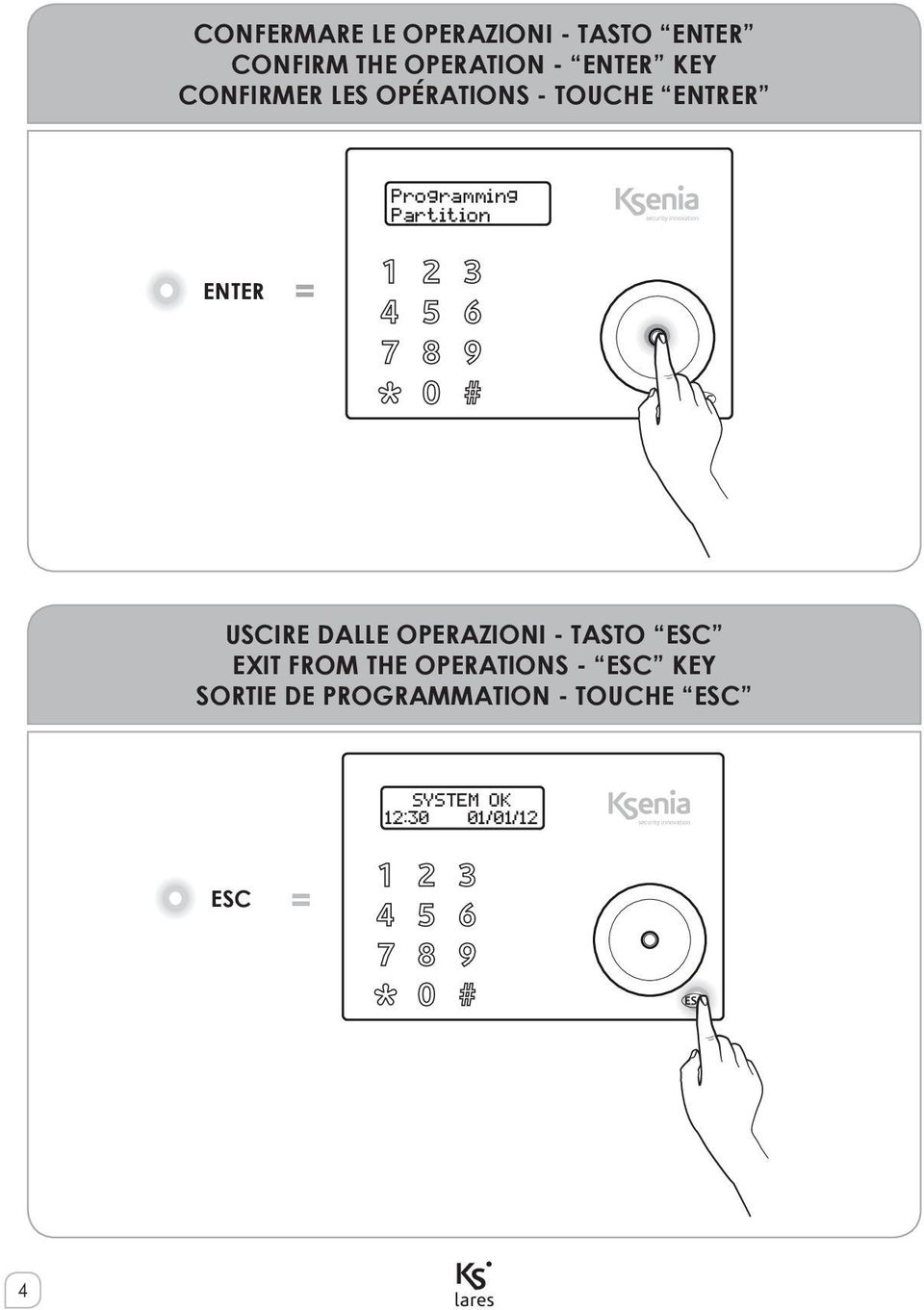
4 CONFERMARE LE OPERAZIONI - TASTO ENTER CONFIRM THE OPERATION - ENTER KEY CONFIRMER LES OPÉRATIONS - TOUCHE ENTRER Programming Partition ENTER = ESC USCIRE DALLE OPERAZIONI - TASTO ESC EXIT FROM THE OPERATIONS - ESC KEY SORTIE DE PROGRAMMATION - TOUCHE ESC SYSTEM OK 12:30 01/01/12 ESC = ESC 4
5 AVVICINARE LA CHIAVE ALLA TASTIERA APPROACH THE TAG TO THE KEYPAD APPROCHER LE BADGE DU CLAVIER SYSTEM OK 12:30 01/01/12 ESC AVVICINARE LA CHIAVE AL LETTORE volo APPROACH THE KEY TO THE volo OUTDOOR READER APPROCHER LE BADGE DU LECTEUR DE PROXIMITÉ volo 5

6 INTRODUZIONE ITALIANO è una centrale antintrusione e domotica al tempo stesso, che può essere controllata da tastiera LCD ergo, da remoto via telefono oppure via WEB tramite il web-server integrato. In questo manuale sono presentate le operazioni che possono essere eseguite dall utente finale. L installazione di queste apparecchiature deve essere effettuata a regola d arte, in accordo con le norme vigenti. Queste apparecchiature sono state sviluppate secondo criteri di qualità, affidabilità e prestazioni adottati dalla Ksenia Security. Si raccomanda di verificare il corretto funzionamento del sistema almeno una volta al mese. Le procedure per il collaudo dipendono dalla configurazione del sistema. Rivolgersi all installatore del sistema per conoscere le procedure da seguire. Ksenia Security Srl declina ogni responsabilità nel caso in cui le apparecchiature vengano manomesse da personale non autorizzato. Il contenuto di questo manuale può essere soggetto a modifiche, senza preavviso, e non rappresenta un impegno da parte della KSENIA SECURITY. Informazioni sullo smaltimento per gli utenti (Direttive RAEE - WEEE) Attenzione: Per smaltire il presente dispositivo, non utilizzare il normale bidone della spazzatura! Le apparecchiature elettriche ed elettroniche usate devono essere gestite a parte e in conformità alla legislazione che richiede il trattamento, il recupero e il riciclaggio adeguato dei suddetti prodotti. In seguito alle disposizioni attuate dagli Stati membri, i privati residenti nella UE possono conferire gratuitamente le apparecchiature elettriche ed elettroniche usate a centri di raccolta designati* o al rivenditore locale che può ritirare gratuitamente se l utente acquista un altro prodotto nuovo di tipologia simile. Se le apparecchiature elettriche o elettroniche usate hanno batterie o accumulatori, l utente dovrà smaltirli a parte preventivamente in conformità alle disposizioni locali. Lo smaltimento corretto del presente prodotto contribuirà a garantire che i rifiuti siano sottoposti al trattamento, al recupero e al riciclaggio necessari prevenendone il potenziale impatto negativo sull ambiente e sulla salute umana, che potrebbe derivare da un inadeguata gestione dei rifiuti. Sono previste sanzioni molto elevate nel caso di irregolarità nel rispetto del Decreto Leg.vo 151/05. * Per maggiori informazioni si prega di contattare l autorità locale competente. Specifiche tecniche, aspetto, funzionalità e altre caratteristiche del prodotto possono cambiare senza preavviso 6

7 OPERAZIONI DA TASTIERA Per l uso delle funzionalità dei tasti e dello scroll circolare della tastiera CapSense ergo, fare riferimento al manuale relativo 1. OPERAZIONI A RIPOSO Dallo stato di riposo possono essere effettuate sei operazioni: ITALIANO 1. Visualizzazione dettaglio informazioni (premendo il tasto ENTER) 2. Visualizzazione dello stato delle partizioni (premendo il tasto #) 3. Visualizzazione dello stato delle zone (premendo il tasto ) 4. Attivazione macro (tenendo premuto per 3 secondi il tasto numerico corrispondente) 5. Inserimento PIN (default ) 6. Blocco tastiera per pulizia: pressione per 3 secondi del tasto ESC Nello stato di riposo, premendo il tasto ENTER, possono essere visualizzate le seguenti informazioni: - Nel caso siano presenti delle condizioni di allarme, è possibile visualizzare le zone in allarme (se è abilitata la visualizzazione degli avvisi senza PIN) - Dettaglio partizioni inserite (se è abilitata la visualizzazione dello Stato di inserimento dell impianto) - Dettaglio zone aperte (se è abilitata la visualizzazione delle Zone aperte in tempo reale) - Informazioni installatore Per navigare tra queste informazioni usare lo scroll circolare. Per attivare uno scenario senza l inserimento del PIN (funzione macro) tenere premuto il tasto numerico corrispondente per 3 secondi. Tale funzione deve essere abilitata dall installatore. 1 Se la tastiera non è configurata nel sistema, sul display della stessa non sarà riportata alcuna informazione ed il pin utente sarà disabilitato. In questo stato è permesso l accesso con il solo pin installatore. 7

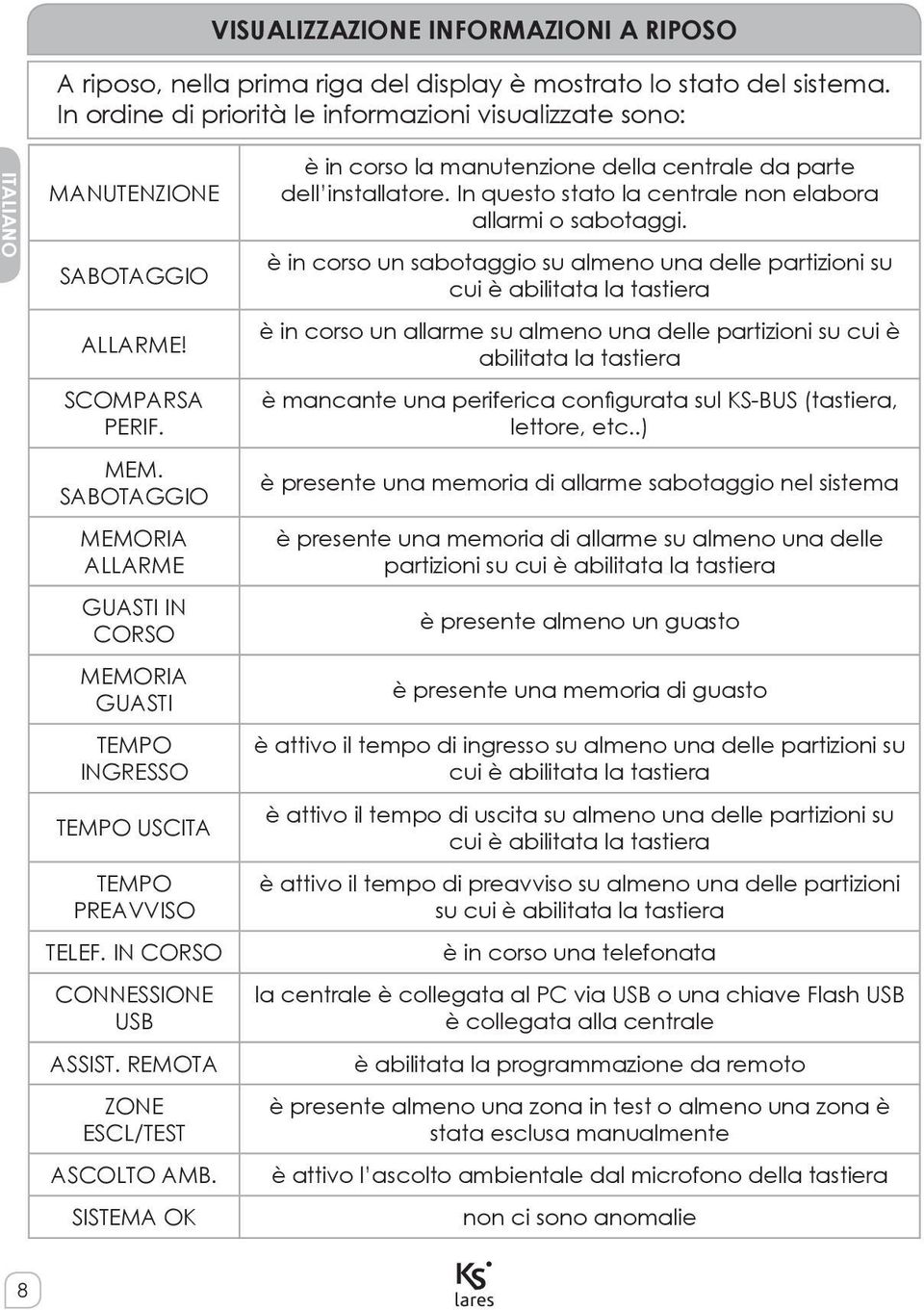
8 VISUALIZZAZIONE INFORMAZIONI A RIPOSO A riposo, nella prima riga del display è mostrato lo stato del sistema. In ordine di priorità le informazioni visualizzate sono: ITALIANO MANUTENZIONE SABOTAGGIO ALLARME! SCOMPARSA PERIF. MEM. SABOTAGGIO MEMORIA ALLARME GUASTI IN CORSO MEMORIA GUASTI TEMPO INGRESSO TEMPO USCITA TEMPO PREAVVISO TELEF. IN CORSO CONNESSIONE USB ASSIST. REMOTA ZONE ESCL/TEST ASCOLTO AMB. SISTEMA OK è in corso la manutenzione della centrale da parte dell installatore. In questo stato la centrale non elabora allarmi o sabotaggi. è in corso un sabotaggio su almeno una delle partizioni su cui è abilitata la tastiera è in corso un allarme su almeno una delle partizioni su cui è abilitata la tastiera è mancante una periferica configurata sul KS-BUS (tastiera, lettore, etc..) è presente una memoria di allarme sabotaggio nel sistema è presente una memoria di allarme su almeno una delle partizioni su cui è abilitata la tastiera è presente almeno un guasto è presente una memoria di guasto è attivo il tempo di ingresso su almeno una delle partizioni su cui è abilitata la tastiera è attivo il tempo di uscita su almeno una delle partizioni su cui è abilitata la tastiera è attivo il tempo di preavviso su almeno una delle partizioni su cui è abilitata la tastiera è in corso una telefonata la centrale è collegata al PC via USB o una chiave Flash USB è collegata alla centrale è abilitata la programmazione da remoto è presente almeno una zona in test o almeno una zona è stata esclusa manualmente è attivo l ascolto ambientale dal microfono della tastiera non ci sono anomalie 8
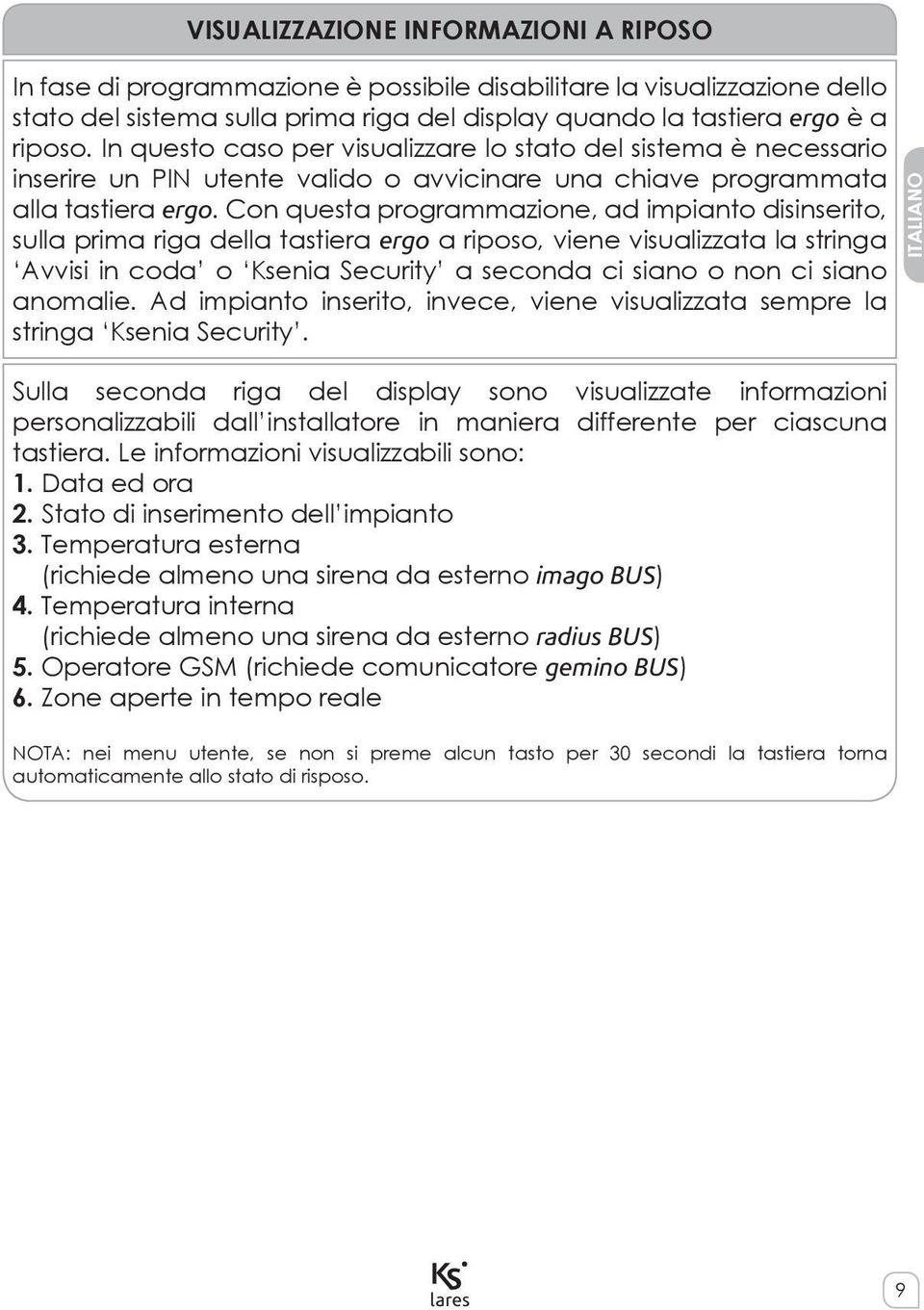
9 VISUALIZZAZIONE INFORMAZIONI A RIPOSO In fase di programmazione è possibile disabilitare la visualizzazione dello stato del sistema sulla prima riga del display quando la tastiera ergo è a riposo. In questo caso per visualizzare lo stato del sistema è necessario inserire un PIN utente valido o avvicinare una chiave programmata alla tastiera ergo. Con questa programmazione, ad impianto disinserito, sulla prima riga della tastiera ergo a riposo, viene visualizzata la stringa Avvisi in coda o Ksenia Security a seconda ci siano o non ci siano anomalie. Ad impianto inserito, invece, viene visualizzata sempre la stringa Ksenia Security. ITALIANO Sulla seconda riga del display sono visualizzate informazioni personalizzabili dall installatore in maniera differente per ciascuna tastiera. Le informazioni visualizzabili sono: 1. Data ed ora 2. Stato di inserimento dell impianto 3. Temperatura esterna (richiede almeno una sirena da esterno imago BUS) 4. Temperatura interna (richiede almeno una sirena da esterno radius BUS) 5. Operatore GSM (richiede comunicatore gemino BUS) 6. Zone aperte in tempo reale NOTA: nei menu utente, se non si preme alcun tasto per 30 secondi la tastiera torna automaticamente allo stato di risposo. 9
10 Il menu di navigazione principale è costituito dalle seguenti voci. Scorrere utilizzando lo scroll circolare. INGRESSO CON IL PIN UTENTE / SCENARI ITALIANO Subito dopo aver inserito il PIN utente, sempre composto da 6 cifre, la tastiera ci propone una serie di scenari (a partire dal più usato, in funzione delle abilitazioni in fase di programmazione) e l ingresso al menu principale. Supponiamo ad esempio che sulla tastiera siano abilitati due scenari, assegnati rispettivamente al tasto 0 ( Disinserimento ed al tasto 1 ( Inserimento ); la tastiera ci propone lo scenario da applicare o il più usato; se non premiamo alcun tasto dopo 3 secondi è automaticamente eseguita l azione riportata sul display e la tastiera torna allo stato di risposo 2. TASTI VELOCI La pressione di un tasto numerico attiva lo scenario corrispondente, la pressione del tasto # (cancelletto) ci permette l ingresso nel menu principale. ESECUZIONE SEQUENZIALE DI PIÙ SCENARI Per eseguire più scenari in modo sequenziale è sufficiente la pressione del tasto enter dopo l esecuzione del primo scenario senza dover inserire nuovamente il codice utente. 2 Se lo scenario proposto non deve essere applicato è sufficiente spostarsi con lo scroll sull azione desiderata, e confermarla con il tasto ENTER. 10
11 MENÙ PRINCIPALE RESET ALLARMI Premendo il tasto Enter si fermano eventuali allarmi in corso e si cancellano le relative memorie. STATO PARTIZIONI Premendo il tasto Enter, è possibile vedere lo stato di inserimento delle partizioni. STATO ZONE Premendo il tasto Enter, è possibile vedere lo stato in tempo reale delle zone. Inoltre è possibile effettuare le operazioni di esclusione / inclusione delle zone. MODIFICA PIN Premendo il tasto Enter, è possibile modificare il PIN di accesso. OPZIONI ERGO Premendo il tasto Enter, è possibile modificare i parametri della tastiera su cui si sta operando, ovvero luminosità del display, il volume dell altoparlante, la segnalazione acustica quando viene violata una zona campanello ed infine la sensibilità dei sensori capacitivi della tastiera. MENU AVANZATO Premendo il tasto Enter si accede alle funzioni avanzate. Vedere il prossimo paragrafo. RITARDO INSERIMENTO Questa funzione consente di posticipare l inserimento automatico del programmatore orario. Premendo il tasto Enter è poi possibile inserire il ritardo espresso in minuti. STATO GUASTI Premendo il tasto Enter è possibile entrare nella visualizzazione dei guasti, e navigare tra essi attraverso lo scroll circolare. Eventuali memorie guasto presenti nel sistema verranno cancellate visualizzando lo stato guasti. ITALIANO 11
12 MENÙ PRINCIPALE ITALIANO STATO GEMINO Premendo il tasto Enter è possibile visualizzare l operatore GSM, la potenza del segnale, il credito residuo e la scadenza della SIM. Questa voce è disponibile solamente quando è presente un gemino BUS configurato nel sistema. RESET TELEFONATE Premendo il tasto Enter è possibile interrompere eventuali azioni dell avvisatore (telefonate, SMS ed ). MENÙ AVANZATO Il menu di navigazione avanzato è costituito dalle seguenti voci, sulle quali è possibile muoversi utilizzando lo scroll circolare. Questo menu è disponibile solo se il pin inserito è programmato con l attributo codice principale abilitato. REGISTRO EVENTI Visualizzazione del registro eventi. Premendo il tasto Enter è possibile entrare nella visualizzazione del registro eventi, e navigare tra gli eventi partendo dall ultimo registrato. Per avere ulteriori dettagli sull evento è sufficiente premere di nuovo il tasto Enter. PROGRAMM. ORARIO Questa funzione consente di abilitare/disabilitare il programmatore orario. PERMESSO INSTALL. In questo menu è possibile abilitare la manutenzione del sistema all installatore. Se questa opzione è impostata su OFF l installatore non potrà effettuare alcuna operazione sull impianto. ASSIST. REMOTA In questa sezione è possibile abilitare la programmazione da remoto dell impianto. EVENTO DI TEST Premendo il tasto Enter è possibile generare l evento Test periodico. RUBRICA In questo menu è possibile programmare la rubrica della centrale. 12
13 MENÙ AVANZATO IMPOSTA DATA ED ORA Premendo il tasto Enter si può modificare la data e l ora della centrale; è sufficiente agire sullo scroll circolare per cambiare il valore. Per passare da un campo all altro è sufficiente premere il tasto Enter. MENU VOCALE In questo menu si abilita il menù vocale, che permette la gestione del sistema da remoto via telefono (richiede la scheda gemino BUS per comunicazione via GSM o pontis per comunicazione via PSTN). Fare riferimento al successivo paragrafo per le funzioni disponibili. GESTIONE CODICI In questo menu è possibile modificare l abilitazione ed il PIN di codici utente che hanno la maschera delle partizioni in comune con il codice principale in uso. GESTIONE CHIAVI In questo menù è possibile modificare l abilitazione delle chiavi che hanno la maschera delle partizioni in comune con il codice principale in uso. TELECOMANDI In questo menù è possibile modificare l abilitazione dei telecomandi che hanno la maschera delle partizioni in comune con il codice principale in uso. CAMBIO LEXAN In questo menu è possibile effettuare la sostituzione del lexan colorato della tastiera senza che sia generato il sabotaggio per l apertura. Seguire le istruzioni riportate sul manuale della tastiera per l apertura e la chiusura del coperchio. ITALIANO OPERAZIONI CON LA CHIAVE La chiave a trasponder o il vostro telefono NFC possono essere utilizzati in alternativa ai codici: è sufficiente avvicinare una chiave valida alla zona di lettura della tastiera (posta in alto a destra) per accedere al menu utente. 13

14 MENU VOCALE DA REMOTO ITALIANO Nel caso in cui sia installato un comunicatore (gemino BUS oppure pontis) è possibile accedere ad un menu guidato vocale: 1. Ascolto ambientale dal microfono della tastiera 2. Informazioni stato zone ed inclusione / esclusione delle zone 3. Informazioni stato partizioni 4. Attivazione scenari (ovvero attivazione uscite e/o inserimento disinserimento impianto) Il menu è completamente guidato da una voce, e ad ogni operazione sono indicati i tasti da premere. In generale con il tasto # del telefono si conferma l operazione mentre con il tasto * si annulla. Per entrare nel menu vocale guidato da remoto ci sono tre possibilità: 1. Chiamando il numero di telefono della SIM installata sul gemino BUS, se è abilitato il risponditore. 2. Chiamando il numero di telefonia fissa al quale è collegata l interfaccia pontis. 3. Durante una telefonata ricevuta dalla centrale, premendo il tasto #. 14

15 OPERAZIONI DA REMOTO VIA SMS Se nel sistema è installato un comunicatore gemino BUS possono essere effettuate delle operazioni da remoto inviando dei semplici SMS al numero di telefono della SIM inserita nel comunicatore stesso. Le possibili operazioni sono: 1. Attivazioni degli scenari 2. Controllo credito e scadenza SIM 3. Attivazione assistenza remota 4. Generazione dell evento riconosciuto codice ITALIANO ATTIVAZIONE SCENARI VIA SMS Il formato del SMS deve essere il seguente: <codice utente>s<numero di scenario> oppure <codice utente>spazio<nome dello scenario><;> Supponiamo, ad esempio, di voler attivare lo scenario 1 (inserimento) con il PIN utente di default (147258). Bisognerà inviare alla centrale un SMS con il seguente testo: s1 oppure inserimento; E possibile configurare fino ad 8 numeri per far inviare la conferma dalla centrale tramite SMS all attivazione dello scenario. CONTROLLO CREDITO E SCADENZA SIM Il formato del SMS deve essere il seguente: <codice utente>c Ad esempio con il PIN utente di default (147258) bisognerà inviare alla centrale un SMS con il seguente testo: c Il dispositivo entro alcuni minuti invierà un SMS con l informazione relativa al credito ed alla scadenza delle SIM inserite nel comunicatore. 15

16 OPERAZIONI DA REMOTO VIA SMS ITALIANO ATTIVAZIONE ASSISTENZA REMOTA Il formato del SMS deve essere il seguente: <codice utente>m<0/1> Supponiamo, ad esempio, di voler attivare l assistenza remota con il PIN utente di default (147258). Bisognerà inviare alla centrale un SMS con il seguente testo: m1 Se programmata la centrale invierà un SMS con l indirizzo IP assegnato dalla rete. Supponiamo, ad esempio, di voler disattivare l assistenza remota con il PIN utente di default (147258). Bisognerà inviare alla centrale un SMS con il seguente testo: m0 GENERAZIONE EVENTO RICONOSCIUTO CODICE Il formato del SMS deve essere il seguente: <codice utente>n Ad esempio con il PIN utente di default (147258) bisognerà inviare alla centrale un SMS con il seguente testo: n Alla ricezione del SMS la centrale genererà l evento riconosciuto codice e, se programmate, verranno eseguite le azioni associate a questo evento. Questa funzionalità risulta molto utile se si vuole diversificare le azioni (per esempio uscite da attivare) che possono essere eseguite dai diversi utenti. CONTROLLO REMOTO DELL IMPIANTO VIA WEB Le centrali della serie (solo modelli 16-IP, 48-IP e 128-IP) dispongono di un web-server integrato per la gestione remota dell impianto via Internet. È sufficiente programmare la centrale ed abilitare il servizio; inoltre se non si dispone di un indirizzo IP statico, la centrale supporta il protocollo per l indirizzamento IP dinamico (DynDNS) che consente di comunicare con la centrale da una qualunque postazione Internet. Per motivi di sicurezza per accedere alle funzionalità attraverso il Web-Server, oltre al PIN per eseguire le operazioni di attivazione, è necessario effettuare un login aggiuntivo con un ulteriore username e password. 16

17 INTRODUCTION is a burglar alarm & Home Automation system that can be controlled by means of an ergo LCD keyboard, as well as remotely by telephone, and even via the Internet through a built-in WEB server. This manual describes the operations that can be performed by the end user. ENGLISH Installation of these systems must be carried out strictly in accordance with the instructions described in this manual, and in compliance with the local laws and bylaws in force. These devices hare been designed and made with the highest standards of quality and performance adopted by Ksenia Security. Is recommended that the installed system should be completely tested at least once a month. Test procedures depends on the system configuration. Ask to the installer for the procedures to be followed. Ksenia Security srl shall not be responsible for damage arising from improper installation or maintenance by unauthorized personnel. The content of this guide can change without prior notice from KSENIA SECURITY. Information for users: Disposal (RAEE - WEEE Directive) Warning! Do not use an ordinary dustbin to dispose of this equipment. Used electrical and electronic equipment must be treated separately, in accordance with the relative legislation which requires the proper treatment, recovery and recycling of used electrical and electronic equipment. Following the implementation of directives in member states, private households within the EU may return their used electrical and electronic equipment to designated collection facilities free of charge*. Local retailers may also accept used products free of charge if a similar product is purchased from them. If used electrical or electronic equipment has batteries or accumulators, these must be disposed of separately according to local provisions. Correct disposal of this product guarantees it undergoes the necessary treatment, recovery and recycling. This prevents any potential negative effects on both the environment and public health which may arise through the inappropriate handling of waste. * Please contact your local authority for further details. Technical specification, appearance, functionally and other product charateristics may change without notice. 17
18 KEYBOARD OPERATIONS Refer to the keyboard manual to use the ergo capsense keyboard and get familiar with the functions of its keys and circular scroll 1. ACTIONS IN STAND-BY MODE ENGLISH Six operations can be performed while the system is in stand-by mode: 1. Detailed list of information (by pressing the Enter key) 2. Partitions status (by pressing the # key) 3. Zones status (by pressing the key) 4. Activation of a function (by holding down the corresponding numeric key for 3 seconds) 5. Entering the PIN (default PIN is ) 6. Keyboard lock for cleaning: hold the ESC key pressed for 3 seconds In stand-by mode, the following informations can be displayed by pressing the ENTER key: - If an alarm occurs, it is possible to see which zone is in alarm (if the notices without PIN display is enabled) - List of armed (if the system activation status display is enabled) - List of open zones (if open zones real time display is enabled) - Information about the installer Use the circular scroll to browse through these lines. To activate a function (macro) without entering the PIN, keep the corresponding numeric key pressed for seconds. This function must be enabled by the installer. 1 If the keyboard is not configured in the system, the keyboard display does not show any information, and the user PIN is disabled. In this way, login is permitted only through the installer PIN. 18

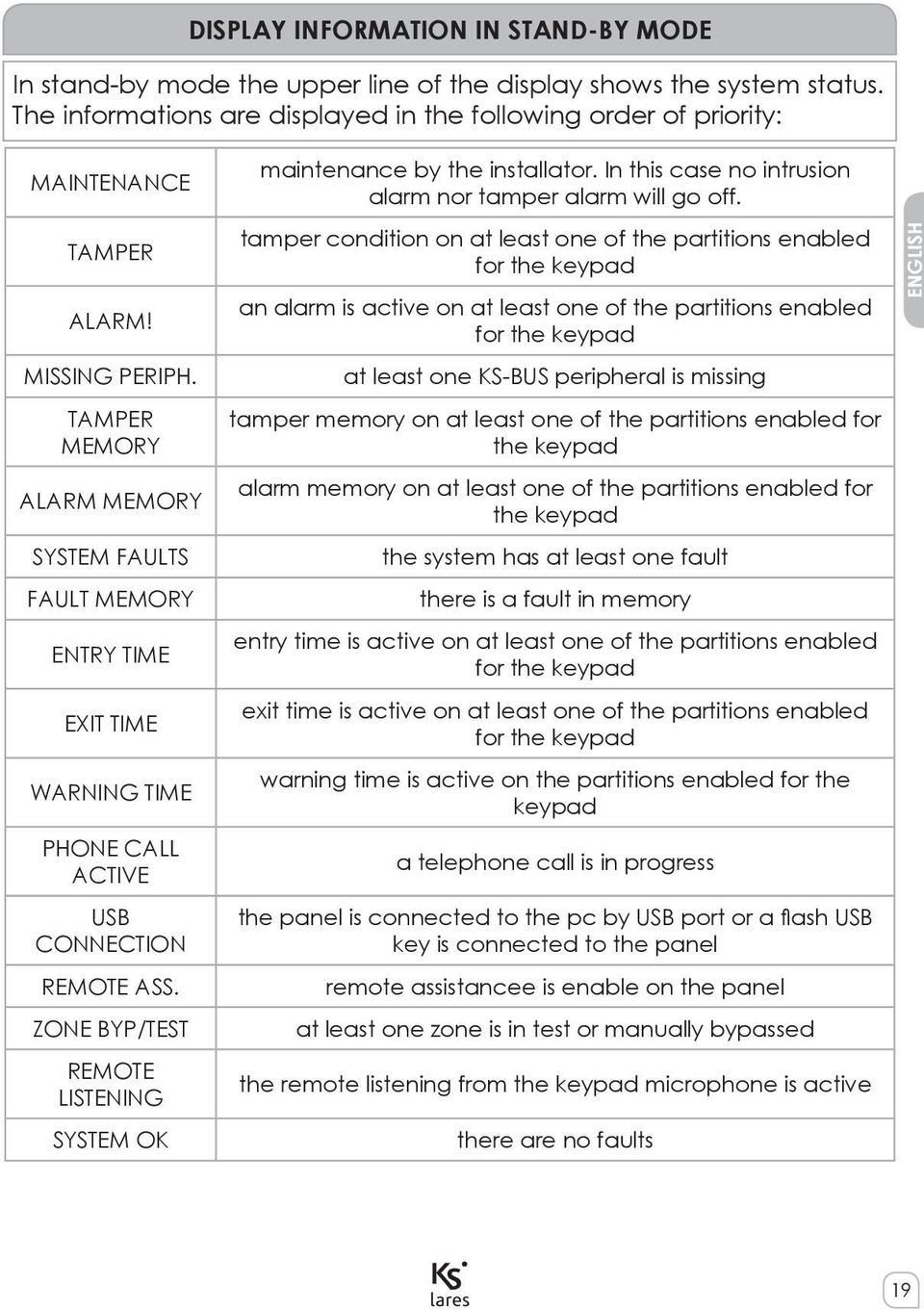
19 DISPLAY INFORMATION IN STAND-BY MODE In stand-by mode the upper line of the display shows the system status. The informations are displayed in the following order of priority: MAINTENANCE TAMPER ALARM! MISSING PERIPH. TAMPER MEMORY ALARM MEMORY SYSTEM FAULTS FAULT MEMORY ENTRY TIME EXIT TIME WARNING TIME PHONE CALL ACTIVE USB CONNECTION REMOTE ASS. ZONE BYP/TEST REMOTE LISTENING SYSTEM OK maintenance by the installator. In this case no intrusion alarm nor tamper alarm will go off. tamper condition on at least one of the partitions enabled for the keypad an alarm is active on at least one of the partitions enabled for the keypad at least one KS-BUS peripheral is missing tamper memory on at least one of the partitions enabled for the keypad alarm memory on at least one of the partitions enabled for the keypad the system has at least one fault there is a fault in memory entry time is active on at least one of the partitions enabled for the keypad exit time is active on at least one of the partitions enabled for the keypad warning time is active on the partitions enabled for the keypad a telephone call is in progress the panel is connected to the pc by USB port or a flash USB key is connected to the panel remote assistancee is enable on the panel at least one zone is in test or manually bypassed the remote listening from the keypad microphone is active there are no faults ENGLISH 19
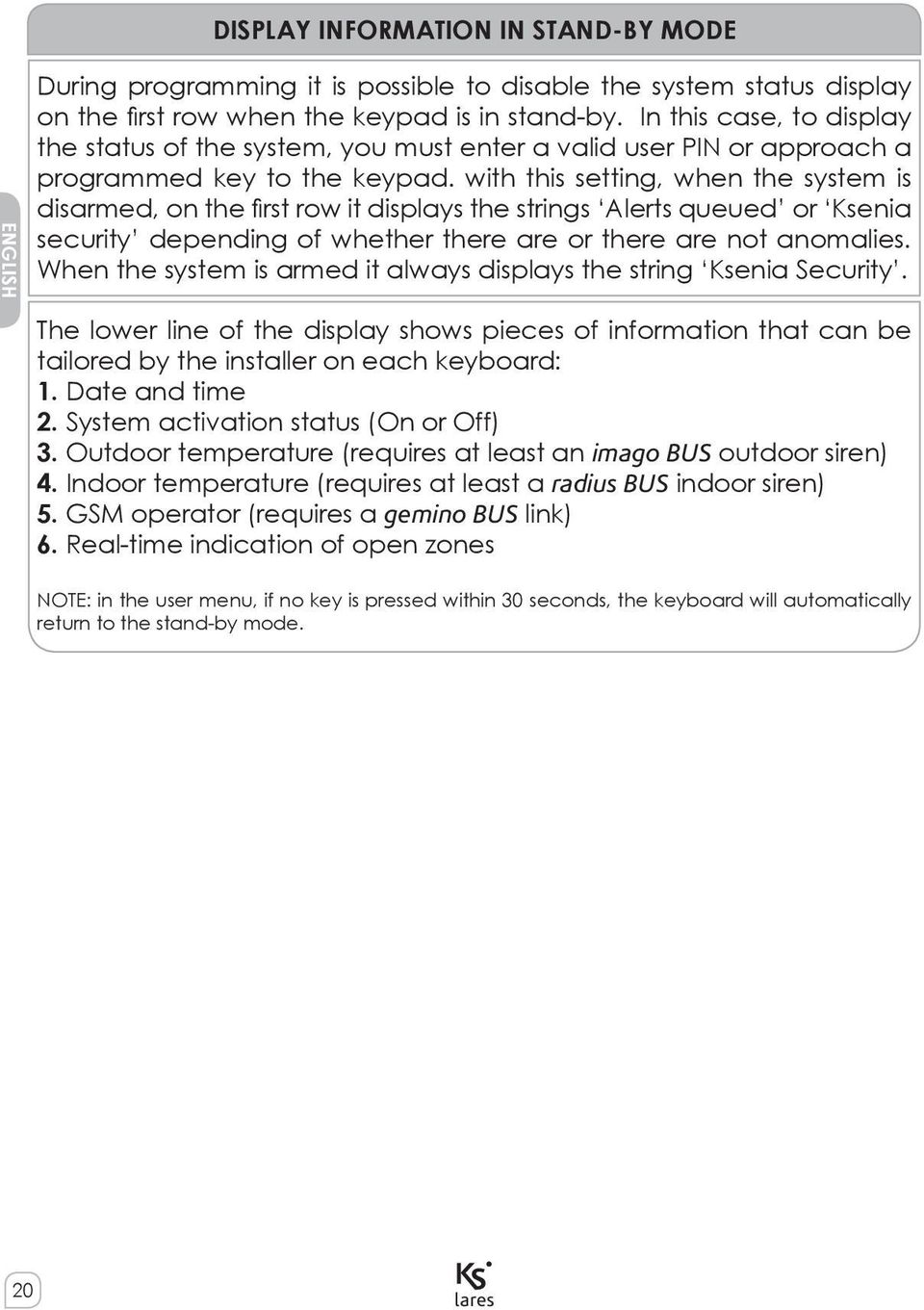
20 DISPLAY INFORMATION IN STAND-BY MODE ENGLISH During programming it is possible to disable the system status display on the first row when the keypad is in stand-by. In this case, to display the status of the system, you must enter a valid user PIN or approach a programmed key to the keypad. with this setting, when the system is disarmed, on the first row it displays the strings Alerts queued or Ksenia security depending of whether there are or there are not anomalies. When the system is armed it always displays the string Ksenia Security. The lower line of the display shows pieces of information that can be tailored by the installer on each keyboard: 1. Date and time 2. System activation status (On or Off) 3. Outdoor temperature (requires at least an imago BUS outdoor siren) 4. Indoor temperature (requires at least a radius BUS indoor siren) 5. GSM operator (requires a gemino BUS link) 6. Real-time indication of open zones NOTE: in the user menu, if no key is pressed within 30 seconds, the keyboard will automatically return to the stand-by mode. 20
21 In the user menu you can browse through the following items using the circular scroll. LOGIN BY USER PIN / SCENARIOS After the user digit user PIN, that is always 6 digit long, the keypad will show the enabled functions (starting from the most used one, depending on the enabled choices 2 ) and access is granted to the first level of the menu. Let s assume, for example, that two functions are enabled on the keyboard, assigned to key 0 (system off) and to key 1 (system on) respectively; the keyboard shows the function to be applied, or the most frequently used one; if you don t press any key within 3 seconds, the function shown on the display is performed automatically and the keyboard returns to the stand-by mode 3. ENGLISH SHORTCUTS Press a numeric key to activate the corresponding function, or press the # key to go into the main menu. SEQUENTIAL EXECUTION OF MULTIPLE SCENARIOS To execute multiple scenarios in sequential mode, simply press the enter key after the first scenario without having to re-enter user code. 2 On basis step on Bus Peripherals / ergo x / Macro Functions 3 If the proposed function is not to be applied, use the circular scroll to move to the desired action and confirm it using the Enter key 21
22 MAIN MENU ENGLISH RESET ALARM Press the Enter key to reset any active alarm and delete the alarm record. PARTITION STATUS Press the Enter key to display the activation status (on/off) of all partitions. ZONE STATUS Press the Enter key to display the real time activation status (on/off) of all zones. CHANGE PIN Press the Enter key to change the access PIN. ERGO OPTIONS Press the Enter key to modify the settings of the keyboard you are operating on, namely display backlight, loudspeaker volume, the acoustic signal when a Chime zone is violated. and touch sensitivity. ADVANCED OPTION Press the Enter key to gain access to the advanced functions. Please, refer to the next paragraph. OVERTIME REQUEST Press the Enter key to do an overtime request and delay the arming of the system. FAULTS STATUS Press the Enter key to display the detected faults; you can browse through them using the circular scroll. Any failure in the system memory will be erased showing fault status. STOP CALLS Press the Enter key to stop any actions of the telephone dialer in consequence of an alarm (calls, SMS or ). OVERTIME REQUEST Press the Enter key to do an overtime request and delay the arming of the system. FAULTS STATUS Press the Enter key to display the detected faults; you can browse through them using the circular scroll. Any failure in the system memory will be erased showing fault status. 22
23 MAIN MENU GEMINO STATUS Press the Enter key to display the GSM operator, signal strength, your remaining credit and the expiry of the SIM. This item is available only if there is a configured gemino BUS into the system. STOP CALLS Press the Enter key to stop any actions of the telephone dialer in consequence of an alarm (calls, SMS or ). ENGLISH ADVANCED MENU The advanced browsing menu consists of the following items, which can be browsed using the circular scroll. This menu is available only if the entered PIN has been programmed with the Main Code parameter enabled. EVENT LOGGER Event record display. Press Enter to display the record; you can browse through the events starting from the last recorded one. For additional details of the event, press the Enter key again. SCHEDULER In this menu it is possible to enable/disable the autoarming feature ENABLE MAINT. In this menu you can enable the installer to log in for system maintenance. If this option is set to OFF, the installer will have no access to the system for any operation whatsoever. REMOTE ASS. In this menu it is possible to enable/disable the remote assistance TEST EVENT Press Enter to generate the Periodic Test event PHONE BOOK In this menu it is possible to program the phone numbers to call. DATE & TIME After pressing the Enter key on this item, you will be able to change the system s date and time simply by operating the circular scroll. To skip from one field to the other, do not to press any key for 3 seconds. 23
24 ADVANCED MENU ENGLISH VOICE MENU In this menu you can enable the voice menu, which enables the system to be managed remotely by telephone. For the functions available in this section, see next paragraph. MANAGE CODES In this menu you can modify the enable function and the user PIN codes enabled in the same partitions as login code. MANAGE KEYS In this menu it is possible to modify the enable function of keys enabled in the same partition as login code. MANAGE REMOTE COMMANDS In this menu it is possible to modify the enable function of remote commands enabled in the same partition as login code. REPLACE LEXAN This menu allows the colour lexan layer of the keyboard to be replaced without triggering a tampering alarm. To open and close the cover, you should follow the instructions provided in the keyboard manual. OPERATIONS WITH KEY The transponder key or your own NFC telephone can be used instead of the keyboard keys to activate the codes: to access the user menu, bring a valid key near the reading zone of the keyboard (located at top right). 24
25 REMOTE VOCAL MENU In the case that a gemino BUS or a pontis communication interface is configured in the system, it is possible to use a vocally guided remote menu which affords the following operations: 1. Listening to the monitored environment from the keyboard panel microphone 2. Getting information on the status of the zones and inclusion / exclusion of them 3. Getting information on the status of the partitions 4. Activating functions (output and/or arming/disarming panel) ENGLISH The menu is completely voice-guided and the keys to be pressed are shown for every operation. Generally, any operation is confirmed by pressing the # key and cancelled by pressing the * key on your telephone. There are three different ways to gain access to the vocally guided remote menu: 1. Calling the phone number of the SIM installed on the gemino BUS, if the responder is enabled 2. Calling the PSTN number the pontis interface is connected to 3. Press the # key during an incoming call received from the system 25
26 REMOTE OPERATIONS VIA SMS If the panel is connected to a gemino BUS communicator some operations can be done remotely sending SMS to the panel. Following operation can be performed: ENGLISH 1. Scenarios activation 2. Pay-as-you-go balance on prepaid SIM card 3. Remote assistance 4. Generating Recognized Code event SCENARIOS ACTIVATION VIA SMS It is possible to activate up to 10 different scenarios simple sending an SMS to the panel. The SMS format must follow this directives: <user code>s<scenario number> or <user code>space<scenario name><;> For example let s suppose that we want scenario number 1 (arming)to be turned on by default user PIN (147258). The SMS that should be sent to the panel will be: s1 or arming; It is possible to program up to 8 different numbers that the system could send back an SMS of acknowledge to, after the arming is executed. PAY-AS-YOU-GO BALANCE ON PREPAID SIM CARD The SMS format must follow this directives: <user code>c For example with the default user PIN (147258). The SMS that should be sent to the panel will be: c Within few minutes the device will send the required information. 26
27 REMOTE OPERATIONS VIA SMS REMOTE ASSISTANCE The SMS format must follow this directives: <user code>m<0/1> For example with the default user PIN (147258) to enable the remote assistance the SMS that should be sent to the panel will be: m1 If programmed the panel will send to the installer the IP address received from the network. For example with the default user PIN (147258) to disable the remote assistance the SMS that should be sent to the panel will be: m0 ENGLISH RECOGNIZED CODE EVENT The SMS format must follow this directives: <user code>n Example: with the default user PIN (147258) in order to generate the Recognized Code event the SMS that should be sent to the panel will be: n The SMS will generate the Recognized Code event and, if programmed, you will perform the actions associated with this event. This feature is very useful if you want to diversify actions (for example to activate outputs) that can be performed by different users. REMOTE CONTROL VIA WEB BROWSER integrated panels (model 16-IP, 48-IP, 128-IP) integrate a web-browser for remote management of the system via Internet. Installer should program the panel and enable the service, moreover, if a static IP address is not available, the system support dynamic IP address service protocol (DynDNS) that allows to communicate with the panel from any Internet point. For security reasons to gain access to web-server service an additional login via a username and a password is required. 27
28 FRANÇAIS INTRODUCTION est un système d alarme et système de domotique qui peut être contrôlé sur place au moyen du clavier LCD ergo, ainsi qu à distance par téléphone, et même via Internet par le biais d un serveur WEB intégré. Ce manuel décrit les opérations qui peuvent être effectuées par l utilisateur final. L installation de ces systèmes doit être effectuée de manière stricte, en respectant les descriptions du présent manuel et en accord avec les lois locales et règlements en vigueur. Ces dispositifs ont eté conçus et fabriqués avec les plus hauts standards de qualité et de performance adoptés par Ksenia Security. Il est recommandé de tester le système une fois installé et au moins une fois par mois. Les procédures de test dépendent de la configuration du système. Demandez à votre installateur de suivre les procédures. Ksenia Security srl ne sera responsable d aucun dommage, de quelque ordre qu il soit, provenant d une installation ou d un entretien réalisé de manière impropre ou par un personnel non autorisé ou formé à le faire. Le contenu du présent guide d installation peut être modifié à tout moment et sans préavis par KSENIA SECURITY. Informations pour les utilisateurs: Evacuation (Directive RAEE - WEEE) Attention! Ne pas utiliser une poubelle ordinaire pour se débarrasser de cet équipement. Les appareils électriques et électroniques usagés doivent être traités séparément, conformément à la législation relative qui nécessite le traitement, la valorisation et le recyclage des équipements électriques et électroniques usagés. Suite à la mise en œuvre des directives dans les Etats membres, les ménages résidant au sein de l UE peuvent remettre gratuitement leurs équipements électriques et électroniques usagés aux centres de collecte désignés gratuitement *. Les détaillants locaux peuvent également accepter des produits usagés gratuitement, si un produit similaire est acheté chez eux. En cas d utilisation d équipements électriques ou électroniques qui comportent des piles ou des accumulateurs, ceux-ci doivent être jetés séparément, conformément aux dispositions locales. La mise au rebut de ce produit garantit qu il subit le traitement nécessaire, la récupération et le recyclage. Cela permet d éviter les éventuels effets négatifs sur l environnement et la santé publique qui peuvent résulter de la manipulation inappropriée des déchets. * Veuillez contacter les autorités locales pour plus de détails Spécifications techniques, l apparence, la fonctionnalité et les autres caractéristiques du produit peuvent changer sas préavis 28
29 OPERATIONS AU CLAVIER Reportez-vous au manuel d utilisation du clavier ergo et familiarisez-vous avec les fonctions de ses touches et du défilement circulaire 1. ACTIONS SUR CLAVIER EN ATTENTE Six opérations peuvent être effectuées pendant que le système est en mode attente (stand-by): 1. Une liste détaillée des informations (en effleurant la touche ENTER) 2. Etat des partitions (en appuyant sur la touche #) 3. Etat des zones (en appuyant sur la touche *) 4. L activation d une fonction (en gardant le doigt sur la touche appropriée pendant 3 sec.) 5. Entrer le code (le code par défaut est ) 6. Verrouillage du clavier pour le nettoyer: gardez le doigt sur la touche ESC pendant 3 secondes FRANÇAIS En mode d attente (stand-by), vous pouvez accéder à l information suivante si vous effleurez la touche Enter: - Si l alarme déclenche, il est possible de connaître la zone qui est en alarme (si la notification sans code PIN est activée) - Liste des zones armées (si l état d activation du système est activé) - Liste des zones ouvertes (si l affichage des zones en temps réel est activé) - De l information à propos de l installateur Utilisez la zone de défilement circulaire pour naviguer entre les lignes. Pour activer une fonction macro sans entrer de code, gardez le doigt sur la touche correspondant à la macro pendant 3 secondes. Cette fonction doit être activée par l installateur. 1 Si le clavier n est pas configuré dans le système, l écran du clavier n affichera aucune information et le code utilisateur est désactivé. Le login sera donc autorisé via le code installateur. 29
30 AFFICHAGE DE L INFORMATION EN MODE D ATTENTE (STAND-BY) En mode d attente, la ligne supérieure du clavier affiche le statut du système. Les informations sont affichées dans l ordre prioritaire suivant: FRANÇAIS ENTRETIEN SABOTAGE ALARME! PERIPH. ABSENT MEMOIRE SABOT. MEMOIRE D ALARME DEFAUT SYSTEME ERREUR EN MEMOIRE DELAI D ENTREE DELAI DE SORTIE DELAI AVERTISS. APPEL TEL. EN COURS CONNECTION USB ASS. A DIST. EXCL./ TEST ZONE ECOUTE A DISTANCE SYSTEME OK Entretien par l installateur. Dans ce cas, ni l alarme intrusion ni l alarme d autoprotection ne déclenchera Sabotage sur une des partitions assignées au clavier Une alarme est en cours sur au moins une des partitions assignées au clavier Au moins un périphérique du KS-Bus est absent Mémoire de sabotage sur au moins une des partitions assignées au clavier Mémoire d alarme sur au moins une des partitions assignées au clavier Le système est en défaut il y a une erreur en mémoire Délai d entrée sur au moins une des partitions assignées au clavier Délai de sortie sur au moins une des partitions assignées au clavier Le délai d avertissement est actif sur au moins une des partitions assignées au clavier Un appel téléphonique est en cours La centrale est connectée au PC par le port USB, ou une clé USB est branchée sur la centrale L assistance à distance est active sur le clavier Au moins une zone est en test ou exclue manuellement L écoute à distance depuis le micro du clavier est actif Il n y a pas de défaut 30
31 AFFICHAGE DE L INFORMATION EN MODE D ATTENTE (STAND-BY) Pendant la programmation et lorsque le clavier est en stand-by, il vous est possible de désactiver l état du système. Par contre, si vous souhaitez l afficher, vous devez entrer un code PIN valide ou approcher un badge programmé du clavier. Avec cette programmation, et lorsque le système est désarmé, les mentions Alarmes en mémoire ou Ksenia Security s afficheront. Qu il y ait ou non des anomalies. Lorsque le système est armé, le système affiche toujours Ksenia Security à l écran du clavier. La ligne du bas de l écran affiche l information que l installateur peut modifier à sa guise sur chaque clavier: FRANÇAIS 1. Date et heure 2. Etat d activation du système (ON/OFF) 3. Température extérieure (sirène imago BUS requise) 4. Température intérieure (sirène radius BUS requise) 5. Opérateur GSM (requiert un lien vers le gemino BUS) 6. Indication des zones ouvertes en temps réel NOTE: Si vous êtes dans le menu utilisateur et qu aucune touche n est effleurée pendant 30 secondes, le clavier retournera en mode d attente. 31
32 Dans le menu utilisateur, vous pouvez naviguer au travers des différents sujets en utilisant le menu déroulant sur la partie tactile circulaire du clavier. LOGIN VIA CODE / SCENARIOS FRANÇAIS Après avoir entré le code au clavier (toujours 6 chiffres), celui-ci affichera les fonctions autorisées (en démarrant par celle qui est la plus utilisée, et dépendant des choix possibles) et vous aurez accès au premier niveau du menu. Exemple : deux fonctions peuvent être assignées respectivement à la touche 0 (désarmement du système) et à la touche 1 (armement du système). Après avoir bien entendu entré votre code, le clavier va vous montrer la fonction que vous utilisez le plus. Si vous n effleurez plus aucune touche pendant 3 secondes (ni 0, ni 1) la fonction affichée sera mise en oeuvre automatiquement et le clavier retournera en mode d attente 2. RACCOURCIS appuyez sur une touche pour activer la fonction correspondante ou effleurez la touche # pour entrer dans le menu principal. EXECUTION SEQUENTIELLE DE MULTIPLES SCENARIOS Pour effectuer de multiples scénarios en mode séquentiel, appuyez sur la touche entrée après le premier scénario, sans avoir à entrer un nouveau code utilisateur. 2 Si la fonction proposée n est pas celle souhaitée, utilisez le défilement circulaire afin d aller jusqu à l action désirée et confirmez-la par la touche Enter 32
33 MENU PRINCIPAL MISE A ZERO Appuyez sur la touche Enter pour remettre à zéro toute alarme en cours et effacer l enregistrement de l alarme. Pour le un sabotage, l installateur doit valider la mise à zéro de l alarme. STATUT DES PART. Appuyez sur la touche Enter pour afficher le statut de l activation (On/ Off) de toutes les partitions. STATUT DES ZONES Appuyez sur la touche Enter pour afficher le statut d activation (On/Off) de toutes les zones en temps réel. CHANGER CODE Appuyez sur la touche Enter pour changer le code d accès. OPTIONS CLAVIER Appuyez sur la touche ENTER pour modifier les paramètres du clavier: rétroéclairage de l écran, le volume du haut-parleur, le signal sonore quand une zone carillon est transgressée et la sensibilité du clavier. OPTIONS AVANCÉES Appuyez sur la touche Enter pour accéder aux fonctions avancées. Veuillez vous référer au paragraphe suivant. RET.ARM.AUTOM Appuyez sur la touche Enter pour retarder l armement automatique du système. Par défaut, la prolongation est de 10 minutes mais vous pouvez la paramétrer. ETAT DES ERREURS Appuyez sur la touche Entrée pour afficher les erreurs détectées ; vous pouvez naviguer au travers de celles-ci grâce au menu circulaire. Toutes les erreurs dans la mémoire du système seront effacées par l affichage de l état des erreurs. ETAT DU GEMINO Appuyez sur la touche Entrée pour afficher le nom de l opérateur GSM, le crédit résiduel et l expiration de la carte SIM. Cette fonction est accessible uniquement si un gemino BUS est configuré sur le système. FRANÇAIS ARRÊT. APPELS Appuyez sur la touche Enter pour arrêter la transmission à la suite d une alarme (appels, SMS ou ). 33
34 OPTIONS AVANCÉES Le menu de navigation avancé se compose des éléments suivants, qui peuvent être parcourus à l aide du défilement circulaire. Ce menu n est disponible que si le code saisi a été programmé avec le paramètre code principal activé. FRANÇAIS MÉMOIRE D ÉVÉNEMENTS affichage de l enregistrement des événement(s). Appuyez sur Enter pour afficher l enregistrement, vous pouvez naviguer à travers les événements à partir du dernier enregistré. Pour plus de détails sur l événement, appuyez à nouveau sur la touche Enter. CALENDRIER Dans ce menu, il est possible d activer / désactiver la fonction autoarmement ACT. DE L ENTRET. Dans ce menu vous pouvez activer la fonction requise afin que l installateur puisse se connecter pour la maintenance du système. Si cette option est réglée sur OFF, l installateur n a pas accès au système pour quelque opération que ce soit. ASSISTANCE À DISTANCE Dans ce menu, il est possible d activer / désactiver l assistance à distance. ANNUAIRE In questo menu è possibile programmare la rubrica della centrale. TESTS PERIODIQUES Appuyez sur la touche Entrée pour générer un événement de test périodique DATE ET HEURE À ce stade et après avoir appuyé sur la touche Enter, vous serez en mesure de changer la date du système et l heure en actionnant tout simplement le défilement circulaire. Pour sauter d un champ à l autre, ne pas appuyer de touche pendant 3 secondes. MENU VOCAL Cette fonction vous permet d activer le menu vocal, afin d être géré à distance par téléphone. Pour les fonctions disponibles dans cette section, voir le paragraphe suivant. 34
35 OPTIONS AVANCÉES CODES Dans ce menu, vous pouvez modifier la fonction et valider les codes des utilisateurs dans les partitions pour lesquelles le code maître est valable GESTION DES BADGES Dans ce menu, il est possible de modifier la fonction de validation des badges (minitags). COMMANDES À DISTANCE Dans ce menu, il est possible de modifier la fonction de validation des commandes à distance. FRANÇAIS CHANG.COUL.CLAV. Ce menu permet à l utilisateur de changer la couleur de la face avant du clavier sans provoquer de sabotage. Pour ouvrir et fermer le couvercle, vous devez suivre les instructions fournies dans le manuel du clavier. OPERATIONS AVEC BADGE / SMARTPHONE Votre badge ou votre téléphone muni de la technologie NFC peut être utilisée à la place des touches du clavier pour activer les codes: pour accéder au menu utilisateur, placez votre badge valide ou votre smartphone à proximité de la zone de lecture du clavier (située en haut à droite). 35
36 MENU VOCAL A DISTANCE FRANÇAIS Dans le cas où un gemino BUS ou un transmetteur RTC/PSTN pontis est configuré dans le système, on peut utiliser un menu vocal à distance qui permet les opérations suivantes: 1. L écoute de l environnement contrôlé à partir du micro du clavier 2. Obtenir des informations sur l état des zones ainsi que l inclusion ou l exclusion de celles-ci 3. Obtenir des informations sur l état des partitions 4. Activer des fonctions (sorties et/ou armement/désarmement de la centrale) Le guide vocal vous mènera au travers du menu et les touches à appuyer vous seront indiquées pour chaque opération. En règle générale, toute opération est confirmée en appuyant sur la touche # et annulée en appuyant sur la touche * de votre téléphone. Il y a trois façons différentes pour avoir accès au menu vocal à distance: 1. Appeler le numéro de téléphone de la carte SIM installée sur le gemino BUS, si le répondeur est activé 2. Appeler le numéro du transmetteur pontis RTC/PSTN. 3. Appuyez sur la touche # pendant un appel entrant reçu par le système. 36
37 OPERATIONS A DISTANCE VIA SMS Si la centrale est connectée à un transmetteur gemino BUS, certaines opérations peuvent être effectuées à distance en envoyant des SMS à la centrale comme: 1. L activation de scénarios 2. Connaître le crédit actuel sur la carte SIM prépayée 3. L assistance à distance 4. Générer un événement Code Reconnu ACTIVATION DE SCENARIOS VIA SMS 10 scénarios peuvent être activés en envoyant des SMS à la centrale. Le format du SMS doit répondre aux exigences suivantes: <code utilisateur>s<numéro du scénario> ou <code utilisateur>espace<numéro du scénario><;> Exemple: vous souhaitez activer le scénario n 1 (armer à distance) par le code Le SMS qui doit être transmis sera: s1 ou armer; Vous pouvez programmer 8 n de téléphones afin de leur transmettre l acquis d armement. FRANÇAIS CONNAÎTRE LE CRÉDIT RÉSIDUEL SUR LA CARTE SIM PRÉPAYÉE Le format du SMS doit répondre aux exigences suivantes: <code utilisateur>c Exemple: avec le code par défaut , le SMS à transmettre sera à la centrale sera: c Dans quelques minutes, la centrale vous communiquera le crédit actuel. 37
38 OPERATIONS A DISTANCE VIA SMS FRANÇAIS L ASSISTANCE À DISTANCE Le format du SMS doit répondre aux exigences suivantes: <code utilisateur>m<0/1> Exemple: avec le code par défaut , afin d autoriser l assistance à distance, le SMS qui devrait être envoyé à la centrale est le suivant: m1 Pour désactiver la fonction d assistance à distance, le SMS qui devrait être envoyé sera: m0 EVENEMENT CODE RECONNU Le SMS doit avoir la forme suivante : <Code utilisateur>n Exemple: si nous utilisons le code PIN pour générer un «Code Reconnu», le SMS qui doit être envoyé à la centrale est le suivant: n Le SMS va générer l événement Code Reconnu (si programmé) et va effectuer les actions associées à cet événement. Cette fonction est très pratique si vous souhaitez diversifier des actions (activer des sorties par exemple) qui pourraient être effectuées par différents utilisateurs. CONTROLE A DISTANCE VIA WEB BROWSER Les centrales (modèles 16-IP, 48-IP, 128-IP) disposent d un navigateur web pour la gestion du système à distance par l intermédiaire d Internet. L installateur doit programmer la centrale pour activer le service. En outre, si une adresse IP statique n est pas disponible, le système autorise l emploi d adresse IP dynamique (protocole (DynDNS) qui permet de communiquer avec la centrale depuis n importe où, si une connexion internet est possible. Pour des raisons de sécurité, l accès au Webserver de la centrale est soumis à un login additionnel via un nom d utilisateur et un mot de passe. 38
39 CERTIFICAZIONI - CERTIFICATIONS - CERTIFICATIONS T 014 / 1th Edition A1: A2: A3:2005 EN EN EN ENTE CERTIFICATORE: IMQ - Sistemi di Sicurezza GRADO 3 CLASSE II
40 29 / 11 / 2013 RMX
Instructions Mozilla Thunderbird Page 1
 Instructions Mozilla Thunderbird Page 1 Instructions Mozilla Thunderbird Ce manuel est écrit pour les utilisateurs qui font déjà configurer un compte de courrier électronique dans Mozilla Thunderbird et
Notice Technique / Technical Manual
 Contrôle d accès Access control Encodeur USB Mifare ENCOD-USB-AI Notice Technique / Technical Manual SOMMAIRE p.2/10 Sommaire Remerciements... 3 Informations et recommandations... 4 Caractéristiques techniques...
Paxton. ins-20605. Net2 desktop reader USB
 Paxton ins-20605 Net2 desktop reader USB 1 3 2 4 1 2 Desktop Reader The desktop reader is designed to sit next to the PC. It is used for adding tokens to a Net2 system and also for identifying lost cards.
Display keypad. Notice d emploi User manual. Part. U3908A - 11/09-01 PC
 Display keypad Notice d emploi User manual 675 07 Part. U3908A - 11/09-01 PC FR UK Français 3 English 25 Index FR 1. Introduction 5 L activateur à clavier et moniteur 6 Le clavier 7 Les touches de navigation
ARP-090G / ARP-090K NOTICE D'EMPLOI INSTRUCTION MANUAL
 2 7 NOTICE D'EMPLOI INSTRUCTION MANUAL ARP-090G / ARP-090K Lire attentivement la notice avant d utiliser l appareil Before operating this product, please read user manual completely FRANCAIS EMPLACEMENT
Instructions pour mettre à jour un HFFv2 v1.x.yy v2.0.00
 Instructions pour mettre à jour un HFFv2 v1.x.yy v2.0.00 HFFv2 1. OBJET L accroissement de la taille de code sur la version 2.0.00 a nécessité une évolution du mapping de la flash. La conséquence de ce
WEB page builder and server for SCADA applications usable from a WEB navigator
 Générateur de pages WEB et serveur pour supervision accessible à partir d un navigateur WEB WEB page builder and server for SCADA applications usable from a WEB navigator opyright 2007 IRAI Manual Manuel
Thank you for choosing the Mobile Broadband USB Stick. With your USB Stick, you can access a wireless network at high speed.
 Thank you for choosing the Mobile Broadband USB Stick. With your USB Stick, you can access a wireless network at high speed. Note: This manual describes the appearance of the USB Stick, as well as the
AND / ET USER GUIDE UK HARDWIRED CONTROL PANEL UK GUIDE UTILISATEUR CENTRALE D ALARME FILAIRE F 496572 1
 AND / ET UK USER GUIDE HARDWIRED CONTROL PANEL UK F GUIDE UTILISATEUR CENTRALE D ALARME FILAIRE 496572 1 English UK Operator Controls and Displays On both control panel and remote keypad the LEDs display
TABLE DES MATIERES A OBJET PROCEDURE DE CONNEXION
 1 12 rue Denis Papin 37300 JOUE LES TOURS Tel: 02.47.68.34.00 Fax: 02.47.68.35.48 www.herve consultants.net contacts@herve consultants.net TABLE DES MATIERES A Objet...1 B Les équipements et pré-requis...2
How to Login to Career Page
 How to Login to Career Page BASF Canada July 2013 To view this instruction manual in French, please scroll down to page 16 1 Job Postings How to Login/Create your Profile/Sign Up for Job Posting Notifications
LOGICIEL D'ADMINISTRATION POUR E4000 & G4000 MANAGEMENT SOFTWARE FOR E4000 & G4000
 LOGICIEL D'ADMINISTRATION POUR E4000 & G4000 MANAGEMENT SOFTWARE FOR E4000 & G4000 TABLE DES MATIÈRES TITRE PAGE Présentation - - - - - - - - - - - - - - - - - - - - - - - - - - - - - - - - - - - -4 Le
Garage Door Monitor Model 829LM
 Garage Door Monitor Model 829LM To prevent possible SERIOUS INJURY or DEATH from a closing garage door: NEVER permit children to operate or play with door control push buttons or remote control transmitters.
Contents Windows 8.1... 2
 Workaround: Installation of IRIS Devices on Windows 8 Contents Windows 8.1... 2 English Français Windows 8... 13 English Français Windows 8.1 1. English Before installing an I.R.I.S. Device, we need to
Thank you for choosing the Mobile Broadband USB Stick. With your USB Stick, you can access a wireless network at high speed.
 Thank you for choosing the Mobile Broadband USB Stick. With your USB Stick, you can access a wireless network at high speed. Note: This manual describes the appearance of the USB Stick, as well as the
Logitech Tablet Keyboard for Windows 8, Windows RT and Android 3.0+ Setup Guide Guide d installation
 Logitech Tablet Keyboard for Windows 8, Windows RT and Android 3.0+ Setup Guide Guide d installation English.......................................... 3 Français.........................................
DOCUMENTATION - FRANCAIS... 2
 DOCUMENTATION MODULE CATEGORIESTOPMENU MODULE CREE PAR PRESTACREA INDEX : DOCUMENTATION - FRANCAIS... 2 INSTALLATION... 2 CONFIGURATION... 2 LICENCE ET COPYRIGHT... 3 SUPPORT TECHNIQUE ET MISES A JOUR...
RULE 5 - SERVICE OF DOCUMENTS RÈGLE 5 SIGNIFICATION DE DOCUMENTS. Rule 5 / Règle 5
 RULE 5 - SERVICE OF DOCUMENTS General Rules for Manner of Service Notices of Application and Other Documents 5.01 (1) A notice of application or other document may be served personally, or by an alternative
Once the installation is complete, you can delete the temporary Zip files..
 Sommaire Installation... 2 After the download... 2 From a CD... 2 Access codes... 2 DirectX Compatibility... 2 Using the program... 2 Structure... 4 Lier une structure à une autre... 4 Personnaliser une
RAPID 3.34 - Prenez le contrôle sur vos données
 RAPID 3.34 - Prenez le contrôle sur vos données Parmi les fonctions les plus demandées par nos utilisateurs, la navigation au clavier et la possibilité de disposer de champs supplémentaires arrivent aux
Important information. New SIMATIC HMI Panels. Migration made easy start now. SIMATIC HMI Panels. siemens.com/simatic-panels
 Important information New SIMATIC HMI Panels Migration made easy start now SIMATIC HMI Panels siemens.com/simatic-panels Totally Integrated Automation Portal (TIA Portal) est l environnement d ingénierie
Guide d'installation rapide TFM-560X YO.13
 Guide d'installation rapide TFM-560X YO.13 Table of Contents Français 1 1. Avant de commencer 1 2. Procéder à l'installation 2 Troubleshooting 6 Version 06.08.2011 16. Select Install the software automatically
APPENDIX 6 BONUS RING FORMAT
 #4 EN FRANÇAIS CI-DESSOUS Preamble and Justification This motion is being presented to the membership as an alternative format for clubs to use to encourage increased entries, both in areas where the exhibitor
DOCUMENTATION - FRANCAIS... 2
 DOCUMENTATION MODULE SHOPDECORATION MODULE PRESTASHOP CREE PAR PRESTACREA INDEX : DOCUMENTATION - FRANCAIS... 2 INSTALLATION... 2 Installation automatique... 2 Installation manuelle... 2 Résolution des
WiFi Security Camera Quick Start Guide. Guide de départ rapide Caméra de surveillance Wi-Fi (P5)
 #45 #46 WiFi Security Camera Quick Start Guide Guide de départ rapide Caméra de surveillance Wi-Fi (P5) #47 Start Here 1 Is this you? TECH SUPPORT CTRL ALT DEL 2 If yes, turn to page three 1 3 If not,
Package Contents. System Requirements. Before You Begin
 Package Contents DWA-125 Wireless 150 USB Adapter CD-ROM (contains software, drivers, and manual) Cradle If any of the above items are missing, please contact your reseller. System Requirements A computer
Compléter le formulaire «Demande de participation» et l envoyer aux bureaux de SGC* à l adresse suivante :
 FOIRE AUX QUESTIONS COMMENT ADHÉRER? Compléter le formulaire «Demande de participation» et l envoyer aux bureaux de SGC* à l adresse suivante : 275, boul des Braves Bureau 310 Terrebonne (Qc) J6W 3H6 La
Italiano. 2 Menù Tecnico IN QUESTA CENTRALE È STATO INSTALLATO IL NUOVO FIRMWARE VERSIONE 2.1.00
 ADD-ON ai manuali delle CENTRALI ProxinetW/Proxinet8/Proxinet36/Proxinet76/Proxinet192 per la gestione della SIRENA radio PXWSE, delle TASTIERE radio PXWKTB/PXWKTN, degli ALIMENTATORI supplementari superviosionati
INSTRUMENTS DE MESURE SOFTWARE. Management software for remote and/or local monitoring networks
 INSTRUMENTS DE MESURE SOFTWARE SOFTWARE Logiciel de supervision des réseaux locaux et/ou distants Management software for remote and/or local monitoring networks MIDAs EVO 4 niveaux de fonctionnalités
Règlement sur le télémarketing et les centres d'appel. Call Centres Telemarketing Sales Regulation
 THE CONSUMER PROTECTION ACT (C.C.S.M. c. C200) Call Centres Telemarketing Sales Regulation LOI SUR LA PROTECTION DU CONSOMMATEUR (c. C200 de la C.P.L.M.) Règlement sur le télémarketing et les centres d'appel
VTP. LAN Switching and Wireless Chapitre 4
 VTP LAN Switching and Wireless Chapitre 4 ITE I Chapter 6 2006 Cisco Systems, Inc. All rights reserved. Cisco Public 1 Pourquoi VTP? Le défi de la gestion VLAN La complexité de gestion des VLANs et des
GUIDE D INSTALLATION RAPIDE S2-FIXE-RTC
 ABC DEF Esc GHI JKL MNO PQRS TUV WXYZ CLR SOS Enter GUIDE D INSTALLATION RAPIDE S2-FIXE-RTC Contenu de la boîte ABC DEF Esc GHI JKL MNO PQRS TUV WXYZ CLR SOS Enter Centrale d alarme x1 Sirène intérieure
TECHNICAL MANUAL FT GEN 17
 IT MANUALE TECNICO EN TECHNICAL MANUAL FR MANUEL TECHNIQUE FT GEN 7 3 4 5 6 Schede opzionali Art. 5733 e Art. 5734 per Monitor serie Bravo Optional cards Art. 5733 and Art. 5734 for Bravo series Monitor
Quick Installation Guide TEW-P21G
 Quick Installation Guide TEW-P21G Table of of Contents Contents... 1. Avant de commencer... 2. Comment effectuer les connexions... 3. Utilisation du serveur d'impression... 1 1 2 3 Troubleshooting... 7
Contrôle d'accès Access control. Notice technique / Technical Manual
 p.1/18 Contrôle d'accès Access control INFX V2-AI Notice technique / Technical Manual p.2/18 Sommaire / Contents Remerciements... 3 Informations et recommandations... 4 Caractéristiques techniques... 5
Tutoriel de formation SurveyMonkey
 Tutoriel de formation SurveyMonkey SurveyMonkey est un service de sondage en ligne. SurveyMonkey vous permet de créer vos sondages rapidement et facilement. SurveyMonkey est disponible à l adresse suivante
THE LAW SOCIETY OF UPPER CANADA BY-LAW 19 [HANDLING OF MONEY AND OTHER PROPERTY] MOTION TO BE MOVED AT THE MEETING OF CONVOCATION ON JANUARY 24, 2002
![THE LAW SOCIETY OF UPPER CANADA BY-LAW 19 [HANDLING OF MONEY AND OTHER PROPERTY] MOTION TO BE MOVED AT THE MEETING OF CONVOCATION ON JANUARY 24, 2002](/thumbs/19/276456.jpg "THE LAW SOCIETY OF UPPER CANADA BY-LAW 19 [HANDLING OF MONEY AND OTHER PROPERTY] MOTION TO BE MOVED AT THE MEETING OF CONVOCATION ON JANUARY 24, 2002") 2-aes THE LAW SOCIETY OF UPPER CANADA BY-LAW 19 [HANDLING OF MONEY AND OTHER PROPERTY] MOTION TO BE MOVED AT THE MEETING OF CONVOCATION ON JANUARY 24, 2002 MOVED BY SECONDED BY THAT By-Law 19 [Handling
2-aes THE LAW SOCIETY OF UPPER CANADA BY-LAW 19 [HANDLING OF MONEY AND OTHER PROPERTY] MOTION TO BE MOVED AT THE MEETING OF CONVOCATION ON JANUARY 24, 2002 MOVED BY SECONDED BY THAT By-Law 19 [Handling
Vanilla : Virtual Box
 Vanilla : Virtual Box Installation Guide for Virtual Box appliance Guide d'installation de l'application VirtualBox Vanilla Charles Martin et Patrick Beaucamp BPM Conseil Contact : [email protected],
Contrôle d accès Access control MOD-TCPIP-AI. Notice technique / Technical Manual
 Contrôle d accès Access control MOD-TCPIP-AI Notice technique / Technical Manual Notice technique Mod-TCPIP-AI 9 septembre 2008 v.1.0 p.2/16 Sommaire / Contents Sommaire / Contents...2 Remerciements...3
CLB FR/ANG 7/05/04 14:52 Page 1. Clavier de commande radio CLB800HF NOTICE D'UTILISATION EKZ 0107 00B
 CLB FR/ANG 7/05/04 14:52 Page 1 NOTICE D'UTILISATION EKZ 0107 00B Clavier de commande radio CLB800HF 4ghi 7pqrs 2abc 5jkl 8tuv 0 0 Menu 3def 6mno 9wxyz CLB FR/ANG 7/05/04 14:52 Page 2 Nous vous remercions
AMENDMENT TO BILL 32 AMENDEMENT AU PROJET DE LOI 32
 THAT the proposed clause 6(1), as set out in Clause 6(1) of the Bill, be replaced with the following: Trustee to respond promptly 6(1) A trustee shall respond to a request as promptly as required in the
First Nations Assessment Inspection Regulations. Règlement sur l inspection aux fins d évaluation foncière des premières nations CONSOLIDATION
 CANADA CONSOLIDATION CODIFICATION First Nations Assessment Inspection Regulations Règlement sur l inspection aux fins d évaluation foncière des premières nations SOR/2007-242 DORS/2007-242 Current to September
Application Form/ Formulaire de demande
 Application Form/ Formulaire de demande Ecosystem Approaches to Health: Summer Workshop and Field school Approches écosystémiques de la santé: Atelier intensif et stage d été Please submit your application
BGSM-120/100. I F n. Comunicatori di Allarme GSM/GPRS Transmetteurs d'alarme GSM/GPRS GSM/GPRS Alarmcommunicators ISO 14001 9191.
 ISO 14001 9191.BNT2 BGSM-120/100 ISO 14001 IT-52588 Comunicatori di Allarme GSM/GPRS Transmetteurs d'alarme GSM/GPRS GSM/GPRS Alarmcommunicators I F n 0470 No. I Parti F Composants n Onderdelen 1 Antenna
Surveillance de Scripts LUA et de réception d EVENT. avec LoriotPro Extended & Broadcast Edition
 Surveillance de Scripts LUA et de réception d EVENT avec LoriotPro Extended & Broadcast Edition L objectif de ce document est de présenter une solution de surveillance de processus LUA au sein de la solution
Micro-ordinateurs, informations, idées, trucs et astuces utiliser le Bureau à distance
 Micro-ordinateurs, informations, idées, trucs et astuces utiliser le Bureau à distance Auteur : François CHAUSSON Date : 8 février 2008 Référence : utiliser le Bureau a distance.doc Préambule Voici quelques
Support Orders and Support Provisions (Banks and Authorized Foreign Banks) Regulations
 CANADA CONSOLIDATION CODIFICATION Support Orders and Support Provisions (Banks and Authorized Foreign Banks) Regulations Règlement sur les ordonnances alimentaires et les dispositions alimentaires (banques
SA-32 / SA-62 INSTRUCTION MANUAL - MANUEL D INSTRUCTIONS
 SA-32 / SA-62 INSTRUCTION MANUAL - MANUEL D INSTRUCTIONS 4 5 6 7 4 5 6 7 1. Telephone Paging Volume Control 1. Contrôle de volume Paging Téléphone 2. Microphone Volume Control 2. Contrôle volume du microphone
Cheque Holding Policy Disclosure (Banks) Regulations. Règlement sur la communication de la politique de retenue de chèques (banques) CONSOLIDATION
 CANADA CONSOLIDATION CODIFICATION Cheque Holding Policy Disclosure (Banks) Regulations Règlement sur la communication de la politique de retenue de chèques (banques) SOR/2002-39 DORS/2002-39 Current to
that the child(ren) was/were in need of protection under Part III of the Child and Family Services Act, and the court made an order on
 ONTARIO Court File Number at (Name of court) Court office address Applicant(s) (In most cases, the applicant will be a children s aid society.) Full legal name & address for service street & number, municipality,
GUIDA PER L UTENTE / MODE D'EMPLOI POUR L'UTILISATEUR / USER S MANUAL
 GUIDA PER L UTENTE / MODE D'EMPLOI POUR L'UTILISATEUR / USER S MANUAL Installazione ed uso / Installation et utilisation / Installation and use SOMMARIO / SOMMAIRE / CONTENTS SOMMARIO / SOMMAIRE / CONTENTS...2
Italiano - English - Français
 Italiano - English - Français Soluzioni di automazione flessibili al servizio della sezionatura Flexible automation for panel sizing Solutions d automatisation flexibles pour la sciage Cella di sezionatura
FT SB 08. Chiamata digitale Art. 3340 Digital call Art. 3340 Appel numérique Art. 3340 Digitale oproepmodule, Art. 3340 09-2006 FOGLIO TECNICO
 I GB F NL TECHNICAL FEUILLE SHEET TECHNIQUE FOGLIO TECNICO TECHNISCHE HANDLEIDING FT SB 08 Chiamata digitale Art. 3340 Digital call Art. 3340 Appel numérique Art. 3340 Digitale oproepmodule, Art. 3340
SERENITY. Crow s Passion for Smart Residential Security
 Crow s Passion for Smart Residential Security Serenity est un système d alarme extraordinaire qui s intègre dans votre intérieur comme une oeuvre d art Avec Serenity vous pouvez profiter de l expérience
PORTADA PROGRAMMER MANUAL
 PORTADA PROGRAMMER MANUAL Pag 1 FERMAX 100C MEMOKEY KIT INSTRUCTIONS. Edition: October 2003. This technical document of an informative nature is issued by FERMAX ELECTRONICA S.A.E. The company reserves
4-441-095-22 (1) Network Camera
 4-441-095-22 (1) Network Camera Guide de l outil SNC easy IP setup Logiciel version 1.0 Avant d utiliser cet appareil, lisez attentivement ce manuel et conservez-le pour vous y reporter ultérieurement.
HAUTE DISPONIBILITÉ DE MACHINE VIRTUELLE AVEC HYPER-V 2012 R2 PARTIE CONFIGURATION OPENVPN SUR PFSENSE
 HAUTE DISPONIBILITÉ DE MACHINE VIRTUELLE AVEC HYPER-V 2012 R2 PARTIE CONFIGURATION OPENVPN SUR PFSENSE Projet de semestre ITI soir 4ème année Résumé configuration OpenVpn sur pfsense 2.1 Etudiant :Tarek
Academic Project. B2- Web Development. Resit Project. Version 1.0 Last update: 24/05/2013 Use: Students Author: Samuel CUELLA
 SUPINFO Academic Dept. Resit Project Academic Project B2- Web Development 2012-2013 Version 1.0 Last update: 24/05/2013 Use: Students Author: Samuel CUELLA Conditions d utilisations : SUPINFO International
Gestion des prestations Volontaire
 Gestion des prestations Volontaire Qu estce que l Income Management (Gestion des prestations)? La gestion des prestations est un moyen de vous aider à gérer votre argent pour couvrir vos nécessités et
AIDE FINANCIÈRE POUR ATHLÈTES FINANCIAL ASSISTANCE FOR ATHLETES
 AIDE FINANCIÈRE POUR ATHLÈTES FINANCIAL ASSISTANCE FOR ATHLETES FORMULAIRE DE DEMANDE D AIDE / APPLICATION FORM Espace réservé pour l utilisation de la fondation This space reserved for foundation use
DOCUMENTATION - FRANCAIS... 2
 DOCUMENTATION MODULE PRETTYSLIDER MODULE PRESTASHOP CREE PAR PRESTACREA INDEX : DOCUMENTATION - FRANCAIS... 2 INSTALLATION... 2 Installation automatique... 2 Installation manuelle... 2 Résolution des problèmes...
Quick Start Guide This guide is intended to get you started with Rational ClearCase or Rational ClearCase MultiSite.
 Rational ClearCase or ClearCase MultiSite Version 7.0.1 Quick Start Guide This guide is intended to get you started with Rational ClearCase or Rational ClearCase MultiSite. Product Overview IBM Rational
APPENDIX 2. Provisions to be included in the contract between the Provider and the. Holder
 Page 1 APPENDIX 2 Provisions to be included in the contract between the Provider and the Obligations and rights of the Applicant / Holder Holder 1. The Applicant or Licensee acknowledges that it has read
Adeunis-RF Softwares. Stand-Alone configuration Manager V2. User guide version V1 FRANCAIS ENGLISH
 Adeunis-RF Softwares Stand-Alone configuration Manager V2 User guide version V1 FRANCAIS ENGLISH Adeunis RF 283 rue Louis Néel Parc Technologique Pré Roux 38920 Crolles - France Tel : +33 0)4 76 92 07
DOCUMENTATION MODULE BLOCKCATEGORIESCUSTOM Module crée par Prestacrea - Version : 2.0
 DOCUMENTATION MODULE BLOCKCATEGORIESCUSTOM Module crée par Prestacrea - Version : 2.0 INDEX : DOCUMENTATION - FRANCAIS... 2 1. INSTALLATION... 2 2. CONFIGURATION... 2 3. LICENCE ET COPYRIGHT... 3 4. MISES
I>~I.J 4j1.bJ1UlJ ~..;W:i 1U
 ~I ~~I ~ ~WI~I ~WI ~~'~.M ~ o~wj' js'~' ~ ~JA1ol..;l.:w I>~I.J 4j1.bJ1UlJ ~..;W:i 1U Exercice 1: Le modele TCP/IP est traditionnellement considere comme une pile de 5 couches. Pour chaque couche, expliquer
calls.paris-neuroscience.fr Tutoriel pour Candidatures en ligne *** Online Applications Tutorial
 calls.paris-neuroscience.fr Tutoriel pour Candidatures en ligne Online Applications Tutorial 1/4 Pour postuler aux Appels d Offres de l ENP, vous devez aller sur la plateforme : calls.parisneuroscience.fr.
AUDIT COMMITTEE: TERMS OF REFERENCE
 AUDIT COMMITTEE: TERMS OF REFERENCE PURPOSE The Audit Committee (the Committee), assists the Board of Trustees to fulfill its oversight responsibilities to the Crown, as shareholder, for the following
SPEZZATRICE AUTOMATICA PRESSABURRO ITALIAN BAKERIES MACHINERY AUTOMATIC BUTTER PRESSING MACHINE MACHINE AUTOMATIQUE PRESSE-BEURRE LA PÂTE
 SPEZZATRICE AUTOMATICA PRESSABURRO ITALIAN BAKERIES MACHINERY AUTOMATIC BUTTER PRESSING MACHINE MACHINE AUTOMATIQUE PRESSE-BEURRE LA PÂTE ITALIAN BAKERIES MACHINERY PRESSABURRO VERNICIATA BUTTER PRESSING
MELTING POTES, LA SECTION INTERNATIONALE DU BELLASSO (Association étudiante de lʼensaparis-belleville) PRESENTE :
 MELTING POTES, LA SECTION INTERNATIONALE DU BELLASSO (Association étudiante de lʼensaparis-belleville) PRESENTE : Housing system est un service gratuit, qui vous propose de vous mettre en relation avec
Informazioni su questo libro
 Informazioni su questo libro Si tratta della copia digitale di un libro che per generazioni è stato conservata negli scaffali di una biblioteca prima di essere digitalizzato da Google nell ambito del progetto
A propos de ce livre. Consignes d utilisation
 A propos de ce livre Ceci est une copie numérique d un ouvrage conservé depuis des générations dans les rayonnages d une bibliothèque avant d être numérisé avec précaution par Google dans le cadre d un
Institut français des sciences et technologies des transports, de l aménagement
 Institut français des sciences et technologies des transports, de l aménagement et des réseaux Session 3 Big Data and IT in Transport: Applications, Implications, Limitations Jacques Ehrlich/IFSTTAR h/ifsttar
Folio Case User s Guide
 Fujitsu America, Inc. Folio Case User s Guide I N S T R U C T I O N S This Folio Case is a stylish, lightweight case for protecting your Tablet PC. Elastic Strap Pen Holder Card Holders/ Easel Stops Figure
Lavatory Faucet. Instruction Manual. Questions? 1-866-661-9606 [email protected]
 Lavatory Faucet Instruction Manual rev. 19-01-2015 Installation Manual You will need Adjustable Wrench Adjustable Pliers Plumber s Tape Hardware list (included) Allen Key Socket wrench tool Important Follow
Registre cantonal tessinois des volontaires sains. Médecins et pharmaciens cantonaux Martigny, 25 mai 2000 G. M. Zanini
 Registre cantonal tessinois des volontaires sains Médecins et pharmaciens cantonaux Martigny, 25 mai 2000 G. M. Zanini 1.Pourquoi un registre au Tessin? 2.Quels sont les objectifs? 3.Sur quelle base le
Practice Direction. Class Proceedings
 Effective Date: 2010/07/01 Number: PD - 5 Title: Practice Direction Class Proceedings Summary: This Practice Direction describes the procedure for requesting the assignment of a judge in a proceeding under
GIGABIT PCI DESKTOP ADAPTER DGE-530T. Quick Installation Guide+ Guide d installation+
 GIGABIT PCI DESKTOP ADAPTER Quick Installation Guide+ Guide d installation+ Check Your Package Contents Quick Installation Guide Gigabit Ethernet PCI Adapter CD with Manual and Drivers DO NOT insert the
Exercices sur SQL server 2000
 Exercices sur SQL server 2000 La diagramme de classe : Exercices sur SQL server 2000 Le modèle relationnel correspondant : 1 Créer les tables Clic-droit on Tables et choisir «New Table» Créer la table
France SMS+ MT Premium Description
 France SMS+ MT Premium Description Summary Subscription : kinematics Subscription via SMS (Kinematic + messages) Subscription via Wap (Kinematic + messages) Subscription via Mix SMS / WAP Subscription
If the corporation is or intends to become a registered charity as defined in the Income Tax Act, a copy of these documents must be sent to:
 2014-10-07 Corporations Canada 9th Floor, Jean Edmonds Towers South 365 Laurier Avenue West Ottawa, Ontario K1A 0C8 Corporations Canada 9e étage, Tour Jean-Edmonds sud 365 avenue Laurier ouest Ottawa (Ontario)
Confirmation du titulaire de la carte en cas de contestation de transaction(s) Cardholder s Certification of Disputed Transactions
 Confirmation du titulaire de la carte en cas de contestation de transaction(s) Cardholder s Certification of Disputed Transactions Informations personnelles Nom/Prénom Name / Firstname Numéro de la carte
22/09/2014 sur la base de 55,03 euros par action
 CORPORATE EVENT NOTICE: Amortissement d'orane Reprise de cotation PUBLICIS GROUPE S.A. PLACE: Paris AVIS N : PAR_20140902_06559_EUR DATE: 02/09/2014 MARCHE: EURONEXT PARIS Amortissement en titres et en
Restaurant Application Quick Reference Guide
 Restaurant Application Quick Reference Guide Ingenico Telium Canada English Color key Required Merchant Input on Point of Sale Required Customer Input on Internal or External PIN-pad Optional Merchant
English Q&A #1 Braille Services Requirement PPTC 144918. Q1. Would you like our proposal to be shipped or do you prefer an electronic submission?
 English Q&A #1 Braille Services Requirement PPTC 144918 Q1. Would you like our proposal to be shipped or do you prefer an electronic submission? A1. Passport Canada requests that bidders provide their
Utiliser une WebCam. Micro-ordinateurs, informations, idées, trucs et astuces
 Micro-ordinateurs, informations, idées, trucs et astuces Utiliser une WebCam Auteur : François CHAUSSON Date : 8 février 2008 Référence : utiliser une WebCam.doc Préambule Voici quelques informations utiles
Deadline(s): Assignment: in week 8 of block C Exam: in week 7 (oral exam) and in the exam week (written exam) of block D
 ICM STUDENT MANUAL French 2 JIC-FRE2.2V-12 Module Change Management and Media Research Study Year 2 1. Course overview Books: Français.com, niveau intermédiaire, livre d élève+ dvd- rom, 2ième édition,
The new consumables catalogue from Medisoft is now updated. Please discover this full overview of all our consumables available to you.
 General information 120426_CCD_EN_FR Dear Partner, The new consumables catalogue from Medisoft is now updated. Please discover this full overview of all our consumables available to you. To assist navigation
3615 SELFIE. http://graffitiresearchlab.fr HOW-TO / GUIDE D'UTILISATION
 3615 SELFIE http://graffitiresearchlab.fr HOW-TO / GUIDE D'UTILISATION Hardware : Minitel Computer DIN FM545 45 connector (http://www.gotronic.fr/art-fiche-din-fm545-4747.htm) Cable Arduino compatible
Manuel de référence des commandes SMS Advisor Advanced
 Manuel de référence des commandes SMS Advisor Advanced Content Introduction 1 Règles 2 Syntaxe 2 Authentification de l utilisateur 2 Liste des commandes SMS 3 Messages de sources non autorisées 10 Commandes
Quick Installation Guide TV-IP400 TV-IP400W
 Quick Installation Guide TV-IP400 TV-IP400W Table of of Contents Contents Français... 1. Avant de commencer... 2. Installation du matériel... 3. Configuration de la Webcam... Troubleshooting... 1 1 2 3
Supervision et infrastructure - Accès aux applications JAVA. Document FAQ. Page: 1 / 9 Dernière mise à jour: 15/04/12 16:14
 Document FAQ Supervision et infrastructure - Accès aux EXP Page: 1 / 9 Table des matières Introduction... 3 Démarrage de la console JMX...4 I.Généralités... 4 II.WebLogic... 5 III.WebSphere... 6 IV.JBoss...
UNIVERSITE DE YAOUNDE II
 UNIVERSITE DE YAOUNDE II The UNIVERSITY OF YAOUNDE II INSTITUT DES RELATIONS INTERNATIONALES DU CAMEROUN INTERNATIONAL RELATIONS INSTITUTE OF CAMEROON B.P. 1637 YAOUNDE -CAMEROUN Tél. 22 31 03 05 Fax (237)
Multiple issuers. La cotation des actions ROBECO ci-dessous est suspendue sur EURONEXT PARIS dans les conditions suivantes :
 CORPORATE EVENT NOTICE: Suspension de cotation Multiple issuers PLACE: Paris AVIS N : PAR_20141002_07393_EUR DATE: 02/10/2014 MARCHE: EURONEXT PARIS La cotation des fonds mentionnés ci-dessous sera suspendue
Editing and managing Systems engineering processes at Snecma
 Editing and managing Systems engineering processes at Snecma Atego workshop 2014-04-03 Ce document et les informations qu il contient sont la propriété de Ils ne doivent pas être copiés ni communiqués
FCM 2015 ANNUAL CONFERENCE AND TRADE SHOW Terms and Conditions for Delegates and Companions Shaw Convention Centre, Edmonton, AB June 5 8, 2015
 FCM 2015 ANNUAL CONFERENCE AND TRADE SHOW Terms and Conditions for Delegates and Companions Shaw Convention Centre, Edmonton, AB June 5 8, 2015 Early-bird registration Early-bird registration ends April
Warning: Failure to follow these warnings could result in property damage, or personal injury.
 Western Steel & Tube 1 Storage Locker Extended Storage Locker Storage Cabinet Assembly And Use Instructions Warning: Failure to follow these warnings could result in property damage, or personal injury.
SERVEUR DÉDIÉ DOCUMENTATION
 SERVEUR DÉDIÉ DOCUMENTATION Release 5.0.6.0 19 Juillet 2013 Copyright 2013 GIANTS Software GmbH, All Rights Reserved. 1/9 CHANGE LOG Correction de bug divers (5.0.6.0) Ajout d une option de relance automatique
Système de sécurité sans fil
 Système de sécurité sans fil 2GIG-CNTRL2 (2GIG-CP2) Guide d utilisation AVERTISSEMENT : Avis d instruction du propriétaire Ne doit être enlevée par personne sauf l occupant Le système de sécurité Go!Control