
Adobe LiveCycle ES3 Service Pack Installation Instructions
|
|
|
- Daniel Gravel
- il y a 10 ans
- Total affichages :
Transcription
1 Adobe LiveCycle ES3 Service Pack Installation Instructions Service pack 2, Version September 2012 Copyright 2012 Adobe Systems Incorporated and its licensors. All rights reserved. Contents Purpose of this service pack on page 1 Service pack overview on page 1 Known issues on page 2 Prepare to install the service pack on page 2 Install the service pack for Workbench and Designer on page 2 Install and configure the service pack for LiveCycle server on page 3 Install the service pack for LiveCycle server using GUI on page 3 Install the service pack for LiveCycle server using CLI on page 4 Install the service pack for Correspondence Management Solution on page 6 Run Configuration Manager on page 7 Upgrade to LiveCycle ES3 and install the service pack on page 9 Applying the service pack to an upgraded LiveCycle deployment on page 9 Issues addressed on page 10 Service pack 1 (10.0.3) on page 10 Service pack 2 (10.0.4) on page 14 Purpose of this service pack This service pack provides general fixes to Adobe LiveCycle Enterprise Suite 3 (ES3). Service pack overview To successfully install and deploy the service pack, you must complete the following steps: 1. Install the service pack. 2. Rebuild the EAR files using LiveCycle Configuration Manager. 3. Deploy the new EAR files using Configuration Manager or manually. 1
2 Service Pack Installation Instructions Known issues 2 4. Bootstrap the database. Note: This step does not affect the existing data. 5. Deploy the LiveCycle Components (DSC) using Configuration Manager. 6. Verify the service pack installation. Note: Click here for information about the supported platform combinations for LiveCycle ES3. Known issues For a complete list of the known issues in LiveCycle ES3, see the Release Notes document. Prepare to install the service pack Consider the following points before installing the service pack: Ensure that you have a fresh or an upgraded instance of LiveCycle ES3 running. For information on installing or upgrading to LiveCycle ES3, see the appropriate documentation at Use any MD5 encryption utility to verify that the service pack files are downloaded properly. The checksum number is posted on the Adobe download site. Ensure that your environment is backed up. To create a backup, follow the instructions at Backing up the LiveCycle data. Ensure that you have sufficient free disk space available to install the service packs. Service pack for LiveCycle server requires 6 GB of disk space. Service pack for Workbench requires 200 MB of disk space. Install the service pack for Workbench and Designer There are two methods used to incorporate Adobe LiveCycle Workbench 10 functionality into your LiveCycle environment: Default integrated development environment As a plug-in to an existing Eclipse environment Perform the following procedure to install the service pack for Workbench: Note: There is no separate installer for Designer. The Designer files are updated automatically on installing the service pack for Workbench. 1. Ensure that Workbench is not running. 2. Install the service pack for Workbench by running adobelivecycle_workbench_patch\10.0\disk1\instdata\windows\vm\lcs3_sp_inst all.exe. This step opens a wizard that guides you through the installation. 3. On the Welcome screen, click Next.
3 Service Pack Installation Instructions Install and configure the service pack for LiveCycle server 3 4. On the Choose Install Folder screen, verify that the default location displayed is correct for your existing installation, or click Choose to select the alternate folder where Workbench is currently installed, and then click Next. 5. On the Service Pack Summary screen, review the information and, if it is correct, click Next. (Click Previous to correct any errors that occurred.) 6. On the Pre-Installation Summary screen, click Install. 7. On the Apply Patch screen, click Next to apply the updates. 8. When the Install Complete screen refreshes to indicate a successful installation, click Done. 9. Start Workbench. 10. Select Help > About Adobe LiveCycle Workbench ES3, and verify that Version x is displayed on the startup screen. Install and configure the service pack for LiveCycle server Perform the following procedures to install the service pack: Install the service pack using the Graphical User Interface (GUI) (see Install the service pack for LiveCycle server using GUI on page 3). or Install the service pack using the Command-line interface (CLI) (see Install the service pack for LiveCycle server using CLI on page 4) (Optional) Install the patch for Correspondence Management Solution (see Install the service pack for Correspondence Management Solution on page 6) Configure and deploy LiveCycle for the service pack using LiveCycle Configuration manager (see Run Configuration Manager on page 7). Note: Ensure that Configuration Manager is not running before you start the service pack installation wizard. Caution: While running Configuration Manager, ensure that you perform the Initialize LiveCycle Database task to properly configure the service pack. This step does not affect the existing data. Install the service pack for LiveCycle server using GUI 1. Run the appropriate installer for your operating system: (32-bit Windows) server\Disk1\InstData\Windows\VM\lces3_sp_install.exe (64-bit Windows) server\Disk1\InstData\Windows_64bit\ VM/lces3_sp_install.exe (AIX) server/Disk1/InstData/AIX/VM/lces3_sp_install.bin (Linux) server/Disk1/InstData/Linux/NoVM/lces3_sp_install.bin (Solaris) server/Disk1/InstData/Solaris/NoVM/lces3_sp_install.bin This step opens a wizard that guides you through the installation.
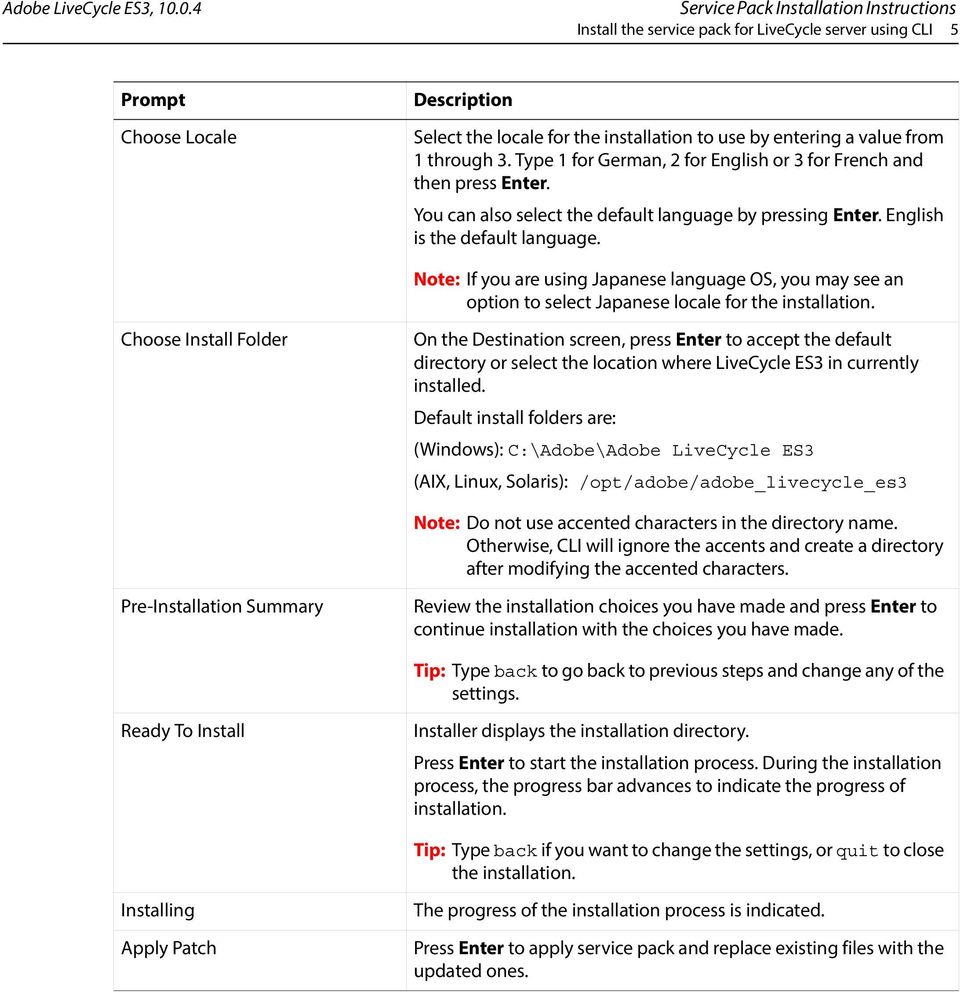
4 Service Pack Installation Instructions Install the service pack for LiveCycle server using CLI 4 Note: On a UNIX-like system, when you download files from the source, lces3_sp_install.bin might lose the executable permissions. Ensure that you restore the write-execute permissions after downloading the files. 2. When prompted, select the language to use for the installation and then click OK. 3. On the Introduction screen, click Next. 4. On the Choose Install Folder screen, verify that the default location displayed is correct for your existing installation, or click Browse to select the alternate folder where LiveCycle ES3 is currently installed, and click Next. 5. On the Service Pack Summary screen, review the information and, if it is correct, click Next. (Click Previous to go back to previous screens and correct errors, if any). 6. On the Pre-installation Summary screen, review the information and, if it is correct, click Install. (Click Previous to go back to previous screens and correct errors, if any.) Note: This step may take a few minutes to complete. 7. On the Apply Patch screen, click Next. Note: The typical time to apply patch updates is approximately 5 minutes. However, depending upon the resources available on your system, applying patches may take as many as 15 minutes. 8. When the Installation Complete screen refreshes to indicate a successful installation, ensure that Start Configuration Manager is selected and then click Done. Note: If you have Correspondence Management Solution running on LiveCycle ES3, it is recommended to install the service pack for Correspondence Management Solution, as described in Install the service pack for Correspondence Management Solution on page 6, before running the Configuration Manager. Note: On AIX, start Configuration Manager manually by running the ConfigurationManager.sh script from the [LiveCycle root]/configurationmanager/bin/ directory. Install the service pack for LiveCycle server using CLI 9. At the command line, navigate to the directory relevant for your operating system: (32-bit Windows) server\Disk1\InstData\Windows\VM\ (64-bit Windows) server\Disk1\InstData\Windows_64bit\VM\ (AIX) server/Disk1/InstData/AIX/VM/ Note: AIX is supported only for WebSphere Application Server. (Linux) server/Disk1/InstData/Linux/NoVM/ (Solaris) server/Disk1/InstData/Solaris/NoVM/ 10. Execute the following command: (Windows) lces3_sp_install -i console (UNIX)./lces3_sp_install -i console 11. Follow the on-screen instructions. For more information, see the table below.
5 Service Pack Installation Instructions Install the service pack for LiveCycle server using CLI 5 Prompt Choose Locale Description Select the locale for the installation to use by entering a value from 1 through 3. Type 1 for German, 2 for English or 3 for French and then press Enter. You can also select the default language by pressing Enter. English is the default language. Note: If you are using Japanese language OS, you may see an option to select Japanese locale for the installation. Choose Install Folder On the Destination screen, press Enter to accept the default directory or select the location where LiveCycle ES3 in currently installed. Default install folders are: (Windows): C:\Adobe\Adobe LiveCycle ES3 (AIX, Linux, Solaris): /opt/adobe/adobe_livecycle_es3 Note: Do not use accented characters in the directory name. Otherwise, CLI will ignore the accents and create a directory after modifying the accented characters. Pre-Installation Summary Review the installation choices you have made and press Enter to continue installation with the choices you have made. Tip: Type back to go back to previous steps and change any of the settings. Ready To Install Installer displays the installation directory. Press Enter to start the installation process. During the installation process, the progress bar advances to indicate the progress of installation. Tip: Type back if you want to change the settings, or quit to close the installation. Installing Apply Patch The progress of the installation process is indicated. Press Enter to apply service pack and replace existing files with the updated ones.
6 Service Pack Installation Instructions Install the service pack for Correspondence Management Solution 6 Prompt LiveCycle Configuration Manager Installation Complete Description Press Enter to complete the installation. You can run the Configuration Manager by running the following script: (Windows): [LiveCycle_root]\configurationManager\bin\Config urationmanager.bat (AIX, Linux, Solaris): [LiveCycle_root]/configurationManager/bin/Config urationmanager.sh For more information, see Run Configuration Manager on page 7. For Configuration Manager steps relevant to clustered configurations, see the Configuring LiveCycle Application Server Clusters document that applies to your application server. The installation completion screen displays the status and the location of install. Press Enter to exit the installer. Note: To correctly uninstall LiveCycle, run the uninstaller from the command line, using the -i console flag. Install the service pack for Correspondence Management Solution 1. Stop the Application Server. 2. Run the Correspondence Management patch installer for your operating system: (32-bit Windows) CMS\Disk1\InstData\Windows\VM\lces3_sp_install.exe (64-bit Windows) CMS\Disk1\InstData\Windows_64bit\ VM/lces3_sp_install.exe (AIX) CMS/Disk1/InstData/AIX/VM/lces3_sp_install.bin (Linux) CMS/Disk1/InstData/Linux/NoVM/lces3_sp_install.bin (Solaris) CMS/Disk1/InstData/Solaris/NoVM/lces3_sp_install.bin This step opens a wizard that guides you through the installation. 3. Select the language to use in the install wizard and click OK. 4. On the Introduction panel, click Next. 5. Either accept the default Adobe LiveCycle product directory or click Choose to select the location where LiveCycle ES3 and Correspondence Management Solution are installed, and then click Next. 6. Read the Patch Summary information and click Next. 7. Read the Pre-Installation Summary information and click Install. 8. When the installation is complete, click Next to apply the patch to your installed files.
![bat (AIX, Linux, Solaris): [LiveCycle_root]/configurationManager/bin/Config urationmanager.sh For more information, see Run Configuration Manager on page 7.](/docs-images/40/2350535/images/page_6.jpg "For Configuration Manager steps relevant to clustered configurations, see the Configuring LiveCycle Application Server Clusters document that applies to your application server.")
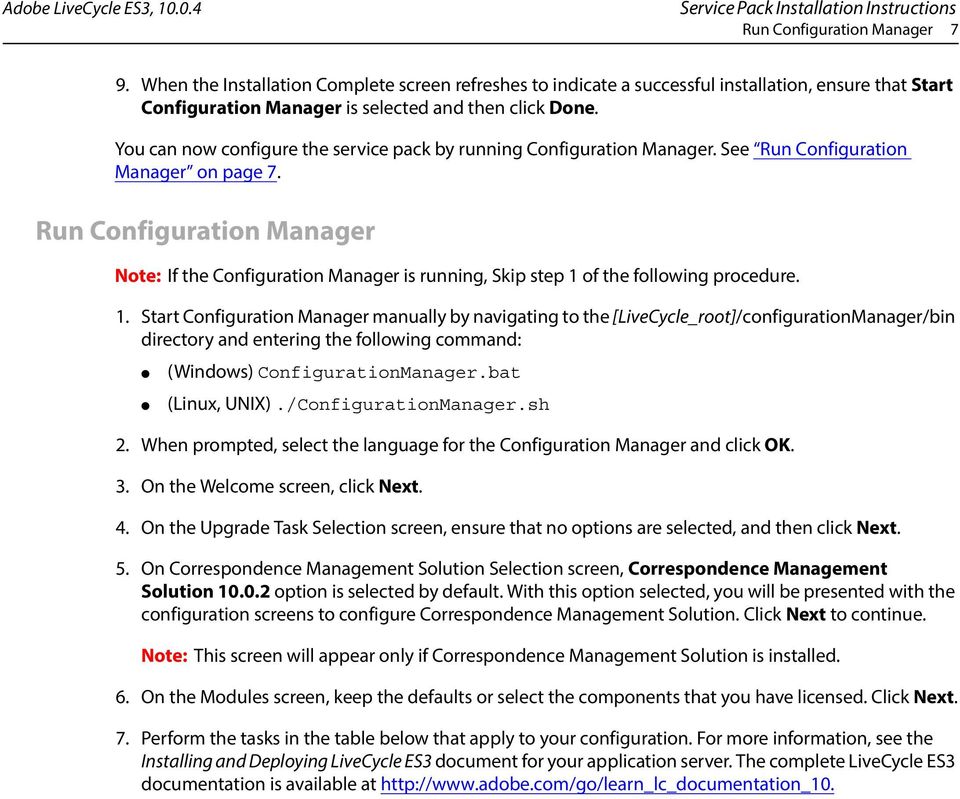
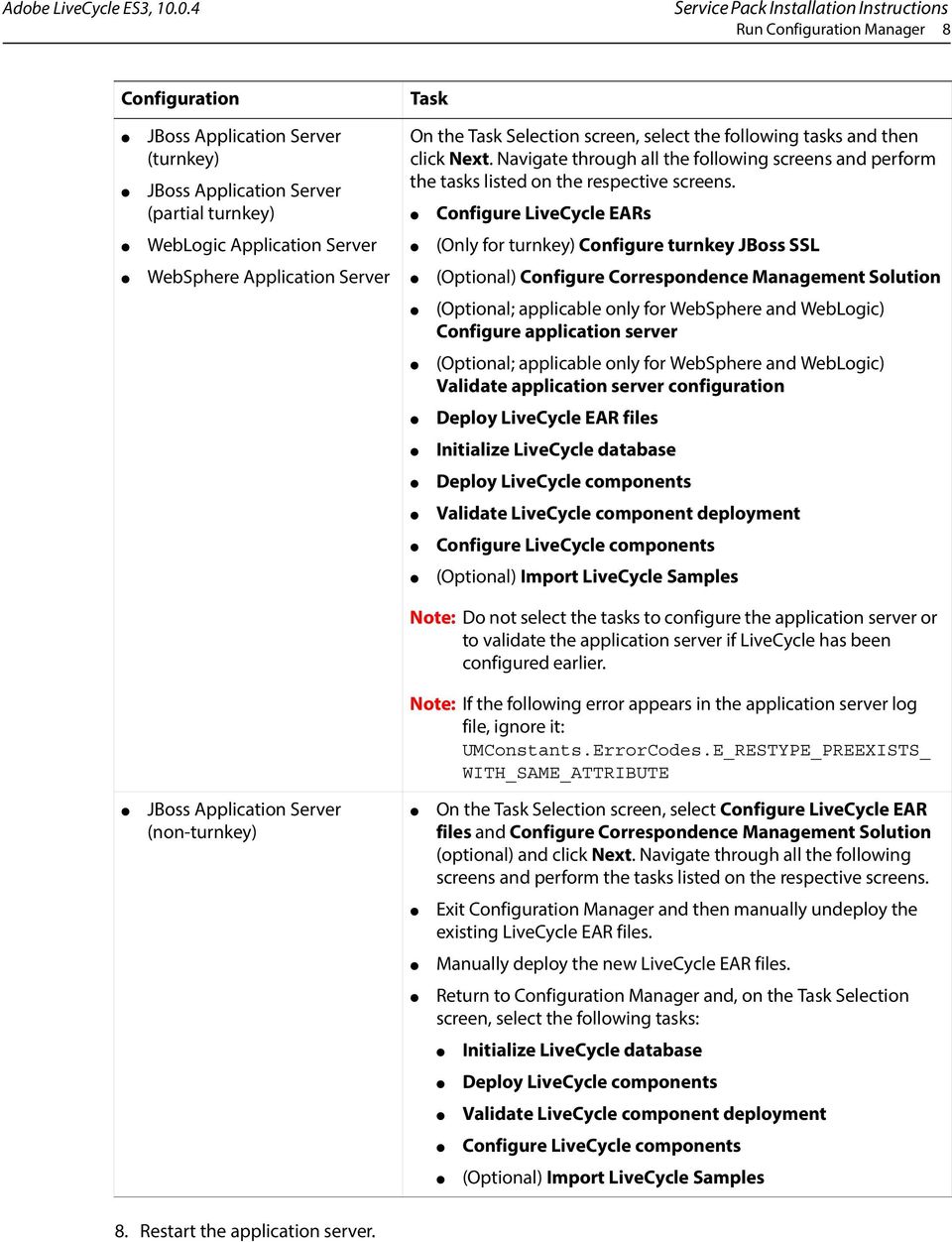
7 Service Pack Installation Instructions Run Configuration Manager 7 9. When the Installation Complete screen refreshes to indicate a successful installation, ensure that Start Configuration Manager is selected and then click Done. You can now configure the service pack by running Configuration Manager. See Run Configuration Manager on page 7. Run Configuration Manager Note: If the Configuration Manager is running, Skip step 1 of the following procedure. 1. Start Configuration Manager manually by navigating to the [LiveCycle_root]/configurationManager/bin directory and entering the following command: (Windows) ConfigurationManager.bat (Linux, UNIX)./ConfigurationManager.sh 2. When prompted, select the language for the Configuration Manager and click OK. 3. On the Welcome screen, click Next. 4. On the Upgrade Task Selection screen, ensure that no options are selected, and then click Next. 5. On Correspondence Management Solution Selection screen, Correspondence Management Solution option is selected by default. With this option selected, you will be presented with the configuration screens to configure Correspondence Management Solution. Click Next to continue. Note: This screen will appear only if Correspondence Management Solution is installed. 6. On the Modules screen, keep the defaults or select the components that you have licensed. Click Next. 7. Perform the tasks in the table below that apply to your configuration. For more information, see the Installing and Deploying LiveCycle ES3 document for your application server. The complete LiveCycle ES3 documentation is available at
8 Service Pack Installation Instructions Run Configuration Manager 8 Configuration Task JBoss Application Server (turnkey) JBoss Application Server (partial turnkey) WebLogic Application Server WebSphere Application Server On the Task Selection screen, select the following tasks and then click Next. Navigate through all the following screens and perform the tasks listed on the respective screens. Configure LiveCycle EARs (Only for turnkey) Configure turnkey JBoss SSL (Optional) Configure Correspondence Management Solution (Optional; applicable only for WebSphere and WebLogic) Configure application server (Optional; applicable only for WebSphere and WebLogic) Validate application server configuration Deploy LiveCycle EAR files Initialize LiveCycle database Deploy LiveCycle components Validate LiveCycle component deployment Configure LiveCycle components (Optional) Import LiveCycle Samples Note: Do not select the tasks to configure the application server or to validate the application server if LiveCycle has been configured earlier. Note: If the following error appears in the application server log file, ignore it: UMConstants.ErrorCodes.E_RESTYPE_PREEXISTS_ WITH_SAME_ATTRIBUTE JBoss Application Server (non-turnkey) On the Task Selection screen, select Configure LiveCycle EAR files and Configure Correspondence Management Solution (optional) and click Next. Navigate through all the following screens and perform the tasks listed on the respective screens. Exit Configuration Manager and then manually undeploy the existing LiveCycle EAR files. Manually deploy the new LiveCycle EAR files. Return to Configuration Manager and, on the Task Selection screen, select the following tasks: Initialize LiveCycle database Deploy LiveCycle components Validate LiveCycle component deployment Configure LiveCycle components (Optional) Import LiveCycle Samples 8. Restart the application server.
9 Service Pack Installation Instructions Upgrade to LiveCycle ES3 and install the service pack 9 Note: In a clustered configuration, restart each application server instance of the cluster. Note: If you do not restart the application server after installing service pack, you may encounter error "ALC-WKS " and PDF forms will fail to render. 9. Log in to Administration Console by typing the URL name]:[port]/adminui in a web browser. Tip: To verify the service pack installation, log in to the Administration Console and select About. Ensure that the service pack version indicates SP2. Also, ensure that all Installed Modules report SP2 under the Patch column. Upgrade to LiveCycle ES3 and install the service pack Perform the following procedure to upgrade from LiveCycle version ES Update 1 or ES2 to LiveCycle ES3 and apply the service pack. To upgrade to LiveCycle ES3: 1. Upgrade to LiveCycle ES3 by following the instructions in the Upgrading to LiveCycle ES3 document for your application server. (See the "Installing the product files" section.) Do not start Configuration Manager. 2. Apply the service pack to the installed files by following steps 1 through 8 of the Install the service pack for LiveCycle server using GUI on page 3 procedure. 3. Start Configuration Manager as instructed in steps 1 through 3 of the Run Configuration Manager on page 7 procedure. 4. Complete the configuration, upgrade, and deployment by following the instructions in the "Configuring LiveCycle for Deployment" chapter of the Upgrading to LiveCycle ES3 document for your application server. Applying the service pack to an upgraded LiveCycle deployment If you have upgraded from LiveCycle ES Update1 or ES2 to LiveCycle ES3, perform the following steps to apply the service pack: To apply the service pack to an upgraded LiveCycle Server: 1. Apply the service pack by following the steps 1 through 8 of the Install the service pack for LiveCycle server using GUI on page 3 procedure in this document. 2. Start Configuration Manager as instructed in steps 1 through 3 of the Run Configuration Manager on page 7 procedure. 3. On the Upgrade Task Selection screen, select one of the following, as required: Upgrade from LiveCycle ES Update 1 Upgrade from LiveCycle ES2 or LiveCycle ES On the Task Selection screen, select the following task options: Configure EARs
![Log in to Administration Console by typing the URL http://[host name]:[port]/adminui in a web browser.](/docs-images/40/2350535/images/page_9.jpg "Tip: To verify the service pack installation, log in to the Administration Console and select About. Ensure that the service pack version indicates SP2.")
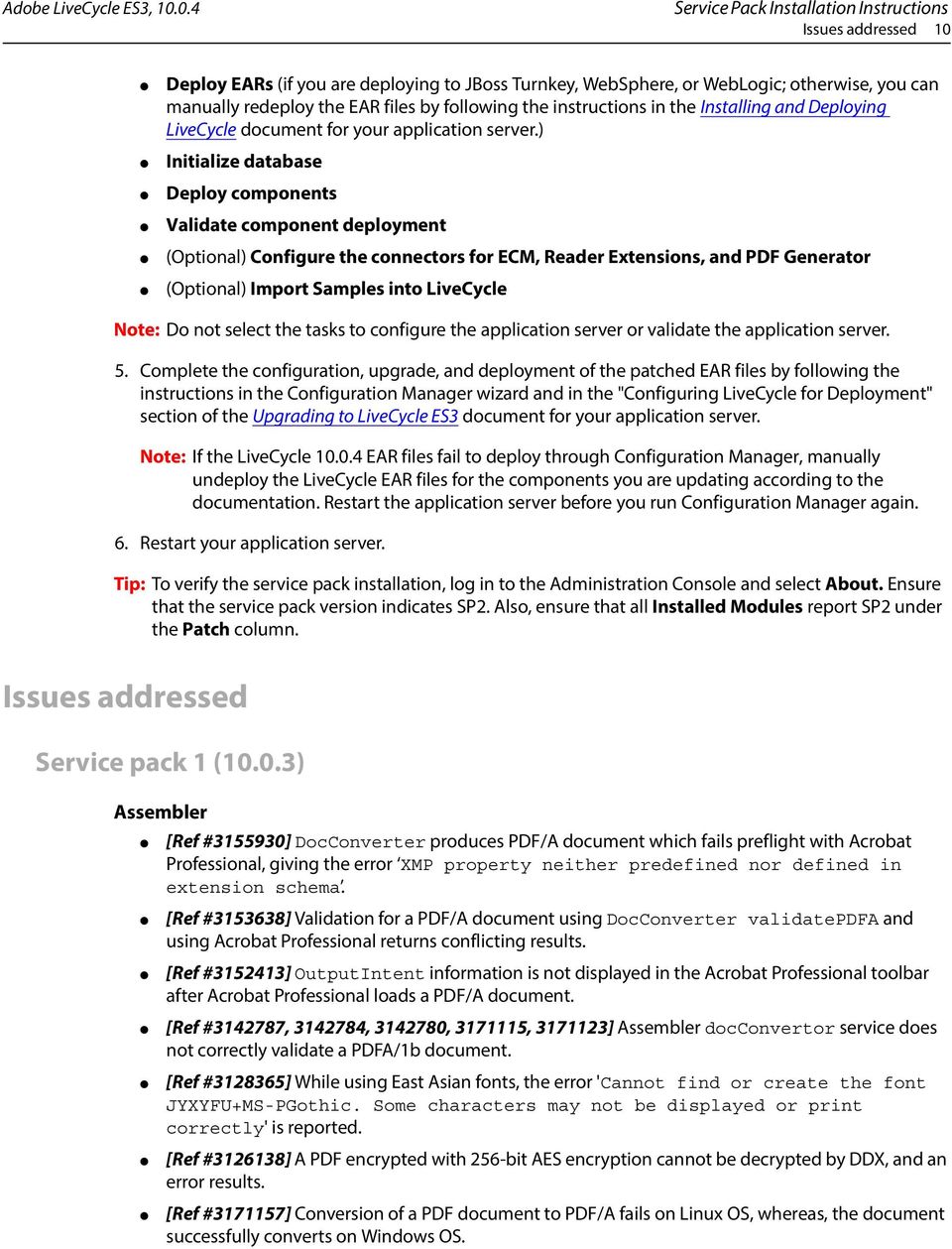
10 Service Pack Installation Instructions Issues addressed 10 Deploy EARs (if you are deploying to JBoss Turnkey, WebSphere, or WebLogic; otherwise, you can manually redeploy the EAR files by following the instructions in the Installing and Deploying LiveCycle document for your application server.) Initialize database Deploy components Validate component deployment (Optional) Configure the connectors for ECM, Reader Extensions, and PDF Generator (Optional) Import Samples into LiveCycle Note: Do not select the tasks to configure the application server or validate the application server. 5. Complete the configuration, upgrade, and deployment of the patched EAR files by following the instructions in the Configuration Manager wizard and in the "Configuring LiveCycle for Deployment" section of the Upgrading to LiveCycle ES3 document for your application server. Note: If the LiveCycle EAR files fail to deploy through Configuration Manager, manually undeploy the LiveCycle EAR files for the components you are updating according to the documentation. Restart the application server before you run Configuration Manager again. 6. Restart your application server. Tip: To verify the service pack installation, log in to the Administration Console and select About. Ensure that the service pack version indicates SP2. Also, ensure that all Installed Modules report SP2 under the Patch column. Issues addressed Service pack 1 (10.0.3) Assembler [Ref # ] DocConverter produces PDF/A document which fails preflight with Acrobat Professional, giving the error XMP property neither predefined nor defined in extension schema. [Ref # ] Validation for a PDF/A document using DocConverter validatepdfa and using Acrobat Professional returns conflicting results. [Ref # ] OutputIntent information is not displayed in the Acrobat Professional toolbar after Acrobat Professional loads a PDF/A document. [Ref # , , , , ] Assembler docconvertor service does not correctly validate a PDFA/1b document. [Ref # ] While using East Asian fonts, the error 'Cannot find or create the font JYXYFU+MS-PGothic. Some characters may not be displayed or print correctly' is reported. [Ref # ] A PDF encrypted with 256-bit AES encryption cannot be decrypted by DDX, and an error results. [Ref # ] Conversion of a PDF document to PDF/A fails on Linux OS, whereas, the document successfully converts on Windows OS.
11 Service Pack Installation Instructions Service pack 1 (10.0.3) 11 [Ref # ] Documents converted and validated successfully using Callas, fail PDF/A validation using docconvertor. [Ref # ] A PDF document converted to a erroneous PDF/A-1b document incorrectly passes the validation. [Ref # ] A PDF document fails conversion giving the error 'Annotation uses RGB GTS_PDFA1 color space, but not found in the destination output profiles'. [Ref # ] Conversion of a PDF document to PDF/A-1b and the validation fails giving the error 'ICC profile version is 4.0 or higher'. [Ref # ] Forms and Output cache grows endlessly, resulting in low disk space on the server. Core [Ref # ] Stale sessions are created in the Oracle database when using certain LiveCycle SQL statements. [Ref # ] The Automated Ordering process for a batch with multiple requests throws an OverlappingFileLockException exception. Core - Standard Services [Ref # ] Mapping a blob object returned by JDBCService to a Document type variable fails with an InvalidCoercionException exception. [Ref # ] The WriteString operation in Workbench fails to append to an existing file. [Ref # ] An exception is thrown when trying to add the JDBCService component to a workflow. [Ref # ] The FTP PUT service is not backward compatible. [Ref # ] On a Unix-based NFS mount, the WriteFile service writes a 0-byte file to and fails with an exception. Core - User Manager [Ref # ] Authentication using SAML fails with the "The assertion is not signed correctly" error. [Ref # ] After being authenticated using SAML, the user get redirected to a page with the following error: You have reached this page because cookies might not be enabled on your browser. Please enable the cookies and then re access the LiveCycle application. Correspondence Management Solution [Ref # ] On pressing Delete, two characters instead of one, get deleted in the Correspondence Management text editor. [Ref # ] Difficult to remove the content highlighting. A new checkbox, Enable CCR PDF highlight, has been added to the Create Correspondence UI, which when deselected disables the highlighting. [Ref # ] The Content View is not the default view in the letter preview mode. [Ref # ] The description for a placeholder or variable is not saved. [Ref # ] Issues with the display when sorting assets. [Ref # ] Conditional expressions in a repeating element are not evaluated.
![[Ref #3171186] A PDF document fails conversion giving the error 'Annotation uses RGB GTS_PDFA1 color space, but not found in the destination output profiles'.](/docs-images/40/2350535/images/page_11.jpg "[Ref #3171140] Conversion of a PDF document to PDF/A-1b and the validation fails giving the error 'ICC profile version is 4.0 or higher'.")
12 Service Pack Installation Instructions Service pack 1 (10.0.3) 12 [Ref # ] Japanese, French, and German characters are not supported in Correspondence Management assets names. [Ref # ] Cannot remove an assigned post-process. [Ref # ] Special characters are not supported in Correspondence Management assets names. [Ref # ] Letter references are not updated if the text with variables is added to a condition or list. [Ref # ] Changes made to a data dictionary do not reflect on the publish instance and other cluster nodes. [Ref # ] Importing a letter with fragments fails if it already exists in the system. [Ref # ] Imported packages in CRX are not deleted after the import is complete. Also, the package manager doesn t open if you import more than 500 packages. [Ref # ] Added accessibility shortcuts in the Correspondence Management tools. PDF Generator [Ref # ] Adobe LiveCycle PDF Generator fails to convert Microsoft Visio files to Adobe PDF documents. The PDF generator process results in a time out. [Ref # ] Image2pdf service fails to convert TIFF file to an Adobe PDF document and user encounters Java heap space error. This issue occurs when TIFF file is created from a PDF document. [Ref # ] When the PaperCaptureService operation times out, a new process instance is initiated instead of resuming the process from the memory. EMC Connectors [Ref # ] LiveCycle ES3 Connector for Microsoft SharePoint does not support Kerberos authentication protocol. [Ref # ] LiveCycle ES3 Connector for Microsoft SharePoint does not support Just in time creation of the users. [Ref # ] LiveCycle ES3 Connector for EMC Documentum does not support multiple connection broker. [Ref # ] Workbench does not restrict developers from creating an updated version of pre-existing LiveCycle application. Forms [Ref # ] Performance of rendering interactive forms through Assembler Service calls (using DDX) is not as expected. [Ref # ] Image Field content is reduced in dimensions when rendered in to a static PDF, and is rendered as expected in to a dynamic PDF. [Ref # ] After applying a quick fix to prevent text overlapping problems, some PDF to PDF/A conversions are not as expected. Specifically page break is now allowed in forms, where it was not previously allowed. [Ref # ] Forms and Output cache grows endlessly, resulting in low disk space on the server. [Ref # ] LiveCycle Designer in German locale crashes when changing the Overflow Leader from Inherited to None or New. This does not happen with English locale designer.
![[Ref # 3157325] Letter references are not updated if the text with variables is added to a condition or list.](/docs-images/40/2350535/images/page_12.jpg "[Ref # 3157269] Changes made to a data dictionary do not reflect on the publish instance and other cluster nodes.")
13 Service Pack Installation Instructions Service pack 1 (10.0.3) 13 Output [Ref # ] When a PostScript file is rendered using generateprintedoutput, the landscape page gets printed as portrait, resulting in trimming of the page content. [Ref # ] generatepdfoutput orchestration generates an exception when Acrobat X or higher is selected as the pdfoption. Workbench [Ref # ] While searching a custom event in Workbench, user encounters an error could not find event properties and search for the custom event fails. [Ref # ] User encounters document passivate error and LCA files fail to export. Slow response of the LiveCycle servers causes this issue. [Ref # ] The visual representation of process routes appears faded or deleted, when a process includes a large number of activities. This is an issue only with visual representation and does not affect the actual process functionality. [Ref # ] Addresses the following issues: An asset can not be checked in if the name of the asset is more than 128 bytes long Performance issues when working with large applications. Improved performance is noticeable on: Check in/out Synchronize/Get application Create LCA (Export) Delete Remote view of applications It also provides three new options available in the workbench.ini: com.adobe.workbench.export.disableimprovedexport: Use to enable or disable the new exporting method. This new exporting method is to avoid potential out of memory errors and time out errors on the LiveCycle serve when exporting a large application. The new exporting method retrieves a specified count of assets for one time and then retrieve the next specified count of assets for next time to avoid the out of memory and time out errors. The default value for this option is "false". Note: Although this will avoid potential errors, performance will be slower since there is the need for more connections between Workbench and the LiveCycle server. com.adobe.workbench.export.batchsize: Use to set the 'specified count' described in specification of com.adobe.workbench.export.disableimprovedexport. For some cases, the size of one asset in a large application (greater than 1mg), the users should decrease this 'specified count' otherwise the out of memory or time out will occur. The valid value for this option is 1 to unlimited integer, the default value is 100. com.adobe.workbench.synchronization.retrieveonetime: This option is similar to the com.adobe.workbench.export.batchsize option, and is used for Synchronization action. The synchronization action retrieves a specified count of assets for one time, if the size of a single asset is big the users should consider to decrease this number also. The valid value for this option is 1 to unlimited integer, the default value is 100.
![[Ref #3139689] generatepdfoutput orchestration generates an exception when Acrobat X or higher is selected as the pdfoption.](/docs-images/40/2350535/images/page_13.jpg "Workbench [Ref #3158295] While searching a custom event in Workbench, user encounters an error could not find event properties and search for the custom event fails.")
14 Service Pack Installation Instructions Service pack 2 (10.0.4) 14 [Ref # ] Workbench encounters an internal error and fails to create a new version of a Form application on the Document server. [Ref # , # ] User encounters an error com.adobe.idp.dsc.dscruntimeexception: Internal error while checking out XDP files and while synchronizing LiveCycle applications from server, check-in and check-out operation for large XDP files is slow. [Ref # ] The process designer is unavailable and activities are not visible when you leave a process open and restart the workbench. [Ref # ] Workbench is very slow while synchronizing LiveCycle applications from a server. [Ref # ] User encounters an error Failed to load/render Property Editor in Workbench. This error occurs when user expands the Form Data Mapping section of an Assign Task. [Ref # ] Workbench is very slow while synchronizing LiveCycle applications from a server. [Ref # ] In LiveCycle designer, the size of forms database increases with every check-out and check-in of forms. Purge tool to remove non-required version of forms is not available. Service pack 2 (10.0.4) Assembler [Ref # ] Assembler creates bookmarks with changed characters when creating PDF documents with Cyrillic characters. [Ref # ] On using Header or Footer tag in a DDX document, the resultant PDF does not contain any content. [Ref # ] In the Workbench, the text for XDP Result is overlapping in Document Builder view. Correspondence Management [Ref # ] Correspondence Management logs, present across various log files, are consolidated into a single log file. [Ref # ] StackOverFlowError is generated for RevertToLastPublish operation, while viewing previous version, and while rendering letters using cmletterpublishdate. [Ref # ] Upon deleting an extended property from a Data Dictionary element it is not deleted. [Ref # ] When the data type of a variable is updated, it shows correctly, but there is no information message, 'i' message about the change. [Ref # ] Upon updating a data module of a letter in Correspondence Management, there is no notification to indicate that a newer version of the module exists. [Ref # ] In Correspondence Management, RevertToLastPublish does not work, even though the user interface shows the asset to be successfully reverted. [Ref # ] Unexpected Error is thrown, instead of an appropriate exception, when an invalid value is passed to getuseddatamodules and getdependentmodules APIs [Ref # ] In Correspondence Management user interface, users cannot input Japanese characters in the Name field. However, they can copy paste the unsupported characters in the field. [Ref # ] While creating or modifying a DD, the corresponding element cannot be selected using keyboard because of an accessibility issue in the DD Editor. [Ref # ] Correspondence Management login and help messages are not translated into Japanese.
15 Service Pack Installation Instructions Service pack 2 (10.0.4) 15 [Ref # ] In Correspondence Management if a Text module is part of a condition and a list, the Export dependency does not work for the Text module. [Ref # ] In Correspondence Management the Reset button in the Advanced Search panel is not translated into Japanese. [Ref # ] In Correspondence Management, a condition cannot be applied to its own copy, unless it is saved once after copying. [Ref # ] In Correspondence Management, RevertToLastPublish operation fails for new and pre-existing imported assets. The asset remains in same state with same content as that of the imported asset. [Ref # ] Time taken to publish a DD is about a minute. [Ref # ] An unexpected error is generated when an invalid FormID is passed to getlayoutservice().getformbyversion API. [Ref # ] An unexpected error is generated when an invalid Form ID is passed to getfragment- LayoutService().getDependentLetters API. [Ref # ] An unexpected error is generated when a NULL or an invalid ID is passed to getlayout- Service().deleteForm API. [Ref # ] When ignore list style option is enabled for a list or a condition, it is applicable to other modules also. [Ref # ] When a new user is provided with administration rights, the user is not able to install packages in CRX. [Ref # ] In Correspondence Management, When a Content Data module is updated with empty file, the preview of the content still shows the content from the previous file. [Ref # ] In Correspondence Management, it is not possible to revert a Content Data module which has an associated letter, if both the letter and the module are published at least once. [Ref # ] In Correspondence Management, in the audit screen in Audit tab, the Advanced Search does not work. [Ref # ] In Correspondence Management, users are not able to save a letter if its name contains only a single letter of alphabet. [Ref # ] In Correspondence Management, SaveAsPDF, PDF, and Print operations are enabled for drafted letters. [Ref # ] In Correspondence Management, Advanced Search in Letter tab does not work. [Ref # ] In Correspondence Management, upon submitting a letter the audit logs are not generated. [Ref # ] In Correspondence Management, a user is allowed to run SavePDF, , and Print operations on a letter even when the mandatory field are not filled. [Ref # ] In Correspondence Management, the caption for a letter body field in the Letter Editor is missing. [Ref # ] In Correspondence Management, if a drafted letter is edited again and saved, it prompts for a new name of the letter instance, even if a name for the letter instance is already mentioned. [Ref # ] In Correspondence Management, deactivation of a letter works only for the Published letters and not for letters in Modified or ReadyToPublish state, even if such letters are published once. [Ref # ] Multiple addresses in the To field in editor are not allowed.
![[Ref #2970935] In Correspondence Management the Reset button in the Advanced Search panel is not translated into Japanese.](/docs-images/40/2350535/images/page_15.jpg "[Ref #2982506] In Correspondence Management, a condition cannot be applied to its own copy, unless it is saved once after copying.")
16 Service Pack Installation Instructions Service pack 2 (10.0.4) 16 [Ref # ] In Correspondence Management, text box with UseDefault selected for it, gets disabled in certain scenarios. [Ref # ] In Correspondence Management, upon saving a letter as draft, 'letter submitted successfully' message is displayed, instead of a 'letter saved successfully' message. [Ref # ] In Correspondence Management, for letter preview and letter instance view, both operations, the 'Save as draft' option is enabled. [Ref # ] In Correspondence Management, the agentsignatureimage DDE does not get populated when previewing a letter. [Ref # ] In Correspondence Management, a letter instance name allows spaces and special characters to be typed in and saves them, instead of allowing only alphanumeric characters and underscores in the letter instance name. [Ref # ] In Administration Console, in CorrespondenceManagement/processes/SendToPrinter : 1.0 service, no default value is set for defaultprinturl. [Ref # ] Data Dictionary gets saved in published state when imported using Asset Manager user interface. [Ref # ] Letter fails to preview when the cmletterpublishdate parameter is passed in the preview URL. [Ref # ] Letter fails to reload when there is no attachment. [Ref # ] Edits made in Document Composer are not persisted when the original text module is edited. [Ref # ] Custom attributes are truncated if they do not fit on the audit details page. Also, there is a colon missing after newly added attributes' names. [Ref # ] The Save as Draft button is either disabled or missing when the Race condition is applied. [Ref # ] Read audit logs are not generated for Data Dictionary and Category. [Ref # ] No error message is shown if server fails to start. Also, it doesn't allow to log in to Asset Manager. [Ref # ] The letter instance name is not shown in the audit logs. [Ref # ] The persona ""jrobinson"" cannot view the Manage Templates user interface. [Ref # ] Any user with basic Correspondence Management roles can use the assetexportservice.importasset() API. [Ref # ] The performance of Manage Assets user interface degrades when multiple users are logged in and concurrently fire lots of search queries. [Ref # ] When creating a letter, it is allowed to link a variable to its source. [Ref # ] The ""datamoduleservice.createtestdatamodule()"" and ""formservice.createtest- Form()"" functions return ""java.lang.classcastexception: java.lang"" exception. [Ref # ] The text is not visible while typing text in Document Composer fields. [Ref # ] Letter fails to preview when the cmletterpublishdate parameter is passed in the preview URL. [Ref # , # ] Spnego feature is not available for Correspondence Management running with CQ. [Ref # ] Read audit logs are not generated for Data Dictionary and Category.
![[Ref #3087588] In Correspondence Management, for letter preview and letter instance view, both operations, the 'Save as draft' option is enabled.](/docs-images/40/2350535/images/page_16.jpg "[Ref #3088650] In Correspondence Management, the agentsignatureimage DDE does not get populated when previewing a letter.")
17 Service Pack Installation Instructions Service pack 2 (10.0.4) 17 [Ref # ] The default value for Numeric Place Holder and Numeric field is set to 0 in the PDF. Also, the DDE variable defaults to 0 when its value is removed. [Ref # ] All DDE types are set to String even if they are integer or Boolean. [Ref # ] Inline Expressions are not evaluated for Integer and Boolean DDEs through server-side rendition. [Ref # ] The Race condition is applied during initialization phase preventing Correspondence Management to start up properly. [Ref # ] Fragment data does not merge with letter when rendered from server-side API. [Ref # ] Viewing, printing, saving, or mailing a draft of a letterinstance fails if its corresponding letter is deactivated. [Ref # ] Letters diagnosed with error ""Variable Assignment has an ID that does not exist"" do not auto correct. [Ref # ] There Indentation in the PDF generated from server and the one submitted from Document Composer is different, [Ref # ] Reload fails when XML is extracted from a PDF that is rendered from the server. [Ref # ] PDFs generated for the PolicyJacket sample letter from ES2 and ES2 service pack builds are different. [Ref # ] If multiple letters with common dependent assets are imported and one of the letters is published, the list of dependent assets also includes others letters which share the common dependent assets. [Ref # ] In Correspondence Management, the time taken to publish the first letter is unacceptably large. [Ref # ] English strings appear in Correspondence Management user interface for Japanese. [Ref # ] A DDE that is used by another computed DDE and used in a data module can be deleted. [Ref # ] Extremely slow publish performance on a server with large number of assets. [Ref # ] Blank error dialog pops up when you update the layout XDP of a published letter and try to republish it with the earlier cmpublishdate. [Ref # ] Flash exception occurs when rendering a letter with cmletterpublishdate, which is a date earlier than the original publishing date. [Ref # ] The documentation for the customization story related to Splitting Logic of Assets has been enhanced. [Ref # ] When saving a letter, the default letter instance name is blank. [Ref # ] If you publish an imported asset, the list of dependencies includes additional assets that have not been published. [Ref # ] The success page after submitting a letter opens in a new window. [Ref # ] Documentation added for Attachment support. [Ref # ] Documentation added for Delivery Mechanism feature. [Ref # ] Documentation added for Auditing feature. [Ref # ] Documentation added for Managing Letter Instances feature. [Ref # ] Documentation added for Deactivation of Letter feature. [Ref # ] Multiple issues related to importing and exporting of letters and data dictionary.
![[Ref #3173838] Inline Expressions are not evaluated for Integer and Boolean DDEs through server-side rendition.](/docs-images/40/2350535/images/page_17.jpg "[Ref #3174967] The Race condition is applied during initialization phase preventing Correspondence Management to start up properly.")
18 Service Pack Installation Instructions Service pack 2 (10.0.4) 18 [Ref # ] In Preview mode, the display does not return on resizing the screen. [Ref # ] Cannot tab to the next field. [Ref # ] In Correspondence Management, a placeholder with drop-down list of values does not display the values in the order the values were typed in. [Ref # ] Cannot preview a letter. [Ref # ] The order of placeholder has changed in Data Editing view after applying the patch [Ref # ] A class cast exception is thrown when trying to save a letter instance. [Ref # ] Cannot view a letter instance saved as draft. [Ref # ] Audit logs are generated even if CRUD operation fails. [Ref # ] Viewing a letter instance fails when a data module, which wasn't selected in the original letter, is selected before submitting the letter. [Ref # ] On updating a DDE that is used in a condition automatically changes to protected mode. [Ref # ] Rendering a letter with cmpublishdate prior to the current publish date of a text module, returns latest published state of the text module. [Ref # ] Redundant OK, Yes, No, and Cancel buttons appear on an error message dialog. [Ref # ] The Submit button is not enabled even if all mandatory fields are populated. [Ref # ] Opening a letter for editing takes long time in Windows Internet Explorer and sometimes crashes in Mozilla Firefox. [Ref # ] Drop-down list in the Data Elements view do not function properly with the mouse. [Ref # ] The scroll bar in the Data view does not function properly with the mouse wheel. [Ref # ] The sample packages are updated to enable OMR and Duplicate Print features. [Ref # ] To enable HRSDC features, an LCA is required to be installed on LiveCycle. This is available at: //livecycle/icc/branches/hrsdc/distribution/crx-package/src/main/resources/etc/aep/deploy/docservic es/correspondencemanagement/ /lca/correspondencemanagementprocesses.lca [Ref # ] If you copy an asset and save the newly created asset, an audit log is not generated for this action. [Ref # ] In the Manage Assets user interface, the sorting of the columns Asset type, Action Type, status, and version in the data grid is incorrect. The columns must sort alphabetically. [Ref # ] Documentation is required for the updates to the Import / Export asset feature in Correspondence Management [Ref # ] The new APIs related for Letter Instance, Content Data Module, and Audit do not have ACLs applied to them. As a result of which all the users can perform CRUD operations on these APIs. [Ref # ] If you use the APIs to programmatically create a ContentDataModule, the system throws the error ""Content is Missing!!. The current error message is misleading since this error occurs because the filename is not set. [Ref # ] Documentation for the Correspondence Management configurations: On all Author instances, the Publish URL to be set for: com.adobe.livecycle.content.activate.impl.activationmanagerimpl On all Publish instances, the Author URL to be set for: com.adobe.livecycle.content.activate.impl.versionrestoremanagerimpl
![[Ref #3196808] The order of placeholder has changed in Data Editing view after applying the patch 1.3.8. [Ref #3196915] A class cast exception is thrown when trying to save a letter instance.](/docs-images/40/2350535/images/page_18.jpg "[Ref #3197891] Cannot view a letter instance saved as draft. [Ref #3198456] Audit logs are generated even if CRUD operation fails.")
19 Service Pack Installation Instructions Service pack 2 (10.0.4) 19 [Ref # ] The Correspondence Management option 'reload without latest' loads the latest published text asset if the text has bulleted content. [Ref # ] Content Data modules show up in content library. Users able to assign them to target area [Ref # ] A user is allowed to enable/disable the lock order for content in view mode. The Done button is also enabled. However, clicking the Done button does not perform any action. [Ref # ] The letter reload fails and an error, Error in reloading Letter : {fault code: fault, errid: 0, info: failed to reload variable, occurs. This error occurs when type of a variable is changed and letter is loaded using reload with latest option. [Ref # ] If a data dictionary element contains two variables such that the name of one variable is contained within the name of the other variable, the evaluation of the expression is not always computed correctly. [Ref # ] The letter submission fails, if the content of the letter and the filename of the content contain special characters. [Ref # ] When a letter is going to be deactivated, then the user is not notified that the letter will no longer be available on the publish instance. When the letter has been deactivated, then the user is not notified that the letter has been deactivated successfully. [Ref # ] , printing, or custom delivery of a published letter fails if the corresponding letter on the Author instance is deactivated [Ref # ] Documentation required to describe that print delivery mechanism works fine for PDF attachments but office documents & image attachments would work only for PDFG customers. [Ref # ] Default Print Dispatcher wrapper process fails if the associated letter does not contain any attachment [Ref # ] During the import package process, the CM Asset Import group check should not be performed for the admin user. [Ref # ] Change default values of Author and Publish URL set in com.adobe.livecycle.content.activate.impl.versionrestoremanagerimpl and com.adobe.livecycle.content.activate.impl.activationmanagerimpl APIs. The default values of author and publish should be 8080 & 8180 and ADEP should be replaced with lc. [Ref # ] The user should not be allowed to the name of a letter instance if the letter is saved as a draft. [Ref # ] The tool tip and icon for View Letter Instance should be changed [Ref # ] On the Attachments tab, say the Max. Number of Attachments is set to zero. If you save and view the letter instance and then go to the Attachments tab, the Max. Number of Attachments field displays a blank value. [Ref # ] The module is not assigned to its container information message when same module is assigned to a text asset twice. [Ref # ] If the Manage Letter Instance configuration is disabled on the Publish instance, the Letters tab must not display. [Ref # ] The audit logs generated for any action on the Author i\nstances are replicated on the Publish instance. [Ref # ] On selecting Manage Letter Instance on Publish option for an author the renderletter API is called and it causes an error letter Instance Creation and Updation is only supported from Publish Server.
![[Ref #3202623] Content Data modules show up in content library. Users able to assign them to target area [Ref #3202708] A user is allowed to enable/disable the lock order for content in view mode.](/docs-images/40/2350535/images/page_19.jpg "The Done button is also enabled. However, clicking the Done button does not perform any action.")
20 Service Pack Installation Instructions Service pack 2 (10.0.4) 20 [Ref # ] The replication queue on the Publish instance is blocked if two Audit logs with the same name are generated. [Ref # ] When custom function is used in a condition, the default data module is always rendered along with the resultant module. [Ref # ] The documentation for associating a letter to the postprocess is required. [Ref # ] User encounters an error, No function is mapped to the name ""REMOTE_test:contains"". javax.servlet.jsp.el.elexception: No function is mapped to the name ""REMOTE_test:contains"", and the custom functions fails to work with computed DDE. [Ref # ] On retrieving the version of a letter that has complex dependency, the user encounters an error ""javax.jcr.pathnotfoundexception: No such node /content/apps/.."" [Ref # ] If splitting is enabled on a system and a package is exported from the System, then importing the package on another system displays in a blank list of imported assets. However, all the assets in the package are correctly imported into the destination system. [Ref # ] On selecting the Asset Library, the debug console displays an error. [Ref # ] After customer submits a letter and views the letter in Adobe Reader, the escape sequence \u2028 appears in both the ServiceNumber and DecisionNumber assets. [Ref # ] The color of the drop-down placeholder is always gray even if the field is mandatory and is not filled-in. [Ref # ] The customization build fails due to missing third-party libraries. [Ref # ] In the Configuration manager, auditing and all audit operations should be deselected (not enabled), by default. [Ref # ] The browser hangs and users encounter a Flash error while scrolling in the Asset Manager user interface. [Ref # ] On adding assets to a letter, the submit button is unavailable. [Ref # ] The check box that makes an image module visible/not visible stops working. This happens only when an image module within a list is reordered. [Ref # ] If a condition contains multiple expressions, only the first expression is evaluated. [Ref # ] If a condition contains multiple expressions, if the ""Condition may evaluate to multiple results"" option is selected, the multiple true results display in a random order. [Ref # ] The activatedatamodule and publishdatamodule APIs return DataModule with category and subcategory set to null. [Ref # ] The activateform and publishform APIs return form object with fields set to null. [Ref # ] The welcome message drop-down box does not show tool-tip text for user name. [Ref # ] The Correspondence Management user interface displays the principalname and the usedid. The user interface should not contain the principalname. [Ref # ] Check with QA [Ref # ] In Correspondence Management, the DDI creation time of a correspondence, specially on AIX-WAS platform, is optimized for better performance. [Ref # ] On installing LiveCycle ES3 Service Pack 2 (10.0.4) on a LiveCycle ES3 System, the URL opens an older version of the CRX login page instead of Correspondence Management Asset Manager user interface. [Ref # ] Marking primitives as key elements allows Composites, Collections, and their child elements also to be marked as 'Key Elements'.
![[Ref #3210664] The documentation for associating a letter to the postprocess is required. [Ref #3211319] User encounters an error, No function is mapped to the name ""REMOTE_test:contains"". javax.](/docs-images/40/2350535/images/page_20.jpg "servlet.jsp.el.elexception: No function is mapped to the name \"\"REMOTE_test:contains\"\", and the custom functions fails to work with computed DDE.")
21 Service Pack Installation Instructions Service pack 2 (10.0.4) 21 [Ref # ] Once an editable letter is saved, it fails to reopen in the Document Composer. [Ref # ] The icc:def is not available in the XML extracted from a PDF Document. This issue occurs with the PDF documents created using save PDF post process. [Ref # ] On previewing a letter template, an error invalid ':' character in the user name is added to the error.log file. [Ref # ] On invoking the CheckDependency API an error, Cannot find annotation for - [nt:unstructured], is logged to publish instance error logs. [Ref # ] In the Asset Manager user interface, the browser, and the Adobe Flash crashes on selecting the insert link option in the text editor. [Ref # ] On assigning a Data Dictionary to the data module, the data modules fails to update an error, Data Dictionary used in the updated Content is not the same as that of the old Content!, occurs. [Ref # ] The tool-tip text on the lock icon of a condition is not localized. [Ref # ] On exporting a letter to a read-only file, the export fails and no message is displayed for the failed export operation. [Ref # ] The text of the asset deactivation window are not localized. [Ref # ] In the LiveCycle ES3 based CRX Server, if the crx-repository path contains space the clustering fails. [Ref # ] In the letter preview, texts of the save as the draft button are not localized. [Ref # ] LiveCycle ES3 Service Pack 2 adds support for letter attachments, Correspondence Delivery mechanism, Letter Instances, Auditing, User Signature Image, and de-activation of a letter. [Ref # ] On assigning a Data Module with DDEs to a letter and updating the letter, the letter gets corrupted. [Ref # ] For the modules assigned using a fragment, the module dependencies report does not contain letter name. [Ref # ] HTML option in the delivery mechanism is removed. [Ref # ] The post process to create a text module is removed from LiveCycle Archive (LCA). [Ref # ] The Correspondence Management roles for the LiveCycle are not mapped to corresponding groups in CRX. Content Services [Ref # ] Migrating a node in Content Services fails if the node name contains ""["" or ""]"" characters. [Ref # ] The Content Services Migration user interface is branded according to Adobe Digital Enterprise Platform (ADEP). [Ref # ] The dam:asset shows up in the list of Target Types on Content Services Migration Configuration user interface. [Ref # ] Spring and Content APIs have dependencies on Content Services Migration Package preventing Content Services migration package to install on Granite builds.. Core [Ref # ] English text in Category Management user interface of LiveCycle Administration Console for French, German, and Japanese. [Ref # ] The capitalization of the word ""Category"" is not correct in the Service Management user interface of LiveCycle Administration Console.
22 Service Pack Installation Instructions Service pack 2 (10.0.4) 22 [Ref # ] The text on the PDF Generator default settings page of LiveCycle Administration Console is not properly aligned. [Ref # ] The text on Health Monitor user interface is truncated. [Ref # ] A sample code of how to export a LiveCycle application (.lca) by using Application- Manager.exportApplicationArchive API. [Ref # , # ] In a secure JBoss environment, work manager fails when the JMX console is set as a password-protected URL. [Ref # ] A short lived process propagates the changes from the XPath expression to the underlying XML variable, whereas, the long lived process does not. [Ref # ] When trying to check in a file that is marked for deletion, error is generated on LiveCycle server and the application servers crashes. [Ref # ] On exporting multiple groups using runtime config for an application, the securityprofilesettings section contains only one group. [Ref # ] Session files in the GDS do not get deleted. [Ref # ] The LiveCycle API to export an application consisting of XDPs as a LiveCycle archive (.lca) is provided from ES2 onwards. [Ref # ] In Admin UI, go to Services -> PDF Generator -> Security Settings -> Set default settings. The titles for the three drop-down lists are not correctly aligned. [Ref # ] LiveCycle ES3 does not support ES2/ES3 based applications and associated operations. Service Pack 2 adds new APIs to support ES2/ES3 based applications. [Ref # ] ContentRepositoryConnector/query operation fails to query the custom node types. [Ref # ] The new ApplicationManagerClient APIs do not contain all the methods supported by the old ApplicationManagerClient APIs. [Ref # ] The version of Gemfire is updated to [Ref # ] The Execute Script service of LiveCycle reads some Boolean variables and always prints a True value to System.out.println. [Ref # ] When explicitly changing the content type to XML using 'application/xml', an error is generated. [Ref # ] The Java API importapplication() replaces existing applications of the same name with the new applications. To update an existing application, use API importapplication() in place of API updateapplication(). [Ref # ] If the value of a variable is set to null in the mappings, then the preceding mapping values are also set to null. Core- Standard Services [Ref # ] While invoking a process designed to send an with PDF attachments to users, a list of records will be fetched, and an will be sent to individual users through loop that executes for N records. The process needs to run continuously for two hour. The attachment size would be a maximum of 2 MB. The process works fine and send some mails for 2 minutes or 3 minutes, then the system hangs and after approximately 12 minutes it throws timeout error. [Ref # ] While using Turnkey servers for processing work items picked up from an external database. Each work item starts a LiveCycle process. If one of the servers encounters a problem where an error is thrown, from this point on, all further invocation will result in the same error. [Ref # ] The first time a process is invoked after a restart of the LCES2 server, a SOAPUI error is generated. It happens for a process that calls an external web service.
23 Service Pack Installation Instructions Service pack 2 (10.0.4) 23 [Ref # ] When a user creates a short-lived process and call multiple JDBC services within this process, the various JDBC calls work in independent transactions. [Ref # ] Web service waits for a response from the server in spite of an error. Even though the client sets a timeout on the web service service, the connection reset is not honored. Core- User Manager [Ref # ] User is not redirected to workspace after SAML authentication. [Ref # ] When trying to edit an already configured Keberos Auth Provider in an Enterprise/Hybrid domain, the settings are not persisted. As a workaround one has to delete the existing Auth Provider and create a new one. [Ref # ] During Kerberos authentication negotiation, multiple headers for setting cookies are being sent from the server to client. [Ref # ] In the embedded mode, the CQ instances cannot be configured to use LDAP. The Live- Cycle User Management is the only source to synchronize user from third-party services. [Ref # ] The Administration console does not display users who are disabled and re-enabled once. [Ref # , # ] Certificate-based Rights Management authentication fails when CRL Distribution Point in CA certificate contains ""%20"". [Ref # ] Users are unable to use bit-pattern matching for the LDAP filter. [Ref # ] Synchronization logs show wrong statistical data when more than one directory is registered. [Ref # ] The Correspondence Management roles are not bootstrapped for the LiveCycle users, thus the LiveCycle users cannot Log in to the Correspondence Management user interface. To enable LiveCycle users to log in to the Correspondence Management user interface, the LiveCycle users are manually added to the Correspondence Management groups. [Ref # ] For the LiveCycle users logging using Spnego authentication, the Correspondence Management roles are not applied automatically. [Ref # ] In the Creating New Group screen of User Management, the Cancel and Finish buttons are truncated. [Ref # ] The OutputService:sendToPrinter API does not work for CISF protocol and an error, java.lang.nosuchmethoderror message:jcifs.smb.smbfile.print(ljava/io/input- Stream;Ljava/lang/String;)I while invoking service OutputService and operation sendtoprinter and no fault routes were found to be configured, occurs [Ref # ] Authentication to a LiveCycle REST endpoint fails when the password contains special characters. Designer [Ref # ] When creating or opening a document from within Workbench or Designer, a CoolType.dll error is generated, leading to Designer 10 crashing. ECM Connectors [Ref # ] The CLI configuration fails for SharePoint. [Ref # ] The SharePointVersion property present in the cli_propertyfile_ecm_sharepoint_template.txt and sharepoint-configurationcli command results in failure of Sharepoint configuration in command-line mode.
24 Service Pack Installation Instructions Service pack 2 (10.0.4) 24 [Ref # ] Activation of Adobe LiveCycle connector feature on multiple Site Collection fails with an exception. [Ref # ] LiveCycle needs to provide support for Mutual Authentication from SharePoint to Live- Cycle. [Ref # ] Using LiveCycle connector on SharePoint, while trying to upload or download files greater than 150 MB in size, a time-out error is generated. [Ref # ] LiveCycle fails to upload files greater than 100 MB to Microsoft SharePoint. [Ref # ] Command Line property file for the SharePoint connector, cli_propertyfile_ecm_sharepoint_template.txt, contain mentions of ADEP. [Ref # ] On Microsoft Windows, if the path of the IBM FileNet client installation directory contains special characters (for example, parenthesis), then the JBoss application server fails to start. Forms [Ref # ] The system libraries to run XMLFormService on the UNIX systems are not available. Installer [Ref # , # ] The SET ADOBE_LIVECYCLE property for LCBackupMode.cmd and LCBackupMode.sh is set to C:\Adobe\ADEP\Document Services 10.0 instead of C:\Adobe\Adobe LiveCycle ES3. [Ref # ] Support for Websphere 8 on SUSE Linux with the database on a separate SQL windows instance is required. [Ref # ] Workbench ES3 service pack 1 installer does not update any files for Designer. [Ref # ] In the Fench installer for ES2 service pack 1 (10.0.3), the text on the Installation Complete screen is truncated. [Ref # ] The checkbox label on the last installer screen for French, German, and Japanese is in English. [Ref # ] Documentation updated to include corresponding steps for WebSphere [Ref # ] For the LiveCycle installer, the Oracle database driver needs to be upgraded from to [Ref # ] Manually Configuring JBoss section does not contain instructions to set CallByValue true in jboss-service.xml [Ref # ] The Plug-in Name of all the Feature Plug-ins and Feature Name of all the Adobe LiveCycle Workbench ES3 Features contain references of ADEP. [Ref # ] The patch processing logs contain mentions of ADEP. LiveCycle Configuration Manager [Ref # ] Partial Turnkey installation does not save the custom port number for the database. Instead it reverts to the default port number when LCM is rerun. [Ref # , # ] When upgrading LiveCycle ES2 to LiveCycle ES3, the default path of GDS in LCM is incorrect. [Ref # ] Although, LiveCycle Configuration Manager works in the GUI mode, it throws an error after validating the JDK in the command line mode. [Ref # ] LCGlobalDocStorageDir is misspelled as LCGlobcalDocStorageDir in uservalues- ForCLI.properties file, hindering the configuration using the CLI mode.
25 Service Pack Installation Instructions Service pack 2 (10.0.4) 25 [Ref # ] In the LiveCycle Configuration Manager, on the Task Selection screen, option to initialize LiveCycle ES3 database is not configurable. [Ref # ] The Core Quick Fix does not get applied. However, the About screen is updated with new patch number. [Ref # ] The CLI command to include or exclude adobe-centralmigrationbridge-dsc.jar in DSC deployment list is not available. [Ref # ] The IBM FileNet 5.0 does not require Java option -Dwasp.location. Remove the option from the corresponding LiveCycle Configuration Manager (LCM) screen. [Ref # ] On the Required Manual Configurations for Adobe LiveCycle ES3 Connector for IBM FileNet Content Manager screen, path longer than the size of the screen are not displayed. [Ref # ] Even after deselecting the option Correspondence Management Solution on the Correspondence Management Solution Selection screen, the option Configure Correspondence Management Solution on the Configure LiveCycle ES3 components screen is not disabled. [Ref # ] An error Failed to determine server type. com.adobe.livecycle.cdv.cdvexception[alc-lcm ]: Failed to determine server type. may occur while configuring an application server. The error occurs only while configuring WebSphere on Red Hat Linux 5.6 with Oracle 11g R2. [Ref # ] ConfigurationManager.bat lacks encoding option for double-byte characters in Japanese language. Localization [Ref # ] In the localized versions of the legal notification window, the copyright symbol is displayed as a question mark. [Ref # ] Text of the About LiveCycle Window are truncated PDF Generator [Ref # , # ] LiveCycle PDF Generator does not run with UAC on. [Ref # ] On MS Windows bit Spanish OS, with MS Office 2007 and multi-threading enabled, processing different types of Office documents in a batch mode results in intermittent failures. [Ref # ] When attempting to convert a web page to PDF, with a ZIP file containing all resources for the web page (including index.html), the main page in the resulting page is truncated. [Ref # ] ICEBrowser based PDF converted from HTML do not support custom header and footer. [Ref # ] The ExportPDF functionality does not recognize French characters. [Ref # ] Running OCR on a PDF file using PDF Generator, with the 'Standard OCR' settings results in an error. [Ref # ] Configuring appmon to use Notepad as the primary native application to convert TXT files does not work anymore. Process Management [Ref # , # , # ] Description of a newly created category in Workbench is not displayed in Administration Console > Category Management. [Ref # ] The task start point of existing processes are not shown in Workspace after LiveCycle upgrade. [Ref # ] On marking a form to favorites, the workspace stops displaying all the categories.
26 Service Pack Installation Instructions Service pack 2 (10.0.4) 26 Rights Management [Ref # ] In an error message, using è (e-acute) character results in an error. [Ref # ] When protecting a PDF document using API calls or a process in Workbench, the metadata is encrypted, even though 'metadata in plain text' is set in the policy. [Ref # ] Documentation is required for the AuditProvider Interface Setup [Ref # ] Workbench ES3 service pack 1 installer does not update any files for Designer. Signatures [Ref # ] The user is unable to import the list of signature fields from a signed PDF, when a form has hidden signature added. System Testing [Ref # ] Support information for third-party software and services included with LiveCycle is published at Typography [Ref # ] Agenda fonts are not recognized by LiveCycle Designer ES3. Workbench [Ref # ] Providing manual input strings for the form asset path can make a process uneditable. [Ref # ] Service pack installer needs to display LiveCycle Designer in the list of items to install.
27 Adobe LiveCycle ES3 Service Pack Installationsanweisungen Service Pack 2, Version September 2012 Copyright 2012 Adobe Systems Incorporated and its licensors. All rights reserved. Inhalt Zweck dieses Service Packs auf Seite 1 Service Pack Übersicht auf Seite 2 Bekannte Probleme auf Seite 2 Vorbereitung der Installation des Service Packs auf Seite 2 Installieren des Service Packs für Workbench und Designer auf Seite 3 Workbench auf Seite 3 Designer auf Seite 3 Installation und Konfiguration des Service Pack für LiveCycle-Server auf Seite 4 Installieren des Service Packs mithilfe der GUI auf Seite 4 Installieren des Service Packs für den LiveCycle-Server mithilfe der CLI auf Seite 5 Installieren des Service Packs für Correspondence Management Solution auf Seite 7 Ausführen von Configuration Manager auf Seite 8 Aktualisierung auf LiveCycle ES3 und Installation des Service Packs auf Seite 10 Das Service Pack auf eine aktualisierte LiveCycle-Bereitstellung anwenden auf Seite 11 Behobene Probleme auf Seite 12 Service Pack 1 (10.0.3) auf Seite 12 Service Pack 2 (10.0.4) auf Seite 16 Zweck dieses Service Packs Dieses Service Pack bietet allgemeine Problembehebungen für Adobe LiveCycle ES3 (Enterprise Suite 3). 1
28 Service Pack Installationsanweisungen Service Pack Übersicht 2 Service Pack Übersicht Zur Installation und zur Bereitstellung dieses Service Packs müssen Sie folgende Schritte ausführen: 1. Installieren Sie das Service Pack. 2. Erstellen Sie die EAR-Dateien erneut mithilfe von LiveCycle Configuration Manager. 3. Stellen Sie die neuen EAR-Dateien mithilfe von Configuration Manager oder manuell bereit. 4. Führen Sie ein Bootstrapping der Datenbank durch. Hinweis: Dieser Schritt wirkt sich nicht auf vorhandene Daten aus. 5. Stellen Sie die LiveCycle-Komponenten (DSC) mithilfe von Configuration Manager bereit. 6. Überprüfen Sie die Installation des Service Packs. Hinweis: Klicken Sie hier, um weitere Informationen zu unterstützten Plattformkombinationen für LiveCycle ES3 zu erhalten. Bekannte Probleme Eine vollständige Liste der bekannten Probleme in LiveCycle ES3 finden Sie in den Versionshinweisen. Vorbereitung der Installation des Service Packs Beachten Sie vor der Installation des Service Packs folgende Punkte: Stellen Sie sicher, dass Sie eine neue oder aktualisierte Instanz von LiveCycle ES3 ausführen. Die vollständige Dokumentation zu LiveCycle ES3 finden Sie unter Verwenden Sie ein MD5-Verschlüsselungsdienstprogramm, um zu überprüfen, ob die Service Pack-Dateien ordnungsgemäß heruntergeladen wurden. Der Prüfsummenwert wird auf der Downloadsite von Adobe veröffentlicht. Stellen Sie sicher, dass Ihre Umgebung gesichert wird. Zum Erstellen eines Backup folgen Sie den Anweisungen unter LiveCycle-Daten sichern. Stellen Sie zudem vor der Installation dieses Service Packs sicher, dass genügend freier Speicherplatz zur Verfügung steht. Die Installation des Service Packs für LiveCycle-Server erfordert 6 GB Speicherplatz. Das Service Pack für Workbench erfordert 200 MB Speicherplatz. Das Service Pack für Designer erfordert 25 MB Speicherplatz.
29 Service Pack Installationsanweisungen Installieren des Service Packs für Workbench und Designer 3 Installieren des Service Packs für Workbench und Designer Workbench Designer Es gibt zwei Methoden zum Integrieren von Adobe LiveCycle Workbench 10-Funktionalität in Ihre LiveCycle-Umgebung: Integrierte Standardentwicklungsumgebung Als Plug-In für eine vorhandene Eclipse Umgebung Führen Sie folgendes Verfahren aus, um das Service Pack für Workbench zu installieren: 1. Stellen Sie sicher, dass Workbench nicht ausgeführt wird. 2. Installieren Sie das Service Pack für Workbench, indem Sie adobelivecycle_workbench_patch\10.0\disk1\instdata\windows\vm\lcs3_sp_inst all.exe ausführen. In diesem Schritt wird ein Assistent geöffnet, der Sie durch die Installation führt. 3. Klicken Sie im Begrüßungsbildschirm auf Weiter. 4. Prüfen Sie im Bildschirm Ordner für die Installation wählen, ob der angezeigte Standardspeicherort für Ihre vorhandene Installation zutrifft, oder klicken Sie auf Auswählen, um den alternativen Ordner auszuwählen, in dem Workbench derzeit installiert ist. Klicken Sie dann auf Weiter. 5. Prüfen Sie die Informationen im Bildschirm Service Pack Zusammenfassung. Falls diese korrekt sind, klicken Sie auf Weiter. (Falls Sie Fehler korrigieren müssen, klicken Sie auf Previous.) 6. Klicken Sie im Bildschirm Pre-Installation Summary auf Install. 7. Klicken Sie im Bildschirm Apply Patch auf Next, um die Aktualisierungen anzuwenden. 8. Wenn der Bildschirm Install Complete nach der Aktualisierung anzeigt, dass die Installation erfolgreich durchgeführt wurde, klicken Sie auf Done. 9. Starten Sie Workbench. 10. Wählen Sie Help > About Adobe LiveCycle Workbench ES3 und überprüfen Sie, ob Version x im Startbildschirm angezeigt wird. Führen Sie folgendes Verfahren aus, um das Service Pack für Adobe LiveCycle Designer 10 zu installieren. 1. Führen Sie Designer 10_German_SP2.exe aus. In diesem Schritt wird ein Assistent geöffnet, der Sie durch die Installation führt. Hinweis: Falls die Service Pack-Installation fehlschlägt und Designer meldet, dass die Datei C:\... \Temp\Designer.msi nicht gefunden wurde, fragen Sie beim technischen Support von Adobe an, wie Sie mit der Installation des Service Packs weiter verfahren sollen. 2. Klicken Sie im Begrüßungsbildschirm auf Aktualisieren.
30 Service Pack Installationsanweisungen Installation und Konfiguration des Service Pack für LiveCycle-Server 4 3. Klicken Sie im letzten Dialogfeld des InstallShield-Assistenten auf Fertig stellen. 4. Starten Sie Designer, wählen Sie Hilfe > Info und überprüfen Sie, ob die angezeigte Versionsnummer mit x.x beginnt. Ist dies der Fall, wurde das Service Pack korrekt installiert. Installation und Konfiguration des Service Pack für LiveCycle-Server Führen Sie folgende Verfahren aus, um das Service Pack zu installieren: Installieren Sie das Service Pack über die grafischen Benutzeroberfläche (GUI) (siehe Installieren des Service Packs mithilfe der GUI auf Seite 4). oder Installieren Sie das Service Pack über die Befehlszeilenschnittstelle (CLI) (siehe Installieren des Service Packs für den LiveCycle-Server mithilfe der CLI auf Seite 5). (Optional) Installieren Sie den Patch für Correspondence Management Solution (siehe Installieren des Service Packs für Correspondence Management Solution auf Seite 7) Konfigurieren Sie LiveCycle für das Service Pack mithilfe von LiveCycle Configuration Manager und stellen Sie es bereit (siehe Ausführen von Configuration Manager auf Seite 8). Hinweis: Stellen Sie sicher, dass Configuration Manager nicht ausgeführt wird, bevor Sie den Installationsassistenten für das Service Pack starten. Vorsicht: Stellen Sie beim Ausführen von Configuration Manager sicher, dass Sie die Aufgabe zum Initialisieren der LiveCycle-Datenbank ausführen, um das Service Pack ordnungsgemäß zu konfigurieren. Dieser Schritt wirkt sich nicht auf vorhandene Daten aus. Installieren des Service Packs mithilfe der GUI 1. Führen Sie das für Ihr Betriebssystem vorgesehene Installationsprogramm aus: (32-bit Windows) server\Disk1\InstData\Windows\VM\lces3_sp_install.exe (64-bit Windows) server\Disk1\InstData\Windows_64bit\VM/lces3_sp_install.exe (AIX) server/Disk1/InstData/AIX/VM/lces3_sp_install.bin (Linux) server/Disk1/InstData/Linux/NoVM/lces3_sp_install.bin (Solaris) server/Disk1/InstData/Solaris/NoVM/lces3_sp_install.bin In diesem Schritt wird ein Assistent geöffnet, der Sie durch die Installation führt. Hinweis: Wenn Sie Dateien von der Quelle auf UNIX-ähnlichen Systemen herunterladen, verliert lces3_sp_install.bin möglicherweise die Ausführungsberechtigungen. Achten Sie darauf, dass Sie die Schreib- und Ausführrechte nach dem Herunterladen der Datei wiederherstellen. 2. Wählen Sie bei Aufforderung die für die Installation gewünschte Sprache aus und klicken Sie auf OK. 3. Klicken Sie im Begrüßungsbildschirm auf Weiter. 4. Prüfen Sie im Bildschirm Ordner für die Installation wählen, ob der angezeigte Standardspeicherort für Ihre vorhandene Installation zutrifft, oder klicken Sie auf Durchsuchen, um den alternativen Ordner auszuwählen, in dem LiveCycle ES3 derzeit installiert ist. Klicken Sie dann auf Weiter.
31 Service Pack Installationsanweisungen Installieren des Service Packs für den LiveCycle-Server mithilfe der CLI 5 5. Prüfen Sie die Informationen im Bildschirm Service Pack Zusammenfassung. Falls diese korrekt sind, klicken Sie auf Weiter. (Falls Sie ggf. vorhandene Fehler korrigieren müssen, klicken Sie auf Vorherige, um zu den vorherigen Bildschirmen zurückzukehren). 6. Prüfen Sie die Informationen im Bildschirm Zusammenfassung vor der Installation und klicken Sie auf Installieren, falls diese korrekt sind. (Falls Sie ggf. vorhandene Fehler korrigieren müssen, klicken Sie auf Vorherige, um zu den vorherigen Bildschirmen zurückzukehren). Hinweis: Die Ausführung dieses Schritts kann einige Minuten in Anspruch nehmen. 7. Klicken Sie im Bildschirm Patch anwenden auf Weiter. Hinweis: Normalerweise dauert die Anwendung von Patchaktualisierungen etwa 5 Minuten. Allerdings kann die Anwendung von Patches abhängig von den auf Ihrem System verfügbaren Ressourcen bis zu 15 Minuten dauern. 8. Wenn der Bildschirm Installation beendet nach der Aktualisierung anzeigt, dass die Installation erfolgreich durchgeführt wurde, stellen Sie sicher, dass starten Configuration Manager ausgewählt ist und beenden Sie den Assistenten, indem Sie auf Fertig klicken. Hinweis: Wenn Correspondence Management Solution auf LiveCycle ES3 ausgeführt wird, empfiehlt sich die Installation des Service Packs für Correspondence Management Solution, das in Installieren des Service Packs für Correspondence Management Solution auf Seite 7 beschrieben wird, bevor Sie den Configuration Manager ausführen. Hinweis: Unter AIX starten Sie den Configuration Manager manuell, indem Sie das ConfigurationManager.sh-Skript im Ordner [LiveCycle -Stammordner]/ configurationmanager/bin/ starten. Installieren des Service Packs für den LiveCycle-Server mithilfe der CLI 1. Navigieren Sie in der Befehlszeile zum entsprechenden Ordner für Ihr Betriebssystem: (32-bit Windows) server\Disk1\InstData\Windows\VM\ (64-bit Windows) server\Disk1\InstData\Windows_64bit\VM\ (AIX) server/Disk1/InstData/AIX/VM/ Hinweis: AIX wird nur für WebSpere Application Server unterstützt. (Linux) server/Disk1/InstData/Linux/NoVM/ (Solaris) server/Disk1/InstData/Solaris/NoVM/ 2. Führen Sie den folgenden Befehl aus: (Windows) lces3_sp_install -i console (UNIX)./lces3_sp_install -i console 3. Befolgen Sie die Anweisungen auf dem Bildschirm. Weitere Informationen finden Sie in der nachstehenden Tabelle.
32 Service Pack Installationsanweisungen Installieren des Service Packs für den LiveCycle-Server mithilfe der CLI 6 Eingabeaufforderung Gebietsschema auswählen Beschreibung Wählen Sie das Gebietsschema aus, das für die Installation verwendet werden soll, indem Sie einen Wert zwischen 1 und 3 eingeben. Geben Sie 1 für Deutsch, 2 für Englisch oder 3 für Französisch ein und drücken Sie anschließend die Eingabetaste. Sie können auch die Standardsprache auswählen, indem Sie die Eingabetaste drücken. Englisch ist die Standardsprache. Hinweis: Wenn Sie ein japanisches Betriebssystem verwenden, wird möglicherweise eine Option zum Auswählen des japanischen Gebietsschemas für die Installation angezeigt. Installationsordner auswählen Drücken Sie auf dem Bildschirm Zielort die Eingabetaste, um den Standardordner zu übernehmen, oder wählen Sie den Speicherort aus, an dem LiveCycle ES3 derzeit installiert ist. Die standardmäßigen Installationsordner sind: (Windows): C:\Adobe\Adobe LiveCycle ES3 (AIX, Linux, Solaris): /opt/adobe/adobe_livecycle_es3 Hinweis: Verwenden Sie keine Akzentbuchstaben für den Ordnernamen. Andernfalls ignoriert die Befehlszeilenschnittstelle die Akzentzeichen und erstellt einen Ordner mit geänderten Zeichen. Zusammenfassung vor der Installation Prüfen Sie die ausgewählten Installationsoptionen und drücken Sie die Eingabetaste, um die Installation mit den von Ihnen ausgewählten Optionen fortzusetzen. Tipp: Geben Sie back ein, um zu den vorhergehenden Schritten zurückzukehren und Änderungen an den Einstellungen vorzunehmen. Bereit für die Installation Das Installationsprogramm zeigt den Installationsordner an. Drücken Sie die Eingabetaste, um den Installationsvorgang zu starten. Während des Installationsvorgangs zeigt die Fortschrittsanzeige den Status der Installation an. Tipp: Geben Sie back ein, um die Einstellungen zu ändern, oder quit, um das Installationsprogramm zu schließen. Installieren Patch anwenden Der Fortschritt des Installationsvorgangs wird angezeigt. Drücken Sie die Eingabetaste, um das Service Pack anzuwenden und die vorhandenen mit den aktualisierten Dateien zu ersetzen.
33 Service Pack Installationsanweisungen Installieren des Service Packs für Correspondence Management Solution 7 Eingabeaufforderung LiveCycle Configuration Manager Installation abgeschlossen Beschreibung Drücken Sie die Eingabetaste, um den Installationsvorgang abzuschließen. Sie können den Configuration Manager ausführen, indem Sie das folgende Skript ausführen: (Windows): [LiveCycle_Stammordner]\configurationManager\bin \ConfigurationManager.bat (AIX, Linux, Solaris): [LiveCycle_Stammordner]/configurationManager/bin /ConfigurationManager.sh Weitere Informationen finden Sie unter Ausführen von Configuration Manager auf Seite 8. Informationen zu Schritten in Configuration Manager, die für Cluster-Konfigurationen relevant sind, finden Sie in dem für Ihren Anwendungsserver vorgesehenen Dokument Konfigurieren von LiveCycle-Anwendungsserverclustern. Im Bildschirm Installation abgeschlossen werden Status und Speicherort der Installation angezeigt. Drücken Sie die Eingabetaste, um den Installationsvorgang zu beenden. Hinweis: Um LiveCycle ordnungsgemäß zu deinstallieren, führen Sie das Deinstallationsprogramm über die Befehlszeile mit dem Flag -i console aus. Installieren des Service Packs für Correspondence Management Solution 1. Beenden Sie den Anwendungsserver. 2. Führen Sie das Correspondence Management Patch-Installationsprogramm für Ihr Betriebssystem aus: (32-bit Windows) CMS\Disk1\InstData\Windows\VM\lces3_sp_install.exe (64-bit Windows) CMS\Disk1\InstData\Windows_64bit\VM/lces3_sp_install.exe (AIX) CMS/Disk1/InstData/AIX/VM/lces3_sp_install.bin (Linux) CMS/Disk1/InstData/Linux/NoVM/lces3_sp_install.bin (Solaris) CMS/Disk1/InstData/Solaris/NoVM/lces3_sp_install.bin In diesem Schritt wird ein Assistent geöffnet, der Sie durch die Installation führt. 3. Wählen Sie die im Installationsassistenten zu verwendende Sprache aus und klicken Sie auf OK. 4. Klicken Sie im Begrüßungsbildschirm auf Weiter. 5. Akzeptieren Sie das angegebene Adobe LifeCycle-Standardverzeichnis oder klicken Sie auf Auswählen und wählen Sie den Speicherort aus, an dem LiveCycle ES3 und Correspondence Management Solution installiert sind. Klicken Sie dann auf Weiter.
34 Service Pack Installationsanweisungen Ausführen von Configuration Manager 8 6. Lesen Sie die Informationen zur Patch - Zusammenfassung und klicken Sie auf Weiter. 7. Lesen Sie die Informationen zur Zusammenfassung vor der Installation und klicken Sie auf Installieren. 8. Nach Abschluss der Installation klicken Sie auf Weiter und wenden Sie den Patch auf die installierten Dateien an. 9. Wenn der Bildschirm Installation beendet nach der Aktualisierung anzeigt, dass die Installation erfolgreich durchgeführt wurde, stellen Sie sicher, dass Configuration Manager starten ausgewählt ist und klicken Sie auf Fertig. Jetzt können Sie das Service Pack konfigurieren, indem Sie den Configuration Manager ausführen. Siehe Ausführen von Configuration Manager auf Seite 8. Ausführen von Configuration Manager Hinweis: Wenn Configuration Manager bereits ausgeführt wird, überspringen Sie Schritt 1 des folgenden Verfahrens. 1. Starten Sie Configuration Manager manuell, indem Sie zum Ordner [LiveCycle_Stammordner]/configurationManager/bin navigieren und den folgenden Befehl eingeben: (Windows) ConfigurationManager.bat (Linux, UNIX)./ConfigurationManager.sh 2. Wählen Sie bei der entsprechenden Aufforderung eine Sprache für den Configuration Manager und klicken Sie auf OK. 3. Klicken Sie im Begrüßungsbildschirm auf Weiter. 4. Stellen Sie sicher, dass im Bildschirm Auswahl der Aktualisierungsaufgaben keine Optionen ausgewählt sind, und klicken Sie auf Weiter. 5. Auf dem Bildschirm für die Correspondence Management Solution-Auswahl ist die Option Correspondence Management Solution standardmäßig ausgewählt. Wenn diese Option ausgewählt ist, werden die Konfigurationsbildschirme zum Konfigurieren von Correspondence Management Solution angezeigt. Klicken Sie auf Weiter, um den Vorgang fortzusetzen. Hinweis: Dieser Bildschirm wird nur angezeigt, wenn Correspondence Management Solution installiert ist. 6. Behalten Sie die Standardeinstellungen im Bildschirm Module bei oder wählen Sie die Komponenten aus, die Sie lizenziert haben. Klicken Sie auf Weiter. 7. Führen Sie die in der folgenden Tabelle aufgeführten Aufgaben aus, die auf Ihre Konfiguration zutreffen. Weitere Informationen hierzu finden Sie im Dokument Installieren und Bereitstellen von LiveCycle ES3 für Ihren Anwendungsserver. Die gesamte LiveCycle ES3-Dokumentation finden Sie unter
35 Service Pack Installationsanweisungen Ausführen von Configuration Manager 9 Konfiguration JBoss Application Server (Turnkey) JBoss Application Server (Teil-Turnkey) WebLogic Application Server WebSphere Application Server Aufgabe Wählen Sie im Bildschirm Taskauswahl die folgenden Aufgaben aus und klicken Sie dann auf Weiter. Navigieren Sie durch alle nachfolgenden Bildschirme und führen Sie die auf den entsprechenden Bildschirmen aufgelisteten Aufgaben aus. LiveCycle-EARs konfigurieren (Nur für Turnkey) Konfigurieren von Turnkey JBoss SSL (Optional) Konfigurieren von Correspondence Management Solution (Optional, gilt nur für WebSphere und WebLogic) Konfigurieren des Anwendungsservers (Optional, gilt nur für WebSphere und WebLogic) Anwendungsserverkonfiguration überprüfen LiveCycle-EAR-Dateien bereitstellen LiveCycle-Datenbank initialisieren LiveCycle-Komponenten bereitstellen LiveCycle-Komponentenbereitstellung überprüfen LiveCycle-Komponenten konfigurieren (Optional) LiveCycle-Beispiele importieren Hinweis: Wählen Sie die Aufgaben zum Konfigurieren oder zum Überprüfen des Anwendungsservers nicht aus, falls LiveCycle bereits zuvor konfiguriert wurde. Hinweis: Wenn dieser Fehler in der Protokolldatei des Anwendungsservers angezeigt wird, kann er ignoriert werden: UMConstants.ErrorCodes.E_RESTYPE_PREEXIST S_WITH_SAME_ATTRIBUTE
36 Service Pack Installationsanweisungen Aktualisierung auf LiveCycle ES3 und Installation des Service Packs 10 Konfiguration JBoss Application Server (Nicht-Turnkey) Aufgabe Wählen Sie im Bildschirm Taskauswahl die Option Konfigurieren von LiveCycle EAR-Dateien und Konfigurieren von Correspondence Management Solution (optional) und klicken Sie auf Weiter. Navigieren Sie durch alle nachfolgenden Bildschirme und führen Sie die auf den entsprechenden Bildschirmen aufgelisteten Aufgaben aus. Beenden Sie Configuration Manager und heben Sie die Bereitstellung der vorhandenen LiveCycle-EAR-Dateien manuell auf. Stellen Sie die neuen LiveCycle-EAR-Dateien manuell bereit. Wechseln Sie zu Configuration Manager zurück und wählen Sie im Bildschirm Taskauswahl die folgenden Aufgaben aus: LiveCycle-Datenbank initialisieren LiveCycle-Komponenten bereitstellen LiveCycle-Komponentenbereitstellung überprüfen LiveCycle-Komponenten konfigurieren (Optional) LiveCycle-Beispiele importieren 8. Starten Sie den Anwendungsserver neu. Hinweis: Starten Sie in einer Clusterkonfiguration jede Anwendungsserverinstanz des Clusters neu. Hinweis: Wenn Sie den Anwendungsserver nach der Installation des Service Packs nicht neu starten, kann der Fehler ALC-WKS auftreten und die PDF-Formulare werden nicht wiedergegeben. 9. Melden Sie sich bei Administration Console an, indem Sie in das Adressfeld eines Webbrowsers eingeben. Tipp: Um die Service Pack-Installation zu überprüfen, melden Sie sich bei Verwaltungskonsole an und wählen Sie Info. Stellen Sie sicher, dass bei der Service Pack-Version SP2 angegeben ist. Stellen Sie außerdem sicher, dass bei allen installierten Modulen in der Spalte Patch SP2 angezeigt wird. Aktualisierung auf LiveCycle ES3 und Installation des Service Packs Führen Sie das folgende Verfahren aus, um eine LiveCycle-Bereitstellung der Version ES Update 1 oder ES2 auf LiveCycle ES3 zu aktualisieren und das Service Pack anzuwenden. Aktualisieren auf LiveCycle ES3: 1. Aktualisieren Sie auf LiveCycle ES3, indem Sie den Anweisungen im Dokument Aktualisieren auf LiveCycle ES3 für Ihren Anwendungsserver folgen. (Siehe den Abschnitt Installieren der Produktdateien.) Starten Sie Configuration Manager nicht. 2. Wenden Sie das Service Pack auf die installierten Dateien an, indem Sie die Schritte 1 bis 8 des Verfahrens Installieren des Service Packs mithilfe der GUI auf Seite 4 ausführen.
37 Service Pack Installationsanweisungen Das Service Pack auf eine aktualisierte LiveCycle-Bereitstellung anwenden Starten Sie Configuration Manager so, wie es in den Schritten 1 bis 3 des Verfahrens Ausführen von Configuration Manager auf Seite 8 angegeben ist. 4. Schließen Sie die Konfiguration, Aktualisierung und Bereitstellung ab, indem Sie die Anweisungen im Kapitel Konfigurieren von LiveCycle für die Bereitstellung des für Ihren Anwendungsserver vorgesehenen Dokuments Aktualisieren auf LiveCycle ES3 ausführen. Das Service Pack auf eine aktualisierte LiveCycle-Bereitstellung anwenden Wenn Sie von LiveCycle ES Update1 oder ES2 auf LiveCycle ES3 aktualisiert haben, führen Sie folgende Schritte aus, um das Service Pack anzuwenden: Anwenden des Service Packs auf einen aktualisierten LiveCycle-Server: 1. Wenden Sie das Service Pack an, indem Sie die Schritte 1 bis 8 des Verfahrens Installieren des Service Packs mithilfe der GUI auf Seite 4 in diesem Dokument ausführen. 2. Starten Sie Configuration Manager so, wie es in den Schritten 1 bis 3 des Verfahrens Ausführen von Configuration Manager auf Seite 8 angegeben ist. 3. Wählen Sie im Bildschirm Auswahl der Aktualisierungsaufgaben nach Bedarf eine der folgenden Optionen aus: Aktualisieren von LiveCycle ES Update 1 Aktualisieren von LiveCycle ES2 oder LiveCycle ES Wählen Sie im Bildschirm Taskauswahl die folgenden Aufgabenoptionen aus: EAR-Dateien konfigurieren EAR-Dateien bereitstellen (wenn Sie eine Bereitstellung unter JBoss Turnkey, WebSphere oder WebLogic durchführen; andernfalls können Sie die EAR-Dateien manuell neu bereitstellen, indem Sie den Anweisungen in dem für Ihren Anwendungsserver vorgesehenen Dokument LiveCycle installieren und bereitstellen folgen.) Datenbank initialisieren Komponenten bereitstellen Bereitstellung von Komponenten überprüfen (Optional) Connectors für ECM, Reader Extensions und PDF Generator konfigurieren. (Optional) Beispiele in LiveCycle importieren Hinweis: Wählen Sie die Aufgaben zum Konfigurieren oder Überprüfen des Anwendungsservers nicht aus. 5. Führen Sie die Konfiguration, Aktualisierung und Bereitstellung der durch den Patch korrigierten EAR-Dateien durch, indem Sie die Anweisungen im Assistenten von LiveCycle Configuration Manager und im Abschnitt Konfigurieren von für die Bereitstellung des Dokuments Aktualisieren auf LiveCycle ES3 für Ihren Anwendungsserver ausführen. Hinweis: Wenn die EAR-Dateien von LiveCycle nicht vom Configuration Manager bereitgestellt werden, heben Sie die Bereitstellung der LiveCycle-EAR-Dateien für die Komponenten, die aktualisiert werden, entsprechend der Dokumentation manuell auf. Starten Sie den Anwendungsserver neu, bevor Sie Configuration Manager erneut ausführen.
38 Service Pack Installationsanweisungen Behobene Probleme Starten Sie den Anwendungsserver neu. Tipp: Um die Service Pack-Installation zu überprüfen, melden Sie sich bei Verwaltungskonsole an und wählen Sie Info. Stellen Sie sicher, dass bei der Service Pack-Version SP2 angegeben ist. Stellen Sie außerdem sicher, dass bei allen installierten Modulen in der Spalte Patch SP2 angezeigt wird. Behobene Probleme Service Pack 1 (10.0.3) Assembler Core [Ref # ] DocConverter erstellt PDF/A-Dokument, das den Preflight-Test mit Acrobat Professional nicht besteht. Es wird der Fehler XMP-Eigenschaft im Erweiterungsschema weder vordefiniert noch definiert ausgegeben. [Ref # ] Validierung für ein PDF/A-Dokument mit DocConverter validatepdfa und Verwendung von Acrobat Professional gibt widersprüchliche Ergebnisse aus. [Ref # ] OutputIntent-Informationen werden nicht in der Acrobat Professional-Symbolleiste angezeigt, nachdem das PDF/A-Dokument in Acrobat Professional geladen wurde. [Ref # , , , , ] Assembler docconvertor-dienst validiert ein PDFA/1b-Dokument nicht ordnungsgemäß. [Ref # ] Bei Verwendung von ostasiatische Schriften wird der Fehler Cannot find or create the font JYXYFU+MS-PGothic. Some characters may not be displayed or print correctly angezeigt. [Ref # ] Eine PDF, die mit 256-Bit-AES-Verschlüsselung verschlüsselt wurde, kann nicht von DDX entschlüsselt werden und ein Fehler wird angezeigt. [Ref # ] Konvertierung eines PDF-Dokuments in PDF/A schlägt auf Linux fehl, aber das Dokument wird erfolgreich auf Windows konvertiert. [Ref # ] Dokumente, die mit Callas konvertiert und validiert wurden, verursachen einen Fehler bei der PDF/A-Validierung mit docconvertor. [Ref # ] Ein PDF-Dokument, das in ein fehlerhaftes PDF/A-1b-Dokument konvertiert wurde, besteht fälschlicherweise die Validierung. [Ref # ] Bei einem PDF-Dokument wird bei der Konvertierung der Fehler Annotation uses RGB GTS_PDFA1 color space, but not found in the destination output profiles angezeigt. [Ref # ] Konvertierung eines PDF-Dokuments in PDF/A-1b und Validierung schlägt fehl und folgender Fehler wird angezeigt: ICC-Profilversion ist 4.0 oder höher. [Ref # ] Forms- und Output-Cache wird immer größer. Dadurch nimmt der Festplattenspeicher auf dem Server ab. [Ref # ] Abgelaufene Sitzungen werden in der Oracle-Datenbank bei Verwendung bestimmter LiveCycle SQL-Anweisungen erstellt. [Ref # ] Der automatische Bestellvorgang für einen Stapel mit mehreren Anforderungen gibt eine Ausnahme zurück: OverlappingFileLockException.
39 Service Pack Installationsanweisungen Service Pack 1 (10.0.3) 13 Core Standarddienste [Ref # ] Die Zuordnung eines Blob-Objekts, das von JDBCService an eine Dokumenttypvariable zurückgegeben wird, schlägt fehl und die Ausnahme InvalidCoercionException wird angezeigt. [Ref # ] Der Vorgang WriteString in Workbench kann nicht an die vorhandene Datei angehängt werden. [Ref # ] Eine Ausnahme wird zurückgegeben, wenn einem Arbeitsablauf eine JDBCService-Komponente hinzugefügt werden soll. [Ref # ] Der FTP PUT-Dienst ist nicht abwärtskompatibel. [Ref # ] Bei einer Unix-basierten NFS-Bereitstellung schreibt der WriteFile-Dienst eine 0-Byte-Datei dazu und schlägt mit einer Ausnahme fehl. Core User Manager [Ref # ] Authentifizierung mit SAML schlägt fehl und zeigt folgenden Fehler an: The assertion is not signed correctly. [Ref # ] Nach der Authentifizierung mit SAML wird der Benutzer auf eine Seite mit folgendem Fehler umgeleitet: You have reached this page because cookies might not be enabled on your browser. Please enable the cookies and then re access the LiveCycle application. Correspondence Management Solution [Ref # ] Wenn Sie die Taste Entf drücken, werden zwei Zeichen im Correspondence Management-Testeditor gelöscht. [Ref # ] Probleme beim Entfernen von Inhaltshervorhebungen. Ein neues Kontrollkästchen Enable CCR PDF highlight wurde zur Benutzeroberfläche Korrespondenz erstellen hinzugefügt. Wenn diese Option deaktiviert ist, werden Hervorhebungen deaktiviert. [Ref # ] Die Inhaltsansicht ist nicht die Standardansicht im Modus für die Briefvorschau. [Ref # ] Die Beschreibung für einen Platzhalter oder eine Variable wird nicht gespeichert. [Ref # ] Fehler in der Anzeige beim Sortieren von Elementen. [Ref # ] Konditionale Ausdrücke in einem sich wiederholenden Element werden nicht ausgewertet. [Ref # ] Japanische, französische und deutsche Zeichen werden in Correspondence Management-Elementnamen nicht unterstützt. [Ref # ] Zugewiesene Nachbearbeitung kann nicht entfernt werden. [Ref # ] Sonderzeichen werden in Correspondence Management-Elementnamen nicht unterstützt. [Ref # ] Briefreferenzen werden nicht aktualisiert, wenn der Text mit Variablen zu einer Bedingung oder Liste hinzugefügt wird. [Ref # ] Änderungen am Datenwörterbuch werden nicht in der Veröffentlichungsinstanz und anderen Clusterknoten angezeigt. [Ref # ] Fehler beim Importieren eines Briefs mit Fragmenten, wenn er bereits im System vorhanden ist.
40 Service Pack Installationsanweisungen Service Pack 1 (10.0.3) 14 [Ref # ] Importierte Pakete in CRX werden nicht gelöscht, nachdem der Import abgeschlossen ist. Außerdem öffnet sich der Paketmanager nicht, wenn mehr als 500 Pakete importiert werden. [Ref # ] Verknüpfungen mit mehr Zugriff in Correspondence Management-Tools. PDF Generator [Ref # ] Adobe LiveCycle PDF Generator kann Microsoft Visio-Dateien nicht in Adobe PDF-Dokumente konvertieren. Der PDF Generator-Vorgang führt zu einem Timeout. [Ref # ] Image2pdf-Dienst kann keine TIFF-Dateien in ein Adobe PDF-Dokument konvertieren und es wird folgender Fehler angezeigt: Java-Heap-Speicher. Dieser Fehler tritt auf, wenn TIFF-Dateien aus einem PDF-Dokument erstellt werden. [Ref # ] Wenn der PaperCaptureService-Vorgang das Zeitlimit überschreitet, wird eine neue Vorgangsinstanz initiiert, anstatt den Vorgang vom Speicher fortzusetzen. EMC Connectors [Ref # ] LiveCycle ES3 Connector for Microsoft SharePoint unterstützt kein Kerberos-Authentifizierungsprotokoll. [Ref # ] LiveCycle ES3 Connector for Microsoft SharePoint unterstützt Just-in-time-Erstellung der Benutzer nicht. [Ref # ] LiveCycle ES3 Connector for EMC Documentum unterstützt nicht mehrere Verbindungsbroker. [Ref # ] In Workbench können Entwickler eine aktualisierte Version einer bereits vorhandenen LiveCycle-Anwendung ohne Einschränkungen erstellen. Forms [Ref # ] Die Leistung beim Wiedergeben von interaktiven Formularen über Assembler-Dienst-Aufrufe (mit DDX) ist nicht wie erwartet. [Ref # ] Die Größe von Bildfeld-Inhalt wird reduziert, wenn er in einer statischen PDF wiedergegeben wird. In einer dynamischen PDF wird er aber wie erwartet wiedergegeben. [Ref # ] Nach Anwendung einer Schnelllösung, um Probleme bei der Textüberlagerung zu verhindern, sind einige PDF-Konvertierungen zu PDF/A nicht wie erwartet. Insbesondere Seitenumbrüche sind jetzt in Formularen zugelassen. Zuvor war das nicht der Fall. [Ref # ] Forms- und Output-Cache wird immer größer. Dadurch nimmt der Festplattenspeicher auf dem Server ab. [Ref # ] LiveCycle Designer im deutschen Gebietsschema stürzt ab, wenn der Überlaufkopfbereich von Übernommen auf Keine oder neu geändert wird. Das passiert nicht im Designer für das englische Gebietsschema. Ausgabe [Ref # ] Wenn eine PostScript-Datei mithilfe von generateprintedoutput wiedergegeben wird, wird die Querformat-Seite als Hochformat ausgedruckt, wodurch der Seiteninhalt abgeschnitten wird. [Ref # ] generatepdfoutput-orchestrierung generiert eine Ausnahme, wenn Acrobat X oder höher als pdfoption ausgewählt wird.
41 Service Pack Installationsanweisungen Service Pack 1 (10.0.3) 15 Workbench [Ref # ] Beim Suchen eines benutzerdefinierten Ereignisses in Workbench wird eine Fehlermeldung Ereigniseigenschaften konnten nicht gefunden werden angezeigt und die Suche schlägt fehl. [Ref # ] Der Fehler Dokument passiviert wird angezeigt und LCA-Dateien können nicht exportiert werden. Eine langsame Reaktion des LiveCycle-Servers verursacht dieses Problem. [Ref # ] Die visuelle Darstellung von Vorgangsrouten wird schwach oder gelöscht angezeigt, wenn ein Vorgang viele Aktivitäten beinhaltet. Dieses Problem tritt nur bei visuellen Darstellungen auf und nicht in den Vorgangsfunktionen. [Ref # ] Behandelt folgende Probleme: Ein Element kann nicht eingecheckt werden, wenn der Name des Elements länger als 128 Byte ist. Leistungsprobleme beim Arbeiten mit großen Anwendungen. Verbesserte Leistung macht sich bei folgenden Vorgängen bemerkbar: Ein-/Auschecken Synchronisieren/Abrufen von Anwendungen Erstellen von LCA (Export) Löschen Remote-Anzeige von Anwendungen Dabei werden außerdem drei neue Optionen in der workbench.ini verfügbar: com.adobe.workbench.export.disableimprovedexport: Verwenden Sie diese, um die neue Exportmethode zu aktivieren bzw. zu deaktivieren. Diese neue Exportmethode soll potenzielle Speicherplatz- und Timeoutprobleme auf dem LiveCycle-Server beim Exportieren einer großen Anwendung vermeiden. Die neue Exportmethode ruft zuerst eine bestimmte Elementanzahl ab und ruft dann die nächste bestimmte Elementanzahl für das nächste Mal ab, um Speicherplatz- und Timeoutprobleme zu vermeiden. Der Standardwert für diese Option ist false. Hinweis: Dies vermeidet zwar potenzielle Fehler, aber die Leistung wird langsamer, da mehr Verbindungen zwischen Workbench und dem LiveCycle-Server erforderlich sind. com.adobe.workbench.export.batchsize: Verwenden Sie diese, um die bestimmte Anzahl, die in der Spezifikation von com.adobe.workbench.export.disableimprovedexport beschrieben ist, einzustellen. Wenn die Größe eines Elements in einer großen Anwendung größer als 1 mg ist, muss der Benutzer diese bestimmte Anzahl reduzieren, da es ansonsten zu Speicherplatzund Timeoutproblemen kommt. Der gültige Wert für diese Option ist 1 bis eine unbegrenzte Ganzzahl. Der Standardwert ist 100. com.adobe.workbench.synchronization.retrieveonetime: Diese Option ist ähnlich der Option com.adobe.workbench.export.batchsize und wird für die Synchronisierungsaktion verwendet. Die Synchronisierungsaktion ruft zuerst eine bestimmte Anzahl von Elementen ab. Wenn die Größe eines einzelnen Elements groß ist, sollte der Benutzer diese Anzahl auch reduzieren. Der gültige Wert für diese Option ist 1 bis eine unbegrenzte Ganzzahl. Der Standardwert ist 100. [Ref # ] In Workbench tritt ein interner Fehler auf und es kann keine neue Version einer Formularanwendung auf Document-Server erstellt werden.
42 Service Pack Installationsanweisungen Service Pack 2 (10.0.4) 16 [Ref # , # ] Der Benutzer erhält einen Fehler com.adobe.idp.dsc.dscruntimeexception: Interner Fehler beim Auschecken von XDP-Dateien und beim Synchronisieren von LiveCycle-Anwendungen vom Server. Vorgänge zum Ein- bzw. Auschecken für große XDP-Dateien sind langsam. [Ref # ] Der Prozessentwickler ist nicht verfügbar und Aktivitäten werden nicht angezeigt, wenn ein Vorgang geöffnet bleibt und Workbench neu gestartet wird. [Ref # ] Workbench ist beim Synchronisieren von LiveCycle-Anwendungen von einem Server sehr langsam. [Ref # ] Der Benutzer erhält einen Fehler Fehler beim Laden/Abrufen des Eigenschafteneditors in Workbench. Dieser Fehler tritt auf, wenn der Abschnitt Formulardatenzuordnung von Aufgabe zuweisen erweitert wird. [Ref # ] Workbench ist beim Synchronisieren von LiveCycle-Anwendungen von einem Server sehr langsam. [Ref # ] In LiveCycle-Designer wird die Formulardatenbank bei jedem Auschecken und Einchecken von Formularen größer. Das Bereinigungstool zum Entfernen von nicht erforderlichen Versionen von Formularen ist nicht verfügbar. Service Pack 2 (10.0.4) Assembler [Ref # ] Beim Erstellen von PDF-Dokumenten mit kyrillischen Zeichen erstellt der Assembler Lesezeichen. [Ref # ] Bei Verwendung des Tags Kopf- oder Fußzeile in einem DDX-Dokument enthält das PDF-Dokument keinen Inhalt. [Ref # ] In der Workbench überschneidet sich der Text für XDP Result in der Document Builder-Ansicht. Correspondence Management [Ref # ] Correspondence Management-Protokolle, die in verschiedenen Protokolldateien vorhanden sind, werden in einer einzigen Protokolldatei konsolidiert. [Ref # ] StackOverFlowError wird für den RevertToLastPublish-Vorgang beim Anzeigen der früheren Version und der Wiedergabe von Briefen mithilfe von cmletterpublishdate erzeugt. [Ref # ] Beim Löschen einer erweiterten Eigenschaft aus einem Datenwörterbuchelement wird es nicht gelöscht. [Ref # ] Die Aktualisierung des Datentyps einer Variablen wird richtig angezeigt, aber ohne Informationsmeldung: 'i' Meldung über die Änderung. [Ref # ] Bei der Aktualisierung eines Datenmoduls eines Briefs in Correspondence Management wird nicht mitgeteilt, dass eine aktuellere Version des Moduls vorhanden ist. [Ref # ] In Correspondence Management funktioniert RevertToLastPublish nicht, obwohl die Benutzeroberfläche anzeigt, dass das Element erfolgreich zurückgesetzt wurde. [Ref # ] Die Meldung Unerwarteter Fehler wird anstelle einer entsprechenden Ausnahme angezeigt, wenn an getuseddatamodules und getdependentmodules APIs ein ungültiger Wert übergeben wird [Ref # ] In der Correspondence Management-Benutzeroberfläche ist es Benutzern nicht gestattet, japanische Zeichen im Feld Name einzugeben. Die Benutzer können aber die nicht unterstützten Zeichen kopieren und in das Feld einfügen.
43 Service Pack Installationsanweisungen Service Pack 2 (10.0.4) 17 [Ref # ] Beim Erstellen oder Ändern von DD kann das entsprechende Element aufgrund eines Problems in Verbindung mit den Eingabehilfen im DD Editor nicht mithilfe der Tastatur ausgewählt werden. [Ref # ] Anmelden und Hilfenachrichten von Correspondence Management werden nicht ins Japanische übersetzt. [Ref # ] Falls in Correspondence Management ein Textmodul Teil einer Bedingung und einer Liste ist, funktioniert die Option Abhängigkeit exportieren nicht für das Textmodul. [Ref # ] In Correspondence Management wird die Schaltfläche Zurücksetzen im Erweiterten Suchbereich nicht ins Japanische übersetzt. [Ref # ] In Correspondence Management kann eine Bedingung nicht auf die eigene Kopie angewendet werden, falls sie nicht nach dem Kopieren gespeichert wird. [Ref # ] In Correspondence Management schlägt der RevertToLastPublish-Vorgang für neue und bereits vorhandene importierte Elemente fehl. Es ändert sich weder der Zustand des Elements noch der Inhalt des importierten Elements. [Ref # ] Das Veröffentlichen von DD dauert ungefähr eine Minute. [Ref # ] Ein unerwarteter Fehler wird erzeugt, wenn eine ungültige FormID an getlayoutservice().getformbyversion API übergeben wird. [Ref # ] Ein unerwarteter Fehler wird erzeugt, wenn eine ungültige FormID an getfragmentlayoutservice().getdependentletters API übergeben wird. [Ref # ] Ein unerwarteter Fehler wird erzeugt, wenn eine NULL oder eine ungültige ID an getlayoutservice().deleteform API übergeben wird. [Ref # ] Wenn die Option Listenstil ignorieren für eine Liste oder Bedingung aktiviert ist, gilt sie auch für andere Module. [Ref # ] Erhält ein neuer Benutzer Administratorrechte, dann kann er keine Pakte in CRX installieren. [Ref # ] Correspondence Management: Wenn ein Inhaltsdatenmodul mit einer leeren Datei aktualisiert wird, zeigt die Vorschau des Inhalts noch immer den Inhalt der vorigen Datei an. [Ref # ] In Correspondence Management ist es nicht möglich, ein Inhaltsdatenmodul mit verknüpftem Brief zurückzusetzen, wenn sowohl der Brief als auch das Modul mindestens einmal veröffentlicht werden. [Ref # ] Correspondence Management: In der Registerkarte Prüfen im Prüfbildschirm funktioniert die Erweiterte Suche nicht. [Ref # ] In Correspondence Management können Benutzer einen Brief nicht speichern, wenn sein Name nur einen einzigen Buchstaben des Alphabets enthält. [Ref # ] In Correspondence Management sind die Funktionen SaveAsPDF, PDF und Druckvorgänge für Briefentwürfe aktiviert. [Ref # ] In Correspondence Management funktioniert die Erweiterte Suche in der Registerkarte Brief nicht. [Ref # ] In Correspondence Management werden beim Senden eines Briefs die Prüfprotokolle nicht generiert. [Ref # ] In Correspondence Management darf ein Benutzer die Funktionen SavePDF, und Druckvorgänge an einem Brief auch dann ausführen, wenn die Pflichtfelder nicht ausgefüllt sind. [Ref # ] In Correspondence Management fehlt die Beschriftung eines Felds im Brieftextkörper des -Editors.
44 Service Pack Installationsanweisungen Service Pack 2 (10.0.4) 18 [Ref # ] Wird in Correspondence Management ein Brief erneut bearbeitet und gespeichert, so wird für die Briefinstanz auch dann ein neuer Name angefordert, wenn für die Briefinstanz bereits ein Name erwähnt worden ist. [Ref # ] In Correspondence Management funktioniert die Deaktivierung eines Briefs nur für die veröffentlichten Briefe und nicht für Briefe mit dem Status Modified oder ReadyToPublish, auch wenn derartige Briefe einmal veröffentlicht sind. [Ref # ] Im -Editor sind im Feld To nicht mehrere -Adressen zulässig. [Ref # ] In Correspondence Management wird das Textfeld mit dazu ausgewählten UseDefault in bestimmten Szenarien deaktiviert. [Ref # ] In Correspondence Management wird beim Speichern eines Briefs als Entwurf die Meldung 'Brief gesendet' und nicht 'Brief gespeichert' angezeigt. [Ref # ] In Correspondence Management wird für die Briefvorschau und die Anzeige der Briefinstanz - beides Vorgänge - die Option 'Als Entwurf speichern' aktiviert. [Ref # ] In Correspondence Management, wird agentsignatureimage DDE bei der Vorschau eines Briefs nicht aufgefüllt. [Ref # ] In Correspondence Management können mithilfe eines Briefinstanznamens Leerzeichen und Sonderzeichen eingegeben und gespeichert werden, sodass nicht nur alphanumerische Zeichen und Unterstriche im Briefinstanznamen zulässig sind. [Ref # ] In der Verwaltungskonsole in CorrespondenceManagement/processes/SendToPrinter: 1.0 service, für defaultprinturl ist kein Standardwert festgelegt. [Ref # ] Datenlexikon wird beim Import mithilfe der Asset Manager -Benutzeroberfläche im Status Veröffentlicht gespeichert. [Ref # ] Fehler bei der Briefvorschau, wenn der Parameter cmletterpublishdate in der URL-Vorschau übergeben wird. [Ref # ] Fehler beim erneuten Laden des Briefs, wenn keine Anlage vorhanden ist. [Ref # ] Die Änderungen im Dokumentsetzer bleiben nicht erhalten, wenn das ursprüngliche Textmodul bearbeitet wird. [Ref # ] Benutzerdefinierte Attribute werden abgeschnitten, wenn sie nicht auf die Seite mit den Prüfdetails passen. Außerdem fehlt eine Spalte nach den neu hinzugefügten Attributnamen. [Ref # ] Die Schaltfläche Als Entwurf speichern ist entweder deaktiviert oder sie fehlt, wenn die Racebedingung angewandt wird. [Ref # ] Prüfprotokolle werden nicht für Datenlexikon und Kategorie generiert. [Ref # ] Es wird keine Fehlermeldung angezeigt, wenn der Start des Servers fehlschlägt. Eine Anmeldung bei Asset Manager wird ebenfalls nicht gestattet. [Ref # ] Der Briefinstanzname wird nicht in den Prüfprotokollen angezeigt. [Ref # ] Die Persona jrobinson kann nicht mit der Benutzeroberfläche Vorlagen verwalten angezeigt werden. [Ref # ] Jeder Benutzer mit grundlegenden Correspondence Management-Rollen kann assetexportservice.importasset() API verwenden. [Ref # ] Die Leistung der Benutzeroberfläche Elemente verwalten verringert sich, wenn mehrere Benutzer angemeldet sind und gleichzeitig eine hohe Zahl von Suchabfragen ausführen. [Ref # ] Beim Erstellen eines Briefs ist es zulässig, eine Variable mit seiner Quelle zu verknüpfen. [Ref # ] Die Funktionen datamoduleservice.createtestdatamodule() und formservice.createtestform() geben die Ausnahme java.lang.classcastexception: java.lang zurück.
45 Service Pack Installationsanweisungen Service Pack 2 (10.0.4) 19 [Ref # ] Der Text ist bei der Texteingabe in Felder des Dokumentsetzers nicht sichtbar. [Ref # ] Fehler bei der Vorschau, wenn der Parameter cmletterpublishdate in der URL-Vorschau übergeben wird. [Ref # , # ] Die Funktion Spnego ist nicht verfügbar für Correspondence Management, das mit CQ ausgeführt wird. [Ref # ] Prüfprotokolle werden nicht für Datenlexikon und Kategorie generiert. [Ref # ] Der Standardwert für Numerische Platzhalter und Numerisches Feld ist im PDF-Dokument auf 0 festgelegt. Außerdem wird die DDE-Variable standardmäßig auf 0 zurückgesetzt, werden ihr Wert entfernt wird. [Ref # ] Alle DDE-Typen werden in String umgewandelt, auch wenn es sich um ganze Zahlen oder Boolesche Variablen handelt. [Ref # ] Inline Expressions werden nicht durch serverseitige Wiedergabe auf Ganzzahlen und Boolesche Variablen in DDES geprüft. [Ref # ] Die Racebedingung wird während der Initialisierungsphase angewandt, wodurch ein ordnungsgemäßer Start von Correspondence Management verhindert wird. [Ref # ] Fragmentdaten lassen sich bei Wiedergabe von serverseitiger API nicht mit dem Brief zusammengeführt. [Ref # ] Anzeige, Druck, Speichern oder Versand des Entwurfs einer Briefinstanz schlagen fehl, wenn der entsprechende Brief deaktiviert ist. [Ref # ] Brief mit der Fehlerdiagnose Variable Assignment has an ID that does not exist wird nicht automatisch korrigiert. [Ref # ] Der vom Server generierte Einzug im PDF-Dokument unterscheidet sich von dem vom Dokumentsetzer gesendeten Einzug, [Ref # ] Fehler beim erneuten Laden, wenn XML aus einem PDF-Dokument extrahiert wird, das vom Server wiedergegeben wird. [Ref # ] Die für den PolicyJacket-Musterbrief aus ES2 und ES2 Service Pack-Builds generierten PDF-Dokumente sind verschieden. [Ref # ] Falls mehrere Briefe mit gemeinsamen abhängigen Elementen importiert werden und einer der Briefe veröffentlicht wird, enthält die Liste abhängiger Briefe auch andere Briefe, welche die gemeinsamen abhängigen Elemente aufweisen. [Ref # ] In Correspondence Management dauert es zu lange, bis der erste Brief veröffentlicht ist. [Ref # ] Englische Zeichenfolgen werden in der Benutzeroberfläche Correspondence Management für Japanisch angezeigt. [Ref # ] Eine DDE, die von einer anderen berechneten DDE verwendet wird und in einem Datenmodul benutzt wird, kann gelöscht werden. [Ref # ] Äußerst langsame Veröffentlichungsleistung auf einem Server mit einer großen Anzahl von Elementen. [Ref # ] Ein leerer Fehlerdialog wird angezeigt, wenn Sie das Layout XDP eines veröffentlichten Briefs aktualisieren und versuchen, es mit dem früheren cmpublishdate erneut zu veröffentlichen. [Ref # ] Eine Flash-Ausnahme tritt auf, wenn ein Brief mit cmletterpublishdate wiedergegeben wird, das vor dem ursprünglichen Veröffentlichungsdatum liegt. [Ref # ] Die Dokumentation für den Anpassungsverlauf in Verbindung mit der Aufteilungslogik der Elemente wurde erweitert.
46 Service Pack Installationsanweisungen Service Pack 2 (10.0.4) 20 [Ref # ] Beim Speichern eines Briefs ist der standardmäßige Briefinstanzname leer. [Ref # ] Falls Sie ein importiertes Element veröffentlichen, enthält die Liste der Abhängigkeiten zusätzliche Elemente, die nicht veröffentlicht wurden. [Ref # ] Nach dem Senden eines Briefs wird in einem neuen Fenster eine Seite mit Bestätigungsmeldung geöffnet. [Ref # ] Dokumentation für die Unterstützung der Anlage hinzugefügt. [Ref # ] Dokumentation für die Funktion Übermittlungsmechanismus hinzugefügt. [Ref # ] Dokumentation für die Funktion Prüfung hinzugefügt. [Ref # ] Dokumentation für die Funktion Briefinstanzen verwalten hinzugefügt. [Ref # ] Dokumentation für die Funktion Deaktivieren des Briefs hinzugefügt. [Ref # ] Mehrere Probleme beim Import und Export von Briefen und Datenlexikon. [Ref # ] Im Vorschaumodus kehrt die Anzeige nicht zur Einstellung der Bildschirmgröße zurück. [Ref # ] Die Navigation zum nächsten Feld ist nicht möglich. [Ref # ] In Correspondence Management zeigt ein Platzhalter mit einer Dropdown-Liste die Werte nicht in der eingegebenen Reihenfolge an. [Ref # ] Die Vorschau eines Briefs ist nicht möglich. [Ref # ] Die Reihenfolge des Platzhalters hat sich in der Ansicht Datenbearbeitung nach Anwendung von Patch geändert. [Ref # ] Eine Klassenkonvertierungsausnahme wird erzeugt, wenn Sie vesuchen, eine Briefinstanz zu speichern. [Ref # ] Eine als Entwurf gespeicherte Briefinstanz kann nicht angezeigt werden. [Ref # ] Prüfprotokolle werden auch dann generiert, falls der CRUD-Vorgang fehltschägt. [Ref # ] Die Anzeige einer Briefinstanz schlägt fehlt, wenn ein im ursprünglichen Brief nicht ausgewähltes Datenmodul vor dem Versand des Briefs ausgewählt wird. [Ref # ] Bei Aktualisierung wechselt eine DDE, die in einer Bedingung verwendet wird, automatisch in den geschützten Modus. [Ref # ] Wenn ein Brief mit cmpublishdate vor dem aktuellen Veröffentlichungsdatum eines Textmoduls wiedergegeben wird, wird der Status Zuletzt veröffentlicht zurückgegeben. [Ref # ] Redundante Schaltflächen OK, Ja, Nein und Abbrechen werden in einem Fehlermeldedialog angezeigt. [Ref # ] Die Sendeschaltfläche ist auch dann nicht aktiviert, wenn alle Pflichtfelder aufgefüllt sind. [Ref # ] Das Öffnen eines Briefs zur Bearbeitung dauert in Windows Internet Explorer lang und verursacht in Mozilla Firefox machmal einen Absturz. [Ref # ] Die Dropdown-Liste in der Ansicht Datenelemente funktioniert mit der Maus nicht ordnungsgemäß. [Ref # ] Die Bildlaufleiste in der Datenansicht funktioniert mit dem Mausrad nicht ordnungsgemäß. [Ref # ] Die Musterpakete werden aktualisiert, um die Funktionen OMR und Duplicate Print zu aktivieren.
47 Service Pack Installationsanweisungen Service Pack 2 (10.0.4) 21 [Ref # ] Zum Aktivieren von HRSDC -Funktionen muss im LiveCycle eine LCA installiert werden. Diese ist verfügbar unter: //livecycle/icc/branches/hrsdc/distribution/crx-package/src/main/resources/etc/aep/deploy/docservic es/correspondencemanagement/ /lca/correspondencemanagementprocesses.lca [Ref # ] Falls Sie ein Element kopieren und das neu erstellte Element speichern, wird für diesen Vorgang kein Prüfprotokoll generiert. [Ref # ] In der Benutzeroberfläche Elemente verwalten ist das Sortieren der Spalten Elementtyp, Aktionstyp, Status und Version im Datenraster nicht korrekt. Die Spalten müssen alphabetisch sortiert werden. [Ref # ] Für die Aktualisierungen der Funktion Import / Export Element in Correspondence Management ist eine Dokumentation erforderlich. [Ref # ] Die neuen APIs für Briefinstanz, Inhaltsdatenmodul und Prüfung verfügen nicht über ACLs, die auf sie angewandt wurden. Infolgedessen können alle Benutzer CRUD-Vorgänge zu diesen APIs ausführen. [Ref # ] Falls Sie die APIs verwenden, um ein ContentDataModule programmgesteuert zu erstellen, meldet das System den Fehler Content is Missing!!. Die aktuelle Fehlermeldung ist irreführend, denn dieser Fehler tritt auf, da der Dateiname nicht festgelegt ist. [Ref # ] Dokumentation für die Correspondence Management -Konfigurationen: Für alle Author -Instanzen ist die Publish URL festgelegt auf: com.adobe.livecycle.content.activate.impl.activationmanagerimpl Für alle Publish -Instanzen ist die Author URL festgelegt auf: com.adobe.livecycle.content.activate.impl.versionrestoremanagerimpl [Ref # ] In Correspondence Management lädt die Option reload without latest das zuletzt veröffentlichte Textelement, falls der Text über gegliederten Inhalt verfügt. [Ref # ] In der Inhaltsbibliothek werden Inhaltsdatenmodule angezeigt. Benutzer können sie Zielbereichen zuordnen. [Ref # ] Ein Benutzer ist berechtigt, die Sperrungsreihenfolge im Ansichtsmodus zu aktivieren/deaktivieren. Die Schaltfläche Fertig ist ebenfalls aktiviert. Wenn Sie auf die Schaltfläche Fertig klicken, wird jedoch keine Aktion durchgeführt. [Ref # ] Das erneute Laden des Briefs schlägt fehl und die Fehlermeldung Error in reloading Letter : {fault code: fault, errid: 0, info: failed to reload variable wird angezeigt. Dieser Fehler tritt auf, wenn der Typ einer Variablen verändert wird und der Brief durch erneutes Laden als letzte Option geladen wird. [Ref # ] Falls ein Datenlexikonelement zwei Variablen enthält, wobei der Name einer Variablen im Namen der anderen enthalten ist, wird der Ausdruck nicht immer korrekt berechnet. [Ref # ] Das Senden des Briefs schlägt fehl, wenn der Briefinhalt und der Dateiname des Inhalts Sonderzeichen enthalten. [Ref # ] Wenn ein Brief deaktiviert werden soll, wird der Benutzer nicht darüber benachrichtigt, dass der Brief nicht mehr in der Publish -Instanz verfügbar ist. Wenn ein Brief deaktiviert wurde, wird der Benutzer nicht darüber benachrichtigt. [Ref # ] Die -Zustellung, der Druck oder die benutzerdefinierte Lieferung eines veröffentlichten Briefs schlagen fehl, wenn der entsprechende Brief in der Author -Instanz deaktiviert wird. [Ref # ] Die Dokumentation soll beschreiben, dass der Druckübermittlungsmechanismus für PDF-Anlagen gut funktioniert, Office-Dokumente und Bildanlagen dagegen nur für PDFG-Kunden. [Ref # ] Fehler im Default Print Dispatcher -Wrapperprozess, wenn der verknüpfte Brief keine Anlage enthält.
48 Service Pack Installationsanweisungen Service Pack 2 (10.0.4) 22 [Ref # ] Während des Import-Paketprozesses sollte die Prüfung der Gruppe CM Asset Import n nicht für den Admin-Benutzer durchgeführt werden. [Ref # ] Ändern der Standardwerte für Author - und Publish -URL festgelegt in com.adobe.livecycle.content.activate.impl.versionrestoremanagerimpl und com.adobe.livecycle.content.activate.impl.activationmanagerimpl APIs. Die Standardwerte für Author und Publish sollten 8080 & 8180 betragen und ADEP sollte durch lc ersetzt werden. [Ref # ] Dem Benutzer sollte nicht gestattet werden, den Namen einer Briefinstanz zu ändern, wenn der Brief als Entwurf gespeichert ist. [Ref # ] Das QuickInfo und das Smbol für die Anzeige der Briefinstanz sollten geändert werden. [Ref # ] Auf der Registerkarte Anlagen wird die Max. Anzahl von Anlagen auf Null festgelegt. Falls Sie die Briefinstanz speichern und anzeigen und dann auf die Registerkarte Anlagen gehen, zeigt das Feld Max. Anzahl von Anlagen einen leeren Wert an. [Ref # ] Das Modul wird nicht ihrer Container Information Message zugeordnet, wenn dasselbe Modul zwei Mal einem Textelement zugeordnet wurde. [Ref # ] Falls die Konfiguration Briefinstanz verwalten auf der Publish -Instanz deaktiviert ist, muss die Registerkarte Briefe nicht angezeigt werden. [Ref # ] Die für jede Aktion der Author -Instanzen generierten Prüfprotokolle werden in der Publish -Instanz repliziert. [Ref # ] Bei Auswahl von Briefinstanz verwalten in der Option Veröffentlichen für einen Autor wird renderletter API aufgerufen und verursacht einen Fehler Briefinstanz erstellen und aktualisieren wird nur durch den Publish-Server unterstützt. [Ref # ] Die Replikationswarteschlange in der Publish -Instanz wird gesperrt, wenn zwei Prüfprotokolle mit identischem Namen generiert werden. [Ref # ] Bei Verwendung der benutzerdefinierten Funktion in einer Bedingung wird das Standarddatenmodul immer zusammen mit dem entstehenden Modul wiedergegeben. [Ref # ] Die Dokumenation für die Verknüpfung eines Briefs mit dem Postprozess ist erforderlich. [Ref # ] Der Benutzer erhält eine Fehlermeldung, Keine Funktion wird dem Namen REMOTE_test:contains zugeordnet. javax.servlet.jsp.el.elexception: Keine Funktion wird dem Namen REMOTE_test:contains zugeordnet und die benutzerdefinierten Funktionen funktionieren nicht mit der berechneten DDE. [Ref # ] Beim Abrufen der Version eines Briefs mit komplexer Abhängigkeit erhält der Benutzer eine Fehlermeldung javax.jcr.pathnotfoundexception: No such node /content/apps/.."" [Ref # ] Falls die Funktion Aufteilung in einem System aktiviert ist und ein Paket aus dem System exportiert wird, so wird der Import des Pakets in einem anderen System in einer leeren Liste importierter Elemente angezeigt. Alle Elemente in dem Paket werden jedoch ordnungsgemäß im Zielsystem importiert. [Ref # ] Bei Auswahl der Elementbibliothek zeigt die Debug-Konsole eine Fehlermeldung an. [Ref # ] Wenn der Kunde einen Brief sendet und diesen in Adode Reader anzeigt, wird die Escapesequenz \u2028 sowohl in der ServiceNumber- als auch in den DecisionNumber -Elementen angezeigt. [Ref # ] Die Farbe des Dropdown-Platzhalters ist immer grau, sogar wenn es sich um ein nicht ausgefülltes Pflichtfeld handelt. [Ref # ] Fehler in der Anpassungsstruktur wegen fehlender Drittanbieterbibliothek.
49 Service Pack Installationsanweisungen Service Pack 2 (10.0.4) 23 [Ref # ] Im Configuration Manager sollten Prüfungen und alle Prüfvorgänge standardmäßig deaktiviert (nicht aktiviert) werden. [Ref # ] Der Browser hängt sich auf und Benutzer erhalten beim Bildlauf in der Asset Manager -Benutzeroberfläche eine Flash-Fehlermeldung. [Ref # ] Beim Hinzufügen von Elementen zu einem Brief ist die Sendeschaltfläche nicht verfügbar. [Ref # ] Das Kontrollkästchen, das dafür sorgt, dass ein Bildmodul sichtbar/nicht sichtbar ist, funktioniert nicht mehr. Dies geschieht nur, wenn ein Bildmodul innerhalb einer Liste umsortiert wird. [Ref # ] Falls eine Bedingung mehrere Ausdrücke enthält, wird nur der erste Ausdruck ausgewertet. [Ref # ] Falls eine Bedingung mehrere Ausdrücke enthält, falls die Option Bedingung prüft möglicherweise mehrere Ergebnisse ausgewählt wird, werden mehrere richtige Ergebnisse in zufälliger Reihenfolge angezeigt. [Ref # ] activatedatamodule and publishdatamodule APIs return DataModule with category and subcategory ist auf null festgelegt. [Ref # ] activatedatamodule and publishdatamodule APIs return form object with fields ist auf null festgelegt. [Ref # ] Die Begrüßung im Dropdown-Feld zeigt keinen QuickInfo-Text für den Benutzernamen. [Ref # ] Die Correspondence Management-Benutzeroberfläche zeigt den Prinzipalnamen und die UserID an. Die Benutzeroberfläche sollte keinen Prinzipalnamen enthalten. [Ref # ] Erkundigen Sie sich bei QS [Ref # ] In Correspondence Management ist die DDI-Erstellungszeit einer Korrespondenz insbesondere auf der AIX-WAS-Plattform leistungsoptimiert. [Ref # ] Beim Installierten von LiveCycle ES3 Service Pack 2 (10.0.4) auf einem LiveCycle ES3-System öffnet die URL eine ältere Version der CRX-Anmeldeseite statt der Asset Manager -Benutzeroberfläche in Correspondence Management. [Ref # ] Durch das Markieren von Primitiven als Schlüsselelemente können Composites, Collections und ihre untergeordneten Elemente ebenfalls als Schlüsselelemente markiert werden'. [Ref # ] Nachdem ein bearbeitbarer Brief gespeichert wurde, kann er im Dokumentsetzer nicht wieder geöffnet werden. [Ref # ] icc:def ist in dem aus einem PDF-Dokument extrahierten XML nicht verfügbar. Dieses Problem tritt bei PDF-Dokumenten auf, die nicht mit dem PDF-Postprozess erstellt wurden. [Ref # ] Bei der Vorschau einer Briefvorlage wird die Fehlermeldung ungültiges : -Zeichen im Benutzernamen zur error.log -Datei hinzugefügt. [Ref # ] Beim Aufrufen der CheckDependency API wird ein Fehler, Anmerkung für - [nt:unstrukturiert] wurde nicht gefunden, unter den Fehlermeldungen der Publish -Instanz protokolliert. [Ref # ] In der Asset Manager -Benutzeroberfläche stürzn der Browser und Adobe Flash bei Auswahl der Option Link einfügen im Texteditor ab. [Ref # ] Beim Zuweisen eines Datenlexikons zum Datenmodul schlägt die Aktualisierung eines Fehlers durch das Datenmodul fehl, das im aktualisierten Inhalt verwendete Datenlexikon ist nicht dasselbe wie der alte Inhalt! [Ref # ] Der QuickInfo-Text auf dem Sperrsymbol einer Bedingung ist nicht lokalisiert.
50 Service Pack Installationsanweisungen Service Pack 2 (10.0.4) 24 [Ref # ] Beim Export eines Briefs in eine schreibgeschützte Datei schlägt der Export fehl und für den fehlgeschlagenen Exportvorgang wird keine Meldung angezeigt. [Ref # ] Der Text des Fensters Elementdeaktivierung wird nicht lokalisiert. [Ref # ] Im LiveCycle ES3-basierten CRX Server schlägt die Clusterbildung fehl, wenn der crx-repository -Pfad Leerzeichen enthält. [Ref # ] In der Briefvorschau werden Texte der Schaltfläche Als Entwurf speichern nicht lokalisiert. [Ref # ] LiveCycle ES3 Service Pack 2 fügt Unterstützung für Briefanlagen, Korrespondenzübermittlungsmechanismus, Briefinstanzen, Prüfung, Benutzersignaturbild und Deaktivierung eines Briefs. [Ref # ] Beim Zuweisen eines Datenmoduls mit DDEs zu einem Brief und Aktualisieren des Briefs wird dieser beschädigt. [Ref # ] Für die zugewiesenen Module, die ein Fragment benutzen, enthält der Bericht Modulabhängigkeiten keinen Briefnamen. [Ref # ] Die HTML-Option im -Übermittlungsmechanismus wurde entfernt. [Ref # ] Der Postprozess zum Erstellen eines Textmoduls wurde aus dem LiveCycle-Archiv (LCA) entfernt. [Ref # ] The Correspondence Management-Rollen für LiveCycle werden nicht den entsprechenden Gruppen in CRX zugeordnet. Content Services [Ref # ] Das Migrieren eines Knotens in Content Services schlägt fehl, wenn der Knotenname [ or ] -Zeichen enthält. [Ref # ] Die Benutzeroberfläche Content Services Migration wird entsprechend der Adobe Digital Enterprise Platform (ADEP) gekennzeichnet. [Ref # ] Die Option dam:asset wird in der Liste der Zieltypen auf der Benutzeroberfläche Content Services Migration Configuration angezeigt. [Ref # ] Spring- und Content-APIs verfügen über Abhängigkeiten im Content Services -Migrationspaket, um zu verhindern, dass es auf Granitbausteinen installiert wird.. Core [Ref # ] Englischer Text in in der Benutzeroberfläche Category Management der LiveCycle Administration Console für Französisch, Deutsch und Japanisch. [Ref # ] Category wird in der Benutzeroberfläche Service Management der LiveCycle Administration Console nicht großgeschrieben. [Ref # ] Der Text auf der Standardeinstellungsseite des PDF-Generators von LiveCycle Administration Console ist nicht richtig ausgerichtet. [Ref # ] Der Text in der Benutzeroberfläche Health Monitor ist abgeschnitten. [Ref # ] Ein Beispielcode für den Export einer LiveCycle-Anwendung (.lca) mithilfe von ApplicationManager.exportApplicationArchive API. [Ref # , # ] In einer sicheren JBoss-Umgebung funktioniert der Work Manager nicht, wenn die JMX Console als kennwortgeschtüzte URL festgelegt ist. [Ref # ] Ein Prozess von kurzer Lebensdauer überträgt die Änderungen vom XPath-Ausdruck an die zugrunde liegende XML-Variable, während dies beim langlebigen Prozess nicht der Fall ist.
51 Service Pack Installationsanweisungen Service Pack 2 (10.0.4) 25 [Ref # ] Beim Versuch, eine Datei zu prüfen, die zum Löschen markiert ist, wird auf dem LiveCycle-Server eine Fehlermeldung generiert und die Anwendungsserver stürzen ab. [Ref # ] Beim Export mehrerer Gruppen, die für eine Anwendung Laufzeitkonfiguration verwenden, enthält der Abschnitt securityprofilesettings nur eine Gruppe. [Ref # ] Sitzungsdateien in der GDS werden nicht gelöscht. [Ref # ] Die LiveCycle API für den Export einer Anwendung, die aus XDPs als LiveCycle-Archiv (.lca) besteht, wird ab ES2 bereitgestellt. [Ref # ] Wählen Sie in Admin UI Dienste -> PDF Generator -> Sicherheitseinstellungen -> Standardeinstellungen festlegen. Die Titel für die drei Dropdown-Listen sind nicht richtig ausgerichtet. [Ref # ] LiveCycle ES3 unterstützt nicht ES2/ES3-basierte Anwendungen und zugeordnete Vorgänge. Service Pack 2 fügt neue APIs hinzu, um ES2/ES3-basierte Anwendungen zu unterstützen. [Ref # ] ContentRepositoryConnector/Vorgang zur Abfrage von benutzerdefinierten Knotentypen schlägt fehl. [Ref # ] Die neuen ApplicationManagerClient APIs enthalten nicht alle Methoden, die durch die alten ApplicationManagerClient APIs unterstützt werden. [Ref # ] Die Version von Gemfire wurde auf aktualisiert. [Ref # ] Der Execute Script-Dienst von LiveCycle liest manche Boolesche Variablen und druckt immer den Wert True für System.out.println. [Ref # ] Bei expliziter Änderung des Inhaltstyps zu XML mithilfe von application/xml wird eine Fehlermeldung generiert. [Ref # ] Java API importapplication() ersetzt bestehende Anwendungen mit identischem Namen bei den neuen Anwendungen. Zum Aktualisieren einer bestehenden Anwendung verwenden Sie API importapplication() anstelle von API updateapplication(). [Ref # ] Falls der Wert einer Variablen in den Zuordnungen auf null festgelegt ist, werden die vorangehenden Zuordnungswerte ebenfalls auf null festgelegt. Core Standarddienste [Ref # ] Beim Aufrufen einer Prozesses für den Versand einer mit PDF-Anlagen an Benutzer wird eine Liste der Aufzeichnungen abgerufen und einzelnen Benutzern durch eine Schleife, die N Aufzeichnungen ausführt, eine zugestellt. Der Prozess muss zwei Stunden lang ununterbrochen laufen. Die Anlage darf nicht größer als 2 MB sein. Der Prozess verläuft reibungslos und Sie senden 2 bis 3 Minuten lang einige s, dann hängt sich das System auf und nach ungefähr 12 Minuten wird ein Zeitlimitfehler angezeigt. [Ref # ] Bei der Verwendung von Turnkey-Servern für die Verarbeitung von Arbeitselementen, die aus einer externen Datenbank stammen. Jedes Arbeitselement beginnt einen LiveCycle-Prozess. Falls bei einem der Server ein Problem auftritt, bei dem eine Fehlermeldung angezeigt wird, führt jeder weitere Aufruf zur gleichen Fehlermeldung. [Ref # ] Beim ersten Aufruf eines Prozesses nach dem Neustart des LCES2-Servers wird eine SOAPUI-Fehlermeldung generiert. Dies geschieht für einen Prozess, der einen externen Webdienst aufruft. [Ref # ] Wenn ein Benutzer einen Prozess mit kurzer Lebensdauer erstellt und mehrere JDBC-Dienste innerhalb dieses Prozesses aufruft, funktionieren die verschiedenen JDBC-Aurufe in unabhängigen Transaktionen. [Ref # ] Webdienst wartet trotz Fehlermeldung auf eine Antwort vom Server. Obwohl der Client für den Webdienst ein Zeitlimit festlegt, wird die Verbindung nicht zurückgesetzt.
52 Service Pack Installationsanweisungen Service Pack 2 (10.0.4) 26 Core User Manager [Ref # ] Benutzer wird nach SAML-Authentifizierung nicht an Workspace umgeleitet. [Ref # ] Bei dem Versuch, einen bereits konfigurierten Keberos Auth Provider in einer Enterprise/Hybrid-Domäne zu bearbeiten, bleiben die Einstellungen nicht erhalten. Als vorläufige Lösung ist der bestehende Auth Provider zu löschen und ein neuer einzurichten. [Ref # ] Während der Kerberos-Authentifizierungsverhandlung sendet der Server mehrere Kopfzeilen für die Einrichtung von Cookies an den Client. [Ref # ] Im eingebetteten Modus können die CQ-Instanzen nicht für die Benutzung von LDAP konfiguriert werden. Das LiveCycle User Management ist die einzige Quelle für die Synchronisation der Benutzer von Drittanbieterdiensten. [Ref # ] Die Verwaltungskonsole zeigt keine Benutzer an, die deaktiviert sind und wieder aktiviert werden. [Ref # , # ] Die zertifikatbasierte Authentifizierung für Rights Management schlägt fehl, wenn der CRL-Verteilungspunkt im CA-Zertifikat %20 enthält. [Ref # ] Benutzer können nicht auf Pattern Matching (Bitmuster/Abgleich) für den LDAP-Filter zurückgreifen. [Ref # ] Die Synchronisierungsprotokolle zeigen falsche Statistikdaten, wenn mehr als ein Verzeichnis registriert wird. [Ref # ] Es wurde kein Bootstrapping der Correspondence Management-Rollen für LiveCycle-Benutzer ausgeführt; LiveCycle-Benutzer können sich daher nicht in der Correspondence Management-Benutzeroberfläche anmelden. Um LiveCycle-Benutzern die Möglichkeit zu geben, sich bei der Correspondence Management-Benutzeroberfläche anzumelden, werden sie zu Correspondence Management-Gruppen manuell hinzugefügt. [Ref # ] Für LiveCycle-Benutzer, die sich mithilfe der Spnego-Authentifizierung anmelden, werden die Correspondence Management-Rollen nicht automatisch angewandt. [Ref # ] Im Bildschirm Neue Gruppe einrichten der Benutzerverwaltung sind die Schaltflächen Abbrechen und Fertig stellen abgeschnitten. [Ref # ] OutputService:sendToPrinter API funktioniert nicht für das CISF-Protokoll und es wird eine Fehlermeldung, java.lang.nosuchmethoderror message:jcifs.smb.smbfile.print(ljava/io/inputstream;ljava/lang/string;)i angezeigt, wenn der Dienst OutputService und der Vorgang sendtoprinter aufgerufen wird und keine fehlerhaften Routen konfiguriert werden müssen [Ref # ] Die Authentifizierung für einen LiveCycle REST Endpunkt schlägt fehlt, wenn das Kennwert Sonderzeichen enthält. Designer [Ref # ] Beim Erstellen oder Öffnen eines Dokuments aus Workbench oder Designer wird eine CoolType.dll-Fehlermeldung generiert, die den Absturz von Designer 10 verursacht. ECM-Anschlüsse: [Ref # ] Die CLI-Konfiguration schlägt für SharePoint fehl. [Ref # ] Die in cli_propertyfile_ecm_sharepoint_template.txt und im sharepoint-configurationcli-befehl vorhandene SharePointVersion-Eigenschaft verursacht einen Fehler in der Sharepoint-Konfiguration im Befehlszeilenmodus. [Ref # ] Die Funktion Adobe LiveCycle-Connector an mehreren Standorten schlägt mit einer Ausnahme fehl.
53 Service Pack Installationsanweisungen Service Pack 2 (10.0.4) 27 [Ref # ] LiveCycle muss für die Gegenseitige Authentifizierung von SharePoint und LiveCycle Unterstützung bieten. [Ref # ] Bei der Benutzung des LiveCycle-Connectors mit SharePoint wird beim Versuch, Dateien, die größer als 150 MB sind, hochzuladen oder herunterzuladen, ein Zeitlimitfehler generiert. [Ref # ] LiveCycle gelingt es nicht, Dateien mit einem Umfang von mehr als 100 MB zu Microsoft SharePoint hochzuladen. [Ref # ] Eigenschaftendatei der Befehlszeile für den SharePoint-Connector, cli_propertyfile_ecm_sharepoint_template.txt, enthält Hinweise auf ADEP. [Ref # ] Wenn unter Microsoft Windows der Pfad des IBM FileNet-Clientinstallationsordners Sonderzeichen (zum Beispiel Klammern) enthält, wird die JBoss-Anwendung nicht gestartet. Forms [Ref # ] Die Systembibliotheken zur Ausführung von XMLFormService auf UNIX-Systemen sind nicht verfügbar. Installationsprogramm [Ref # , # ] Die SET ADOBE_LIVECYCLE-Eigenschaft für LCBackupMode.cmd und LCBackupMode.sh ist festgelegt auf C:\Adobe\ADEP\Document Services 10.0 statt C:\Adobe\Adobe LiveCycle ES3. [Ref # ] Unterstützung für Websphere 8 auf SUSE Linux mit der Datenbank in einer separaten SQL/Windows-Instanz ist erforderlich. [Ref # ] Workbench ES3 Service Pack 1 Installer aktualisiert keine Dateien für Designer. [Ref # ] Im französischen Installationsprogramm für ES2 Service Pack 1 (10.0.3) ist der Text auf dem Bildschirm Installation abgeschlossen abgeschnitten. [Ref # ] Die Beschriftung des Kontrollkästchens auf dem letzten Installationsbildschirm für Französisch, Deutsch und Japanisch ist in Englisch. [Ref # ] Dokumentation um die entsprechenden Schritte für WebSphere aktualisiert [Ref # ] Für das LiveCycle Installationsprogramm muss der Oracle-Datenbanktreiber von auf aktualisiert werden. [Ref # ] Manuelles Konfigurieren des JBoss-Abschnitts enthält keine Anleitungen für die Einstellung des CallByValue auf true in jboss-service.xml [Ref # ] Der Plug-in Name für alle Feature Plug-ins und Feature Name aller Adobe LiveCycle Workbench ES3 Features enthält Verweise auf ADEP. [Ref # ] Die Patchverarbeitungsprotokolle enthalten Hinweise auf ADEP. LiveCycle Configuration Manager [Ref # ] Die Teil-Turnkey-Installation speichert nicht die benutzerdefinierte Anschlussnummer für die Datenbank. Stattdessen greift sie erneut auf den Standardanschluss zurück, wenn LCM erneut ausgeführt wird. [Ref # , # ] Beim Aktualisierten von LiveCycle ES2 auf LiveCycle ES3 ist der Standardpfad von GDS in LCM falsch. [Ref # ] Obwohl LiveCycle Configuration Manager im GUI-Modus funktioniert gibt er nach Validieren von JDK im Befehlszeilenmodus eine Fehlermeldung aus. [Ref # ] LCGlobalDocStorageDir ist in der Datei uservaluesforcli.properties falsch geschrieben als LCGlobcalDocStorageDir, wodurch die Konfiguration im CLI-Modus behindert wird.
54 Service Pack Installationsanweisungen Service Pack 2 (10.0.4) 28 [Ref # ] Im LiveCycle Configuration Manager ist im Bildschirm Taskauswahl die Option zur Initalisierung der LiveCycle ES3-Datenbank nicht konfigurierbar. [Ref # ] Der Core Quick Fix wird nicht angewandt. Jedoch wird der Bildschirm Informationen zu mit der neuen Patchnummer aktualisiert. [Ref # ] Der CLI-Befehl zur Einbeziehung oder zum Ausschluss von adobe-centralmigrationbridge-dsc.jar in der DSC-Checkliste für die Bereitstellung ist nicht verfügbar. [Ref # ] IBM FileNet 5.0 erfordert nicht die Java-Option -Dwasp.location. Entfernen Sie die Option aus dem entsprechenden LiveCycle Configuration Manager (LCM)-Bildschirm. [Ref # ] Auf dem Bildschirm Erforderliche manuelle Konfiguration für Adobe LiveCycle ES3 Connector für IBM FileNet Content Manager wird der über die Bildschirmgröße hinausgehende Pfad nicht angezeigt. [Ref # ] Sogar nach dem Aufheben der Option Correspondence Management Solution auf dem Bildschirm für die Correspondence Management Solution-Auswahl wird die Option Konfigurieren von Correspondence Management Solution auf dem Bildschirm Konfigurieren von LiveCycle ES3-Komponenten nicht angezeigt. [Ref # ] Ein Fehler Fehler beim Ermitteln von server type. com.adobe.livecycle.cdv.cdvexception[alc-lcm ]: Fehler beim Ermitteln des Servertyps. kann beim Konfigurieren eines Anwendungsservers auftreten. Der Fehler tritt nur beim Konfigurieren von WebSphere auf Red Hat Linux 5.6 mit Oracle 11g R2 auf. [Ref # ] ConfigurationManager.bat hat keine Option zum Kodieren von Doppelbyte-Zeichen in japanischer Sprache. Lokalisierung [Ref # ] In den lokalisierten Versionen des Fensters mit den rechtlichen Hinweisen wird das Copyright-Symbol mit einem Fragezeichen angezeigt. [Ref # ] Text des Fensters Informationen zu LiveCycle ist abgeschnitten. PDF Generator [Ref # , # ] LiveCycle PDF Generator funktioniert nicht mit aktivierter Benutzerkontensteuerung. [Ref # ] In MS Windows bit spanisches OS, mit MS Office 2007 und aktivierter Mehrprozessunterstützung führt die Verarbeitung verschiedener Typen von Office-Dokumenten im Batchmodus zu zeitweilig auftretenden Fehlern. [Ref # ] Beim Versuch, eine Website mithilfe einer ZIP-Datei, die alle Ressourcen für die Website enthält (einschließilch index.html), in PDF zu konvertieren, wird die Hauptseite in der Ergebnisseite abgeschnitten. [Ref # ] Aus HTML konvertierte ICEBrowser-basierte PDF-Datei unterstützt nicht benutzerdefinierte Kopf- und Fußzeile. [Ref # ] Die ExportPDF-Funktion erkennt keine französischen Zeichen. [Ref # ] Die Ausführung von OCR in einer PDF-Datei mithilfe von PDF Generator mit den Standard OCR -Einstellungen ergibt eine Fehlermeldung. [Ref # ] Das Konfigurieren von appmon zur Nutzung von Notepad als primäre native Anwendung zum Konvertieren von TXT.-Dateien funktioniert nicht mehr. Process Management. [Ref # , # , # ] Die Beschreibung einer neu eingerichteten Kategorie in Workbench wird in der Verwaltungskonsole > Kategorieverwaltung nicht angezeigt.
55 Service Pack Installationsanweisungen Service Pack 2 (10.0.4) 29 [Ref # ] Der Startpunkt der Aufgabe für bestehende Prozesse wird nach der LiveCycle-Aktualisierung nicht in Workspace angezeigt. [Ref # ] Beim Markieren eines Formulars als Favoriten zeigt Workspace nicht mehr alle Kategorien an. Rights Management [Ref # ] In einer Fehlermeldung wird bei Verwendung des Zeichens è (e mit Akut) ein Fehler ausgegeben. [Ref # ] Wenn Sie ein PDF-Dokument mithilfe von API-Aufrufen oder Prozessen in Workbench schützen, sind die Metadaten verschlüsselt, auch wenn in der Richtlinie Metadaten als einfacher Text festgelegt ist. [Ref # ] Dokumentation für die AuditProvider-Benutzeroberfläche erforderlich Einrichtung [Ref # ] Workbench ES3 Service Pack 1 Installer aktualisiert keine Dateien für Designer. Signaturen [Ref # ] Der Benutzer kann die Liste der Signaturfelder nicht aus einer signierten PDF-Datei importieren, wenn ein Formular eine ausgeblendete Signatur enthält. Systemprüfung [Ref # ] Informationen für die Unterstützung von Software und Diensten von Drittanbietern, die in LiveCycle enthalten sind, sind unter veröffentlicht Typografie [Ref # ] Agenda-Schriftarten werden von LiveCycle Designer ES3 nicht erkannt. Workbench [Ref # ] Die manuelle Eingabezeichenfolge für den Formularelementpfad kann dazu führen, dass ein Prozess nicht bearbeitet werden kann. [Ref # ] Das Service Pack-Installationsprogramm muss in der Liste der zu installierenden Elemente LiveCycle Designer anzeigen.
56 Adobe LiveCycle ES3 Service Pack Instructions d installation Service pack 2, Version Septembre 2012 Copyright 2012 Adobe Systems Incorporated and its licensors. All rights reserved. Sommaire «Objectif de ce Service Pack», page 1 «Présentation du Service Pack», page 2 «Problèmes connus», page 2 «Préparation à l installation du Service Pack», page 2 «Installation du Service Pack de Workbench et Designer», page 3 «Workbench», page 3 «Designer», page 3 «Installation et configuration du Service Pack du serveur LiveCycle», page 4 «Installation du Service Pack du serveur LiveCycle à l aide de l interface utilisateur graphique», page 4 «Installation du Service Pack du serveur LiveCycle à l aide de l interface de ligne de commande», page 5 «Installation du Service Pack de la solution Correspondence Management», page 7 «Exécution de Configuration Manager», page 8 «Mise à niveau vers LiveCycle ES3 et installation du Service Pack», page 10 «Application du Service Pack à un déploiement mis à niveau de LiveCycle», page 11 «Problèmes résolus», page 12 «Service Pack 1 (10.0.3)», page 12 «Service Pack 2 (10.0.4)», page 16 Objectif de ce Service Pack Ce Service Pack propose des correctifs d ordre général pour le logiciel Adobe LiveCycle Enterprise Suite 3 (ES3). 1
57 Instructions d'installation du Service Pack Présentation du Service Pack 2 Présentation du Service Pack Pour effectuer l installation et le déploiement du Service Pack, procédez comme suit : 1. Installez le Service Pack. 2. Recréez les fichiers EAR à l aide de LiveCycle Configuration Manager. 3. Déployez les nouveaux fichiers EAR en utilisant Configuration Manager ou manuellement. 4. Démarrez la base de données. Remarque : cette étape n a aucune incidence sur les données existantes. 5. Déployez les composants LiveCycle (DSC) à l aide de Configuration Manager. 6. Vérifiez l installation du Service Pack. Remarque : cliquez ici pour plus d informations sur les combinaisons de plateformes prises en charge par LiveCycle ES3. Problèmes connus Pour obtenir la liste complète des problèmes connus dans LiveCycle ES3, voir les Notes de mise à jour. Préparation à l installation du Service Pack Vérifiez les points suivants avant d installer ce Service Pack : Assurez-vous de disposer d une instance en cours d exécution de LiveCycle ES3 (installation d origine ou mise à niveau). Pour plus d informations sur l installation ou la mise à niveau vers LiveCycle ES3, voir la documentation correspondante à l adresse : Vérifiez que les fichiers du Service Pack ont été correctement téléchargés, à l aide de l utilitaire de chiffrement MD5. La somme de contrôle est indiquée sur le site de téléchargement d Adobe. Vérifiez que votre environnement a été sauvegardé. Pour créer une sauvegarde, suivez les instructions de Sauvegarde des données LiveCycle. Vérifiez que l espace disque disponible est suffisant pour installer les Service Packs. Le Service Pack du serveur LiveCycle requiert 6 Go d espace disque. Le Service Pack de Workbench requiert 200 Mo d espace disque. Le Service Pack de Designer requiert 25 Mo d espace disque.
58 Instructions d'installation du Service Pack Installation du Service Pack de Workbench et Designer 3 Installation du Service Pack de Workbench et Designer Workbench Designer Vous pouvez incorporer la fonctionnalité Adobe LiveCycle Workbench 10 à votre environnement LiveCycle de deux manières : environnement de développement intégré par défaut ; en tant que plug-in dans un environnement Eclipse existant. Effectuez la procédure suivante pour installer le Service Pack de Workbench : 1. Vérifiez que Workbench n est pas en cours d exécution. 2. Pour installer le Service Pack de Workbench, exécutez adobelivecycle_workbench_patch\10.0\disk1\instdata\windows\vm\lcs3_sp_inst all.exe. Un assistant s ouvre et vous guide tout au long de l installation. 3. Dans l écran de bienvenue, cliquez sur Suivant. 4. Dans l écran Choisir le répertoire d installation, vérifiez que l emplacement par défaut affiché correspond à votre installation ou cliquez sur Choisir pour sélectionner le dossier dans lequel Workbench est actuellement installé, puis cliquez sur Suivant. 5. Dans l écran Résumé du Service Pack, vérifiez les informations et, si elles sont correctes, cliquez sur Suivant. Cliquez sur Précédent pour corriger les éventuelles erreurs. 6. Dans l écran Résumé préalable à l installation, cliquez sur Installer. 7. Dans l écran Appliquer le correctif, cliquez sur Suivant pour appliquer les mises à jour. 8. Lorsque l écran Installation terminée indique que l installation a abouti, cliquez sur Terminé. 9. Démarrez Workbench. 10. Sélectionnez Aide > A propos d Adobe LiveCycle Workbench ES3 et vérifiez que le numéro de version x s affiche sur l écran de démarrage. Effectuez la procédure suivante pour installer le Service Pack d Adobe LiveCycle Designer Exécutez Designer 10_French_SP2.exe. Un assistant s ouvre et vous guide tout au long de l installation. Remarque : si l installation du Service Pack échoue et une boîte de dialogue Designer indiquant que le fichier C:\... \Temp\Designer.msi est introuvable s affiche, contactez le support technique d Adobe pour savoir comment poursuivre l installation du Service Pack. 2. Dans l écran de bienvenue, cliquez sur Mettre à jour.
59 Instructions d'installation du Service Pack Installation et configuration du Service Pack du serveur LiveCycle 4 3. Dans l écran Terminé de l assistant InstallShield, cliquez sur Terminer. 4. Démarrez Designer, sélectionnez Aide > A propos de, puis vérifiez que le numéro de version affiché commence par x.x pour vous assurer que le Service Pack a été correctement installé. Installation et configuration du Service Pack du serveur LiveCycle Effectuez les procédures suivantes pour installer le Service Pack : Installez le Service Pack à l aide de l interface utilisateur graphique (voir «Installation du Service Pack du serveur LiveCycle à l aide de l interface utilisateur graphique», page 4) ou installez le Service Pack à l aide de l interface de ligne de commande (voir «Installation du Service Pack du serveur LiveCycle à l aide de l interface de ligne de commande», page 5). (Facultatif)) Installez le correctif de la solution Correspondence Management (voir «Installation du Service Pack de la solution Correspondence Management», page 7) Configurez et déployez LiveCycle pour le Service Pack en utilisant LiveCycle Configuration Manager (voir «Exécution de Configuration Manager», page 8). Remarque : avant de lancer l assistant d installation du Service Pack, vérifiez que Configuration Manager n est pas en cours d exécution. Attention : lors de l exécution de Configuration Manager, assurez-vous d exécuter la tâche Initialiser la base de données LiveCycle afin de configurer correctement le Service Pack. cette étape n a aucune incidence sur les données existantes. Installation du Service Pack du serveur LiveCycle à l aide de l interface utilisateur graphique 1. Exécutez le programme d installation correspondant à votre système d exploitation : (Windows 32 bits) server\Disk1\InstData\Windows\VM\lces3_sp_install.exe (Windows 64 bits) server\Disk1\InstData\Windows_64bit\ VM/lces3_sp_install.exe (AIX) server/Disk1/InstData/AIX/VM/lces3_sp_install.bin (Linux) server/Disk1/InstData/Linux/NoVM/lces3_sp_install.bin (Solaris) server/Disk1/InstData/Solaris/NoVM/lces3_sp_install.bin Un assistant s ouvre et vous guide tout au long de l installation. Remarque : sous un système tel qu UNIX, lces3_sp_install.bin risque de perdre les autorisations d exécutable lorsque vous téléchargez des fichiers à partir de la source. Veillez à restaurer les autorisations en écriture et exécution après le téléchargement des fichiers. 2. Lorsque vous y êtes invité, sélectionnez la langue d installation souhaitée et cliquez sur OK. 3. Dans l écran d introduction, cliquez sur Suivant. 4. Dans l écran Choisir le répertoire d installation, vérifiez que l emplacement par défaut affiché correspond à votre installation ou cliquez sur Parcourir pour sélectionner le dossier dans lequel LiveCycle ES3 est actuellement installé, puis cliquez sur Suivant.
60 Instructions d'installation du Service Pack Installation du Service Pack du serveur LiveCycle à l aide de l interface de ligne de commande 5 5. Dans l écran Résumé du Service Pack, vérifiez les informations et, si elles sont correctes, cliquez sur Suivant. (Cliquez sur Précédent pour revenir aux écrans précédents et corriger les erreurs, le cas échéant). 6. Dans l écran Résumé préalable à l installation, vérifiez les informations et, si elles sont correctes, cliquez sur Installer. (Cliquez sur Précédent pour revenir aux écrans précédents et corriger les erreurs, le cas échéant). Remarque : cette étape peut prendre quelques minutes. 7. Dans l écran Appliquer le correctif, cliquez sur Suivant. Remarque : en général, l opération prend environ 5 minutes. Toutefois, selon les ressources disponibles sur votre système, l application des correctifs peut prendre jusqu à 15 minutes. 8. Lorsque l écran Installation terminée indique que cette dernière a abouti, vérifiez que l option Démarrer Configuration Manager est sélectionnée, puis cliquez sur Terminer. Remarque : si la solution Correspondence Management est exécutée sur LiveCycle ES3, il est recommandé d installer le Service Pack de la solution Correspondence Management, comme décrit dans «Installation du Service Pack de la solution Correspondence Management», page 7, avant l exécution de Configuration Manager. Remarque : sur AIX, démarrez Configuration Manager manuellement en exécutant le script ConfigurationManager.sh à partir du répertoire [racine LiveCycle]/configurationManager/bin/. Installation du Service Pack du serveur LiveCycle à l aide de l interface de ligne de commande 1. Sur la ligne de commande, accédez au répertoire approprié pour votre système d exploitation : (Windows 32 bits) server\Disk1\InstData\Windows\VM\ (Windows 64 bits) server\Disk1\InstData\Windows_64bit\VM\ (AIX) server/Disk1/InstData/AIX/VM/ Remarque : AIX est pris en charge uniquement pour WebSphere Application Server. (Linux) server/Disk1/InstData/Linux/NoVM/ (Solaris) server/Disk1/InstData/Solaris/NoVM/ 2. Exécutez la commande suivante : (Windows) lces3_sp_install -i console (UNIX)./lces3_sp_install -i console 3. Suivez les instructions qui s affichent. Pour plus d informations, voir le tableau ci-après.
61 Instructions d'installation du Service Pack Installation du Service Pack du serveur LiveCycle à l aide de l interface de ligne de commande 6 Invite Description Choisir les paramètres régionaux Sélectionnez la langue de l installation en saisissant une valeur comprise entre 1 et 3. Saisissez 1 pour l allemand, 2 pour l anglais ou 3 pour le français, puis appuyez sur Entrée. Vous pouvez également sélectionner la langue par défaut en appuyant sur Entrée. L anglais est la langue par défaut. Remarque : si vous utilisez un système d exploitation en japonais, une option vous permettant de sélectionner le japonais pour l installation peut s afficher. Choisir le dossier d installation Dans l écran Destination, appuyez sur Entrée pour accepter le répertoire par défaut ou saisissez l emplacement dans lequel LiveCycle ES3 est actuellement installé. Les dossiers d installation par défaut sont les suivants : (Windows) : C:\Adobe\Adobe LiveCycle ES3 (AIX, Linux, Solaris): /opt/adobe/adobe_livecycle_es3 Remarque : n utilisez pas de caractère accentué dans le nom du répertoire. Sinon, l interface de ligne de commande ignorera les accents et créera un répertoire après modification des caractères accentués. Résumé préalable à l installation Consultez les choix d installation que vous avez effectués, puis appuyez sur Entrée pour poursuivre l installation avec les choix opérés. Conseil : saisissez back pour revenir aux étapes précédentes, puis modifiez les paramètres de votre choix. Prêt à installer Le programme d installation affiche le répertoire d installation. Appuyez sur Entrée pour lancer le processus d installation. Au cours du processus d installation, la barre de progression se remplit pour indiquer la progression de l installation. Conseil : saisissez back si vous souhaitez modifier des paramètres ou quit pour fermer l installation. Installation Appliquer le correctif La progression du processus d installation s affiche. Appuyez sur Entrée pour appliquer le Service Pack et remplacer les fichiers existants par les fichiers mis à jour.
62 Instructions d'installation du Service Pack Installation du Service Pack de la solution Correspondence Management 7 Invite LiveCycle Configuration Manager Installation terminée Description Appuyez sur Entrée pour terminer l installation. Vous pouvez exécuter Configuration Manager à l aide du script suivant : (Windows) : [racine_livecycle]\configurationmanager\bin\conf igurationmanager.bat (AIX, Linux, Solaris) : [racine_livecycle]/configurationmanager/bin/conf igurationmanager.sh Pour plus d informations, voir «Exécution de Configuration Manager», page 8. Pour connaître la procédure Configuration Manager relative aux configurations en grappe, voir le document Configuration des grappes de serveurs d applications LiveCycle correspondant à votre serveur d applications. L écran de fin d installation affiche le statut et l emplacement de l installation. Appuyez sur Entrée pour quitter le programme d installation. Remarque : pour désinstaller correctement LiveCycle, exécutez le programme de désinstallation à partir de la ligne de commande, à l aide de l indicateur -i console. Installation du Service Pack de la solution Correspondence Management 1. Arrêtez le serveur d applications. 2. Exécutez le programme d installation du correctif Correspondence Management de votre système d exploitation : (Windows 32 bits) CMS\Disk1\InstData\Windows\VM\lces3_sp_install.exe (Windows 64 bits) CMS\Disk1\InstData\Windows_64bit\ VM/lces3_sp_install.exe (AIX) CMS/Disk1/InstData/AIX/VM/lces3_sp_install.bin (Linux) CMS/Disk1/InstData/Linux/NoVM/lces3_sp_install.bin (Solaris) CMS/Disk1/InstData/Solaris/NoVM/lces3_sp_install.bin Un assistant s ouvre et vous guide tout au long de l installation. 3. Sélectionnez la langue à utiliser dans l assistant d installation, puis cliquez sur OK. 4. Dans le panneau d introduction, cliquez sur Suivant. 5. Acceptez le répertoire du produit Adobe LiveCycle par défaut ou cliquez sur Choisir pour sélectionner l emplacement dans lequel LiveCycle ES3 et la solution Correspondence Management sont installés, puis cliquez sur Suivant.
63 Instructions d'installation du Service Pack Exécution de Configuration Manager 8 6. Lisez les informations résumées du correctif, puis cliquez sur Suivant. 7. Lisez les informations résumées préalables à l installation, puis cliquez sur Installer. 8. Une fois l installation terminée, cliquez sur Suivant pour appliquer le correctif à vos fichiers installés. 9. Lorsque l écran Installation terminée indique que cette dernière a abouti, vérifiez que l option Démarrer Configuration Manager est sélectionnée, puis cliquez sur Terminer. Vous pouvez à présent configurer le Service Pack en exécutant Configuration Manager. Reportez-vous à la section «Exécution de Configuration Manager», page 8. Exécution de Configuration Manager Remarque : si Configuration Manager est déjà démarré, ignorez l étape 1 de la procédure suivante. 1. Démarrez Configuration Manager manuellement en accédant au répertoire [racine_livecycle]/configurationmanager/bin et saisissez la commande suivante : (Windows) ConfigurationManager.bat (Linux, UNIX)./ConfigurationManager.sh 2. Quand vous y êtes invité, sélectionnez la langue souhaitée pour l interface de Configuration Manager et cliquez sur OK. 3. Dans l écran de bienvenue, cliquez sur Suivant. 4. Dans l écran Sélection de la tâche de mise à niveau, vérifiez qu aucune option n est sélectionnée, puis cliquez sur Suivant. 5. L option Solution Correspondence Management est sélectionnée par défaut sur l écran Sélection de la solution Correspondence Management. Si cette option est sélectionnée, vous aurez accès aux écrans de configuration permettant de configurer la solution Correspondence Management. Cliquez sur Suivant pour continuer. Remarque : cet écran apparaît uniquement si la solution Correspondence Management est installée. 6. Dans l écran Modules, conservez les paramètres par défaut ou sélectionnez les composants que vous avez concédés sous licence. Cliquez sur Suivant. 7. Effectuez les tâches du tableau suivant qui correspondent à votre configuration. Pour plus de détails, consultez le document Installation et déploiement de LiveCycle ES3 pour votre serveur d applications. L ensemble de la documentation de LiveCycle ES3 est disponible à l adresse
64 Instructions d'installation du Service Pack Exécution de Configuration Manager 9 Configuration JBoss Application Server (clé en main) JBoss Application Server (clé en main partielle) WebLogic Application Server WebSphere Application Server Tâche Dans l écran Choix de la tâche, sélectionnez les tâches suivantes avant de cliquer sur Suivant. Parcourez l ensemble des écrans suivants et effectuez les tâches répertoriées dans les écrans respectifs. Configurer les fichiers EAR de LiveCycle (Pour installations clé en main uniquement) Configurer SSL de JBoss clé en main (Facultatif ) Configurer la solution Correspondence Management (Facultatif, s applique uniquement à WebSphere et WebLogic) Configurer le serveur d applications (Facultatif, s applique uniquement à WebSphere et WebLogic) Valider la configuration du serveur d applications Déployer les fichiers EAR de LiveCycle Initialiser la base de données LiveCycle Déployer les composants LiveCycle Valider le déploiement des composants LiveCycle Configurer les composants LiveCycle (Facultatif ) Importer les exemples LiveCycle Remarque : ne sélectionnez pas les tâches de configuration ou de validation du serveur d applications si LiveCycle a déjà été configuré. Remarque : si cette erreur apparaît dans le fichier journal du serveur d applications, ignorez-la : UMConstants.ErrorCodes.E_RESTYPE_PREEXI STS_WITH_SAME_ATTRIBUTE
65 Instructions d'installation du Service Pack Mise à niveau vers LiveCycle ES3 et installation du Service Pack 10 Configuration JBoss Application Server (non clé en main) Tâche Dans l écran Choix de la tâche, sélectionnez Configurer les fichiers EAR de LiveCycle et Configurer la solution Correspondence Management (facultatif), puis cliquez sur Suivant. Parcourez l ensemble des écrans suivants et effectuez les tâches répertoriées dans les écrans respectifs. Quittez Configuration Manager, puis annulez manuellement le déploiement des fichiers EAR existants de LiveCycle. Déployez manuellement les nouveaux fichiers EAR de LiveCycle. Revenez à Configuration Manager. Dans l écran Choix de la tâche, sélectionnez les tâches suivantes : Initialiser la base de données LiveCycle Déployer les composants LiveCycle Valider le déploiement des composants LiveCycle Configurer les composants LiveCycle (Facultatif ) Importer les exemples LiveCycle 8. Redémarrez le serveur d applications. Remarque : dans une configuration en grappe, redémarrez chaque instance de serveur d applications de la grappe. Remarque : si vous ne redémarrez pas le serveur d applications après l installation du Service Pack, l erreur ALC-WKS risque de se produire et le rendu des formulaires au format PDF échouera. 9. Connectez-vous à la console d administration en saisissant d hôte]:[port]/adminui dans un navigateur Web. Conseil : pour vérifier l installation du Service Pack, connectez-vous à Administration Console et sélectionnez A propos de. Vérifiez que la version du Service Pack est bien SP2. Vérifiez également que pour tous les Modules installés, la colonne Correctif indique bien SP2. Mise à niveau vers LiveCycle ES3 et installation du Service Pack Effectuez la procédure suivante pour mettre à niveau LiveCycle ES Update 1 ou ES2 vers LiveCycle ES3 et appliquer le Service Pack. Pour mettre à niveau vers LiveCycle ES3 : 1. Effectuez la mise à niveau vers LiveCycle ES3 en suivant les instructions du document Mise à niveau vers LiveCycle ES3 correspondant à votre serveur d applications. Voir la section Installation des fichiers du produit. Ne démarrez pas Configuration Manager. 2. Appliquez le Service Pack aux fichiers installés en suivant les étapes 1 à 8 de la procédure «Installation du Service Pack du serveur LiveCycle à l aide de l interface utilisateur graphique», page 4.
66 Instructions d'installation du Service Pack Application du Service Pack à un déploiement mis à niveau de LiveCycle Démarrez Configuration Manager en suivant les étapes 1 à 3 de la procédure «Exécution de Configuration Manager», page Terminez la configuration, la mise à niveau et le déploiement en suivant les instructions contenues dans le chapitre «Configuration de LiveCycle pour le déploiement» du document Mise à niveau vers LiveCycle ES3 correspondant à votre serveur d applications. Application du Service Pack à un déploiement mis à niveau de LiveCycle Si vous avez effectué la mise à niveau de LiveCycle ES Update1 ou ES2 vers LiveCycle ES3, suivez la procédure ci-après pour appliquer le Service Pack : Pour appliquer le Service Pack à une version mise à niveau du serveur LiveCycle : 1. Appliquez le Service Pack en suivant les étapes 1 à 8 de la procédure «Installation du Service Pack du serveur LiveCycle à l aide de l interface utilisateur graphique», page 4 décrite dans ce document. 2. Démarrez Configuration Manager en suivant les étapes 1 à 3 de la procédure «Exécution de Configuration Manager», page Dans l écran Sélection de la tâche de mise à niveau, sélectionnez l une des tâches suivantes : Mettre à niveau à partir de LiveCycle ES Update 1 Mettre à niveau à partir de LiveCycle ES2 ou LiveCycle ES Dans l écran Choix de la tâche, sélectionnez les options suivantes : Configurer les fichiers EAR Déployer les fichiers EAR (si vous les déployez sur JBoss clé en main, WebSphere ou WebLogic ; dans le cas contraire, vous pouvez les redéployer manuellement en suivant les instructions du document Installation et déploiement de LiveCycle correspondant à votre serveur d applications) Initialiser la base de données Déployer les composants Valider le déploiement des composants (Facultatif) Configurer les connecteurs pour ECM, Reader Extensions et PDF Generator (Facultatif) Importer les exemples dans LiveCycle Remarque : ne sélectionnez pas les tâches de configuration ou de validation du serveur d applications. 5. Terminez la configuration, la mise à niveau et le déploiement des fichiers EAR corrigés en suivant les instructions indiquées dans l assistant de Configuration Manager et dans la section Configuration de Document Services pour le déploiement du document Mise à niveau vers LiveCycle ES3 correspondant à votre serveur d applications. Remarque : si les fichiers EAR de LiveCycle ne se déploient pas avec Configuration Manager, annulez manuellement le déploiement des fichiers EAR de LiveCycle pour les composants que vous mettez à jour, en fonction de la documentation. Relancez le serveur d applications avant d exécuter Configuration Manager à nouveau.
67 Instructions d'installation du Service Pack Problèmes résolus Redémarrez le serveur d applications. Conseil : pour vérifier l installation du Service Pack, connectez-vous à Administration Console et sélectionnez A propos de. Vérifiez que la version du Service Pack est bien SP2. Vérifiez également que pour tous les Modules installés, la colonne Correctif indique bien SP2. Problèmes résolus Service Pack 1 (10.0.3) Assembler Core [Réf # ] DocConverter produit un document PDF/A qui échoue au contrôle en amont avec Acrobat Professional, ce qui produit l erreur Propriété XMP ni prédéfinie ni définie dans un schéma d extension. [Réf # ] La validation d un document PDF/A à l aide de DocConverter validatepdfa et Acrobat Professional renvoie des résultats conflictuels. [Réf # ] Les informations OutputIntent ne sont pas affichées dans la barre d outils d Acrobat Professional après le chargement du document PDF/A dans Acrobat Professional. [Réf # , , , , ] Le service docconvertor d Assembler ne valide pas correctement un document PDFA/1b. [Réf # ] Lors de l utilisation de polices asiatiques, l erreur Impossible de trouver ou de créer la police JYXYFU+MS-PGothic. Il se peut que certains caractères s affichent mal ou s impriment mal s affiche. [Réf # ] Un PDF chiffré en AES 256 bits ne peut être déchiffré par DDX et une erreur survient. [Réf # ] La conversion d un document PDF en PDF/A échoue sous le système d exploitation Linux, alors que la conversion fonctionne sous le système d exploitation Windows. [Réf # ] Les documents convertis et validés via Callas échouent la validation PDF/A via docconvertor. [Réf # ] Un document PDF converti en document PDF/A-1b erroné réussit la validation. [Réf # ] La conversion d un document PDF échoue avec l erreur L annotation utilise l espace colorimétrique RGB GTS_PDFA1, mais est introuvable dans les profils de sortie de destination. [Réf # ] La conversion d un document PDF en PDF/A-1b et la validation échouent avec l erreur Profil ICC version 4 ou ultérieure. [Réf # ] Le cache de Forms et Output augmente indéfiniment, ce qui réduit l espace disque sur le serveur. [Réf # ] Des sessions dépassées sont créées dans la base de données Oracle lors de l utilisation de certaines instructions LiveCycle SQL. [Réf # ] Le processus de tri automatisé pour un lot avec plusieurs requêtes renvoie une exception OverlappingFileLockException.
68 Instructions d'installation du Service Pack Service Pack 1 (10.0.3) 13 Core - Services standard [Réf # ] Le mappage d un objet BLOB renvoyé par JDBCService à une variable de type Document échoue avec l exception InvalidCoercionException. [Réf # ] L opération WriteString dans Workbench ne parvient pas à ajouter à un fichier existant. [Réf # ] Une exception est renvoyée lors d une tentative d ajout du composant JDBCService à un flux de production. [Réf # ] Le service FTP PUT n est pas rétrocompatible. [Réf # ] Sur un montage NFS Unix, le service WriteFile écrit un fichier de zéro octet et échoue avec une exception. Core - User Manager [Réf # ] L authentification via SAML échoue avec le message d erreur L assertion n est pas signée correctement. [Réf # ] Après avoir été authentifié via SAML, l utilisateur est redirigé vers une page avec l erreur suivante : Vous avez atteint cette page car les cookies ne sont peut-être pas activés dans votre navigateur. Veuillez activer les cookies et accéder de nouveau à l application LiveCycle. Solution Correspondence Management [Réf # ] Lors d une pression sur Supprimer, deux caractères sont supprimés au lieu d un dans l éditeur de texte Correspondence Management. [Réf # ] Il est difficile de supprimer la mise en surbrillance du contenu. Une nouvelle case à cocher, Activer la mise en surbrillance CCR PDF, a été ajoutée à l interface utilisateur de Create Correspondence, qui, quand elle est désélectionnée, désactive la mise en surbrillance. [Réf # ] La vue de contenu n est pas la vue par défaut dans le mode d aperçu de lettre. [Réf # ] La description pour un emplacement réservé ou une variable n est pas enregistrée. [Réf # ] Problèmes d affichage lors du tri d éléments. [Réf # ] Les expressions conditionnelles dans un élément se répétant ne sont pas évaluées. [Réf # ] Les caractères japonais, français et allemands ne sont pas pris en charge dans les noms d éléments de Correspondence Management. [Réf # ] Impossible de supprimer un post-traitement assigné. [Réf # ] Les caractères spéciaux ne sont pas pris en charge dans les noms d éléments de Correspondence Management. [Réf # ] Les références de lettre ne sont pas mises à jour si le texte avec des variables est ajouté à une condition ou une liste. [Réf # ] Les modifications apportées à un dictionnaire de données ne sont pas reflétées dans l instance de publication ou d autres nœuds de cluster. [Réf # ] L importation d une lettre avec des fragments échoue si elle existe déjà dans le système. [Réf # ] Les packages importés dans CRX ne sont pas supprimés à la fin de l importation. De plus, le gestionnaire de packages ne s ouvre pas si vous importez plus de 500 packages. [Réf # ] Ajout de raccourcis d accessibilité dans les outils de Correspondence Management.
69 Instructions d'installation du Service Pack Service Pack 1 (10.0.3) 14 PDF Generator [Réf # ] Adobe LiveCycle PDF Generator ne parvient pas à convertir des fichiers Microsoft Visio en documents Adobe PDF. Le processus de génération de PDF expire. [Réf # ] Le service Image2pdf ne parvient pas à convertir un fichier TIFF en document Adobe PDF et l utilisateur reçoit une erreur espace du tas Java. Ce problème survient quand le fichier TIFF a été créé à partir d un document PDF. [Réf # ] Quand l opération PaperCaptureService expire, une nouvelle instance de processus est initiée au lieu de reprendre le processus depuis la mémoire. Connecteurs EMC [Réf # ] LiveCycle ES3 Connector for Microsoft SharePoint ne prend pas en charge le protocole d authentification Kerberos. [Réf # ] LiveCycle ES3 Connector pour Microsoft SharePoint ne prend pas en charge la création juste à temps des utilisateurs. [Réf # ] LiveCycle ES3 Connector pour EMC Documentum ne prend pas en charge le courtier de connexions multiples. [Réf # ] Workbench ne restreint pas les développeurs dans la création d une version à jour d une application LiveCycle existante. Forms [Réf # ] Les performances de rendu de formulaires interactifs via des appels au service Assembler (avec DDX) ne sont pas comme prévu. [Réf # ] Les dimensions d un contenu de champ d image sont réduites lors du processus de rendu en PDF statique et sont rendues correctement en PDF dynamique. [Réf # ] Après l application d un Quick Fix pour empêcher les problèmes de superposition de texte, certaines conversions de PDF en PDF/A ne donnent pas le résultat escompté. En particulier, les sauts de page sont autorisés dans les formulaires alors que ce n était pas le cas auparavant. [Réf # ] Le cache de Forms et Output augmente indéfiniment, ce qui réduit l espace disque sur le serveur. [Réf # ] LiveCycle Designer en allemand se bloque lors du changement du début de débordement de Hérité à Aucun ou Nouveau. Cela ne se produit pas dans la version anglaise. Output [Réf # ] Quand un fichier PostScript est rendu via generateprintedoutput, la page en paysage est imprimée en portrait, ce qui provoque un découpage du contenu de la page. [Réf # ] L orchestration generatepdfoutput génère une exception quand Acrobat X ou ultérieur est sélectionné comme pdfoption. Workbench [Réf # ] Lors de la recherche d un événement personnalisé dans Workbench, l utilisateur reçoit une erreur Impossible de trouver les propriétés de l événement et la recherche échoue. [Réf # ] L utilisateur reçoit une erreur de passivation de document et les fichiers LCA ne sont pas exportés. Une réponse lente des serveurs LiveCycle peut causer ce problème.
70 Instructions d'installation du Service Pack Service Pack 1 (10.0.3) 15 [Réf # ] La représentation des itinéraires de processus apparaît effacée ou supprimée quand le processus inclut un grand nombre d activités. Ce problème ne survient qu avec la représentation visuelle et n affecte pas la fonctionnalité du processus. [Réf # ] Traite les problèmes suivants : Un élément ne peut pas être archivé si son nom dépasse 128 octets de long. Problèmes de performances lors de l utilisation de grosses applications. L amélioration des performances est notable dans les cas suivants : Archivage/extraction Synchronisation/obtention d applications Création de fichier LCA (Exportation) Suppression Affichage à distance d applications Trois nouvelles options sont aussi disponibles dans le fichier workbench.ini : com.adobe.workbench.export.disableimprovedexport Permet d activer ou de désactiver la nouvelle méthode d exportation. Cette nouvelle méthode d exportation permet d éviter les erreurs potentielles de mémoire et d expiration de délai dans le serveur LiveCycle lors de l exportation de grosses applications. La nouvelle méthode d exportation récupère un nombre spécifié d éléments pour une fois, puis récupère le nombre spécifié d éléments suivant pour la fois suivante afin d éviter les erreurs de mémoire et d expiration de délai. La valeur par défaut de cette option est «false». Remarque : bien que cela permette d éviter des erreurs potentielles, les performances sont réduites en raison du nombre plus important de connexions nécessaires entre Workbench et le serveur LiveCycle. com.adobe.workbench.export.batchsize Permet de définir le nombre spécifié mentionné dans la description de com.adobe.workbench.export.disableimprovedexport. Dans certains cas, comme la taille d un élément dans une grosse application (supérieur à 1 mg), les utilisateurs doivent réduire le nombre spécifié sinon une erreur de mémoire ou d expiration de délai se produit. La valeur valide pour cette option est comprise entre 1 et un entier illimité. La valeur par défaut est 100. com.adobe.workbench.synchronization.retrieveonetime Cette option est similaire à l option com.adobe.workbench.export.batchsize et est utilisée pour l action de synchronisation. L action de synchronisation récupère un nombre spécifié d éléments pour une fois. Si la taille d un unique élément est importante, les utilisateurs doivent envisager de réduire de ce nombre. La valeur valide pour cette option est comprise entre 1 et un entier illimité. La valeur par défaut est 100. [Réf # ] Workbench rencontre une erreur interne et ne parvient pas à créer une session de l application Form sur le serveur de document. [Réf # , # ] L utilisateur rencontre une erreur com.adobe.idp.dsc.dscruntimeexception: erreur interne lors de l extraction de fichiers XDP et de la synchronisation d applications LiveCycle depuis le serveur. Les opérations d archivage et d extraction pour les gros fichiers XDP est lente. [Réf # ] Le concepteur de processus n est pas disponible et des activités ne sont pas visibles quand vous laissez un processus ouvert et redémarrez Workbench.
71 Instructions d'installation du Service Pack Service Pack 2 (10.0.4) 16 [Réf # ] Workbench est très lent lors de la synchronisation d applications LiveCycle depuis un serveur. [Réf # ] L utilisateur reçoit une erreur indiquant une erreur de chargement/rendu de l éditeur de propriétés dans Workbench. Cette erreur se produit quand l utilisateur développe la section de mappage des données de formulaire d une tâche assignée. [Réf # ] Workbench est très lent lors de la synchronisation d applications LiveCycle depuis un serveur. [Réf # ] Dans LiveCycle Designer, la taille de la base de données de formulaires augmente à chaque archivage et extraction de formulaire. L outil de purge permettant de supprimer les versions inutiles des formulaires n est pas disponible. Service Pack 2 (10.0.4) Assembler [Réf # ] Assembler crée des signets avec des caractères modifiés lors de la création de documents PDF avec des caractères cyrilliques. [Réf # ] Avec l utilisation de balises d en-tête ou de pied de page dans un document DDX, le PDF créé est vide de tout contenu. [Réf # ] Dans Workbench, le texte de XDP Result se superpose dans la vue de Document Builder. Correspondence Management [Réf # ] Les journaux de Correspondence Management, présents dans divers fichiers journaux, sont consolidés dans un seul et même fichier journal. [Réf # ] L erreur StackOverFlowError est générée pour l opération RevertToLastPublish lors de la visualisation de la version précédente et du rendu des lettres à l aide de cmletterpublishdate. [Réf # ] La suppression d une propriété étendue d un élément de dictionnaire de données échoue. [Réf # ] Quand le type de date d une variable est mis à jour, il s affiche correctement mais sans message d informations (message «i») relatif à la modification. [Réf # ] Lors de la mise à jour d un module de données d une lettre dans Correspondence Management, aucune notification n indique qu une version plus récente du module existe. [Réf # ] Dans Correspondence Management, RevertToLastPublish ne fonctionne pas, même si l interface utilisateur affiche que l élément a été correctement modifié. [Réf # ] Une erreur inattendue est générée au lieu d une exception appropriée quand une valeur non valide est transmise aux API getuseddatamodules et getdependentmodules. [Réf # ] Dans l interface utilisateur de Correspondence Management, les utilisateurs ne peuvent pas saisir de caractères japonais dans le champ Nom. Ils peuvent toutefois copier et coller dans ce champ les caractères non pris en charge. [Réf # ] Lors de la création ou de la modification d un dictionnaire de données, l élément correspondant ne peut pas être sélectionné à l aide du clavier, du fait d un problème d accessibilité dans l éditeur de dictionnaires de données. [Réf # ] La connexion à Correspondence Management et les messages d aide ne sont pas traduits en japonais.
72 Instructions d'installation du Service Pack Service Pack 2 (10.0.4) 17 [Réf # ] Dans Correspondence Management, si un module de texte fait partie d une condition et d une liste, alors la fonction Exporter la dépendance ne fonctionne pas pour le module de texte. [Réf # ] Dans Correspondence Management, le bouton Réinitialiser du panneau de recherche avancée n est pas traduit en japonais. [Réf # ] Dans Correspondence Management, une condition ne peut pas être appliquée à sa propre copie, à moins d être enregistrée après la copie. [Réf # ] Dans Correspondence Management, l opération RevertToLastPublish échoue pour les éléments importés nouveaux et pré-existants. L élément reste dans le même état et conserve le même contenu que l élément importé. [Réf # ] La durée de publication d un dictionnaire de données est d environ une minute. [Réf # ] Une erreur inattendue est générée quand un FormID non valide est transmis à l API getlayoutservice().getformbyversion. [Réf # ] Une erreur inattendue est générée quand un ID Form non valide est transmis à l API getfragmentlayoutservice().getdependentletters. [Réf # ] Une erreur inattendue est générée quand un ID NULL ou non valide est transmis à l API getlayoutservice().deleteform. [Réf # ] Quand l option Ignorer le style de liste est activée pour une liste ou une condition, elle s applique aux autres modules également. [Réf # ] Quand un nouvel utilisateur dispose des droits administratifs, il ne peut pas installer les packages dans CRX. [Réf # ] Dans Correspondence Management, quand un module de données de contenu est mis à jour avec un fichier vide, l aperçu du contenu affiche encore le contenu du fichier précédent. [Réf # ] Dans Correspondence Management, il n est pas possible de rétablir le module de données de contenu associé à une lettre, si la lettre et le module sont publiés une fois au moins. [Réf # ] Dans Correspondence Management, dans l écran d audit de l onglet Audit, la Recherche avancée ne fonctionne pas. [Réf # ] Dans Correspondence Management, les utilisateurs ne peuvent pas enregistrer de lettre dont le nom ne contient qu une seule lettre de l alphabet. [Réf # ] Dans Correspondence Management, les opérations SaveAsPDF, PDF et Print sont activées pour les brouillons de lettres. [Réf # ] Dans Correspondence Management, la Recherche avancée de l onglet Lettre ne fonctionne pas. [Réf # ] Dans Correspondence Management, lors de la soumission d une lettre, les journaux d audit ne sont pas générés. [Réf # ] Dans Correspondence Management, un utilisateur est autorisé à exécuter les opérations SavePDF, et Print sur une lettre, même quand le champ obligatoire n est pas renseigné. [Réf # ] Dans Correspondence Management, la légende d un champ du corps de lettre de l éditeur de lettres de courrier électronique est manquant. [Réf # ] Dans Correspondence Management, si un brouillon de lettre est remodifié puis enregistré, l utilisateur est invité à saisir un nouveau nom l instance de lettre, même s il en existe déjà un. [Réf # ] Dans Correspondence Management, la désactivation d une lettre ne fonctionne que pour les lettres publiées et non pour les lettres dont l état est Modifié ou Prêt à publier, même si elles ne sont publiées qu une seule fois.
73 Instructions d'installation du Service Pack Service Pack 2 (10.0.4) 18 [Réf # ] Il est impossible de saisir plusieurs adresses électroniques dans le champ A de l éditeur de courriers électroniques. [Réf # ] Dans Correspondence Management, la zone de texte dont la sélection est UseDefault se désactive dans certains scénarios. [Réf # ] Dans Correspondence Management, lors de l enregistrement d une lettre sous forme de brouillon, un message indiquant que la lettre a bien été envoyée s affiche au lieu d un message indiquant que la lettre a bien été enregistrée. [Réf # ] Dans Correspondence Management, l option Enregistrer en tant que brouillon est activée pour les opérations d aperçu de lettre et d affichage d instance de lettre. [Réf # ] Dans Correspondence Management, le DDE agentsignatureimage n est pas renseigné lors de l affichage de l aperçu d une lettre. [Réf # ] Dans Correspondence Management, un nom d instance de lettre autorise et enregistre les espaces et les caractères spéciaux, au lieu de n autoriser que les caractères alphanumériques et les traits de soulignement. [Réf # ] Dans Administration Console, CorrespondenceManagement/processes/SendToPrinter : service 1.0, aucune valeur par défaut n est définie pour defaultprinturl. [Réf # ] Le dictionnaire de données est enregistré dans l état Publié quand il est importé à l aide de l interface utilisateur d Asset Manager. [Réf # ] L aperçu de la lettre ne s affiche pas quand le paramètre cmletterpublishdate est transmis à l URL d aperçu. [Réf # ] La lettre ne se recharge pas quand il n y a pas de pièce jointe. [Réf # ] Les modifications apportées au composeur de document ne sont pas conservées quand le module de texte d origine est modifié. [Réf # ] Les attributs personnalisés sont tronqués s ils n entrent pas dans la pages des détails de l audit. En outre, une colonne est manquante après l ajout de nouveaux noms d attribut. [Réf # ] Le bouton Enregistrer en tant que brouillon est soit désactivé soit manquant quand la condition de concurrence est appliquée. [Réf # ] Les journaux d audit de lecture ne sont pas générés pour Data Dictionary et Category. [Réf # ] Aucun message d erreur ne s affiche si le démarrage du serveur échoue. En outre, il est impossible de se connecter à Asset Manager. [Réf # ] Le nom d instance de lettre ne s affiche pas dans les journaux d audit. [Réf # ] La personne jrobinson ne peut pas consulter l interface utilisateur de Manage Templates. [Réf # ] Tout utilisateur ayant les rôles de base de Correspondence Management peut utiliser l API assetexportservice.importasset(). [Réf # ] Les performances de l interface utilisateur de Manage Assets se dégradent quand plusieurs utilisateurs sont connectés et effectuent un grand nombre de recherches. [Réf # ] Lors de la création d une lettre, il est possible de lier une variable à sa source. [Réf # ] Les fonctions datamoduleservice.createtestdatamodule() et formservice.createtestform() renvoient l exception java.lang.classcastexception: java.lang. [Réf # ] Le texte saisi dans les champs du composeur de document n est pas visible. [Réf # ] L aperçu de la lettre ne s affiche pas quand le paramètre cmletterpublishdate est transmis à l URL d aperçu.
74 Instructions d'installation du Service Pack Service Pack 2 (10.0.4) 19 [Réf # , # ] La fonction Spnego n est pas disponible pour Correspondence Management s exécutant avec CQ. [Réf # ] Les journaux d audit de lecture ne sont pas générés pour Data Dictionary et Category. [Réf # ] La valeur par défaut de l emplacement numérique et du champ numérique est définie sur 0 dans le PDF. En outre, la valeur par défaut de la variable DDE est 0 quand sa valeur est supprimée. [Réf # ] Tous les types de DDE sont définis sur String, même s il s agit de nombres entiers ou de valeurs booléennes. [Réf # ] Les expressions en ligne ne sont pas évaluées pour les DDE des nombres entiers ou des valeurs booléennes via le rendu côté serveur. [Réf # ] La condition de concurrence s applique durant la phase d initialisation, empêchant Correspondence Management de démarrer correctement. [Réf # ] Les données fragments ne fusionnent pas avec la lettre lors du rendu à partir de l API côté serveur. [Réf # ] L affichage, l impression, l enregistrement ou l envoi par courrier électronique d un brouillon d une instance de lettre échoue si la lettre correspondante est désactivée. [Réf # ] Les lettres présentant une erreur selon laquelle l affectation de variable a un ID non existant ne se corrigent pas automatiquement. [Réf # ] La mise en retrait du PDF généré par le serveur et celle du PDF soumis par le composeur de document est différent. [Réf # ] Le rechargement échoue quand des données XML sont extraites d un PDF rendu à partir du serveur. [Réf # ] Les PDF générés pour l exemple de lettre PolicyJacket à partir des versions de Service Pack ES2 et ES2 sont différents. [Réf # ] Si plusieurs lettres ayant des éléments dépendants en commun sont importées et que l une d elles est publiée, la liste des éléments dépendants inclut également d autres lettres partageant lesdits éléments dépendants. [Réf # ] Dans Correspondence Management, le délai de publication de la première lettre est trop long. [Réf # ] Des chaînes anglaises apparaissent dans l interface utilisateur japonaise de Correspondence Management. [Réf # ] Un DDE utilisé par un autre DDE calculé et utilisé dans un module de données peut être supprimé. [Réf # ] Le processus de publication est extrêmement lent sur un serveur contenant un grand nombre d éléments. [Réf # ] Une boîte de dialogue vide apparaît lors de la mise à jour du fichier XDP de mise en page d une lettre publiée et de la tentative de republication avec une date cmpublishdate antérieure. [Réf # ] Une exception Flash se produit lors du rendu d une lettre avec cmletterpublishdate correspondant à une date antérieure à la date de publication d origine. [Réf # ] La documentation de l historique de personnalisation lié à la logique de division des éléments a été améliorée. [Réf # ] Lors de l enregistrement d une lettre, le nom d instance de lettre par défaut n est pas renseigné. [Réf # ] Lors de la publication d un élément importé, la liste des dépendances inclut d autres éléments qui n ont pas été publiés.
75 Instructions d'installation du Service Pack Service Pack 2 (10.0.4) 20 [Réf # ] La page de confirmation de soumission d une lettre s ouvre dans une autre fenêtre. [Réf # ] Documentation ajoutée pour la prise en charge des pièces jointes. [Réf # ] Documentation ajoutée pour la fonctionnalité des mécanismes de livraison. [Réf # ] Documentation ajoutée pour la fonctionnalité d audit. [Réf # ] Documentation ajoutée pour la fonctionnalité de gestion des instances de lettre. [Réf # ] Documentation ajoutée pour la fonctionnalité de désactivation des lettres. [Réf # ] Questions diverses liées à l import/export des lettres et dictionnaires de données. [Réf # ] En mode d aperçu, l affichage ne retourne pas sur l écran de redimensionnement. [Réf # ] Impossible d accéder au champ suivant à l aide de la touche de tabulation. [Réf # ] Dans Correspondence Management, un emplacement pourvu d une liste déroulante de valeurs n affiche pas les valeurs dans l ordre où elles ont été saisies. [Réf # ] Impossible d afficher une lettre. [Réf # ] L ordre de l emplacement a changé dans l aperçu Edition des données après l application du correctif [Réf # ] Une exception de conversion de classe est générée lors de la tentative d enregistrement d une instance de lettre. [Réf # ] Impossible d afficher une instance de lettre enregistrée en tant que brouillon. [Réf # ] Les journaux d audit sont générés, même si l opération CRUD échoue. [Réf # ] L affichage d une instance de lettre échoue lorsqu un module de données non sélectionné dans la lettre d origine est sélectionné avant la soumission de la lettre. [Réf # ] Un DDE mis à niveau utilisé dans une condition passe automatiquement en mode protégé. [Réf # ] Le rendu d une lettre dont la date cmpublishdate est antérieure à la date de publication actuelle d un module de texte renvoie le dernier état publié du module de texte. [Réf # ] Les boutons OK, Oui, Non et Annuler apparaissent de manière redondante sur une boîte de dialogue de message d erreur. [Réf # ] Le bouton Soumettre n est pas activé, même si tous les champs obligatoires sont renseignés. [Réf # ] L ouverture d une lettre à éditer prend du temps dans Windows Internet Explorer et provoque parfois l arrêt brutal de Mozilla Firefox. [Réf # ] La liste déroulante de l aperçu Eléments de données ne fonctionne pas correctement avec la souris. [Réf # ] La barre de défilement de l aperçu Données ne fonctionne pas correctement avec la molette de la souris. [Réf # ] Les exemples de packages sont mis à jour pour activer les fonctionnalités OMR et Impression en double. [Réf # ] Pour activer les fonctionnalités HRSDC, un fichier LCA doit être installé sur LiveCycle. Ce dernier est disponible ici : //livecycle/icc/branches/hrsdc/distribution/crx-package/src/main/resources/etc/aep/deploy/docservic es/correspondencemanagement/ /lca/correspondencemanagementprocesses.lca [Réf # ] Lors de la copie d un élément et de la sauvegarde d un élément nouvellement créé, aucun journal d audit n est généré pour cette action.
76 Instructions d'installation du Service Pack Service Pack 2 (10.0.4) 21 [Réf # ] Dans l interface utilisateur de Manage Assets, le tri des colonnes Type d élément, Type d action, Etat et Version de la grille des données est incorrect. Les colonnes doivent être triées par ordre alphabétique. [Réf # ] Documentation requise pour les mises à jour de la fonction Import/Export d éléments dans Correspondence Management. [Réf # ] Aucune ACL n est appliquée aux nouvelles API pour Instance de lettre, Module de données de contenu et Audit. Ainsi, tous les utilisateurs peuvent effectuer des opérations CRUD sur ces API. [Réf # ] Lors de l utilisation des API pour créer un module ContentDataModule par programmation, le système génère une erreur selon laquelle du contenu est manquant. Le message d erreur actuel est trompeur, car cette erreur se produit parce que le nom de fichier n est pas défini. [Réf # ] Documentation pour les configurations de Correspondence Management : sur toutes les instances de création, URL de publication à définir : com.adobe.livecycle.content.activate.impl.activationmanagerimpl Sur toutes les instances de publication, URL de création à définir : com.adobe.livecycle.content.activate.impl.versionrestoremanagerimpl [Réf # ] L option de Correspondence Management Recharger sans le dernier élément en date charge le dernier élément de texte publié si le texte a du contenu à puces. [Réf # ] Les modules de données de contenu s affiche dans la bibliothèque de contenu. Les utilisateurs peuvent les affecter à une zone cible. [Réf # ] Un utilisateur est autorisé à activer/désactiver l ordre de verrouillage du contenu en mode d affichage. Le bouton Terminé est également activé. Le fait de cliquer sur Terminé n a toutefois aucun effet. [Réf # ] Le rechargement de la lettre échoue et une erreur ({fault code: fault, errid: 0, info: failed to reload variable) est générée. Cette erreur se produit quand le type d une variable est modifié et que la lettre est chargée à l aide de l option Recharger avec le dernier élément. [Réf # ] Si un élément du dictionnaire de données contient deux variables, de sorte que le nom d une variable est contenu dans le nom de l autre, l évaluation de l expression n est pas toujours calculée correctement. [Réf # ] La soumission de la lettre échoue si le contenu de la lettre et le nom de fichier du contenu contiennent des caractères spéciaux. [Réf # ] Quand une lettre est sur le point d être désactivée, l utilisateur n est pas averti que la lettre ne sera alors plus disponible sur l instance de publication. Quand une lettre a été désactivée, l utilisateur n en est pas averti. [Réf # ] L envoi par courrier électronique, l impression ou la livraison personnalisée d une lettre publiée échoue si la lettre correspondante de l instance de création est désactivée. [Réf # ] Documentation requise pour décrire que le mécanisme de livraison de l impression fonctionne correctement pour les PDF joints, mais que les images et les documents Office joints ne fonctionnent que pour les clients PDFG. [Réf # ] Le processus Dispatcher wrapper d impression par défaut échoue si la lettre associée ne contient pas de pièce jointe. [Réf # ] Durant le processus d importation des packages, la vérification du groupe CM Asset Import ne doit pas être effectuée pour l utilisateur admin.
77 Instructions d'installation du Service Pack Service Pack 2 (10.0.4) 22 [Réf # ] Changer les valeurs par défaut des URL Créer et Publier définies dans les API com.adobe.livecycle.content.activate.impl.versionrestoremanagerimpl et com.adobe.livecycle.content.activate.impl.activationmanagerimpl. Les valeurs par défaut de Créer et Publier doivent être 8080 et 8180 et ADEP doit être remplacé par lc. [Réf # ] L utilisateur ne doit pas être autorisé à modifier le nom d une instance de lettre si la lettre est enregistrée en tant que brouillon. [Réf # ] L info-bulle et l icône de l instance d affichage de lettre doivent être modifiées. [Réf # ] Dans l onglet Pièces jointes, le nombre maximal de pièces jointes est défini sur zéro. Si vous enregistrez puis affichez une instance de lettre, puis allez à l onglet Pièces jointes, le champ Nombre maximum de pièces jointes n affiche aucune valeur. [Réf # ] Le module n est pas affecté à son message d informations de conteneur quand le même module est affecté deux fois à un élément de texte. [Réf # ] Si la configuration de l instance de gestion de lettre est désactivée dans l instance de publication, l onglet Lettres ne doit pas s afficher. [Réf # ] Les journaux d audit générés pour toute action sur les instances de création sont répliqués sur l instance de publication. [Réf # ] Lors de la sélection de l instance de gestion de lettre dans l option Publier d un auteur, l API renderletter est appelée et génère une erreur. La création et la mise à jour d instances de lettre ne sont prises en charge que par le serveur de publication. [Réf # ] La file d attente de réplication de l instance de publication est bloquée si deux journaux d audit ayant le même nom sont générés. [Réf # ] Quand la fonction de personnalisation est utilisée comme condition, le module de données par défaut est toujours rendu avec le module résultant. [Réf # ] Documentation permettant d associer une lettre au post-traitement requise. [Réf # ] L utilisateur rencontre une erreur : aucune fonction n est mappée au nom REMOTE_test:contains. javax.servlet.jsp.el.elexception : Aucune fonction n est associée au nom REMOTE_test:contains et les fonctions de personnalisation ne fonctionnent pas avec le DDE calculé. [Réf # ] Lors de la récupération de la version d une lettre ayant une dépendance complexe, l utilisateur rencontre une erreur javax.jcr.pathnotfoundexception: Aucun nœud /content/apps/. [Réf # ] Si la division est activée sur un système et qu un package est exporté depuis le système, alors l importation du package vers un autre système s affiche dans une liste vierge d éléments importés. Toutefois, tous les éléments du package sont correctement importés vers le système de destination. [Réf # ] Lors de la sélection de la bibliothèque d éléments, la console de débogage affiche une erreur. [Réf # ] Quand le client soumet une lettre et affiche cette dernière dans Adobe Reader, la séquence de caractères d échappement \u2028 apparaît dans les éléments ServiceNumber et DecisionNumber. [Réf # ] La couleur de l emplacement de la liste déroulante est toujours grise, même si le champ obligatoire n est pas renseigné. [Réf # ] La version de personnalisation échoue du fait de bibliothèques tierces manquantes. [Réf # ] Dans Configuration Manager, l audit et toutes les opérations d audit doivent être désélectionnés (non activés) par défaut. [Réf # ] Le navigateur se bloque et les utilisateurs rencontrent une erreur Flash lorsqu ils parcourent l interface utilisateur d Asset Manager.
78 Instructions d'installation du Service Pack Service Pack 2 (10.0.4) 23 [Réf # ] Lors de l ajout d éléments à une lettre, le bouton Soumettre n est pas disponible. [Réf # ] La case à cocher qui permet d afficher/masquer un module d images ne fonctionne plus. Cela se produit uniquement lorsqu un module d images est réorganisé au sein d une liste. [Réf # ] Si une condition contient plusieurs expressions, seule la première est évaluée. [Réf # ] Si une condition contient plusieurs expressions et si l option L évaluation de la condition peut renvoyer plusieurs résultats est cochée, alors les résultats multiples True s affichent dans un ordre aléatoire. [Réf # ] Les API activatedatamodule et publishdatamodule renvoient les données DataModule avec une catégorie et une sous-catégorie définies sur Null. [Réf # ] Les API activateform et publishform renvoient un objet de formulaire avec des champs définis sur Null. [Réf # ] Le menu déroulant du message d accueil n affiche pas le texte de l info-bulle pour le nom d utilisateur. [Réf # ] L interface utilisateur de Correspondence Management affiche les paramètres principalname et usedid. L interface utilisateur ne doit pas contenir le paramètre principalname. [Réf # ] Vérifier avec QA. [Réf # ] Dans Correspondence Management, le délai de création de DDI d une correspondance, notamment sur la plateforme AIX-WAS, est optimisé pour des performances optimales. [Réf # ] Lors de l installation de LiveCycle ES3 Service Pack 2 (10.0.4) sur un système LiveCycle ES3, l URL ouvre une ancienne version de la page de connexion de CRX au lieu de l interface utilisateur d Asset Manager de Correspondence Management. [Réf # ] La création de données primitives en tant qu éléments clés permet aux éléments Composites, Collections, ainsi qu à leurs éléments enfants d être également marqués comme étant des éléments clés. [Réf # ] Quand une lettre modifiable est enregistrée, elle ne se rouvre pas dans le composeur de document. [Réf # ] icc:def n est pas disponible dans le XML extrait d un document PDF. Ce problème se produit avec les documents PDF créés à l aide du post-traitement d enregistrement des PDF. [Réf # ] A l affichage de l aperçu d un modèle de lettre, une erreur est générée selon laquelle un caractère «:» non valide est ajouté au fichier error.log. [Réf # ] Lors de l appel de l API CheckDependency, une erreur Impossible de trouver l annotation pour - [nt:unstructured], est enregistrée dans les journaux d erreurs d instances de publication. [Réf # ] Dans l interface utilisateur d Asset Manager, le navigateur et Adobe Flash cessent de fonctionner lors de la sélection de l option permettant d insérer un lien dans l éditeur de texte. [Réf # ] Lors de l affectation d un dictionnaire de données au module de données, ce dernier n est pas mis à jour et l erreur «Le dictionnaire de données utilisé dans le contenu mis à jour est différent de celui utilisé dans l ancien contenu!» est générée. [Réf # ] Le texte de l info-bulle de l icône de verrouillage d une condition n est pas localisé. [Réf # ] L exportation d une lettre vers un fichier en lecture seule échoue et aucun message ne s affiche indiquant que l opération a échoué. [Réf # ] Le texte de la fenêtre de désactivation de l élément n est pas localisé.
79 Instructions d'installation du Service Pack Service Pack 2 (10.0.4) 24 [Réf # ] Dans le serveur CRX basé sur LiveCycle ES3, si le chemin d accès crx-repository contient des espaces, la mise en grappe échoue. [Réf # ] Dans l aperçu de la lettre, le texte du bouton Enregistrer en tant que brouillon n est pas localisé. [Réf # ] LiveCycle ES3 Service Pack 2 ajoute la prise en charge des pièces jointes aux lettres, au mécanisme de livraison des correspondances, aux instances de lettre, à l audit, à l image de signature utilisateur et à la désactivation d une lettre. [Réf # ] Lors de l affectation d un module de donnée avec des DDE à une lettre et de la mise à jour de la lettre, cette dernière est corrompue. [Réf # ] Pour les modules affectés à l aide d un fragment, le rapport de dépendances du module ne contient pas le nom de la lettre. [Réf # ] L option HTML dans le mécanisme de livraison du courrier électronique est supprimée. [Réf # ] Le post-traitement de création d un module de texte est supprimé de l archive LCA (LiveCycle Archive). [Réf # ] Les rôles de Correspondence Management de LiveCycle ne sont pas mappés aux groupes correspondants dans CRX. Content Services [Réf # ] La migration d un nœud dans Content Services échoue si le nom du nœud contient le caractère «[» ou «]». [Réf # ] L interface utilisateur de migration de Content Services porte les informations de marque d ADEP (Adobe Digital Enterprise Platform). [Réf # ] dam:asset s affiche dans la liste des Types cibles dans l interface utilisateur de configuration de migration de Content Services. [Réf # ] Les API Spring et Content contiennent des dépendances dans le package de migration de Content Services empêchant ce dernier de s installer sur les versions Granite. Core [Réf # ] Du texte anglais apparaît dans l interface utilisateur de Category Management de LiveCycle Administration Console localisée en français, en allemand et en japonais. [Réf # ] L orthographe du mot Category écrit en majuscule est incorrecte dans l interface utilisateur de Service Management de LiveCycle Administration Console. [Réf # ] Le texte de la page des paramètres par défaut de PDF Generator de LiveCycle Administration Console est mal aligné. [Réf # ] Le texte de l interface utilisateur de Health Monitor est tronqué. [Réf # ] Exemple de code permettant d exporter une application LiveCycle (.lca) à l aide de l API ApplicationManager.exportApplicationArchive. [Réf # , # ] Dans un environnement JBoss sécurité, Work Manager échoue quand la console JMX est définie en tant qu URL protégée par un mot de passe. [Réf # ] Un processus de courte durée propage les changements depuis l expression XPath vers la variable XML sous-jacente, contrairement au processus de longue durée. [Réf # ] Lors de la tentative de suppression d un fichier marqué pour suppression, une erreur est générée sur le serveur LiveCycle et le serveur d application se bloque. [Réf # ] Lors de l exportation de plusieurs groupes à l aide de la configuration d exécution d une application, la section securityprofilesettings ne contient qu un seul groupe.
80 Instructions d'installation du Service Pack Service Pack 2 (10.0.4) 25 [Réf # ] Les fichiers de session du répertoire de stockage global ne sont pas supprimés. [Réf # ] L API LiveCycle d exportation d une application contenant des fichiers XDP comme archive LiveCycle (.lca) est disponible à partir d ES2. [Réf # ] Dans l interface utilisateur d administration, allez à Services -> PDF Generator -> Paramètres de protection -> Définir les paramètres par défaut. Les titres des trois listes déroulantes ne sont pas correctement alignés. [Réf # ] LiveCycle ES3 ne prend pas en charge les applications basées sur ES2/ES3 ni les opérations qui leur sont associées. Service Pack 2 ajoute de nouvelles API pour la prise en charge des applications basées sur ES2/ES3. [Réf # ] L opération ContentRepositoryConnector/query échoue pour la requête des types de nœuds personnalisés. [Réf # ] Les nouvelles API ApplicationManagerClient ne contiennent pas toutes les méthodes prises en charge par les API ApplicationManagerClient. [Réf # ] La version mise à jour de Gemfire est [Réf # ] Le service Execute Script de LiveCycle lit des variables booléennes et imprime toujours une valeur True pour System.out.println. [Réf # ] Quand le type de contenu est explicitement modifié en XML à l aide d application/xml, une erreur est générée. [Réf # ] L API Java importapplication() remplace les applications existantes du même nom par les nouvelles applications. Pour mettre à jour une application existante, utilisez l API importapplication() à la place de l API updateapplication(). [Réf # ] Si la valeur de la variable est définie sur Null dans les mappages, alors les valeurs précédentes de mappage sont également définies sur Null. Core - Services standard [Réf # ] Lors de l appel d un processus visant à envoyer un courrier électronique avec un PDF joint à plusieurs utilisateurs, une liste d enregistrements est extraite et le courrier électronique est envoyé à chaque utilisateur via une boucle s exécutant pour N enregistrements. Le processus doit s exécuter en continu pendant deux heures. La taille de la pièce jointe doit être de 2 Mo maximum. Le processus se déroule correctement et envoie des courriers électroniques pendant 2 à 3 minutes, puis le système se bloque et au bout de 12 minutes environ, une erreur de délai d expiration est générée. [Réf # ] Quand des serveurs clé en main sont utilisés pour le traitement des tâches récupérées d une base de données externe : chaque tâche démarre un processus LiveCycle. Si l un des serveurs rencontre un problème générant une erreur, tout nouvel appel à partir de ce point génère la même erreur. [Réf # ] Lors du premier appel d un processus après le redémarrage du serveur LCES2, une erreur SOAPUI est générée. L erreur se produit pour les processus appelant un serveur Web externe. [Réf # ] Lors de la création par un utilisateur d un processus de courte durée et de l appel de plusieurs services JDBC au sein du processus, ces derniers fonctionnent dans des transactions indépendantes. [Réf # ] Le service Web attend la réponse du serveur malgré l erreur. Même si le client définit un délai d expiration pour le service Web, la connexion n est pas réinitialisée.
81 Instructions d'installation du Service Pack Service Pack 2 (10.0.4) 26 Core - User Manager [Réf # ] L utilisateur n est pas redirigé vers Workspace après l authentification SAML. [Réf # ] Lors de la tentative d édition d un fournisseur d authentification Keberos dans un domaine d entreprise ou hybride, les paramètres ne sont pas conservés. L une des solutions de contournement consiste à supprimer le fournisseur d authentification et d en créer un nouveau. [Réf # ] Lors de la négociation de l authentification Kerberos, plusieurs en-têtes de cookies (paramètres) sont envoyés depuis le serveur vers le client. [Réf # ] En mode intégré, les instances CQ ne peuvent pas être configurées pour utiliser LDAP. LiveCycle User Management est la seule source de synchronisation de l utilisateur depuis des services tiers. [Réf # ] La console d administration n affiche pas les utilisateurs qui ont été désactivés puis réactivés. [Réf # , # ] L authentification de Rights Management avec certificat échoue quand le point de distribution CRL du certificat d une autorité de certification contient %20. [Réf # ] Les utilisateurs ne peuvent pas utiliser le filtrage bit pour le filtre LDAP. [Réf # ] Les journaux de synchronisation affichent des données statistiques fausses quand plus d un répertoire est enregistré. [Réf # ] Les rôles de Correspondence Management ne sont pas amorcés pour les utilisateurs LiveCycle et ces derniers ne peuvent pas se connecter à l interface utilisateur de Correspondence Management. Pour que les utilisateurs LiveCycle puissent se connecter à l interface utilisateur de Correspondence Management, ils sont ajoutés manuellement aux groupes Correspondence Management. [Réf # ] Pour la connexion des utilisateurs LiveCycle via l authentification Spnego, les rôles de Correspondence Management ne s appliquent pas automatiquement. [Réf # ] Dans l écran de création des nouveaux groupes de User Management, les boutons Annuler et Terminer sont tronqués. [Réf # ] L API OutputService:sendToPrinter ne fonctionne pas pour le protocole CISF et une erreur «java.lang.nosuchmethoderror message:jcifs.smb.smbfile.print(ljava/io/inputstream;ljava/lang/string;)i pendant l appel du service OutputService et de l opération sendtoprinter - aucun itinéraire erroné n a été trouvé pour la configuration» se produit. [Réf # ] L authentification à un point de fin LiveCycle REST échoue quand le mot de passe contient des caractères spéciaux. Designer [Réf # ] Lors de la création ou de l ouverture d un document à partir de Workbench ou Designer, une erreur CoolType.dll est générée, conduisant à l arrêt brutal de Designer 10. ECM Connectors [Réf # ] La configuration de l interface de ligne de commande échoue pour SharePoint. [Réf # ] La propriété SharePointVersion présente dans le fichier cli_propertyfile_ecm_sharepoint_template.txt et la commande sharepoint-configurationcli entraîne l échec de la configuration Sharepoint en mode de ligne de commande. [Réf # ] L activation de la fonctionnalité du connecteur Adobe LiveCycle sur plusieurs collections de sites échoue et renvoie une exception.
82 Instructions d'installation du Service Pack Service Pack 2 (10.0.4) 27 [Réf # ] LiveCycle doit fournir un support pour l authentification mutuelle de SharePoint à LiveCycle. [Réf # ] L utilisation du connecteur LiveCycle sur SharePoint durant la tentative de téléchargement de fichiers supérieurs à 150 Mo génère une erreur de délai d expiration. [Réf # ] LiveCycle ne parvient pas à télécharger des fichiers supérieurs à 100 Mo vers Microsoft SharePoint. [Réf # ] Le fichier de propriétés de ligne de commande du connecteur SharePoint, cli_propertyfile_ecm_sharepoint_template.txt, contient des mentions d ADEP. [Réf # ] Dans Microsoft Windows, si le chemin du répertoire d installation du client IBM FileNet contient des caractères spéciaux (comme des parenthèses) alors le démarrage du serveur d application JBoss échoue. Forms [Réf # ] Les bibliothèques système devant exécuter XMLFormService sur les systèmes UNIX ne sont pas disponibles. Programme d installation [Réf # , # ] La propriété SET ADOBE_LIVECYCLE de LCBackupMode.cmd et LCBackupMode.sh est définie sur C:\Adobe\ADEP\Document Services 10.0 au lieu de C:\Adobe\Adobe LiveCycle ES3. [Réf # ] La prise en charge de Websphere 8 sur SUSE Linux avec la base de données dans une instance SQL Windows séparée est requise. [Réf # ] Le programme d installation Workbench ES3 Service Pack 1 ne met pas à jour les fichiers de Designer. [Réf # ] Dans le programme d installation français pour ES2 Service Pack 1 (10.0.3), le texte de l écran Installation terminée est tronqué. [Réf # ] Le libellé de la case à cocher du dernier écran du programme d installation en français, allemand et japonais est en anglais. [Réf # ] Documentation mise à jour incluant à présent les étapes correspondantes de WebSphere [Réf # ] Pour le programme d installation de LiveCycle , le pilote de la base de données Oracle doit être mis à jour depuis la version vers la version [Réf # ] La configuration manuelle de la section JBoss ne contient pas d instructions permettant de définir CallByValue sur True dans jboss-service.xml. [Réf # ] Les noms des modules externes et des fonctionnalités d Adobe LiveCycle Workbench ES3 contiennent tous des références à ADEP. [Réf # ] Les journaux de traitement des correctifs contiennent des mentions d ADEP. LiveCycle Configuration Manager [Réf # ] Une installation clé en main partielle n enregistre pas le numéro de port personnalisé de la base de données. Elle revient au numéro de port par défaut lorsque LCM est exécuté de nouveau. [Réf # , # ] Lors de la mise à niveau de LiveCycle ES2 vers LiveCycle ES3, le chemin par défaut de GDS dans LCM est incorrect. [Réf # ] Bien que LiveCycle Configuration Manager fonctionne en mode d interface utilisateur graphique, il renvoie une erreur après avoir validé le JDK en mode de ligne de commande.
83 Instructions d'installation du Service Pack Service Pack 2 (10.0.4) 28 [Réf # ] LCGlobalDocStorageDir est orthographié à tort LCGlobcalDocStorageDir dans le fichier uservaluesforcli.properties, ce qui empêche la configuration d utiliser le mode d interface de ligne de commande. [Réf # ] Dans LiveCycle Configuration Manager, sur l écran Choix de la tâche, l option d initialisation de la base de données LiveCycle ES3 n est pas configurable. [Réf # ] Le Core Quick Fix n est pas appliqué. L écran A propos de est toutefois mis à jour et indique le nouveau numéro de correctif. [Réf # ] La commande de l interface de ligne de commande permettant d inclure ou exclure adobe-centralmigrationbridge-dsc.jar dans la liste de déploiement DSC n est pas disponible. [Réf # ] IBM FileNet 5.0 n a pas besoin de l option Java -Dwasp.location. Otez l option de l écran LiveCycle Configuration Manager (LCM) correspondant. [Réf # ] Dans l écran Configurations manuelles requises pour LiveCycle Connector pour IBM FileNet Content Manager, les chemins plus longs que la taille de l écran ne s affichent pas. [Réf # ] Même après avoir désélectionné l option Correspondence Management Solution sur l écran Sélection de la solution Correspondence Management, l option Configurer la solution Correspondence Management de l écran Configurer les composants LiveCycle ES3 n est pas désactivée. [Réf # ] Une erreur Echec d identification du type de serveur. com.adobe.livecycle.cdv.cdvexception[alc-lcm ] : Echec d identification du type de serveur peut se produire lors de la configuration d une serveur d applications. Cette erreur ne se produit que durant la configuration de WebSphere sur Red Hat Linux 5.6 avec Oracle 11g R2. [Réf # ] ConfigurationManager.bat a besoin d une option d encodage pour les caractères à deux octets en japonais. Localisation [Réf # ] Dans les versions localisées de la fenêtre de notification légale, le symbole Copyright s affiche sous forme de point d interrogation. [Réf # ] Le texte de la fenêtre A propos de LiveCycle est tronqué. PDF Generator [Réf # , # ] LiveCycle PDF Generator ne s exécute pas quand le contrôle des comptes d utilisateurs (UAC) est activé. [Réf # ] Dans le système d exploitation MS Windows bits version espagnole, avec MS Office 2007 et le multithread activé, le traitement de divers types de documents Office par lots cause des échecs intermittents. [Réf # ] Lors de la tentative de conversion d une page Web en PDF, avec un fichier ZIP contenant toutes les ressources de la page Web (notamment le fichier index.html), la page principale de la page créée est tronquée. [Réf # ] Les PDF basés sur ICEBrowser convertis à partir du mode HTML ne prennent pas en charge les en-têtes et pieds de page personnalisés. [Réf # ] La fonctionnalité ExportPDF ne reconnaît pas les caractères français. [Réf # ] L exécution d OCR sur un fichier PDF à l aide de PDF Generator génère une erreur quand le paramètre OCR standard est activé. [Réf # ] La configuration d appmon permettant d utiliser le Bloc-notes comme application native primaire pour la conversion de fichiers TXT ne fonctionne plus. Process Management.
84 Instructions d'installation du Service Pack Service Pack 2 (10.0.4) 29 [Réf # , # , # ] La description d une nouvelle catégorie créée dans Workbench ne s affiche pas dans Console d administration > Category Management. [Réf # ] Le point de départ de la tâche des processus existants ne s affiche pas dans Workspace une fois LiveCycle mis à niveau. [Réf # ] Lorsqu un formulaire est ajouté aux favoris, Workspace n affiche plus toutes les catégories. Rights Management [Réf # ] Dans un message d erreur, l utilisation du caractère è (e accent grave) génère une erreur. [Réf # ] Lors de la protection d un document PDF à l aide d appels d API ou d un processus dans Workbench, les métadonnées sont cryptées, même si la stratégie indique que les métadonnées sont en texte plein. [Réf # ] Documentation requise pour l interface AuditProvider Paramétrage [Réf # ] Le programme d installation Workbench ES3 Service Pack 1 ne met pas à jour les fichiers de Designer. Signatures [Réf # ] L utilisateur ne peut pas importer la liste des champs de signature à partir d un PDF signé lorsqu un formulaire contient des signatures masquées qui ont été ajoutées. Test du système [Réf # ] Des informations sur la prise en charge des logiciels et services tiers inclus avec LiveCycle sont disponibles à l adresse Typographie [Réf # ] Les polices d agenda ne sont pas reconnues par LiveCycle Designer ES3. Workbench [Réf # ] Les chaînes de saisie manuelle pour le chemin d accès aux éléments de formulaire peuvent empêcher la modification d un processus. [Réf # ] Le programme d installation du Service Pack doit afficher LiveCycle Designer dans la liste des éléments à installer.
85 Adobe LiveCycle ES3 サービスパック インストール 手 順 Service Pack 2 バージョン 年 9 月 Copyright 2012 Adobe Systems Incorporated and its licensors. All rights reserved. 目 次 このサービスパックの 目 的 (1 ページ) サービスパックの 概 要 (2 ページ) 既 知 の 問 題 (2 ページ) サービスパックのインストールの 準 備 (2 ページ) Workbench のサービスパックと Designer のインストール (3 ページ) Workbench (3 ページ) Designer (3 ページ) LiveCycle サーバーのサービスパックをインストールし 設 定 する (4 ページ) GUI を 使 用 して LiveCycle サーバーのサービスパックをインストール する (4 ページ) CLI を 使 用 して LiveCycle サーバーのサービスパックをインストー ルする (5 ページ) Correspondence Management Solution のサービスパックのインストール (7 ページ) Configuration Manager の 実 行 (8 ページ) LiveCycle ES3 をアップグレードしてサービスパックをインストールする (10 ページ) アップグレードされた LiveCycle デプロイへのサービスパックの 適 用 (10 ページ) 修 正 されている 問 題 (11 ページ) サービスパック 1 (10.0.3) (11 ページ) サービスパック 2 (10.0.4) (16 ページ) このサービスパックの 目 的 このサービスパックは Adobe LiveCycle Enterprise Suite 3 (ES3) への 全 般 的 な 修 正 を 提 供 します 1
86 サービスパックのインストール 手 順 サービスパックの 概 要 2 サービスパックの 概 要 サービスパックを 正 常 にインストールおよびデプロイするには 次 の 手 順 を 実 行 する 必 要 があり ます 1. サービスパックをインストールします 2. LiveCycle Configuration Manager を 使 用 して EAR ファイルを 再 構 築 します 3. Configuration Manager を 使 用 するか 手 動 で 新 しい EAR ファイルをデプロイします 4. データベースをブートストラップします 注 意 : この 手 順 によって 既 存 のデータが 影 響 を 受 けることはありません 5. Configuration Manager を 使 用 して LiveCycle コンポーネント (DSC) をデプロイします 6. サービスパックのインストールを 検 証 します 注 意 : LiveCycle ES3 に 対 してサポートされるプラットフォームの 組 み 合 わせについては ここを クリックします 既 知 の 問 題 LiveCycle ES3 の 既 知 の 問 題 の 一 覧 については リリースノート ドキュメントを 参 照 してく ださい サービスパックのインストールの 準 備 サービスパックをインストールする 前 に 次 の 点 に 注 意 します 実 行 中 の LiveCycle ES3 の 新 しい またはアップグレードされたインスタンスがあることを 確 認 してください LiveCycle ES3 のインストールまたはアップグレードについて 詳 しくは で 該 当 するドキュメントを 参 照 してく ださい MD5 暗 号 化 ユーティリティを 使 用 して サービスパックファイルが 正 常 にダウンロードされた ことを 確 認 できます チェックサム 番 号 はアドビのダウンロードサイトに 公 開 されています その 際 環 境 をバックアップしてください バックアップを 作 成 するには LiveCycle データの バックアップの 指 示 に 従 ってください サービスパックをインストールできる 十 分 な 空 きディスク 容 量 を 確 保 してください LiveCycle サーバーのサービスパックには 6 GB のディスク 容 量 が 必 要 です Workbench のサービスパックは 200 MB のディスク 容 量 が 必 要 です Designer のサービスパックには 25 MB のディスク 容 量 が 必 要 です
87 サービスパックのインストール 手 順 Workbench のサービスパックと Designer のインストール 3 Workbench のサービスパックと Designer のインストール Workbench Designer Adobe LiveCycle Workbench 10 の 機 能 を LiveCycle 環 境 に 組 み 込 むには 2 通 りの 方 法 があります デフォルトの 統 合 開 発 環 境 の 使 用 既 存 の Eclipse 環 境 に 対 するプラグインとして 使 用 Workbench のサービスパックをインストールするには 次 の 手 順 を 実 行 します 1. Workbench が 実 行 中 でないことを 確 認 します 2. adobelivecycle_workbench_patch\10.0\disk1\instdata\windows\vm\lcs3_sp_insta ll.exe. を 実 行 して Workbench のサービスパックをインストールします この 手 順 により インストールの 手 順 を 示 すウィザードが 開 きます 3. ようこそ 画 面 で 次 へ をクリックします 4. インストールフォルダーを 選 択 画 面 で 表 示 されるデフォルトの 場 所 が 既 存 のインストール 場 所 であることを 確 認 するか または 選 択 をクリックして 現 行 の Workbench がインストール されている 別 のフォルダーを 選 択 してから 次 へ をクリックします 5. サービスパックの 概 要 画 面 で 情 報 を 確 認 し その 情 報 が 正 しい 場 合 は 次 へ をクリックしま す( 間 違 いがある 場 合 は 前 へ をクリックして 修 正 します) 6. プレインストール 概 要 画 面 で インストール をクリックします 7. パッチの 適 用 画 面 で 次 へ をクリックし 更 新 プログラムを 適 用 します 8. インストールの 完 了 画 面 が 更 新 され インストールが 正 常 に 完 了 したことを 示 すメッセージが 表 示 されたら 完 了 をクリックします 9. Workbench を 起 動 します 10. Help / About Adobe LiveCycle Workbench ES3 を 選 択 して スタートアップ 画 面 に Version x と 表 示 されることを 確 認 します Adobe LiveCycle Designer 10 のサービスパックをインストールするには 次 の 手 順 を 実 行 します 1. Designer 10_Japanese_SP2.exe を 実 行 します この 手 順 により インストールの 手 順 を 示 すウィ ザードが 開 きます 注 意 : サービスパックのインストールが 失 敗 して C:\... \Temp\Designer.msi ファイル が 見 つからないことを 示 す Designer のダイアログボックスが 表 示 された 場 合 は サー ビスパックのインストールを 続 行 する 方 法 について アドビのテクニカルサポートにお 問 い 合 わせください 2. ようこそ 画 面 で 更 新 をクリックします
88 サービスパックのインストール 手 順 LiveCycle サーバーのサービスパックをインストールし 設 定 する 4 3. InstallShield ウィザードの 完 了 画 面 で 完 了 をクリックします 4. Designer を 起 動 し ヘルプ/バージョン 情 報 を 選 択 して 表 示 されるバージョン 番 号 が x.x から 始 まっていることを 確 認 することで サービスパックが 正 しくインストールされ たことを 検 証 します LiveCycle サーバーのサービスパックをインストールし 設 定 する サービスパックをインストールするには 次 の 手 順 を 実 行 します グラフィカルユーザーインターフェイス(GUI)を 使 用 してサービスパックをインストールし ます( GUI を 使 用 して LiveCycle サーバーのサービスパックをインストール する (4 ページ) を 参 照 ) または コマンドラインインターフェイス(CLI)を 使 用 してサービスパックをインストールします ( CLI を 使 用 して LiveCycle サーバーのサービスパックをインストー ルする (5 ページ)を 参 照 ) ( オプション ) Correspondence Management Solution のパッチをインストールします ( Correspondence Management Solution のサービスパックのインストール (7 ページ) を 参 照 ) LiveCycle Configuration Manager を 使 用 してサービスパック 用 に LiveCycle を 設 定 およびデプロイ します( Configuration Manager の 実 行 (8 ページ)を 参 照 ) 注 意 : サービスパックインストールウィザードを 起 動 する 前 に Configuration Manager が 実 行 中 でないことを 確 認 してください 警 告 : Configuration Manager の 実 行 中 に LiveCycle ES データベースを 初 期 化 タスクを 実 行 し てサービスパックを 正 しく 設 定 します この 手 順 によって 既 存 のデータが 影 響 を 受 ける ことはありません GUI を 使 用 して LiveCycle サーバーのサービスパックをインストール する 1. オペレーティングシステムに 合 わせて 次 のインストーラーを 実 行 します (32 ビット 版 Windows) server\Disk1\InstData\Windows\VM\lces3_sp_install.exe (64 ビット 版 Windows) server\Disk1\InstData\Windows_64bit\ VM/lces3_sp_install.exe (AIX) server/Disk1/InstData/AIX/VM/lces3_sp_install.bin (Linux) server/Disk1/InstData/Linux/NoVM/lces3_sp_install.bin (Solaris) server/Disk1/InstData/Solaris/NoVM/lces3_sp_install.bin この 手 順 により インストールの 手 順 を 示 すウィザードが 開 きます 注 意 : UNIX 系 システムでは ファイルをソースからダウンロードするときに lces3_sp_install.bin の 実 行 可 能 権 限 が 失 われる 可 能 性 があります ファイルのダウ ンロード 後 に 書 き 込 み/ 実 行 権 限 を 復 元 するようにしてください 2. プロンプトが 表 示 されたら インストールプログラムで 使 用 する 言 語 を 選 択 して OK をク リックします
89 サービスパックのインストール 手 順 CLI を 使 用 して LiveCycle サーバーのサービスパックをインストー ルする 5 3. ようこそ 画 面 で 次 へ をクリックします 4. インストールフォルダーを 選 択 画 面 で 表 示 されるデフォルトの 場 所 が 既 存 のインストール 場 所 であることを 確 認 するか または 参 照 をクリックして 現 行 の LiveCycle ES3 がインストー ルされている 別 のフォルダーを 選 択 してから 次 へ をクリックします 5. サービスパックの 概 要 画 面 で 情 報 を 確 認 し その 情 報 が 正 しい 場 合 は 次 へ をクリックしま す ( 間 違 いがある 場 合 は 前 へ をクリックして 前 の 画 面 に 戻 り 修 正 します) 6. プリインストールの 概 要 画 面 で 情 報 を 確 認 し その 情 報 が 正 しい 場 合 は インストール をク リックします ( 間 違 いがある 場 合 は 前 へ をクリックして 前 の 画 面 に 戻 り 修 正 します) 注 意 : この 手 順 には 数 分 かかる 場 合 があります 7. パッチを 適 用 画 面 で 次 へ をクリックします 注 意 : パッチ 更 新 プログラムの 適 用 にかかる 時 間 は 通 常 は 5 分 程 度 です ただし システムで 利 用 できるリソースによっては パッチの 適 用 に 15 分 程 度 かかる 場 合 もあります 8. インストール 完 了 画 面 が 更 新 され インストールが 正 常 に 完 了 したことを 示 すメッセージが 表 示 されたら Configuration Manager 起 動 が 選 択 されていることを 確 認 し 完 了 をク リックします 注 意 : LiveCycle ES3 で Correspondence Management Solution が 実 行 されている 場 合 は Configuration Manager を 実 行 する 前 に Correspondence Management Solution のサービス パックのインストール (7 ページ)で 説 明 されているように Correspondence Management Solution のサービスパックをインストールすることをお 勧 めします 注 意 : AIX では [LiveCycle root]/configurationmanager/bin/ ディレクトリから ConfigurationManager.sh スクリプトを 実 行 することにより Configuration Manager を 手 動 で 起 動 します CLI を 使 用 して LiveCycle サーバーのサービスパックをインストー ルする 1. コマンドラインで 次 の 各 オペレーティングシステムに 対 応 するディレクトリに 移 動 します (32 ビット 版 Windows) server\Disk1\InstData\Windows\VM\ (64 ビット 版 Windows) server\Disk1\InstData\Windows_64bit\VM\ (AIX) server/Disk1/InstData/AIX/VM/ 注 意 : AIX では WebSphere Application Server のみがサポートされています (Linux) server/Disk1/InstData/Linux/NoVM/ (Solaris) server/Disk1/InstData/Solaris/NoVM/ 2. 次 のコマンドを 実 行 します (Windows) lces3_sp_install -i console (UNIX)./lces3_sp_install -i console 3. 画 面 の 指 示 に 従 って 操 作 します 詳 しくは 次 の 表 を 参 照 してください
90 サービスパックのインストール 手 順 CLI を 使 用 して LiveCycle サーバーのサービスパックをインストー ルする 6 プロンプト ロケールを 選 択 説 明 インストールプログラムで 使 用 するロケールを 値 1 ~ 3 を 入 力 して 選 択 します ドイツ 語 の 場 合 は 1 を 英 語 の 場 合 は 2 を フランス 語 の 場 合 は 3 を 入 力 して Enter キーを 押 しま す デフォルトの 言 語 を 選 択 するには Enter キーを 押 します デ フォルトの 言 語 は 日 本 語 です 注 意 : 日 本 語 の OS を 使 用 している 場 合 は インストールプ ログラムで 日 本 語 ロケールを 選 択 するオプションが 表 示 されます インストールフォルダを 選 択 インストール 場 所 画 面 で Enter キーを 押 してデフォルトディ レクトリを 使 用 するか 現 在 LiveCycle ES3 がインストールさ れている 場 所 を 選 択 します デフォルトのインストールフォルダは 次 のとおりです (Windows):C:\Adobe\Adobe LiveCycle ES3 (AIX Linux Solaris): /opt/adobe/adobe_livecycle_es3 注 意 : ディレクトリ 名 にアクセント 記 号 付 きの 文 字 を 使 用 し ないでください アクセント 記 号 付 きの 文 字 を 使 用 す ると CLI によってアクセントが 無 視 され アクセン ト 記 号 付 きの 文 字 が 変 更 されてからディレクトリが 作 成 されます プリインストールの 概 要 選 択 したインストール 内 容 を 確 認 し その 内 容 でインストー ルを 続 行 する 場 合 は Enter キーを 押 します ヒント: 前 の 手 順 に 戻 って 設 定 を 変 更 するには back と 入 力 します インストール 準 備 完 了 インストーラによりインストールディレクトリが 表 示 されま す Enter キーを 押 すと インストールプロセスが 開 始 します イ ンストール 中 進 行 状 況 バーによりインストールの 進 行 状 況 が 示 されます ヒント: 設 定 を 変 更 する 場 合 は back と 入 力 します quit と 入 力 すると インストールが 終 了 します インストール 中 パッチを 適 用 インストールの 進 行 状 況 が 示 されます サービスパックを 適 用 し 既 存 のファイルを 更 新 プログラム のファイルに 置 き 換 えるには Enter キーを 押 します
91 サービスパックのインストール 手 順 Correspondence Management Solution のサービスパックのインストール 7 プロンプト LiveCycle Configuration Manager インストール 完 了 説 明 Enter キーを 押 すと インストールが 完 了 します Configuration Manager を 実 行 するには 次 のスクリプトを 実 行 します (Windows): [LiveCycle_root]\configurationManager\bin\Config urationmanager.bat (AIX Linux Solaris): [LiveCycle_root]/configurationManager/bin/Config urationmanager.sh 詳 しくは Configuration Manager の 実 行 (8 ページ)を 参 照 してください クラスター 化 設 定 に 関 連 する Configuration Manager の 手 順 に ついて 詳 しくは 使 用 しているアプリケーションサーバー 版 の LiveCycle アプリケーションサーバークラスタの 設 定 ドキュ メントを 参 照 してください インストールの 完 了 画 面 にインストールのステータスと 場 所 が 表 示 されます Enter キーを 押 すと インストーラが 終 了 します 注 意 : LiveCycle を 適 切 にアンインストールするには -i console フラグを 使 用 してコマンドラインからアンイ ンストーラーを 実 行 します Correspondence Management Solution のサービスパックのインストール 1. アプリケーションサーバーを 停 止 します 2. オペレーティングシステムに 合 わせて 次 のいずれかの Correspondence Management パッチイ ンストーラーを 実 行 します (32 ビット 版 Windows) CMS\Disk1\InstData\Windows\VM\lces3_sp_install.exe (64 ビット 版 Windows) CMS\Disk1\InstData\Windows_64bit\ VM/lces3_sp_install.exe (AIX) CMS/Disk1/InstData/AIX/VM/lces3_sp_install.bin (Linux) CMS/Disk1/InstData/Linux/NoVM/lces3_sp_install.bin (Solaris) CMS/Disk1/InstData/Solaris/NoVM/lces3_sp_install.bin この 手 順 により インストールの 手 順 を 示 すウィザードが 開 きます 3. インストールウィザードで 使 用 する 言 語 を 選 択 し OK をクリックします 4. 概 要 パネルで 次 へ をクリックします 5. デフォルトの Adobe LiveCycle 製 品 ディレクトリをそのまま 使 用 するか 選 択 をクリックし て LiveCycle ES3 と Correspondence Management Solution のインストール 場 所 を 選 択 し 次 へ をクリックします
92 サービスパックのインストール 手 順 Configuration Manager の 実 行 8 6. パッチの 概 要 の 情 報 を 読 み 次 へ をクリックします 7. プリインストールの 概 要 情 報 を 読 み インストール をクリックします 8. インストールが 完 了 したら 次 へ をクリックして インストールされたファイルに 対 して パッチを 適 用 します 9. インストール 完 了 画 面 が 更 新 され インストールが 正 常 に 完 了 したことを 示 すメッセージが 表 示 されたら Configuration Manager の 起 動 が 選 択 されていることを 確 認 し 完 了 をク リックします これで Configuration Manager を 実 行 することでサービスパックを 設 定 できるようになりました Configuration Manager の 実 行 (8 ページ)を 参 照 してください Configuration Manager の 実 行 注 意 : Configuration Manager が 実 行 中 の 場 合 は 次 の 手 順 1 をスキップしてください 1. [LiveCycle_root]/configurationManager/bin ディレクトリに 移 動 し 次 のコマンドを 入 力 して Configuration Manager を 手 動 で 起 動 します (Windows)ConfigurationManager.bat (Linux UNIX)./ConfigurationManager.sh 2. プロンプトが 表 示 されたら Configuration Manager で 使 用 する 言 語 を 選 択 して OK をク リックします 3. ようこそ 画 面 で 次 へ をクリックします 4. アップグレードタスクの 選 択 画 面 で どのオプションも 選 択 されていないことを 確 認 して 次 へ をクリックします 5. Correspondence Management Solution の 選 択 画 面 で デフォルトで Correspondence Management Solution オプションが 選 択 されています このオプションが 選 択 されてい ると Correspondence Management Solution を 設 定 するための 画 面 が 表 示 されます 次 へ を クリックして 続 行 します 注 意 : この 画 面 は Correspondence Management Solution をインストールしている 場 合 にのみ 表 示 されます 6. モジュール 画 面 で デフォルトのままにするか ライセンスされているコンポーネントを 選 択 します 次 へ をクリックします 7. 使 用 している 設 定 に 応 じて 次 の 表 のタスクを 実 行 します 詳 しくは 使 用 しているアプリ ケーションサーバー 版 の LiveCycle ES3 のインストールおよびデプロイ ドキュメントを 参 照 し てください すべての LiveCycle ES3 ドキュメントは にあります
93 サービスパックのインストール 手 順 Configuration Manager の 実 行 9 設 定 JBoss Application Server ( 自 動 ) JBoss Application Server ( 部 分 的 な 自 動 ) WebLogic Application Server WebSphere Application Server タスク タスク 選 択 画 面 で 次 のタスクを 選 択 して 次 へ をクリッ クします 次 の 画 面 を 順 にすべて 表 示 して それぞれの 画 面 に 表 示 されたタスクを 実 行 します LiveCycle EAR の 設 定 ( 自 動 のみ) 自 動 オプションの JBoss SSL の 設 定 (オプション) Correspondence Management Solution の 設 定 (オプション WebSphere および WebLogic のみに 該 当 )ア プリケーションサーバーの 設 定 (オプション WebSphere および WebLogic のみに 該 当 )ア プリケーションサーバー 設 定 の 検 証 LiveCycle EAR ファイルのデプロイ LiveCycle データベースの 初 期 化 LiveCycle コンポーネントのデプロイ LiveCycle コンポーネントデプロイメントの 検 証 LiveCycle コンポーネントの 設 定 (オプション)LiveCycle サンプルの 読 み 込 み 注 意 : LiveCycle を 以 前 に 設 定 してある 場 合 は アプリケー ションサーバーの 設 定 またはアプリケーションサー バーの 検 証 を 行 うタスクは 選 択 しないでください 注 意 : アプリケーションサーバーのログファイルに 次 のエ ラーが 記 録 されることがありますが このエラーは 無 視 してください UMConstants.ErrorCodes.E_RESTYPE_PREEXISTS _WITH_SAME_ATTRIBUTE JBoss Application Server ( 自 動 以 外 ) タスク 選 択 画 面 で LiveCycle EAR ファイルの 設 定 と Correspondence Management Solution の 設 定 ( オプショ ン ) を 選 択 し 次 へ をクリックします 次 の 画 面 を 順 に すべて 表 示 して それぞれの 画 面 に 表 示 されたタスクを 実 行 します Configuration Manager を 終 了 し 次 に 既 存 の LiveCycle EAR ファイルのデプロイを 手 動 で 解 除 します 新 しい LiveCycle EAR ファイルを 手 動 でデプロイします Configuration Manager に 戻 り タスク 選 択 画 面 で 次 のタス クを 選 択 します LiveCycle データベースの 初 期 化 LiveCycle コンポーネントのデプロイ LiveCycle コンポーネントデプロイメントの 検 証 LiveCycle コンポーネントの 設 定 (オプション)LiveCycle サンプルの 読 み 込 み
94 サービスパックのインストール 手 順 LiveCycle ES3 をアップグレードしてサービスパックをインストールする アプリケーションサーバーを 再 起 動 します 注 意 : クラスタ 化 設 定 で クラスタの 各 アプリケーションサーバーインスタンスを 再 起 動 します 注 意 : サービスパックのインストール 後 にアプリケーションサーバーを 再 起 動 しないと ALC-WKS エラーが 発 生 する 場 合 があり PDF フォームのレンダリングに 失 敗 します 9. Web ブラウザーに URL name]:[port]/adminui と 入 力 し Administration Console にログインします ヒント: サービスパックのインストールを 確 認 するには Administration Console にログインして バージョン 情 報 を 選 択 します サービスパックバージョンが SP2 と 表 示 されている ことを 確 認 します また パッチ 列 の 下 のすべての インストール 済 みのモジュー ル が SP2 と 表 示 されていることを 確 認 します LiveCycle ES3 をアップグレードしてサービスパックをインス トールする LiveCycle ES Update 1 または ES 2 バージョンを LiveCycle ES3 にアップグレードしてサービスパック を 適 用 するには 次 の 手 順 を 実 行 します LiveCycle ES3 にアップグレードするには 次 の 操 作 を 実 行 します 1. 使 用 しているアプリケーションサーバー 版 の LiveCycle ES3 へのアップグレード の 手 順 に 従 っ て LiveCycle ES3 にアップグレードします ( 製 品 ファイルのインストール の 節 を 参 照 ) Configuration Manager は 開 始 しないでください 2. GUI を 使 用 して LiveCycle サーバーのサービスパックをインストール する (4 ページ)の 手 順 1 ~ 8 に 従 って 新 しくインストールしたファイルにサービスパックを 適 用 します 3. Configuration Manager の 実 行 (8 ページ)の 手 順 1 ~ 3 のとおりに Configuration Manager を 起 動 します 4. 使 用 しているアプリケーションサーバー 版 の LiveCycle ES3 へのアップグレード の LiveCycle をデプロイするための 設 定 の 手 順 に 従 って 設 定 アップグレード デプロイを 完 了 します アップグレードされた LiveCycle デプロイへのサービスパックの 適 用 LiveCycle ES アップデート 1 または ES2 を LiveCycle ES3 にアップグレードした 場 合 は 次 の 手 順 を 実 行 してサービスパックを 適 用 します アップグレードされた LiveCycle Server にサービスパックを 適 用 するには 次 の 操 作 を 実 行 し ます 1. このドキュメント 内 の GUI を 使 用 して LiveCycle サーバーのサービスパックをインストール す る (4 ページ)の 手 順 1 ~ 8 に 従 って サービスパックを 適 用 します 2. Configuration Manager の 実 行 (8 ページ)の 手 順 1 ~ 3 の 通 りに Configuration Manager を 起 動 します
95 サービスパックのインストール 手 順 修 正 されている 問 題 アップグレードタスクの 選 択 画 面 で 必 要 に 応 じて 次 のタスクから 1 つを 選 択 します LiveCycle ES Update 1 からのアップグレード LiveCycle ES 2 または LiveCycle ES 2.5 からのアップグレード 4. タスク 選 択 画 面 で 次 のタスクオプションを 選 択 します EAR を 設 定 EAR をデプロイ(JBoss 自 動 WebSphere または WebLogic にデプロイする 場 合 それ 以 外 の 場 合 は 使 用 しているアプリケーションサーバー 版 の LiveCycle のインストールとデプロイの 手 順 に 従 って EAR ファイルを 手 動 で 再 度 デプロイすることも 可 能 です) データベースを 初 期 化 コンポーネントをデプロイ コンポーネントのデプロイメントを 検 証 (オプション)ECM Reader Extensions および PDF Generator 用 のコネクタを 設 定 (オプション)サンプルを LiveCycle に 読 み 込 む 注 意 : アプリケーションサーバーの 設 定 またはアプリケーションサーバーの 検 証 を 行 うタスクは 選 択 しないでください 5. Configuration Manager ウィザードと 使 用 しているアプリケーションサーバー 版 の LiveCycle のインストールおよびデプロイ ドキュメントの LiveCycle をデプロイするための 設 定 の 手 順 に 従 って パッチ 適 用 済 みの EAR ファイルの 設 定 アップグレード デプロイメントを 完 了 します 注 意 : LiveCycle EAR ファイルが Configuration Manager を 使 用 してデプロイできない 場 合 は ドキュメントに 従 って 更 新 するコンポーネントの LiveCycle EAR ファイルのデプ ロイを 手 動 で 解 除 してください アプリケーションサーバーを 再 起 動 してから Configuration Manager を 再 度 実 行 してください 6. アプリケーションサーバーを 再 起 動 します ヒント: サービスパックのインストールを 確 認 するには Administration Console にログインして バージョン 情 報 を 選 択 します サービスパックバージョンが SP2 と 表 示 されている ことを 確 認 します また パッチ 列 の 下 のすべての インストール 済 みのモジュー ル が SP2 と 表 示 されていることを 確 認 します 修 正 されている 問 題 サービスパック 1 (10.0.3) Assembler [ 参 照 番 号 ] DocConverter が PDF/A ドキュメントを 作 成 しそれが Acrobat Professional によるプリフライトに 失 敗 し XMP プロパティが 事 前 定 義 されていないか また は 拡 張 スキーマで 定 義 されていません というエラーになります [ 参 照 番 号 ] DocConverter validatepdfa を 使 用 した 場 合 と Acrobat Professional を 使 用 した 場 合 とで PDF/A ドキュメントの 検 証 が 矛 盾 する 結 果 を 返 します [ 参 照 番 号 ] Acrobat Professional が PDF/A ドキュメントを 読 み 込 んだ 後 に OutputIntent 情 報 が Acrobat Professional ツールバーに 表 示 されません
96 サービスパックのインストール 手 順 サービスパック 1 (10.0.3) 12 Core [ 参 照 番 号 ] Assembler docconvertor サービスが PDFA/1b ドキュメントを 正 しく 検 証 しません [ 参 照 番 号 ] 東 アジアフォントを 使 用 すると フォント JYXYFU+MS-PGothic が 見 つからない または 作 成 できません 文 字 が 正 しく 表 示 印 刷 されない 場 合 があります という エラーが 発 生 します [ 参 照 番 号 ] 256 ビット AES 暗 号 化 を 使 用 して 暗 号 化 した PEF を DDX で 復 号 できず 結 果 がエラーになります [ 参 照 番 号 ] Linux OS では PDF ドキュメントを PDF/A に 変 換 するのに 失 敗 しますが Windows OS では 正 常 に 変 換 されます [ 参 照 番 号 ] Callas を 使 用 して 正 常 に 変 換 検 証 されたドキュメントが docconvertor による PDF/A の 検 証 に 失 敗 します [ 参 照 番 号 ] エラーが 報 告 された PDF/A-1b に 変 換 された PDF ドキュメントが 不 正 に 検 証 に 合 格 します [ 参 照 番 号 ] PDF ドキュメントが 変 換 に 失 敗 し 注 釈 は RGB GTS_PDFA1 カラース ペースを 使 用 しますが 宛 先 出 力 プロファイルに 見 つかりません というエラーが 発 生 します [ 参 照 番 号 ] PDF ドキュメントの PDF/A-1b への 変 換 および 検 証 が 失 敗 し ICC プロ ファイルバージョンは 4.0 以 上 です というエラーが 発 生 します [ 参 照 番 号 ] フォームと 出 力 キャッシュが 無 限 に 増 えて サーバーのディスク 容 量 が 少 なくなります [ 参 照 番 号 ] LiveCycle SQL 文 を 使 用 すると Oracle データベースに 古 いセッションが 作 成 されます [ 参 照 番 号 ] 複 数 の 要 求 を 使 用 したバッチの 自 動 順 序 処 理 が OverlappingFileLockException 例 外 になります Core - Standard Services [ 参 照 番 号 ] JDBCService によって 返 された blob オブジェクトのドキュメント 型 の 変 数 へのマッピングが 失 敗 し InvalidCoercionException 例 外 が 発 生 します [ 参 照 番 号 ] WriteString 操 作 が 既 存 のファイルへの 追 加 に 失 敗 します [ 参 照 番 号 ] JDBCService コンポーネントをワークフローに 追 加 しようとすると 例 外 が 発 生 します [ 参 照 番 号 ] FTP PUT サービスは 下 位 互 換 性 がありません [ 参 照 番 号 ] Unix ベースの NFS マウントで WriteFile サービスが 0 バイトのファイ ルを 書 き 出 して 例 外 を 発 生 させて 失 敗 します Core - User Manager [ 参 照 番 号 ] SAML を 使 用 した 認 証 が アサーションは 正 しく 署 名 されませんでした というエラーを 発 生 させて 失 敗 します [ 参 照 番 号 ] SAML を 使 用 して 認 証 された 後 ユーザーが 次 のエラーでページにリダ イレクトされます ブラウザーで cookie が 有 効 になっていない 可 能 性 があるので このページに 移 動 されました クッキーを 有 効 にして LiveCycle アプリケーションにもう 一 度 アクセスしてください
97 サービスパックのインストール 手 順 サービスパック 1 (10.0.3) 13 Correspondence Management Solution [ 参 照 番 号 ] Correspondence Management テキストエディターで Delete キーを 押 す と 1 文 字 ではなく 2 文 字 が 削 除 されます [ 参 照 番 号 ] コンテンツのハイライトを 削 除 するのが 困 難 です 新 しいチェックボッ クスである CCR PDF ハイライトを 有 効 にするが 通 信 を 作 成 UI に 追 加 され これの 選 択 が 解 除 されるとハイライトが 無 効 になります [ 参 照 番 号 ] コンテンツビューはレターのプレビューモードではデフォルトではあり ません [ 参 照 番 号 ] プレースホルダーまたは 変 数 の 説 明 が 保 存 されません [ 参 照 番 号 ] アセットのソート 時 に 表 示 に 問 題 が 発 生 します [ 参 照 番 号 ] 繰 り 返 し 要 素 の 条 件 式 は 評 価 されません [ 参 照 番 号 ] 日 本 語 フランス 語 ドイツ 語 の 文 字 が Correspondence Management ア セット 名 でサポートされていません [ 参 照 番 号 ] 割 り 当 てられた 後 処 理 を 削 除 できません [ 参 照 番 号 ] 特 殊 文 字 が Correspondence Management アセット 名 でサポートされてい ません [ 参 照 番 号 ] 変 数 を 含 む 文 が 条 件 またはリストに 追 加 されると レター 参 照 が 更 新 さ れません [ 参 照 番 号 ] データディクショナリの 変 更 が 発 行 インスタンスや 他 のクラスターノー ドに 反 映 されません [ 参 照 番 号 ] フラグメントを 含 むレターがシステムに 存 在 する 場 合 は その 読 み 込 み に 失 敗 します [ 参 照 番 号 ] CRX に 読 み 込 まれたパッケージが 読 み 込 み 完 了 後 に 削 除 されません ま た 500 個 を 超 えるパッケージを 読 み 込 むと Package Manager が 開 きません [ 参 照 番 号 ] Correspondence Management ツールにアクセシビリティショートカット が 追 加 されました PDF Generator [ 参 照 番 号 ] Adobe LiveCycle PDF Generator が Microsoft Visio ファイルを Adobe PDF ドキュメントへの 変 換 に 失 敗 します PDF Generator プロセスはタイムアウトになります [ 参 照 番 号 ] Image2pdf サービスが TIFF ファイルの Adobe PDF ドキュメントへの 変 換 に 失 敗 し Java heap space エラーになります この 問 題 は TIFF ファイルが PDF ドキュメントから 作 成 された 場 合 に 発 生 します [ 参 照 番 号 ] PaperCaptureService 操 作 がタイムアウトになると メモリからプロセス を 再 開 せずに 新 しいプロセスインスタンスが 開 始 されます EMC Connectors [ 参 照 番 号 ] LiveCycle ES3 Connector for Microsoft SharePoint は Kerberos 認 証 プロトコ ルをサポートしていません [ 参 照 番 号 ] LiveCycle ES3 Connector for Microsoft SharePoint は ユーザーのジャストイ ンタイム 作 成 をサポートしていません [ 参 照 番 号 ] LiveCycle ES3 Connector for EMC Documentum は 複 数 の 接 続 ブローカーを サポートしていません [ 参 照 番 号 ] Workbench は 開 発 者 が 古 い LiveCycle アプリケーションの 更 新 バージョン の 作 成 を 制 限 していません
98 サービスパックのインストール 手 順 サービスパック 1 (10.0.3) 14 Forms [ 参 照 番 号 ] Assembler サービスコール(DDX を 使 用 )からのレンダリングインタラク ティブフォームが 予 想 どおりに 実 行 されません [ 参 照 番 号 ] 画 像 フィールドがスタティック PDF にレンダリングされるとコンテンツ のサイズが 小 さくなり ダイナミック PDF に 予 想 どおりにレンダリングされます [ 参 照 番 号 ] クイックフィックスを 適 用 してテキストが 重 ならないようにした 後 PDF から PDF/A への 変 換 が 予 想 どおりに 実 行 されない 場 合 があります 特 に 以 前 許 可 されな かった 改 ページがフォームで 許 可 されるようになります [ 参 照 番 号 ] フォームと 出 力 キャッシュが 無 限 に 増 えて サーバーのディスク 容 量 が 少 なくなります [ 参 照 番 号 ] オーバーフローリーダーを 継 承 から なし または 新 規 に 変 更 すると ドイツ 語 ロケールの LiveCycle Designer がクラッシュします これは 英 語 ロケールの Designer では 発 生 しません Output [ 参 照 番 号 ] generateprintedoutput を 使 用 して PostScript ファイルをレンダリン グすると 横 ページが 縦 で 印 刷 され ページコンテンツがトリミングされます [ 参 照 番 号 ] Acrobat X 以 降 が pdfoption として 選 択 されると generatepdfoutput オーケストレーションは 例 外 を 発 生 します Workbench [ 参 照 番 号 ] Workbench でカスタムイベントを 検 索 中 に イベントプロパティが 見 つ かりませんでしたというエラーが 発 生 し カスタムイベントの 検 索 に 失 敗 します [ 参 照 番 号 ] ドキュメントのパッシブ 化 エラーが 発 生 し LCA ファイルの 書 き 出 しが 失 敗 します LiveCycle サーバーの 応 答 が 遅 いとこの 問 題 が 発 生 します [ 参 照 番 号 ] プロセスが 多 数 のアクティビティを 含 んでいると プロセスのルーティ ング 表 示 が 薄 い または 削 除 されて 見 えます これは 表 示 だけの 問 題 であり 実 際 のプロセ スの 機 能 には 影 響 ありません [ 参 照 番 号 ] 次 の 問 題 を 修 正 します アセット 名 の 長 さが 128 バイトを 超 えると アセットがチェックインされません 大 きなアプリケーションを 使 用 して 作 業 する 場 合 のパフォーマンスの 問 題 パフォーマン スは 次 の 機 能 で 著 しく 向 上 します チェックイン/アウト 同 期 /アプリケーションの 取 得 LCA の 作 成 ( 書 き 出 し) Delete アプリケーションのリモート 表 示 workbench.ini に 3 つの 新 しいオプションを 提 供 します
99 サービスパックのインストール 手 順 サービスパック 1 (10.0.3) 15 com.adobe.workbench.export.disableimprovedexport: 新 しい 書 き 出 し 方 法 の 有 効 化 および 無 効 化 に 使 用 します この 新 しい 書 き 出 し 方 法 は 大 きなアプリケーションの 書 き 出 し 中 に LiveCycle サーバーのメモリ 不 足 によるエ ラーやタイムアウトエラーを 回 避 するためのものです 新 しい 書 き 出 し 方 法 は 一 回 の 指 定 回 数 のアセットを 取 得 し 次 回 に 次 の 指 定 回 数 のアセットを 取 得 し メモリ 不 足 やタイムアウトエラーを 回 避 します このオプションのデフォルト 値 は false で す 注 意 :これは 発 生 する 可 能 性 のあるエラーを 回 避 しますが Workbench と LiveCycle サーバーの 接 続 回 数 を 増 やす 必 要 があるため パフォーマンスが 低 くなります com.adobe.workbench.export.batchsize: com.adobe.workbench.export.disableimprovedexport の 仕 様 に 記 載 された 指 定 回 数 を 設 定 するために 使 用 します 大 きなアプリケーションのアセットのサ イズが 1 MB 超 の 場 合 ユーザーはこの 指 定 回 数 を 減 らす 必 要 があります そう でない 場 合 はメモリ 不 足 またはタイムアウトが 発 生 します このオプションの 有 効 値 は 1 ~ 無 限 整 数 で デフォルト 値 は 100 です com.adobe.workbench.synchronization.retrieveonetime: このオプションは com.adobe.workbench.export.batchsize オプションと 同 様 で 同 期 アクションに 使 用 されます 同 期 アクションは 一 回 の 指 定 回 数 のアセット を 取 得 します 1 つのアセットのサイズが 大 きい 場 合 は ユーザーはこの 回 数 を 減 ら すことも 考 慮 する 必 要 があります このオプションの 有 効 値 は 1 ~ 無 限 整 数 で デ フォルト 値 は 100 です [ 参 照 番 号 ] Workbench に 内 部 エラーが 発 生 し Document Server のフォームアプリ ケーションの 新 バージョンの 作 成 に 失 敗 します [ 参 照 番 号 ] XDP ファイルのチェックアウト 中 やサーバーから LiveCycle ア プリケーションの 同 期 中 に com.adobe.idp.dsc.dscruntimeexception: Internal error エラーが 発 生 し 大 きな XDP ファイルのチェックインおよびチェックアウト 操 作 が 遅 くなります [ 参 照 番 号 ] プロセスを 開 いた 状 態 で Workbench を 再 起 動 すると プロセスデザイ ナーが 使 用 できず アクティビティが 表 示 されません [ 参 照 番 号 ] サーバーから LiveCycle アプリケーションを 同 期 中 は Workbench が 非 常 に 遅 くなります [ 参 照 番 号 ] Workbench でプロパティエディターのロード / レンダリングに 失 敗 しまし たというエラーが 発 生 します このエラーは ユーザーが Assign Task の Form Data Mapping セクションを 拡 張 すると 発 生 します [ 参 照 番 号 ] サーバーから LiveCycle アプリケーションを 同 期 中 は Workbench が 非 常 に 遅 くなります [ 参 照 番 号 ] LiveCycle Designer では フォームのチェックアウトおよびチェックイン のたびにフォームデータベースのサイズが 大 きくなります フォームの 不 要 なバージョンを 削 除 する 削 除 ツールが 使 用 できません
100 サービスパックのインストール 手 順 サービスパック 2 (10.0.4) 16 サービスパック 2 (10.0.4) Assembler [ 参 照 番 号 ] キリル 文 字 の PDF ドキュメントを 作 成 すると Assembler が 作 成 したブッ クマークで 文 字 化 けが 起 こります [ 参 照 番 号 ] DDX ドキュメントでヘッダーまたはフッターを 使 用 すると 生 成 された PDF にコンテンツがまったく 含 まれません [ 参 照 番 号 ] Workbench で XDP 結 果 のテキストが Document Builder ビュー 内 でオー バーラップします Correspondence Management [ 参 照 番 号 ] Correspondence Management ログは さまざまなログファイルに 渡 って 存 在 しますが それが 1 つのログファイルに 連 結 されます [ 参 照 番 号 ] 以 前 のバージョンを 表 示 中 および cmletterpublishdate を 使 用 してレター をレンダリングしているときに RevertToLastPublish 操 作 に 対 して StackOverFlowError が 発 生 し ます [ 参 照 番 号 ] データディクショナリ 要 素 から 拡 張 プロパティを 削 除 しても それが 削 除 されません [ 参 照 番 号 ] 変 数 のデータ 型 が 更 新 されると それが 正 しく 表 示 されますが 変 更 につ いての i 情 報 メッセージがありません [ 参 照 番 号 ] Correspondence Management でレターのデータモジュールを 更 新 すると 新 しいバージョンのモジュールが 存 在 することを 示 す 通 知 がありません [ 参 照 番 号 ] Correspondence Management で RevertToLastPublish が 機 能 しません ユー ザーインターフェイスには 正 常 に 戻 されたアセットが 表 示 されます [ 参 照 番 号 ] 無 効 な 値 が getuseddatamodules および getdependentmodules API に 渡 され ると 適 切 な 例 外 の 代 わりに 不 明 なエラーが 発 生 します [ 参 照 番 号 ] Correspondence Management ユーザーインターフェイスの 名 前 フィールド に 日 本 語 文 字 を 入 力 できません ただし サポートされていない 文 字 をそのフィールドに 貼 り 付 けることは 可 能 です [ 参 照 番 号 ] DD を 作 成 または 変 更 しているときに DD エディターでのアクセシビリ ティ 問 題 のために 対 応 する 要 素 をキーボードで 選 択 できません [ 参 照 番 号 ] Correspondence Management のログインとヘルプのメッセージが 日 本 語 化 されていません [ 参 照 番 号 ] Correspondence Management で テキストモジュールが 条 件 とリストの 一 部 である 場 合 書 き 出 し 依 存 はそのテキストモジュールに 対 して 機 能 しません [ 参 照 番 号 ] Correspondence Management で 詳 細 検 索 パネルのリセットボタンが 日 本 語 化 されていません [ 参 照 番 号 ] Correspondence Management で 条 件 をコピーした 後 でそれが 保 存 されて いなければ 条 件 を 自 分 自 身 のコピーに 適 用 することはできません [ 参 照 番 号 ] Correspondence Management で 新 しいおよび 既 存 の 読 み 取 りアセットに 対 して RevertToLastPublish 操 作 が 失 敗 します このアセットは 読 み 込 まれたアセットのコンテ ンツと 同 じものとして 同 じ 状 態 に 留 まります [ 参 照 番 号 ] DD を 発 行 するための 時 間 が 約 1 分 間 かかります
101 サービスパックのインストール 手 順 サービスパック 2 (10.0.4) 17 [ 参 照 番 号 ] 無 効 な FormID が getlayoutservice().getformbyversion API に 渡 されると 不 明 なエラーが 発 生 します [ 参 照 番 号 ] 無 効 な FormID が getfragmentlayoutservice().getdependentletters API に 渡 さ れると 不 明 なエラーが 発 生 します [ 参 照 番 号 ] ヌルまたは 無 効 な ID が getlayoutservice().deleteform API に 渡 されると 不 明 なエラーが 発 生 します [ 参 照 番 号 ] リストまたは 条 件 に 対 して リストスタイルを 無 視 するオプションを 有 効 にすると それがたのモジュールにも 適 用 可 能 になります [ 参 照 番 号 ] 新 規 ユーザーに 管 理 権 限 を 与 えても そのユーザーは CRX でパッケージを インストールできません [ 参 照 番 号 ] Correspondence Management で コンテンツデータモジュールを 空 のファ イルで 更 新 しても コンテンツのプレビューで 以 前 のファイルのコンテンツが 表 示 されます [ 参 照 番 号 ] Correspondence Management で レターとモジュールが 少 なくとも 1 回 発 行 されていると レターが 関 連 付 けられているコンテンツデータモジュールを 元 に 戻 すことが できません [ 参 照 番 号 ] Correspondence Management で 監 査 タブの 監 査 画 面 で 詳 細 検 索 が 機 能 しません [ 参 照 番 号 ] Correspondence Management で レターの 名 前 が 英 字 1 文 字 だけの 場 合 レターを 保 存 できません [ 参 照 番 号 ] Correspondence Management で 草 稿 レターに 対 して SaveAsPDF PDF および Print 操 作 が 有 効 になってしまいます [ 参 照 番 号 ] Correspondence Management で レタータブの 詳 細 検 索 が 機 能 しません [ 参 照 番 号 ] Correspondence Management で レターの 送 信 時 に 監 査 ログが 生 成 され ません [ 参 照 番 号 ] Correspondence Management で レターの 必 須 フィールドが 記 入 されてい ないときでも レターに 対 して SavePDF および Print 操 作 が 実 行 できてしまいます [ 参 照 番 号 ] Correspondence Management で 電 子 メールレターエディターのレター 本 文 フィールドにキャプションがありません [ 参 照 番 号 ] Correspondence Management で 草 稿 レターを 再 び 編 集 して 保 存 した 場 合 レターインスタンスの 名 前 がすでに 指 定 されている 場 合 でも レターインスタンスの 新 しい 名 前 を 入 力 するよう 指 示 されます [ 参 照 番 号 ] Correspondence Management で レターのアクティベート 解 除 は 発 効 さ れたレターに 対 してのみ 機 能 し Modified または ReadyToPublish ステートのレターに 対 しては それがたとえ 一 度 は 発 行 されたものであっても 機 能 しません [ 参 照 番 号 ] 電 子 メールエディターの 宛 先 フィールドに 複 数 の 電 子 メールアドレスを 指 定 することが 許 されません [ 参 照 番 号 ] Correspondence Management で UseDefault が 選 択 されたテキストボック スが 特 定 のシナリオによっては 無 効 になります [ 参 照 番 号 ] Correspondence Management で レターを 草 稿 として 保 存 すると レター は 正 常 に 保 存 されました というメッセージの 代 わりに レターは 正 常 の 送 信 されました と いうメッセージが 表 示 されます
102 サービスパックのインストール 手 順 サービスパック 2 (10.0.4) 18 [ 参 照 番 号 ] Correspondence Management で レタープレビューおよびレターインスタ ンスビューに 対 して 草 稿 として 保 存 オプションが 有 効 になっています [ 参 照 番 号 ] Correspondence Management で レターのプレビュー 時 に agentsignatureimage DDE が 入 力 されません [ 参 照 番 号 ] Correspondence Management で レターインスタンス 名 に 空 白 と 特 殊 文 字 を 入 力 して 保 存 できてしまいます 本 来 はレターインスタンス 名 には 英 数 字 と 下 線 のみが 使 用 できます [ 参 照 番 号 ] Administration Console で CorrespondenceManagement/processes/SendToPrinter : 1.0 サービスで defaultprinturl に 対 して デフォルト 値 が 設 定 されていません [ 参 照 番 号 ] Asset Manager ユーザーインターフェイスを 使 用 してプロンプトが 表 示 され たときに データディクショナリが 発 行 ステートで 保 存 されます [ 参 照 番 号 ] cmletterpublishdate パラメーターがプレビュー URL に 渡 されたときに レ ターのプレビューが 失 敗 します [ 参 照 番 号 ] 添 付 ファイルがないときに レターの 再 読 み 込 みが 失 敗 します [ 参 照 番 号 ] Document Composer で 行 われた 変 更 は 元 のテキストモジュールが 編 集 さ れたときには 存 続 されません [ 参 照 番 号 ] カスタム 属 性 は 監 査 詳 細 ページに 収 まらない 部 分 が 切 り 捨 てられます また 新 しく 追 加 した 属 性 の 名 前 の 後 にコロンがありません [ 参 照 番 号 ] 競 合 状 態 が 適 用 されたときに 草 稿 として 保 存 ボタンが 表 示 される 場 合 とされない 場 合 があります [ 参 照 番 号 ] データディクショナリおよびカテゴリに 対 して 監 査 ログの 読 み 取 りが 生 成 されません [ 参 照 番 号 ] サーバーが 起 動 に 失 敗 したときに エラーメッセージが 表 示 されません また Asset Manager にログインできません [ 参 照 番 号 ] 監 査 ログにレターインスタンス 名 が 表 示 されません [ 参 照 番 号 ] jrobinson という 人 物 は Manage Templates ユーザーインターフェイス を 見 ることができません [ 参 照 番 号 ] Correspondence Management の 基 本 ロールを 持 つすべてのユーザーが assetexportservice.importasset() API を 使 用 することができます [ 参 照 番 号 ] 複 数 のユーザーがログインして 多 くの 検 索 クエリーを 同 時 に 実 行 すると Manage Assets ユーザーインターフェイスのパフォーマンスが 低 下 します [ 参 照 番 号 ] レターの 作 成 時 に 変 数 をそのソースへリンクすることが 許 可 されていま す [ 参 照 番 号 ] datamoduleservice.createtestdatamodule() と formservice.createtestform() 関 数 が java.lang.classcastexception: java.lang 例 外 を 返 します [ 参 照 番 号 ] Document Composer のフィールドにテキストを 入 力 するときに テキスト が 表 示 されません [ 参 照 番 号 ] cmletterpublishdate パラメーターがプレビュー URL に 渡 されたときに レ ターのプレビューが 失 敗 します [ 参 照 番 号 ] CQ で 実 行 している Correspondence Management に 対 して Spnego 機 能 が 使 用 できません
103 サービスパックのインストール 手 順 サービスパック 2 (10.0.4) 19 [ 参 照 番 号 ] データディクショナリおよびカテゴリに 対 して 監 査 ログの 読 み 取 りが 生 成 されません [ 参 照 番 号 ] Numeric Place Holder と Numeric フィールドのデフォルト 値 が PDF で 0 に 設 定 されています また DDE 変 数 は 値 が 削 除 されたときにデフォルトで 0 に 設 定 されます [ 参 照 番 号 ] すべての DDE 型 は たとえそれらが 整 数 またはブール 値 の 場 合 でも 文 字 列 に 設 定 されます [ 参 照 番 号 ] インライン 数 式 は サーバーサイドのレンディションでは 整 数 とブール 値 DDE に 対 して 評 価 されません [ 参 照 番 号 ] 初 期 化 フェーズで 競 合 条 件 が 適 用 され Correspondence Management が 正 しく 起 動 できません [ 参 照 番 号 ] サーバーサイド API からレンダリングした 場 合 フラグメントデータがレ ターとマージしません [ 参 照 番 号 ] letterinstance は その 対 応 レターがアクティベート 解 除 されていると 表 示 印 刷 保 存 またはメール 送 信 に 失 敗 します [ 参 照 番 号 ] 変 数 割 り 当 てが 存 在 しない ID を 持 っています エラーとして 診 断 された レターが 自 動 修 正 しません [ 参 照 番 号 ] サーバーから 生 成 された PDF 内 のインデントが Document Composer から 送 信 されたインデントと 異 なります [ 参 照 番 号 ] サーバーからレンダリングされた PDF から XML を 抽 出 すると 再 読 み 込 み が 失 敗 します [ 参 照 番 号 ] ES2 と ES3 サービスパックビルドから PolicyJacket サンプルレター 用 に 生 成 された PDF が 異 なります [ 参 照 番 号 ] 共 通 の 依 存 アセットを 持 つ 複 数 のレターが 取 り 込 まれ そのうちの 1 つの レターが 発 行 された 場 合 依 存 アセットのリストにも この 共 通 依 存 アセットを 共 有 する 他 の レターが 含 まれます [ 参 照 番 号 ] Correspondence Management で 最 初 のレターを 発 行 するための 時 間 が 非 常 に 長 くかかります [ 参 照 番 号 ] 日 本 語 用 の Correspondence Management ユーザーインターフェイスに 英 語 の 文 字 列 が 表 示 されます [ 参 照 番 号 ] 別 の 計 算 処 理 された DDE によって 使 用 されデータモジュール 内 で 使 用 され ている DDE が 削 除 できてしまいます [ 参 照 番 号 ] 大 量 のアセットを 持 つサーバー 上 で 発 行 パフォーマンスが 極 端 に 低 速 に なります [ 参 照 番 号 ] 発 行 済 みレターのレイアウト XDP を 更 新 し 以 前 の cmpublishdate を 使 っ てそれを 再 発 行 しようとすると 空 白 のエラーダイアログが 表 示 されます [ 参 照 番 号 ] 元 の 発 行 日 よりも 古 い 日 付 の cmletterpublishdate でレターをレンダリング すると Flash 例 外 が 発 生 します [ 参 照 番 号 ] アセットの 分 割 ロジックに 関 連 するカスタマイズストーリーのドキュメン テーションが 強 化 されました [ 参 照 番 号 ] レターの 保 存 時 に デフォルトのレターインスタンス 名 が 空 白 です [ 参 照 番 号 ] 取 り 込 んだアセットを 発 行 すると 依 存 のリストには 発 行 されていない 追 加 アセットが 含 まれます
104 サービスパックのインストール 手 順 サービスパック 2 (10.0.4) 20 [ 参 照 番 号 ] レターを 送 信 した 後 の 成 功 ページが 新 しいウィンドウで 開 きます [ 参 照 番 号 ] 添 付 ファイルサポートのために 追 加 されたドキュメンテーション [ 参 照 番 号 ] 配 信 メカニズム 機 能 のために 追 加 されたドキュメンテーション [ 参 照 番 号 ] 監 査 機 能 のために 追 加 されたドキュメンテーション [ 参 照 番 号 ] レターインスタンス 管 理 機 能 のために 追 加 されたドキュメンテーション [ 参 照 番 号 ] レターアクティベート 解 除 機 能 のために 追 加 されたドキュメンテーション [ 参 照 番 号 ] レターおよびデータディクショナリの 読 み 込 みと 書 き 出 しに 関 する 複 数 の 問 題 [ 参 照 番 号 ] プレビューモードで ディスプレイが 画 面 のサイズ 変 更 時 に 戻 りません [ 参 照 番 号 ] 次 のフィールドにタブで 移 動 できません [ 参 照 番 号 ] Correspondence Management で 値 のドロップダウンリストを 持 つプレー スホルダーが 値 を 入 力 したときの 順 序 で 値 を 表 示 しません [ 参 照 番 号 ] レターをプレビューできません [ 参 照 番 号 ] パッチ を 適 用 した 後 に プレースホルダーの 順 序 がデータ 編 集 ビュー で 変 わってしまいました [ 参 照 番 号 ] レターインスタンスを 保 存 しようとすると クラスキャスト 例 外 が 発 生 し ます [ 参 照 番 号 ] 草 稿 として 保 存 されたレターインスタンスを 表 示 できません [ 参 照 番 号 ] CRUD 操 作 が 失 敗 した 場 合 でも 監 査 ログが 生 成 されます [ 参 照 番 号 ] 元 のレター 内 では 選 択 されなかったデータモジュールがレターの 送 信 前 に 選 択 されたときに レターインスタンスの 表 示 に 失 敗 します [ 参 照 番 号 ] ある 条 件 で 使 用 されている DDE を 更 新 すると 自 動 的 に 保 護 モードに 変 更 されます [ 参 照 番 号 ] テキストモジュールの 現 在 の 発 行 日 より 前 の cmpublishdate でレターをレ ンダリングすると テキストモジュールの 最 新 の 発 行 済 みステートを 返 します [ 参 照 番 号 ] エラーメッセージに 冗 長 な OK はい いいえ キャンセルのボタンが 表 示 されます [ 参 照 番 号 ] 必 須 フィールドが 記 入 してあっても 送 信 ボタンが 有 効 になりません [ 参 照 番 号 ] 編 集 のためにレターを 開 くと Windows Internet Explorer では 長 い 時 間 がか かり Mozilla Firefox ではクラッシュする 場 合 があります [ 参 照 番 号 ] データ 要 素 ビューのドロップダウンリストがマウスでは 正 しく 機 能 しませ ん [ 参 照 番 号 ] データビューのスクロールバーがマウスホイールで 正 しく 機 能 しません [ 参 照 番 号 ] OMR および Duplicate Print 機 能 を 有 効 にするために サンプルパッケージ がアップデートされました
105 サービスパックのインストール 手 順 サービスパック 2 (10.0.4) 21 [ 参 照 番 号 ] HRSDC 機 能 を 有 効 にするためには LiveCycle で LCA をインストールする 必 要 があります これは 次 の 場 所 から 入 手 できます: //livecycle/icc/branches/hrsdc/distribution/crx-package/src/main/resources/etc/aep/deploy/docservic es/correspondencemanagement/ /lca/correspondencemanagementprocesses.lca [ 参 照 番 号 ] アセットをコピーし 新 しく 作 成 されたアセットを 保 存 すると この 操 作 に 対 して 監 査 ログが 生 成 されません [ 参 照 番 号 ] Manage Assets ユーザーインターフェイスで データグリッド 内 のアセット タイプ アクションタイプ ステータス バージョンの 列 のソーティングが 正 しくありません これらの 列 はアルファベット 順 にソートされなければなりません [ 参 照 番 号 ] Correspondence Management でのアセットの 読 み 取 り / 書 き 出 し 機 能 に 対 するアップデートのためのドキュメントが 必 要 です [ 参 照 番 号 ] レターインスタンス コンテンツデータモジュール および 監 査 に 関 する 新 しい API は これらに 適 用 する ACL を 持 っていません この 結 果 すべてのユーザーはこれら の API で CRUD 操 作 を 実 行 できてしまいます [ 参 照 番 号 ] API を 使 用 して ContentDataModule を 作 成 すると コンテンツがありませ ん というエラーが 発 生 します このエラーはファイル 名 が 設 定 されていないときに 発 生 する ものなので 現 在 のエラーメッセージは 不 適 切 です [ 参 照 番 号 ] Correspondence Management 設 定 のためのドキュメント: すべてのオー サーインスタンスで 設 定 する 発 行 URL: com.adobe.livecycle.content.activate.impl.activationmanagerimpl すべての 発 行 インスタンスで 設 定 するオーサー URL: com.adobe.livecycle.content.activate.impl.versionrestoremanagerimpl [ 参 照 番 号 ] Correspondence Management のオプション 最 新 なしに 再 読 み 込 み は テキストに 箇 条 書 きが 含 まれていると 最 新 の 発 行 済 みテキストアセットを 読 み 込 みます [ 参 照 番 号 ] コンテンツライブラリにコンテンツデータモジュールが 表 示 されます ユーザーはこれらのモジュールをターゲット 領 域 に 割 り 当 てられます [ 参 照 番 号 ] ユーザーは ビューモードでコンテンツのロック 順 序 を 有 効 / 無 効 にでき ます 完 了 ボタンも 有 効 にできます ただし 完 了 ボタンをクリックしても 何 も 行 われません [ 参 照 番 号 ] レターの 再 読 み 込 みが 失 敗 し Error in reloading Letter : {fault code: fault, errid: 0, info: failed to reload variable が 発 生 します このエラーは 変 数 の 型 が 変 更 され 最 新 オプションの 再 読 み 込 みを 使 用 してレターが 読 み 込 まれたときに 発 生 します [ 参 照 番 号 ] データディクショナリ 要 素 に 2 つの 変 数 が 含 まれていて 1 つの 変 数 の 名 前 が 他 の 変 数 の 名 前 の 中 に 含 まれている 場 合 式 の 評 価 は 必 ずしも 正 しく 計 算 されない 場 合 が あります [ 参 照 番 号 ] レターのコンテンツとコンテンツのファイル 名 に 特 殊 文 字 が 含 まれている と レターの 送 信 が 失 敗 します [ 参 照 番 号 ] レターがアクティベート 解 除 されるときに ユーザーは そのレターが 発 行 インスタンスで 使 用 できなくなるという 通 知 を 受 け 取 りません このレターがアクティベー ト 解 除 されたときに ユーザーは レターが 正 常 にアクティベート 解 除 されたという 通 知 を 受 け 取 りません [ 参 照 番 号 ] 発 行 済 みレターの 電 子 メール 印 刷 またはカスタム 配 信 は オーサーイ ンスタンスでの 対 応 レターがアクティベート 解 除 されていると 失 敗 します
106 サービスパックのインストール 手 順 サービスパック 2 (10.0.4) 22 [ 参 照 番 号 ] 印 刷 配 信 機 能 は PDF 添 付 ファイルに 対 しては 機 能 するが オフィスドキュ メントと 画 像 添 付 ファイルは PDFG カスタマーに 対 してのみ 機 能 するという 説 明 をマニュアル に 記 載 する 必 要 があります [ 参 照 番 号 ] デフォルトの 印 刷 ディスッパッチャーラッパープロセスは 関 連 レターに 添 付 ファイルが 含 まれていないと 失 敗 します [ 参 照 番 号 ] パッケージ 読 み 取 りプロセス 時 に CM アセット 読 み 取 りグループチェッ クは 管 理 者 ユーザーに 対 しては 実 行 するべきではありません [ 参 照 番 号 ] com.adobe.livecycle.content.activate.impl.versionrestoremanagerimpl および com.adobe.livecycle.content.activate.impl.activationmanagerimpl API に 設 定 されているオーサーお よび 発 行 URL のデフォルト 値 を 変 更 してください オーサーと 発 行 のデフォルト 値 は 8080 と 8180 にするべきであり ADEP は lc と 置 換 するべきです [ 参 照 番 号 ] レターが 草 稿 として 保 存 された 場 合 ユーザーはレターインスタンスの 名 前 を 変 更 できなくするべきです [ 参 照 番 号 ] レターインスタンスの 表 示 のツールヒントとアイコンを 変 更 するべきです [ 参 照 番 号 ] 添 付 ファイルタブで たとえば 添 付 ファイルの 最 大 数 がゼロに 設 定 さ れてます レターインスタンスを 保 存 して 表 示 してから 添 付 ファイルタブに 移 行 すると 添 付 ファイルの 最 大 数 フィールドには 空 白 値 が 表 示 されています [ 参 照 番 号 ] 同 じモジュールがテキストアセットに 2 回 割 り 当 てられているときは モ ジュールがそのコンテナ 情 報 メッセージに 割 り 当 てられません [ 参 照 番 号 ] Manage Letter Instance 設 定 が 発 行 インスタンスで 無 効 になっている 場 合 レタータブは 表 示 されるべきではありません [ 参 照 番 号 ] オーサーインスタンスですべてのアクションに 対 して 生 成 された 監 査 ログ は 発 行 インスタンスで 複 製 されます [ 参 照 番 号 ] オーサーの 発 行 オプションでレターインスタンスの 管 理 を 選 択 したときに renderletter API が 呼 び 出 され レターエラー インスタンスの 作 成 と 更 新 は 発 行 サーバーから のみサポートされています が 発 生 します [ 参 照 番 号 ] 同 じ 名 前 の 2 つの 監 査 ログが 生 成 された 場 合 発 行 インスタンスでの 複 製 キューがブロックされます [ 参 照 番 号 ] カスタム 関 数 がある 条 件 で 使 用 されたときに デフォルトデータモジュー ルは 生 成 されるモジュールと 一 緒 に 常 にレンダリングされます [ 参 照 番 号 ] レターを 事 後 処 理 に 関 連 付 けるためのドキュメントが 必 要 です [ 参 照 番 号 ] ユーザーは REMOTE_test:contains という 名 前 に 関 数 がマッピングされ ていないというエラーを 受 け 取 ります javax.servlet.jsp.el.elexception: REMOTE_test:contains という 名 前 に 関 数 がマッピングされていません カスタム 関 数 は 計 算 済 みの DDE で 機 能 するこ とに 失 敗 します [ 参 照 番 号 ] 複 雑 な 依 存 関 係 を 持 つレターのバージョンを 取 得 するときに ユーザーは javax.jcr.pathnotfoundexception: No such node /content/apps/.. というエラーを 受 け 取 ります [ 参 照 番 号 ] システム 上 で 分 割 が 有 効 になっていて パッケージがそのシステムから 書 き 出 された 場 合 そのパッケージを 別 のシステムで 読 み 込 むと 読 み 込 まれたアセットのリス トが 空 白 で 表 示 されます ただし このパッケージのすべてのアセットは 宛 先 システムに 正 しく 読 み 込 まれます [ 参 照 番 号 ] アセットライブラリの 選 択 時 に デバッグコンソールにエラーが 表 示 され ます
107 サービスパックのインストール 手 順 サービスパック 2 (10.0.4) 23 [ 参 照 番 号 ] カスタマーがレターを 送 信 しそのレターを Adobe Reader で 表 示 したとき に エスケープシーケンス \u2028 が ServiceNumber および DecisionNumber アセットの 両 方 の 表 示 されます [ 参 照 番 号 ] 必 須 フィールドが 記 入 されていない 場 合 でも ドロップダウンプレースホ ルダーのカラーは 常 にグレーです [ 参 照 番 号 ] サードパーティ 製 ライブラリがないので カスタマイズビルドが 失 敗 しま す [ 参 照 番 号 ] Configuration manager で 監 査 とすべての 監 査 操 作 は デフォルトで 選 択 解 除 ( 有 効 になっていないように)されるべきです [ 参 照 番 号 ] Asset Manager ユーザーインターフェイスでスクロールすると ブラウザー がハングし Flash エラーが 発 生 します [ 参 照 番 号 ] アセットをレターに 追 加 したときに 送 信 ボタンが 使 用 できません [ 参 照 番 号 ] 画 像 モジュールを 表 示 / 非 表 示 にするチェックボックスが 機 能 しません こ れは リスト 内 の 画 像 モジュールの 順 序 が 再 び 並 べ 替 えられたときにのみ 発 生 します [ 参 照 番 号 ] 条 件 に 複 数 の 式 が 含 まれている 場 合 最 初 の 式 のみが 評 価 されます [ 参 照 番 号 ] 条 件 に 複 数 の 式 が 含 まれている 場 合 条 件 を 複 数 の 結 果 に 評 価 してもかま わない オプションを 選 択 すると 複 数 の 真 の 結 果 がランダムな 順 序 で 表 示 されます [ 参 照 番 号 ] activatedatamodule と publishdatamodule API は カテゴリとサブカテゴリ をヌルに 設 定 して DataModule を 返 します [ 参 照 番 号 ] activateform と publishform API は フィールドをヌルに 設 定 してフォーム オブジェクトを 返 します [ 参 照 番 号 ] ようこそメッセージドロップダウンボックスが ユーザー 名 のツールヒン トテキストを 表 示 しません [ 参 照 番 号 ] Correspondence Management ユーザーインターフェイスには principalname と usedid が 表 示 されます このユーザーインターフェイスには principalname を 含 めるべきではありません [ 参 照 番 号 ] QA でチェック [ 参 照 番 号 ] Correspondence Management で ( とくに AIX-WAS プラットフォームにおい て ) 対 応 の DDI 作 成 時 間 が 最 適 化 され パフォーマンスが 向 上 しました [ 参 照 番 号 ] LiveCycle ES3 サービスパック 2 (10.0.4) を LiveCycle ES3 システムにインス トールするときに URL は Correspondence Management Asset Manager ユー ザーインターフェイスの 代 わりに 古 いバージョンの CRX ログインページを 開 きます [ 参 照 番 号 ] プリミティブをキー 要 素 としてマーク 付 けすることで Composites Collections およびそれらの 子 要 素 も キー 要 素 としてマーク 付 けされます [ 参 照 番 号 ] 編 集 可 能 なレターが 保 存 された 後 に それを Document Composer で 再 び 開 くことに 失 敗 します [ 参 照 番 号 ] PDF から 抽 出 された XML 内 で icc:def が 使 用 できません この 問 題 は PDF 保 存 後 処 理 を 使 用 して 作 成 された PDF ドキュメントで 発 生 します [ 参 照 番 号 ] レターテンプレートをプレビューすると ユーザー 名 内 に 無 効 な 文 字 : があるというエラーが error.log ファイルに 追 加 されます
108 サービスパックのインストール 手 順 サービスパック 2 (10.0.4) 24 [ 参 照 番 号 ] CheckDependency API を 起 動 すると 注 釈 が 見 つかりません - [nt:unstructured] というエラーが 発 行 インスタンスエラーログに 記 録 されます [ 参 照 番 号 ] Asset Manager ユーザーインターフェイスで ブラウザー および Adobe Flash がテキストエディターで 挿 入 リンクオプションを 選 択 したときにクラッシュします [ 参 照 番 号 ] データディクショナリをデータモジュールに 割 り 当 てたときに データモ ジュールが 更 新 に 失 敗 し 更 新 されたコンテンツ 内 で 使 用 されているデータディクショナリが 古 いコンテンツのものと 同 じではありません というエラーが 発 生 します [ 参 照 番 号 ] 条 件 のロックアイコンのツールヒントテキストがローカライズされていま せん [ 参 照 番 号 ] レターを 読 み 取 り 専 用 ファイルに 書 き 出 そうとすると 書 き 出 しが 失 敗 し 失 敗 した 書 き 出 し 操 作 に 対 してメッセージが 何 も 表 示 されません [ 参 照 番 号 ] アセットアクティベート 解 除 ウィンドウのテキストがローカライズされて いません [ 参 照 番 号 ] LiveCycle ES3 ベースの CRX サーバーで crx-repository パスに 空 白 が 含 まれ ていると クラスター 化 が 失 敗 します [ 参 照 番 号 ] レタープレビューで 草 稿 として 保 存 ボタンがローカライズされていま せん [ 参 照 番 号 ] LiveCycle ES3 サービスパック 2 は レター 添 付 ファイル Correspondence Delivery 機 能 レターインスタンス 監 査 ユーザーシグネチャ 画 像 およびレターのアクティ ベート 解 除 のサポートを 提 供 します [ 参 照 番 号 ] DDE を 持 つデータモジュールをレターに 割 り 当 て レターを 更 新 すると レターが 破 損 します [ 参 照 番 号 ] フラグメントを 使 用 して 割 り 当 てられたモジュールの 場 合 モジュール 依 存 レポートにレター 名 が 含 まれません [ 参 照 番 号 ] 電 子 メール 配 信 機 能 の HTML オプションが 削 除 されています [ 参 照 番 号 ] テキストモジュールを 作 成 するための 後 処 理 が LiveCycle Archive (LCA) か ら 削 除 されています [ 参 照 番 号 ] LiveCycle の Correspondence Management ロールが CRX 内 の 対 応 グループ にマッピングされていません Content Services [ 参 照 番 号 ] ノード 名 に [ または ] 文 字 が 含 まれていると コンテンツサービス 内 のノードの 移 行 が 失 敗 します [ 参 照 番 号 ] コンテンツサービス 移 行 ユーザーインターフェイスは Adobe Digital Enterprise Platform (ADEP) に 従 ってブランド 化 されています [ 参 照 番 号 ] コンテンツサービス 移 行 設 定 ユーザーインターフェイスのターゲットタイ プのリストに dam:asset が 表 示 されます [ 参 照 番 号 ] Spring と Content API はコンテンツサービス 移 行 パッケージへの 依 存 を 持 っ ているので コンテンツサービス 移 行 パッケージが Granite ビルド 上 にインストールできませ ん
109 サービスパックのインストール 手 順 サービスパック 2 (10.0.4) 25 Core [ 参 照 番 号 ] フランス 語 ドイツ 語 日 本 語 の LiveCycle 管 理 コンソールの カテゴリ? 管 理 ユーザーインターフェイスが 英 語 テキストになっています [ 参 照 番 号 ] 単 語 Category の 大 文 字 は LiveCycle 管 理 コンソールのサービス 管 理 ユーザーインターフェイスで 正 しくありません [ 参 照 番 号 ] LiveCycle 管 理 コンソールの PDF Generator のデフォルト 設 定 のテキストが 正 しく 整 列 されていません [ 参 照 番 号 ] Health Monitor ユーザーインターフェイスのテキストが 切 り 捨 てられていま す [ 参 照 番 号 ] ApplicationManager.exportApplicationArchive API を 使 用 した LiveCycle アプリ ケーション (.lca) を 書 き 出 す 方 法 のサンプルコード [ 参 照 番 号 ] セキュアな JBoss 環 境 で JMX コンソールがパスワード 保 護 され た URL として 設 定 されていると 作 業 マネージャーが 失 敗 します [ 参 照 番 号 ] 短 期 寿 命 のプロセスは XPath 式 からの 変 更 をその 下 にある XML 変 数 に 伝 播 しますが 長 期 寿 命 のプロセスはそうしません [ 参 照 番 号 ] 削 除 マークの 付 いているファイルをチェックインしようとすると LiveCycle サーバーでエラーが 発 生 し アプリケーションサーバーがクラッシュします [ 参 照 番 号 ] アプリケーションのランタイム config を 使 用 して 複 数 のグループを 書 き 出 したとき securityprofilesettings セクションに 1 つのグループしか 含 まれていません [ 参 照 番 号 ] GDS 内 のセッションファイルが 削 除 されません [ 参 照 番 号 ] ES2 以 降 から LiveCycle アーカイブ (.lca) として XDP で 構 成 されたアプリ ケーションを 書 き 出 すための LiveCycle API が 提 供 されています [ 参 照 番 号 ] Admin UI で Services -> PDF Generator -> Security Settings -> Set default settings に 移 動 します これら 3 つのドロップダウンリストのタイトルが 正 しく 整 列 していませ ん [ 参 照 番 号 ] LiveCycle ES3 は ES2/ES3 ベースのアプリケーションと 関 連 操 作 をサポート していません サービスパック 2 で ES2/ES3 ベースのアプリケーションをサポートする 新 しい API が 追 加 されました [ 参 照 番 号 ] ContentRepositoryConnector/query 操 作 はカスタムノードタイプの 問 い 合 わ せに 失 敗 します [ 参 照 番 号 ] 新 しい ApplicationManagerClient API に 古 い ApplicationManagerClient API によってサポートされていたメソッドが 必 ずしもすべてが 含 まれていません [ 参 照 番 号 ] Gemfire のバージョンは にアップデートされています [ 参 照 番 号 ] LiveCycle の Execute Script は 一 部 のブール 変 数 を 読 み 常 に 真 値 を System.out.println に 印 字 します [ 参 照 番 号 ] application/xml を 使 用 してコンテンツタイプを XML に 明 示 的 に 変 更 し ようとすると エラーが 発 生 します
110 サービスパックのインストール 手 順 サービスパック 2 (10.0.4) 26 [ 参 照 番 号 ] Java API importapplication() は 同 じ 名 前 の 既 存 のアプリケーションを 新 しい アプリケーションで 置 換 します 既 存 のアプリケーションをアップデートするには API updateapplication() の 代 わりに API importapplication() を 使 用 します [ 参 照 番 号 ] マッピングで 変 数 の 値 がヌルに 設 定 されると 前 にあるマッピング 値 もヌ ルに 設 定 されます Core - Standard Services [ 参 照 番 号 ] PDF 添 付 ファイルを 付 けて 電 子 メールをユーザーに 送 信 するために 設 計 さ れているプロセスを 起 動 すると レコードのリストが 取 得 され N 個 のレコードに 対 して 実 行 するループによって 電 子 メールが 個 々のユーザーに 送 信 されます このプロセスは 連 続 的 に 2 時 間 実 行 する 必 要 があります 添 付 ファイルのサイズは 最 大 2 MB です プロセスは 2 分 または 3 分 では 正 常 に 一 部 のメールを 送 信 しますが その 後 システムはハングし 約 12 分 後 にタイム アウトエラーになります [ 参 照 番 号 ] 自 動 を 使 用 しているときに 作 業 項 目 を 処 理 するサーバーは 外 部 データ ベースから 取 得 します 各 作 業 項 目 は LiveCycle プロセスを 開 始 します サーバーの 1 つで 問 題 が ありエラーが 発 生 すると この 時 点 から それ 以 降 のすべての 呼 び 出 しは 同 じエラーになりま す [ 参 照 番 号 ] 最 初 に LCES2 サーバーの 再 起 動 後 にプロセスが 呼 び 出 され SOAPUI エラー が 生 成 されます これは 外 部 のウェブサービスを 呼 び 出 すプロセスで 起 こります [ 参 照 番 号 ] ユーザーが 短 期 寿 命 のプロセスを 作 成 し このプロセス 内 で 複 数 の JDBC サービスを 呼 び 出 すと さまざまな JDBC コールは 独 立 したトランザクション 内 で 機 能 します [ 参 照 番 号 ] ウェブサービスは エラーにも 関 わらずサーバーからの 応 答 を 待 ちます クライアントはウェブサービスでタイムアウトを 設 定 しますが 接 続 リセットは 遵 守 されませ ん Core - User Manager [ 参 照 番 号 ] ユーザーは SAML 認 証 後 にワークスペースへリダイレクトされません [ 参 照 番 号 ] Enterprise/Hybrid ドメインで すでに 設 定 されている Keberos Auth Provider を 編 集 しようとすると 設 定 が 存 続 しません 対 策 としては 既 存 の AUth Provider を 削 除 して から 新 しいものを 作 成 する 必 要 があります [ 参 照 番 号 ] Kerberos 認 証 ネゴシエーション 時 に クッキーを 設 定 する 複 数 のヘッダー がサーバーからクライアントに 送 信 されます [ 参 照 番 号 ] 埋 め 込 みモードで CQ インスタンスは LDAP を 使 用 するように 設 定 できま せん LiveCycle User Management は サードパーティサービスからユーザーを 同 期 するための 唯 一 のソースです [ 参 照 番 号 ] 管 理 コンソールは 一 度 無 効 にされてから 再 び 有 効 にされたユーザーを 表 示 しません [ 参 照 番 号 ] 証 明 書 ベースの Rights Management 認 証 は 認 証 局 の 証 明 書 の CRL 配 信 ポイントに %20 が 含 まれていると 失 敗 します [ 参 照 番 号 ] ユーザーは LDAP フィルターに 対 してビットパターンマッチングを 使 用 す ることができません [ 参 照 番 号 ] 複 数 のディレクトリが 登 録 されていると 同 期 ログに 間 違 った 統 計 データ が 表 示 されます
111 サービスパックのインストール 手 順 サービスパック 2 (10.0.4) 27 [ 参 照 番 号 ] Correspondence Management ロールは LiveCycle ユーザーに 対 してブートス トラップされないので LiveCycle ユーザーは Correspondence Management ユーザーインター フェイスにログインできません LiveCycle ユーザーが Correspondence Management ユーザーイ ンターフェイスにログインできるようにするために LiveCycle ユーザーを Correspondence Management グループに 手 動 で 追 加 します [ 参 照 番 号 ] Spnego 認 証 を 使 用 してログインする LiveCycle ユーザーの 場 合 は Correspondence Management ロールは 自 動 的 には 適 用 されません [ 参 照 番 号 ] ユーザー 管 理 の 新 規 グループの 作 成 画 面 で キャンセルボタンと 完 了 ボタ ンが 切 り 捨 てられています [ 参 照 番 号 ] OutputService:sendToPrinter API は CISF プロトコルに 対 して 機 能 せず java.lang.nosuchmethoderror message:jcifs.smb.smbfile.print(ljava/io/inputstream;ljava/lang/string;)i while invoking service OutputService and operation sendtoprinter and no fault routes were found to be configured という エラーが 発 生 します [ 参 照 番 号 ] パスワードに 特 殊 文 字 が 含 まれていると LiveCycle REST エンドポイントへ の 認 証 が 失 敗 します Designer [ 参 照 番 号 ] Workbench または Designer からドキュメントを 作 成 または 開 くと CoolType.dll エラーが 発 生 し Designer 10 のクラッシュにつながります ECM Connectors [ 参 照 番 号 ] CLI 設 定 が SharePoint に 対 して 失 敗 します [ 参 照 番 号 ] SharePointVersion プロパティが cli_propertyfile_ecm_sharepoint_template.txt および sharepoint-configurationcli コマンド 内 にあると コマンドラインモードで Sharepoint 設 定 が 失 敗 します [ 参 照 番 号 ] 複 数 の Site Collection に 対 して Adobe LiveCycle コネクター 機 能 をアクティ ベートすると 例 外 が 発 生 して 失 敗 します [ 参 照 番 号 ] LiveCycle SharePoint から LiveCycle への 相 互 認 証 のサポートを 提 供 する 必 要 があります [ 参 照 番 号 ] SharePoint で LiveCycle コネクターを 使 用 し 150 MB 以 上 のファイルをアッ プロードまたはダウンロードすると タイムアウトエラーになります [ 参 照 番 号 ] LiveCycle は 100 MB 以 上 のファイルを Microsoft SharePoint にアップロード すると 失 敗 します [ 参 照 番 号 ] SharePoint コネクターのコマンドラインプロパティファイル cli_propertyfile_ecm_sharepoint_template.txt には ADEP の 言 及 がふくまれています [ 参 照 番 号 ] Microsoft Windows で IBM FileNet クライアントインストールディレクトリ のパスに 特 殊 文 字 (たとえばカッコ)が 含 まれていると JBoss アプリケーションサーバーが 起 動 に 失 敗 します
112 サービスパックのインストール 手 順 サービスパック 2 (10.0.4) 28 Forms [ 参 照 番 号 ] UNIX システム 上 で XMLFormService を 実 行 するためのシステムライブラリ がありません Installer [ 参 照 番 号 ] LCBackupMode.cmd と LCBackupMode.sh の SET ADOBE_LIVECYCLE は C:\Adobe\Adobe LiveCycle ES3 ではなく C:\Adobe\ADEP\Document Services 10.0 に 設 定 され ています [ 参 照 番 号 ] データベースが 別 の SQL Windows インスタンスにある SUSE Linux 上 の Websphere 8 に 対 するサポートが 必 要 です [ 参 照 番 号 ] Workbench ES3 サービスパック 1 インストーラーは Designer のファイルを アップデートしません [ 参 照 番 号 ] ES2 サービスパック 1 (10.0.3) のフランス 語 インストーラーで インストー ル 完 了 画 面 のテキストが 切 り 捨 てられています [ 参 照 番 号 ] フランス 語 ドイツ 語 日 本 語 の 最 後 のインストーラー 画 面 のチェック ボックスラベルが 英 語 です [ 参 照 番 号 ] WebSphere の 対 応 手 順 を 含 めるようドキュメントを 更 新 [ 参 照 番 号 ] LiveCycle インストーラーで Oracle データベースドライバーを から にアップグレードする 必 要 があります [ 参 照 番 号 ] JBoss の 手 動 設 定 セクションに jboss-service.xml で CallByValue を 真 に 設 定 する 手 順 がありません [ 参 照 番 号 ] すべての Feature プラグインのプラグイン 名 と すべての Adobe LiveCycle Workbench ES3 Features の Feature 名 に ADEP の 参 照 が 含 まれています [ 参 照 番 号 ] パッチ 処 理 ログに ADEP の 言 及 が 含 まれています LiveCycle Configuration Manager [ 参 照 番 号 ] 部 分 自 動 インストールで データベースのカスタムポート 番 号 が 保 存 され ません その 代 わり LCM が 再 実 行 されたときに デフォルトのポート 番 号 に 戻 されます [ 参 照 番 号 ] LiveCycle ES2 を LiveCycle ES3 にアップグレーとするときに LCM での GDS のデフォルトパスが 間 違 っています [ 参 照 番 号 ] LiveCycle Configuration Manager は GUI モードで 機 能 しますが コマンドラ インモードで JDK の 検 証 後 にエラーが 発 生 します [ 参 照 番 号 ] uservaluesforcli.properties ファイルで LCGlobalDocStorageDir が LCGlobcalDocStorageDir としてスペルミスされており CLI モードを 使 用 した 設 定 ができません [ 参 照 番 号 ] LiveCycle Configuration Manager の Task Selection 画 面 で LiveCycle ES3 デー タベースを 初 期 化 するオプションが 設 定 不 能 です [ 参 照 番 号 ] Core Quick Fix が 適 用 されません ただし バージョン 情 報 画 面 は 新 しい パッチ 番 号 で 更 新 されています [ 参 照 番 号 ] DSC デプロイメントリストで adobe-centralmigrationbridge-dsc.jar を 含 める または 除 外 する CLI コマンドがありません [ 参 照 番 号 ] IBM FileNet 5.0 は Java オプション -Dwasp.location を 必 要 としません この オプションを 対 応 する LiveCycle Configuration Manager (LCM) 画 面 から 削 除 してください
113 サービスパックのインストール 手 順 サービスパック 2 (10.0.4) 29 [ 参 照 番 号 ] IBM FileNet Content Manager 画 面 の Adobe LiveCycle ES3 Connector の 必 要 な 手 動 設 定 で パスが 画 面 のサイズより 長 く 表 示 されていません [ 参 照 番 号 ] Correspondence Management Solution Selection 画 面 で Correspondence Management Solution オプションを 選 択 解 除 した 後 でも Configure LiveCycle ES3 コンポー ネント 画 面 で Configure Correspondence Management Solution オプションが 無 効 になってい ません [ 参 照 番 号 ] アプリケーションサーバーの 設 定 時 に Failed to determine server type. com.adobe.livecycle.cdv.cdvexception[alc-lcm ]: Failed to determine server type. エラー が 発 生 する 場 合 があります このエラーは Oracle 11g R2 を 持 つ Red Hat Linux 5.6 で WebSphere を 設 定 しているときにのみ 発 生 します [ 参 照 番 号 ] ConfigurationManager.bat には 日 本 語 のダブルバイト 文 字 に 対 するエン コーディングオプションがありません Localization [ 参 照 番 号 ] 法 的 通 知 ウィンドウのローカライズ 版 で 著 作 権 記 号 が 疑 問 符 として 表 示 されています [ 参 照 番 号 ] About LiveCycle ウィンドウのテキストが 切 り 捨 てられています PDF Generator [ 参 照 番 号 ] LiveCycle PDF Generator は UAC をオンにした 状 態 では 実 行 しませ ん [ 参 照 番 号 ] MS Windows ビットスペイン 語 OS で MS Office 2007 とマルチス レッドを 有 効 にした 場 合 異 なるタイプの Office ドキュメントをバッチモードで 処 理 すると ときどき 失 敗 する 場 合 があります [ 参 照 番 号 ] Web ページを PDF に 変 換 しようとしたときに ZIP ファイルに Web ページ のすべてのリソース (index.html を 含 む ) が 含 まれているときに 生 成 されたページのメイン ページの 一 部 分 が 切 り 捨 てられています [ 参 照 番 号 ] HTML から 変 換 された ICEBrowser ベースの PDF は カスタムのヘッダーと フッターをサポートしていません [ 参 照 番 号 ] ExportPDF 機 能 はフランス 語 文 字 を 認 識 しません [ 参 照 番 号 ] PDF Generator を 使 用 して PDF ファイルに 対 して OCR を 実 行 すると 標 準 OCR 設 定 で エラーになります [ 参 照 番 号 ] メモ 帳 を 主 要 ネイティブアプリケーションとして 使 用 して TXT ファイルを 変 換 するために appmon を 設 定 する 方 法 は 機 能 しなくなりました Process Management [ 参 照 番 号 ] Workbench で 新 しく 作 成 したカテゴリの 説 明 が Administration Console > Category Management に 表 示 されません [ 参 照 番 号 ] LiveCycle をアップグレードしたら 既 存 のプロセスのタスク 開 始 点 がワー クスペースに 表 示 されなくなりました [ 参 照 番 号 ] フォームをお 気 に 入 りにマークすると ワークスペースはすべてのカテゴ リを 表 示 しなくなります
114 サービスパックのインストール 手 順 サービスパック 2 (10.0.4) 30 Rights Management [ 参 照 番 号 ] エラーメッセージで è (e アキュート ) 文 字 を 使 用 するとエラーになりま す [ 参 照 番 号 ] Workbench で API コールまたはプロセスを 使 用 して PDF ドキュメントを 保 護 するときに ポリシーで メタデータをプレーンテキストにする が 設 定 されていても メ タデータが 暗 号 化 されます [ 参 照 番 号 ] AuditProvider Interface のためのドキュメントが 必 要 です Setup [ 参 照 番 号 ] Workbench ES3 サービスパック 1 インストーラーは Designer のファイルを アップデートしません Signatures [ 参 照 番 号 ] フォームに 非 表 示 のシグネチャが 追 加 されている 場 合 署 名 付 きの PDF か らシグネチャフィールドのリストを 読 み 取 ることができません System Testing [ 参 照 番 号 ] LiveCycle に 含 まれているサードパーティのソフトウェアとサービスのサ ポート 情 報 が にあ ります Typography [ 参 照 番 号 ] 議 事 録 のフォントが LiveCycle Designer ES3 で 認 識 されません Workbench [ 参 照 番 号 ] フォームアセットパスの 手 動 入 力 文 字 列 を 提 供 すると プロセスが 編 集 不 能 になることがあります [ 参 照 番 号 ] サービスパックインストーラーで インストールする 項 目 のリストに LiveCycle Designer を 表 示 する 必 要 があります
Instructions Mozilla Thunderbird Page 1
 Instructions Mozilla Thunderbird Page 1 Instructions Mozilla Thunderbird Ce manuel est écrit pour les utilisateurs qui font déjà configurer un compte de courrier électronique dans Mozilla Thunderbird et
WEB page builder and server for SCADA applications usable from a WEB navigator
 Générateur de pages WEB et serveur pour supervision accessible à partir d un navigateur WEB WEB page builder and server for SCADA applications usable from a WEB navigator opyright 2007 IRAI Manual Manuel
How to Login to Career Page
 How to Login to Career Page BASF Canada July 2013 To view this instruction manual in French, please scroll down to page 16 1 Job Postings How to Login/Create your Profile/Sign Up for Job Posting Notifications
Quick Start Guide This guide is intended to get you started with Rational ClearCase or Rational ClearCase MultiSite.
 Rational ClearCase or ClearCase MultiSite Version 7.0.1 Quick Start Guide This guide is intended to get you started with Rational ClearCase or Rational ClearCase MultiSite. Product Overview IBM Rational
Instructions pour mettre à jour un HFFv2 v1.x.yy v2.0.00
 Instructions pour mettre à jour un HFFv2 v1.x.yy v2.0.00 HFFv2 1. OBJET L accroissement de la taille de code sur la version 2.0.00 a nécessité une évolution du mapping de la flash. La conséquence de ce
calls.paris-neuroscience.fr Tutoriel pour Candidatures en ligne *** Online Applications Tutorial
 calls.paris-neuroscience.fr Tutoriel pour Candidatures en ligne Online Applications Tutorial 1/4 Pour postuler aux Appels d Offres de l ENP, vous devez aller sur la plateforme : calls.parisneuroscience.fr.
Contents Windows 8.1... 2
 Workaround: Installation of IRIS Devices on Windows 8 Contents Windows 8.1... 2 English Français Windows 8... 13 English Français Windows 8.1 1. English Before installing an I.R.I.S. Device, we need to
LOGICIEL D'ADMINISTRATION POUR E4000 & G4000 MANAGEMENT SOFTWARE FOR E4000 & G4000
 LOGICIEL D'ADMINISTRATION POUR E4000 & G4000 MANAGEMENT SOFTWARE FOR E4000 & G4000 TABLE DES MATIÈRES TITRE PAGE Présentation - - - - - - - - - - - - - - - - - - - - - - - - - - - - - - - - - - - -4 Le
Package Contents. System Requirements. Before You Begin
 Package Contents DWA-125 Wireless 150 USB Adapter CD-ROM (contains software, drivers, and manual) Cradle If any of the above items are missing, please contact your reseller. System Requirements A computer
Guide d'installation rapide TFM-560X YO.13
 Guide d'installation rapide TFM-560X YO.13 Table of Contents Français 1 1. Avant de commencer 1 2. Procéder à l'installation 2 Troubleshooting 6 Version 06.08.2011 16. Select Install the software automatically
Thank you for choosing the Mobile Broadband USB Stick. With your USB Stick, you can access a wireless network at high speed.
 Thank you for choosing the Mobile Broadband USB Stick. With your USB Stick, you can access a wireless network at high speed. Note: This manual describes the appearance of the USB Stick, as well as the
Vanilla : Virtual Box
 Vanilla : Virtual Box Installation Guide for Virtual Box appliance Guide d'installation de l'application VirtualBox Vanilla Charles Martin et Patrick Beaucamp BPM Conseil Contact : [email protected],
Adeunis-RF Softwares. Stand-Alone configuration Manager V2. User guide version V1 FRANCAIS ENGLISH
 Adeunis-RF Softwares Stand-Alone configuration Manager V2 User guide version V1 FRANCAIS ENGLISH Adeunis RF 283 rue Louis Néel Parc Technologique Pré Roux 38920 Crolles - France Tel : +33 0)4 76 92 07
lundi 3 août 2009 Choose your language What is Document Connection for Mac? Communautés Numériques L informatique à la portée du Grand Public
 Communautés Numériques L informatique à la portée du Grand Public Initiation et perfectionnement à l utilisation de la micro-informatique Microsoft Document Connection pour Mac. Microsoft Document Connection
Extended Communication Server release 4: Service pack 2
 Extended Communication Server release 4: Service pack 2 Juin, 2008 TC1048 Alcatel-Lucent Office Offer - All Rights Reserved Alcatel-Lucent 2007 12/06/2008 - Ed.01 INTRODUCTION Le service pack 2 pour Extended
Tutoriel de formation SurveyMonkey
 Tutoriel de formation SurveyMonkey SurveyMonkey est un service de sondage en ligne. SurveyMonkey vous permet de créer vos sondages rapidement et facilement. SurveyMonkey est disponible à l adresse suivante
VTP. LAN Switching and Wireless Chapitre 4
 VTP LAN Switching and Wireless Chapitre 4 ITE I Chapter 6 2006 Cisco Systems, Inc. All rights reserved. Cisco Public 1 Pourquoi VTP? Le défi de la gestion VLAN La complexité de gestion des VLANs et des
GIGABIT PCI DESKTOP ADAPTER DGE-530T. Quick Installation Guide+ Guide d installation+
 GIGABIT PCI DESKTOP ADAPTER Quick Installation Guide+ Guide d installation+ Check Your Package Contents Quick Installation Guide Gigabit Ethernet PCI Adapter CD with Manual and Drivers DO NOT insert the
Academic Project. B2- Web Development. Resit Project. Version 1.0 Last update: 24/05/2013 Use: Students Author: Samuel CUELLA
 SUPINFO Academic Dept. Resit Project Academic Project B2- Web Development 2012-2013 Version 1.0 Last update: 24/05/2013 Use: Students Author: Samuel CUELLA Conditions d utilisations : SUPINFO International
Thank you for choosing the Mobile Broadband USB Stick. With your USB Stick, you can access a wireless network at high speed.
 Thank you for choosing the Mobile Broadband USB Stick. With your USB Stick, you can access a wireless network at high speed. Note: This manual describes the appearance of the USB Stick, as well as the
Application Form/ Formulaire de demande
 Application Form/ Formulaire de demande Ecosystem Approaches to Health: Summer Workshop and Field school Approches écosystémiques de la santé: Atelier intensif et stage d été Please submit your application
DOCUMENTATION - FRANCAIS... 2
 DOCUMENTATION MODULE SHOPDECORATION MODULE PRESTASHOP CREE PAR PRESTACREA INDEX : DOCUMENTATION - FRANCAIS... 2 INSTALLATION... 2 Installation automatique... 2 Installation manuelle... 2 Résolution des
Editing and managing Systems engineering processes at Snecma
 Editing and managing Systems engineering processes at Snecma Atego workshop 2014-04-03 Ce document et les informations qu il contient sont la propriété de Ils ne doivent pas être copiés ni communiqués
Supervision et infrastructure - Accès aux applications JAVA. Document FAQ. Page: 1 / 9 Dernière mise à jour: 15/04/12 16:14
 Document FAQ Supervision et infrastructure - Accès aux EXP Page: 1 / 9 Table des matières Introduction... 3 Démarrage de la console JMX...4 I.Généralités... 4 II.WebLogic... 5 III.WebSphere... 6 IV.JBoss...
English Q&A #1 Braille Services Requirement PPTC 144918. Q1. Would you like our proposal to be shipped or do you prefer an electronic submission?
 English Q&A #1 Braille Services Requirement PPTC 144918 Q1. Would you like our proposal to be shipped or do you prefer an electronic submission? A1. Passport Canada requests that bidders provide their
TABLE DES MATIERES A OBJET PROCEDURE DE CONNEXION
 1 12 rue Denis Papin 37300 JOUE LES TOURS Tel: 02.47.68.34.00 Fax: 02.47.68.35.48 www.herve consultants.net contacts@herve consultants.net TABLE DES MATIERES A Objet...1 B Les équipements et pré-requis...2
Creating a Backup of Bootable Disk and Recovery Image
 Appendix Appendix Image Backup and Recovery Procedures Thank you for purchasing a Fujitsu computer. Fujitsu is committed to bringing you the best computing experience with your new system. It is very important
Nouveautés printemps 2013
 » English Se désinscrire de la liste Nouveautés printemps 2013 19 mars 2013 Dans ce Flash Info, vous trouverez une description des nouveautés et mises à jour des produits La Capitale pour le printemps
Practice Direction. Class Proceedings
 Effective Date: 2010/07/01 Number: PD - 5 Title: Practice Direction Class Proceedings Summary: This Practice Direction describes the procedure for requesting the assignment of a judge in a proceeding under
USB 598. Quick Start Guide (Windows) Guide de démarrage rapide (Windows) USB Modem. Modem USB. www.sierrawireless.com
 USB 598 With Avec USB Modem Quick Start Guide (Windows) Modem USB Guide de démarrage rapide (Windows) www.sierrawireless.com This guide provides installation instructions for users of: Windows Vista Windows
RAPID 3.34 - Prenez le contrôle sur vos données
 RAPID 3.34 - Prenez le contrôle sur vos données Parmi les fonctions les plus demandées par nos utilisateurs, la navigation au clavier et la possibilité de disposer de champs supplémentaires arrivent aux
Cedric Dumoulin (C) The Java EE 7 Tutorial http://docs.oracle.com/javaee/7/tutorial/doc/
 Cedric Dumoulin (C) The Java EE 7 Tutorial http://docs.oracle.com/javaee/7/tutorial/doc/ Webographie The Java EE 7 Tutorial http://docs.oracle.com/javaee/7/tutorial/doc/ Les slides de cette présentation
SunVTS 7.0 Software Quick Reference
 SunVTS 7.0 Software Quick Reference Sun Microsystems, Inc. www.sun.com Part No. 820-1419-11 April 2008, Revision A Submit comments about this document at: http://www.sun.com/hwdocs/feedback Copyright 2008
Restaurant Application Quick Reference Guide
 Restaurant Application Quick Reference Guide Ingenico Telium Canada English Color key Required Merchant Input on Point of Sale Required Customer Input on Internal or External PIN-pad Optional Merchant
SERVEUR DÉDIÉ DOCUMENTATION
 SERVEUR DÉDIÉ DOCUMENTATION Release 5.0.6.0 19 Juillet 2013 Copyright 2013 GIANTS Software GmbH, All Rights Reserved. 1/9 CHANGE LOG Correction de bug divers (5.0.6.0) Ajout d une option de relance automatique
Once the installation is complete, you can delete the temporary Zip files..
 Sommaire Installation... 2 After the download... 2 From a CD... 2 Access codes... 2 DirectX Compatibility... 2 Using the program... 2 Structure... 4 Lier une structure à une autre... 4 Personnaliser une
SAP SNC Portal. User Guide for Suppliers. M1, M2b Modules - Edition 3. Direction des Achats/Ph.Longuet Date: 4/11/11
 SAP SNC Portal User Guide for Suppliers M1, M2b Modules - Edition 3 Direction des Achats/Ph.Longuet Date: 4/11/11 SAP SNC How to get started with Sagemcom SNC 1 - SNC Portal, what are features? SNC is
1 Configuration des Fichiers Hosts, Hostname, Resolv.conf
 INSTALLATION ET CONFIGURATION ZIMBRA SUR DEBIAN 4.0 ETCH Zimbra est une solution Open Source d e-mail et de partage de calendrier destinée aux entreprises, aux prestataires de service, aux institutions
that the child(ren) was/were in need of protection under Part III of the Child and Family Services Act, and the court made an order on
 ONTARIO Court File Number at (Name of court) Court office address Applicant(s) (In most cases, the applicant will be a children s aid society.) Full legal name & address for service street & number, municipality,
Table des matières ENGLISH VERSION NEAR BOTTOM OF PAGE. Transferts sécurisés de fichiers Système MFT (Managed File Transfer) Guide de l utilisateur
 ENGLISH VERSION NEAR BOTTOM OF PAGE Transferts sécurisés de fichiers Système MFT (Managed File Transfer) Guide de l utilisateur Table des matières Survol...2 Considérations en matière de conformité des
DOCUMENTATION - FRANCAIS... 2
 DOCUMENTATION MODULE CATEGORIESTOPMENU MODULE CREE PAR PRESTACREA INDEX : DOCUMENTATION - FRANCAIS... 2 INSTALLATION... 2 CONFIGURATION... 2 LICENCE ET COPYRIGHT... 3 SUPPORT TECHNIQUE ET MISES A JOUR...
Paxton. ins-20605. Net2 desktop reader USB
 Paxton ins-20605 Net2 desktop reader USB 1 3 2 4 1 2 Desktop Reader The desktop reader is designed to sit next to the PC. It is used for adding tokens to a Net2 system and also for identifying lost cards.
WiFi Security Camera Quick Start Guide. Guide de départ rapide Caméra de surveillance Wi-Fi (P5)
 #45 #46 WiFi Security Camera Quick Start Guide Guide de départ rapide Caméra de surveillance Wi-Fi (P5) #47 Start Here 1 Is this you? TECH SUPPORT CTRL ALT DEL 2 If yes, turn to page three 1 3 If not,
Contrôle d'accès Access control. Notice technique / Technical Manual
 p.1/18 Contrôle d'accès Access control INFX V2-AI Notice technique / Technical Manual p.2/18 Sommaire / Contents Remerciements... 3 Informations et recommandations... 4 Caractéristiques techniques... 5
Notice Technique / Technical Manual
 Contrôle d accès Access control Encodeur USB Mifare ENCOD-USB-AI Notice Technique / Technical Manual SOMMAIRE p.2/10 Sommaire Remerciements... 3 Informations et recommandations... 4 Caractéristiques techniques...
Lesson Plan Physical Descriptions. belle vieille grande petite grosse laide mignonne jolie. beau vieux grand petit gros laid mignon
 Lesson Plan Physical Descriptions Objective: Students will comprehend and describe the physical appearance of others. Vocabulary: Elle est Il est Elle/Il est Elle/Il a les cheveux belle vieille grande
Exercices sur SQL server 2000
 Exercices sur SQL server 2000 La diagramme de classe : Exercices sur SQL server 2000 Le modèle relationnel correspondant : 1 Créer les tables Clic-droit on Tables et choisir «New Table» Créer la table
First Nations Assessment Inspection Regulations. Règlement sur l inspection aux fins d évaluation foncière des premières nations CONSOLIDATION
 CANADA CONSOLIDATION CODIFICATION First Nations Assessment Inspection Regulations Règlement sur l inspection aux fins d évaluation foncière des premières nations SOR/2007-242 DORS/2007-242 Current to September
Logitech Tablet Keyboard for Windows 8, Windows RT and Android 3.0+ Setup Guide Guide d installation
 Logitech Tablet Keyboard for Windows 8, Windows RT and Android 3.0+ Setup Guide Guide d installation English.......................................... 3 Français.........................................
SAP SNC Portal. User Guide for Suppliers. M1, M2b Modules - Edition 1. Direction des Achats/Ph.Longuet Date: 5/08/10
 SAP SNC Portal User Guide for Suppliers M1, M2b Modules - Edition 1 Direction des Achats/Ph.Longuet Date: 5/08/10 SAP SNC How to get started with Sagemcom SNC 1 - SNC Portal, what are features? SNC is
Oracle FS Data Protection Manager. Release Notes. Part Number E50336-01 Oracle FS Data Protection Manager release 3.5.
 Oracle FS Data Protection Manager Release Notes Part Number E50336-01 Oracle FS Data Protection Manager release 3.5.0 2014 December Copyright 2005, 2014, Oracle and/or its affiliates. All rights reserved.
HAUTE DISPONIBILITÉ DE MACHINE VIRTUELLE AVEC HYPER-V 2012 R2 PARTIE CONFIGURATION OPENVPN SUR PFSENSE
 HAUTE DISPONIBILITÉ DE MACHINE VIRTUELLE AVEC HYPER-V 2012 R2 PARTIE CONFIGURATION OPENVPN SUR PFSENSE Projet de semestre ITI soir 4ème année Résumé configuration OpenVpn sur pfsense 2.1 Etudiant :Tarek
Principe de TrueCrypt. Créer un volume pour TrueCrypt
 Sommaire : Principe de TrueCrypt...1 Créer un volume pour TrueCrypt...1 Premier montage...6 Réglages...8 Save Currently Mounted Volumes as Favorite...8 Settings > Preferences...9 TrueCrypt Traveller pour
Fiche produit ifinance v4
 Fiche produit ifinance v4 2005-2015, Synium Software GmbH Traduction française 2003-2015, SARL Mac V.F. Philippe Bonnaure http://www.macvf.fr [email protected] Version 4 du 25/06/2015 Identification du
DOCUMENTATION - FRANCAIS... 2
 DOCUMENTATION MODULE FOOTERCUSTOM MODULE PRESTASHOP CREE PAR PRESTACREA INDEX : DOCUMENTATION - FRANCAIS... 2 INSTALLATION... 2 Installation automatique... 2 Installation manuelle... 2 Résolution des problèmes...
France SMS+ MT Premium Description
 France SMS+ MT Premium Description Summary Subscription : kinematics Subscription via SMS (Kinematic + messages) Subscription via Wap (Kinematic + messages) Subscription via Mix SMS / WAP Subscription
ArcScan Tutorial. Copyright 1995-2012 Esri All rights reserved.
 Copyright 1995-2012 Esri All rights reserved. Table of Contents Exercise 1: Interactive vectorization........................... 3 Exercice 2 : Vectorisation automatique.......................... 12 Copyright
Contrôle d accès Access control MOD-TCPIP-AI. Notice technique / Technical Manual
 Contrôle d accès Access control MOD-TCPIP-AI Notice technique / Technical Manual Notice technique Mod-TCPIP-AI 9 septembre 2008 v.1.0 p.2/16 Sommaire / Contents Sommaire / Contents...2 Remerciements...3
APPENDIX 6 BONUS RING FORMAT
 #4 EN FRANÇAIS CI-DESSOUS Preamble and Justification This motion is being presented to the membership as an alternative format for clubs to use to encourage increased entries, both in areas where the exhibitor
Les techniques de la télémaintenance
 Les techniques de la télémaintenance 1. VNC Virtual Network Computer est un produit gratuit de prise de contrôle à distance; Sa particularité est de permettre le contrôle de l'interface graphique d'une
Règlement sur le télémarketing et les centres d'appel. Call Centres Telemarketing Sales Regulation
 THE CONSUMER PROTECTION ACT (C.C.S.M. c. C200) Call Centres Telemarketing Sales Regulation LOI SUR LA PROTECTION DU CONSOMMATEUR (c. C200 de la C.P.L.M.) Règlement sur le télémarketing et les centres d'appel
NON URGENTE TEMPORAIRE DEFINITIVE. OBJET : PROCÉDURE DE MISE EN SERVICE DE LA VERSION 4.1.12.00.b : RELEASE 4.1
 COMMUNICATION TECHNIQUE N TC0876 Ed. 01 OmniVista 4760 Nb de pages : 12 Date : 26-01-2007 URGENTE NON URGENTE TEMPORAIRE DEFINITIVE OBJET : PROCÉDURE DE MISE EN SERVICE DE LA VERSION 4.1.12.00.b : RELEASE
Sun Blade G2 RAID 0/1 Expansion Module Installation Guide
 Sun Blade G2 RAID 0/1 Expansion Module Installation Guide Copyright 2008 Sun Microsystems, Inc., 4150 Network Circle, Santa Clara, California 95054, U.S.A. All rights reserved. Sun Microsystems, Inc. has
DOCUMENTATION - FRANCAIS... 2
 DOCUMENTATION MODULE PRETTYSLIDER MODULE PRESTASHOP CREE PAR PRESTACREA INDEX : DOCUMENTATION - FRANCAIS... 2 INSTALLATION... 2 Installation automatique... 2 Installation manuelle... 2 Résolution des problèmes...
AMENDMENT TO BILL 32 AMENDEMENT AU PROJET DE LOI 32
 THAT the proposed clause 6(1), as set out in Clause 6(1) of the Bill, be replaced with the following: Trustee to respond promptly 6(1) A trustee shall respond to a request as promptly as required in the
Surveillance de Scripts LUA et de réception d EVENT. avec LoriotPro Extended & Broadcast Edition
 Surveillance de Scripts LUA et de réception d EVENT avec LoriotPro Extended & Broadcast Edition L objectif de ce document est de présenter une solution de surveillance de processus LUA au sein de la solution
Quick Installation Guide TEW-P21G
 Quick Installation Guide TEW-P21G Table of of Contents Contents... 1. Avant de commencer... 2. Comment effectuer les connexions... 3. Utilisation du serveur d'impression... 1 1 2 3 Troubleshooting... 7
APPENDIX 2. Provisions to be included in the contract between the Provider and the. Holder
 Page 1 APPENDIX 2 Provisions to be included in the contract between the Provider and the Obligations and rights of the Applicant / Holder Holder 1. The Applicant or Licensee acknowledges that it has read
Acce s aux applications informatiques Supply Chain Fournisseurs
 Acce s aux applications informatiques Supply Chain Fournisseurs Toujours plus de service pour vous ; rapide, pratique, sécurisé, écologique et gratuit! Vous vous connectez à notre site MESSIER BUGATTI
Developing an alternative scenario in a case study for a single country. Mise en œuvre un scénario alternatif pour une étude de cas pour un seul pays
 Developing an alternative scenario in a case study for a single country Mise en œuvre un scénario alternatif pour une étude de cas pour un seul pays 1. Creating a new scenario based on an existing scenario
Cheque Holding Policy Disclosure (Banks) Regulations. Règlement sur la communication de la politique de retenue de chèques (banques) CONSOLIDATION
 CANADA CONSOLIDATION CODIFICATION Cheque Holding Policy Disclosure (Banks) Regulations Règlement sur la communication de la politique de retenue de chèques (banques) SOR/2002-39 DORS/2002-39 Current to
Sécurité des systèmes d exploitation
 Sécurité des systèmes d exploitation Jean-Marc Robert Génie logiciel et des TI Plan de la présentation Systèmes d exploitation Microsoft XP, Vista, 7, Unix/Linux MAC Conclusion Jean-Marc Robert, ETS Sécurité
Comment calculer une moyenne journalière de l irradiance avec excel 2007? How to calculate a daily average amount of irradiance with Excel 2007?
 Comment calculer une moyenne journalière de l irradiance avec excel 2007? How to calculate a daily average amount of irradiance with Excel 2007? Weatherlink fournit les données suivantes pour l irradiance.
Ocs Inventory et GLPI s appuie sur un serveur LAMP. Je vais donc commencer par installer les paquets nécessaires.
 Installation & Configuration GPLPI / OCS Inventory NG Installer sur Debian 5 Lenny, Liaison Active Directory, Mise en place du couple OCS/GLPI Par : POMENTE Guillaume OCS Inventory et GLPI sont deux outils
English version Legal notice
 English version Legal notice Legal information FCS Campus Paris-Saclay Espace Technologique - Bâtiment Discovery Route de l'orme aux Merisiers - RD 128 91190 Saint-Aubin Publication director : Dominique
DOCUMENTATION MODULE BLOCKCATEGORIESCUSTOM Module crée par Prestacrea - Version : 2.0
 DOCUMENTATION MODULE BLOCKCATEGORIESCUSTOM Module crée par Prestacrea - Version : 2.0 INDEX : DOCUMENTATION - FRANCAIS... 2 1. INSTALLATION... 2 2. CONFIGURATION... 2 3. LICENCE ET COPYRIGHT... 3 4. MISES
Motivations (many2many) Motivations (many2one) Sur le thème de la Version. La gestion de version. La gestion de configuration.
 À la recherche de la qualité Motivations (one2one) Développer : 1 utilisateur 1 fichier/classe/package Cycle prog: 1ère version tests correction bugs version corrigée tests difficiles/fonctionnels version
CommandCenter Secure Gateway
 CommandCenter Secure Gateway Quick Setup Guide for CC-SG Virtual Appliance - No License Server Ce guide de configuration rapide décrit comment installer et configurer CommandCenter Secure Gateway. Pour
NOTICE INSTALLATION. ARCHANGE WebDAV Office N&B/Couleur KONICA MINOLTA BUSINESS SOLUTIONS FRANCE
 NOTICE INSTALLATION ARCHANGE WebDAV Office N&B/Couleur KONICA MINOLTA BUSINESS SOLUTIONS FRANCE Date Version Marque de révision Rédaction 02/08/2012 3 - Benjamin VERGUET Nicolas AUBLIN 1) PRINCIPE DE FONCTIONNEMENT...
Plan. Department of Informatics
 Plan 1. Application Servers 2. Servlets, JSP, JDBC 3. J2EE: Vue d ensemble 4. Distributed Programming 5. Enterprise JavaBeans 6. Enterprise JavaBeans: Special Topics 7. Prise de recul critique Enterprise
SunVTS Quick Reference Card
 SunVTS Quick Reference Card Sun Microsystems, Inc. 901 San Antonio Road Palo Alto, CA 94303-4900 U.S.A. 650-960-1300 Part No. 806-2059-10 February 2000, Revision A Send comments about this document to:
Stock Management Suite
 Stock Management Suite User Guide V1.00 Goods Receipt module Transfer interstores or interstocks Inventory Picking List Goods movements www.westid.fr Stock Management Suite Contents Contents 1. Stock Management
AND / ET USER GUIDE UK HARDWIRED CONTROL PANEL UK GUIDE UTILISATEUR CENTRALE D ALARME FILAIRE F 496572 1
 AND / ET UK USER GUIDE HARDWIRED CONTROL PANEL UK F GUIDE UTILISATEUR CENTRALE D ALARME FILAIRE 496572 1 English UK Operator Controls and Displays On both control panel and remote keypad the LEDs display
SHAREPOINT PORTAL SERVER 2013
 Powered by TCPDF (www.tcpdf.org) SHAREPOINT PORTAL SERVER 2013 Sharepoint portal server 2013 DEVELOPING MICROSOFT SHAREPOINT SERVER 2013 CORE SOLUTIONS Réf: MS20488 Durée : 5 jours (7 heures) OBJECTIFS
RULE 5 - SERVICE OF DOCUMENTS RÈGLE 5 SIGNIFICATION DE DOCUMENTS. Rule 5 / Règle 5
 RULE 5 - SERVICE OF DOCUMENTS General Rules for Manner of Service Notices of Application and Other Documents 5.01 (1) A notice of application or other document may be served personally, or by an alternative
DELL E6500 : Remplacement du disque dur d origine par un disque dur chiffrant
 DELL E6500 : Remplacement du disque dur d origine par un disque dur chiffrant Table des matières Objectif du document... 2 Contexte... 2 Réflexion sur l utilisation... 2 Ordre des actions... 2 Comment
3615 SELFIE. http://graffitiresearchlab.fr HOW-TO / GUIDE D'UTILISATION
 3615 SELFIE http://graffitiresearchlab.fr HOW-TO / GUIDE D'UTILISATION Hardware : Minitel Computer DIN FM545 45 connector (http://www.gotronic.fr/art-fiche-din-fm545-4747.htm) Cable Arduino compatible
Sun StorEdge PCI Dual Ultra3 SCSI Host Adapter Release NotesM
 Sun StorEdge PCI Dual Ultra3 SCSI Host Adapter Release NotesM Sun Microsystems, Inc. 4150 Network Circle Santa Clara, CA 95054 U.S.A. 650-960-1300 Part No. 816-2157-14 November 2002, Revision A Send comments
1-Introduction 2. 2-Installation de JBPM 3. 2-JBPM en action.7
 Sommaire 1-Introduction 2 1-1- BPM (Business Process Management)..2 1-2 J-Boss JBPM 2 2-Installation de JBPM 3 2-1 Architecture de JOBSS JBPM 3 2-2 Installation du moteur JBoss JBPM et le serveur d application
Support Orders and Support Provisions (Banks and Authorized Foreign Banks) Regulations
 CANADA CONSOLIDATION CODIFICATION Support Orders and Support Provisions (Banks and Authorized Foreign Banks) Regulations Règlement sur les ordonnances alimentaires et les dispositions alimentaires (banques
Stakeholder Feedback Form January 2013 Recirculation
 071 Stakeholder Feedback Fm January 2013 Recirculation A. How to Submit Your Comments 1. 2. 3. EMAIL: [email protected] OR FAX: (416) 874-4079 OR MAIL: Consultations Transitional
Our recommendation engine has come up with some personalized suggestions for you.
 Purchase flow 1. 1. Product preview I want this! You'll get 10 files. Attribute Value 2. 2. Payment form Optimize for conversion (?) Require shipping information More information: Required Enter placeholder
NOTICE INSTALLATION. ARCHANGE Email Simplex Office N&B/Couleur KONICA MINOLTA BUSINESS SOLUTIONS FRANCE
 NOTICE INSTALLATION ARCHANGE Email Simplex Office N&B/Couleur KONICA MINOLTA BUSINESS SOLUTIONS FRANCE Date Version Marque de révision Rédaction 31/07/2012 1 - Nicolas AUBLIN 1) PRINCIPE DE FONCTIONNEMENT...
The new consumables catalogue from Medisoft is now updated. Please discover this full overview of all our consumables available to you.
 General information 120426_CCD_EN_FR Dear Partner, The new consumables catalogue from Medisoft is now updated. Please discover this full overview of all our consumables available to you. To assist navigation
PACKZ System Requirements. Version: 2015-05-27. Version: 2015-05-27 Copyright 2015, PACKZ Software GmbH. 1
 PACKZ System Requirements Version: 2015-05-27 Copyright 2015, PACKZ Software GmbH. All rights reserved.this manual may not be copied, photocopied, reproduced, translated, or converted to any electronic
Quick Setup Guide Guide de configuration rapide. Tablet Device SGPT12 Series Tablette électronique Série SGPT12
 Quick Setup Guide Guide de configuration rapide Tablet Device SGPT12 Series Tablette électronique Série SGPT12 Welcome / Bienvenue Congratulations on your purchase of this Xperia Tablet S. This Quick Setup
Export Permit (Steel Monitoring) Regulations. Règlement sur les licences d exportation (surveillance de l acier) CONSOLIDATION CODIFICATION
 CANADA CONSOLIDATION CODIFICATION Export Permit (Steel Monitoring) Regulations Règlement sur les licences d exportation (surveillance de l acier) SOR/87-321 DORS/87-321 Current to August 4, 2015 À jour
IRA (Initial Rapid Assessment)
 Global Health Cluster Pour la Version française IRA (Initial Rapid Assessment) Software User Guide January 2010 FAQ (frequently asked questions) 1. How to get to questions and answers? 2. Why after opening