
PART. T5338C. INTERFACCIA SCS/SCS Art. F422 INTERFACE SCS-SCS référence F422 SCS/SCS INTERFACE item F422
|
|
|
- Dominique Lamontagne
- il y a 10 ans
- Total affichages :
Transcription
1 PART. T5338C Istruzioni dʼuso Mode dʼemploi Instruction sheet INTERFACCIA SCS/SCS Art. F422 INTERFACE SCS-SCS référence F422 SCS/SCS INTERFACE item F422 10/ AP
2

3 INDICE CARATTERISTICHE GENERALI 2 CONFIGURAZIONE Configurazione dell indirizzo 3 Configurazione delle modalità di funzionamento 3 Espansione fisica 3 Espansione logica 3 Montante pubblico 3 Interfaccia antifurto/automazione 3 Separazione galvanica 3 Controllo access 3 MODALITA DI FUNZIONAMENTO Modalità espansione fisica 4 Modalità espansione logica 7 Modalità montante pubblico 10 Interfaccia antifurto/automazione 11 Modalità separazione galvanica 13 Modalità controllo accessi 15 UTILIZZO MULTIPLO 16 1 Italiano

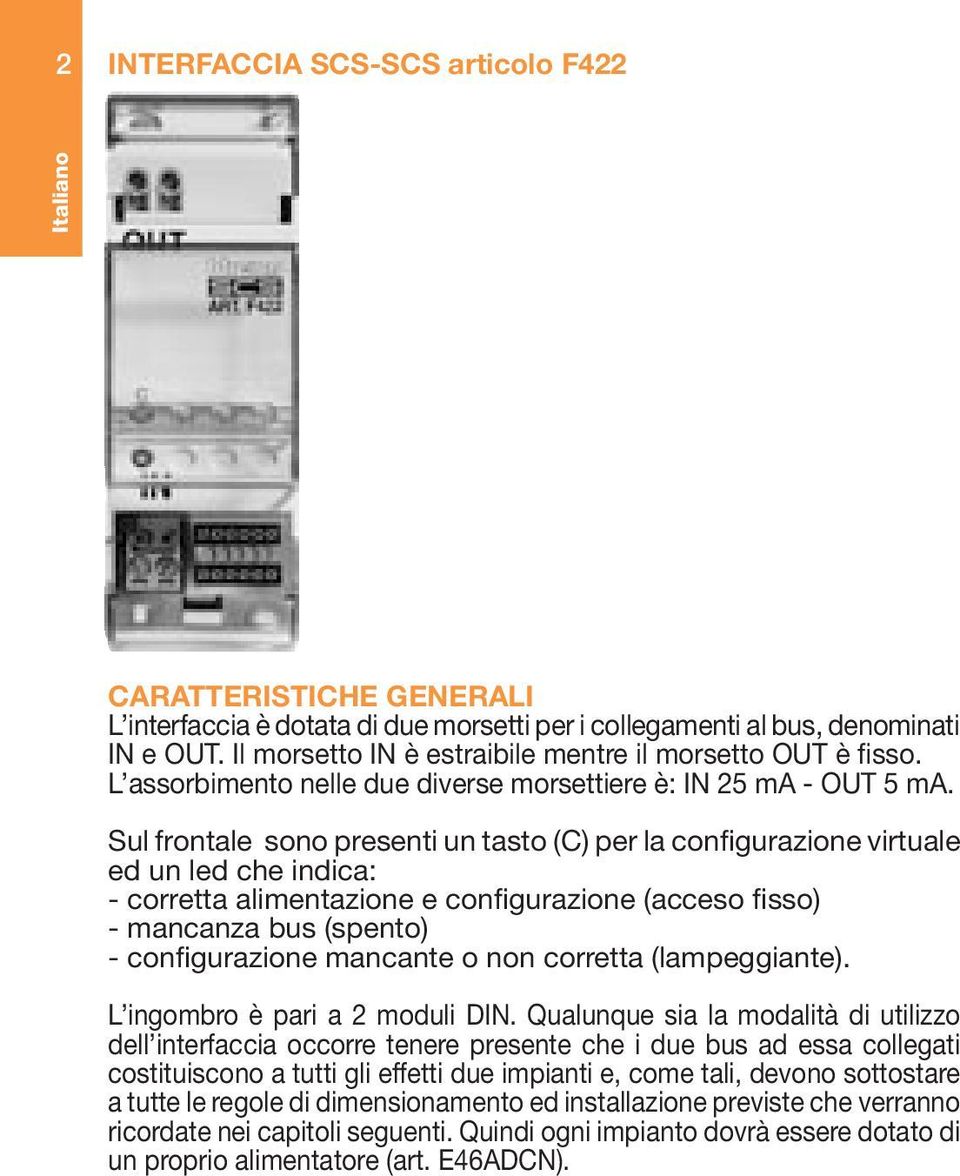
4 2 INTERFACCIA SCS-SCS articolo F422 Italiano CARATTERISTICHE GENERALI L interfaccia è dotata di due morsetti per i collegamenti al bus, denominati IN e OUT. Il morsetto IN è estraibile mentre il morsetto OUT è fisso. L assorbimento nelle due diverse morsettiere è: IN 25 ma - OUT 5 ma. Sul frontale sono presenti un tasto (C) per la configurazione virtuale ed un led che indica: - corretta alimentazione e configurazione (acceso fisso) - mancanza bus (spento) - configurazione mancante o non corretta (lampeggiante). L ingombro è pari a 2 moduli DIN. Qualunque sia la modalità di utilizzo dell interfaccia occorre tenere presente che i due bus ad essa collegati costituiscono a tutti gli effetti due impianti e, come tali, devono sottostare a tutte le regole di dimensionamento ed installazione previste che verranno ricordate nei capitoli seguenti. Quindi ogni impianto dovrà essere dotato di un proprio alimentatore (art. E46ADCN).
5 CONFIGURAZIONE Configurazione dell indirizzo (configuratori I1 I2 I3 I4) Le sedi I1, I2, I3, I4 servono ad identificare in modo univoco l interfaccia all interno dell impianto. A seconda della modalità di funzionamento, l indirizzo viene assegnato configurando in modo diverso queste sedi; per i dettagli fare riferimento alle descrizioni delle singole modalità nelle pagine successive. Configurazione della modalità di funzionamento (configuratore MOD) Sono previste le seguenti sei modalità: 1. Espansione fisica: permette di aumentare la lunghezza totale del bus o di superare il limite di assorbimento di 1200 ma dovute al singolo alimentatore. 2. Espansione logica: permette di aumentare il numero di dispositivi di un impianto che è di 81 (max 9 ambienti con 9 punti luce ciascuno). 3. Montante pubblico: permette di interfacciare i sistemi citofonici o videocitofonici digitali con gli altri bus dei sistemi antifurto o automazione. 4. Interfaccia antifurto/automazione: permette di far dialogare fra loro i sistemi di automazione e l antifurto. 5. Separazione galvanica: permette di interfacciare funzioni diverse (es: diffusione sonora e automazione) 6. Controllo accessi: permette di interfacciare il sistema controllo : accessi con le altre funzioni di My Home 3 Italiano

6 4 Italiano Tabella di configurazione I1 Indirizzo interfaccia I2 Indirizzo interfaccia I3 Indirizzo interfaccia I4 Indirizzo interfaccia MOD 0 5 modalità MODALITÀ DI FUNZIONAMENTO 1. Modalità Espansione fisica (configuratore MOD=1) Con l interfaccia configurata in questa modalità, è possibile estendere il limite fisico della lunghezza massima di doppino del sistema o del limite di 1200mA erogati dall alimentatore, ma non il limite sul numero degli attuatori (max 81). Le regole di dimensionamento da rispettare per un singolo impianto sono le seguenti: 1. La lunghezza del collegamento fra l alimentatore e il dispositivo più distante non deve superare i 250m. 2. La lunghezza totale dei collegamenti non deve superare i 500m di estensione. 3. La massima corrente disponibile all estremità del cavo SCS (art. L4669) lungo 250m è di 600mA. 4. Ai fini di una ripartizione ottimale delle correnti sulla linea bus, è consigliabile installare l alimentatore art. E46ADCN in posizione intermedia.
7 È importante evidenziare che i bus, collegati in ingresso ed in uscita all interfaccia, devono essere alimentati ciascuno con il suo alimentatore e per ciascuno di essi valgono i limiti del sistema, in termini di assorbimento e di distanza massima che si può coprire con il bus, come precedentemente indicato. Non è perciò possibile alimentare con un solo alimentatore (art. E46ADCN) un impianto costituito da due o più bus, connessi fra loro da interfacce configurate in modalità espansione fisica, anche se il numero e il tipo di componenti connessi al sistema non comportasse il superamento dell assorbimento massimo previsto (1200 ma). L indirizzo I3 I4 dell interfaccia definisce anche il cosiddetto indirizzo di separazione tra i due bus. Infatti, supponendo ad esempio che I3=3, I4=2: sul bus di ingresso (IN) gli indirizzi vanno da A=1 / PL=1 ad A=3 / PL=1; sul bus di uscita (OUT) gli indirizzi vanno da A=3 / PL=3 ad A=9 / PL=9 o all indirizzo della interfaccia successiva. Come si nota dall esempio, tutti gli indirizzi del bus 1 sono più bassi di quello dell interfaccia, mentre tutti gli indirizzi del bus 2 sono più alti, perciò l indirizzo dell interfaccia ha la funzione di separare in due blocchi tutti gli indirizzi di cui può essere composto l impianto. Non è possibile configurare un attuatore del bus connesso al morsetto OUT con un indirizzo più basso di quello dell interfaccia. Viceversa, non è possibile configurare un attuatore del bus connesso al morsetto IN con un indirizzo più alto di quello dell interfaccia. 5 Italiano

8 6 Esempio di impianto: Italiano Regole di installazione: È necessario configurare sia I3 che I4 con configuratori da 1 a 9 per fissare l indirizzo di separazione tra i due bus. Se si mettono più interfacce in serie, gli indirizzi dei dispositivi tra una interfaccia e l altra devono essere compresi tra quelli delle due interfacce (vedi esempio in figura). Sullo stesso bus non possono essere messe due interfacce, in questa modalità, in parallelo. In questa modalità non è possibile collegare all interfaccia il sistema antifurto. Per farlo occorre usare una interfaccia configurata nella modalità 4: interfaccia antifurto/automazione (v. punto 4). È possibile mettere fino a QUATTRO interfacce in serie, che suddividono l impianto in cinque tratte distinte alimentate singolarmente. Il modulo scenari ed i ricevitori IR (in modalità autoapprendimento) vanno installati sul tratto di bus corrispondente al proprio indirizzo locale (ad es. se si configura il modulo scenari come A=0 (nessun configuratore), PL=1 esso andrà posto sul tratto 1 dell impianto in figura).

9 Alcuni dispositivi vanno obbligatoriamente posti sul bus a indirizzi più alti (il 3 in figura). Tali dispositivi sono: la centrale del sistema di gestione energia (art. F421), il pannello di controllo del sistema gestione energia (art. N4682). 2. Modalità espansione logica (configuratore MOD=2) Questa modalità permette di separare gli impianti comandi, ciascuno dei quali può quindi sfruttare tutti gli indirizzi disponibili. È perciò possibile connettere su un bus automazione più impianti, per ognuno dei quali si hanno a disposizione tutti gli 81 indirizzi. Il bus su cui vengono connessi tutti gli altri ha perciò funzione di montante privato. Tale bus deve necessariamente appartenere ad un impianto di automazione. Si consiglia l uso di questa modalità per impianti in grandi ville o in ambiente terziario/industriale. Un caso tipico può essere la villa distribuita su più piani: si può realizzare un impianto per ogni piano e collegarli fra loro tramite un altro impianto con funzione di montante. Esempio di impianto: 7 Italiano

10 8 Italiano Regole di installazione: È necessario configurare I4 per numerare da 1 a 9 i bus collegati al montante. Il bus dei singoli impianti collegati al montante deve essere collegato al morsetto chiamato OUT dell interfaccia. Il bus montante deve necessariamente essere costituito da un impianto di automazione. In questa modalità è possibile collegare al montante fino a NOVE interfacce; si possono dunque gestire fino a DIECI impianti (contando anche il montante) come se fossero uno solo. Dal montante (morsetto IN) entrano i comandi generali (tapparelle e luci), di gruppo (questo permette un minimo di centralizzazione dei comandi, utilizzando dispositivi standard del sistema comandi) ed i comandi gestione energia (per permettere di posizionare la centrale gestione energia sul montante). I comandi punto-punto vengono invece bloccati dall interfaccia, quindi rimangono all interno del singolo impianto, montante compreso. I comandi di tutti i sistemi diversi dall automazione, compresi i comandi AUSILIARI, passano nelle due direzioni senza nessuna elaborazione. Per poter inviare comandi da un impianto all altro è possibile fare uso dei comandi ausiliari, sfruttando il comando speciale H4651/2. È inoltre possibile utilizzare il comando per impianti estesi H/L4655. Il sistema antifurto va collegato al montante attraverso un interfaccia configurata in modalità interfaccia antifurto/automazione (vedi pag. 9). È possibile effettuare la supervisione ed il controllo da PC solo se lo si connette al bus montante (per la disponibilità del software contattare la rete vendita BTicino).

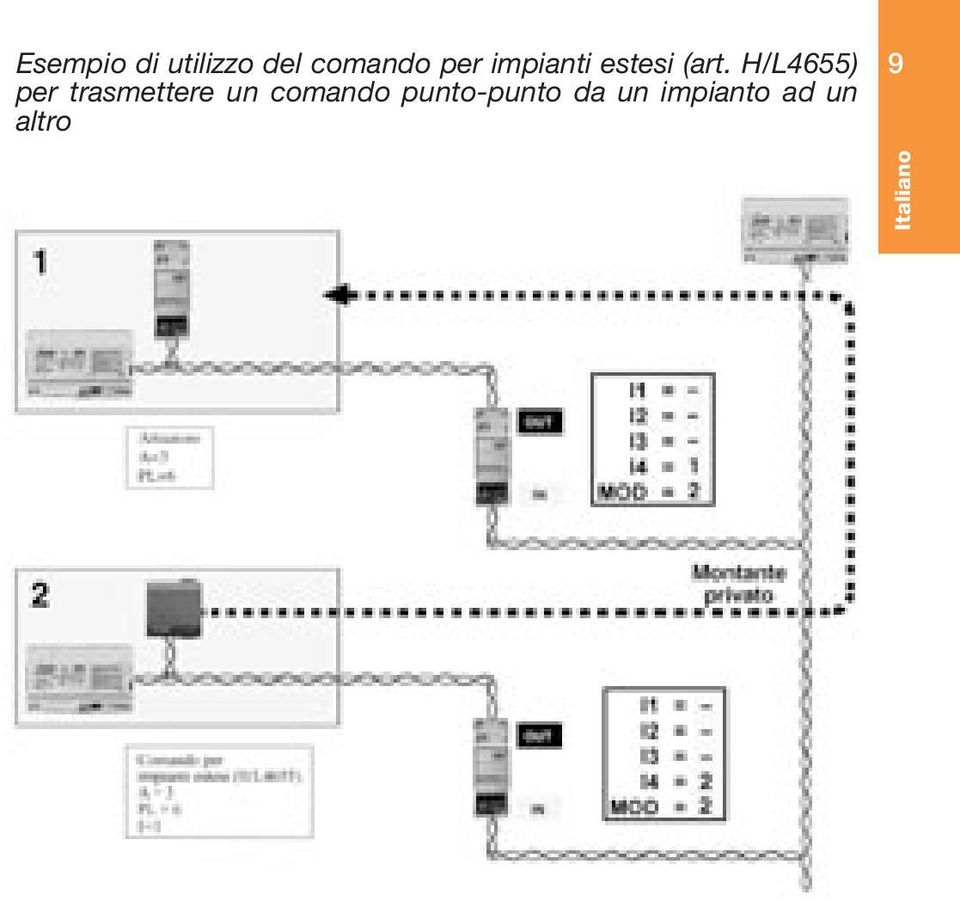
11 Esempio di utilizzo del comando per impianti estesi (art. H/L4655) per trasmettere un comando punto-punto da un impianto ad un altro 9 Italiano
12 10 Italiano 3. Modalità Montante Pubblico (configuratore MOD=3) A differenza del caso precedente, con questa configurazione l interfaccia esegue la separazione di tutti i sistemi dal montante. Questa modalità è indicata, ad esempio, per condomini nei quali sia richiesto di centralizzare gli allarmi rilevati dagli impianti antifurto dei singoli appartamenti sul centralino di portineria. In questo caso la funzione di montante viene espletata dal montante citofonico o videocitofonico digitale. Esempio di impianto:

13 Regole di installazione: Il collegamento del bus montante della videocitofonia digitale 8 fili al morsetto OUT dell interfaccia avviene tramite i fili 5 e 6. Il bus dei singoli impianti all interno degli appartamenti deve essere collegato al morsetto chiamato IN. La supervisione può essere fatta solo da montante e consente di vedere, tramite il centralino di portineria gli eventi di allarme dell antifurto. Sono quindi disponibili 9 allarmi/segnalazioni per ogni appartamento. Non è possibile conoscere nulla sullo stato del singolo impianto o comandare dall appartamento dispositivi installati sul montante. L indirizzo dell interfaccia è il medesimo che il sistema videocitofonico usa per indirizzare l appartamento. Occorre quindi riportare in I1I2I3I4 l indirizzo MN dell appartamento. L interfaccia entra nel computo dei 100 dispositivi per montante; è possibile collegare al montante un massimo di 80 appartamenti con interfaccia. 11 Italiano 4. Interfaccia antifurto/automazione (configuratore MOD=4) Questa configurazione consente di connettere il sistema SCS automazione al sistema antifurto SCS. Questa modalità può essere utile per poter comandare da remoto tramite comunicatore telefonico anche l impianto di automazione. O per associare ad eventi che si verificano sul bus antifurto dei comandi su quello automazione. Configurare I4 con un configuratore da 1 a 9.

14 12 Esempio di impianto: Italiano L interfaccia garantisce il transito dei seguenti tipi di comandi nella direzione indicata di volta in volta dalle frecce: Antifurto (OUT) Automazione (IN) Comandi ausiliari AUX Comandi non antifurto (serve per poter inviare comandi da remoto attraverso la centrale antifurto) Eventi di cambio stato e parzializzazione Eventi allarme

15 Regole di installazione: Non è possibile espandere l impianto antifurto come si fa con l impianto automazione quando si utilizzano le modalità espansione fisica e logica. L impianto antifurto deve sempre essere connesso al morsetto OUT dell interfaccia. E possibile mettere una sola interfaccia per ogni sistema antifurto installato sull impianto. Quindi, ad esempio non è possibile connettere fra loro due distinti impianti automazione attraverso un sistema antifurto. Quando si utilizza l interfaccia in questa modalità non è consentito posizionare sul bus antifurto gli attuatori del sistema automazione; essi vanno posti sul bus automazione e possono essere comandati anche da comandi posti sul bus antifurto (es. comunicatore telefonico). 13 Italiano 5. Modalità Separazione Galvanica (configuratore MOD=-) Questa configurazione consente di mantenere separate le alimentazioni dei due bus, permettendo di interfacciare funzioni diverse di My Home (es: diffusione sonora e automazione). In alcuni casi l utilizzo di questa interfaccia è indispensabile (ad esempio quando si installa la diffusione sonora), in altri casi è una possibile scelta installativa; ad esempio è possibile (ma non obbligatorio) installare la Termoregolazione su un bus separato ed interfacciarla all automazione con un interfaccia in modalità Separazione Galvanica

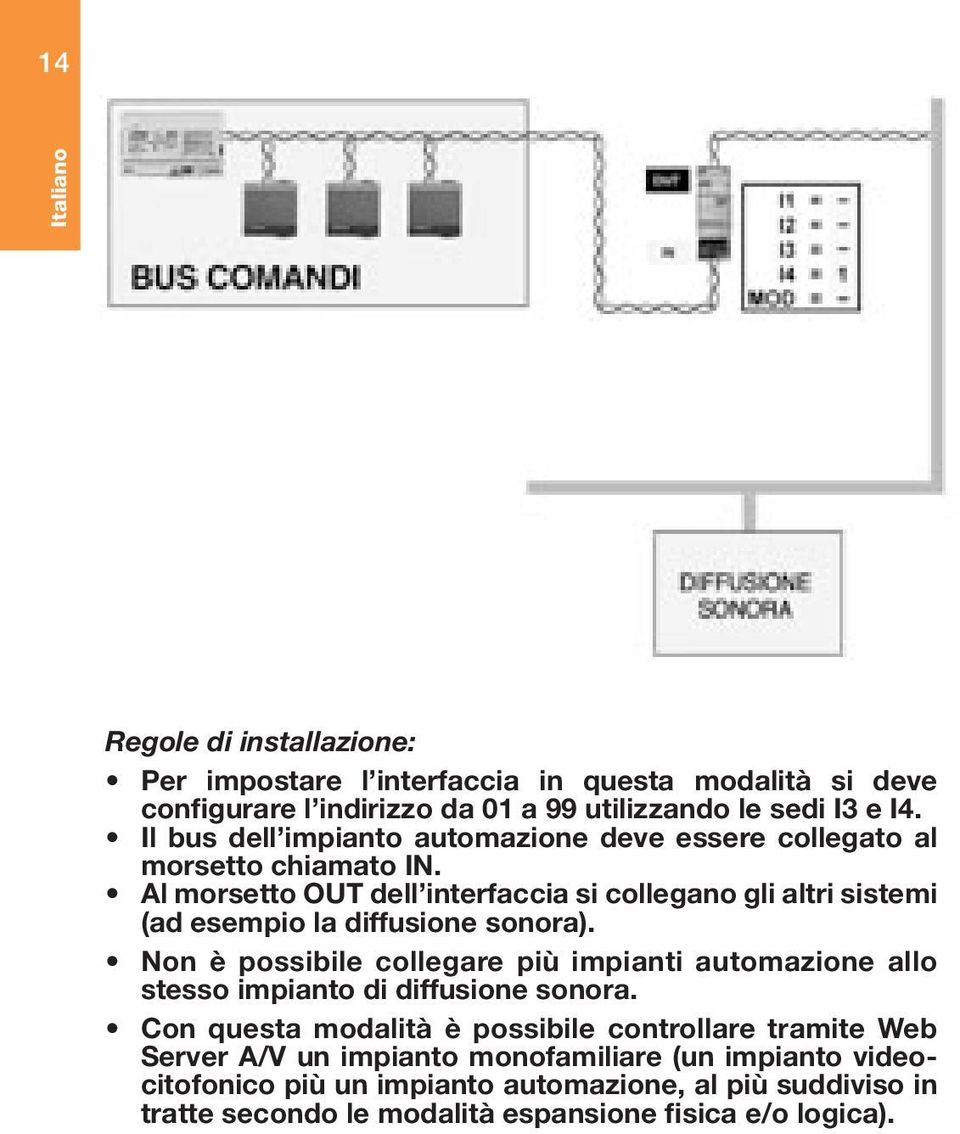
16 14 Italiano Regole di installazione: Per impostare l interfaccia in questa modalità si deve configurare l indirizzo da 01 a 99 utilizzando le sedi I3 e I4. Il bus dell impianto automazione deve essere collegato al morsetto chiamato IN. Al morsetto OUT dell interfaccia si collegano gli altri sistemi (ad esempio la diffusione sonora). Non è possibile collegare più impianti automazione allo stesso impianto di diffusione sonora. Con questa modalità è possibile controllare tramite Web Server A/V un impianto monofamiliare (un impianto videocitofonico più un impianto automazione, al più suddiviso in tratte secondo le modalità espansione fisica e/o logica).
17 6. Modalità Controllo Accessi (configuratore MOD=5) Con l interfaccia configurata in questa modalità è possibile interfacciare il sistema Controllo Accessi con le altre funzioni di MyHome. Ad esempio è possibile comandare le serrature del sistema Videocitofonia. Esempio di impianto: 15 Italiano Regole di installazione: Configurare l interfaccia inserendo in I4 un configuratore da 1 a 9. Collegare il sistema Controllo Accessi sul lato IN dell interfaccia, gli altri sistemi (Videocitofonia, Automazione, ecc.) sul lato OUT. Non è possibile installare più di un interfaccia in questa modalità sullo stesso impianto Controllo Accessi.

18 16 Italiano UTILIZZO MULTIPLO È possibile utilizzare più interfacce configurate secondo differenti modalità nello stesso impianto. Ad esempio si può pensare ad un impianto con tre interfacce (configurate per l espansione logica), per connettere tre bus automazione ad un montante. Ognuno di questi può essere poi espanso (modalità espansione fisica) tramite altre tre interfacce se necessario. Un caso del genere si può presentare quando si deve progettare un impianto per una villa su tre piani dove i singoli piani siano di grandi dimensioni. Non è però possibile realizzare un impianto dove sia presente più di un montante, sia nel caso della configurazione in modalità espansione logica sia in quella di montante pubblico. Esempio di utilizzo multiplo dell interfaccia (combinazione delle diverse modalità):

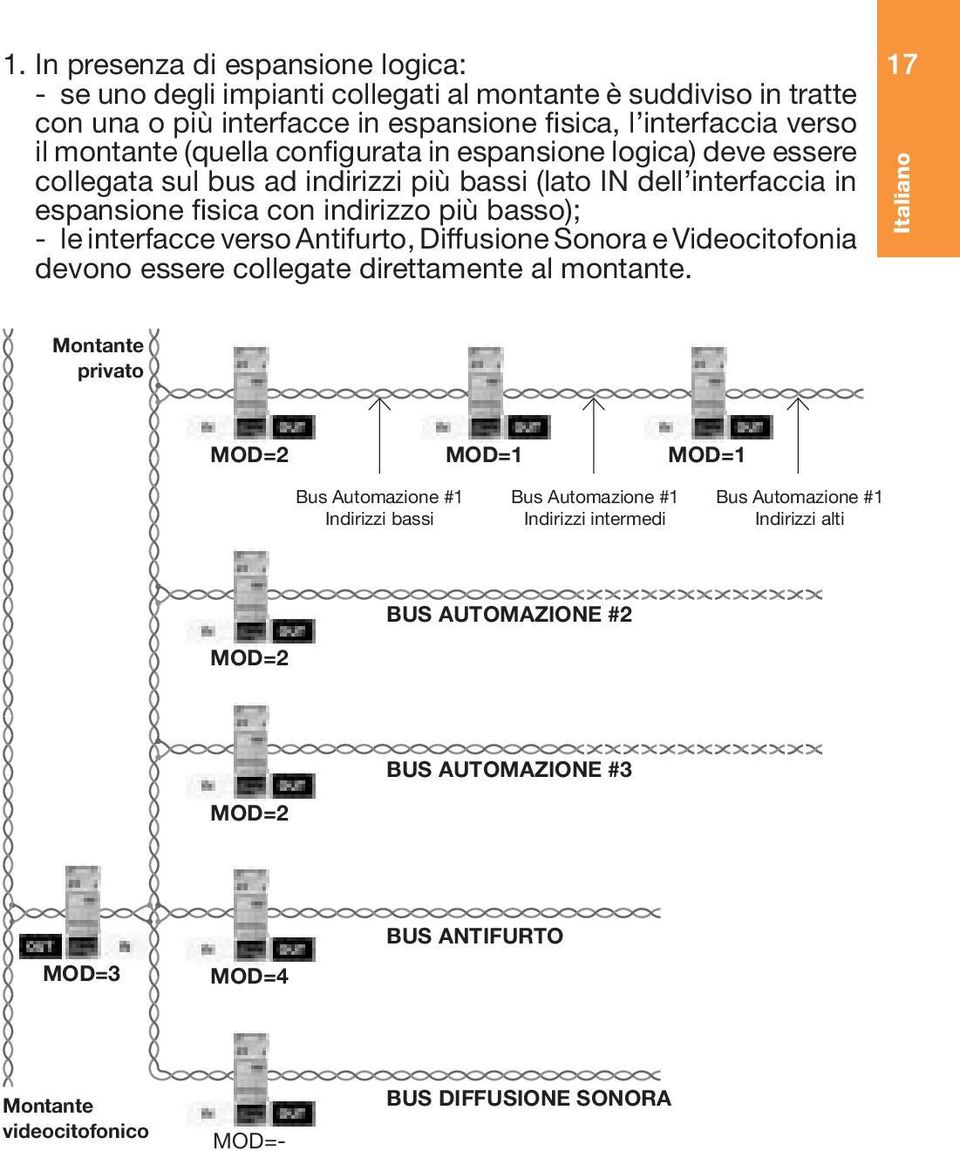
19 1. In presenza di espansione logica: - se uno degli impianti collegati al montante è suddiviso in tratte con una o più interfacce in espansione fisica, l interfaccia verso il montante (quella configurata in espansione logica) deve essere collegata sul bus ad indirizzi più bassi (lato IN dell interfaccia in espansione fisica con indirizzo più basso); - le interfacce verso Antifurto, Diffusione Sonora e Videocitofonia devono essere collegate direttamente al montante. 17 Italiano Montante privato MOD=2 MOD=1 MOD=1 Bus Automazione #1 Indirizzi bassi Bus Automazione #1 Indirizzi intermedi Bus Automazione #1 Indirizzi alti BUS AUTOMAZIONE #2 MOD=2 BUS AUTOMAZIONE #3 MOD=2 MOD=3 MOD=4 BUS ANTIFURTO Montante videocitofonico MOD=- BUS DIFFUSIONE SONORA
20 18 2. Su impianti senza espansione logica ma con espansione fisica, le interfacce verso Antifurto, Diffusione Sonora e Videocitofonia devono essere collegate sul bus ad indirizzi più bassi. Italiano MOD=1 MOD=1 Bus Automazione #1 Indirizzi bassi Bus Automazione #1 Indirizzi intermedi Bus Automazione #1 Indirizzi alti MOD=4 BUS ANTIFURTO MOD=- BUS DIFFUSIONE SONORA

21 INDEX CARACTERISTIQUES GENERALES 20 CONFIGURATION Configuration de l adresse 21 Configuration des modalités de fonctionnement 21 Extension physique 21 Extension logique 21 Colonne montante publique 21 Interface antivol/automation 21 Séparation galvanique 21 Contrôle accès 21 MODALITES DE FONCTIONNEMENT Modalité extension physique 22 Modalité extension logique 25 Modalité colonne montante publique 28 Interface antivol/automation 29 Modalité séparation galvanique 31 Modalité contrôle accès 33 UTILISATION MULTIPLE Français
22 20 INTERFACE SCS-SCS référence F422 Français CARACTERISTIQUES GENERALES L interface est munie de deux bornes pour les raccordements au bus, dénommées IN et OUT. La borne IN est extractible, tandis que la borne OUT est fixe. L absorption dans les deux borniers est: IN 25 ma OUT 5 ma. Sur la face avant se trouvent une touche (C) pour la configuration virtuelle et un led qui indique: - alimentation correcte et configuration (accès fixe) - manque bus (éteint) - configuration manquante ou non correcte (clignotant). L encombrement est égal à 2 modules DIN. Quelle que soit la modalité d utilisation de l interface, il faut tenir compte que les deux bus qui lui sont raccordés constituent à tous les effets deux installations et, comme telles, doivent se soumettre à toutes les règles de dimensionnement et d installation prévues, qui seront rappelées dans les chapitres suivants. En conséquence chaque installation devra être équipée de sa propre alimentation (réf. E46ADCN).
23 CONFIGURATION Configuration de l adresse (configurateurs I1 I2 I3 I4) Les logements I1, I2, I3, I4 servent à identifier de façon univoque l interface à l intérieur de l installation. Selon la modalité de fonctionnement, l adresse est assignée, en configurant de façon différente ces logements; pour plus de détails, se reporter aux descriptions de chaque modalité dans les pages suivantes. Configuration de la modalité de fonctionnement (configurateur MOD) Les six modalités suivantes sont prévues: 1. Extension physique: permet d augmenter la longueur totale du bus ou de dépasser la limite d absorption de 1200 ma due à chaque alimentation. 2. Extension logique: permet d augmenter le nombre de dispositifs d une installation qui est de 81 (max. 9 milieux avec 9 points lumière chacun). 3. Colonne montante publique: permet de connecter par interface les systèmes parlophoniques ou vidéophoniques numériques aux autres bus des systèmes antivol ou automation. 4. Interface antivol/automation: permet de faire dialoguer entre eux les systèmes d automation et l antivol. 5. Séparation galvanique: permet de connecter par interface différentes fonctions (ex.: diffusion sonore et automation) 6. Contrôle accès: permet de connecter par interface le système contrôle: accès aux autres fonctions de My Home. 21 Français
24 22 Français Tableau de configuration I1 Adresse interface I2 Adresse interface I3 Adresse interface I4 Adresse interface MOD 0 5 modalités MODALITES DE FONCTIONNEMENT 1. Modalité Extension physique (configuration MOD=1) L interface étant configurée dans cette modalité, il est possible d étendre la limite physique de la longueur maximale de la boucle du système ou de la limite de 1200 ma distribués par l alimentation, mais pas la limite du nombre d actionneurs (max. 81). Les règles de dimensionnement à respecter pour chaque installation sont les suivantes: 1. La longueur du raccordement entre l alimentation et le dispositif le plus éloigné ne doit pas dépasser 250 m. 2. La longueur totale des raccordements ne doit pas dépasser 500 m. d extension. 3. L intensité maximale disponible à l extrémité du câble SCS (réf. L4669) long de 250 m. est de 600 ma. 4. En vue d une répartition optimale des intensités sur la ligne bus, il est conseillé d installer l alimentation réf. E46ADCN en position intermédiaire.
25 Il importe de souligner que les bus, raccordés en entrée et en sortie à l interface, doivent être alimentés chacun par sa propre alimentation et pour chacun d eux sont valables les limites du système, en termes d absorption et de distance maximale que l on peut couvrir avec le bus, comme précédemment indiqué. Il n est donc pas possible d alimenter avec une seule alimentation (réf. E46ADCN) une installation constituée de deux ou plusieurs bus, raccordés entre eux par des interfaces configurées en modalité extension physique, même si le nombre et le type de composants connectés au système ne comportaient pas le dépassement de l absorption maximale prévue (1200 ma). adresse I3 I4 de l interface définit aussi la dite adresse de séparation entre les deux bus. De fait, en supposant par exemple que I3=3, I4=2: sur le bus d entrée (IN) les adresses vont de A=1 /PL=1 à A=3 /PL=1; sur le bus de sortie (OUT) les adresses vont de A=3 /PL=3 à A=9 /PL=9 ou à l adresse de l interface suivante. plus basses que celle de l interface, tandis que toutes les adresses du bus 2 sont plus élevées, et donc l adresse de l interface a pour fonction de séparer en deux blocs toutes les adresses dont peut être composée l installation. Il n est pas possible de configurer un actionneur du bus connecté à la borne OUT avec une adresse plus basse que celle de l interface. Vice-versa, il n est pas possible de configurer un actionneur du bus connecté à la borne IN avec une adresse plus élevée que celle de l interface. 23 Français
26 24 Exemple d installation: Français Règles de montage: Il faut configurer, aussi bien I3 que I4, avec des configurateurs de 1 à 9, pour fixer l adresse de séparation entre les deux bus. Si l on met plusieurs interfaces en série, les adresses des dispositifs entre une interface et l autre doivent être comprises entre celles des deux interfaces (voir exemple de la figure). Sur le même bus, dans cette modalité, on ne peut pas mettre deux interfaces en parallèle. Dans cette modalité, il n est pas possible de raccorder à l interface le système antivol. Pour le faire, il faut utiliser une interface configurée dans la modalité 4: interface antivol/automation (cf. point 4). Il est possible de mettre jusqu à QUATRE interfaces en série, qui partagent l installation en cinq parcours distincts alimentés séparément. Le module ambiances et les récepteurs IR (en modalité auto-apprentissage) sont montés sur le parcours de bus correspondant à sa propre adresse locale (par ex. si l on configure le module ambiances comme A=0 (aucun configurateur), PL=1 sera placé sur le parcours 1 de l installation de la figure).
27 Certains dispositifs sont obligatoirement placés sur le bus à adresses les plus élevées (le 3 sur la figure). Ces dispositifs sont: la centrale du système de gestion énergie (réf. F421), le tableau de commande du système gestion énergie (réf. N4682). 2. Modalité extension logique (configurateur MOD=2) Cette modalité permet de séparer les installations commandes, chacune d entre elles peut en conséquence exploiter toutes les adresses disponibles. Il est donc possible de connecter sur un bus automation plusieurs installations, pour chacune desquelles on a à disposition toutes les 81 adresses. Le bus sur lequel sont connectés toutes les autres a donc la fonction d une colonne montante privée. Ce bus doit nécessairement appartenir à une installation d automation. L utilisation de cette modalité est conseillée pour des installations dans de grandes villas ou en milieu tertiaire/industriel. Un cas typique peut être la villa répartie sur plusieurs étages: on peut réaliser une installation pour chaque étage et les relier entre elles par une autre installation avec fonction de colonne montante. Exemple d installation: 25 Français
28 26 Français Règles de montage: Il faut configurer I4 pour numéroter de 1 à 9 les bus raccordés à la colonne montante. Le bus de chaque installation raccordée à la colonne montante doit être raccordé à la borne appelée OUT de l interface. Le bus colonne montante doit nécessairement être constitué d une installation d automation. Dans cette modalité il est possible de raccorder à la colonne montante jusqu à NEUF interfaces; on peut donc gérer jusqu à DIX installations (en comptant aussi la colonne montante), comme si ce n était qu une seule. Par la colonne montante (borne IN) entrent les commandes générales (volets et éclairage), de groupe (cela permet un minimum de centralisation des commandes, en utilisant des dispositifs standard du système commandes) et les commandes gestion énergie (pour permettre de positionner la centrale gestion énergie sur la colonne montante). Les commandes point-point sont au contraire bloquées par l interface, elles restent donc à l intérieur de chaque installation, colonne montante comprise. Les commandes de tous les systèmes autres que celui de l automation, y compris les commandes AUXILIAIRES, passent dans les deux directions sans aucune élaboration. Pour pouvoir envoyer des commandes d une installation à l autre, il est possible d utiliser des commandes auxiliaires, en exploitant la commande spéciale H4651/2. Il est en outre possible d utiliser la commande pour installations étendues H/L4655. Le système antivol est raccordé à la colonne montante au travers d une interface configurée en modalité interface antivol/automation (voir page 9). Il est possible d effectuer la supervision et le contrôle à partir d un PC, seulement si l on se connecte au bus de la colonne montante (pour la disponibilité du logiciel contacter le réseau vente Bticino).
29 Exemple d utilisation de la commande pour installations étendues (réf. H/L4655) pour transmettre une commande point-point d une installation à une autre 27 Français Actionneur Colonne montante privée Commande pour installations étendues (H/L4655)
30 28 Français 3. Modalité Colonne Montante Publique (configurateur MOD=3) A la différence du cas précédent, avec cette configuration l interface exécute la séparation de tous les systèmes à partir de la colonne montante. Cette modalité est indiquée, par exemple, pour des immeubles dans lesquels il est demandé de centraliser les alarmes détectées par les installations antivol de chaque appartement sur la centrale de conciergerie. Dans ce cas la fonction de colonne montante est remplie par la colonne montante parlophone ou vidéophone numérique. Exemple d installation: fils fils
31 Règles de montage: Le raccordement du bus colonne montante de la vidéophonie numérique 8 fils à la borne OUT de l interface se fait par les fils 5 et 6. Le bus de chaque installation à l intérieur des appartements doit être raccordé à la borne appelée IN. La supervision peut être faite seulement de la colonne montante et permet de voir, par l intermédiaire de la centrale de conciergerie, les évènements d alarme de l antivol. 9 alarmes/signalisations sont donc disponibles pour chaque appartement. On ne peut rien connaître sur l état de chaque installation, ni commander de l appartement des dispositifs montés sur la colonne montante. L adresse de l interface est la même que celle que le système vidéophonique utilise pour adresser l appartement. Il faut donc reporter en I1I2I3I4 l adresse MN de l appartement. L interface entre dans le compte des 100 dispositifs pour colonne montante; il est possible de raccorder à la colonne montante un maximum de 80 appartements avec interface. 29 Français 4. Interface antivol/automation I(configurateur MOD=4) Cette configuration permet de connecter le système SCS automation au système antivol SCS. Cette modalité peut être utile pour pouvoir commander à distance, au moyen du communicateur téléphonique, aussi l installation d automation. Ou pour associer à des évènements qui se vérifient sur le bus antivol des commandes sur le bus automation. Configurer I4 avec un configurateur de 1 à 9.
32 30 Exemple d installation: Français BUS AUTOMATION L interface assure le transit des types de commande suivants dans la direction indiquée à chaque fois par les flèches: Antivol (OUT) Automation (IN) Commandes auxiliaires AUX Commandes non antivol (sert à pouvoir envoyer des commandes à distance au travers de la centrale antivol) Evènements de changement état et découpage Evènements alarme
33 Règles de montage Il n est pas possible d étendre l installation antivol, comme on le fait pour l installation automation, lorsqu on utilise les modalités extension physique et logique. L installation antivol doit toujours être connectée à la borne OUT de l interface. Il est possible de mettre une seule interface pour chaque système antivol monté sur l installation. En conséquence, par exemple il n est pas possible de connecter entre elles deux installations distinctes d automation par l intermédiaire d un système antivol. Lorsqu on utilise l interface dans cette modalité, il n est pas permis de positionner sur le bus antivol les actionneurs du système automation; ils sont placés sur le bus automation et peuvent être commandés aussi à partir de commandes placées sur le bus antivol (ex. communicateur téléphonique). 31 Français 5. Modalité Séparation Galvanique (configurateur MOD=-) Cette configuration permet de conserver séparées les alimentations des deux bus, en permettant de connecter par interface des fonctions différentes de My Home (ex.: diffusion sonore et automation). Dans certains cas, l utilisation de cette interface est indispensable (par exemple lorsqu on installe la diffusion sonore), dans d autres cas c est un choix possible de montage; par exemple il est possible (mais non obligatoire) de monter la thermorégulation sur un bus séparé et de la connecter par interface à l automation avec une interface en modalité Séparation galvanique.
34 32 Français BUS COMMANDES DIFFUSION SONORE Règles de montage Pour paramétrer l interface dans cette modalité, on doit configurer l adresse de 01 à 99, en utilisant les logements I3 et I4. Le bus de l installation automation doit être raccordé à la borne appelée IN. A la borne OUT de l interface, on raccorde les autres système (par exemple la diffusion sonore). Il n est pas possible de raccorder plusieurs installations automation à la même installation de diffusion sonore. Avec cette modalité, il est possible de contrôler par l intermédiaire du Web Server A/V une installation mono familiale (une installation vidéophonique plus une installation automation, tout au plus divisée en parcours selon les modalités extension physique et/ou logique).
35 6. Modalité Contrôle Accès (configurateur MOD=5) L interface étant configurée dans cette modalité, il est possible de connecter par interface le système Contrôle Accès aux autres fonctions de MyHome. Par exemple il est possible de commander les serrures du système Vidéophonie. Exemple d installation 33 Français VIDEOPHONIE BUS CONTROLE ACCES Règles de montage: Configurer l interface en insérant en I4 un configurateur de 1 à 9. Raccorder le système Contrôle Accès sur le côté IN de l interface, les autres systèmes (Vidéophonie, Automation, etc.) sur le côté OUT. Il n est pas possible de monter plus d une interface dans cette modalité sur la même installation Contrôle Accès.
36 34 Français UTILISATION MULTIPLE On peut utiliser plusieurs interfaces configurées selon différentes modalités dans la même installation. Par exemple, on peut penser à une installation avec trois interfaces (configurées pour l extension logique), pour connecter trois bus automation à une colonne montante. Chacune d elles peut être ensuite étendue (modalité extension physique) au moyen de trois autres interfaces, si nécessaire. Un cas du genre peut se présenter, lorsqu on doit projeter une installation pour une villa sur trois étages, dans laquelle chaque étage a de grandes dimensions. Il n est pourtant pas possible de réaliser une installation où se trouve plus d une colonne montante, tant dans le cas de la configuration en modalité extension logique que dans celle de colonne montante publique. Exemple d utilisation multiple de l interface (combinaison des différentes modalités): Extension physique Extension logique Colonne montante privée Interface antivol/automation
37 1. En présence d extension logique: - si une des installations raccordées à la colonne montante est divisée en parcours à une ou plusieurs interfaces en extension physique, l interface vers la colonne montante (celle configurée en extension logique) doit être raccordée sur le bus avec les adresses les plus basses (côté IN de l interface en extension physique avec adresse la plus basse); - les interfaces vers Antivol, Diffusion sonore et Vidéophonie doivent être raccordées directement à la colonne montante. 35 Français Colonne montante privée MOD=2 MOD=1 MOD=1 Bus Automation #1 Adresses basses Bus Automation #1 Adresses intermédiaires Bus Automation #1 Adresses hautes BUS AUTOMATION #2 MOD=2 BUS AUTOMATION #3 MOD=2 MOD=3 MOD=4 BUS ANTIVOL Colonne montante vidéophonique MOD=- BUS DIFFUSION SONORE
38 36 Français 2. Sur les installations sans extension logique, mais avec extension physique, les interfaces vers Antivol, Diffusion sonore et Vidéophonie doivent être raccordées sur le bus avec les adresses les plus basses. MOD=1 MOD=1 Bus Automation #1 Adresses basses Bus Automation #1 Adresses intermédiaires Bus Automation #1 Adresses hautes MOD=4 BUS ANTIVOL MOD=- BUS DIFFUSION SONORE
39 INDEX GENERAL FEATURES 38 CONFIGURATION Address configuration 38 Functioning mode configuration Physical expansion 39 Logical expansion 39 Public riser 39 Intrusion detection/automation system interface 39 Galvanic separation 39 Control mode 39 FUNCTIONING MODE Physical expansion mode 40 Logical expansion mode 43 Mode public riser 46 Intrusion detection/automation system interface 47 Galvanic separation mode 49 Access control mode 51 MULTIPLE USE English
40 38 SCS-SCS INTERFACE item F422 English GENERAL FEATURES The interface is fitted with two terminals for the bus connections, called IN and OUT. The terminal IN is a plug-in one, the terminal OUT is of fix type. The absorption of the two different terminal boards is: IN 33 ma - OUT 2mA. On the front side, there is a key (C) used for the virtual configuration and a LED which indicates: - correct power supply and configuration (steadily lit) - no bus (off) - configuration missing or incorrect (flashing) The size corresponds to two DIN modules. Independently from the using mode of the interface, it is necessary to observe that the two buses connected to it form two completely different systems which, as such, must comply with all dimensioning and installing rules, that will be recalled in the following chapters. As a consequence, every system has to be equipped with its own power supply (item E46ADCN).
41 CONFIGURATION Address configuration (configurators I1 I2 I3 I4) The seats I1 I2 I3 I4 are used for identifying in a univocal way the interface inside the system. Depending on the functioning mode, the address shall be assigned by configuring these fittings; for more details, please refer to the descriptions of the single modes in the following pages. 39 English Functioning mode configuration (configurator MOD) Six modes are possible: 1. Physical expansion: it allows to increase the total bus length or to exceed the absorption top limit of 1200mA due to the single power supply. 2. Logical expansion: it allows to increase the number of devices (81) within a system (max. 9 ambiences with 9 lighting points each). 3. Public riser: it allows to interface digital audio or video door entry systems with the other buses of intrusion detection or automation systems. 4. Intrusion detection/automation system interface: it allows the communication between automation systems and intrusion detection system. 5. Galvanic separation: interfaces different functions (e.g. sound system and automation) 6. Access control: interfaces the control system: accesses with other My Home functions
42 40 English Configuration table I1 Interface address I2 Interface address I3 Interface address I4 Interface address MOD 0 5 modes FUNCTIONING MODE 1. Physical expansion mode (configurator MOD=1) With the interface configured this way, it is possible to extend the physical limit given by the max. length of the twisted pair or by the 1200mA supplied by the feeder, but not the limit number of activators (max. 81). The dimensioning rules to observe for a single system are the following ones: 1. The distance between power supply and the farthest device may not exceed 250 m. 2. The max. cabling length may not exceed 500 m. 3. The maximum current available at the end of the SCS 250m cable (item L4669) is 600mA. 4. In order to have the best possible currents distribution on the bus line, it is recommended to install the power supply item E46ADCN in an intermediate position.
43 We have to point out that the buses that are connected (IN and OUT) to the interface must be fed each by its own power supply and that the system s limits are valid for everyone of them, as far as concerns absorption and max. distance that can be covered through bus, as previously indicated. Therefore it is not possible to feed a system formed by two or more buses with a single power supply (item E46ADCN), connected with each other by interfaces configured in physical expansion mode, even if the number and type of components connected to the system should not cause the overcoming of the max. expected absorption (1200 ma). The interface address I3 I4 also defines the so-called separation address between the two buses. So, if we suppose for instance that I3=3, I4=2: on the incoming bus (IN), the addresses range from A=1/PL=1 to A=3/PL=1; on the outgoing bus (OUT), the addresses range from A=3/PL=3 to A=9/PL=9 or to the address of the following interface. As you can see from the example, all addresses of bus 1 are lower than the one of the interface, whereas all addresses of bus 2 are higher, therefore the interface address has the function of separating into two blocks all addresses the system can consist of. It is not possible to configure an activator of the bus connected to the terminal OUT with an address lower than the one of the interface. Vice-versa, it is not possible to configure an activator of the bus connected to the terminal IN with an address higher than the one of the interface. 41 English
44 42 Example of a system: English Installation rules: It is necessary to configure both I3 and I4 with configurators from 1 to 9 to set the separation address between the two buses. If several interfaces are connected in series, the addresses of the devices between an interface and another one must be included between the ones of the two interfaces (see example above). Two interfaces in this mode (parallel) cannot be put on the same bus. The intrusion detection system cannot be connected to the interface in this mode. For doing so, it is necessary to use an interface configured in mode 4: intrusion detection/automation system interface (see point 4). It is possible to connect up to FOUR interfaces in series, which subdivide the system into five distinct sections that are fed separately. The scenario module and the IR receivers (in auto-learning mode) must be installed on the section of bus corresponding to its own local address (e.g. if you configure the scenario module as A=0 (no configurator), PL=1 it will have to be placed on section 1 of the system in the picture).
45 Some devices must compulsory be placed on the bus at higher addresses (the No. 3 in the picture). These devices are: the energy management system control unit (item F421), the control panel of the energy management system (item N4682), the telephone communicator (item 4075N). 2. Logical expansion mode (configurator MOD=2) This mode allows to separate the commands systems, everyone of which can therefore exploit all available addresses. It is thus possible to connect several systems on an automation bus, for everyone of which one has all 81 addresses available. The bus on which all other ones are connected has therefore the function of private riser. This bus must compulsory belong to an automation system. The use of this mode is recommended for installations in big villas or systems in the services/industrial sector. A typical case can be a villa on several floors: one can realise a system for every floor and then connect them to each other by means of another system functioning as a riser. Example of a system: 43 English
46 44 English Installation rules: It is necessary to configure I4 to number the buses connected to the riser from 1 to 9. The bus of the single systems connected to the riser must be connected to the terminal called OUT of the interface. The riser bus must compulsory be formed by an automation system. In this mode, it is possible to connect to the riser up to NINE interfaces; hence, it is possible to manage up to TEN systems (including the riser) as if they were only one. From the riser (terminal IN) come in general commands (shutters and lights), group commands (this allows a minimum degree of commands centralisation by using standard devices of the commands system) and energy management commands (for allowing to place the energy management control unit on the riser). The point-point commands, instead, are blocked by the interface and remain therefore inside the single system, the riser included. The commands of all systems but automation, included the AUXILIARY commands, pass through in both directions without being elaborated. In order to be able to send commands from one system to the other, it is possible to make use of the auxiliary commands by using the special H4651/2 control. It is also possible to use the control for extended H/L4655 systems. The intrusion detection system must be connected to the riser by means of an interface configured in mode intrusion detection/ automation system (see page 9). Supervision and control from PC are only possible if this is connected to the riser bus (As far as the availability of this software is concerned, please contact your local BTicino dealer).
47 Example on how to use the control for extended systems (item H/L4655) in order to send a point-point command from one system to another 45 English
48 46 English 3. Mode public riser (configurator MOD=3) Differently from the previous case, with this configuration the interface carries out the separation of all systems from the riser. This mode is indicated, for instance, for apartment blocks where the request is to centralise the alarms coming from the intrusion detection systems of the single apartments on the central porter switchboard. In this case, the riser function is carried out by the digital riser of the audio or video door entry system. Example of a system:
49 Installation rules: The connection of the riser bus of the Terraneo 8 wire digital video door entry system to terminal OUT of the interface is made through the conductors 5 and 6. The bus of the single systems inside the apartments must be connected to the terminal called IN. Monitoring is possible only from a riser and allows the viewing of burglar alarm events via the switchboard. Available are therefore 9 alarms/signals for every apartment. Nothing can be known about the status of the single system nor can devices installed on the riser be controlled from the apartment. The address of the interface is the same used by the video door entry system to address the apartment. It is necessary to put into I1I2I3I4 the MN address of the apartment. The interfaceis part ofthe 100 devices per riser; it is therefore possible to connect max. 80 apartments with interface to the riser. 47 English 4. Intrusion detection/automation system interface (configurator MOD=4) This configuration allows to connect the SCS automation system to the SCS intrusion detection system. This mode can be useful for remote controlling the automation system too, through the telephone communicator, or for associating commands on the automation bus to events happening on the intrusion detection bus. Configure I4 with a configurator from 1 to 9.
50 48 Example of a system: English The interface guarantees the passage of following command types in the direction indicated by the arrows: Intrusion detection system (OUT) Automation (IN) AUX auxiliary commands Non burglar alarm commands. (used for sending remote commands through the burglar alarm unit) Change of status and subdividing Alarm events
51 Installation rules: When the physical and logical expansion modes are used, the intrusion detection system cannot be expanded like it is possible to do with the automation system. The intrusion detection system must always be connected It is possible to mount an interface only for every intrusion detection system installed on the system. So, for instance, it is not possible to connect to each other two separate automation systems through an intrusion detection system. When the interface is used in this mode, it is not allowed to place the activators of the automation system on the bus of the intrusion detection system; they have to be placed on the automation system bus and can be controlled even by commands placed on the bus of the intrusion detection system (for instance, telephone communicator). 49 English 5. Galvanic separation mode (no configurator required) This configuration keeps the power supplies of the two buses separate, thus allowing you to interface different My Home functions (e.g. sound system and automation). In some cases the use of this interface is essential (for instance when the sound system is installed), in other cases it is a possible installation choice; for instance it is possible (but not essential) to install the Temperature control on a separate bus and interface it to the automation with an interface in Galvanic Separation mode.
52 50 English Installation rules: To set up the interface in this mode, configure the address from 01 to 99 using the I3 and I4 fittings. The bus of the automation system must be connected to the IN terminal. The other systems (for example, the sound system) shall be connected to the OUT terminal. It is not possible to connect several automation systems to the same sound system. With this mode it is possible to control just one single-family system through A/V Web Server (an Audio/Video system plus an automation system, at the most subdivided into several sections depending on physical and/or logical expansion mode).
53 6. Access Control Mode (configurator MOD=5) When the interface is configured in this mode, it is possible to interface the Access Control System with the other My Home functions. For instance, it is possible to control the door locks of the Video door-entry system. Example of a system: 51 English Installation instructions: Configure the interface by inserting a configurator, from 1 to 9, in I4. Connect the Access Control system to the IN side of the interface and the other systems (Video door-entry, Automation, etc.) to the OUT side. In this mode, it is not possible to install more than one interface on the same Access Control system.
54 52 English MULTIPLE USE Several interfaces configured according to different modes can be used on the same system. So, for instance, we can think of a system with three interfaces (configured for logical expansion) in order to connect three automation buses to a riser. Everyone of these can then be expanded (physical expansion mode) through three other interfaces, if necessary. This can happen in case one has to plan a system for a villa on three levels, where every single floor has big dimensions. Yet it is not possible to realise a system with more than one riser, both in case of logical expansion mode and in public riser mode. Example of multiple use of the interface (combination of different modes)
55 1. With logical expansion: - If one of the systems connected to the riser is subdivided into sections with one or more interfaces in physical expansion, the interface towards the riser (the one configured in logical expansion) must be connected to the bus with lower addresses (IN side of the interface in physical expansion with lower address); - The interfaces toward the Burglar alarm, Sound System and Video door-entry system must be connected directly to the riser. 53 English Private riser MOD=2 MOD=1 MOD=1 AUTOMATION BUS #1 LOW ADDRESSES AUTOMATION BUS #1 INTERMEDIATE ADDRESSES AUTOMATION BUS #1 HIGH ADDRESSEES BUS AUTOMAZIONE #2 MOD=2 BUS AUTOMAZIONE #3 MOD=2 MOD=3 MOD=4 BURGLAR ALARM BUS Video handset riser MOD=- SOUND SYSTEM BUS
56 54 English 2. With systems without a logical expansion but with a physical expansion, the interfaces toward the Burglar alarm, Sound System and Video door-entry system must be connected to the bus with lower addresses. MOD=1 MOD=1 AUTOMATION BUS #1 LOW ADDRESSES AUTOMATION BUS #1 INTERMEDIATE ADDRESSES AUTOMATION BUS #1 HIGH ADDRESSEES MOD=4 BURGLAR ALARM BUS MOD=- SOUND SYSTEM BUS
57 55 English
58
59
60 BTicino s.p.a Via Messina, Milano - Italia
APPENDIX 6 BONUS RING FORMAT
 #4 EN FRANÇAIS CI-DESSOUS Preamble and Justification This motion is being presented to the membership as an alternative format for clubs to use to encourage increased entries, both in areas where the exhibitor
Contrôle d'accès Access control. Notice technique / Technical Manual
 p.1/18 Contrôle d'accès Access control INFX V2-AI Notice technique / Technical Manual p.2/18 Sommaire / Contents Remerciements... 3 Informations et recommandations... 4 Caractéristiques techniques... 5
Important information. New SIMATIC HMI Panels. Migration made easy start now. SIMATIC HMI Panels. siemens.com/simatic-panels
 Important information New SIMATIC HMI Panels Migration made easy start now SIMATIC HMI Panels siemens.com/simatic-panels Totally Integrated Automation Portal (TIA Portal) est l environnement d ingénierie
Instructions Mozilla Thunderbird Page 1
 Instructions Mozilla Thunderbird Page 1 Instructions Mozilla Thunderbird Ce manuel est écrit pour les utilisateurs qui font déjà configurer un compte de courrier électronique dans Mozilla Thunderbird et
Utiliser une WebCam. Micro-ordinateurs, informations, idées, trucs et astuces
 Micro-ordinateurs, informations, idées, trucs et astuces Utiliser une WebCam Auteur : François CHAUSSON Date : 8 février 2008 Référence : utiliser une WebCam.doc Préambule Voici quelques informations utiles
TECHNICAL MANUAL FT GEN 17
 IT MANUALE TECNICO EN TECHNICAL MANUAL FR MANUEL TECHNIQUE FT GEN 7 3 4 5 6 Schede opzionali Art. 5733 e Art. 5734 per Monitor serie Bravo Optional cards Art. 5733 and Art. 5734 for Bravo series Monitor
Paxton. ins-20605. Net2 desktop reader USB
 Paxton ins-20605 Net2 desktop reader USB 1 3 2 4 1 2 Desktop Reader The desktop reader is designed to sit next to the PC. It is used for adding tokens to a Net2 system and also for identifying lost cards.
WEB page builder and server for SCADA applications usable from a WEB navigator
 Générateur de pages WEB et serveur pour supervision accessible à partir d un navigateur WEB WEB page builder and server for SCADA applications usable from a WEB navigator opyright 2007 IRAI Manual Manuel
Notice Technique / Technical Manual
 Contrôle d accès Access control Encodeur USB Mifare ENCOD-USB-AI Notice Technique / Technical Manual SOMMAIRE p.2/10 Sommaire Remerciements... 3 Informations et recommandations... 4 Caractéristiques techniques...
INSTRUMENTS DE MESURE SOFTWARE. Management software for remote and/or local monitoring networks
 INSTRUMENTS DE MESURE SOFTWARE SOFTWARE Logiciel de supervision des réseaux locaux et/ou distants Management software for remote and/or local monitoring networks MIDAs EVO 4 niveaux de fonctionnalités
Application Form/ Formulaire de demande
 Application Form/ Formulaire de demande Ecosystem Approaches to Health: Summer Workshop and Field school Approches écosystémiques de la santé: Atelier intensif et stage d été Please submit your application
Le passé composé. C'est le passé! Tout ça c'est du passé! That's the past! All that's in the past!
 > Le passé composé le passé composé C'est le passé! Tout ça c'est du passé! That's the past! All that's in the past! «Je suis vieux maintenant, et ma femme est vieille aussi. Nous n'avons pas eu d'enfants.
Instructions pour mettre à jour un HFFv2 v1.x.yy v2.0.00
 Instructions pour mettre à jour un HFFv2 v1.x.yy v2.0.00 HFFv2 1. OBJET L accroissement de la taille de code sur la version 2.0.00 a nécessité une évolution du mapping de la flash. La conséquence de ce
Informazioni su questo libro
 Informazioni su questo libro Si tratta della copia digitale di un libro che per generazioni è stato conservata negli scaffali di una biblioteca prima di essere digitalizzato da Google nell ambito del progetto
A propos de ce livre. Consignes d utilisation
 A propos de ce livre Ceci est une copie numérique d un ouvrage conservé depuis des générations dans les rayonnages d une bibliothèque avant d être numérisé avec précaution par Google dans le cadre d un
DOCUMENTATION - FRANCAIS... 2
 DOCUMENTATION MODULE SHOPDECORATION MODULE PRESTASHOP CREE PAR PRESTACREA INDEX : DOCUMENTATION - FRANCAIS... 2 INSTALLATION... 2 Installation automatique... 2 Installation manuelle... 2 Résolution des
SA-32 / SA-62 INSTRUCTION MANUAL - MANUEL D INSTRUCTIONS
 SA-32 / SA-62 INSTRUCTION MANUAL - MANUEL D INSTRUCTIONS 4 5 6 7 4 5 6 7 1. Telephone Paging Volume Control 1. Contrôle de volume Paging Téléphone 2. Microphone Volume Control 2. Contrôle volume du microphone
Fabricant. 2 terminals
 Specifications Fabricant Nominal torque (Nm) 65 Minimal torque (Nm) 0,63 Coil resistance - 20 C (ohms) 20 Rated current DC (A) 1 Rotor inertia (kg.m 2 ) 2.10-3 Weight (kg) 7,20 Heat dissipation continuous
Improving the breakdown of the Central Credit Register data by category of enterprises
 Improving the breakdown of the Central Credit Register data by category of enterprises Workshop on Integrated management of micro-databases Deepening business intelligence within central banks statistical
Italiano - English - Français
 Italiano - English - Français Soluzioni di automazione flessibili al servizio della sezionatura Flexible automation for panel sizing Solutions d automatisation flexibles pour la sciage Cella di sezionatura
Cheque Holding Policy Disclosure (Banks) Regulations. Règlement sur la communication de la politique de retenue de chèques (banques) CONSOLIDATION
 CANADA CONSOLIDATION CODIFICATION Cheque Holding Policy Disclosure (Banks) Regulations Règlement sur la communication de la politique de retenue de chèques (banques) SOR/2002-39 DORS/2002-39 Current to
Compléter le formulaire «Demande de participation» et l envoyer aux bureaux de SGC* à l adresse suivante :
 FOIRE AUX QUESTIONS COMMENT ADHÉRER? Compléter le formulaire «Demande de participation» et l envoyer aux bureaux de SGC* à l adresse suivante : 275, boul des Braves Bureau 310 Terrebonne (Qc) J6W 3H6 La
First Nations Assessment Inspection Regulations. Règlement sur l inspection aux fins d évaluation foncière des premières nations CONSOLIDATION
 CANADA CONSOLIDATION CODIFICATION First Nations Assessment Inspection Regulations Règlement sur l inspection aux fins d évaluation foncière des premières nations SOR/2007-242 DORS/2007-242 Current to September
Garage Door Monitor Model 829LM
 Garage Door Monitor Model 829LM To prevent possible SERIOUS INJURY or DEATH from a closing garage door: NEVER permit children to operate or play with door control push buttons or remote control transmitters.
MELTING POTES, LA SECTION INTERNATIONALE DU BELLASSO (Association étudiante de lʼensaparis-belleville) PRESENTE :
 MELTING POTES, LA SECTION INTERNATIONALE DU BELLASSO (Association étudiante de lʼensaparis-belleville) PRESENTE : Housing system est un service gratuit, qui vous propose de vous mettre en relation avec
Tammy: Something exceptional happened today. I met somebody legendary. Tex: Qui as-tu rencontré? Tex: Who did you meet?
 page: pro10 1. quelqu'un, quelque chose 2. chacun vs. aucun 3. more indefinite pronouns A pronoun replaces a noun which has been mentioned or is obvious from context. An indefinite pronoun refers to people
ONTARIO Court File Number. Form 17E: Trial Management Conference Brief. Date of trial management conference. Name of party filing this brief
 ONTARIO Court File Number at (Name of court) Court office address Form 17E: Trial Management Conference Brief Name of party filing this brief Date of trial management conference Applicant(s) Full legal
DOCUMENTATION - FRANCAIS... 2
 DOCUMENTATION MODULE CATEGORIESTOPMENU MODULE CREE PAR PRESTACREA INDEX : DOCUMENTATION - FRANCAIS... 2 INSTALLATION... 2 CONFIGURATION... 2 LICENCE ET COPYRIGHT... 3 SUPPORT TECHNIQUE ET MISES A JOUR...
Activity Space: acrobatica a squadre
 Activity Space: acrobatica a squadre Nell activity show dell acrobatica a squadre potete costruire diverse forme. Provate a formare diverse figure. Potete anche creare delle nuove forme voi stessi. È importante
3615 SELFIE. http://graffitiresearchlab.fr HOW-TO / GUIDE D'UTILISATION
 3615 SELFIE http://graffitiresearchlab.fr HOW-TO / GUIDE D'UTILISATION Hardware : Minitel Computer DIN FM545 45 connector (http://www.gotronic.fr/art-fiche-din-fm545-4747.htm) Cable Arduino compatible
Règlement sur le télémarketing et les centres d'appel. Call Centres Telemarketing Sales Regulation
 THE CONSUMER PROTECTION ACT (C.C.S.M. c. C200) Call Centres Telemarketing Sales Regulation LOI SUR LA PROTECTION DU CONSOMMATEUR (c. C200 de la C.P.L.M.) Règlement sur le télémarketing et les centres d'appel
Gestion des prestations Volontaire
 Gestion des prestations Volontaire Qu estce que l Income Management (Gestion des prestations)? La gestion des prestations est un moyen de vous aider à gérer votre argent pour couvrir vos nécessités et
RULE 5 - SERVICE OF DOCUMENTS RÈGLE 5 SIGNIFICATION DE DOCUMENTS. Rule 5 / Règle 5
 RULE 5 - SERVICE OF DOCUMENTS General Rules for Manner of Service Notices of Application and Other Documents 5.01 (1) A notice of application or other document may be served personally, or by an alternative
FÉDÉRATION INTERNATIONALE DE NATATION Diving
 QUALIFICATION SYSTEM - 2 ND SUMMER YOUTH OLYMPIC GAMES - NANJING 2014 FÉDÉRATION INTERNATIONALE DE NATATION Diving A. Events (5) MEN S EVENTS (2) WOMEN S EVENTS (2) MIXED EVENTS (2) 3m individual springboard
If you understand the roles nouns (and their accompanying baggage) play in a sentence...
 If you understand the roles nouns (and their accompanying baggage) play in a sentence...... you can use pronouns with ease (words like lui, leur, le/la/les, eux and elles)...... understand complicated
Exercices sur SQL server 2000
 Exercices sur SQL server 2000 La diagramme de classe : Exercices sur SQL server 2000 Le modèle relationnel correspondant : 1 Créer les tables Clic-droit on Tables et choisir «New Table» Créer la table
AMENDMENT TO BILL 32 AMENDEMENT AU PROJET DE LOI 32
 THAT the proposed clause 6(1), as set out in Clause 6(1) of the Bill, be replaced with the following: Trustee to respond promptly 6(1) A trustee shall respond to a request as promptly as required in the
GAME CONTENTS CONTENU DU JEU OBJECT OF THE GAME BUT DU JEU
 GAME CONTENTS 3 wooden animals: an elephant, a Polar bear and an African lion 1 Playing Board with two tree stumps, one red and one blue 1 Command Board double sided for two game levels (Green for normal
Credit Note and Debit Note Information (GST/ HST) Regulations
 CANADA CONSOLIDATION CODIFICATION Credit Note and Debit Note Information (GST/ HST) Regulations Règlement sur les renseignements à inclure dans les notes de crédit et les notes de débit (TPS/ TVH) SOR/91-44
Support Orders and Support Provisions (Banks and Authorized Foreign Banks) Regulations
 CANADA CONSOLIDATION CODIFICATION Support Orders and Support Provisions (Banks and Authorized Foreign Banks) Regulations Règlement sur les ordonnances alimentaires et les dispositions alimentaires (banques
Acce s aux applications informatiques Supply Chain Fournisseurs
 Acce s aux applications informatiques Supply Chain Fournisseurs Toujours plus de service pour vous ; rapide, pratique, sécurisé, écologique et gratuit! Vous vous connectez à notre site MESSIER BUGATTI
that the child(ren) was/were in need of protection under Part III of the Child and Family Services Act, and the court made an order on
 ONTARIO Court File Number at (Name of court) Court office address Applicant(s) (In most cases, the applicant will be a children s aid society.) Full legal name & address for service street & number, municipality,
Contrôle d accès Access control MOD-TCPIP-AI. Notice technique / Technical Manual
 Contrôle d accès Access control MOD-TCPIP-AI Notice technique / Technical Manual Notice technique Mod-TCPIP-AI 9 septembre 2008 v.1.0 p.2/16 Sommaire / Contents Sommaire / Contents...2 Remerciements...3
ETABLISSEMENT D ENSEIGNEMENT OU ORGANISME DE FORMATION / UNIVERSITY OR COLLEGE:
 8. Tripartite internship agreement La présente convention a pour objet de définir les conditions dans lesquelles le stagiaire ci-après nommé sera accueilli dans l entreprise. This contract defines the
Le No.1 de l économie d énergie pour patinoires.
 Le No.1 de l économie d énergie pour patinoires. Partner of REALice system Economie d énergie et une meilleure qualité de glace La 2ème génération améliorée du système REALice bien connu, est livré en
Surveillance de Scripts LUA et de réception d EVENT. avec LoriotPro Extended & Broadcast Edition
 Surveillance de Scripts LUA et de réception d EVENT avec LoriotPro Extended & Broadcast Edition L objectif de ce document est de présenter une solution de surveillance de processus LUA au sein de la solution
Exemple PLS avec SAS
 Exemple PLS avec SAS This example, from Umetrics (1995), demonstrates different ways to examine a PLS model. The data come from the field of drug discovery. New drugs are developed from chemicals that
Contents Windows 8.1... 2
 Workaround: Installation of IRIS Devices on Windows 8 Contents Windows 8.1... 2 English Français Windows 8... 13 English Français Windows 8.1 1. English Before installing an I.R.I.S. Device, we need to
lundi 3 août 2009 Choose your language What is Document Connection for Mac? Communautés Numériques L informatique à la portée du Grand Public
 Communautés Numériques L informatique à la portée du Grand Public Initiation et perfectionnement à l utilisation de la micro-informatique Microsoft Document Connection pour Mac. Microsoft Document Connection
SPEZZATRICE AUTOMATICA PRESSABURRO ITALIAN BAKERIES MACHINERY AUTOMATIC BUTTER PRESSING MACHINE MACHINE AUTOMATIQUE PRESSE-BEURRE LA PÂTE
 SPEZZATRICE AUTOMATICA PRESSABURRO ITALIAN BAKERIES MACHINERY AUTOMATIC BUTTER PRESSING MACHINE MACHINE AUTOMATIQUE PRESSE-BEURRE LA PÂTE ITALIAN BAKERIES MACHINERY PRESSABURRO VERNICIATA BUTTER PRESSING
4. I dimostrativi. ce cet cette
 A. L aggettivo dimostrativo 4. I dimostrativi L aggettivo dimostrativo è utilizzato per indicare la persona o la cosa di cui si parla. Poiché è un determinante precede sempre il sostantivo con il quale
Guide d installation Deco Drain inc. DD200
 Guide d installation Deco Drain inc. DD200 Pour plus informations et pour télécharger les guides d installation en couleur, visitez notre site web. www.decodrain.com Soutien technique : Composez le : 514-946-8901
TABLE DES MATIERES A OBJET PROCEDURE DE CONNEXION
 1 12 rue Denis Papin 37300 JOUE LES TOURS Tel: 02.47.68.34.00 Fax: 02.47.68.35.48 www.herve consultants.net contacts@herve consultants.net TABLE DES MATIERES A Objet...1 B Les équipements et pré-requis...2
LOGICIEL D'ADMINISTRATION POUR E4000 & G4000 MANAGEMENT SOFTWARE FOR E4000 & G4000
 LOGICIEL D'ADMINISTRATION POUR E4000 & G4000 MANAGEMENT SOFTWARE FOR E4000 & G4000 TABLE DES MATIÈRES TITRE PAGE Présentation - - - - - - - - - - - - - - - - - - - - - - - - - - - - - - - - - - - -4 Le
THE EVOLUTION OF CONTENT CONSUMPTION ON MOBILE AND TABLETS
 THE EVOLUTION OF CONTENT CONSUMPTION ON MOBILE AND TABLETS OPPA investigated in March 2013 its members, in order to design a clear picture of the traffic on all devices, browsers and apps. One year later
Once the installation is complete, you can delete the temporary Zip files..
 Sommaire Installation... 2 After the download... 2 From a CD... 2 Access codes... 2 DirectX Compatibility... 2 Using the program... 2 Structure... 4 Lier une structure à une autre... 4 Personnaliser une
INDIVIDUALS AND LEGAL ENTITIES: If the dividends have not been paid yet, you may be eligible for the simplified procedure.
 Recipient s name 5001-EN For use by the foreign tax authority CALCULATION OF WITHHOLDING TAX ON DIVIDENDS Attachment to Form 5000 12816*01 INDIVIDUALS AND LEGAL ENTITIES: If the dividends have not been
DOCUMENTATION MODULE BLOCKCATEGORIESCUSTOM Module crée par Prestacrea - Version : 2.0
 DOCUMENTATION MODULE BLOCKCATEGORIESCUSTOM Module crée par Prestacrea - Version : 2.0 INDEX : DOCUMENTATION - FRANCAIS... 2 1. INSTALLATION... 2 2. CONFIGURATION... 2 3. LICENCE ET COPYRIGHT... 3 4. MISES
Natixis Asset Management Response to the European Commission Green Paper on shadow banking
 European Commission DG MARKT Unit 02 Rue de Spa, 2 1049 Brussels Belgium [email protected] 14 th June 2012 Natixis Asset Management Response to the European Commission Green
Guide d'installation rapide TFM-560X YO.13
 Guide d'installation rapide TFM-560X YO.13 Table of Contents Français 1 1. Avant de commencer 1 2. Procéder à l'installation 2 Troubleshooting 6 Version 06.08.2011 16. Select Install the software automatically
PRACTICE DIRECTION ON THE LENGTH OF BRIEFS AND MOTIONS ON APPEAL
 Tribunal pénal international pour le Rwanda International Criminal Tribunal for Rwanda PRACTICE DIRECTION ON THE LENGTH OF BRIEFS AND MOTIONS ON APPEAL INTRODUCTION In accordance with Rule 107bis of the
Embases pour raccordement G1/8 - G1/4
 Embases pour raccordement - Manifolds for spool valves Informations générales General information Embases modulaires pour distributeurs et Multiple sub-bases for and spool valves Embases monobloc pour
Thank you for choosing the Mobile Broadband USB Stick. With your USB Stick, you can access a wireless network at high speed.
 Thank you for choosing the Mobile Broadband USB Stick. With your USB Stick, you can access a wireless network at high speed. Note: This manual describes the appearance of the USB Stick, as well as the
Comfort Duett. TV-kit. www.comfortaudio.com. USA: English/Français/Español. Comfort Duett
 Comfort Duett TV-kit USA: English/Français/Español www.comfortaudio.com Comfort Duett 1 English The television kit makes it possible to amplify the sound from the TV via the charger unit. As soon as Comfort
Practice Direction. Class Proceedings
 Effective Date: 2010/07/01 Number: PD - 5 Title: Practice Direction Class Proceedings Summary: This Practice Direction describes the procedure for requesting the assignment of a judge in a proceeding under
NORME INTERNATIONALE INTERNATIONAL STANDARD. Dispositifs à semiconducteurs Dispositifs discrets. Semiconductor devices Discrete devices
 NORME INTERNATIONALE INTERNATIONAL STANDARD CEI IEC 747-6-3 QC 750113 Première édition First edition 1993-11 Dispositifs à semiconducteurs Dispositifs discrets Partie 6: Thyristors Section trois Spécification
Thank you for choosing the Mobile Broadband USB Stick. With your USB Stick, you can access a wireless network at high speed.
 Thank you for choosing the Mobile Broadband USB Stick. With your USB Stick, you can access a wireless network at high speed. Note: This manual describes the appearance of the USB Stick, as well as the
How to Login to Career Page
 How to Login to Career Page BASF Canada July 2013 To view this instruction manual in French, please scroll down to page 16 1 Job Postings How to Login/Create your Profile/Sign Up for Job Posting Notifications
Interest Rate for Customs Purposes Regulations. Règlement sur le taux d intérêt aux fins des douanes CONSOLIDATION CODIFICATION
 CANADA CONSOLIDATION CODIFICATION Interest Rate for Customs Purposes Regulations Règlement sur le taux d intérêt aux fins des douanes SOR/86-1121 DORS/86-1121 Current to August 4, 2015 À jour au 4 août
Les Portfolios et Moodle Petit inventaire
 Les Portfolios et Moodle Petit inventaire [email protected] Sommaire Les Portfolios et Moodle Petit inventaire... 1 Introduction... 1 Contexte... 1 Des portfolios utilisés dans la communauté
Principe de TrueCrypt. Créer un volume pour TrueCrypt
 Sommaire : Principe de TrueCrypt...1 Créer un volume pour TrueCrypt...1 Premier montage...6 Réglages...8 Save Currently Mounted Volumes as Favorite...8 Settings > Preferences...9 TrueCrypt Traveller pour
INVESTMENT REGULATIONS R-090-2001 In force October 1, 2001. RÈGLEMENT SUR LES INVESTISSEMENTS R-090-2001 En vigueur le 1 er octobre 2001
 FINANCIAL ADMINISTRATION ACT INVESTMENT REGULATIONS R-090-2001 In force October 1, 2001 LOI SUR LA GESTION DES FINANCES PUBLIQUES RÈGLEMENT SUR LES INVESTISSEMENTS R-090-2001 En vigueur le 1 er octobre
RAPID 3.34 - Prenez le contrôle sur vos données
 RAPID 3.34 - Prenez le contrôle sur vos données Parmi les fonctions les plus demandées par nos utilisateurs, la navigation au clavier et la possibilité de disposer de champs supplémentaires arrivent aux
APPENDIX 2. Provisions to be included in the contract between the Provider and the. Holder
 Page 1 APPENDIX 2 Provisions to be included in the contract between the Provider and the Obligations and rights of the Applicant / Holder Holder 1. The Applicant or Licensee acknowledges that it has read
Dans une agence de location immobilière...
 > Dans une agence de location immobilière... In a property rental agency... dans, pour et depuis vocabulaire: «une location» et «une situation» Si vous voulez séjourner à Lyon, vous pouvez louer un appartement.
Archived Content. Contenu archivé
 ARCHIVED - Archiving Content ARCHIVÉE - Contenu archivé Archived Content Contenu archivé Information identified as archived is provided for reference, research or recordkeeping purposes. It is not subject
Mon Service Public - Case study and Mapping to SAML/Liberty specifications. Gaël Gourmelen - France Telecom 23/04/2007
 Mon Service Public - Case study and Mapping to SAML/Liberty specifications Gaël Gourmelen - France Telecom 23/04/2007 Agenda Brief presentation of the "Mon Service Public" project (main features) Detailed
Appointment or Deployment of Alternates Regulations. Règlement sur la nomination ou la mutation de remplaçants CONSOLIDATION CODIFICATION
 CANADA CONSOLIDATION CODIFICATION Appointment or Deployment of Alternates Regulations Règlement sur la nomination ou la mutation de remplaçants SOR/2012-83 DORS/2012-83 Current to August 30, 2015 À jour
WINTER BOAT STORAGE SYSTEM SYSTÈME DE REMISAGE HIVERNAL POUR BATEAU
 MANUAL / MANUEL VIDEO WINTER BOAT STORAGE SYSTEM SYSTÈME DE REMISAGE HIVERNAL POUR BATEAU ASSEMBLY INSTRUCTIONS GUIDE D ASSEMBLAGE NAVIGLOO 14-18½ ft/pi FISHING BOAT! RUNABOUT! PONTOON BOAT! SAILBOAT (SAILBOAT
DOCUMENTATION - FRANCAIS... 2
 DOCUMENTATION MODULE PRETTYSLIDER MODULE PRESTASHOP CREE PAR PRESTACREA INDEX : DOCUMENTATION - FRANCAIS... 2 INSTALLATION... 2 Installation automatique... 2 Installation manuelle... 2 Résolution des problèmes...
Form of Deeds Relating to Certain Successions of Cree and Naskapi Beneficiaries Regulations
 CANADA CONSOLIDATION CODIFICATION Form of Deeds Relating to Certain Successions of Cree and Naskapi Beneficiaries Regulations Règlement sur la forme des actes relatifs à certaines successions de bénéficiaires
Name Use (Affiliates of Banks or Bank Holding Companies) Regulations
 CANADA CONSOLIDATION CODIFICATION Name Use (Affiliates of Banks or Bank Holding Companies) Regulations Règlement sur l utilisation de la dénomination sociale (entités du même groupe qu une banque ou société
Critères à l attention des fabricants et des fournisseurs de biens ou de services : dispositifs mécaniques pour bingo
 Alcohol and Gaming Commission des alcools Commission of Ontario et des jeux de l'ontario Gaming Registration & Lotteries Inscription pour les jeux et loteries 90 Sheppard Avenue East 90, avenue Sheppard
SCHOLARSHIP ANSTO FRENCH EMBASSY (SAFE) PROGRAM 2015-2 APPLICATION FORM
 SCHOLARSHIP ANSTO FRENCH EMBASSY (SAFE) PROGRAM 2015-2 APPLICATION FORM APPLICATION FORM / FORMULAIRE DE CANDIDATURE Note: If there is insufficient space to answer a question, please attach additional
The new consumables catalogue from Medisoft is now updated. Please discover this full overview of all our consumables available to you.
 General information 120426_CCD_EN_FR Dear Partner, The new consumables catalogue from Medisoft is now updated. Please discover this full overview of all our consumables available to you. To assist navigation
ASSEMBLY INSTRUCTIONS DIRECTIVES POUR L'ASSEMBLAGE ombre pendant lamp lampe suspendue à tons dégradés, chocolat
 ASSEMBLY INSTRUCTIONS DIRECTIVES POUR L'ASSEMBLAGE ombre pendant lamp lampe suspendue à tons dégradés, chocolat SKU 2728089 INSTRUCTIONAL MANUAL MANUEL D'INSTRUCTIONS 270/2707 COMPONENT LIST LISTE DES
Module Title: French 4
 CORK INSTITUTE OF TECHNOLOGY INSTITIÚID TEICNEOLAÍOCHTA CHORCAÍ Semester 2 Examinations 2010 Module Title: French 4 Module Code: LANG 6020 School: Business Programme Title: Bachelor of Business Stage 2
ASSEMBLY INSTRUCTIONS DIRECTIVES POUR L'ASSEMBLAGE luster chandelier lamp chandelier à trois branches en verre lustré
 ASSEMBLY INSTRUCTIONS DIRECTIVES POUR L'ASSEMBLAGE luster chandelier lamp chandelier à trois branches en verre lustré SKU 2711592 INSTRUCTIONAL MANUAL MANUEL D'INSTRUCTIONS 270/2707 COMPONENT LIST LISTE
UNIVERSITE DE YAOUNDE II
 UNIVERSITE DE YAOUNDE II The UNIVERSITY OF YAOUNDE II INSTITUT DES RELATIONS INTERNATIONALES DU CAMEROUN INTERNATIONAL RELATIONS INSTITUTE OF CAMEROON B.P. 1637 YAOUNDE -CAMEROUN Tél. 22 31 03 05 Fax (237)
U0990C01PC - 10W06 F453AV. TiF453AV. Manuel d utilisation
 F453AV TiF453AV U0990C01PC - 10W06 Manuel d utilisation 2 TiF453AV Manuel d utilisation Table des matières 1. Prérequis hardware et software 4 2. Installation 4 1.1 Prérequis Hardware 4 1.2 Prérequis Software
General Import Permit No. 13 Beef and Veal for Personal Use. Licence générale d importation n O 13 bœuf et veau pour usage personnel CONSOLIDATION
 CANADA CONSOLIDATION CODIFICATION General Import Permit No. 13 Beef and Veal for Personal Use Licence générale d importation n O 13 bœuf et veau pour usage personnel SOR/95-43 DORS/95-43 Current to June
Nouveautés printemps 2013
 » English Se désinscrire de la liste Nouveautés printemps 2013 19 mars 2013 Dans ce Flash Info, vous trouverez une description des nouveautés et mises à jour des produits La Capitale pour le printemps
POLICY: FREE MILK PROGRAM CODE: CS-4
 POLICY: FREE MILK PROGRAM CODE: CS-4 Origin: Authority: Reference(s): Community Services Department Cafeteria Services and Nutrition Education Division Resolution #86-02-26-15B.1 POLICY STATEMENT All elementary
Lesson Plan Physical Descriptions. belle vieille grande petite grosse laide mignonne jolie. beau vieux grand petit gros laid mignon
 Lesson Plan Physical Descriptions Objective: Students will comprehend and describe the physical appearance of others. Vocabulary: Elle est Il est Elle/Il est Elle/Il a les cheveux belle vieille grande
Lavatory Faucet. Instruction Manual. Questions? 1-866-661-9606 [email protected]
 Lavatory Faucet Instruction Manual rev. 19-01-2015 Installation Manual You will need Adjustable Wrench Adjustable Pliers Plumber s Tape Hardware list (included) Allen Key Socket wrench tool Important Follow
Logitech Tablet Keyboard for Windows 8, Windows RT and Android 3.0+ Setup Guide Guide d installation
 Logitech Tablet Keyboard for Windows 8, Windows RT and Android 3.0+ Setup Guide Guide d installation English.......................................... 3 Français.........................................
This is a preview - click here to buy the full publication NORME INTERNATIONALE INTERNATIONAL STAN DARD. Telecontrol equipment and systems
 NORME INTERNATIONALE INTERNATIONAL STAN DARD CEI IEC 870-3 Première édition First edition 1989-03 Matériels et systèmes de téléconduite Troisième partie: Interfaces (caractéristiques électriques) Telecontrol
BGSM-120/100. I F n. Comunicatori di Allarme GSM/GPRS Transmetteurs d'alarme GSM/GPRS GSM/GPRS Alarmcommunicators ISO 14001 9191.
 ISO 14001 9191.BNT2 BGSM-120/100 ISO 14001 IT-52588 Comunicatori di Allarme GSM/GPRS Transmetteurs d'alarme GSM/GPRS GSM/GPRS Alarmcommunicators I F n 0470 No. I Parti F Composants n Onderdelen 1 Antenna
Warning: Failure to follow these warnings could result in property damage, or personal injury.
 Western Steel & Tube 1 Storage Locker Extended Storage Locker Storage Cabinet Assembly And Use Instructions Warning: Failure to follow these warnings could result in property damage, or personal injury.
Formulaire de candidature pour les bourses de mobilité internationale niveau Master/ Application Form for International Master Scholarship Programme
 Formulaire de candidature pour les bourses de mobilité internationale niveau Master/ Application Form for International Master Scholarship Programme Année universitaire / Academic Year: 2013 2014 A REMPLIR