
User guide Conference phone Konftel 200. English I Espanol I Français
|
|
|
- Alexis Fontaine
- il y a 10 ans
- Total affichages :
Transcription
1

2

3 User guide Conference phone Konftel 200 English I Espanol I Français

4 This package includes the following items: 1 pc User Guide 1 pc Conference Phone 1 pc Power supply 1 pc Power supply and network cable 1 set Intermediate plugs English The optional equipment package includes the following items: 1 pair Expansion microphones 2 pcs Expansion microphone cable 4.9 ft (1.5 m) 2 pcs Expansion microphone cable 8.2 ft (2.5 m) 1 pc Remote control 4 pcs Batteries (AAA) for the remote control Please check that the package contains all items listed. If any items are missing, please contact your dealer. WARNING: To reduce the risk of fire or shock hazard, do not expose this product to rain or moisture. CAUTION RISK OF ELECTRIC SHOCK DO NOT OPEN CAUTION: TO REDUCE THE RISK OF ELECTRICAL SHOCK, DO NOT REMOVE COVER OR BACK. NO USER- SERVICEABLE PARTS INSIDE. REFER SERVICING TO QUALIFIED PERSONNEL. The lightning symbol is intended to alert you to the presence of uninsulated dangerous voltage within this product s enclosure that might be of sufficient magnitude to constitute a risk of electric shock. Do not open the product s case. The exclamation symbol is intended to inform you that important operating and maintenance instructions are included in the literature accompanying this product. Konftel 200 User Guide
5 Contents Description Display and Keypad Placement Guide Connection Calling Incoming Calls Outgoing Calls Three-way Calls Programming the Flash key Speed Dialing, Redial Volume Control, Mute, Tuning Menu Add a New Number in Phonebook Edit Phonebook Delete Name and Number Ring Volume Change Time and Date Select Language Keypad Tone Accessories and Spare Parts Accessories Expansion microphones Remote Control Remote Control Functions Troubleshooting and Maintenance Technical Data Warranty Service FCC Information CSA Information English Konftel 200 User Guide
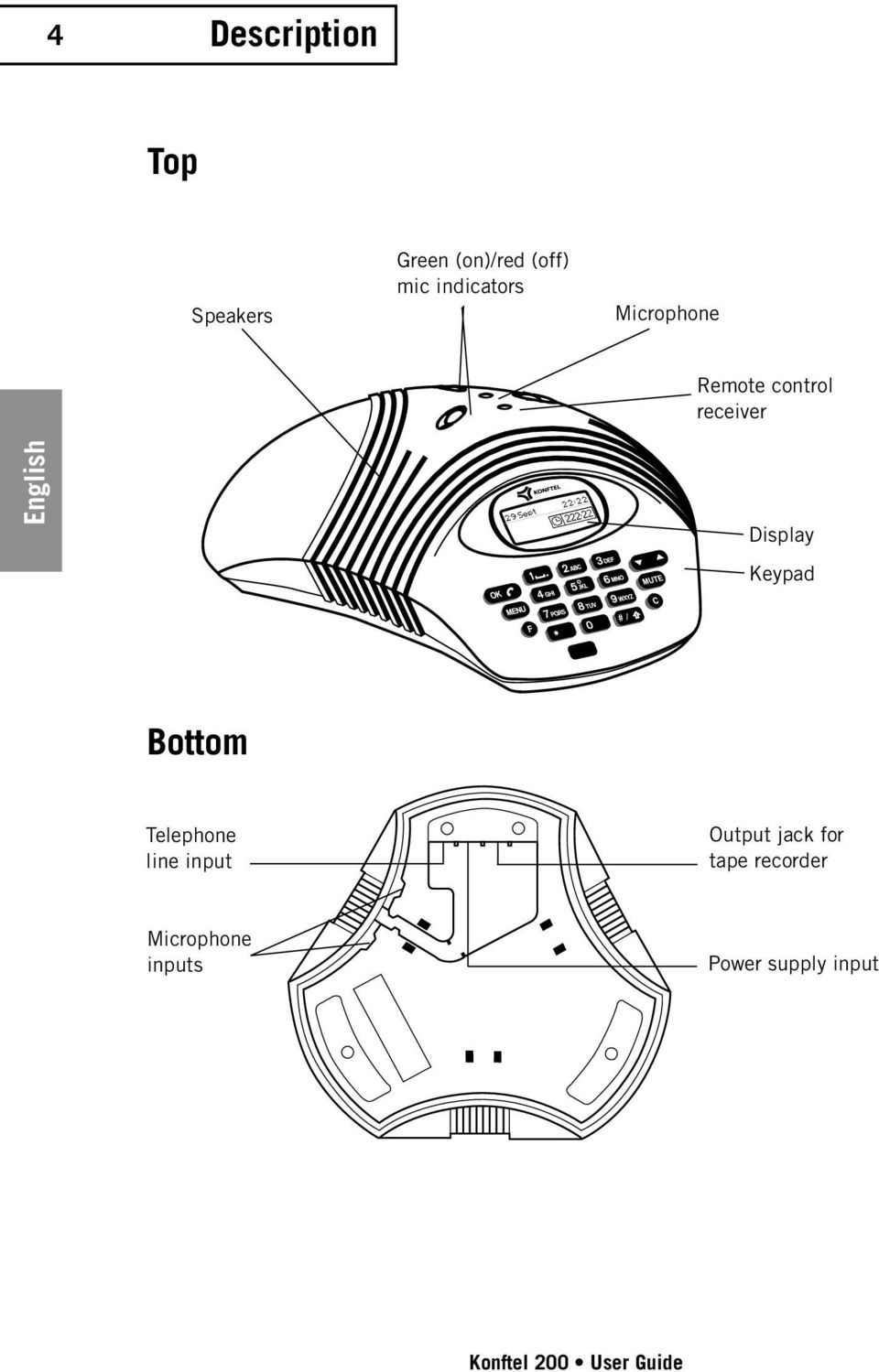
6 4 Description Top Speakers Green (on)/red (off) mic indicators Microphone Remote control receiver English Display Keypad Bottom Telephone line input Output jack for tape recorder Microphone inputs Power supply input Konftel 200 User Guide
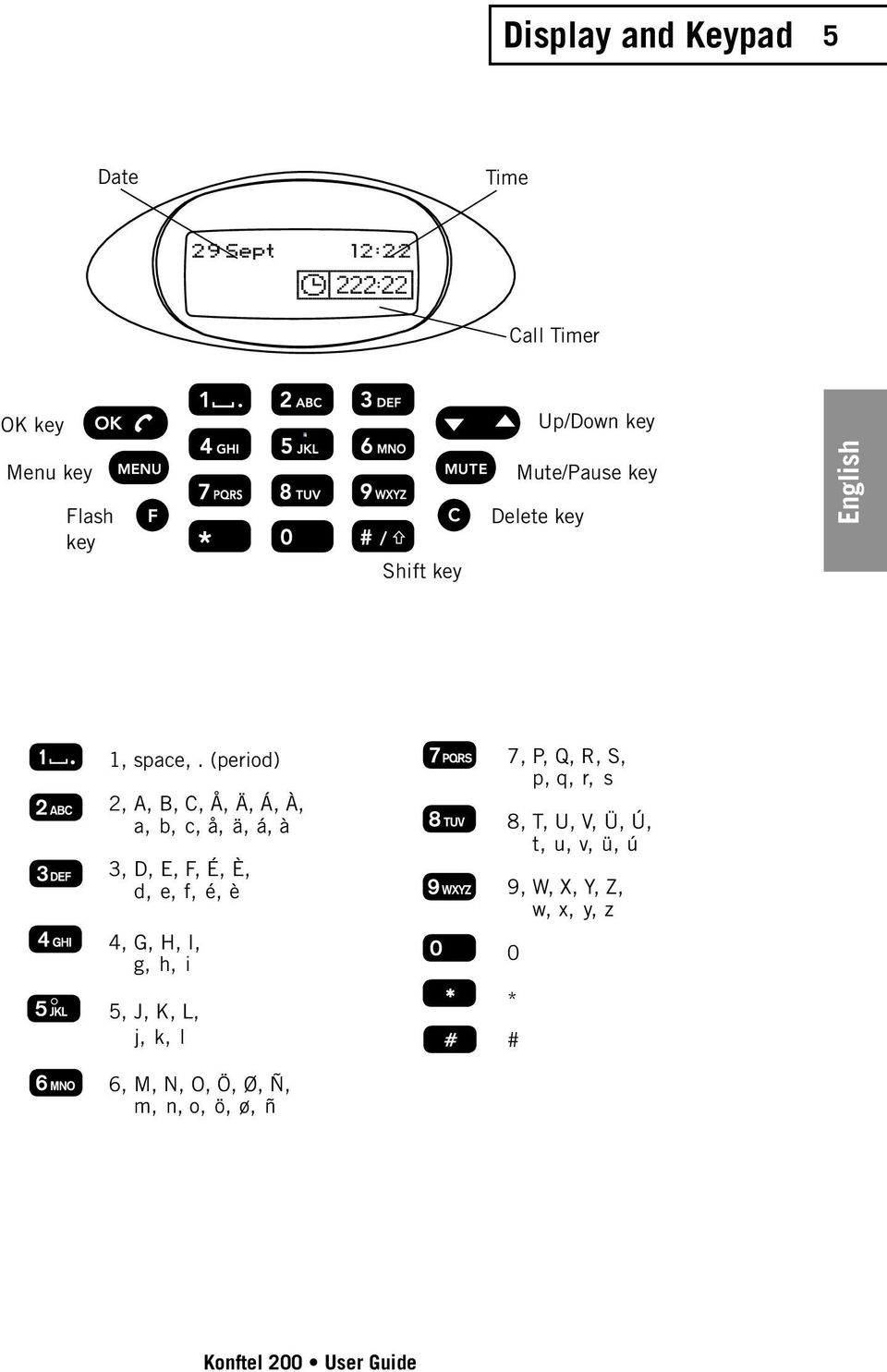
7 Display and Keypad 5 Date Time Call Timer OK key Up/Down key Menu key Flash key Shift key Mute/Pause key Delete key English 1, space,. (period) 2, A, B, C, Å, Ä, Á, À, a, b, c, å, ä, á, à 3, D, E, F, É, È, d, e, f, é, è 4, G, H, I, g, h, i 7, P, Q, R, S, p, q, r, s 8, T, U, V, Ü, Ú, t, u, v, ü, ú 9, W, X, Y, Z, w, x, y, z 0 5, J, K, L, j, k, l * # 6, M, N, O, Ö, Ø, Ñ, m, n, o, ö, ø, ñ Konftel 200 User Guide
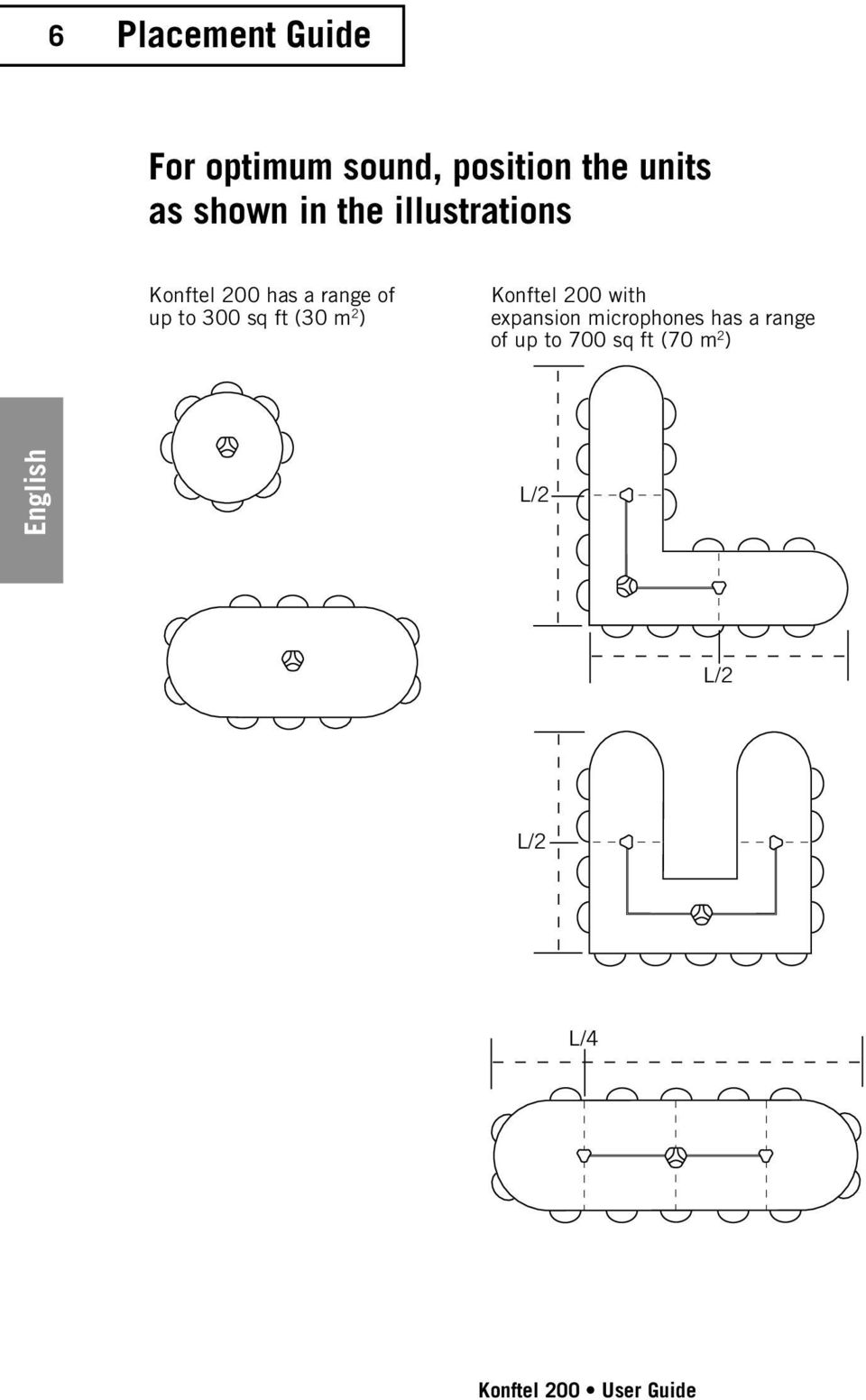
8 6 Placement Guide For optimum sound, position the units as shown in the illustrations Konftel 200 has a range of up to 300 sq ft (30 m 2 ) Konftel 200 with expansion microphones has a range of up to 700 sq ft (70 m 2 ) English L/2 L/2 L/2 L/4 Konftel 200 User Guide
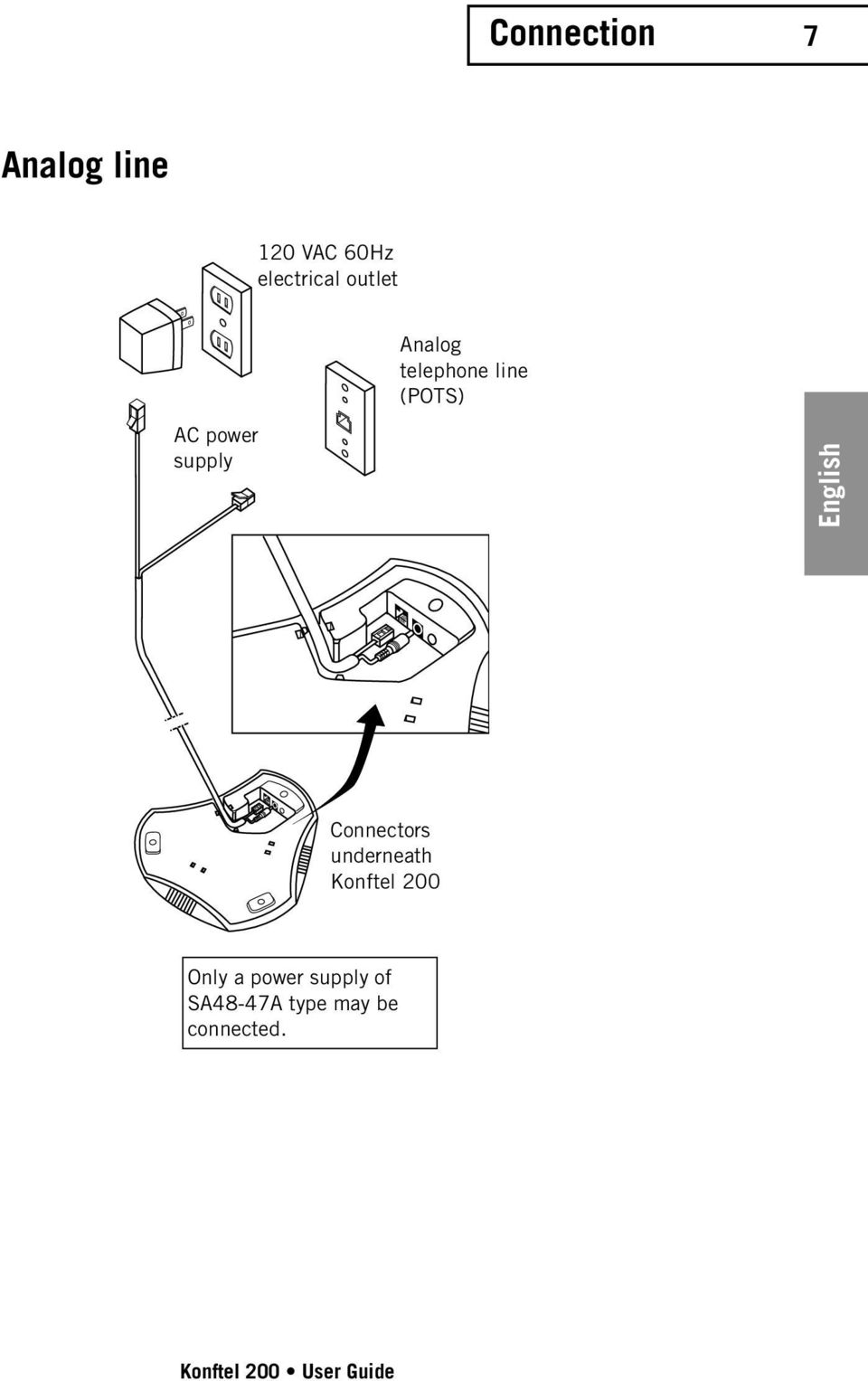
9 Connection 7 Analog line 120 VAC 60Hz electrical outlet Analog telephone line (POTS) AC power supply English Connectors underneath Konftel 200 Only a power supply of SA48-47A type may be connected. Konftel 200 User Guide
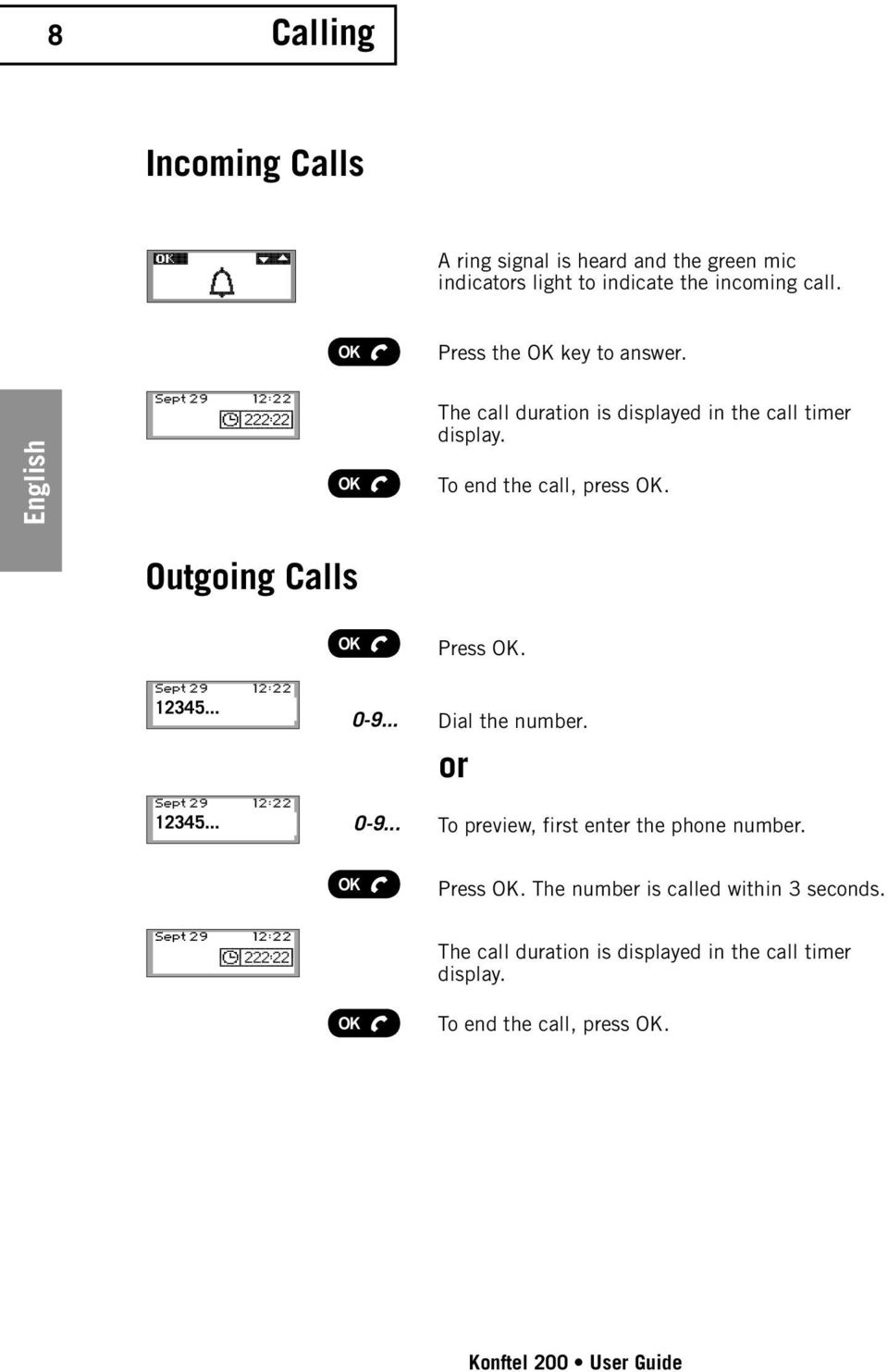
10 8 Calling Incoming Calls A ring signal is heard and the green mic indicators light to indicate the incoming call. Press the OK key to answer. English The call duration is displayed in the call timer display. To end the call, press OK. Outgoing Calls Press OK Dial the number. or To preview, first enter the phone number. Press OK. The number is called within 3 seconds. The call duration is displayed in the call timer display. To end the call, press OK. Konftel 200 User Guide
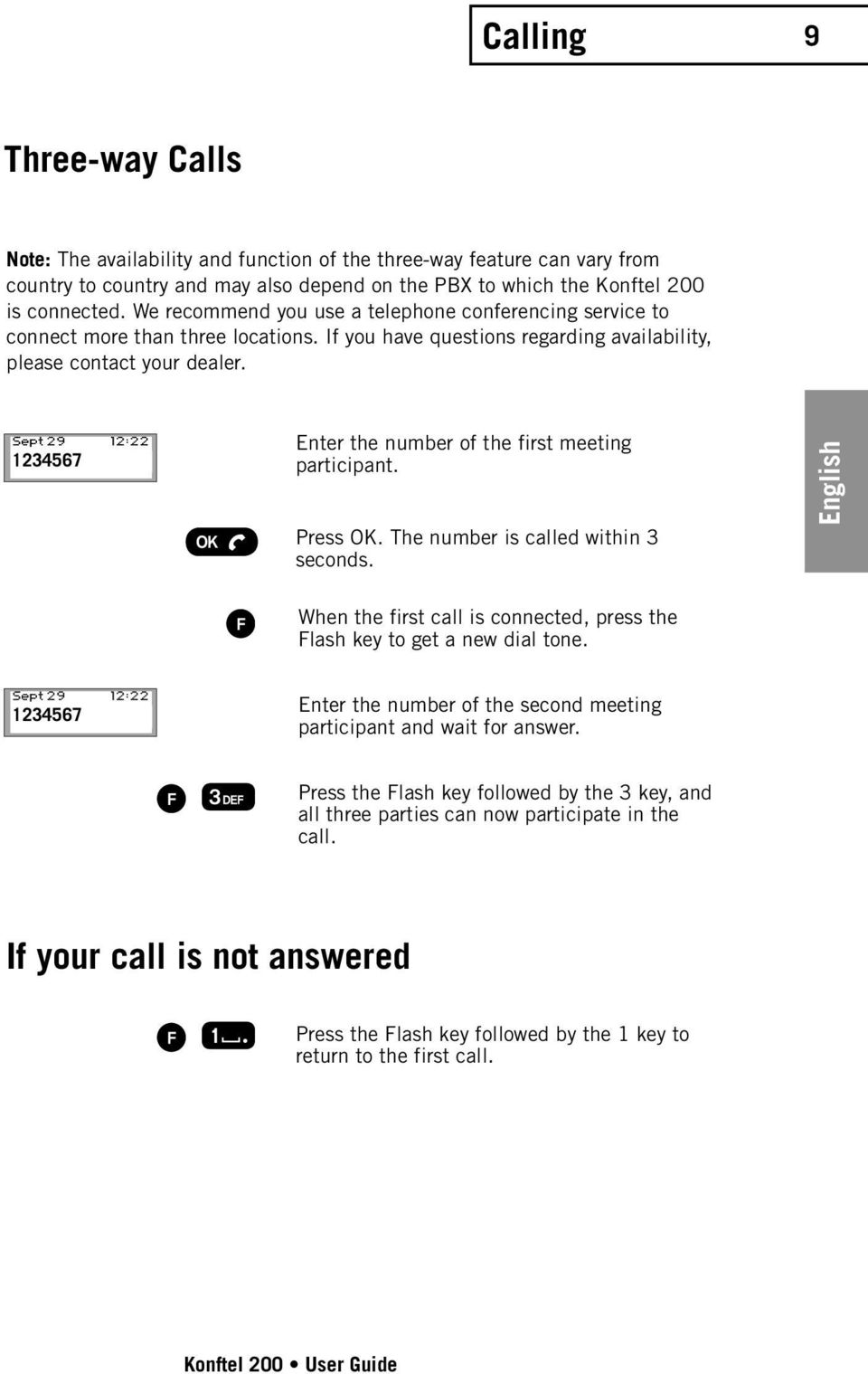
11 Calling 9 Three-way Calls Note: The availability and function of the three-way feature can vary from country to country and may also depend on the PBX to which the Konftel 200 is connected. We recommend you use a telephone conferencing service to connect more than three locations. If you have questions regarding availability, please contact your dealer Enter the number of the first meeting participant. Press OK. The number is called within 3 seconds. English When the first call is connected, press the Flash key to get a new dial tone Enter the number of the second meeting participant and wait for answer. Press the Flash key followed by the 3 key, and all three parties can now participate in the call. If your call is not answered Press the Flash key followed by the 1 key to return to the first call. Konftel 200 User Guide
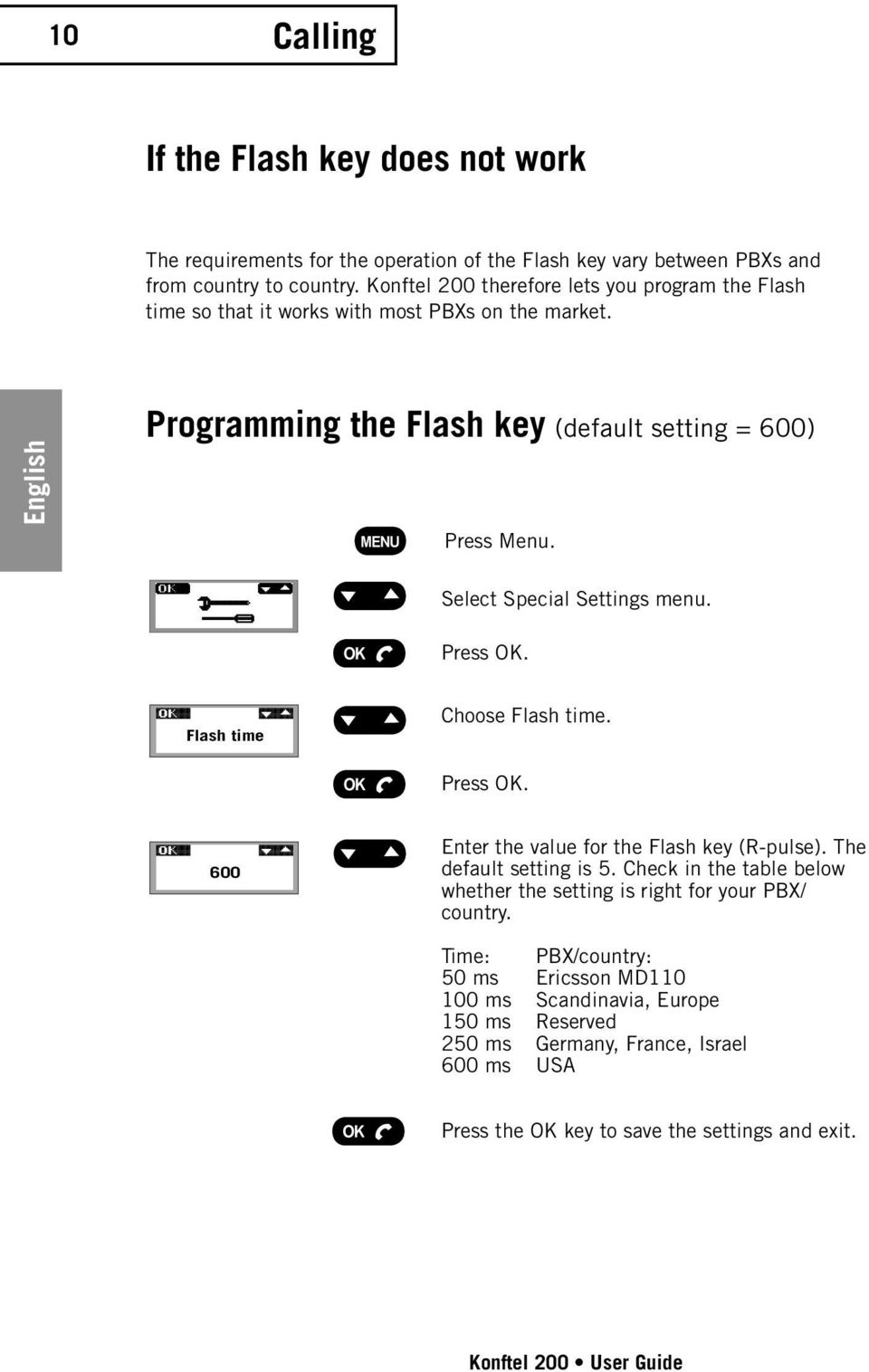
12 10 Calling If the Flash key does not work The requirements for the operation of the Flash key vary between PBXs and from country to country. Konftel 200 therefore lets you program the Flash time so that it works with most PBXs on the market. English Programming the Flash key (default setting = 600) Press Menu. Select Special Settings menu. Press OK. Flash time Choose Flash time. Press OK. 600 Enter the value for the Flash key (R-pulse). The default setting is 5. Check in the table below whether the setting is right for your PBX/ country. Time: PBX/country: 50 ms Ericsson MD ms Scandinavia, Europe 150 ms Reserved 250 ms Germany, France, Israel 600 ms USA Press the OK key to save the settings and exit. Konftel 200 User Guide
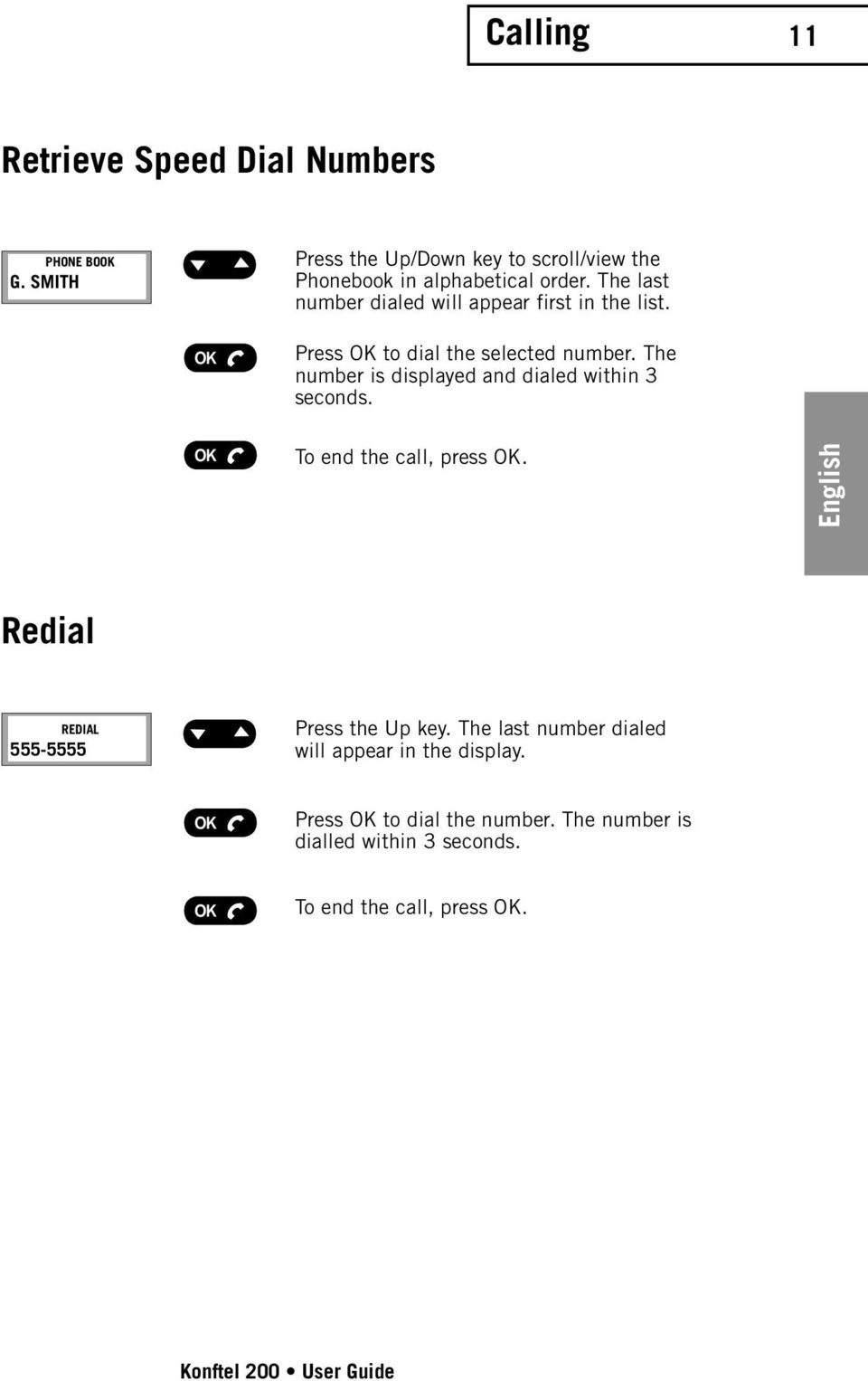
13 Calling 11 Retrieve Speed Dial Numbers PHONE BOOK G. SMITH Press the Up/Down key to scroll/view the Phonebook in alphabetical order. The last number dialed will appear first in the list. Press OK to dial the selected number. The number is displayed and dialed within 3 seconds. To end the call, press OK. English Redial REDIAL Press the Up key. The last number dialed will appear in the display. Press OK to dial the number. The number is dialled within 3 seconds. To end the call, press OK. Konftel 200 User Guide
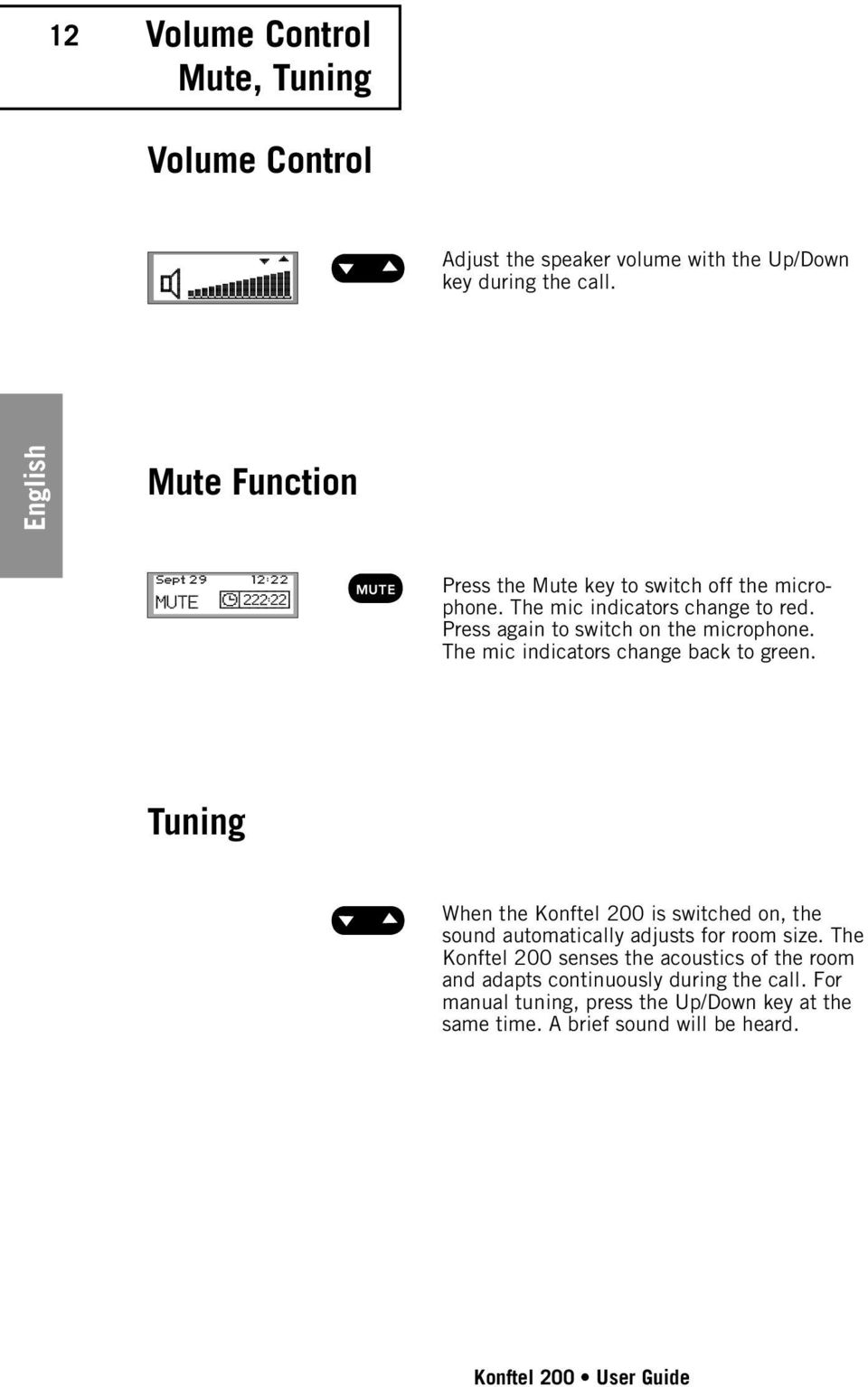
14 12 Volume Control Mute, Tuning Volume Control Adjust the speaker volume with the Up/Down key during the call. English Mute Function Press the Mute key to switch off the microphone. The mic indicators change to red. Press again to switch on the microphone. The mic indicators change back to green. Tuning When the Konftel 200 is switched on, the sound automatically adjusts for room size. The Konftel 200 senses the acoustics of the room and adapts continuously during the call. For manual tuning, press the Up/Down key at the same time. A brief sound will be heard. Konftel 200 User Guide
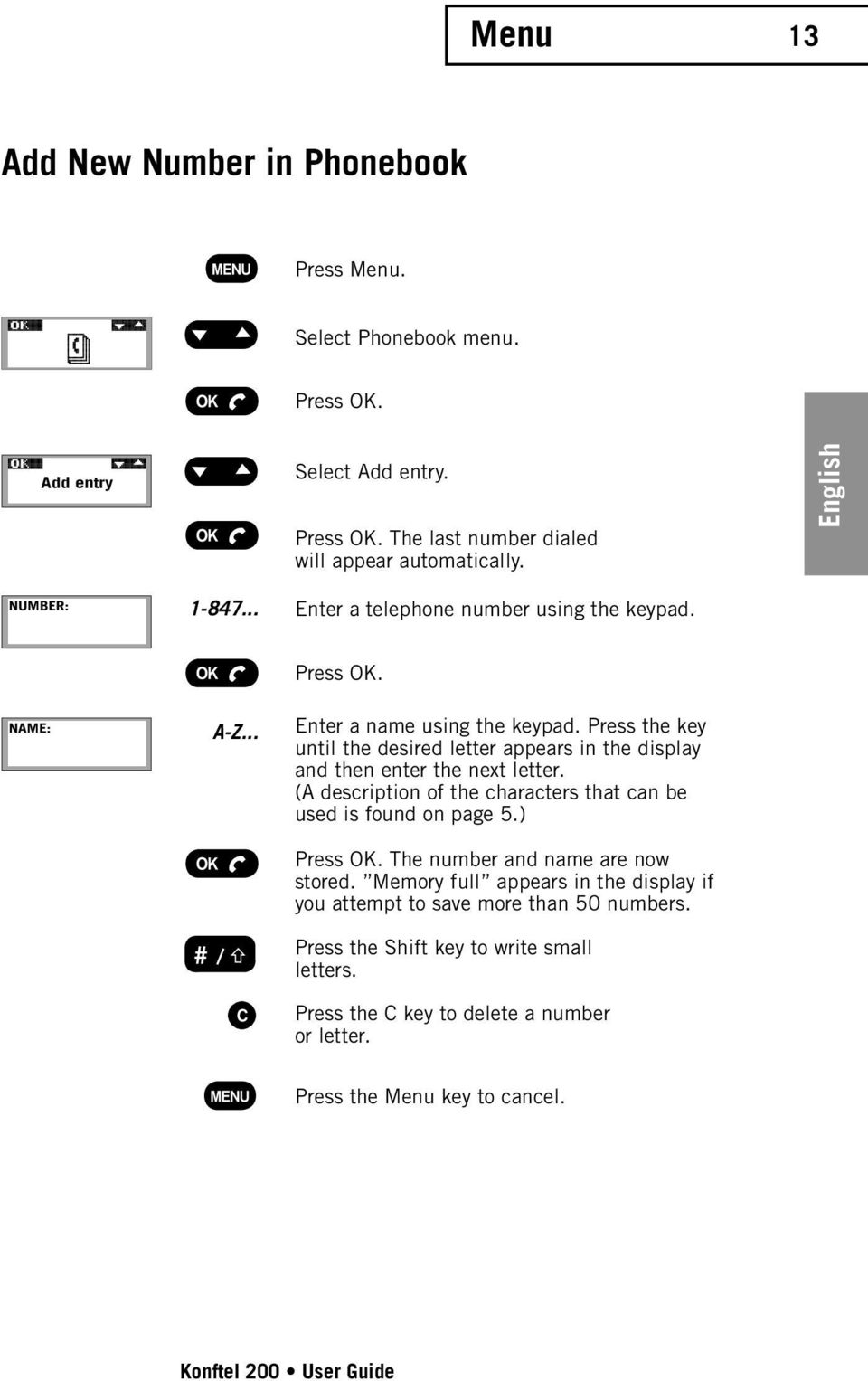
15 Menu 13 Add New Number in Phonebook Press Menu. Select Phonebook menu. Press OK. Add entry Select Add entry. Press OK. The last number dialed will appear automatically. English NUMBER: Enter a telephone number using the keypad. NAME: A-Z... Press OK. Enter a name using the keypad. Press the key until the desired letter appears in the display and then enter the next letter. (A description of the characters that can be used is found on page 5.) Press OK. The number and name are now stored. Memory full appears in the display if you attempt to save more than 50 numbers. Press the Shift key to write small letters. Press the C key to delete a number or letter. Press the Menu key to cancel. Konftel 200 User Guide
16 14 Menu Edit Phonebook Press Menu. Select Phonebook menu. Press OK. English Edit Select Edit. Press OK. PHONE BOOK Company Inc. Select the name you want to edit from the list using the Up/Down key. Press OK. NUMBER: Edit the number with the keypad and press OK. NAME: A-Z... Edit the name with the keypad and press OK. The number/name is now stored. Press the C key to delete a number or letter. Press the Menu key to cancel. Konftel 200 User Guide
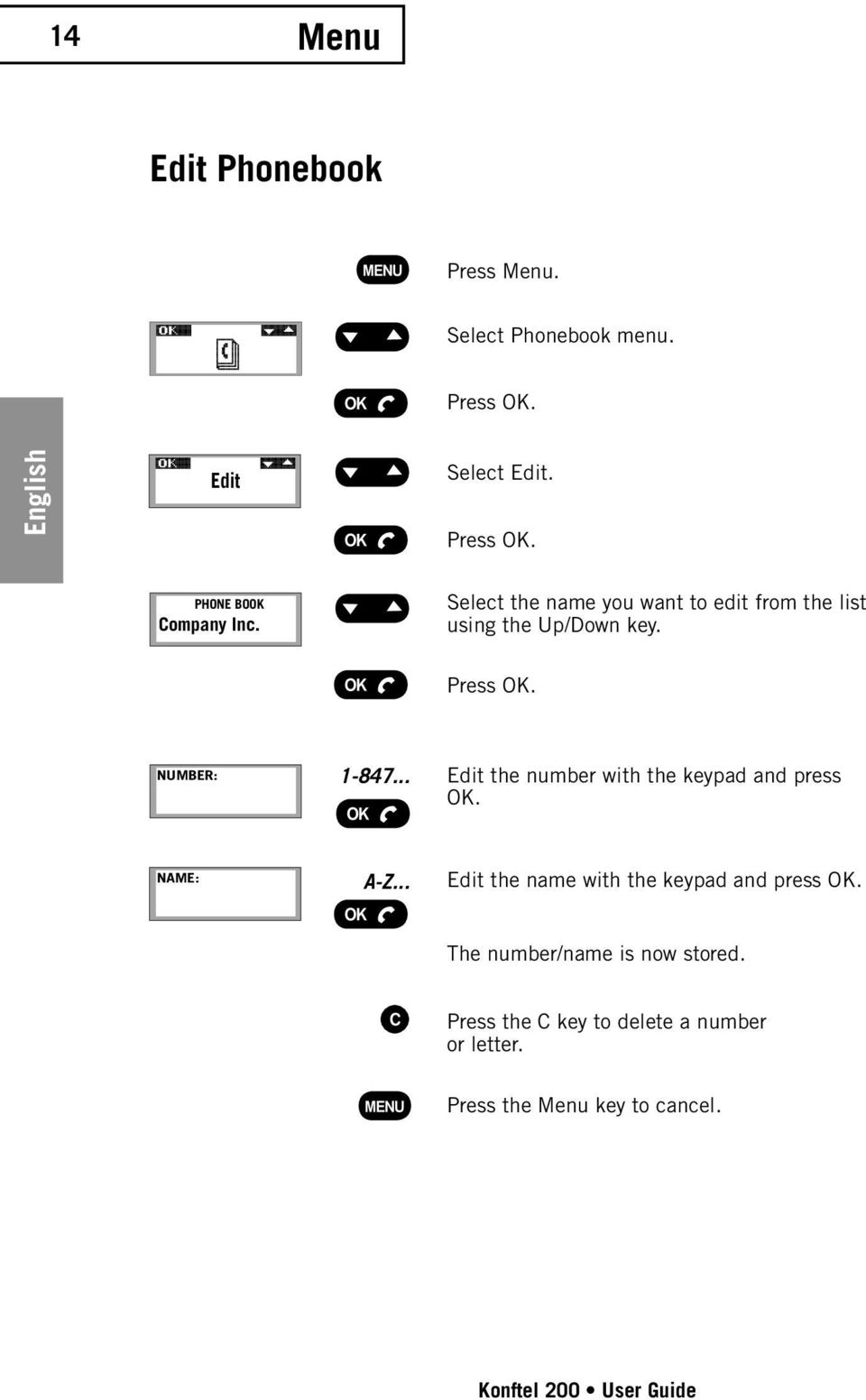
17 Menu 15 Delete Name and Number Press Menu. Select Phonebook menu. Press OK. Erase PHONE BOOK Company Inc Select Erase. Press OK. Select the name that you wish to delete from the list. Press OK to select. English Erase? Erase? appears in the display. If you do not wish to delete, press the C key. If you wish to delete, press OK. The selected name and number are now deleted. Adjust the Ring Volume Press Menu. Select the Ring Volume menu. Press OK. Adjust the volume with the Up/Down key. The ring volume is muted by selecting the symbol with an oblique bar over the bell. Press OK. The Ring Signal Volume is now stored. Konftel 200 User Guide
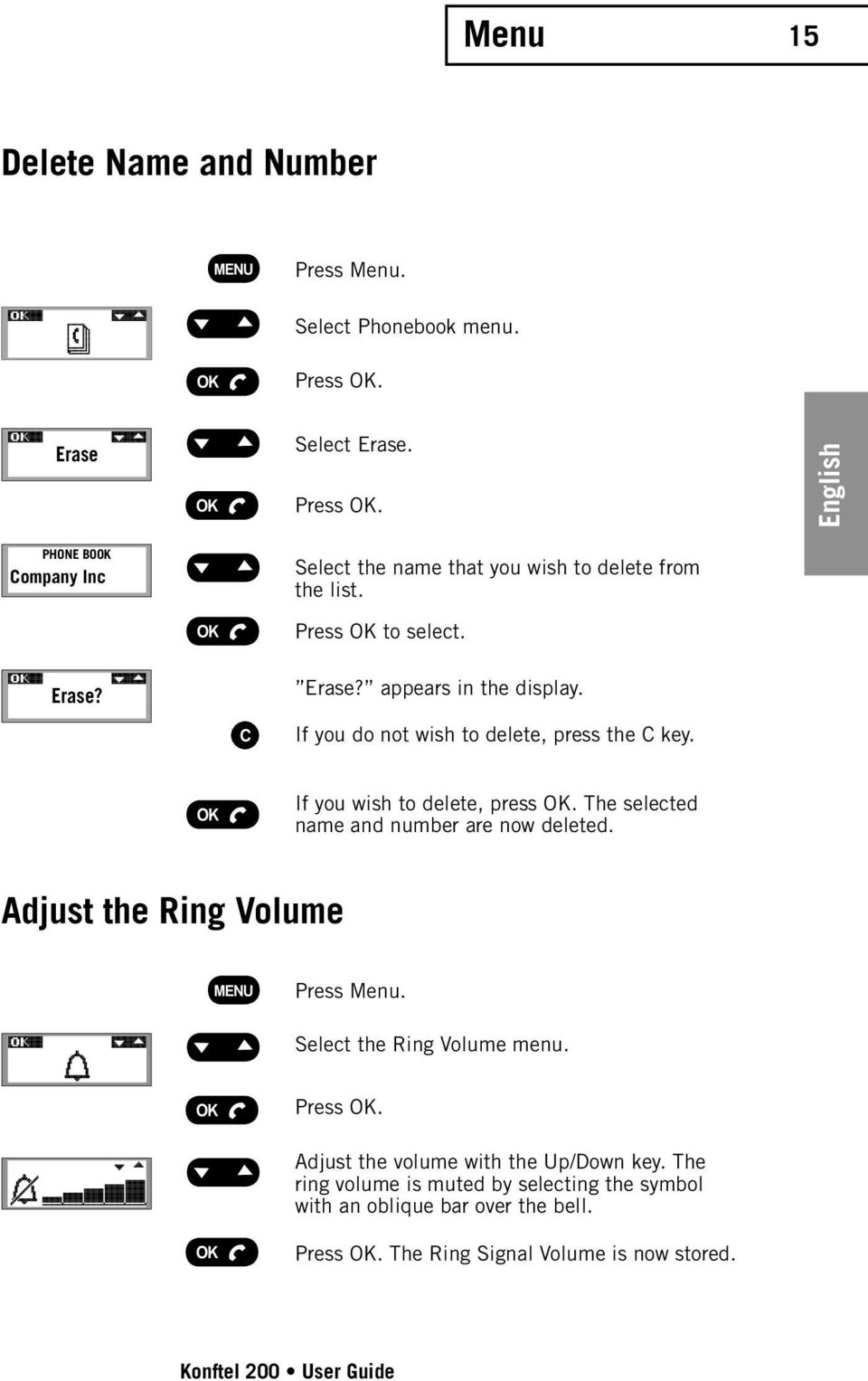
18 16 Menu Change Time and Date Press Menu. Select Time and Date menu. Press OK. English Adjust Time and Date with the Up/Down key. Select Date. Press OK. Select Month. Press OK. Select Year. Press OK. Select Hour. Press OK. Select Minutes. Press OK. Time and date are now stored. Go back with C key Select Language Press Menu. Select Language menu. Press OK. English Select language with the Up/Down key. Spanish... Press OK. Konftel 200 User Guide
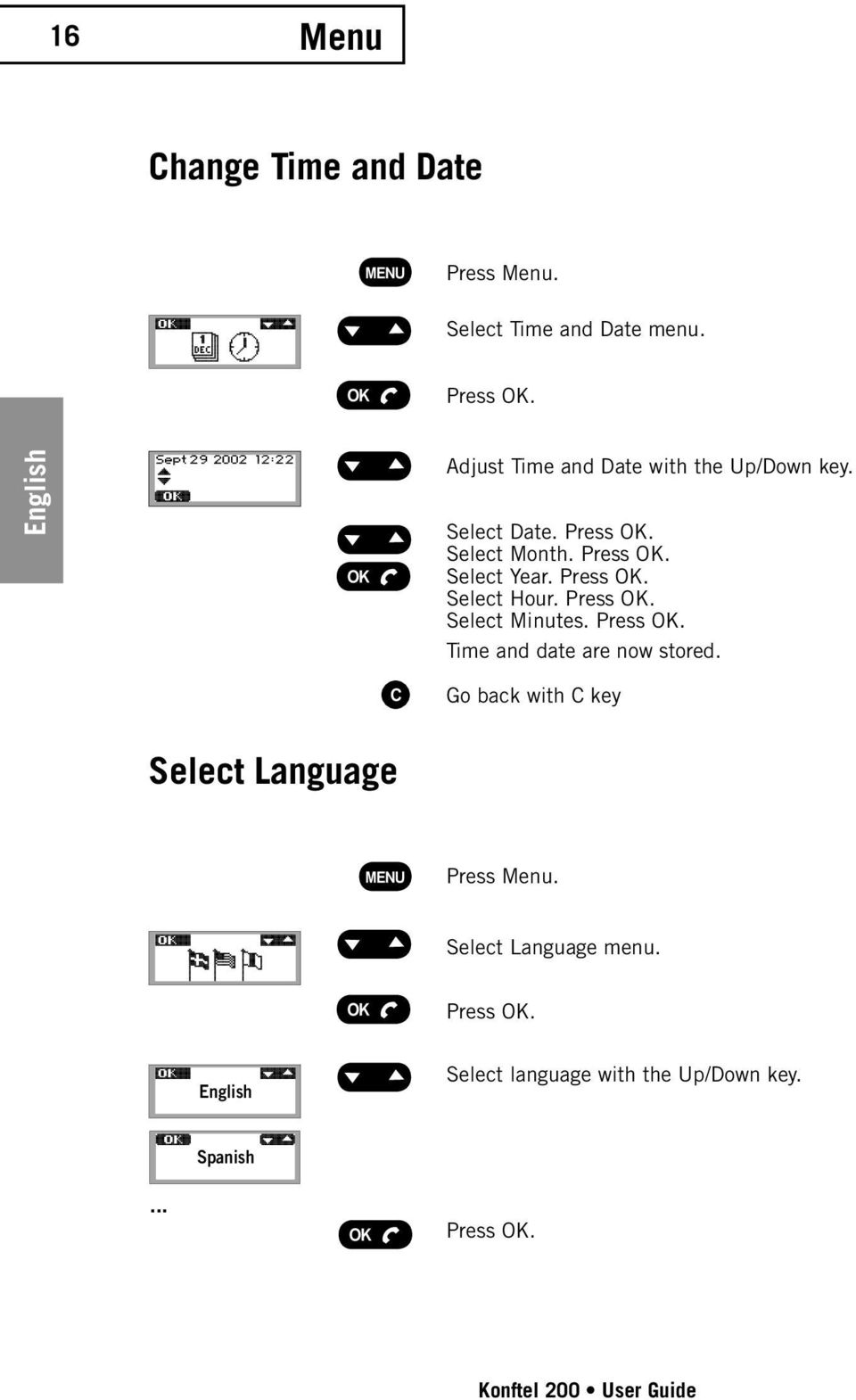
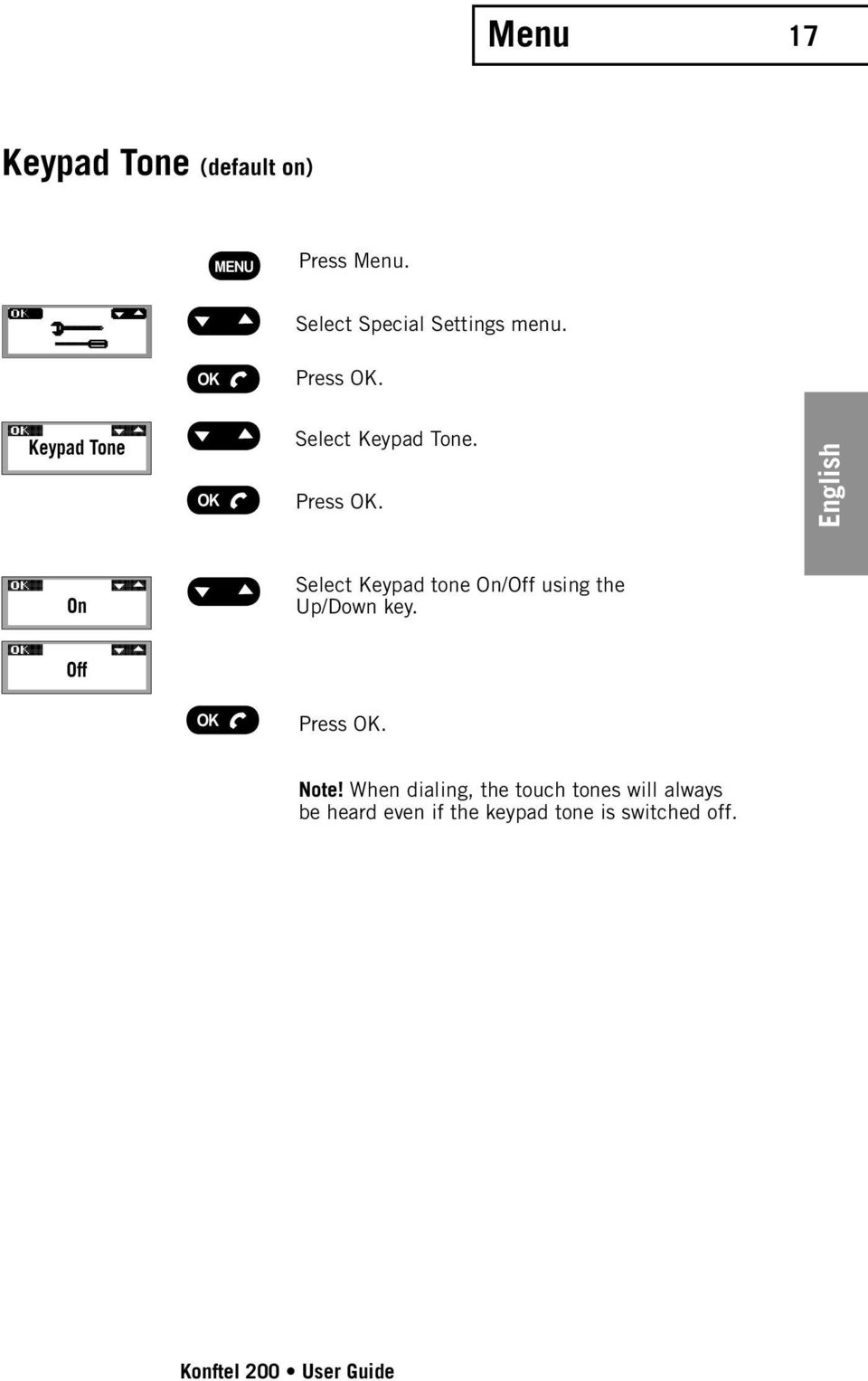
19 Menu 17 Keypad Tone (default on) Press Menu. Select Special Settings menu. Press OK. Keypad Tone Select Keypad Tone. Press OK. English On Select Keypad tone On/Off using the Up/Down key. Off Press OK. Note! When dialing, the touch tones will always be heard even if the keypad tone is switched off. Konftel 200 User Guide
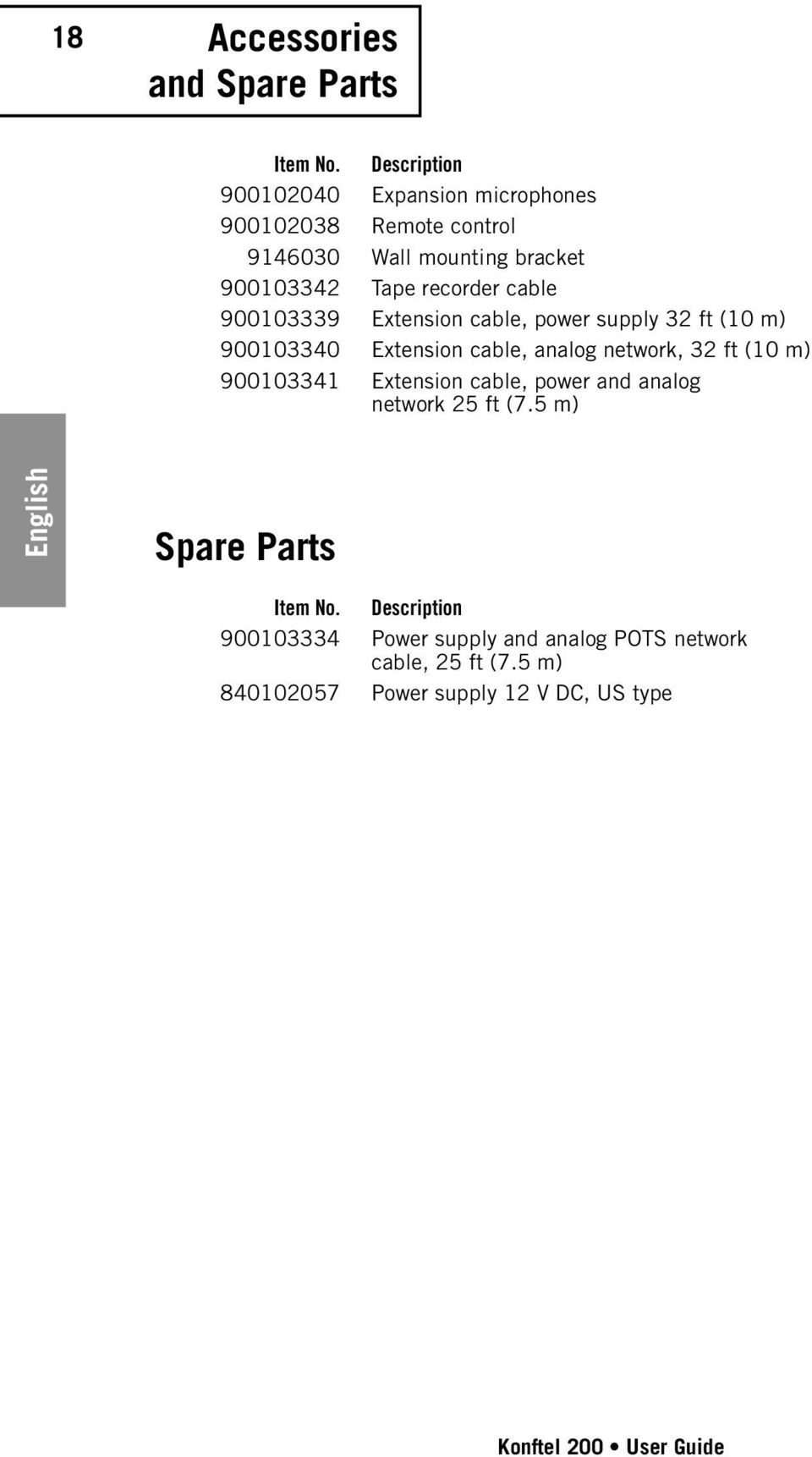
20 18 Accessories and Spare Parts Item No. Description Expansion microphones Remote control Wall mounting bracket Tape recorder cable Extension cable, power supply 32 ft (10 m) Extension cable, analog network, 32 ft (10 m) Extension cable, power and analog network 25 ft (7.5 m) English Spare Parts Item No. Description Power supply and analog POTS network cable, 25 ft (7.5 m) Power supply 12 V DC, US type Konftel 200 User Guide
21 Accessories 19 Expansion microphones Item No Expansion microphones ft ( m) Konftel 200 English The Konftel 200 can be easily modified to accommodate conference rooms with the use of two expansion microphones. It is then able to provide up to 700 sq. ft. (70 m 2 ) of coverage. Advantages: stronger sound from the speakers, higher microphone sensitivity. Note! Always disconnect the power supply from the electrical outlet when disconnecting or connecting the expansion microphones cables. Carefully use a screwdriver when disconnecting the expansion microphones cables. The expansion microphones should be placed not less than 2.5 ft (0.8 m) and not more than 8 ft (2.5 m) from the central unit and are connected using the cables supplied before making the call. Once the expansion microphones are connected, the built-in microphone of the Konftel 200 is disconnected and the display shows how many units are connected. The expansion microphones are supplied with two sets of cable, 5 ft (1.5 m) and 8 ft (2.5 m). The speaker volume can also be adjusted from the expansion microphones. Tuning can also be performed from the expansion microphones. Press the Up/Down key at the same time. A brief sound will be heard. Press the Mute key for muting. Muting affects all the connected microphones. The microphone indicators will change from green to red. Konftel 200 User Guide
22 20 Accessories Remote Control Item No English All functions of the Konftel 200 can be conveniently operated from your position, regardless of where you are standing or sitting. Konftel 200 User Guide
23 Accessories 21 Remote Control Functions Lifts and replaces the handset regardless of whether Konftel 200 is in menu mode. If the Phonebook is displayed, the number shown will be called. Enter the number or write the name. #/ shifts between capital and small letters. Enters and exits menu mode. OK in menus, lifts and replaces the handset. Dials the speed dial number. English Deletes characters when dialing numbers or writing names. Exits from menus. Used for operator services, e.g. for three-way calls. When a speed dial number is either saved or edited in the Phonebook, it may be stored by ending the programming with a function key instead of OK. The number behind the key is called in all menu modes other than programming. NOTE: A function key is overwritten without prior warning when a new number is stored. Tunes the Konftel 200 to the acoustic environment of the room. Adjusts the volume, leafs through the Phonebook and scrolls through the menus. Mute function. Switches the microphones on and off. Inserts a pause in speed dial numbers. Calls the last number dialed regardless of the menu mode. Konftel 200 User Guide
24 22 Troubleshooting and Maintenance Troubleshooting 1. Check that the microphone is on during the call. The green microphone indicators must be lit. 2. Check that the Konftel 200 is connected between an analog telephone jack and the telephone line input underneath the Konftel 200. English 3. Bypass any extension cables and check whether the system is functioning correctly. If not, contact your dealer. 4. Disconnect the expansion microphones to determine if the system works without them. If not, return all units for service. 5. If the Konftel 200 must wait for a second dial tone, you should insert a pause with the Mute/ Pause key when entering telephone numbers in the Phonebook. Maintenance Clean the equipment with a dry, soft cleaning cloth. Do not use any liquids! Konftel 200 User Guide
25 Technical Data 23 Central Unit Power Supply: Network interface: AC transformer 120 V AC/12 V DC; 700 ma. Analog PBX or POTS, RJ-11. Power supply and network cable: Recommended room conditions: Frequency response: Loudspeaker volume: Room echo suppression: Line echo suppression: Automatic calibration: Tape recorder output: Dimensions: Weight: Temperature range: Humidity: Approvals: FCC Part 68 FCC Part 15 ICES-003 UL60950 CAN/CSA C22.2 Keyboard: 19 keys. 25 ft (7.5 metre), RJ-11 (line), EIAJ Class IV (power). Reverberation time: <0.5 sec. Background noise: <45 db(a) Hz. 85 db SPL (increased if extra microphones are used). 208 ms. 25 ms. <1 ms impulse (not discernible). 3.5 mm tele jack. Contact for connection of tape recorder may only be connected to a SELV voltage in accordance with (UL60950) EN Diameter 9 inch (232 mm). 1.5 lbs (700 g) F (5 40 C) in operation. 20 % 80 % non-condensing. English Konftel 200 User Guide
26 24 Technical Data Expansion Microphones (accessories) English Power supply: Power from microphone outlet Cables: Modular 4/4 contacts 2 x 5 ft (1.5 m) and 2 x 8 ft (2.5 m) Microphone: Omnidirectional Microphone indicator: Green microphone on Red microphone off Temperature range: F (5 40 C) in operation Keyboard: 3 keys Remote Control (accessories) Batteries: 4 x AAA (LR03), 1.5 V Temperature range: F (5 40 C) Range: Up to 16 ft (5 m) Dimensions: 8 x 2 x 1 inch (205 x 55 x 21 mm) (L x B x H) Weight: 4.9 oz (140 g) Keyboard: 26 keys Konftel 200 User Guide
27 Warranty 25 Limited Warranty Konftel warrants to the end user ( Customer ) that this product will be free from defects in workmanship and materials, under normal use and service, for two (2) years from the date of purchase from its authorized reseller. Konftel s sole obligation under this express warranty shall be, at Konftel s option and expense, to repair the defective product or part, deliver to Customer an equivalent product or part to replace the defective item. All products that are replaced will become the property of Konftel. Replacement products or parts may be new or reconditioned. Konftel warrants any replaced or repaired product or part for ninety (90) days from shipment, or the remainder of the initial warranty period, whichever is longer. Products returned to Konftel must be sent prepaid and packaged appropriately for safe shipment, and it is recommended that they be insured or sent by a method that provides for tracking of the package. Responsibility for loss or damage does not transfer to Konftel until the returned item is received by Konftel. The repaired or replaced item will be shipped to Customer, at Konftel s expense, not later than twelwe days (12) days after Konftel receives the defective product, and Konftel will retain risk of loss or damage until the item is delivered to Customer. English Exclusions KONFTEL will not be liable under this limited warranty if its testing and examination discloses that the alleged defect or malfunction in the product does not exist or results from: Failure to follow Konftel s installation, operation, or maintenance instructions. Unauthorized product modification or alteration. Unauthorized use of common carrier communication services accessed through the product. Abuse, misuse, negligent acts or omissions of Customer and persons under Customer s control; or Acts of third parties, acts of God, accident, fire, lighting, power surges or outages, or other hazards. WARRANTY EXCLUSIVE. IF A KONFTEL PRODUCT DOES NOT OPERATE AS WARRANTED ABOVE, CUSTOMER S SOLE REMEDY FOR BREACH OF THAT WARRANTY SHALL BE REPAIR OR REPLACEMENT AT KONFTEL S OPTION. TO THE FULL EXTENT ALLOWED BY LAW, THE FOREGOING WARRANTIES AND REMEDIES ARE EXCLUSIVE AND ARE IN LIEU OF ALL OTHER WARRANTIES, TERMS, OR CONDITIONS, EXPRESS OR IMPLIED, EITHER IN FACT OR BY OPERATION OF LAW, STATUTORY OR OTHERWISE, INCLUDING WARRANTIES, TERMS, OR CONDITIONS OF MERCHANTABILITY, FITNESS FOR A PARTICULAR PURPOSE, SATISFACTORY QUALITY, CORRESPONDENCE WITH DESCRIPTION, AND NON-INFRINGEMENT, ALL OF WHICH ARE EXPRESSLY DISCLAIMED. KONFTEL NEITHER ASSUMES NOR AUTHORIZES ANY OTHER PERSON TO ASSUME FOR IT ANY OTHER LIABILITY Konftel 200 User Guide
28 26 Service Service Agreements For information on KONFTEL service agreements, call or KONFTELs helpdesk: USA and Canada +1-(847) Monday through Friday 8:00 AM to 17:00 PM (GMT:-1) International Monday through Friday 8:00 AM to 17:00 PM (GMT:-1) English If you purchased your product from a Konftel Authorized Reseller, contact the Authorized Reseller for information about service agreements applicable to your product. LIMITATION OF LIABILITY. TO THE FULL EXTENT ALLOWED BY LAW, KONFTEL EXCLUDES FOR ITSELF AND ITS SUPPLIERS ANY LIABILITY, WHETHER BASED IN CONTRACT OR TORT (INCLUDING NEGLIGENCE), FOR INCIDENTAL, CONSEQUENTIAL, INDIRECT, SPECIAL, OR PUNITIVE DAMAGES OF ANY KIND, OR FOR LOSS OF REVENUE OR PROFITS, LOSS OF BUSINESS, LOSS OF INFORMATION OR DATA, OR OTHER FINANCIAL LOSS ARISING OUT OF OR IN CONNECTION WITH THE SALE, INSTALLA- TION, MAINTENANCE, USE, PERFORMANCE, FAILURE, OR INTERRUPTION OF ITS PRODUCTS, EVEN IF KONFTEL OR ITS AUTHORIZED RESELLER HAS BEEN ADVISED OF THE POSSIBILITY OF SUCH DAMAGES, AND LIMITS ITS LIABILITY TO REPAIR OR REPLACE AT KONFTEL S OPTION. THIS DIS- CLAIMER OF LIABILITY FOR DAMAGES WILL NOT BE AFFECTED IF ANY REMEDY PROVIDED HEREIN SHALL FAIL OF ITS ESSENTIAL PURPOSE. Disclaimer Some countries, states, or provinces do not allow the exclusion or limitation of implied warranties or the limitation of incidental or consequential damages for certain products supplied to consumers, or the limitation of liability for personal injury, so the above limitations and exclusions may be limited in their application to you. When the implied warranties are not allowed to be excluded in their entirety, they will be limited to the duration of the applicable written warranty. This warranty gives you specific legal rights which may vary depending on local law. Konftel 200 User Guide
29 FCC Information 27 FCC Statement This equipment complies with Part 68 of the FCC rules and the requirements adopted by the ACTA. On the bottom of this equipment is a label that contains, among other information, a product identifier in the format US:5RWMT05B If requested, this number must be provided to the telephone company. An applicable certification jack Universal Service Order Code (USOC) for the equipment is provided (i.e., RJ11C ) in the packaging with each piece of approved terminal equipment. A plug and jack used to connect this equipment to the premises wiring and telephone network must comply with the applicable FCC Part 68 rules and requirements adopted by the ACTA. A compliant telephone cord and modular plug is provided with this product. It is designed to be connected to a compatible modular jack that is also compliant. See installation instructions for details. The REN is used to determine the number of devices that may be connected to a telephone line. Excessive RENs on a telephone line may result in the devices not ringing in response to an incoming call. In most but not all areas, the sum of RENs should not exceed five (5.0). To be certain of the number of devices that may be connected to a line, as determined by the total RENs, contact the local telephone company. [For products approved after July 23, 2001, the REN for this product is part of the product identifier that has the format US: 5RWMT05B The digits represented by 05 are the REN without a decimal point (e.g., 03 is a REN of 0.3). For earlier products, the REN is separately shown on the label.] English NOTICE: If your home has specially wired alarm equipment connected to the telephone line, ensure the installation of this Konftel 200 does not disable your alarm equipment. If you have questions about what will disable alarm equipment, consult your telephone company or a qualified installer. NOTICE: According to telephone company reports, AC electrical surges, typically resulting from lightning strikes, are very destructive to telephone equipment connected to AC power sources. To minimize damage from these types of surges, a surge protector is recommended. Konftel 200 User Guide
30 28 FCC Information English The FCC Wants You To Know In the unlikely event that your phone causes problems on the phone line, the phone company can temporarily discontinue your service. If this happens, the phone company attempts to notify you in advance. If advance notice is not practical, the phone company notifies you as soon as possible and advises you of your right to file a complaint with the FCC. Also, the phone company can make changes to its lines, equipment, operations, or procedures that could affect the operation of this telephone. The telephone company notifies you of these changes in advance, so you can take the necessary steps to prevent interruption of your telephone service. This equipment complies with the limits for a Class B digital device as specified in Part 15 of FCC Rules. These limits provide reasonable protection against radio and TV interference in a residential area. However, your equipment might cause TV or radio interference even when it is operating properly. To eliminate interference, you can try one or more of the following corrective measures: reorient or relocate the receiving antenna increase the distance between the equipment and the radio or TV. use outlets on different electrical circuits for the equipment and the radio or TV Consult your local store if the problem still exists. Connection to party line service is subject to state tariffs. Contact the state public utility commission, public service commission or corporation commission for information. Warning: Changes or modifications to this phone not expressly approved by the party responsible for compliance could void the user s authority to operate the equipment. Note: Consent all party if the conversation was recorded. Lightning Your telephone has built-in lightning protection to reduce the risk of damage from surges in telephone line and power line current. This lightning protection meets or exceeds FCC requirements. However, lightning striking the telephone or power lines can damage your telephone. Lightning damage is not common. Nevertheless, if you live in an area that has severe electrical storms, we suggest that you unplug your phone when storms approach to reduce the possibility of damage. Konftel 200 User Guide
31 CSA Information 29 Statement This product meets the applicable Industry Canada technical specifications. The Ringer Equivalence Number is an indication of the maximum number of devices allowed to be connected to a telephone interface. The termination on an interface may consist of any combination of devices subject only to the requirement that the sum of the Ringer Equivalence Numbers of all the devices does not exceed five. English Konftel 200 User Guide
32
33 Manual de instrucciones Sistema de conferencia telefónica Konftel 200 English I Espanol I Français
34 En este paquete se incluyen los siguientes elementos: 1 unidad Manual de instrucciones 1 unidad Sistema de conferencia telefónica 1 unidad Alimentación 1 unidad Cable de alimentación y de red 1 juego Conectores intermedios En el paquete de equipo opcional se incluyen los siguientes elementos: 1 par Micrófonos de expansión Español 2 unds Cable para micrófono de expansión de 4.9 ft (1,5 m) 2 unds Cable para micrófono de expansión de 8.2 ft (2,5 m) 1 unidad Mando a distancia 4 unds Pilas (AAA) para el mando a distancia Compruebe que el paquete contiene todos los elementos descritos. Si falta alguno de ellos, póngase en contacto con su distribuidor. WARNING: To reduce the risk of fire or shock hazard, do not expose this product to rain or moisture. CAUTION RISK OF ELECTRIC SHOCK DO NOT OPEN CAUTION: TO REDUCE THE RISK OF ELECTRICAL SHOCK, DO NOT REMOVE COVER OR BACK. NO USER- SERVICEABLE PARTS INSIDE. REFER SERVICING TO QUALIFIED PERSONNEL. The lightning symbol is intended to alert you to the presence of uninsulated dangerous voltage within this product s enclosure that might be of sufficient magnitude to constitute a risk of electric shock. Do not open the product s case. The exclamation symbol is intended to inform you that important operating and maintenance instructions are included in the literature accompanying this product. Konftel 200 Manual de instrucciones
35 Índice Descripción Pantalla y teclado Instrucciones de colocación Conexión Llamadas Recepción de llamadas Realización de llamadas Llamadas a tres Programación de la tecla Flash Marcación rápida, rellamada Control de volumen, función silencio y ajuste Menú Agregar números al listín telefónico Modificar el listín telefónico Borrar un número y nombre Ajustar el volumen del timbre Modificar fecha y hora Seleccionar idioma Tono de teclado Accesorios y piezas de repuesto Accesorios Micrófonos de expansión Mando a distancia Funciones del mando a distancia Localización de fallos y mantenimiento Especificaciones técnicas Mantenimiento Español Konftel 200 Manual de instrucciones
36 4 Descripción Parte superior Altavoces Indicadores de micrófono verde (encendido)/ rojo (apagado) Micrófono Receptor de mando a distancia Pantalla Teclado Español Parte inferior Entrada de línea telefónica Salida para grabadora Entradas para micrófono Entrada de alimentación Konftel 200 Manual de instrucciones
37 Pantalla y teclado 5 Fecha Hora Contador de llamadas Tecla OK Tecla Menú Tecla Flash Tecla Arriba/Abajo Tecla Silencio/Pausa Tecla Borrar Tecla Mayús Español 1, espacio,. (punto) 2, A, B, C, Å, Ä, Á, À, a, b, c, å, ä, á, à 3, D, E, F, É, È, d, e, f, é, è 4, G, H, I, g, h, i 5, J, K, L, j, k, l 7, P, Q, R, S, p, q, r, s 8, T, U, V, Ü, Ú, t, u, v, ü, ú 9, W, X, Y, Z, w, x, y, z 0 * # 6, M, N, O, Ö, Ø, Ñ, m, n, o, ö, ø, ñ Konftel 200 Manual de instrucciones
38 6 Instrucciones de colocación Para obtener un sonido óptimo, coloque las unidades tal y como se muestra en las ilustraciones. Utilice Konftel 200 para salas de un tamaño máximo de 300 sq ft (30 m 2 ). Utilice Konftel 200 con micrófonos de expansión para salas de un tamaño máximo de 700 sq ft (70 m 2 ) L/2 Español L/2 L/2 L/4 Konftel 200 Manual de instrucciones
39 Conexión 7 Línea analógica Toma de alimentación 120 V CA 60Hz Alimentación CA Línea de teléfono analógica (POTS) Español Conectores en la parte inferior de Konftel 200 Sólo se puede utilizar un conector de alimentación de tipo SA48-47A. Konftel 200 Manual de instrucciones
40 8 Llamadas Recepción de llamadas Se oye un timbre de llamada y se enciende el indicador de micrófono verde para indicar la llamada entrante. Pulse la tecla OK para contestar. La duración de la llamada se muestra en la pantalla de contador de llamadas. Para finalizar la llamada, pulse OK. Español Realización de llamadas Pulse OK. Marque el número. o Para verlo antes, introduzca el número de teléfono. Pulse OK. El número se marcará en un plazo de 3 segundos. La duración de la llamada se muestra en la pantalla de contador de llamadas. Para finalizar la llamada, pulse OK. Konftel 200 Manual de instrucciones
41 Llamadas 9 Llamadas a tres Nota:la disponibilidad y funcionamiento de la llamada a tres puede variar en función del país y también depender de la central a la que esté conectada Konftel 200. Le recomendamos que utilice un servicio de conferencia telefónica para conectar más de tres ubicaciones. Si tiene alguna duda con respecto a la disponibilidad, póngase en contacto con su distribuidor Introduzca el número del primer participante de la reunión. Pulse OK. El número se marcará en un plazo de 3 segundos Cuando se haya conectado la primera llamada, pulse la tecla Flash para obtener un nuevo tono de marcado. Introduzca el número del segundo participante de la reunión y espere a obtener respuesta. Español Pulse la tecla Flash seguida de la tecla 3 y los tres participantes podrán formar parte de la llamada. Si no recibe respuesta a su llamada Pulse la tecla Flash seguida de la tecla 1 para volver a la primera llamada. Konftel 200 Manual de instrucciones
42 10 Llamadas Si la tecla Flash no funciona Los requisitos para el funcionamiento de la tecla Flash pueden variar en función de las centrales y los países. Por lo tanto, Konftel 200 le permite programar el tiempo de pulso R de modo que funcione con la mayoría de las centrales del mercado. Programación de la tecla Flash (valor predeterminado = 600) Pulse la tecla Menú. Seleccione el menú Configuración especial. Español Tiempo para la transmisión Pulse OK. Elija Tiempo para la transmisión. Pulse OK. 600 Introduzca el valor de la tecla Flash (pulso R). El valor predeterminado es 5. Consulte la siguiente tabla para comprobar si la configuración es la correcta para su central o país. Tiempo: Central/país: 50 ms Ericsson MD ms Escandinavia, Europa 150 ms Reservado 250 ms Alemania, Francia, Israel 600 ms EE.UU. Pulse la tecla OK para guardar la configuración y salir. Konftel 200 Manual de instrucciones
43 Llamadas 11 Recuperar números de marcación rápida LISTÍN TELEFÓNICO G. SMITH Pulse la tecla Arriba/Abajo para ver/desplazarse por el listín telefónico en orden alfabético. El último número marcado aparecerá en primer lugar en la lista. Pulse OK para marcar el número seleccionado. Se muestra el número y se marca en un plazo de 3 segundos. Para finalizar la llamada, pulse OK. Rellamada RELLAMADA Pulse la tecla Arriba. Aparece el último número marcado en la pantalla. Español Pulse OK para marcar el número. El número se marcará en un plazo de 3 segundos. Para finalizar la llamada, pulse OK. Konftel 200 Manual de instrucciones
44 12 Control de volumen función Silencio y ajuste Control de volumen Ajuste el volumen de los altavoces con la tecla Arriba/Abajo durante la llamada. Función Silencio Español Pulse la tecla Silencio para apagar el micrófono. La luz de los indicadores cambia a roja. Pulse de nuevo la tecla para encender el micrófono. La luz de los indicadores cambia a verde. Ajuste Al encender el sistema Konftel 200, el sonido se ajusta automáticamente al tamaño de la sala. Este sistema detecta la acústica de la sala y se adapta continuamente a ella durante la llamada. Para realizar el ajuste manual, pulse la tecla Arriba/Abajo al mismo tiempo. Se producirá un sonido breve. Konftel 200 Manual de instrucciones
45 Menú 13 Agregar números al listín telefónico Pulse la tecla Menú. Seleccione el menú Anuario Tel. Pulse OK. Añadir Seleccione la opción Añadir. Pulse OK. Aparece el último número marcado automáticamente. NÚMERO: Introduzca un número mediante el teclado. NOMBRE: A-Z... Pulse OK. Introduzca un nombre mediante el teclado. Pulse la tecla hasta que aparezca la letra que desee en la pantalla y, a continuación, introduzca la siguiente letra. (Puede consultar una descripción de los caracteres que se pueden usar en la página 5.) Español Pulse OK y el número y nombre se almacenarán. Si intenta almacenar más de 50 números, aparecerá el mensaje Memoria llena en la pantalla. Pulse la tecla Mayús para escribir letras minúsculas. Pulse la tecla C para borrar un número o una letra. Pulse la tecla Menú para cancelar. Konftel 200 Manual de instrucciones
46 14 Menú Modificar el listín telefónico Pulse la tecla Menú. Seleccione el menú Anuario Tel. Pulse OK. Editar Seleccione la opción Editar. Pulse OK. Español ANUARIO TEL. Company Inc. Seleccione el nombre que desea modificar de la lista mediante la tecla Arriba/Abajo. Pulse OK. NÚMERO: Modifique el número con el teclado y pulse OK. NOMBRE: A-Z... Modifique el nombre con el teclado y pulse OK. El número/nombre se almacena. Pulse la tecla C para borrar un número o una letra. Pulse la tecla Menú para cancelar. Konftel 200 Manual de instrucciones
47 Menú 15 Borrar un número y nombre Pulse la tecla Menú. Seleccione el menú Anuario Tel. Pulse OK. Borrar Seleccione la opción Borrar. Pulse OK. ANUARIO TEL. Company Inc. Borrar? Seleccione el nombre que desea borrar de la lista. Pulse OK para confirmarlo. Se muestra el mensaje Borrar? en la pantalla. Si no desea borrarlo, pulse la tecla C. Español Para borrarlo, pulse OK. El número y nombre seleccionados se borran. Ajustar el volumen de timbre Pulse la tecla Menú. Seleccione el menú Volumen de timbre. Pulse OK. Ajuste el volumen con la tecla Arriba/Abajo. El volumen de timbre se puede silenciar si selecciona el símbolo de barra oblicua sobre el timbre. Pulse OK y el nuevo volumen de timbre de llamada se almacenará. Konftel 200 Manual de instrucciones
48 16 Menú Modificar fecha y hora Pulse la tecla Menú. Seleccione el menú Fecha y hora. Pulse OK. Ajuste la fecha y la hora con la tecla Arriba/ Español Abajo. Seleccione la fecha. Pulse OK. Seleccione el mes. Pulse OK. Seleccione el año. Pulse OK. Seleccione la hora. Pulse OK. Seleccione los minutos. Pulse OK. La fecha y la hora se almacenan. Para retroceder, pulse la tecla C Seleccionar idioma Pulse la tecla Menú. Seleccione el menú Idioma. Pulse OK. English Ajuste el idioma con la tecla Arriba/Abajo. Español... Pulse OK. Konftel 200 Manual de instrucciones
49 Menú 17 Tono de teclado (activado de forma predeterminada) Pulse la tecla Menú. Seleccione el menú Configuración especial. Pulse OK. Teclado tono Seleccione la opción Teclado tono. Pulse OK. On Off Seleccione el tono de teclado encendido/apagado mediante la tecla Arriba/Abajo. Pulse OK. Español Nota: al marcar, siempre se oirán los tonos de marcado aunque el tono de teclado esté apagado. Konftel 200 Manual de instrucciones
50 18 Accesorios y piezas de repuesto Nº de componente. Descripción Micrófonos de expansión Mando a distancia Soporte para montaje en muro Cable para grabadora Cable alargador eléctrico, 32 ft (10 m) Cable alargador de red analógica, 32 ft (10 m) Cable alargador eléctrico y de red analógica, 25 ft (7,5 m). Piezas de repuesto Español Nº de componente. Descripción Cable de alimentación y red analógica POTS, 25 ft (7,5 m) Alimentación de 12 V CC, tipo EE.UU. Konftel 200 Manual de instrucciones
51 Accesorios 19 Micrófonos de expansión Nº de componente Micrófonos de expansión 2.5 ft (0,8 m) 8 ft (2,5 m) Konftel 200 El sistema de conferencia telefónica Konftel 200 se puede modificar fácilmente para ajustarse a los distintos tamaños de salas de conferencia mediante el uso de dos micrófonos de expansión. Gracias a esto, su alcance máximo es de 700 sq ft (70 m 2 ). Ventajas: sonido más potente de los altavoces y micrófonos más sensibles. Nota: desconecte siempre el cable de alimentación de la toma al desconectar o conectar los cables de los micrófonos de expansión. Utilice un destornillador para desconectar los cables de los micrófonos de expansión con cuidado. Los micrófonos de expansión se deben colocar a una distancia de entre 2.5 ft (0,8 m) y 8 ft (2,5 m) de la unidad central y conectar mediante los cables proporcionados antes de realizar la llamada. Una vez que se hayan conectado los micrófonos de expansión, se desconecta el micrófono que lleva incorporado la unidad y la pantalla muestra cuántas unidades están conectadas. Los micrófonos de expansión incluyen dos juegos de cables: de 5 ft (1,5 m) y de 8 ft (2,5 m). También se puede ajustar el volumen del altavoz desde los micrófonos de expansión. Asimismo, se puede ajustar la unidad desde los micrófonos de expansión. Pulse la tecla Arriba/Abajo al mismo tiempo. Se producirá un sonido breve. Pulse la tecla Silencio para silenciar el volumen. La función de silencio afecta a todos los micrófonos conectados. La luz de los indicadores cambia de verde a roja. Español Konftel 200 Manual de instrucciones
52 20 Accesorios Mando a distancia Nº de componente Español Todas las funciones del sistema Konftel 200 se pueden activar o desactivar cómodamente desde cualquier posición, con independencia de si está de pie o sentado. Konftel 200 Manual de instrucciones
53 Accesorios 21 Funciones del mando a distancia Descuelga y sustituye el microteléfono, independientemente de si el sistema Konftel 200 está en el modo de menú. Si se muestra el listín telefónico, se marcará el número mostrado. Introduzca el número o escriba el nombre. #/ alterna entre letras mayúsculas y minúsculas. Entra y sale del modo de menú. La tecla OK en los menús descuelga y sustituye el microteléfono. Marca el número de marcación rápida. Borra caracteres al marcar números o escribir nombres. Sale de los menús. Se utiliza para servicios de operador, por ejemplo, las llamadas a tres. Español Al guardar o modificar un número de marcación rápida en el Listín telefónico, se puede guardar con una tecla de función en vez de la tecla OK. El número representado por la tecla se obtiene en todos los menús excepto en el de programación. NOTA: las teclas de función se sobreescriben sin previo aviso al guardar otro número. Ajusta el sistema Konftel 200 al entorno acústico de la sala. Ajusta el volumen, se desplaza por el listín telefónico y por los menús. Función Silencio. Enciende y apaga los micrófonos. Inserta una pausa en los números de marcación rápida. Llama al último número marcado independientemente del modo de menú en el que esté. Konftel 200 Manual de instrucciones
54 22 Localización de fallos y mantenimiento Localización de fallos 1. Compruebe que el micrófono está encendido durante la llamada. El indicador verde del micrófono debe estar encendido. 2. Compruebe que el cable de teléfono del sistema Konftel 200 está conectado a la entrada de línea telefónica debajo del mismo. 3. No utilice ningún cable de extensión y compruebe si el sistema funciona correctamente. Si no es así, póngase en contacto con su distribuidor. 4. Desconecte los micrófonos de expansión para determinar si el sistema funciona sin ellos. Si no es así, devuelva todas las unidades. Español 5. Si el sistema Konftel 200 debe esperar a un segundo tono de marcado, debe insertar una pausa con la tecla Silencio/Pausa al introducir los números de teléfono en el Listín telefónico. Mantenimiento Limpie la unidad con un paño suave y seco. No emplee líquidos. Konftel 200 Manual de instrucciones
55 Especificaciones técnicas 23 Unidad central Transformador de red: Interfaz de red: Transformador CA 120 V CA/12 V CC, 700 ma. Central analógica o RTPC, RJ-11 Cable de alimentación y de red: Condiciones recomendadas de la sala: Respuesta de frecuencia: Volumen del altavoz: Supresión del eco en la sala: Supresión del eco en la línea: Calibración automática: Salida para grabadora: Dimensiones: Peso: Intervalo de temperatura: Humedad: 25 ft (7,5 m), RJ-11 (teléfono), EIAJ clase IV (eléctrico). Tiempo de reverberación: <0,5 s Ruido de fondo: <45 db(a) Hz 85 db SPL (mayor si se utilizan micrófonos adicionales). 208 ms. 25 ms. Homologación:: FCC Sección 68 FCC Sección 15 ICES-003 UL60950 CAN/CSA C22.2 Teclado: 19 teclas. <1 ms impulso (no apreciable). Conector de teléfono de 3,5 mm El contacto para la conexión de la grabadora debe ser de muy baja tensión de seguridad (SELV), de conformidad con la norma (UL60950) EN inch (232 mm) de diámetro. 1.5 lbs (700 gramos) F (5 40 C) (en funcionamiento). 20 % 80 % sin condensación Español Konftel 200 Manual de instrucciones
56 24 Especificaciones técnicas Micrófonos de expansión (accesorios) Alimentación: Alimentación de la toma de micrófono Cables: Modular 4/4 contactos de 2 x 5 ft (1.5 m) y 2 x 8 ft (2.5 m) Micrófono: Omnidireccional Indicador de micrófono: Verde: micrófono encendido Rojo: micrófono apagado Intervalo de temperatura: 5 40 C (en funcionamiento). Teclado: 3 teclas Mando a distancia (accesorios) Español Pilas: 4 x AAA (LR03), 1,5 V Intervalo de temperatura: F (5 40 C) Alcance: Hasta 16 ft (5 m) Dimensiones: 8 x 2 x 1 inch (205 x 55 x 21 mm) (largo x ancho x alto) Peso: 4.8 oz (140 gr) Teclado: 26 teclas Konftel 200 Manual de instrucciones
57 Mantenimiento 25 Servicio de mantenimiento Para obtener más información sobre los servicios de mantenimiento de KONFTEL, llame o escriba al departamento de asistencia de KONFTEL. EE.UU. y Canadá Tfno.: +1-(847) , de lunes a viernes de 8:00 a 17:00 (GMT:-1) Correo electrónico: [email protected] Otros países Tfno.: , de lunes a viernes de 8:00 a 17:00 (GMT:-1) Correo electrónico: [email protected] Si ha adquirido su producto a través de un distribuidor autorizado de Konftel, póngase en contacto con el distribuidor para obtener información sobre los servicios de mantenimiento correspondientes para su producto. Para obtener información sobre la garantía y homologación FCC y CSA, consulte las páginas de la versión en inglés. Español Konftel 200 Manual de instrucciones
58
59 User guide Conference phone Konftel 200 English I Espanol I Français
60 Cet emballage contient: 1 x Guide de l utilisateur 1 x Téléphone pour conférences 1 x Transformateur secteur 1 x Câble d alimentation et de réseau téléphonique traditionnel 1 x Adaptateur téléphonique L équipement supplémentaire en option comprend les éléments suivants: 1 paire de Microphones supplémentaires 2 x Câblepour microphone supplémentaire de 4.9 ft (1,5 mètre) 2 x Câble pour microphone supplémentaire de 8.2 ft (2,5 mètres) 1 x Télécommande 4 x Batteries (AAA) Français Veuillez vérifier que l emballage contient tous les articles ci-dessus. S il manque des articles, veuillez le signaler à votre revendeur. WARNING: To reduce the risk of fire or shock hazard, do not expose this product to rain or moisture. CAUTION RISK OF ELECTRIC SHOCK DO NOT OPEN CAUTION: TO REDUCE THE RISK OF ELECTRICAL SHOCK, DO NOT REMOVE COVER OR BACK. NO USER- SERVICEABLE PARTS INSIDE. REFER SERVICING TO QUALIFIED PERSONNEL. The lightning symbol is intended to alert you to the presence of uninsulated dangerous voltage within this product s enclosure that might be of sufficient magnitude to constitute a risk of electric shock. Do not open the product s case. The exclamation symbol is intended to inform you that important operating and maintenance instructions are included in the literature accompanying this product. Konftel 200 Guide de l utilisateur
61 Sommaire Description Affichage et touches Agencements Connexions Conversation Pour recevoir une communication Pour établir une communication Conversations à trois Programmation de la touche Flash Numéro de la carte, répétition du numéro Réglage du volume, fonction secret, calibrage Menu Ajouter un nouveau numéro dans le répertoire Modifier le répertoire Effacez des noms et des numéros Ajustez le volume du signal d appel sonore Changer l heure et la date Sélectionnez la langue Tonalité du clavier Accessoires Microphones supplémentaires Télécommande Fonctions de la télécommande Dépannage et entretien Données techniques Garantie Français Konftel 200 Guide de l utilisateur
62 4 Description Face supérieure Haut-parleur Indicateurs verts/rouges Microphone Récepteur pour la télécommande Affichage Ensemble de touches Face inférieure Français Entrée de ligne téléphonique analogique Prise de sortie du magnétophone Prise d entrée du microphone Alimentation électrique Konftel 200 Guide de l utilisateur
63 Affichage et touches 5 Date Heure Compteur de la durée de la conversation Touche OK Touche du menu Touche Flash Touche en haut / en bas Secret-/Touche de pause Touche d effacement Touche de permutation 1, espace,. (point) 2, A, B, C, Å, Ä, Á, À, a, b, c, å, ä, á, à 3, D, E, F, É, È, d, e, f, é, è 4, G, H, I, g, h, i 5, J, K, L, j, k, l 7, P, Q, R, S, p, q, r, s 8, T, U, V, Ü, Ú, t, u, v, ü, ú 9, W, X, Y, Z, w, x, y, z 0 * # Français 6, M, N, O, Ö, Ø, Ñ, m, n, o, ö, ø, ñ Konftel 200 Guide de l utilisateur
64 6 Agencements Pour la meilleure reproduction sonore, positionnez les éléments de la manière illustrée Utilisez le Konftel 200 pour les locaux jusqu à 300 sq ft (30 m 2 ) Utilisez le Konftel 200 avec microphones supplémentaires pour les locaux jusqu à 700 sq ft (70 m 2 ) L/2 L/2 Français L/2 L/4 Konftel 200 Guide de l utilisateur
65 Connexions 7 Analogique Prise de courant 120 V AC 60 Hz Transformateur Connexion pour réseau téléphonique analogique (POTS) Contacts de dessous du Konftel 200 Français Seul peut être connecté un transformateur secteur de type SA48-47A. Konftel 200 Guide de l utilisateur
66 8 Conversation Pour recevoir une communication Un signal d appel sonore se fait entendre et les indicateurs verts de microphone s allument pour signaler qu une communication est en ligne. Appuyez sur la touche OK pour répondre. La durée de la communication s inscrit sur la fenêtre d affichage du compteur de durée des conversations. Pour terminer la conversation, appuyez sur OK. Pour établir une communication Appuyez sur OK Composer le numéro. ou Français Composer le numéro en premier, si vous voulez en contrôler la conformité. Appuyez sur OK. Le numéro se met à sonner après approximativement 3 secondes. La durée de la communication s inscrit sur la fenêtre d affichage du compteur de durée des conversations. Pour terminer la conversation, appuyez sur OK. Konftel 200 Guide de l utilisateur
67 Conversation 9 Conversations à trois Remarque: La disponibilité et la mise en œuvre de la fonction conversation à trois peut varier d un pays à l autre mais dépend aussi de l autocommutateur privé auquel est connecté le Konftel 200. Si vous voulez connecter des participants multiples, nous vous conseillons d utiliser un service de conférences téléphoniques. Si vous avez des questions concernant la disponibilité, veuillez consulter votre revendeur Composez le numéro du premier participant à la conférence. Appuyez sur OK. Le numéro est appelé dans les 3 secondes. Quand la première communication est établie, appuyez sur la touche R pour obtenir une nouvelle tonalité de numérotation Composez le numéro du deuxième participant et attendez la réponse. Appuyez sur la touche R puis sur la touche 3 : les trois correspondants peuvent alors participer à la conversation. Français Si vous n obtenez pas de réponse à votre appel Appuyez sur la touche R, puis sur la touche 1 pour retourner au premier appel. Konftel 200 Guide de l utilisateur
68 10 Conversation Si la touche Flash ne fonctionne pas (POTS) Les critères de fonctionnement de la touche Flash varient entre standards et entre pays. Le Konftel 200 vous permet donc de programmer le temps d impulsion Flash de telle sorte qu il puisse fonctionner avec la plupart des standards privés du marché. Programmation de la touche Flash (réglage par défaut = 600) Appuyez sur Menu. Sélectionnez le menu Réglages spéciaux. Appuyez sur OK. Temps flash Choisissez Temps flash paramét. Appuyez sur OK. Français 600 Entrez une valeur pour l impulsion R. Le réglage par défaut est 2. Vérifiez dans le tableau ci-dessous si ce réglage est correct pour votre standard/pays. Durée: Standard privé/pays: 50 ms Ericsson MD ms Scandinavie, Europe 150 ms Réservé 250 ms Allemagne, France, Israël 600 ms USA Appuyez sur la touche OK pour enregistrer les réglages et sortir. Konftel 200 Guide de l utilisateur
69 Conversation 11 Recherche du numéro ANNUAIRE TEL A. DUPONT Appuyez sur la touche en haut/en bas pour parcourir la liste ou pour regarder dans l annuaire alphabétique téléphonique. Le dernier numéro appelé est montré en premier dans la liste. Appuyez sur OK, pour appeler le numéro choisi. Le numéro apparaît et se met à sonner après approximativement 3 secondes. Pour terminer la conversation, appuyez sur OK. Répétition du numéro DERNIER APPELÉ Appuyez sur la touche en haut. Le dernier numéro appelé apparaît sur la fenêtre d affichage. Appuyez sur OK pour composer le numéro. Le numéro se met à sonner après approximativement 3 secondes. Pour terminer la conversation, appuyez sur OK. Français Konftel 200 Guide de l utilisateur
70 12 Réglage du volume, fonction secret, calibrage Réglage du volume Ajustez le volume du haut-parleur avec la touche en haut/en bas lorsqu une communication est en ligne. Fonction secret Appuyez sur la touche secret pour désactiver le microphone. L indicateur de microphone bascule au rouge. Appuyez une fois de plus pour activer le microphone. Les indicateurs de microphone reviennent au vert. Français Calibrage Lorsque Konftel 200 est activé, le son est compensé automatiquement par rapport à la pièce et à la ligne téléphonique. Konftel 200 sonde l acoustique de la pièce et s adapte continuellement pendant la durée de la communication. Dans le cas d une compensation manuelle, on agit en appuyant en même temps sur la touche en haut/en bas. On entend un court grésillement. Konftel 200 Guide de l utilisateur
71 Menu 13 Ajoutez un nouveau numéro de téléphone dans l annuaire téléphonique Appuyez sur Menu. Sélectionnez le menu de l annuaire téléphonique. Appuyez sur OK. Ajout entrée Choisissez Ajoutez un nouveau numéro. Appuyez sur OK. Le dernier numéro appelé apparaît automatiquement. NUMERO: Inscrivez le numéro de téléphone à l aide de l ensemble de touches. Appuyez sur OK. NOM: A-Z... Inscrivez le nom à l aide de l ensemble de touches. Appuyez sur la touche jusqu à tant que la lettre désirée apparaisse sur la fenêtre d affichage et inscrivez ensuite la prochaine lettre. (Vous trouverez à la page 5 une description des caractères qui peuvent être utilisés.) Appuyez sur OK. Les numéros et les noms sont sauvegardés. Mémoire pleine apparaît sur la fenêtre d affichage si vous essayez de sauvegarder plus de 50 numéros. Français Appuyez sur la touche de permutation pour écrire des lettres en minuscules. Appuyez sur la touche C pour effacer un chiffre ou une lettre. Appuyez sur la touche OK pour couper. Konftel 200 Guide de l utilisateur
72 14 Menu Modifiez les données de l annuaire téléphonique Appuyez sur Menu. Sélectionnez le menu de l annuaire téléphonique. Appuyez sur OK. Modifier Choisissez Modifier. Appuyez sur OK. ANNUAIRE TEL Company Inc. Choisissez, dans la liste, le nom que vous désirez changer avec la touche en haut/en bas. Appuyez sur OK. NUMERO: Changez le numéro à l aide de l ensemble de touches et appuyez sur OK. Français NOM: A-Z... Changez le nom à l aide de l ensemble de touches et appuyez sur OK. Le numéro et le nom sont sauvegardés. Appuyez sur la touche C pour effacer un chiffre ou une lettre. Appuyez sur la touche Menu pour couper. Konftel 200 Guide de l utilisateur
73 Menu 15 Effacez des noms et des numéros Appuyez sur Menu. Sélectionnez le menu de l annuaire téléphonique. Appuyez sur OK. Effacer Sélectionnez Effacer. Appuyez sur OK. ANNUAIRE TEL Company Inc. Sélectionnez le nom que vous voulez effacer de la liste. Appuyez sur OK pour choisir. Effacer? Effacer? apparaît sur la fenêtre d affichage. Si vous ne voulez pas effacer, appuyez sur la touche C. Si vous voulez effacer, appuyez sur OK. Le nom et le numero choisis seront effacés. Ajustez le volume du signal d appel sonore Français Appuyez sur Menu. Choisissez le menu pour régler le volume du signal d appel sonore. Appuyez sur OK. Ajustez le volume à l aide de la touche en haut/en bas. Si le symbole de la clochette barrée est choisi, le signal d appel sonore est désactivé. Appuyez sur OK. Le volume du signal d appel sonore est Konftel 200 Guide de l utilisateur
74 16 Menu Changer l heure et la date Appuyez sur la touche Menu. Sélectionnez le menu Heure et Date. Appuyez sur OK. Ajustez l heure et la date avec la touche en haut/en bas. Sélectionnez la date. Appuyez sur OK. Sélectionnez le mois. Appuyez sur OK. Sélectionnez l année. Appuyez sur OK. Sélectionnez l heure. Appuyez sur OK. Sélectionnez les minutes. Appuyez sur OK. L heure et la date seront sauvegardées. Retournez avec la touche C. Sélectionnez la langue Français Appuyez sur Menu. Sélectionnez le Menu de la Langue. Appuyez sur OK. Français Sélectionnez la langue avec la touche en haut/en bas. English... Appuyez sur OK. Konftel 200 Guide de l utilisateur
75 Menu 17 Tonalité du clavier (activée par défaut) Appuyez sur Menu. Sélectionnez le menu Réglages spéciaux. Appuyez sur OK. Son touche Sélectionnez Tonalité clavier. Appuyez sur OK. Marche Sélectionnez Tonalité clavier Activée/ Désactivée à l aide des touches Haut/Bas. Arrêt Appuyez sur OK. Note: Pendant que vous numérotez, les tonalités des touches sont toujours audibles, même si la tonalité du clavier est désactivée. Français Konftel 200 Guide de l utilisateur
76 18 Accessoires N de l article Descriptif Microphones supplémentaires Télécommande Support mural Câble de magnétophone Rallonge de câble d alimentation de 32 ft (10 m) Câble de rallonge, alimentation et réseau analogique, 32 ft (10 m) Câble de rallonge, alimentation et réseau analogique, 25 ft (7,5 m) Pièces de rechange N de l article Descriptif Câble d alimentation et de réseau téléphonique traditionnel, 25 ft (7.5 m), 7,5 m Transformateur secteur 12 V DC. Français Konftel 200 Guide de l utilisateur
77 Accessoires 19 Microphones supplémentaires N de l article ft ( m) Konftel 200 Pour des locaux de grandes surfaces, le Konftel 200 peut être complété, d une manière simple et rapide, avec deux modules microphones complémentaires. Ainsi il peut couvrir une surface de 700 sq. ft. (70 m 2 ). Avantages: Puissance accrue de la sonorité émise par les haut-parleurs, sensibilité accrue des microphones. Remarque!: toujours mettre l appareil hors tension pour débrancher ou rebrancher les câbles des microphones supplémentaires. Débrancher délicatement les câbles des micros supplémentaires à l aide d un tournevis. Les modules microphones peuvent être placés à une distance minimale de 2.5 ft (0.8 m) et à une distance maximale de 8 ft (2.5 m) de l unité centrale. Elle doit être connectée avec le câblage suivant avant que la communication soit établie. Lorsque les connexions ont été établies, le microphone de l unité centrale est débranché et dans la fenêtre d affichage apparaît le nombre de modules branchés. Les modules microphones sont livrés en deux versions avec un câblage de 5 ft (1,5 m) ou de 8 ft (2,5 m). Français Le volume des haut-parleurs peut même être ajusté à partir des modules microphones. L équilibrage sonore peut même être effectué à partir des modules microphones. La touche en haut/en bas est appuyée en même temps. Un court grésillement se fait entendre. Pour utiliser la fonction secret, appuyez sur la touche Secret. La fonction secret prend le contrôle de tous les microphones connectés. Les indicateurs de microphone changent de la couleur verte à la couleur rouge. Konftel 200 Guide de l utilisateur
78 20 Accessories Télécommande N de l article Français Konftel 200 peut être complété avec une télécommande. Toutes les fonctions peuvent être contrôlées à partir de l endroit où vous vous trouvez sans prendre en considération que vous soyez debout ou assis. Konftel 200 Guide de l utilisateur
79 Accessories 21 Fonctions de la télécommande Décroche ou, alternativement, raccroche le combiné téléphonique, indépendamment du fait que Konftel 200 puisse se trouver dans un menu quelconque. Si le répertoire téléphonique apparaît, le numéro de téléphone correspondant sera appelé. Composez le numéro ou écrivez le nom. #/ alterne entre les majuscules et les minuscules. Entre et sort du menu. OK dans le menu, décroche et raccroche le combiné téléphonique. Appelle le numéro. Efface des chiffres ou des lettres pendant l écriture de la numérotation ou du nom. Termine le menu. S utilise pour des opérations particulières. Par exemple dans le cas d une conversation tripartite. Lorsqu un numéro est sauvegardé dans le répertoire téléphonique ou, alternativement, modifié, on peut le conserver en arrêtant la programmation et en utilisant une touche de fonction à la place de OK. Le numéro derrière la touche sonne, indépendamment du menu en place, sans programmation. Nota Bene: Les touches de fonction écrasent le texte sans avertissement préalable, quand un nouveau numéro est conservé. Français Adapte Konftel 200 au milieu acoustique du local. Ajuste le volume, parcourt le répertoire téléphonique et consulte le répertoire des menus. Fonction de secret. Active et désactive les microphones. Introduit la fonction pause dans les numéros de carte. Appelle le numéro appelé en dernier, indépendamment du menu activé. Konftel 200 Guide de l utilisateur
80 22 Dépannage et entretien Dépannage 1. Contrôlez que le microphone est activé pendant la communication. Les indicateurs verts de microphone doivent être allumés. 2. Vérifiez que le Konftel 200 est connecté au jack de téléphone analogique et l entrée de la ligne téléphonique au dessous du Konftel En cas de besoin, connectez, en parallèle, des câbles rallonges et contrôlez que le système fonctionne correctement. Sinon, adressez-vous à votre revendeur. 4. Débranchez le microphone supplémentaire pour voir si le système fonctionne sans lui. Dans la négative, renvoyez tous les appareils pour réparation. 5. Si le Konftel 200 doit attendre une deuxième tonalité de numérotation, vous devez insérer une pause avec la touche Assourdissement/Pause en composant un numéro de téléphone en prévision ou dans le répertoire. Français Entretien Nettoyez les équipements à l aide d un chiffon doux et sec. N employez aucun liquide. Konftel 200 Guide de l utilisateur
81 Données Techniques 23 Unité centrale Alimentation secteur: Connexion télé: Câble d alimentation et de réseau analogique: Condition acoustique recommandée de la pièce: Réponse en fréquence: Volume du haut-parleur: AC transformer 120 V AC/12 V DC; 700 ma. Analogique PBX ou POTS, RJ ft (7,5 mètres), RJ-11 (télé), EIAJ classe IV (électricité) Temps d écho: <0,5 s Bruit de fond:<45 dba Hz 85 dbspl (augmente si les modules microphones sont utilisés) Amortissement de l écho de la pièce: 208 ms Amortissement linéaire de l écho: 25 ms Ajustement intérieur automatique: <1 ms d impulsion (imperceptible) Prise de sortie du Jack télé de 3,5 mm. Le contact pour la connexion du magnéto phone magnétophone ne peut être utilisé que pour les tensions SELV (Sécurité du Voltage le plus Bas) suivant la norme SS-EN Dimensions: Diamètre: 9 inch (232 mm) Poids: 1.5 lbs (700 g) Échelle de température: F (5-40 C) en état de fonctionnement Hygrométrie: 20 % - 80 % sans condensation EMC: FCC Part 68 FCC Part 15 ICES-003 UL60950 CAN/CSA C22.2 Clavier: 19 touches Français Konftel 200 Guide de l utilisateur
82 24 Données Techniques Module microphonique (accessoires) Alimentation en courant électrique: Courant arrivant de la prise de microphone Câblage: Modulaire: contacts de 4/4 r 2 x 5 ft (1,5 m) et 2 x 8 ft (2,5 m) Microphone: Captage omnidirectionnel Indicateur de microphone: Vert: microphone actif Rouge: microphone inactif Échelle de température: F (5 40 C) en état de fonctionnement Clavier : 3 touches Télécommande (accessoires) Français Batteries: 4 x AAA (LR03), 1.5 V Échelle de température: F (5 40 C) Rayon d action: Jusqu à 16 ft (5 m) Dimensions: 8 x 2 x 1 inch (205 x 55 x 21 mm) (L x L x H) Poids: 4.9 oz (140 g) Clavier: 26 touches Konftel 200 Guide de l utilisateur
83 Garantie 25 Contrats de maintenance Pour plus d informations sur les contrats de maintenance, contacter KONFTEL par téléphone ou par USA et Canada +1-(847) du lundi au vendredi de 8:00 à 17:00 h (GMT -1) [email protected] International du lundi au vendredi de 8:00 à 17:00 h (GMT -1) [email protected] Si vous avez effectué votre achat auprès d un distributeur KONFTEL agréé, contactez le vendeur pour obtenir des informations sur les contrats applicables à votre matériel. Pour les clauses d application de la garantie ainsi que les informations FCC et CSA, voir les pages de la version anglaise. Français Konftel 200 Guide de l utilisateur
84
85
86 Konftel is a leading company within speaker communication and audio technology. We develop and sell products and technology for telephone meetings based on cutting-edge expertise within acoustics and digital signal processing. Characteristic of our products is that all conference telephones contain the same high quality audio technology OmniSound providing crystal clear sound. Read more about Konftel and our other products on Developed by Konftel AB Box 268, SE Umeå, Sweden Phone: Fax: [email protected] Web: rev B
User guide Conference phone Konftel 100
 User guide Conference phone Konftel 100 English I Español I Conference phones for every situation Cet emballage contient: 1 x Guide de l utilisateur 1 x Téléphone pour conférences 1 x Transformateur secteur
User guide Conference phone Konftel 100. English I Español I Français
 User guide Conference phone Konftel 100 English I Español I Français This package includes the following items: 1 pc User Guide 1 pc Conference Phone 1 pc Power supply 1 pc Power supply and network cable
User guide Conference phone Konftel 100
 User guide Conference phone Konftel 100 Dansk I Deutsch I English I Español I Italiano I Norsk Suomi I Svenska Conference phones for every situation Sommaire Description Connexions, accessoires et pièces
Paxton. ins-20605. Net2 desktop reader USB
 Paxton ins-20605 Net2 desktop reader USB 1 3 2 4 1 2 Desktop Reader The desktop reader is designed to sit next to the PC. It is used for adding tokens to a Net2 system and also for identifying lost cards.
Quick start guide. www.philips.com/support HTL1170B
 For product support, visit Para obtener asistencia técnica, visite Pour en savoir plus sur l assistance sur les produits, visitez le site www.philips.com/support HTL1170B Quick start guide P&F USA, Inc.
Comfort Duett. TV-kit. www.comfortaudio.com. USA: English/Français/Español. Comfort Duett
 Comfort Duett TV-kit USA: English/Français/Español www.comfortaudio.com Comfort Duett 1 English The television kit makes it possible to amplify the sound from the TV via the charger unit. As soon as Comfort
Guide d'installation rapide TFM-560X YO.13
 Guide d'installation rapide TFM-560X YO.13 Table of Contents Français 1 1. Avant de commencer 1 2. Procéder à l'installation 2 Troubleshooting 6 Version 06.08.2011 16. Select Install the software automatically
Notice Technique / Technical Manual
 Contrôle d accès Access control Encodeur USB Mifare ENCOD-USB-AI Notice Technique / Technical Manual SOMMAIRE p.2/10 Sommaire Remerciements... 3 Informations et recommandations... 4 Caractéristiques techniques...
Contrôle d'accès Access control. Notice technique / Technical Manual
 p.1/18 Contrôle d'accès Access control INFX V2-AI Notice technique / Technical Manual p.2/18 Sommaire / Contents Remerciements... 3 Informations et recommandations... 4 Caractéristiques techniques... 5
PRESENTATION REMOTE TÉLÉCOMMANDE DE PRÉSENTATION. User Guide Manuel de l utilisateur
 PRESENTATION REMOTE TÉLÉCOMMANDE DE PRÉSENTATION User Guide Manuel de l utilisateur Targus Presentation Remote Introduction Thank you for your purchase of the Targus Presentation Remote. This cordless
TABLE DES MATIERES A OBJET PROCEDURE DE CONNEXION
 1 12 rue Denis Papin 37300 JOUE LES TOURS Tel: 02.47.68.34.00 Fax: 02.47.68.35.48 www.herve consultants.net contacts@herve consultants.net TABLE DES MATIERES A Objet...1 B Les équipements et pré-requis...2
Instructions Mozilla Thunderbird Page 1
 Instructions Mozilla Thunderbird Page 1 Instructions Mozilla Thunderbird Ce manuel est écrit pour les utilisateurs qui font déjà configurer un compte de courrier électronique dans Mozilla Thunderbird et
Package Contents. System Requirements. Before You Begin
 Package Contents DWA-125 Wireless 150 USB Adapter CD-ROM (contains software, drivers, and manual) Cradle If any of the above items are missing, please contact your reseller. System Requirements A computer
Garage Door Monitor Model 829LM
 Garage Door Monitor Model 829LM To prevent possible SERIOUS INJURY or DEATH from a closing garage door: NEVER permit children to operate or play with door control push buttons or remote control transmitters.
Quick Installation Guide TEW-AO12O
 Quick Installation Guide TEW-AO12O Table of of Contents Contents Français... 1 1. Avant de commencer... 1 2. Installation du matériel... 2 3. Montage... 4 Troubleshooting... 6 Version 10.04.2007 1. Avant
GIGABIT PCI DESKTOP ADAPTER DGE-530T. Quick Installation Guide+ Guide d installation+
 GIGABIT PCI DESKTOP ADAPTER Quick Installation Guide+ Guide d installation+ Check Your Package Contents Quick Installation Guide Gigabit Ethernet PCI Adapter CD with Manual and Drivers DO NOT insert the
worldwide limited warranty and technical support
 worldwide limited warranty and technical support English...1 Canadien-français...6 Warranty Documentation Team Saved date: 11/15/02 11:57 AM Part Number: 311681-121 File name: InsideFrontCover.doc HP NOTEBOOK
SERVEUR DÉDIÉ DOCUMENTATION
 SERVEUR DÉDIÉ DOCUMENTATION Release 5.0.6.0 19 Juillet 2013 Copyright 2013 GIANTS Software GmbH, All Rights Reserved. 1/9 CHANGE LOG Correction de bug divers (5.0.6.0) Ajout d une option de relance automatique
SA-32 / SA-62 INSTRUCTION MANUAL - MANUEL D INSTRUCTIONS
 SA-32 / SA-62 INSTRUCTION MANUAL - MANUEL D INSTRUCTIONS 4 5 6 7 4 5 6 7 1. Telephone Paging Volume Control 1. Contrôle de volume Paging Téléphone 2. Microphone Volume Control 2. Contrôle volume du microphone
Quick Installation Guide TBW-106UB H/W: V1
 Quick Installation Guide TBW-106UB H/W: V1 Table of Contents... 1. Avant de commencer... 2. Procéder à l'installation... 3. Configuration de l'adaptateur Bluetooth... Troubleshooting... 1 1 2 5 7 Version
ASSEMBLY INSTRUCTIONS DIRECTIVES POUR L'ASSEMBLAGE ombre pendant lamp lampe suspendue à tons dégradés, chocolat
 ASSEMBLY INSTRUCTIONS DIRECTIVES POUR L'ASSEMBLAGE ombre pendant lamp lampe suspendue à tons dégradés, chocolat SKU 2728089 INSTRUCTIONAL MANUAL MANUEL D'INSTRUCTIONS 270/2707 COMPONENT LIST LISTE DES
Contents Windows 8.1... 2
 Workaround: Installation of IRIS Devices on Windows 8 Contents Windows 8.1... 2 English Français Windows 8... 13 English Français Windows 8.1 1. English Before installing an I.R.I.S. Device, we need to
Instructions pour mettre à jour un HFFv2 v1.x.yy v2.0.00
 Instructions pour mettre à jour un HFFv2 v1.x.yy v2.0.00 HFFv2 1. OBJET L accroissement de la taille de code sur la version 2.0.00 a nécessité une évolution du mapping de la flash. La conséquence de ce
Lavatory Faucet. Instruction Manual. Questions? 1-866-661-9606 [email protected]
 Lavatory Faucet Instruction Manual rev. 19-01-2015 Installation Manual You will need Adjustable Wrench Adjustable Pliers Plumber s Tape Hardware list (included) Allen Key Socket wrench tool Important Follow
Nouveautés printemps 2013
 » English Se désinscrire de la liste Nouveautés printemps 2013 19 mars 2013 Dans ce Flash Info, vous trouverez une description des nouveautés et mises à jour des produits La Capitale pour le printemps
Thank you for choosing the Mobile Broadband USB Stick. With your USB Stick, you can access a wireless network at high speed.
 Thank you for choosing the Mobile Broadband USB Stick. With your USB Stick, you can access a wireless network at high speed. Note: This manual describes the appearance of the USB Stick, as well as the
DOCUMENTATION - FRANCAIS... 2
 DOCUMENTATION MODULE SHOPDECORATION MODULE PRESTASHOP CREE PAR PRESTACREA INDEX : DOCUMENTATION - FRANCAIS... 2 INSTALLATION... 2 Installation automatique... 2 Installation manuelle... 2 Résolution des
Quick Installation Guide TW100-BRV304
 Quick Installation Guide TW100-BRV304 Table of of Contents Contents Français... 1. Avant de commencer... 2. Installation du matériel... 3. Configuration du routeur... 1 1 2 3 Troubleshooting... 5 Version
ASSEMBLY INSTRUCTIONS DIRECTIVES POUR L'ASSEMBLAGE luster chandelier lamp chandelier à trois branches en verre lustré
 ASSEMBLY INSTRUCTIONS DIRECTIVES POUR L'ASSEMBLAGE luster chandelier lamp chandelier à trois branches en verre lustré SKU 2711592 INSTRUCTIONAL MANUAL MANUEL D'INSTRUCTIONS 270/2707 COMPONENT LIST LISTE
03/2013. Mod: WOKI-60IP/TR. Production code: DTWIC 6000
 03/2013 Mod: WOKI-60IP/TR Production code: DTWIC 6000 ENCASTRABLE INDUCTION DROP IN INDUCTION 11/2011 TECHNICAL FEATURES DOCUMENTATION S.A.V. Notice d utilisation : FX00326-A Guide d intervention : ---
LG Electronics, Inc. Display Limited Warranty - USA
 LG Electronics, Inc. Display Limited Warranty - USA Your LG Display will be repaired or replaced in accordance with the terms of this warranty, at LGE s option, if it proves to be defective in material
Règlement sur le télémarketing et les centres d'appel. Call Centres Telemarketing Sales Regulation
 THE CONSUMER PROTECTION ACT (C.C.S.M. c. C200) Call Centres Telemarketing Sales Regulation LOI SUR LA PROTECTION DU CONSOMMATEUR (c. C200 de la C.P.L.M.) Règlement sur le télémarketing et les centres d'appel
Logitech Tablet Keyboard for Windows 8, Windows RT and Android 3.0+ Setup Guide Guide d installation
 Logitech Tablet Keyboard for Windows 8, Windows RT and Android 3.0+ Setup Guide Guide d installation English.......................................... 3 Français.........................................
WEB page builder and server for SCADA applications usable from a WEB navigator
 Générateur de pages WEB et serveur pour supervision accessible à partir d un navigateur WEB WEB page builder and server for SCADA applications usable from a WEB navigator opyright 2007 IRAI Manual Manuel
Le Cloud Computing est-il l ennemi de la Sécurité?
 Le Cloud Computing est-il l ennemi de la Sécurité? Eric DOMAGE Program manager IDC WE Security products & Solutions Copyright IDC. Reproduction is forbidden unless authorized. All rights reserved. Quelques
Logitech Speaker System Z553 Setup Guide Guide d installation
 Logitech Speaker System Z553 Setup Guide Guide d installation Logitech Speaker System Z553 English................. 3 Français................ 10 www.logitech.com/support...19 2 Package contents Logitech
User Manual MSPBT300. Interface and slot diagram: Playing Music with TF Card. 1. On/off: in OFF position, switch to "MP3", MP3 playback is ready.
 Interface and slot diagram: 10 11 1 12 (1) Last song/volume down User Manual (2) Play/pause (3) Speakers and mobile phone call switching (4) Answer call (5) Next song/volume up (6) TF card port (7) Audio
Quick Installation Guide TV-IP400 TV-IP400W
 Quick Installation Guide TV-IP400 TV-IP400W Table of of Contents Contents Français... 1. Avant de commencer... 2. Installation du matériel... 3. Configuration de la Webcam... Troubleshooting... 1 1 2 3
PAR RINOX INC BY RINOX INC PROGRAMME D INSTALLATEUR INSTALLER PROGRAM
 PAR RINOX INC BY RINOX INC PROGRAMME D INSTALLATEUR INSTALLER PROGRAM DEVENEZ UN RINOXPERT DÈS AUJOURD HUI! BECOME A RINOXPERT NOW OPTIMISER VOS VENTES INCREASE YOUR SALES VISIBILITÉ & AVANTAGES VISIBILITY
Start. Quick. Best Better Good. Installation. Installation. Instalación
 If you have any questions, please visit our website at www. magnavox.com/support Quick Start Need help connecting this LCD? Call us at 1-866-341-3738 Vous avez besoin d aide pour connecter ce téléviseur
Gestion des prestations Volontaire
 Gestion des prestations Volontaire Qu estce que l Income Management (Gestion des prestations)? La gestion des prestations est un moyen de vous aider à gérer votre argent pour couvrir vos nécessités et
DOCUMENTATION - FRANCAIS... 2
 DOCUMENTATION MODULE CATEGORIESTOPMENU MODULE CREE PAR PRESTACREA INDEX : DOCUMENTATION - FRANCAIS... 2 INSTALLATION... 2 CONFIGURATION... 2 LICENCE ET COPYRIGHT... 3 SUPPORT TECHNIQUE ET MISES A JOUR...
Fabricant. 2 terminals
 Specifications Fabricant Nominal torque (Nm) 65 Minimal torque (Nm) 0,63 Coil resistance - 20 C (ohms) 20 Rated current DC (A) 1 Rotor inertia (kg.m 2 ) 2.10-3 Weight (kg) 7,20 Heat dissipation continuous
Folio Case User s Guide
 Fujitsu America, Inc. Folio Case User s Guide I N S T R U C T I O N S This Folio Case is a stylish, lightweight case for protecting your Tablet PC. Elastic Strap Pen Holder Card Holders/ Easel Stops Figure
AND / ET USER GUIDE UK HARDWIRED CONTROL PANEL UK GUIDE UTILISATEUR CENTRALE D ALARME FILAIRE F 496572 1
 AND / ET UK USER GUIDE HARDWIRED CONTROL PANEL UK F GUIDE UTILISATEUR CENTRALE D ALARME FILAIRE 496572 1 English UK Operator Controls and Displays On both control panel and remote keypad the LEDs display
Once the installation is complete, you can delete the temporary Zip files..
 Sommaire Installation... 2 After the download... 2 From a CD... 2 Access codes... 2 DirectX Compatibility... 2 Using the program... 2 Structure... 4 Lier une structure à une autre... 4 Personnaliser une
Practice Direction. Class Proceedings
 Effective Date: 2010/07/01 Number: PD - 5 Title: Practice Direction Class Proceedings Summary: This Practice Direction describes the procedure for requesting the assignment of a judge in a proceeding under
Monitor LRD. Table des matières
 Folio :1/6 Table des matières 1.Installation du logiciel... 3 2.Utilisation du logiciel... 3 2.1.Description de la fenêtre de commande... 3 2.1.1.Réglage des paramètres de communication... 4 2.1.2.Boutons
APPENDIX 2. Provisions to be included in the contract between the Provider and the. Holder
 Page 1 APPENDIX 2 Provisions to be included in the contract between the Provider and the Obligations and rights of the Applicant / Holder Holder 1. The Applicant or Licensee acknowledges that it has read
Application Form/ Formulaire de demande
 Application Form/ Formulaire de demande Ecosystem Approaches to Health: Summer Workshop and Field school Approches écosystémiques de la santé: Atelier intensif et stage d été Please submit your application
ENGLISH 4 FRANÇAIS 6 ESPAÑOL 8
 SY ENGLISH 4 FRANÇAIS 6 ESPAÑOL 8 ENGLISH How to lubricate the sewing machine Warning! Always switch off the machine and disconnect it from the power supply before lubricating the sewing machine. 1 Always
Quick Installation Guide TEW-P21G
 Quick Installation Guide TEW-P21G Table of of Contents Contents... 1. Avant de commencer... 2. Comment effectuer les connexions... 3. Utilisation du serveur d'impression... 1 1 2 3 Troubleshooting... 7
Mesure chimique. Chemical measurement. Sonde de température Pt 1000 Inox Pt 1000 stainless steel. Ref : 703 262. Français p 1.
 Mesure chimique Chemical measurement Français p 1 English p 3 Sonde de température Pt 1000 Inox Pt 1000 stainless steel Version : 6010 Mesure chimique Sonde de température Pt 1000 Inox 1 Description La
NORME INTERNATIONALE INTERNATIONAL STANDARD. Dispositifs à semiconducteurs Dispositifs discrets. Semiconductor devices Discrete devices
 NORME INTERNATIONALE INTERNATIONAL STANDARD CEI IEC 747-6-3 QC 750113 Première édition First edition 1993-11 Dispositifs à semiconducteurs Dispositifs discrets Partie 6: Thyristors Section trois Spécification
«BOREAL 20» MODE D EMPLOI / USER MANUAL REF 983816 S.A HENRI DEPAEPE
 «BOREAL 20» MODE D EMPLOI / USER MANUAL REF 983816 S.A HENRI DEPAEPE 98 AV., DE STALINGRAD -BP 05-92702 COLOMBES CEDEX FRANCE. L appareil «BOREAL 20» de la société DEPAEPE est conforme à la norme de sécurité
Thank you for choosing the Mobile Broadband USB Stick. With your USB Stick, you can access a wireless network at high speed.
 Thank you for choosing the Mobile Broadband USB Stick. With your USB Stick, you can access a wireless network at high speed. Note: This manual describes the appearance of the USB Stick, as well as the
Guide d'installation rapide TK-803R TK-1603R
 Guide d'installation rapide TK-803R TK-1603R Table of Contents Français 1 1. Avant de commencer 1 2. Installation du matériel 2 3. Fonctionnement 4 Technical Specifications Troubleshooting 7 8 Version
Le No.1 de l économie d énergie pour patinoires.
 Le No.1 de l économie d énergie pour patinoires. Partner of REALice system Economie d énergie et une meilleure qualité de glace La 2ème génération améliorée du système REALice bien connu, est livré en
WiFi Security Camera Quick Start Guide. Guide de départ rapide Caméra de surveillance Wi-Fi (P5)
 #45 #46 WiFi Security Camera Quick Start Guide Guide de départ rapide Caméra de surveillance Wi-Fi (P5) #47 Start Here 1 Is this you? TECH SUPPORT CTRL ALT DEL 2 If yes, turn to page three 1 3 If not,
Quick Installation Guide TE100-P1P
 Quick Installation Guide TE100-P1P Table of of Contents Contents... 1 1. Avant de commencer... 1 2. Procéder à l'installation... 2 3. Configuration du serveur d'impression... 3 4. Ajout de l'imprimante
How to Login to Career Page
 How to Login to Career Page BASF Canada July 2013 To view this instruction manual in French, please scroll down to page 16 1 Job Postings How to Login/Create your Profile/Sign Up for Job Posting Notifications
RULE 5 - SERVICE OF DOCUMENTS RÈGLE 5 SIGNIFICATION DE DOCUMENTS. Rule 5 / Règle 5
 RULE 5 - SERVICE OF DOCUMENTS General Rules for Manner of Service Notices of Application and Other Documents 5.01 (1) A notice of application or other document may be served personally, or by an alternative
Owner's Manual RSB-1410
 Owner's Manual RSB-1410 LED SCROLLING MESSAGE SIGN Page en Français 7 Please read and retain these instructions. To register your product, please go to www.royalsovereign.com Because our products are subject
First Nations Assessment Inspection Regulations. Règlement sur l inspection aux fins d évaluation foncière des premières nations CONSOLIDATION
 CANADA CONSOLIDATION CODIFICATION First Nations Assessment Inspection Regulations Règlement sur l inspection aux fins d évaluation foncière des premières nations SOR/2007-242 DORS/2007-242 Current to September
CLIM/GTP/27/8 ANNEX III/ANNEXE III. Category 1 New indications/ 1 re catégorie Nouvelles indications
 ANNEX III/ANNEXE III PROPOSALS FOR CHANGES TO THE NINTH EDITION OF THE NICE CLASSIFICATION CONCERNING AMUSEMENT APPARATUS OR APPARATUS FOR GAMES/ PROPOSITIONS DE CHANGEMENTS À APPORTER À LA NEUVIÈME ÉDITION
POLICY: FREE MILK PROGRAM CODE: CS-4
 POLICY: FREE MILK PROGRAM CODE: CS-4 Origin: Authority: Reference(s): Community Services Department Cafeteria Services and Nutrition Education Division Resolution #86-02-26-15B.1 POLICY STATEMENT All elementary
APPENDIX 6 BONUS RING FORMAT
 #4 EN FRANÇAIS CI-DESSOUS Preamble and Justification This motion is being presented to the membership as an alternative format for clubs to use to encourage increased entries, both in areas where the exhibitor
Support Orders and Support Provisions (Banks and Authorized Foreign Banks) Regulations
 CANADA CONSOLIDATION CODIFICATION Support Orders and Support Provisions (Banks and Authorized Foreign Banks) Regulations Règlement sur les ordonnances alimentaires et les dispositions alimentaires (banques
The new consumables catalogue from Medisoft is now updated. Please discover this full overview of all our consumables available to you.
 General information 120426_CCD_EN_FR Dear Partner, The new consumables catalogue from Medisoft is now updated. Please discover this full overview of all our consumables available to you. To assist navigation
ETABLISSEMENT D ENSEIGNEMENT OU ORGANISME DE FORMATION / UNIVERSITY OR COLLEGE:
 8. Tripartite internship agreement La présente convention a pour objet de définir les conditions dans lesquelles le stagiaire ci-après nommé sera accueilli dans l entreprise. This contract defines the
Aastra 6710a. Guide de Fonctionnement
 Aastra 6710a Guide de Fonctionnement Table des Matières Introduction... 3 Caractéristiques du Téléphone... 3 Composants du Téléphone... 4 Tableau des touches... 5 Vue de dessous... 7 Fonctionnement de
DOCUMENTATION MODULE BLOCKCATEGORIESCUSTOM Module crée par Prestacrea - Version : 2.0
 DOCUMENTATION MODULE BLOCKCATEGORIESCUSTOM Module crée par Prestacrea - Version : 2.0 INDEX : DOCUMENTATION - FRANCAIS... 2 1. INSTALLATION... 2 2. CONFIGURATION... 2 3. LICENCE ET COPYRIGHT... 3 4. MISES
Compléter le formulaire «Demande de participation» et l envoyer aux bureaux de SGC* à l adresse suivante :
 FOIRE AUX QUESTIONS COMMENT ADHÉRER? Compléter le formulaire «Demande de participation» et l envoyer aux bureaux de SGC* à l adresse suivante : 275, boul des Braves Bureau 310 Terrebonne (Qc) J6W 3H6 La
Cheque Holding Policy Disclosure (Banks) Regulations. Règlement sur la communication de la politique de retenue de chèques (banques) CONSOLIDATION
 CANADA CONSOLIDATION CODIFICATION Cheque Holding Policy Disclosure (Banks) Regulations Règlement sur la communication de la politique de retenue de chèques (banques) SOR/2002-39 DORS/2002-39 Current to
LE FORMAT DES RAPPORTS DU PERSONNEL DES COMMISSIONS DE DISTRICT D AMENAGEMENT FORMAT OF DISTRICT PLANNING COMMISSION STAFF REPORTS
 FORMAT OF DISTRICT PLANNING COMMISSION STAFF REPORTS LE FORMAT DES RAPPORTS DU PERSONNEL DES COMMISSIONS DE DISTRICT D AMENAGEMENT A Guideline on the Format of District Planning Commission Staff Reports
Utiliser une WebCam. Micro-ordinateurs, informations, idées, trucs et astuces
 Micro-ordinateurs, informations, idées, trucs et astuces Utiliser une WebCam Auteur : François CHAUSSON Date : 8 février 2008 Référence : utiliser une WebCam.doc Préambule Voici quelques informations utiles
Contrôle d accès Access control MOD-TCPIP-AI. Notice technique / Technical Manual
 Contrôle d accès Access control MOD-TCPIP-AI Notice technique / Technical Manual Notice technique Mod-TCPIP-AI 9 septembre 2008 v.1.0 p.2/16 Sommaire / Contents Sommaire / Contents...2 Remerciements...3
Spécial Catégorie 6 Patch Cords
 Spécial Catégorie 6 Patch Cords Patent Pending Sommaire 1 - Préliminaires... 2 2 Qu est ce qu apporte la catégorie 6... 3 3 Qu est ce que l interopérabilité...3 4 Ce que PatchSee annonçait en septembre
RAPID 3.34 - Prenez le contrôle sur vos données
 RAPID 3.34 - Prenez le contrôle sur vos données Parmi les fonctions les plus demandées par nos utilisateurs, la navigation au clavier et la possibilité de disposer de champs supplémentaires arrivent aux
3-046-449-22 (1) CALLER ID Telephone. Operating Instructions. Mode d emploi IT-ID20. 2000 Sony Corporation
 3-046-449-22 (1) CALLER ID Telephone Operating Instructions Mode d emploi US FR IT-ID20 2000 Sony Corporation WARNING To prevent fire or shock hazard, do not expose the unit to rain or moisture. To avoid
Multiple issuers. La cotation des actions ROBECO ci-dessous est suspendue sur EURONEXT PARIS dans les conditions suivantes :
 CORPORATE EVENT NOTICE: Suspension de cotation Multiple issuers PLACE: Paris AVIS N : PAR_20141002_07393_EUR DATE: 02/10/2014 MARCHE: EURONEXT PARIS La cotation des fonds mentionnés ci-dessous sera suspendue
33 inch open & closed storage Rangement à espace fermé et ouvert de 33po (83.7cm) 33 pulgadas almacenaje abierto y cerra
 33 inch open & closed storage 33 pulgadas almacenaje abierto y cerra! o not throw away packaging materials until assembly is complete.! Assemble this item on a soft surface, such as cardboard or carpet,
LOGICIEL D'ADMINISTRATION POUR E4000 & G4000 MANAGEMENT SOFTWARE FOR E4000 & G4000
 LOGICIEL D'ADMINISTRATION POUR E4000 & G4000 MANAGEMENT SOFTWARE FOR E4000 & G4000 TABLE DES MATIÈRES TITRE PAGE Présentation - - - - - - - - - - - - - - - - - - - - - - - - - - - - - - - - - - - -4 Le
Manuel d'utilisation
 HUNTER-PRO 32 vers. 3 RXN-416 Manuel d'utilisation PIMA Electronic Systems Ltd. 5 Hatzoref Street, Holon 58856, Israël +972-3-5587722 +972-3-5500442 [email protected] http://www.pima-alarms.com 2
86 rue Julie, Ormstown, Quebec J0S 1K0
 Tel : (450) 829-4200 Fax : (450) 829-4204 Email : [email protected] Contacts: Jean Côté [email protected] Jocelyn Côté [email protected] Dispatch [email protected] Phone: (450) 829-4200 Fax: (450) 829-4204
22/09/2014 sur la base de 55,03 euros par action
 CORPORATE EVENT NOTICE: Amortissement d'orane Reprise de cotation PUBLICIS GROUPE S.A. PLACE: Paris AVIS N : PAR_20140902_06559_EUR DATE: 02/09/2014 MARCHE: EURONEXT PARIS Amortissement en titres et en
English Q&A #1 Braille Services Requirement PPTC 144918. Q1. Would you like our proposal to be shipped or do you prefer an electronic submission?
 English Q&A #1 Braille Services Requirement PPTC 144918 Q1. Would you like our proposal to be shipped or do you prefer an electronic submission? A1. Passport Canada requests that bidders provide their
MELTING POTES, LA SECTION INTERNATIONALE DU BELLASSO (Association étudiante de lʼensaparis-belleville) PRESENTE :
 MELTING POTES, LA SECTION INTERNATIONALE DU BELLASSO (Association étudiante de lʼensaparis-belleville) PRESENTE : Housing system est un service gratuit, qui vous propose de vous mettre en relation avec
AUTO ER ADAPT ER SPECIAL USE WARNING
 POWER SPECIALISTS FOR MOBILE COMPUTING AUTO ER ADAPT ER The Lind Automobile Power Adapter is designed to power your laptop computer and to charge its internal battery from an appropriate DC voltage power
PROJET DE LOI. An Act to Amend the Employment Standards Act. Loi modifiant la Loi sur les normes d emploi
 2nd Session, 57th Legislature New Brunswick 60-61 Elizabeth II, 2011-2012 2 e session, 57 e législature Nouveau-Brunswick 60-61 Elizabeth II, 2011-2012 BILL PROJET DE LOI 7 7 An Act to Amend the Employment
Subject to the terms of this Agreement, Adobe hereby grants you a nonexclusive,
 ADOBE SYSTEMS INCORPORATED OPEN SOURCE LICENSE NOTICE TO USER: Adobe Systems Incorporated is providing the Software Documentation for use under the terms of this Agreement. Any use, reproduction, modification
that the child(ren) was/were in need of protection under Part III of the Child and Family Services Act, and the court made an order on
 ONTARIO Court File Number at (Name of court) Court office address Applicant(s) (In most cases, the applicant will be a children s aid society.) Full legal name & address for service street & number, municipality,
PARIS ROISSY CHARLES DE GAULLE
 GPS 2 34 1 E 49 0 46 N GPS* 2 56 56 E 49 0 12 N Votre contact / Your contact: et / and: Accueil : Cabines téléphoniques publiques Reception: Public telephone kiosks Navette Shuttle AÉROPORT DE TT CAR TRANSIT
SA-DACT Dialer Installation Sheet
 SA-DACT Dialer Installation Sheet EN FR EN: Installation Sheet Operation The SA-DACT provides communications between the control panel and the central station over a telephone line system. The DACT transmits
Restaurant Application Quick Reference Guide
 Restaurant Application Quick Reference Guide Ingenico Telium Canada English Color key Required Merchant Input on Point of Sale Required Customer Input on Internal or External PIN-pad Optional Merchant
AUDIT COMMITTEE: TERMS OF REFERENCE
 AUDIT COMMITTEE: TERMS OF REFERENCE PURPOSE The Audit Committee (the Committee), assists the Board of Trustees to fulfill its oversight responsibilities to the Crown, as shareholder, for the following
You're reading an excerpt. Click here to read official SONY IT-ID20 user guide http://yourpdfguides.com/dref/692873
 You can read the recommendations in the, the technical guide or the installation guide for SONY IT-ID20. You'll find the answers to all your questions on the SONY IT-ID20 in the user manual (information,
This is a preview - click here to buy the full publication NORME INTERNATIONALE INTERNATIONAL STAN DARD. Telecontrol equipment and systems
 NORME INTERNATIONALE INTERNATIONAL STAN DARD CEI IEC 870-3 Première édition First edition 1989-03 Matériels et systèmes de téléconduite Troisième partie: Interfaces (caractéristiques électriques) Telecontrol
accidents and repairs:
 accidents and repairs: putting the pieces together accidents et réparations : réunir le tout nobody can repair your Toyota like Toyota Unfortunately, accidents do happen. And the best way to restore your
DOCUMENTATION - FRANCAIS... 2
 DOCUMENTATION MODULE PRETTYSLIDER MODULE PRESTASHOP CREE PAR PRESTACREA INDEX : DOCUMENTATION - FRANCAIS... 2 INSTALLATION... 2 Installation automatique... 2 Installation manuelle... 2 Résolution des problèmes...