
DCB-H360R. Instructions for use MF A REV. 1.1 DIGITAL CABLE HD RECEIVER DIGITAL CABLE HD RECEIVER
|
|
|
- Coralie Lebrun
- il y a 10 ans
- Total affichages :
Transcription
1 Instructions for use GB MF A REV. 1.1 DIGITAL CABLE HD RECEIVER DIGITAL CABLE HD RECEIVER

2 SAFETY INSTRUCTIONS This STB has been manufactured to satisfy international safety standards. Please read the following recommended safety precautions carefully. MAINS SUPPLY: OVERLOADING: LIQUIDS: CLEANING: VENTILATION: AC V~, 50/60Hz Do not overload wall outlets, extension cords or adapters as this can result in fire or electrical shock. Keep liquids away from the STB. Before cleaning, disconnect the STB from the wall socket. Use a cloth lightly dampened with water(no solvents) to clean the exterior. Do not block the STB ventilation holes. Ensure that free airflow is maintained around the STB. Never store the STB where it is exposed to direct sunlight or near heating equipment e.g. a radiator. Never stack other electronic equipment on top of the STB. Place the STB at least 30mm from the wall. Need at least 10mm from the top and both side of the STB for ventilation. DCB-H360R GB ATTACHMENTS: SERVICING: Do not use any attachment that is not recommended by the manufacturer; it may cause a hazard or damage the equipment. Do not attempt to service this product yourself. Any attempt to do so will make the warranty invalid. Refer all servicing to a qualified service agent. Correct Disposal of This Product (Waste Electrical & Electronic Equipment) (Applicable in the European Union and other European countries with separate collection systems) This marking shown on the product or its literature, indicates that it should not be disposed with other household wastes at the end of its working life. To prevent possible harm to the environment or human health from uncontrolled waste disposal, please separate this from other types of wastes and recycle it responsibly to promote the sustainable reuse of material resources. Household users should contact either the retailer where they purchased this product, or their local government office, for details of where and how they can take this item for environmentally safe recycling. Business users should contact their supplier and check the terms and conditions of the purchase contract. This product should not be mixed with other commercial wastes for disposal. LIGHTNING: GROUNDING: Note : If the STB is installed in an area subject to intense lightning activity, protection devices for the STB mains connector and modem telephone line are essential. The individual manufacturer s instruction for safeguarding other equipment, such as TV set, Hi-Fi, etc., connected to the STB must also be followed during lightning storms. CATV cable MUST BE EARTHED. The grounding system must comply with local regulations. Dispose the used batteries at designated place for environment protection. To disconnect the apparatus from the mains, the plug must be pulled out from the mains socket, therefore the mains plug shall be readily operable. GB-1

3 What are SDTV and HDTV? SDTV TECHNICAL OVERVIEW SDTV is a digital TV format that provides a high quality picture at resolutions that can be displayed on standard TV sets (see more on resolutions later in this chapter). HDTV HDTV is a digital TV format that provides the highest quality picture at resolutions that can be displayed on computer monitors and HDTV-ready TV displays (see more on resolutions later in this chapter). Resolution Aspect ratio In addition to resolution, HDTV is also defined by the aspect ratio of its broadcasts. Aspect ratio means the shape of the screen as defined by the ratio of the screen s width to its height. For analog TV and SDTV, the aspect ratio is 4 units wide by 3 units high (usually written 4:3). This is the familiar shape of conventional TVs slightly wider than they are tall. For HDTV broadcasts, the aspect ratio is 16:9 (nearly twice as wide as it is tall). This is, not coincidentally, more like the shape of movies shown in theaters. This makes HDTV an ideal format for broadcasting and viewing movies on a TV. But what happens if you are watching a nearly square-shaped 4:3 broadcast on a rectangular 16:9 TV, or vice-versa? The HD Receiver allows you to choose from a variety of screen formats to help you deal with those scenarios. Dolby Digital 5.1 TECHNICAL OVERVIEW DCB-H360R GB Resolution refers to the number of pixels on the screen. The higher the resolution, the better the visual quality. Digital broadcasts are classified into HD and SD grades according to the visual quality. In general, HD (High Definition) grade supports resolutions of 1920x1080i and 1280x720p and an aspect ratio of 16:9 for both ATSC and DVB standards. SD (Standard Definition) grade supports resolutions of 720x480p and 720x480i for the ATSC standard, and supports resolutions of 720x576p and 720x576i for the DVB standard. SD grade usually supports an aspect ratio of 4:3. However, it may differ depending on the region. DVB-C ( Cable Digital Video Broadcasting) Dolby Digital 5.1 provides 5 discrete channels of digital audio information for use by A/V receivers capable of decoding the 5.1 channel signal. The audio signals are broken into left-front, center, right-front, left-rear, right-rear and a low-frequency effects channel (designed for subwoofers). The result when connected to a compatible Dolby Digital 5.1 channel A/V receiver and speaker setup is a home theater experience that provides much of the dynamic range, 360-degree imaging, and sonic excitement of a real theater. To take full advantage of the Dolby Digital 5.1 capabilities of the HD Receiver, you will need a Dolby Digital 5.1 compatible A/V receiver connected to the HD Receiver through the Dolby Digital Optical jack. AC-3 is a sound encoding/decoding technology developed in 1987 for movie theatres and means an AC-3 bit stream. AC-3 is used synonymously with Dolby Digital nowadays. Digital video broadcasting - cable (DVB-C) is European standard DVB for digital broadcasting transmission via cable. DVB-C system provide audio/video digital transmission through mpeg-2 format and utilize QAM modulation system. DVB-C standard has been developed so that a digital broadcasting signal can be sent through VHF/UHF channels. The advantages of this standard are relatively protected environment with respect to distortion and signal path attenuation so a higher signal to noise ratio can be achieved and no negative effect from multipath so higher order modulation schemes can be implemented. HDMI (High Definition Multimedia Interface) HDMI is an interface to enable the digital transmission of video and audio data with just a single connector.using HDMI the receiver transmits a digital video and audio signal and displays as a vivid picture on a TV having an HDMI input jack. GB-2 D I G I T A L C A B L E R E C E I V E R GB-3

4 CONTENT Safety Instructions Technical Overview Content General Features Connecting Your STB Description Front Panel Rear Panel Remote Control Unit Basic Functions Operating The Receiver Main Menu Installation Manual Scanning Parental Control Reset to Factory Defaults Software Update Channel Update List Favorite Channels Set Channel Lock System Language Selection OSD Settings Media Settings Change PIN Code Timer Settings System Information Mail Box Irdeto Menu CA Status IRD Status Loader Status Available TV Manufacturer Numbers Troubleshooting Disposal Technical Specifications USER SECTION 2. TUNER SECTION 3. VIDEO SECTION 4. AUDIO SECTION GENERAL FEATURES DIGITAL HD/SDTV BROADCASTING RECEPTION SOFTWARE DOWNLOAD VIA NETWORK ADVANCED ELECTRONIC PROGRAM GUIDE MULTI LANGUAGE SUPPORTED FOR OSD SUBTITLE & TELETEXT(OSD ) SUPPORTED WITH MULTI LANGUAGE FULL FUNCTION INFRARED REMOTE CONTROL UNIT SCART OUTPUT LOW POWER CONSUMPTION 4 FAVORITE LISTS AUTO UPDATED EPG PASS LOOP FOR RGB SIGNAL 15 TIMERS TO RESERVE PROGRAMS(EVENTS) FOR TURNING ON/OFF VHF, UHF BAND 50.5~858 MHz MAX Msps SYMBOL RATE 16~256 QAM Modulation Format RF LOOP-THROUGH OUTPUT FOR OTHER RECEIVER OR TV DVB-C COMPLIANT MPEG-2: HD(MP@HL), SD(MP@ML) H.264: MP@L3, MP@L4, HP@L4 up to 30 Mbps USER SELECTABLE OUTPUT FORMATS 1080i, 720p, 576p, (576i) 1~30 Mbps DATA RATE SUPPORTS ASPECT RATIO 4:3(NORMAL) AND 16:9(WIDE SCREEN) HDMI, COMPONENT, COMPOSITE, SCART DOLBY DECODING MPEG-1 AUDIO LAYER 1, LAYER 2 MPEG-2 AUDIO MONO, DUAL, STEREO AND JOINT STEREO AUDIO MODE 32, 44.1 AND 48 khz SAMPLING FREQUENCIES VOLUME CONTROL AND MUTE FUNCTION THROUGH REMOTE CONTROL SPDIF DIGITAL PUT DCB-H360R GB GB-4 D I G I T A L C A B L E R E C E I V E R GB-5

5 ANT.IN RF OUT L R ANT.IN RF OUT PB PR PB PR (EXT) (TV) DCB-H360R CONNECTING YOUR STB Connecting the receiver cable system ANT.IN Connection After installing your cable system, connect the coaxial cable to ANT.IN terminal marked at the rear of the STB. All cable connectors should be finger tightened; do not use any kind of wrench while tightening connectors. The cable should be 75ohm impedance coaxial cable. Set-Top Box Rear Panel L R COMPONENT Y AV2 (EXT) AV1 (TV) HDMI OUT DIGITAL (OPTICAL) Composite Connection 1. Connect the cable system to the ANT.IN jack on the Set-Top Box. 2. Connect the Video Cables. Connecting Your STB Connecting the Set-Top Box to a TV Set Connect a Composite video cable between the jacks on the Set-Top Box and the TV INPUT jacks on the TV. 3. Connect the Audio Cables. Connect an audio cable between the L/R jacks on the Set-Top Box and the L/R AUDIO IN jacks on the TV. Set-Top Box Rear Panel ANT.IN RF OUT L R COMPONENT Y PB PR AV2 (EXT) AV1 (TV) H DCB-H360R GB RF OUT Connection To facilitate the user using analog receiver to view analog channels, STB has been provided with a loop through terminal marked as RF OUT. Connect the coaxial cable from this terminal to the IF input terminal of your analog receiver. Now by keeping the STB in standby, you will be able to tune and view analog channels from your analog receiver. Set-Top Box Rear Panel COMPONENT Y L AV2 AV1 R HDMI OUT Y Pb Pr HDMI DIGITAL (OPTICAL) Component Connection 1. Connect the cable system to the ANT.IN jack on the Set Top Box 2. Connect the Video Cables. YPBPR format : Connect a Component video cable between the jacks on the Set-Top Box and the TV INPUT jacks on the TV. Set-Top Box Rear Panel ANT.IN RF OUT L R COMPONENT Y PB PR 3. Connect the Audio Cables. Connect an audio cable between the L/R jacks on the Set-Top Box and the L/R AUDIO IN jacks on the TV. L R Y Pb Pr HDMI GB-6 D I G I T A L C A B L E R E C E I V E R GB-7

6 ANT.IN RF OUT PB PR PB PR PB PR DCB-H360R Scart Connection 1. Connect the cable system to the ANT.IN jack on the Set-Top Box. 2. Connect a Scart cable between the VCR OUT jacks on VCR and the Scart AV2 (EXT) jacks on the STB. 3, Connect Scart cable between AV1 (TV) jack on the STB and jack Scart Input on the TV Connecting Your STB REAR VCR Set-Top Box Rear Panel L R COMPONENT Y AV2 (EXT) AV1 (TV) HDMI OUT DIGITAL (OPTICAL) Connecting the Set-Top Box to a TV with a HDMI jack 1. Connect the cable system to the ANT.IN jack on the Set-Top Box. 2. Connect a HDMI cable between the HDMI OUT jack on the Set-Top Box and the HDMI IN jack on the HDMI device (TV, Monitor) Note : Depend on the any receiver, HDMI out may not operate properly. Connecting Your STB Set-Top Box Rear Panel ANT.IN RF OUT L R COMPONENT Y HDMI AV2 (EXT) AV1 (TV) HDMI OUT DIGITAL (OPTICAL) DCB-H360R GB L R Y Pb Pr HDMI TV REAR PANEL Connecting an Audio Component There are many types of audio systems on the market today. A simplified illustration of an audio system is shown to the right. For more information, see your audio system owner s manual. ONENT O OUT Y Set-Top Box Rear Panel AV2 (EXT) AV1 (TV) DIGITAL (OPTICAL) ON HDMI OUT For An optical digital audio input, connect the audio system to the DIGITAL AUDIO (OPTICAL) jack on the Set-Top Box. GB-8 D I G I T A L C A B L E R E C E I V E R GB-9

7 Connecting Your STB Selecting the Resolution and the DTV Output Signal You can select the appropriate video output for the connected TV or monitor mode. To select the resolution: Select a resolution by using the RESOLUTION key on the remote control and referring to the following table. Note : EXIT key at the front of the HD receiver also operates as RESOLUTION key, when any OSD is not displayed on the screen. Enter the manufacturer number into the remote control to control the TV with the remote control (see Available TV Manufacturer Numbers on pages 32~37). 1. Turn the TV on. 2. Point the remote control towards the TV. Connecting Your STB Setting Up TV Operations with the Remote Control 3. Enter the TV manufacturer number by using the NUMERICAL keys while pressing the TV key. E.g. For a Samsung TV, press 0, 0 and 1 in this order by using the NUMERICAL keys while pressing the TV key. 4. When the TV is turned off or on, the configuration is finished. DCB-H360R GB To select the video output signal: TV functions that you can control with the remote control Select the output signal by using the PUT key on the remote control and referring to the following table. RGB: Select the output signal by using the PUT key on the remote control referring to the following table. YPBPR: Select YPBPR when the TV is connected to the Component (YPBPR) and HDMI output port of the HD receiver. Resolution and Video Output Video Out Available Resolution Output Status Composite 576i Always output. Scart 576i Scart output can be selected between RGB and Composite. Component (YPBPR) 1080i/720p/576p The 576i resolution is not supported. HDMI 1080i/720p/576p The 576i resolution is not supported. Button key TV STANDBY/ON INPUT SEL VOL+/- CH / MUTE 0~9 Function Press to turn the TV on or off. Press to select an external input source for the TV. Press to adjust the TV volume / Exclusive to the TV Press to select a TV channel. Press to mute the TV sound. Press to select TV channel. Note :1. There is a model that can only be turned on by pressing the numeric key 0 on the remote control. 2. TV models of other manufacturer that can be controlled with the remote control are limited, and some functions may not work. 3. If you replace the remote control batteries or enter a new manufacturer number, the previously configured TV manufacturer number is deleted. 4. When a connected device is an integrated TV model (VCR, DVDP), take care when using the remote control because it may operate both of them simultaneously. 5. If the configuration number does not work, try another number. Note : Initial value is YPBPR (1080i resolution) mode. GB-10 D I G I T A L C A B L E R E C E I V E R GB-11

8 ANT.IN DCB-H360R DESCRIPTION Front Panel 6 7 HIGH DEFINITION CABLE RECEIVER DCB-H360R GUIDE MENU EXIT Rear Panel 1 RF OUT L R COMPONENT Y PB PR AV2 (EXT) AV1 (TV) HDMI OUT DESCRIPTION DIGITAL (OPTICAL) ON POWER OFF DCB-H360R GB GB 1. / I Turns the receiver operating or standby mode. 2. HDTV Displays the broadcasting status. When the STB detects a HD Broadcasting signal, the HDTV logo lights. 3. Display Window Displays information about digital HDTV receiver. 4. GUIDE Press to display the on-screen Electronic Program Guide (EPG) 5. MENU Displays the main menu. 6. OK Selects highlighted items on Guide and Menu screens. 7. < > These arrow keys navigate in the on screen guide and menu system. > < 8. Card Slot Slot for Irdeto Smartcard. 9. EXIT Clears on-screen displays and returns to TV program viewing. 1. ANT.IN This port is connected to your cable system via a coaxial cable. 2. RF OUT Connects a TV or other receiver via a coaxial cable. 3. Connect to a TV, monitor or other external display device through the Analog Video IN port. 4. Connect to a TV, audio receiver or other external device through the analog Audio IN port. 5. COMP. Connect to a TV, monitor or other external display device through the Component Video IN (YPBPR). At this time, the PUT key on the remote control has to be YPBPR mode. 6. AV1 (TV) This is used to connect to your TV. 7. AV2 (EXT) This is used to connect to your VCR, DVD or other receiver. 8. HDMI Out Use the HDMI cable to connect this jack on your television for the best quality picture. 9. DIGITAL AUDIO Output for connection to a digital amplifier. 10. POWER SWITCH This is used to supply(on) or interupt (OFF) the power. 11. POWER CORD Connect to the wall outlet of AC V, 50/60Hz. GB-12 D I G I T A L C A B L E R E C E I V E R GB-13

9 Remote Control Unit DESCRIPTION 1. TV (for TV exclusive use) Switches the remote control mode to TV mode. 2. STB Switches the remote control mode to receiver mode. 3. STANDBY/ON Turns the receiver operating or standby mode ~ 9 NUMERICAL keys Press the number keys to tune to a channel or to enter numbers on menu screens. 5. FAV. CH Use the key to switch between favorite lists. 6. ALT Press once to select the soundtrack list and twice to select video track list. 7. FREEZE Press once to hold the picture, twice to release. 8. AUDIO Change the audio to the left, right or both channel. 9. CH. LIST The scanned channel list appears. 10.Vol+ /Vol- Adjust the volume level 11. MENU Press to display the on-screen menus. DESCRIPTION 16. RESOLUTION Selects the output resolution format between 1080i, 720p, and 576p (576i) according to the video input of the TV or monitor. 17. VIDEO OUPUT Selects Video Output format between RGB and YPBPR according to the video input of TV or monitor 18. TV STANDBY/ON Turns the TV operating or standby mode.(for TV exclusive use) 19. INPUT SEL Press to select the input source in the TV (for TV exclusive use) 20. PRE. CH Turn to the previous channel. 21. SUBTITLE Displays the subtitle on the screen. 22. TEXT Displays the teletext OSD mode on the screen. 23. TIMER This is used to reserve a program by EPG. 24. TV/RADIO Toggles between the TV channel and Radio channel. 25. CH / Press to change the channel > < 26. RETURN Press to return to the previous menu. DCB-H360R GB GB ➐ ❷ ❿ These keys are for moving the highlight bar for selecting options on the menu. 13. GUIDE Press to display the on-screen Electronic Program Guide (EPG). 14. P.SIZE Press to change the screen format according to the screen aspect ratio and the input signal format. 15. COLOR (RED, GREEN, YELLOW, BLUE) Use according to the instructions on the screen when using a menu or guide screen. 27. MUTE Mutes the audio 28. OK Press to confirm and save any data to the receiver in the menu system 29. INFO Displays the program information in the screen. Press it once and basic information appears.press it twice and detailed information appears in the text box. 30. EXIT Clears on-screen displays and return to program viewing. Note : When inserting batteries, make sure that the polarity(+/-) is correct. GB-14 D I G I T A L C A B L E R E C E I V E R GB-15

10 1. Display Screen BASIC FUNCTIONS Before you can view the television program, you must perform the installation. Therefore you will see only menu images at first. After the television channels have been programmed, you will see the following picture(banner) each time you switch channels: Press the INFO key in view mode.! Parental Favorite Channel. # Locked Channel. $ Scramble Channel. % Teletext ^ Subtitle. & Soundtrack. * Mail. ( Announcement. ) Dolby Digital. 1 HD/SD 2 16:9/4:3 3 Signal Status. Select the channel by pressing NUMERICAL 0-9 or ➐ ❷ keys and select the TV/RADIO key to move to TV or Radio channel 2. Volume Control To control the volume level : Press the VOL- or VOL+ keys to adjust the volume level. Press the MUTE key to turn to silence mode. Press the MUTE key again or VOL- / VOL+ keys in order to cancel the mute function. Note : HDMI sound is controlled by TV, not HD receiver. 3. Select Soundtrack Press the ALT key to see the soundtrack list. Press the ➐ ❷ and OK key to select one. BASIC FUNCTIONS The soundtrack service is not provided for every channel and depends on the conditions the operator is in. DCB-H360R GB You will also see this picture each time you change the channels. When you press the TV/RADIO key on the remote control. TV and Radio program are toggled. Detailed program information Press the INFO key twice while you are viewing a program 4. Select Videotrack Press the ALT key twice to see the videotrack list. Press the ➐ ❷ and OK key to select one. The videotrack service is not provided for every channel and depends on the conditions the operator is in. Note : When you select AUTO in the selection window, operation will follow system setting of main menu. First you will see the banner described above. After the INFO key is pressed in the second time, detailed information for current program can be displayed on another banner, if there is more information. When this information is more than one page, YELLOW and BLUE keys can be used for scroll up and down. Note : This service depends on service provider. GB-16 D I G I T A L C A B L E R E C E I V E R GB-17

11 5. Channel List Press the CH LIST key while you are viewing a program. Select list by pressing the TV/RADIO key. The icon behind the channel name symbolises scrambled channel, and the icon behind the channel name shows locked channel. Select the channel by pressing the ➐ ❷ keys on the remote control. Press the OK key to watch that channel. The colour key corresponds the following service list. YELLOW key : Favorites BASIC FUNCTIONS 6. Guide (EPG) Menu EPG-Electronic Program Guide The electronic program guide gives you information for the channels. Note : 1. This service depends on service provider. 2. After receiver recognized the GMT-time from the signal which takes few seconds, it can display correct EPG information. BASIC FUNCTIONS Press the GUIDE key while you are viewing a program. RED key is for moving back to the previous date. GREEN key is for moving to the next coming date. DCB-H360R GB RED key : Alphabetical YELLOW key can be used for scroll up, if there is more information than one page. Press the Press the EXIT key to exit. 5.1 Favorite Channel List (Page Up/Dn) keys to move to next or previous page. Press the YELLOW key on the remote control to select the group of favorite channel list. Press the YELLOW key to switch between favorite channel list and channel list. Use the ➐ ❷ keys to select a favorite group or a channel that you want. Press the > < > < (Page Up/Dn) keys to move to next or previous page. BLUE key can be used for scroll down, if there is more information than one page. Time interval can be adjusted by press keys as followings on EPG screen: 1 key: 1 hour and 30 minutes 2 key: 30 minutes 3 key: 15 minutes With the TV/RADIO key you can browse among the various programs lists. Select the channel by pressing the ➐ ❷ keys and press the OK key to watch this channel. When the TIMER key on the remote control is pressed in the EPG screen, if the current channel involves an event, timer is set immediately and the set timer is indicated on the EPG screen. A program that has been set in this way is indicated on Timer Setting. Press the EXIT key to exit 5.2 Alphabetical Channel LIst Press the RED key on the remote control to select the Alphabetical channel list. Press the RED key to switch between alphabetical channel list and channel list. Use the ➐ ❷ keys to select a Alphabetical group or a channel that you want. Press the EXIT key to exit. GB-18 D I G I T A L C A B L E R E C E I V E R GB-19

12 7. Teletext OSD BASIC FUNCTIONS When the current broadcasting program provides Teletext, press the TEXT key once to see the current language list for Teletext in order to get teletext in OSD regardless of TV type. icon on the banner shows that Teletext is available on this event(program). Even is displayed on the banner, Teletext may not be available due to broadcasting. Press the EXIT key to exit. Note : When the connected TV provides the Teletext feature, this function is not supported. The HD receiver does not support the Teletext VBI function. 9. Audio Mode BASIC FUNCTIONS You can choose a mode among left, right or stereo using the AUDIO key. To change the audio mode: Press the AUDIO key to select the left, right or stereo. DCB-H360R GB GB When the teletext application is active following keys can be used: NUMERICAL keys: are used to change main page. Then in the left upper corner will be visible number of the main page. If the broadcasting program provides this page after the moment (usually about 20s), this page will be visible. ➐ ❷ keys are used to change main page, just (+1) for ➐ key and (-1) for ❷ key. ❿ keys are used to change Next/Previous subpage number. Sometimes broadcaster send one or more subpages on one main page. To change sub-page number just press or ❿ key, if subpages will be exist in STB memory then next/previous subpage will be displayed. 8. Subtitle When the current broadcasting program provides subtitle, press the SUBTITLE key to see the current subtitle language list. If subtitle is available on current program, is displayed on the banner. To change the subtitle language: Press the SUBTITLE key once to see the subtitle language List. Use the ➐ ❷ keys to select a subtitle language you want. Press the OK key and then the subtitle language you want is displayed. Note : When you select AUTO in the selection window, operation will follow system setting of main menu. GB-20 D I G I T A L C A B L E R E C E I V E R GB-21

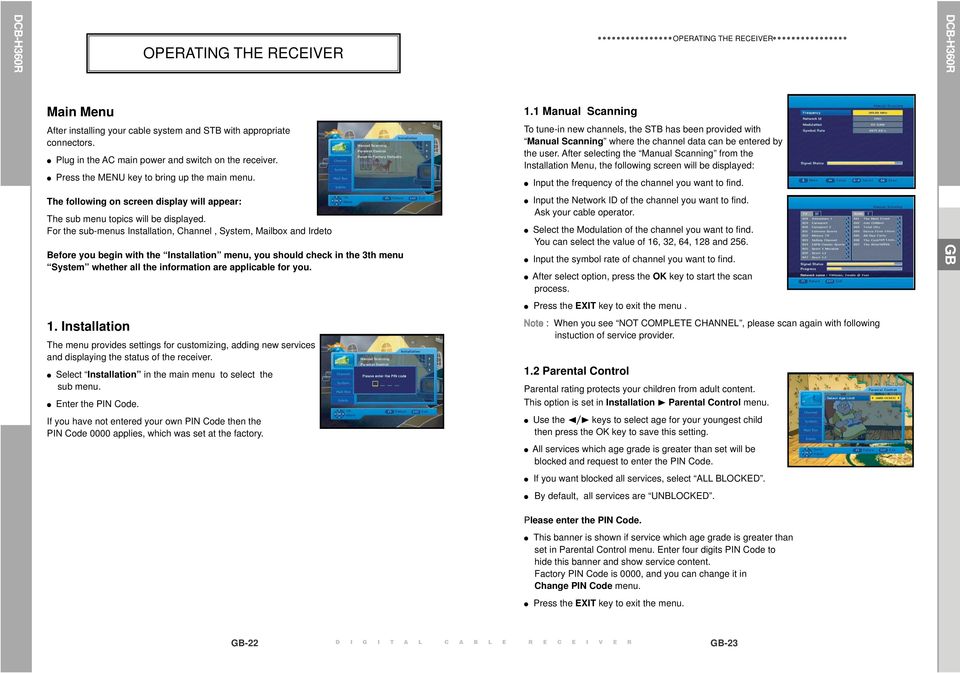
13 Main Menu OPERATING THE RECEIVER After installing your cable system and STB with appropriate connectors. Plug in the AC main power and switch on the receiver. Press the MENU key to bring up the main menu. The following on screen display will appear: The sub menu topics will be displayed. For the sub-menus Installation, Channel, System, Mailbox and Irdeto Before you begin with the Installation menu, you should check in the 3th menu System whether all the information are applicable for you. 1.1 Manual Scanning To tune-in new channels, the STB has been provided with Manual Scanning where the channel data can be entered by the user. After selecting the Manual Scanning from the Installation Menu, the following screen will be displayed: OPERATING THE RECEIVER Input the frequency of the channel you want to find. Input the Network ID of the channel you want to find. Ask your cable operator. Select the Modulation of the channel you want to find. You can select the value of 16, 32, 64, 128 and 256. Input the symbol rate of channel you want to find. After select option, press the OK key to start the scan process. DCB-H360R GB GB Press the EXIT key to exit the menu. 1. Installation The menu provides settings for customizing, adding new services and displaying the status of the receiver. Select Installation in the main menu to select the sub menu. Enter the PIN Code. Note : When you see NOT COMPLETE CHANNEL, please scan again with following instuction of service provider. 1.2 Parental Control Parental rating protects your children from adult content. This option is set in Installation ❿ Parental Control menu. If you have not entered your own PIN Code then the PIN Code 0000 applies, which was set at the factory. Use the ❿ keys to select age for your youngest child then press the OK key to save this setting. All services which age grade is greater than set will be blocked and request to enter the PIN Code. If you want blocked all services, select ALL BLOCKED. By default, all services are UNBLOCKED. Please enter the PIN Code. This banner is shown if service which age grade is greater than set in Parental Control menu. Enter four digits PIN Code to hide this banner and show service content. Factory PIN Code is 0000, and you can change it in Change PIN Code menu. Press the EXIT key to exit the menu. GB-22 D I G I T A L C A B L E R E C E I V E R GB-23
14 1.3 Reset to Factory Defaults This is to recover the Factory set values in case the user has encountered some problems after changing any values of channel data and others which may be in error. The screen display will be as follows: At the request window, if you press the OK key, the receiver will be reset to factory default settings automatically. Note : This causes your previous settings to be deleted! All settings and information including channel data will be deleted. Press the EXIT key to exit the menu. 1.4 Software Update OPERATING THE RECEIVER This option is enabled only if your cable provider sends software for your STB. To upgrade the software, place the cursor on Installation ❿ Software Update menu and press the OK key. If new software is available, banner Start Software Updating Process? will be displayed. There is also information about estimated time of software download. Press the OK key to confirm and start Software Updating process. If there is newest software on your STB You don t need to update software! will be displayed. 2.2 Favorite Channels You can immediately register the present channel to the desired Favorite Group. In addition, you can register a channel to multiple favorite groups. Select the desired Favorite Group(FAV1~FAV4) using the FAV.CH key. Select the desired channel list using the ❷ ➐ or numeric keys at the TV or RADIO list window. Press the RED key and then register the selected channel at the Favorite Group. Then press the OK key for confirmation. You can change TV list or Radio list by the TV/RADIO key and change favorite list by the FAV.CH key. When you press the TV/RADIO key, TV list and Radio list are toggled. Press the FAV.CH key to select another favorite list. Press the EXIT key to exit the menu. To delete channels from Favorite Group: OPERATING THE RECEIVER Select a channel list to delete with the ❷ ➐ keys. DCB-H360R GB GB Note : STB automatically reboots for software upgrading process. During the upgrading process, TV screen will remain blank for approximately 10 minutes. Window display at the STB front panel will show the progress. Service will be resumed automatically after the upgrade is completed. Press the RED key to delete the selected channel from the favorite channels. Press the EXIT key to exit the menu. Note : One favorite list can contain max 200 channels. Press the EXIT key to exit the menu. 2.3 Set Channel Lock 2. Channel The Channel menu has three functions: Saving changes on channel list by select Update List and it provides making four favourite lists and set channel lock, as you want. Enter the PIN Code. If you have not entered your own PIN Code, 0000 applies which was set at the factory. 2.1 Update List Select the TV or RADIO channel window by pressing the ❿ keys. Focus the channel by pressing the ❷ ➐ keys. Select the channel lock by pressing the RED key. Press the OK key for confirmation. This will lock the channel. Whenever you need to view the channel, you will have to enter the PIN Code at the request window. When some new channels will be transmitted to your cable network, these channels would be shown on channel list green colored. To save these channels, use Channel ❿ Update List. To cancel the lock: Press the RED key again in order to cancel the lock. Press the EXIT key to exit the menu.. GB-24 D I G I T A L C A B L E R E C E I V E R GB-25

15 3. System This option enables you to change the system settings as your requirements. 3.1 Language Selection The Language Selection option allows the user to select the desired language of the OSD, Soundtrack, Teletext, Subtitle or EPG. However, these languages for Soundtrack, Teletext, Subtitle and EPG depend on broadcasting. For example, even the language for Subtitle can be selected, it may not be supported because of no Subtitle on the program. OPERATING THE RECEIVER There are 3 OSD languages available and 37 languages supported for soundtracks, subtitles,teletext, and EPG. To select the desired language menu, press the ❿ keys to change language and press the OK key. 3.2 OSD Settings You can set the transparency of OSD, subtitle and Teletext, banner display time and OSD Position. Select OSD Transparency level. The OSD Transparency level from 0 to 100%. Setting is made with the numeric keys, ❿ or CH+/CH- keys. ❿ keys : Setting in increment of 1%. CH+/CH- keys : Setting in increment of 10%. Select Subtitle Transparency level. The OSD Transparency level from 0 to 100%. Setting is made with the numeric keys, ❿ or CH+/CH- keys. ❿ keys : Setting in increment of 1%. CH+/CH- keys : Setting in increment of 10%. Select Teletext Transparency level. The OSD Transparency level from 0 to 100%. Setting is made with the numeric keys, ❿ or CH+/CH- keys. ❿ keys : Setting in increment of 1%. CH+/CH- keys : Setting in increment of 10%. OPERATING THE RECEIVER DCB-H360R GB GB The soundtracks, subtitle, Teletext, and EPG will vary according to the selected language. Press the EXIT key to exit the menu. Set the display duration of the information(banner) box displayed in the screen. The time ranges from 0.5 to 60.0 seconds. Setting is made with the numeric keys, ❿keys or CH+/CH- keys. ❿ keys : Adjusting in increment of 0.5sec. CH+/CH- keys : Adjusting in increment of 1 sec. Note : This setting does not apply to info banner and info window. GB-26 D I G I T A L C A B L E R E C E I V E R GB-27

16 OSD Position Place the cursor on the position you want, and press the ❿ or➐ ❷ keys until the screen moves to the position you want. The screen will move to the position you want. Press the EXIT key to exit the menu. 3.3 Media Settings You can set the various media settings you want. Place the cursor on this sub menu and press OK. Press the ➐ ❷ keys to move the sub items and press the ❿ keys to select the option. Press the OK key to confirm. Screen Format OPERATING THE RECEIVER 3.4 Change PIN Code To change the PIN Code, select the fourth option Change PIN Code. This will take you to the following menu: In this option, you need to enter the current PIN Code at the first cursor, and at the second cursor enter the desired PIN Code. To confirm, you need to enter the new PIN Code again. Please remember the PIN Code should be a 4 digit numerical value. THE FACTORY PRESET PIN Code : Press the EXIT key to exit the menu. OPERATING THE RECEIVER DCB-H360R GB GB Select the Screen Format according to your TV : STANDARD 4:3 or WIDE SCREEN 16:9 ratio type.4:3 Video aspect ratio: PAN&SCAN, Full Screen 14:9 LB (Letter Box), 16:9 LB When selecting 16:9 for the screen format, you can select an aspect ratio of 4:3 for a movie. (However, the 16:9 video menu is not available in this aspect ratio). 16:9 Video aspect ratio: Standard, Wide When selecting 4:3 for the screen format, you can select an aspect ratio of 16:9 for a movie. (However, the 4:3 video menu is not available in this aspect ratio). Select Video Color Bar: Black or Grey. - Warning! Do not display the video color bar in black for extended periods of time as you may experience temporary or permanent image burn. See also the precaution instructions regarding your display device. Select the Video Signal Type : Composite + Component, Composite + RGB Select the Dolby Digital Auto Select : On or Off. On : Outputs the Dolby Digital signal first. Off : Outputs other audio formats first. Select the Digital Out : Dolby Digital or PCM. Dolby Digital : When Dolby Digital Auto Selected is on, outputs the Dolby Digital signal first. PCM : When Dolby Digital Auto Selected is on, outputs the PCM signal first. Select the Subtitle Auto Select : On, Hearing Impaired or off Press the EXIT key to exit the menu. Manufactured under license from Dolby Laboratories. Dolby and the double-d symbol are trademarks of Dolby Laboratories. 3.5 Timer Settings 1) Guard Band Time Guard-Band time is a function to ensure, that whole event will fit in set time boundaries. 1 minute of Guard-Band Time means that STB will start this timer operation 1 minute before set time and end 1 minute after set time. 2) Timer 15 timers are supported including timer(s) from EPG. Select the timer number on Timer using the ❿ keys from 1 to 15. Press the ❿ keys to choose event repetition you want to reserve : Daily, Every Sunday, Every Monday, Every Tuesday, Every Wednesday, Every Thursday, Every Friday, Every Saturday and Once. If the timer is set from EPG screen, EPG is displayed on Event Repetition. Press the Numerical (0~9) keys to set the time you want and press the ➐ ❷ keys to choose a switch time you want to reserve. If set time on Switch-on Time is same as one on Switch-off Time, this timer works for 24 hours. Select TV program to set the event program by pressing the ❿ keys. When you press the TV/RADIO key, TV program and Radio program are toggled. Even you can set timers on Daily and Every Monday or Every Sunday, etc. The priority has the repetition event which is less. For example, when you set timers ononce and daily, Once will work in stead of Daily at that day. If the timer is running, Running message with a timer number is displayed on Timer. Press the EXIT key to exit the menu. GB-28 D I G I T A L C A B L E R E C E I V E R GB-29

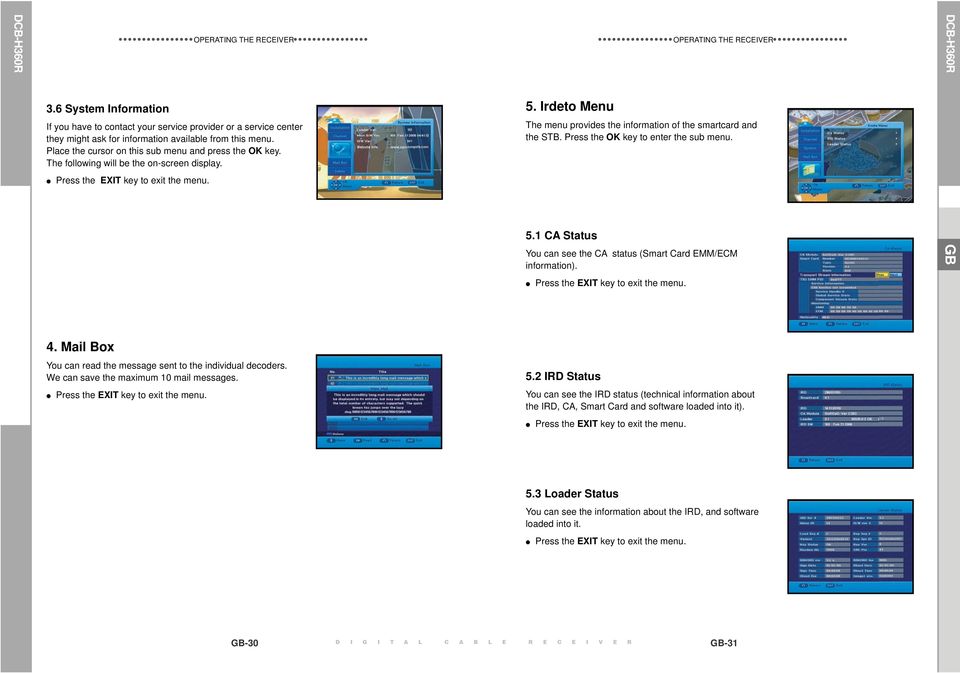
17 3.6 System Information If you have to contact your service provider or a service center they might ask for information available from this menu. Place the cursor on this sub menu and press the OK key. The following will be the on-screen display. Press the EXIT key to exit the menu. OPERATING THE RECEIVER 5. Irdeto Menu OPERATING THE RECEIVER The menu provides the information of the smartcard and the STB. Press the OK key to enter the sub menu. 5.1 CA Status You can see the CA status (Smart Card EMM/ECM information). DCB-H360R GB GB Press the EXIT key to exit the menu. 4. Mail Box You can read the message sent to the individual decoders. We can save the maximum 10 mail messages. 5.2 IRD Status Press the EXIT key to exit the menu. You can see the IRD status (technical information about the IRD, CA, Smart Card and software loaded into it). Press the EXIT key to exit the menu. 5.3 Loader Status You can see the information about the IRD, and software loaded into it. Press the EXIT key to exit the menu. GB-30 D I G I T A L C A B L E R E C E I V E R GB-31
18 1. TV key + 3-Digit User Code 2. TV Operating keys: TV STANDBY/ON, 0~9, CH /, VOL+/-, INPUT SEL, MUTE TV Available TV Manufacturer Numbers Maker (BRAND) NAME CODE NUMBER (3DIGIT) LIST SAMSUNG A.R. SYSTEMS ACCENT ACEC 112 ACURA 195 ADMIRAL ADYSON 379 AGASHI AGEF 324 AIKO AIWA AKAI AKIBA AKITO AKURA ALARON ALBA ALBIRAL 371 ALCYON 407 ALLORGAN ALLSTAR AMPLIVISION AMSTRAD ANAM ANAM NATIONAL ANGLO ANITECH ANSONIC ARC EN CIEL ARCAM ARISTONA ARTHUR MARTIN ASA ASBERG ASORA 195 ASTRA 195 ASUKA ATLANTIC ATORI 195 AUCHAN AUDIOSONIC AUDIOTON AUSIND AUTOVOX AWA AYOMI 411 BAIRD BANG & OLUFSEN 324 BARCO BASIC LINE BASTIDE 379 Maker (BRAND) NAME CODE NUMBER (3DIGIT) LIST BAUR BEKO BEON BEST BESTAR BINATONE 379 BLACK STAR 413 BLACKTRON 378 BLACKWAY 378 BLAUPUNKT BLUE SKY BLUE STAR 378 BONDSTEC 413 BOOTS BPL BRANDT BRANDT ELECTRONIC BRANDT ELECTRONIQUE BRINKMANN BRIONVEGA BRITANNIA 379 BROTHER 076 BRUNS BSR BTC 123 BUSH BUSH(UK) CAPSONIC CARREFOUR CASCADE CASIO CATHAY CCE CENTURION CENTURY CGE CIHAN 217 CIMLINE CITY 195 CLARIVOX CLATRONIC CMS HIGHTEC 379 COMTEL CONCORDE 195 CONDOR CONTEC CONTINENTAL EDISON COSMEL CROSLEY CROWN CRYSTAL 477 CS ELECTRONICS CTC 413 CTC CLATRONIC 045 CURTIS MATHES TV Maker (BRAND) NAME CODE NUMBER (3DIGIT) LIST CURTIS MATHES CYBERTRON 123 DAENYK 042 DAEWOO DAINICHI DANSAI DANSETTE 426 DANTAX 421 DATSURA 209 DAWA DAYTON DE GRAAF DECCA DECCA(UK) DEITRON DENKO 076 DENON 126 DERWENT 105 DESMET DIGATRON 049 DIGILINE DIXI DORIC DREAN DTS 195 DUAL DUAL TEC DUMONT DUMONT-FINLUX DUX DYNATRON ELBE ELBIT 217 ELCIT ELECTA ELECTRO TECH 195 ELEKTA ELG ELIN ELITE ELMAN ELTA EMERSON ERRES ESC ETRON EURO-FEEL 076 EUROMAN EUROPA EUROPHON EXPERT EXQUISIT FAMILY LIFE FENNER FERGUSON FIDELITY FILSAI FINLANDIA FINLUX Available TV Manufacturer Numbers Maker (BRAND) NAME CODE NUMBER (3DIGIT) LIST FIRST LINE FISHER FLINT FNR 045 FORMENTI FORMENTI-PHOENIX FORTRESS FRABA FRIAC FRONTECH FUJITSU FUJITSU GENERAL FUNAI GALAXI GALAXIS GBC GE GEANT CASINO GEC GEC(UK) GELOSO GENERAL GENERAL TECHNIC 195 GENEXXA GOLDHAND 379 GOLDLINE 213 GOLDSTAR(LG) GOODMANS GORENJE 421 GPM 123 GRADIENTE GRAETZ GRANADA GRANADA(UK) GRANDIN GRONIC GRUNDIG HALIFAX HAMPTON 379 HANIMEX 094 HANSEATIC HANTAREX HANTOR HARLEY DAVIDSON 042 HARWOOD HAUPPAUGE HAVERMY 190 HCM HEMA HEMMERMANN HIFIVOX DCB-H360R GB GB-32 D I G I T A L C A B L E R E C E I V E R GB-33

19 TV Maker (BRAND) NAME CODE NUMBER (3DIGIT) LIST HIGASHI 050 HIGHLINE HIKONA 123 HINARI HISAWA HIT 324 HITACHI HITACHI FUJIAN 013 HITSU HORNYPHON HOSHAI HUANYU HYGASHI 379 HYPER HYPERSONIC 172 HYPSON IBERIA ICE ICES IMPERIAL INDIANA INGELEN INGERSOLL 195 INNO HIT INNOVATION INTERACTIVE 210 INTERBUY INTERFUNK INTERNAL INTERVISION IR 346 IRRADIO ISUKAI ITC ITS ITT ITT-NOKIA ITV JEAN 018 JEC 141 JET POINT 365 JVC KAISUI KAMOSONIC 050 KAMP 379 KAPSCH KARCHER KATHREIN 455 KAWASHO 379 KB ARISTOCRAT 107 Available TV Manufacturer Numbers Maker (BRAND) NAME CODE NUMBER (3DIGIT) LIST KENDO KENNEDY KINGSLEY 379 KLARMAX 371 KNEISSEL KOLSTER KONKA KONTAKT 232 KORPEL KORTING KOSMOS KOTRON KOYODA 195 KRAKING 411 KRIESLER KTV KURO 445 KYOSHU KYOTO 107 LECSON LEMAIR 210 LENCO LENOIR LESA 413 LEYCO LIESENK & TTER LIFE LIFETEC LLOYD_S 195 LOEWE LOEWE OPTA LOGIK LOGIX 195 LUMA LUMATRON LUX MAY LUXOR LYCO 076 MAAZ 371 MADISON MAGNADYNE MAGNAFON MAGNAVOX MAGNUM MANDOR 076 MANESTH MANHATTAN MARANTZ MARELLI 324 MARK MASUDA MATSUI MAXIMAL 139 MAXWELL 371 MEDIATOR MEDION MEGAS 435 MEGATRON 126 MELECTRONIC MELVOX 425 TV Available TV Manufacturer Numbers Maker (BRAND) NAME CODE NUMBER (3DIGIT) LIST Maker (BRAND) NAME CODE NUMBER (3DIGIT) LIST MELVOX 425 OPTIMUS 099 MEMOREX OPTONICA 190 MEMPHIS ORBIT MERCURY ORION METZ MICROMAXX ORLINE MICROSTAR ORMENTI-PHOENIX 104 MINERVA ORMOND 195 MINOKA OSAKA 066 MITSUBISHI OSAKI MIVAR OSIO OSO 123 MONACO 195 OSUME MORGAN_S OTAKE 450 MOTION 407 OTTO VERSAND MOTOROLA MTC MTEC MULTISTANDARD 045 P.T ACTRON 217 MULTITEC PAEL MULTITECH PALLADIUM MURPHY PALSONIC MURPHY(UK) 162 PANAMA MUSIKLAND 123 PANASONIC MYRYAD NAD PANAVISION NAIKO PATHE CINEMA NAKIMURA NAONIS PATHE CINEMA(F) NAT PATHE MARCONI NATIONAL PAUSA 195 NEC PAUZA PERDIO NECKERMANN PERFEKT PERSHIN PHILCO NEDIATOR NEI NESCO PHILEX 471 NETSAT PHILHARMONIC 379 NETWORK 213 PHILIPS NEUFUNK NEW TECH NEW WORLD 123 PHOENIX NICAMAGIC NIKKAI PHONOLA PILOT NOBLEX PIONEER NOBLIKO NOGAMATIC PLANTRON NOKIA PLAYSONIC POLICOM POPPY PORTLAND 226 NORDMENDE POWERPOINT PRANDONI-PRINCE NOVATRONIC PRECISION 379 OCEANIC PREMIER PRIMA OCEANIC(F) 150 PRINCE ODEON 076 PRINZ OKANO PROFEX OMEGA 076 PROFI-TRONIC ONCEAS 050 PROLINE ONWA PROSONIC OPERA DCB-H360R GB GB-34 D I G I T A L C A B L E R E C E I V E R GB-35

20 TV Available TV Manufacturer Numbers Maker (BRAND) NAME CODE NUMBER (3DIGIT) LIST Maker (BRAND) NAME CODE NUMBER (3DIGIT) LIST PROTECH SCOTT SEARS 042 PROVISION SEG PYE PYMI SEI QUADRA VISION QUASAR SEI SINUDYNE 446 QUELLE SELECO SENCORA SENTRA SERINO QUESTA 018 SHARP RADIALVA SHORAI RADIOLA SIAM RADIOMARELLI SIAREM RADIONETTE SIEMENS RADIOSHACK RADIOTONE SIERA RANK ARENA 018 SIERRA RCA SIESTA 421 RECOR SILVA RECTILIGNE SILVER REDIFFUSION SINGER REDIFFUSION(UK) SINUDYNE REDSTAR REFLEX REOC 460 SKANTIC REVOX SKY REX SKYWORTH SOGERA 113 RFT SOLAVOX RHAPSODY 379 SONAWA 123 R-LINE SONITRON ROADSTAR SONNECLAIR ROBOTRON SONOKO RODEX SONOLOR ROWA 458 SONTEC ROWSONIC 050 SONY ROYAL LUX SOUND & VISION RTF 065 SOUND WAVE SABA SOUNDESIGN SPECTRA SSANGYONG 195 SACCS 411 STANDARD SAGEM STARLIGHT SAISHO STENWAY STERN SALORA STRATO SAMBERS SUNKAI SANDRA 379 SUNSTAR SANELA 411 SUNWOOD SANSUI SUPERLA 379 SANTON 195 SUPERTECH SANYO SUPRA SUSUMU SUTRON 195 SAVE SWISSLINE 413 SBR SYDNEY 379 SCHAUB LORENZ SYSLINE SYTONG 379 SCHNEIDER TACTUS TANDBERG TANDY TASHIKO TV Available TV Manufacturer Numbers Maker (BRAND) NAME CODE NUMBER (3DIGIT) LIST Maker (BRAND) NAME CODE NUMBER (3DIGIT) LIST TATUNG VESTEL TCM VEXA TEAC VICTOR VIDEO SYSTEM TEC VIDEOLOGIQUE VIDEOSAT TECH LINE VIDEOSYSTEM TECHICA 123 VIDEOTECHNIC TECHNEMA VIDEOTON TECHNICS 099 VIDIKRON 045 TECHNOL ACE 042 VIDTECH 018 TEDELEX 379 VIPER 213 TEIRON 195 VISIOLA 379 TEKNIKA 042 VISION TELEAVIA VISOREX 442 TELECOR VISTAR TELEFUNKEN VOLTEC VORTEC 152 TELEFUSION VOXSON TELEGAZI TELEMEISTER WALTHAM TELESONIC WATSON TELESTAR WATT RADIO TELETECH TELETON WEGA TELEVIDEON WEGA COLOR TELEVISO 425 WEGAVOX 195 TEMCO 094 WELTBLICK TEMPEST WESTINGHOUSE TENNESSEE WESTON 168 TENSAI WHARFEDALE WHITE 045 TESMET 439 WHITE WESTINGHOUSE TETUNG 046 WINCO 426 TEVION WINDSTAR 378 TEXET XRYPTON THOMSON YAMISHI YOKAN THORN YOKO THORN-FERGUSON YORX 123 TOKAI ZANUSSI TOKYO ZOPPAS TOMASHI TOSHIBA TOWADA TOYODA 195 TRAKTON 076 TRANS CONTINENS TRANSONIC TRANSTEC 379 TRIDENT 379 TRISTAR 123 TRIUMPH UHER ULTRA 409 ULTRAVOX UNIC LINE UNITED UNIVERSUM UNIVOX UTAX 050 VEGAVOX 163 DCB-H360R GB GB-36 D I G I T A L C A B L E R E C E I V E R GB-37

21 Problem Possible cause Solution of the problem No display LED on Power cord not plugged in correctly Power cord plug in correctly the front panel; No power supply No pictures on the screen Receiver in Standby mode; Set receiver to On ; SCART,RCA or HDMI not connected Check connection; tightly to video input of television; Incorrect channel or video output Check channel and video input of TV selected on television: (TV instruction manual); Incorrect video output selection on HD Check video output on HD receiver Receiver (Refer to page 10) No sound SCART or Audio connected incorrectly; Check connection; Loudness level = 0; Increase loudness on television set or HD receiver; Muting active Press the MUTE key Remote Control does not Incorrect Operation; Point remote control towards the operate directly receiver; Batteries dead or inserted incorrectly Replace batteries or insert correctly Poor picture quality Signal strength too low Check all wire connections Menu screen does not Channel lists not installed; Scan channels. Please go to disappear Installation menu; On-Screen Error Messages; Signal cable not connected or not tight Check connection Searching for signal ; No signal On-Screen Error Messages; Smartcard (Depend on model) Smartcard Failure - not plugged in correctly; Check the smartcard; Unknown smartcard Please insert Smartcard - not plugged in Insert the smartcard DISPOSAL TROUBLESHOOTING The device, packaging material (e.g. Styrofoam) and the batteries must never be disposed of with household refuse. Please obtain appropriate information about the regulations in your community, and dispose of all refuse in accordance with regulations at the separate locations provided. Power supply Type : Input voltage : Fuse rating : Tuner & Demodulator Input Frequency : Channel Bandwith DEMODULATION : SYMBOL RATE : Constellation : CABLE OUT : TECHNICAL SPECIFICATIONS SMPS AC V~, 50/60 Hz 250 V/T1.6AH 50.5~858 MHz 8 MHz QAM DVB-C MAX Msps 16, 32, 64, 128, 256 QAM RF LOOP-THROUGH OUTPUT for other receiver or TV Video decoder System decoding : MPEG-2 ISO/IEC Profile@Level (MP@HL(HD), MP@ML(SD)) H.264 ISO/IEC (MP@L3, MP@L4, HP@L4 up to 30 Mbps) Resolution : 1080i, 720p, 576p, (576i) Video Output: SD output (2 SCART (AV1,AV2), Composite RCA) HD output (Component (YPBPR), HDMI) Video Format 4:3(Normal) & 16:9 (Widescreen) Audio Decoder System decoding : MPEG Audio-1 ISO/IEC (Layer1, Layer2) MPEG Audio-2 ISO/IEC Dolby Digital (AC-3) Audio mode : Mono, Dual stereo, Joint stereo Sampling Rate: 32kHz, 44.1kHz, 48kHz, 96kHz Audio output : Analog output (L/R (RCA) 1 CH) Digital output (S/PDIF(Optical)) DCB-H360R GB PHISICAL SPECIFICATION Size (W x D x H) Weight (Net) 351 x 227 x 60 mm 2.47Kg GB-38 D I G I T A L C A B L E R E C E I V E R GB-39
22 MEMO MEMO DCB-H360R GB GB-40 D I G I T A L C A B L E R E C E I V E R GB-41
23 MEMO GB-42 D I G I T A L C A B
24 Instructies voor het gebruik NL MF A REV. 1.1 DIGITALE HD-KABELONTVANGER DIGITALE HD-KABELONTVANGER
25 VEILIGHEIDSINSTRUCTIES Deze STB is geproduceerd overeenkomstig de internationale veiligheidsnormen. Lees de volgende aanbevolen veiligheidsvoorschriften aandachtig door. NETVOEDING: OVERBELASTING: VLOEISTOFFEN: REINIGEN: VENTILATIE: AC V~, 50/60 Hz Zorg dat contactdozen, verlengsnoeren of adapters niet worden overbelast. Dit kan leiden tot brand of een elektrische schok. Gebruik geen vloeistoffen in de buurt van de STB. Trek voordat u het apparaat reinigt de stekker uit het stopcontact. Gebruik een met water bevochtigde doek (geen oplosmiddelen) om de behuizing te reinigen. Dek de ventilatieopenening van STB niet af. Zorg voor een vrije luchtstroom rond de STB. Bewaar de STB niet op een plaats waar het apparaat wordt blootgesteld aan direct zonlicht, of in de nabijheid van verwarmingsapparatuur, zoals een radiator. Plaats geen elektronische apparatuur boven op de STB. Plaats de STB minimaal 30 mm van de muur. Laat minstens 10 mm ruimte aan de bovenkant en aan de zijkanten van de STB voor ventilatie. DCB-H360R NL AANSLUITINGEN: Gebruik geen aansluitingen die niet worden aanbevolen door de fabrikant. Dit kan leiden tot gevaarlijke situaties of schade aan het apparaat. Een juiste verwijdering van dit product (Afgedankte elektrische en elektronische apparaten) (Van toepassing in de Europese Unie en in ander Europese landen met een gescheiden inzameling) Wanneer dit symbool op een product of in de documentatie bij een product wordt weergegeven, mag het product aan het eind van de levenscyclus niet worden afgevoerd met het huishoudelijk afval. Om negatieve gevolgen voor het milieu en de volksgezondheid door een ongecontroleerde afvalverwerking te voorkomen, verzoeken we u dit afval te scheiden van andere soorten afval zodat de grondstoffen op een verantwoorde kunnen wijze kunnen worden gerecycled voor duurzaam hergebruik. Particulieren kunnen contact opnemen met de leverancier van het product of de lokale overheid voor meer informatie over het milieuvriendelijk en veilig recyclen van het betreffende item. Bedrijven moeten contact opnemen met de leverancier en de bepalingen en voorwaarden in het koopcontract raadplegen. Dit product moet niet worden afgevoerd met ander commercieel afval.. REPARATIES: BLIKSEM: AARDE: Voer zelf geen reparaties uit aan het product. Indien dit wel wordt geprobeerd, komt de garantie te vervallen. Laat onderhoud en reparaties over aan een gekwalificeerde onderhoudsmonteur. Als de STB is geïnstalleerd in een gebied waar het regelmatig hevig onweert, zijn stroomonderbrekers voor de netaansluiting van de STB en de telefoonlijn van de modem essentieel. De afzonderlijke instructies van de fabrikant voor de beveiliging van andere apparaten, zoals een tv, stereo, enzovoort, die zijn aangesloten op de STB, moeten ook in acht worden genomen tijdens een onweersbui. CATV-kabel MOET ZIJN GEAARD. Het geaarde systeem moet voldoen aan de lokale regelgeving. Opmerking: Geef gebruikte batterijen ter bescherming van het milieu af bij een speciaal daarvoor bestemd inzamelpunt. Haal de stekker uit het stopcontact om het aparaat van het stroomnet te halen. NL-1
26 TECHNISCH OVERZICHT TECHNISCH OVERZICHT DCB-H360R Wat is SDTV en HDTV? Breedte/hoogte-verhouding SDTV SDTV is de standaard voor digitale tv met een hoog beeldkwaliteit. De gebruikte resoluties zijn geschikt voor standaard-tv's (zie verderop in dit hoofdstuk voor meer informatie over de resolutie). HDTV HDTV is de standaard voor digitale tv met de hoogste beeldkwaliteit. De gebruikte resoluties zijn geschikt voor computerschermen en tv-schermen die geschikt zijn voor HDTV (zie verderop in dit hoofdstuk voor meer informatie over de resolutie). Resolutie De resolutie heeft betrekking op het aantal pixels op het scherm. Hoe hoger de resolutie, hoe beter de beeldkwaliteit. Digitale uitzendingen kunnen op basis van de beeldkwaliteit worden onderverdeeld in HD en SD. Doorgaans ondersteunt de HD-kwaliteit (High Definition) resoluties van 1920x1080i en 1280x720p en een beeldverhouding van 16:9 voor zowel ATSC en DVB. SD (Standard Definition) ondersteunt resoluties van 720x480p en 720x480i voor ATSC en resoluties van 720x576p en 720x576i voor DVB. SD ondersteunt doorgaans een beeldverhouding van 4:3. Dit kan echter per regio verschillen. DVB-C ( Cable Digital Video Broadcasting) Digital video broadcasting - cable (DVB-C) is de Europese standaard-dvb voor digitale uitzendingen via de kabel. Met het DVB-C-systeem worden de audio/videosignalen digitaal verzonden in een mpeg-2- indeling en wordt er gebruikgemaakt van het QAM-modulatiesysteem. De DVB-C-standaard is ontwikkeld zodat een digitaal signaal kan worden uitgezonden via VHF/UHF-kanalen. De voordelen van deze standaard zijn een relatief beveiligde omgeving met betrekking tot vervorming en een demping van het signaalpad zodat er een hogere signaal/ruis-ratio wordt bereikt, zonder de negatieve effecten van meerdere paden zodat er hogere modulatieschema's kunnen worden geïmplementeerd. Naast de resolutie wordt de HDTV gedefinieerd aan de hand van de beeldverhouding van de uitzendingen. De beeldverhouding of aspectratio betreft de vorm van het beeld zoals gedefinieerd door de verhouding van de breedte tot de hoogte van het scherm. Voor analoge tv en standaard digitale tv (SDTV) is de beeldverhouding 4 eenheden breed bij 3 eenheden hoog (doorgaans wordt dit geschreven als 4:3). Dit is de bekende vorm van ouderwetse tv's; iets breder dan hoog. Voor HDTV-uitzendingen is de verhouding 16:9 (bijna twee keer zo breed als hoog). Deze verhouding lijkt, niet geheel toevallig, meer op de verhouding die wordt gebruikt voor bioscoopfilms. Hierdoor is HDTV een ideale indeling voor zowel tv-uitzendingen als films. Maar wat gebeurt er als u naar een bijna vierkante 4:3-uitzending kijkt op een tv met een rechthoekige verhouding van 16:9, of vice versa? In dergelijk gevallen kunt u met de HDontvanger kiezen uit verschillende schermformaten. Dolby Digital 5.1 Dolby Digital 5.1 levert 5 afzonderlijke kanalen met digitale audiogegevens die kunnen worden gebruikt door A/V-ontvangers die 5.1-kanaalsignalen kunnen decoderen. De audiosignalen worden opgedeeld in linksvoor, midden, rechtsvoor, linksachter, rechtsachter en een kanaal voor de lage frequenties (ontwikkeld voor subwoofers). Het resultaat in combinatie met een compatibele Dolby Digital 5.1 channel A/V-ontvanger en luidsprekersysteem is een dynamisch bereik, 360 graden imaging en geluidseffecten zoals in de bioscoop. Om optimaal gebruik te maken van de Dolby Digital 5.1-mogelijkheden van de HD-ontvanger, moet u een A/V-ontvanger op de Dolby Digital Optical-aansluiting van de HD-ontvanger aansluiten die geschikt is voor Dolby Digital 5.1. AC-3 is een technologie voor het coderen en decoderen van geluid dat in 1987 is ontwikkeld voor bioscopen en waarmee de bitstroom AC-3 wordt aangeduid. AC-3 is tegenwoordig synoniem aan Dolby Digital. HDMI (High Definition Multimedia Interface) NL HDMI is een interface waarmee video- en audiogegevens met slechts één aansluiting digitaal kunnen worden verzonden. Door middel van HDMI verzendt de ontvanger een digitaal video- en audiosignaal en wordt een helder beeld verkregen op een tv met een HDMI-ingang. NL-2 D I G I T A L E H D - K A B E L O N T V A N G E R NL-3
27 INHOUD Veiligheidsvoorschriften Technisch overzicht Inhoud ALGEMENE KENMERKEN De STB aansluiten Beschrijving Voorzijde Achterzijde Afstandsbediening Basisfuncties Bediening van de ontvanger Hoofdmenu Installatie Netwerk Installatie Kinderslot Standaardintellingen opniew instellen Software opwaarderen Kanaal Vernieuw Lijst Favoriete kanalen Kanaalvergrendeling instellen Systeem Taal Selecteren OSD Instellen Media Instellen PIN-Code wijzigen Timer Instellen Systeeminformatie Mail Box Irdeto Menu CA Status IRD Status Loader Status Beschikbare nummers tv-fabrikanten Problemen oplossen Verwerking Technische specificaties ALGEMENE KENMERKEN 1. GEBRUIKERSGEDEELTE ONTVANGST VAN DIGITALE HD/SDTV-UITZENDINGEN SOFTWARE DOWNLOADEN VIA HET NETWERK GEAVANCEERDE ELEKTRONISCHE PROGRAMMAGIDS MEERTALIGE SCHERMMENU'S ONDERTITELING EN TELETEKST (OSD ) IN MEERDERE TALEN VOLLEDIG FUNCTIONELE INFRARODE AFSTANDSBEDIENING SCARTUITGANG ENERGIEZUINIG 4 VOORKEURSLIJSTEN EPG DIE AUTOMATISCH WORDT BIJGEWERKT PASS LOOP VOOR RGB-SIGNAAL 15 TIMERS OM PROGRAMMA'S (GEBEURTENISSEN) VOOR IN- EN UITSCHAKELEN TE RESERVEREN 2. TUNERGEDEELTE 3. VIDEOGEDEELTE 4. AUDIOGEDEELTE VHF-, UHF-BAND 50,5~858 MHz SYMBOOLFREQUENTIE VAN MAX. 7,252 Msps Modulatie-indeling 16~256 QAM RF LOOP-THROUGH-UITGANG VOOR ANDERE ONTVANGER OF TV COMPATIBEL MET DVB-C MPEG-2: HD(MP@HL), SD(MP@ML) H.264: MP@L3, MP@L4, HP@L4 maximaal 30 Mbps DOOR DE GEBRUIKER TE SELECTEREN UITVOERFORMATEN 1080i, 720p, 576p, (576i) GEGEVENSSNELHEID 1~30 Mbps ONDERSTEUNT EEN BEELDVERHOUDING VAN 4:3 (NORMAAL) EN 16:9 (BREEDBEELD) HDMI, COMPONENT, COMPOSITE, SCART DOLBY DECODING MPEG-1 AUDIO LAYER 1, LAYER 2 MPEG-2 AUDIO MONO, DUAL, STEREO EN JOINT STEREO AUDIOMODI SAMPLINGFREQUENTIES VAN 32, 44.1 EN 48 khz VOLUMEREGELING EN DEMPFUNCTIE OP AFSTANDSBEDIENING SPDIF DIGITALE AUDIO-UITGANG DCB-H360R NL NL-4 D I G I T A L E H D - K A B E L O N T V A N G E R NL-5
28 ANT.IN RF OUT L R ANT.IN RF OUT PB PR PB PR (EXT) (TV) DCB-H360R De STB aansluiten De kabels van de ontvanger aansluiten ANT.IN-aansluiting Nadat u het kabelsysteem hebt geïnstalleerd, sluit u de coaxkabel aan op de ingang ANT.IN aan de achterzijde van de STB. Alle kabelaansluitingen moeten met de hand worden aangedrukt; gebruik geen sleutel bij de bevestiging. De kabel moet een coaxkabel zijn met een impedantie van 75 ohm. Achterzijde Set-Top Box L R COMPONENT Y AV2 (EXT) AV1 (TV) HDMI OUT DIGITAL (OPTICAL) Composietverbinding 1. Sluit het kabelsysteem aan op de ANT.INingang op de Set-Top Box. De STB aansluiten De Set-Top Box aansluiten op een tv 2. Sluit de videokabels aan. Sluit de composietvideokabel aan op de VIDEO OUT- uitgang op de Set-Top Box en de TV INPUT-ingang op de tv. 3. Sluit de audiokabels aan. Gebruik een audiokabel om een verbinding te maken tussen de L/R -uitgang op de Set-Top Box en de L/R AUDIO IN-ingang op de tv. Achterzijde Set-Top Box ANT.IN RF OUT L Achterzijde TV R COMPONENT Y PB PR AV2 (EXT) AV1 (TV) H DCB-H360R NL RF OUT-aansluiting Voor gebruikers die een analoge ontvanger gebruiken om analoge kanalen weer te geven, is de STB uitgerust met de RF OUTuitgang. Sluit de coaxkabel hier op aan en sluit het andere eind aan op de IF input-aansluiting van uw analoge ontvanger. Door de STB stand-by te houden kunt u met de analoge ontvanger kanalen instellen en weergeven. Achterzijde Set-Top Box COMPONENT Achterzijde TV Y L AV2 AV1 HDMI OUT R Y Pb Pr HDMI DIGITAL (OPTICAL) Componentverbinding 1. Sluit het kabelsysteem aan op de ANT.INingang op de Set-Top Box. 2. Sluit de videokabels aan. YPBPR-indeling: sluit de componentvideokabel aan op de VIDEO OUT-uitgang op de Set-Top Box en de TV INPUT-ingang op de tv. Achterzijde Set-Top Box ANT.IN RF OUT L R COMPONENT Y PB PR 3. Sluit de audiokabels aan. Gebruik een audiokabel om een verbinding te maken tussen de L/R uitgang op de Set-Top Box en de L/R AUDIO IN-ingang op de tv. L R Y Pb Pr Achterzijde TV HDMI NL-6 D I G I T A L E H D - K A B E L O N T V A N G E R NL-7
29 ANT.IN RF OUT PB PR PB PR PB PR DCB-H360R Scartaansluiting 1. Sluit het kabelsysteem aan op de ANT.INingang op de Set-Top Box. 2. Sluit een scartkabel aan op de VCR OUTaansluiting op de video en de Scart AV2 (EXT)-aansluiting op de STB. 3. Sluit een scartkabel aan op AV1 (TV)- aansluiting van de STB en de scartaansluiting op de tv. De STB aansluiten REAR VCR Achterzijde Set-Top Box L R COMPONENT Y AV2 (EXT) AV1 (TV) HDMI OUT DIGITAL (OPTICAL) De Set-Top Box aansluiten op een tv met een HDMI-aansluiting 1. Sluit het kabelsysteem aan op de ANT.INingang op de Set-Top Box. 2. Sluit een HDMI-kabel aan tussen de HDMI OUT-uitgang op de Set-Top Box en de HDMI IN-ingang op het HDMI-apparaat (tv, monitor). Opmerking: Mogelijk werkt de HDMIuitgang niet correct. Dit is afhankelijk van de ontvanger. De STB aansluiten Achterzijde Set-Top Box ANT.IN RF OUT L R COMPONENT Y HDMI Achterzijde TV AV2 (EXT) AV1 (TV) HDMI OUT DIGITAL (OPTICAL) DCB-H360R NL L R Y Pb Pr HDMI TV Achterzijde REAR PANELTV Een audiocomponent aansluiten Er zijn vandaag de dag vele soorten audiosystemen op de markt. Rechts ziet u een vereenvoudigde illustratie van een audiosysteem. Raadpleeg de gebruikershandleiding bij het audiosysteem voor meer informatie. ONENT O OUT Y Achterzijde Set-Top Box AV2 (EXT) AV1 (TV) HDMI OUT DIGITAL (OPTICAL) ON Voor een optische digitale audio-invoer, sluit u het audiosysteem aan op de ingang DIGITAL AUDIO (OPTICAL) op de Set-Top Box. Achterzijde audio NL-8 D I G I T A L E H D - K A B E L O N T V A N G E R NL-9
30 De STB aansluiten De resolutie en het DTV-uitgangssignaal selecteren U kunt voor de aangesloten tv of monitor de bijbehorende video-uitvoer selecteren. De resolutie selecteren: Gebruik de toets RESOLUTION op de afstandsbediening om een resolutie te selecteren en raadpleeg hierbij de volgende tabel. Opmerking:: Als er geen schermmenu's worden weergegeven, heeft de toets EXIT aan de voorzijde van de HD-ontvanger dezelfde functie als de toets RESOLUTION. Het signaal voor video-uitvoer selecteren: Gebruik de toets PUT op de afstandsbediening om het uitvoersignaal te selecteren en raadpleeg hierbij de volgende tabel. Toets op de afstandsbediening het nummer voor het betreffende merk in om deze voor de tv te kunnen gebruiken (zie 'Beschikbare nummers tv-fabrikanten' op pagina 32~37). 1. Zet de tv aan. 2. Richt de afstandsbediening op de tv. 3. Houd de toets TV ingedrukt en geef met de CIJFERTOETSEN het nummer voor het betreffende merk op. Voor een tv van bijvoorbeeld het merk Samsung houdt u de toets TV ingedrukt en drukt achtereenvolgens op de CIJFERTOETSEN 0, 0 en Wanneer de tv wordt uit- of ingeschakeld, is de configuratie voltooid. Tv-functies op de afstandsbediening Toets TV STANDBY/ON INPUT SEL VOL+/- CH / MUTE 0~9 Functie De STB aansluiten De tv bedienen met de afstandsbediening Druk op deze knop om de tv aan of uit te zetten. Druk op deze toets om een externe invoerbron voor de tv te selecteren. Druk op deze toets om het volume van de tv aan te passen / Alleen voor de tv. Druk op deze toetsen om een tv-kanaal te selecteren. Druk op deze toets om het geluid van de tv te dempen. Druk op deze toetsen om een tv-kanaal te selecteren. DCB-H360R NL RGB: Gebruik de toets PUT op de afstandsbediening om het uitvoersignaal te selecteren en raadpleeg hierbij de volgende tabel. YPBPR: Selecteer YPBPR wanneer de tv is aangesloten op the Component- (YPBPR) en HDMIuitvoerpoort van de HD-ontvanger. Opmerking: 1. Er is een model dat alleen kan worden ingeschakeld door op de afstandsbediening op de cijfertoets 0 te drukken. Resolution en Video Output Video-uitvoer Beschikbare resolutie Uitvoerstatus Composite 576i Altijd uitvoer. Scart 576i Voor de scartuitvoer kunt u kiezen tussen RGB en Composite Component (YPBPR) 1080i/720p/576p De 576i-resolutie wordt niet ondersteund. HDMI 1080i/720p/576p De 576i-resolutie wordt niet ondersteund. 2. Het aantal modellen van andere fabrikanten dat kan worden bediend met de afstandsbediening, is beperkt. Bovendien is het mogelijk dat bepaalde functies niet werken. 3. Als u de batterijen in de afstandsbediening vervangt of een nieuw fabrieksnummer opgeeft, wordt het vorige fabrieksnummer dat u hebt ingesteld, verwijderd. 4. Wanneer het aangesloten apparaat een geïntegreerd tv-model is (VCR, DVDP), kan het gebeuren dat beide apparaten tegelijk worden bediend. Opmerking: De beginwaarde is de YPBPR-modus (met een resolutie van 1080i). 5. Als het configuratienummer niet werkt, probeert u een ander nummer. NL-10 D I G I T A L E H D - K A B E L O N T V A N G E R NL-11
31 ANT.IN DCB-H360R BESCHRIJVING Voorzijde 6 7 HIGH DEFINITION CABLE RECEIVER DCB-H360R GUIDE MENU EXIT Achterzijde 1 RF OUT L R COMPONENT Y PB PR AV2 (EXT) AV1 (TV) HDMI OUT BESCHRIJVING DIGITAL (OPTICAL) ANT.IN Deze poort is via een coaxkabel aangesloten op het kabelsysteem. ON POWER OFF DCB-H360R NL 1. / I Hiermee schakelt u de receiver in of zet u de receiver stand-by. 2. HDTV De uitzendstatus. Wanneer de STB een HD-uitzendsignaal detecteert, gaat de HDTVlogo branden. 2. RF OUT Gebruik deze aansluiting om via een coaxkabel een tv aan te sluiten. 3. Gebruik deze aansluiting om via de Analog Video IN-poort een tv, monitor of andere extern weergaveapparaat aan te sluiten. 3. Displayvenster Hierin wordt informatie weergegeven over de HDTV-ontvanger. 4. GUIDE U drukt op deze toets om de elektronische programmagids (EPG) op het scherm weer te geven. 5. MENU Druk op deze toets om het hoofdmenu weer te geven 6. OK Druk op deze toets om de gemarkeerde items in de gids en schermmenu's te selecteren. 4. Gebruik deze uitgang om een via de analoge Audio IN-poort een TV, audioreceiver of ander extern apparaat aan te sluiten. 5. COMP. Gebruik deze aansluiting om via de Component Video IN (YPBPR)- poort tv, monitor of ander extern weergaveapparaat aan te sluiten. Op dit moment moet de toets PUT op de afstandsbediening zich in de YPBPR-modus. 6. AV1 (TV) Gebruik deze aansluiting om uw tv aan te sluiten. 7. < > Gebruik deze pijltoetsen om door de menu's en de gids op het scherm te bladeren. > < 7. AV2 (EXT) Deze aansluiting wordt gebruikt om uw video, dvd of een andere ontvanger aan te sluiten. 8. Card Slot De sleuf voor de Irdeto-smartcard. 9. EXIT Hiermee sluit u de schermweergave en keert u terug naar het tvprogramma. 8. HDMI Out Sluit uw tv met de HDMI-kabel aan op deze uitgang voor de beste beeldkwaliteit. 9. DIGITAL AUDIO Uitgang voor het aansluiten van een digitale versterker. 10. AAN/UIT-SCHAKELAAR Wordt gebruikt om de voeding in te schakelen (ON) of te onderbreken (OFF). 11. NETSNOER Sluit het netsnoer aan op een stopcontact van V, 50/60 Hz. NL-12 D I G I T A L E H D - K A B E L O N T V A N G E R NL-13
32 Afstandsbediening BESCHRIJVING 1. TV (alleen voor de tv) Hiermee schakelt u de tv-modus in voor de afstandsbediening. 2. STB Hiermee schakelt u de ontvangermodus in voor de afstandsbediening. 3. STANDBY/O Hiermee schakelt u de ontvanger in of zet u de ontvanger stand-by. 4. CIJFERTOETSEN (0 ~ 9) Druk op de cijfertoetsen om een kanaal te selecteren of nummers op te geven in de schermmenu's. 5. FAV. CH Gebruik deze toets om tussen de voorkeurslijsten te schakelen. 6. ALT Druk een keer op de toets om de soundtracklijst te selecteren en twee keer om videolijst te selecteren. 7. FREEZE Druk een keer op de toets om het beeld stil te zetten, druk nogmaals op de toets om verder te gaan. 8. AUDIO Met deze toets kunt u het geluid via het linkerkanaal, het rechterkanaal of via beide kanalen weergeven. 9. CH. LIST De lijst met gescande kanalen wordt weergegeven. 10. Vol+ /Vol- Met deze toetsen stelt u het volumeniveau in. 11. MENU Druk op deze toets om de schermmenu's weer te geven. 12. ➐ ❷ ❿ Met deze toetsen verplaatst u de selectiebalk waarmee u een optie in een menu kunt markeren. BESCHRIJVING 16. RESOLUTION Met deze toets selecteert u een uitvoerresolutie van 1080i, 720p of 576p (576i), overeenkomstig de video-invoer van de tv of monitor. 17. VIDEO OUPUT Met deze toets stelt u de video-uitvoer in op RGB of YPBPR, overeenkomstig de video-invoer van de tv of monitor. 18. TV STANDBY/ON Hiermee schakelt u de tv in of zet u de tv stand-by (alleen voor de tv). 19. INPUT SEL Druk op deze toets om de invoerbron voor de tv te selecteren (alleen voor de tv). 20. PRE. CH Het vorige kanaal weergeven. 21. SUBTITLE De ondertiteling weergeven. 22. TEXT De OSD-modus voor teletekst op het scherm weergeven. 23. TIMER Deze toets wordt gebruikt om een programma via EPG te reserveren. 24. TV/RADIO Met deze toets schakelt u tussen het tv-kanaal en het radiokanaal. 25. CH / Druk op een van deze toetsen om het kanaal te wijzigen. > < 26. RETURN Druk op deze toets om terug te keren naar het vorige kanaal. 27. MUTE Met deze toets dempt u het geluid. 28. OK Druk op deze toets om de gegevens die u via het menusysteem voor de ontvanger opgeeft, te bevestigen en op te slaan. 29. INFO Met deze toets geeft u de programma-informatie weer op het scherm. Druk een keer op de toets om basisinformatie weer te geven. Druk twee keer op de toets om gedetailleerde informatie in het tekstvak weer te geven. 30. EXIT Hiermee sluit u de schermweergave en keert u terug naar het programma dat wordt weergegeven. DCB-H360R NL 13. GUIDE U drukt op deze toets om de elektronische programmagids (EPG) op het scherm weer te geven. 14. P.SIZE Druk op deze toets om het beeldformaat aan te passen aan de beeldverhouding en de indeling van het invoersignaal. Opmerking: Wanneer u de batterijen plaatst, moet u ervoor zorgen dat positie van de polen (+/-) correct is. 15. KLEUR (ROOD, GROEN, GEEL, BLAUW) Gebruik deze toetsen zoals wordt aangegeven in de instructies op het scherm voor een schermmenu of een gidsvenster. NL-14 D I G I T A L E H D - K A B E L O N T V A N G E R NL-15
33 BASISFUNCTIES 1. Weergavescherm Voordat u een tv-programma kunt weergeven, moet u het apparaat configureren. Daarom krijgt u aanvankelijk alleen menuafbeeldingen te zien. Nadat de tv-kanalen zijn geprogrammeerd, wordt telkens wanneer u het kanaal wijzigt, de volgende afbeelding (balk) weergegeven:! Favorite Channel. # Channel Locked. $ Scramble Channel. % Teletekst ^ Ondertiteling & Soundtrack. * Mail. ( Aankondiging. ) Dolby Digital. Druk in de weergavemodus op de toets INFO. 1 HD/SD 2 16:9/4:3 3 Status Signaal. Selecteer het kanaal via de CIJFERTOETSEN (0-9) of de toetsen ➐ ❷ en druk op de toets TV/RADIO voor het tv- of radiokanaal. 2. Volume instellen Het volumeniveau instellen. Druk op de toets VOL- of VOL+ om het volumeniveau aan te passen. Druk op de toets MUTE om het geluid te dempen. Druk nogmaals op de toets MUTE of druk VOL- of VOL+ om dempfunctie uit te schakelen. Opmerking: Het HDMI-geluid is afkomstig van de tv en niet van de HD-ontvanger. 3. Een soundtrack selecteren BASISFUNCTIES Druk op de toets ALT om de lijst met soundtracks weer te geven. Gebruik de toetsen ➐ ❷ en OK om een soundtrack te selecteren. De soundtrackservice is niet voor elk kanaal beschikbaar en is afhankelijk van de voorwaarden van het bedrijf. DCB-H360R NL Deze afbeelding wordt ook weergegeven telkens wanneer u het kanaal wijzigt. Wanneer u op de toets TV/RADIO op de afstandsbediening drukt, schakelt u tussen het tv- en radioprogramma. Gedetailleerde programma-informatie Druk twee keer op de toets INFO terwijl u een programma weergeeft. 4. Een videotrack selecteren Druk twee keer op de toets ALT om de lijst met videotracks weer te geven. Gebruik de toetsen ➐ ❷ en OK om een soundtrack te selecteren. De videotrackservice is niet voor elk kanaal beschikbaar en is afhankelijk van de voorwaarden van het bedrijf. De hiervoor beschreven balk wordt weergegeven. Wanneer u nogmaals op de toets INFO drukt, kan er, indien deze informatie beschikbaar is, op een andere balk gedetailleerde informatie worden weergegeven voor het huidige programma. Als deze informatie meerdere pagina's beslaat, kunt u met de GELE en BLAUWE toetsen omhoog en omlaag bladeren. Opmerking: Wanneer u in het selectievenster AUTO selecteert, worden de systeeminstellingen in het hoofdmenu gebruikt. Opmerking: De beschikbaarheid van deze service is afhankelijk van de serviceprovider. NL-16 D I G I T A L E H D - K A B E L O N T V A N G E R NL-17
34 5. Lijst met kanalen Druk op de toets CH LIST terwijl u een programma weergeeft. Selecteer een lijst door op de toets TV/RADIO te drukken. Het pictogram achter het kanaal geeft aan dat het een gecodeerd kanaal betreft. Het pictogram achter de naam van het kanaal geeft aan dat het kanaal is vergrendeld. Selecteer het kanaal door op de toetsen ➐ ❷ op de afstandsbediening te drukken. Druk op OK om het kanaal weer te geven. De kleurtoets komt overeen met de volgende servicelijst. Met de GROENE toets gaat u naar de eerstvolgende datum. GELE toets: voorkeuren RODE toets: alfabetisch Druk op de of (Page Up/Dn) om naar de volgende of vorige pagina te gaan. Druk op de toets EXIT om het menu te verlaten. 5.1 Lijst met voorkeurskanalen < > BASISFUNCTIES Druk op de GELE toets op de afstandsbediening om een lijst met voorkeurskanalen te selecteren. Druk op de GELE toets om te schakelen tussen de lijst met voorkeurskanalen en de lijst met kanalen. 6. Programma-informatie (EPG) BASISFUNCTIES EPG-Electronic Program Guide Deze elektronische programmagids bevat informatie over de kanalen. Opmerking: 1. De beschikbaarheid van deze service is afhankelijk van de serviceprovider. 2. Nadat de ontvanger na een paar seconden de GMT-tijd heeft herkend, wordt de juiste EPGinformatie weergegeven. Druk op de toets GUIDE terwijl u een programma weergeeft. Met de RODE toets gaat u naar de vorige datum. Met de GROENE toets gaat u naar de eerstvolgende datum. Als de informatie meerdere pagina's beslaat, kunt u met de GELE toets omhoog bladeren. Als de informatie meerdere pagina's beslaat, kunt u met de BLAUWE toets omlaag bladeren. U kunt het tijdsinterval als volgt instellen met de toetsen op het EPG-scherm: 1 toets: 1 uur en 30 minuten 2 toetsen: 30 minuten 3 toetsen: 15 minuten Met de toets TV/RADIO kunt u door de verschillende programmalijsten bladeren. Selecteer een kanaal door op ➐ ❷ te drukken en druk vervolgens op OK om dit kanaal weer te geven. DCB-H360R NL Gebruik de toetsen ➐ ❷ om een voorkeursgroep of een kanaal te selecteren. Druk op de of (Page Up/Dn) om naar de volgende of vorige pagina te gaan. < > Wanneer u in het EPG-scherm op de toets TIMER van de afstandsbediening drukt terwijl er voor het huidige kanaal een gebeurtenis gaande is, wordt de timer onmiddellijk ingesteld en weergegeven in het EPG-scherm. Als een programma op deze manier is ingesteld, wordt dit weergegeven bij Timer Setting. Druk op de toets EXIT om het menu te verlaten. 5.2 Alfabetische lijst met kanalen Druk op de RODE toets op de afstandsbediening om een alfabetische lijst met kanalen te selecteren. Druk op de RODE toets om te schakelen tussen de alfabetische lijst met kanalen en de lijst met kanalen. Gebruik de toetsen ➐ ❷om een alfabetische groep of een kanaal te selecteren. Druk op de toets EXIT om het menu te verlaten. NL-18 D I G I T A L E H D - K A B E L O N T V A N G E R NL-19
35 BASISFUNCTIES 7. Teletekst OSD Wanneer er voor het huidige programma teletekst beschikbaar is, drukt u een keer op de toets TEXT om de huidige talenlijst voor teletekst weer te geven om ongeacht het type tv teletekst op het scherm weer te geven. Een in de balk geeft aan dat er teletekst beschikbaar is voor deze gebeurtenis (programma). Zelfs als er een op de balk wordt weergegeven, is het mogelijk dat er vanwege het type uitzending geen teletekst beschikbaar is. Druk op de toets EXIT om het menu te verlaten. Opmerking: Als de aangesloten tv een teletekstfunctie bevat, wordt deze functie niet ondersteund. De HD-ontvanger ondersteunt de Teletext VBIfunctie niet. BASISFUNCTIES 8. Ondertiteling Wanneer er voor het huidige programma ondertiteling beschikbaar is, drukt u op de toets SUBTITLE om de lijst met beschikbare talen voor de ondertiteling weer te geven. Als er voor het huidige programma ondertiteling beschikbaar is, wordt het pictogram op de balk weergegeven. De taal voor de ondertiteling wijzigen: Druk een keer op de toets SUBTITLE om de lijst met talen voor de ondertiteling weer te geven. Gebruik de toetsen ➐ ❷ om de gewenste taal te selecteren. Druk op OK om de gewenste taal weer te geven. Opmerking: Wanneer u in het selectievenster AUTO selecteert, worden de systeeminstellingen in het hoofdmenu gebruikt. DCB-H360R NL Wanneer de teletekstfunctie is ingeschakeld, kunt u de volgende toetsen gebruiken: CIJFERTOETSEN: worden gebruikt om de hoofdpagina te wijzigen. In de linkerbovenhoek wordt de paginanummer weergegeven. Als deze pagina beschikbaar is, wordt de pagina weergegeven (doorgaans duurt dit ongeveer 20 seconden). Met de toetsen ➐ ❷ kunt u de pagina wijzigen, (+1) voor ➐ en (-1) voor ❷. De toetsen ❿ gebruikt u om naar de volgende/vorige subpagina te gaan. Mogelijk bevat een hoofdpagina meerdere subpagina's. Om het subpaginanummer te wijzigen drukt u op of ❿. Als de subpagina's in het geheugen van de STB staan, wordt de volgende/vorige subpagina weergegeven. 9. Audiomodus U kunt deze modus met de toets AUDIO instellen op link, rechts of stereo. De audiomodus wijzigen: Druk op de toets AUDIO om links, rechts of stereo te selecteren. NL-20 D I G I T A L E H D - K A B E L O N T V A N G E R NL-21
36 DE ONTVANGER BEDIENEN Hoofdmenu Nadat het kabelsysteem met de juiste connectoren is aangesloten op de STB. Steek de stekker in het stopcontact en zet de ontvanger aan. Druk op de toets MENU om het hoofdmenu weer te geven. Het volgende scherm verschijnt: De onderwerpen van de submenu's Installation, Channel, System, Mailbox en Irdeto worden weergegeven. Voordat u het menu Installation bewerkt, moet u controleren of de gegevens in het derde menu, System, op u van toepassing zijn. 1.1 Netwerk Installatie DE ONTVANGER BEDIENEN Voor het instellen van nieuwe kanalen is de STB uitgerust met de functie Netwerk Installatie. De ze functie kan worden gebruikt om de kanaalgegevens op te geven. Nadat u in het menu Installatie de optie Netwerk Installatie hebt geselecteerd, wordt het v olgende scherm weergegeven: Geef de frequentie op van het gezochte kanaal. Geef de netwerk-id van het gezochte kanaal op. Neem hiervoor contact op met uw kabelmaatschappij. Geef de modulatie op van het gezochte kanaal. U kunt kiezen uit 16, 32, 64, 128 en 256. Geef de symboolfrequentie op van het gezochte kanaal. Nadat u de optie hebt geselecteerd, drukt u op OK om te scannen. Druk op de toets EXIT om het menu te verlaten. DCB-H360R NL Opmerking: Wanneer de tekst NOT COMPLETE CHANNEL wordt weergegeven, probeert unogmaals te scannen en volgt u de instructies van de serviceprovider. 1. Installatie In dit menu kunt u de instellingen aanpassen, nieuwe services toevoegen en de status van de ontvanger weergeven. Selecteer in het hoofdmenu de optie Installatie om het submenu weer te geven. Geef de pincode op. Als u nog geen pincode hebt opgegeven, kunt u de pincode 0000 gebruiken. Dit is de fabrieksinstelling. 1.2 Kinderslot Met het kinderslot kunt u voorkomen dat uw kinderen naar programma's voor volwassenen kunnen kijken. Deze optie stelt u in via het menu Installatie ❿ Kinderslot. Gebruik de toetsen ❿ om een leeftijd voor uw jongste kind te selecteren en druk vervolgens op OK om deze instelling op te slaan. Alle services met een leeftijdsgrens die hoger is, worden geblokkeerd. Om deze programma's te kunnen bekijken moet er een pincode worden opgegeven. Als u alle services wilt blokkeren, selecteert u ALLES GEBLOKKEERD. Standaard zijn alle services ingesteld op NIETS GEBLOKKEERD. Voer de PIN-code in. Deze melding wordt weergegeven als een service wordt geblokkeerd waarvoor de leeftijdsgrens hoger is dan de leeftijdsgrens die is opgegeven in het menu Parental Control. Geef de viercijferige pincode op om deze melding te verbergen en de inhoud weer te geven. De fabrieksinstelling voor de pincode is 0000, maar u kunt de pincode wijzigen in het menu PIN-code wijzigen. Druk op de toets EXIT om het menu te verlaten. NL-22 D I G I T A L E H D - K A B E L O N T V A N G E R NL-23
37 DE ONTVANGER BEDIENEN 1.3 Standaardinstellingen opnieuw instellen Met de optie Reset to Factory Defaults kunt u de fabrieksinstellingen herstellen in het geval er problemen optreden nadat u de kanaalgegevens of andere gegevens hebt gewijzigd. Het volgende scherm wordt weergegeven: Als er een venster met een melding wordt weergegeven, drukt u op OK zodat automatisch de fabrieksinstellingen voor de ontvanger worden hersteld. Opmerking: Al uw eerdere instellingen worden gewist! Alle instellingen en gegevens, inclusief de kanaalgegevens, worden verwijderd. Druk op de toets EXIT om het menu te verlaten. 1.4 Software Opwaarderen De optie Software Update is alleen beschikbaar als de kabelmaatschappij software voor uw STB levert. Als u de software wilt bijwerken, plaatst u de cursor in het menu Installatie ❿ Software Opwaarderen en drukt u op de toets OK. Als er nieuwe software beschikbaar is, wordt de balk Start Software Updating Process? weergegeven. Er wordt tevens aangegeven hoe lang het downloaden van software ongeveer gaat duren. Druk op OK om te bevestigen en de software bij te werken. Als de meest recente software al op uw STB is geïnstalleerd, wordt de melding You don t need to update software! weergegeven. Opmerking: STB reboot automatisch voor software veredelingsprocédé. Tijdens het veredelingsprocédé zal het scherm van TV leeg ongeveer 10 minuten blijven. De vertoning van het venster bij het voorpaneel STB zal de vooruitgang tonen. De dienst zal automatisch worden hervat nadat de verbetering wordt voltooid. Druk op de toets EXIT om het menu te verlaten. 2.2 Favoriete kanalen U kunt het huidige kanaal meteen toevoegen aan de gewenste lijst met voorkeurskanalen. U kunt een kanaal zelfs aan meerdere lijsten met voorkeurskanalen toevoegen. Selecteer de gewenste lijst met voorkeurskanalen (FAV1~FAV4) met de toets FAV.CH. Selecteer in het venster TV of RADIO met de toetsen ❷ ➐ of de cijfertoetsen de gewenste kanaallijst. Druk op de RODE toets en voeg het geselecteerde kanaal toe aan de lijst met voorkeurskanalen. Druk vervolgens op OK om te bevestigen. U kunt schakelen tussen de lijsten TV en Radio door op de toets TV/RADIO te drukken en vervolgens met de toets FAV.CH uw lijst met voorkeurskanalen wijzigen. DE ONTVANGER BEDIENEN Wanneer u op de toets TV/RADIO drukt, schakelt u tussen de lijsten TV en Radio. Druk op de toets FAV.CH om een andere voorkeurslijst te selecteren. Druk op de toets EXIT om het menu te verlaten. Kanalen uit uw lijst met voorkeurskanalen verwijderen: Gebruik de toetsen ❷ ➐ om een lijst met kanalen te selecteren die uw wilt verwijderen. Druk op de RODE toets om het geselecteerde kanaal uit de lijst met voorkeurskanalen te verwijderen. Druk op de toets EXIT om het menu te verlaten. Opmerking: Een voorkeurslijst kan maximaal 200 kanalen bevatten. DCB-H360R NL 2. Kanaal Het menu Channel heeft drie functies: Als u wijzigingen in de lijst met kanalen opslaat door Update List te selecteren, kunt u desgewenst vier lijsten met voorkeurskanalen maken en de kanalen vergrendelen. Geef de Pin Code op. Als u nog geen pincode hebt opgegeven, kunt u de pincode 0000 gebruiken. Dit is de fabrieksinstelling. 2.1 Vernieuw Lijst Wanneer er via de kabelmaatschappij enkele nieuwe zenders worden doorgegeven, worden deze kanalen weergegeven in een groengekleurde lijst. U kunt deze kanalen opslaan via Kanaal ❿ Vernieuw Lijst. 2.3 Kanaalvergrendeling instellen Selecteer met de toetsen ❿ het venster voor het tv- of radiokanaal. Selecteer het kanaal met de toetsen ❷ ➐. Selecteer het kanaalslot door op de RODE toets te drukken. Druk op OK om de selectie te bevestigen. Hiermee is het kanaal vergrendeld. Wanneer u het kanaal wilt bekijken, wordt er een venster weergegeven waarin u een pincode moet opgeven. Een kanaal ontgrendelen: Druk nogmaals op de RODE toets om het kanaal te ontgrendelen. Druk op de toets EXIT om het menu te verlaten. NL-24 D I G I T A L E H D - K A B E L O N T V A N G E R NL-25
38 DE ONTVANGER BEDIENEN 3. Systeem Met deze optie kunt u de systeeminstellingen naar wens aanpassen. 3.1 Taal Selecteren Met de optie Taal Selecteren kunt u de gewenste taal voor de schermweergave, soundtrack, teletekst, ondertiteling of EPG selecteren. Welke talen er beschikbaar zijn voor de soundtrack, teletekst, ondertiteling en EPG is afhankelijk van de zender. Het kan bijvoorbeeld voorkomen dat de taal voor de ondertiteling wel kan worden geselecteerd, maar dat dit niet wordt ondersteund omdat het programma niet is ondertiteld. 3.2 OSD Instellen U kunt de transparantie, de weergavetijd, het kleurenschema en de positie voor de schermweergave, ondertiteling en teletekst instellen. DE ONTVANGER BEDIENEN Selecteer een transparantieniveau voor de schermweergave. U kunt een transparantieniveau tussen 0 en 100% instellen. U kunt de instellingen opgeven met de cijfertoetsen of met de toetsen ❿ of CH+/CH-. ❿ toetsen : de waarde met 1% verhogen of verlagen. CH+/CH--toetsen: de waarde met 10% verhogen of verlagen. Selecteer een Ondertiteling transparantie. U kunt een transparantieniveau tussen 0 en 100% instellen. U kunt de instellingen opgeven met de cijfertoetsen of met de toetsen ❿ of CH+/CH-. ❿ toetsen : de waarde met 1% verhogen of verlagen. CH+/CH- toetsen: de waarde met 10% verhogen of verlagen. Selecteer een Teletekst transparantie. U kunt een transparantieniveau tussen 0 en 100% instellen. U kunt de instellingen opgeven met de cijfertoetsen of met de toetsen ❿ of CH+/CH-. ❿ toetsen : de waarde met 1% verhogen of verlagen. CH+/CH- toetsen: de waarde met 10% verhogen of verlagen. DCB-H360R NL Er zijn 3 schermtalen beschikbaar en de soundtracks, ondertiteling, teletekst en EPG worden ondersteund in 37 talen. Om de gewenste taal te selecteren, drukt u op de toetsen ❿ om de taal te wijzigen. Vervolgens drukt u op OK. De soundtracks, ondertiteling, teletekst en EPG worden weergegeven in de geselecteerde taal. Stel de weergavetijd voor een Tijd banner in. U kunt een tijd opgeven tussen de 0,5 en 60 seconden. U kunt de instellingen opgeven met de cijfertoetsen of met de toetsen ❿ of CH+/CH-. ❿ toetsen : de waarde met 0,5 seconde verhogen of verlagen. CH+/CH--toetsen: de waarde met 1 seconde verhogen of verlagen. Druk op de toets EXIT om het menu te verlaten. Opmerking: Deze instelling is niet van toepassing op informatiebalken en informatievensters. NL-26 D I G I T A L E H D - K A B E L O N T V A N G E R NL-27
39 DE ONTVANGER BEDIENEN OSD-Positie Plaats de cursor op de gewenste positie en gebruik de toetsen ❿ of ➐ ❷ om het scherm naar de gewenste positie te verplaatsen. Het scherm wordt naar de gewenste positie verplaatst. Druk op de toets EXIT om het menu te verlaten. 3.3 Media Instellen U kunt meerdere gewenste media-instellingen opgeven. Plaats de cursor op dit submenu en druk op OK. Druk op ➐ ❷ om de subitems te verplaatsen en druk op ❿ om de optie te selecteren. Druk op OK om de selectie te bevestigen. Beeldformaat Selecteer een beeldformaat dat geschikt is voor uw tv : selecteer een standaard- of breedbeeldverhouding, STANDARD 4:3 of WIDE SCREEN 16:9. 4:3 Beeld conversie: 16:9 LB, PAN & Scan, Volledige gids, 14:9 LB. Wanneer u het beeldformaat 16:9 selecteert, kunt een u een beeldverhouding van 4:3 voor een film selecteren. (Het videomenu 16:9 is niet beschikbaar in deze beeldverhouding). 16:9 Beeld conversie: Breedbeeld, Standaard. Wanneer u het beeldformaat 4:3 selecteert, kunt een u een beeldverhouding van 16:9 voor een film selecteren.(het videomenu 4:3 is echter niet beschikbaar in deze beeldverhouding). Selecteer de kleur voor de Video Kleurenbalk: Grijs, Zwart. - Waarschuwing! Geef de videobalk niet te lang weer in zwart, aangezien dit kan leiden tot tijdelijk of permanent inbranden van de afbeelding. Raadpleeg ook de veiligheidsvoorschriften met betrekking tot het weergaveapparaat. Selecteer het Type Videosignaal: Component + Composiet, RGB + Composiet Stel de automatische selectie voor het digitale Dolby Digital-signaal in: Uit, Aan. Aan: Het Dolby Digital-signaal wordt eerst uitgevoerd. Uit: De andere audio-indelingen worden eerst uitgevoerd. Stel de Digital Out: Dolby Digital, PCM. Dolby Digital: Wanneer gelesecteerde de auto dolby is, output het Digitale signaal Dolby Digital eerst. PCM: Toen de auto dolby selecteerde, output het PCM signaal eerst. Stel de Automatische ondertiteling selectie : Aan, Slechthorenden, Uit Druk op de toets EXIT om het menu te verlaten. Geproduceerd onder licentie van Dolby Laboratories. Dolby en het symbool met de dubbele D zijn handelsmerken van Dolby Laboratories. 3.4 PIN-code wijzigen Als u de pincode wilt wijzigen, selecteert u de vierde optie, PIN- Code wijzigen. Het volgende menu wordt weergegeven: Voor deze optie geeft u bij de eerste cursor de huidige pincode op en bij de tweede cursor de nieuwe pincode. Om de nieuwe pincode te bevestigen, geeft u de pincode nogmaals op. Vergeet niet dat pincode een code moet zijn dat bestaat uit vier cijfers. DE FABRIEKSINSTELLING VOOR DE PINCODE : Druk op de toets EXIT om het menu te verlaten. 3.5 Timer Instellen DE ONTVANGER BEDIENEN 1) Extra tijd Extra tijd is een functie dat ervoor zorgt dat een gebeurtenis volledig binnen de opgegeven tijdsgrenzen past. Een Guard-Band Time van 1 minuut betekent dat de STB deze timerbewerking 1 minuut voor de ingestelde tijd wordt gestart en 1 minuut na de ingestelde tijd wordt gestopt. 2) Timer Er worden 15 timers ondersteund, inclusief EPG-timers. Gebruik de toetsen ❿ om voor Timer een timernummer tussen 1 en 15 op te geven. Gebruik de toetsen ❿ om de gebeurtenisherhaling te selecteren die u wilt reserveren: Daily, Every Sunday, Every Monday, Every Tuesday, Every Wednesday, Every Thursday, Every Friday, Every Saturday en Once. Als u de timer in het EPG-scherm instelt, wordt bij Event Repetition EPG weergegeven. Gebruik de Cijfertoetsen (0~9) om de gewenste tijd in te stellen en gebruik de toetsen ➐ ❷ om de schakeltijd te selecteren die u wilt reserveren. Als de ingestelde tijd voor Switch-on Time hetzelfde is als voor Switch-off Time, werkt de timer gedurende 24 uur. Gebruik de toetsen ❿ om een tv-programma te selecteren waarvoor u de gebeurtenis wilt instellen. Wanneer u op de toets TV/RADIO drukt, schakelt u tussen een tv- en radioprogramma. U kunt timers instellen op Daily en Every Monday of Every Sunday, enzovoort. De kortste herhalingsgebeurtenis heeft voorrang. Wanneer u bijvoorbeeld timers instelt voor Once en Daily, krijgt de instelling Once de betreffende dag voorrang op Daily. Als de timer is geactiveerd, wordt bij Timer het bericht Running en een timernummer weergegeven. Druk op de toets EXIT om het menu te verlaten. DCB-H360R NL NL-28 D I G I T A L E H D - K A B E L O N T V A N G E R NL-29
40 3.6 Systeeminformatie Als u contact moet opnemen met uw serviceprovider of een helpdesk, wort er mogelijk naar informatie in dit menu gevraagd. Plaats de cursor op dit submenu en druk op OK. De volgende informatie wordt op het scherm weergegeven. DE ONTVANGER BEDIENEN Druk op de toets EXIT om het menu te verlaten. 5. Irdeto Menu Dit menu bevat informatie over de smartcard en de STB. Druk op OK om het submenu weer te geven. 5.1 CA Status U kunt u de CA-status weergeven (Smart Card EMM/ECMinformatie). DE ONTVANGER BEDIENEN Druk op de toets EXIT om het menu te verlaten. DCB-H360R NL 4. Mail Box U kunt het bericht lezen dat naar de afzonderlijke decoders is verzonden. Er kunnen maximaal 10 berichten worden opgeslagen. 5.2 IRD Status U kunt de IRD-status weergeven (technische informatie over de IRD, CA, Smartcard en de hierin geladen software). Druk op de toets EXIT om het menu te verlaten. Druk op de toets EXIT om het menu te verlaten. 5.3 Loader Status U kunt informatie over de IRD en de hierin geladen software weergeven. Druk op de toets EXIT om het menu te verlaten. NL-30 D I G I T A L E H D - K A B E L O N T V A N G E R NL-31
41 Beschikbare nummers tv-fabrikanten 1. TV-toets + 3-cijferige code 2. Toetsen voor de bediening van de tv: TV STANDBY/ON, 0~9, VOL+/-, INPUT SEL, MUTE TV Naam fabrikant (MERKNAAM) CODENUMMER (3 CIJFERS) SAMSUNG A.R. SYSTEMS ACCENT ACEC 112 ACURA 195 ADMIRAL ADYSON 379 AGASHI AGEF 324 AIKO AIWA AKAI AKIBA AKITO AKURA ALARON ALBA ALBIRAL 371 ALCYON 407 ALLORGAN ALLSTAR AMPLIVISION AMSTRAD ANAM ANAM NATIONAL ANGLO ANITECH ANSONIC ARC EN CIEL ARCAM ARISTONA ARTHUR MARTIN ASA ASBERG ASORA 195 ASTRA 195 ASUKA ATLANTIC ATORI 195 AUCHAN AUDIOSONIC AUDIOTON AUSIND AUTOVOX AWA AYOMI 411 BAIRD BANG & OLUFSEN 324 BARCO BASIC LINE BASTIDE 379 Naam fabrikant (MERKNAAM) CODENUMMER (3 CIJFERS) BAUR BEKO BEON BEST BESTAR BINATONE 379 BLACK STAR 413 BLACKTRON 378 BLACKWAY 378 BLAUPUNKT BLUE SKY BLUE STAR 378 BONDSTEC 413 BOOTS BPL BRANDT BRANDT ELECTRONIC BRANDT ELECTRONIQUE BRINKMANN BRIONVEGA BRITANNIA 379 BROTHER 076 BRUNS BSR BTC 123 BUSH BUSH(UK) CAPSONIC CARREFOUR CASCADE CASIO CATHAY CCE CENTURION CENTURY CGE CIHAN 217 CIMLINE CITY 195 CLARIVOX CLATRONIC CMS HIGHTEC 379 COMTEL CONCORDE 195 CONDOR CONTEC CONTINENTAL EDISON COSMEL CROSLEY CROWN CRYSTAL 477 CS ELECTRONICS CTC 413 CTC CLATRONIC 045 CURTIS MATHES TV Naam fabrikant (MERKNAAM) CODENUMMER (3 CIJFERS) CURTIS MATHES CYBERTRON 123 DAENYK 042 DAEWOO DAINICHI DANSAI DANSETTE 426 DANTAX 421 DATSURA 209 DAWA DAYTON DE GRAAF DECCA DECCA(UK) DEITRON DENKO 076 DENON 126 DERWENT 105 DESMET DIGATRON 049 DIGILINE DIXI DORIC DREAN DTS 195 DUAL DUAL TEC DUMONT DUMONT-FINLUX DUX DYNATRON ELBE ELBIT 217 ELCIT ELECTA ELECTRO TECH 195 ELEKTA ELG ELIN ELITE ELMAN ELTA EMERSON ERRES ESC ETRON EURO-FEEL 076 EUROMAN EUROPA EUROPHON EXPERT EXQUISIT FAMILY LIFE FENNER FERGUSON FIDELITY FILSAI FINLANDIA FINLUX Beschikbare nummers tv-fabrikanten Naam fabrikant (MERKNAAM) CODENUMMER (3 CIJFERS) FIRST LINE FISHER FLINT FNR 045 FORMENTI FORMENTI-PHOENIX FORTRESS FRABA FRIAC FRONTECH FUJITSU FUJITSU GENERAL FUNAI GALAXI GALAXIS GBC GE GEANT CASINO GEC GEC(UK) GELOSO GENERAL GENERAL TECHNIC 195 GENEXXA GOLDHAND 379 GOLDLINE 213 GOLDSTAR(LG) GOODMANS GORENJE 421 GPM 123 GRADIENTE GRAETZ GRANADA GRANADA(UK) GRANDIN GRONIC GRUNDIG HALIFAX HAMPTON 379 HANIMEX 094 HANSEATIC HANTAREX HANTOR HARLEY DAVIDSON 042 HARWOOD HAUPPAUGE HAVERMY 190 HCM HEMA HEMMERMANN HIFIVOX DCB-H360R NL NL-32 D I G I T A L E H D - K A B E L O N T V A N G E R NL-33
42 TV Beschikbare nummers tv-fabrikanten TV Beschikbare nummers tv-fabrikanten Naam fabrikant (MERKNAAM) CODENUMMER (3 CIJFERS) Naam fabrikant (MERKNAAM) CODENUMMER (3 CIJFERS) Naam fabrikant (MERKNAAM) CODENUMMER (3 CIJFERS) Naam fabrikant (MERKNAAM) CODENUMMER (3 CIJFERS) HIGASHI 050 KENDO MELVOX 425 OPTIMUS 099 HIGHLINE MEMOREX OPTONICA 190 HIKONA 123 KENNEDY MEMPHIS ORBIT HINARI KINGSLEY 379 MERCURY ORION HISAWA KLARMAX KNEISSEL METZ HIT 324 KOLSTER MICROMAXX ORLINE HITACHI KONKA MICROSTAR ORMENTI-PHOENIX KONTAKT 232 MINERVA ORMOND KORPEL MINOKA OSAKA 066 HITACHI FUJIAN KORTING KOSMOS MITSUBISHI OSAKI HITSU KOTRON MIVAR OSIO HORNYPHON KOYODA OSO 123 HOSHAI KRAKING 411 MONACO 195 OSUME HUANYU KRIESLER MORGAN_S OTAKE 450 HYGASHI 379 KTV MOTION 407 OTTO VERSAND HYPER KURO 445 MOTOROLA HYPERSONIC 172 KYOSHU MTC HYPSON KYOTO 107 MTEC IBERIA LECSON MULTISTANDARD 045 P.T ACTRON 217 ICE LEMAIR 210 MULTITEC PAEL ICES IMPERIAL LENCO LENOIR MULTITECH PALLADIUM LESA 413 MURPHY PALSONIC LEYCO MURPHY(UK) 162 PANAMA INDIANA LIESENK & TTER MUSIKLAND 123 PANASONIC INGELEN LIFE MYRYAD LIFETEC NAD PANAVISION INGERSOLL NAIKO PATHE CINEMA INNO HIT LLOYD_S 195 NAKIMURA LOEWE NAONIS PATHE CINEMA(F) INNOVATION LOEWE OPTA NAT PATHE MARCONI INTERACTIVE 210 LOGIK NATIONAL PAUSA 195 INTERBUY LOGIX 195 NEC PAUZA 195 INTERFUNK LUMA PERDIO NECKERMANN PERFEKT LUMATRON PERSHIN 425 INTERNAL LUX MAY PHILCO INTERVISION LUXOR NEDIATOR NEI IR 346 LYCO 076 NESCO PHILEX 471 IRRADIO MAAZ 371 NETSAT PHILHARMONIC 379 ISUKAI MADISON NETWORK 213 PHILIPS ITC MAGNADYNE NEUFUNK ITS NEW TECH ITT MAGNAFON NEW WORLD 123 PHOENIX MAGNAVOX NICAMAGIC MAGNUM NIKKAI PHONOLA ITT-NOKIA MANDOR PILOT MANESTH NOBLEX PIONEER MANHATTAN NOBLIKO ITV MARANTZ NOGAMATIC PLANTRON JEAN 018 MARELLI 324 NOKIA PLAYSONIC 379 JEC 141 MARK POLICOM 074 JET POINT 365 MASUDA POPPY 195 JVC MATSUI PORTLAND NORDMENDE POWERPOINT 232 KAISUI PRANDONI-PRINCE KAMOSONIC 050 MAXIMAL 139 NOVATRONIC PRECISION 379 KAMP 379 MAXWELL 371 OCEANIC PREMIER 142 KAPSCH MEDIATOR PRIMA KARCHER MEDION OCEANIC(F) 150 PRINCE MEGAS 435 ODEON 076 PRINZ KATHREIN 455 MEGATRON 126 OKANO PROFEX KAWASHO 379 MELECTRONIC OMEGA 076 PROFI-TRONIC KB ARISTOCRAT ONCEAS 050 PROLINE MELVOX 425 ONWA PROSONIC OPERA DCB-H360R NL NL-34 D I G I T A L E H D - K A B E L O N T V A N G E R NL-35
43 TV Naam fabrikant (MERKNAAM) CODENUMMER (3 CIJFERS) PROTECH PROVISION PYE PYMI QUADRA VISION 425 QUASAR QUELLE QUESTA 018 RADIALVA RADIOLA RADIOMARELLI RADIONETTE RADIOSHACK RADIOTONE RANK ARENA 018 RCA RECOR RECTILIGNE REDIFFUSION REDIFFUSION(UK) REDSTAR REFLEX REOC 460 REVOX REX RFT RHAPSODY 379 R-LINE ROADSTAR ROBOTRON RODEX ROWA 458 ROWSONIC 050 ROYAL LUX RTF 065 SABA SACCS 411 SAGEM SAISHO SALORA SAMBERS SANDRA 379 SANELA 411 SANSUI SANTON 195 SANYO SAVE SBR SCHAUB LORENZ SCHNEIDER Beschikbare nummers tv-fabrikanten Naam fabrikant (MERKNAAM) CODENUMMER (3 CIJFERS) SCOTT 042 SEARS 042 SEG SEI SEI SINUDYNE 446 SELECO SENCORA 195 SENTRA SERINO SHARP SHORAI SIAM SIAREM SIEMENS SIERA SIERRA SIESTA 421 SILVA SILVER SINGER SINUDYNE SKANTIC SKY SKYWORTH 448 SOGERA 113 SOLAVOX SONAWA 123 SONITRON SONNECLAIR SONOKO SONOLOR SONTEC SONY SOUND & VISION SOUND WAVE SOUNDESIGN 042 SPECTRA 195 SSANGYONG 195 STANDARD STARLIGHT STENWAY STERN STRATO SUNKAI SUNSTAR SUNWOOD SUPERLA 379 SUPERTECH SUPRA SUSUMU SUTRON 195 SWISSLINE 413 SYDNEY 379 SYSLINE 049 SYTONG 379 TACTUS 106 TANDBERG TANDY TASHIKO TV Naam fabrikant (MERKNAAM) CODENUMMER (3 CIJFERS) TATUNG TCM TEAC TEC TECH LINE TECHICA 123 TECHNEMA TECHNICS 099 TECHNOL ACE 042 TEDELEX 379 TEIRON 195 TEKNIKA 042 TELEAVIA TELECOR TELEFUNKEN TELEFUSION TELEGAZI TELEMEISTER TELESONIC TELESTAR TELETECH TELETON TELEVIDEON TELEVISO 425 TEMCO 094 TEMPEST TENNESSEE TENSAI TESMET 439 TETUNG 046 TEVION TEXET THOMSON THORN THORN-FERGUSON TOKAI TOKYO TOMASHI TOSHIBA TOWADA TOYODA 195 TRAKTON 076 TRANS CONTINENS TRANSONIC TRANSTEC 379 TRIDENT 379 TRISTAR 123 TRIUMPH UHER ULTRA 409 ULTRAVOX UNIC LINE UNITED UNIVERSUM UNIVOX UTAX 050 VEGAVOX 163 Beschikbare nummers tv-fabrikanten Naam fabrikant (MERKNAAM) CODENUMMER (3 CIJFERS) VESTEL VEXA VICTOR 170 VIDEO SYSTEM VIDEOLOGIQUE VIDEOSAT VIDEOSYSTEM VIDEOTECHNIC VIDEOTON VIDIKRON 045 VIDTECH 018 VIPER 213 VISIOLA 379 VISION VISOREX 442 VISTAR VOLTEC 074 VORTEC 152 VOXSON WALTHAM WATSON WATT RADIO WEGA WEGA COLOR WEGAVOX 195 WELTBLICK WESTINGHOUSE WESTON 168 WHARFEDALE WHITE 045 WHITE WESTINGHOUSE WINCO 426 WINDSTAR 378 XRYPTON YAMISHI YOKAN YOKO YORX 123 ZANUSSI ZOPPAS DCB-H360R NL NL-36 D I G I T A L E H D - K A B E L O N T V A N G E R NL-37
44 PROBLEMEN OPLOSSEN Probleem Mogelijke oorzaak Oplossing De lampjes aan de Het netsnoer is niet goed aangesloten Sluit het netsnoer goed aan. voorzijde branden niet. Geen stroomtoevoer. Er zijn geen beelden op De ontvanger staat stand-by. Schakel de ontvanger in. het scherm zichtbaar SCART, RCA of HDMI is niet goed Controleer de aansluiting. aangesloten op de videoaansluiting op de tv. Er is op de tv een verkeerd kanaal Controleer het kanaal een de videoof verkeerde video-uitgang geselecteerd. uitgang van de tv (raadpleeg de Er is een verkeerde video-uitgang handleiding bij de tv). op de HD-ontvanger geselecteerd. Controleer de video-uitgang op de HD-ontvanger (zie pagina 10). Geen geluid. De scart- of audiokabel is verkeerd Controleer de aansluiting. aangesloten. Het volumeniveau is 0. Stel het volumeniveau op de tv of HD-ontvanger hoger in. De dempfunctie is ingeschakeld Druk op de toets MUTE. De afstandsbediening De batterijen zijn leeg of niet Richt de afstandsbediening op de werkt niet goed. goed geplaatst. ontvanger. Vervang de batterijen of plaats deze correct. Slechte beeldkwaliteit. Het signaal is te zwak Controleer alle kabelverbindingen. Het schermmenu wordt Er is geen lijst met kanalen opgegeven. Stel de kanalen in. Ga naar het niet verborgen. menu Installation. Netvoeding Type: Ingangsspanning: Zekering : Tuner en demodulator Ingangsfrequentie: Bandbreedte kanaal DEMODULATIE : SYMBOOLFREQUENTIE: Constellatie: KABELUITGANG: TECHNISCHE SPECIFICATIES SMPS AC V~, 50/60 Hz 250 V/T1.6AH 50,5~858 MHz 8 MHz QAM DVB-C MAX. 7,252 Msps 16, 32, 64, 128, 256 QAM RF LOOP-THROUGH voor andere ontvanger of tv Videodecoder Systeemdecodering: MPEG-2 ISO/IEC Profile@Level (MP@HL(HD), MP@ML(SD)) H.264 ISO/IEC (MP@L3, MP@L4, HP@L4 maximaal 30 Mbps) Resolutie: 1080i, 720p, 576p, (576i) Video-uitgang: SD-uitgang (2 SCART (AV1,AV2), Composite RCA) HD-uitgang (Component (YPBPR), HDMI) Video-indeling 4:3 (normaal) en 16:9 (breedbeeld) DCB-H360R NL Het foutbericht De signaalkabel is niet of niet goed Controleer de aansluiting. Searching for signal of aangesloten. No signal wordt weergegeven. Het foutbericht De Smartcard (afhankelijk van het model) Smartcard Failure - is niet goed geplaatst; Controleer de smartcard Unknown smartcard of Please insert Smartcard - is niet geplaatst Plaats de smartcard. wordt weergegeven. Audiodecoder Systeemdecodering: MPEG Audio-1 ISO/IEC (Layer1, Layer2) MPEG Audio-2 ISO/IEC Dolby Digital (AC-3) Audiomodus Mono, Dual stereo, Joint stereo Samplingfrequentie: 32 khz, 44,1 khz, 48 khz, 96 khz VERWERKING Het apparaat, het verpakkingsmateriaal (bijvoorbeeld styrofoam) en de batterijen moeten nooit worden afgevoerd met het huishoudelijk afval. Raadpleeg lokale instanties voor informatie over de regels in uw gemeente en verwerk het afval overeenkomstig de lokale regelgeving. Audio-uitgang: Fysieke specificaties Afmetingen (B x D x H) Gewicht (netto) Analoge uitgang (L/R (RCA) 1 CH) Digital uitgang (S/PDIF(optisch)) 351 x 227 x 60 mm 2.47 kg NL-38 D I G I T A L E H D - K A B E L O N T V A N G E R NL-39
45 MEMO MEMO DCB-H360R NL NL-40 D I G I T A L E H D - K A B E L O N T V A N G E R NL-41
46 MEMO NL-42 D I G I T A L E H D - K
47 Consignes d'utilisation FR MF A REV. 1.1 RECEPTEUR CABLE NUMERIQUE HD RECEPTEUR CABLE NUMERIQUE HD
48 Mise au rebut appropriée du produit (déchets d'équipements électriques et électroniques) (applicable dans l'union européenne et les autres pays d'europe dotés d'un système de tri sélectif) Ce symbole figurant sur le produit ou sa documentation indique qu en fin de vie, celui-ci ne doit pas être jeté avec les autres ordures ménagères. Pour éviter toute nuisance à l'environnement ou à la santé due à des mises au rebut non conformes des déchets, veuillez séparer ce produit des autres types de déchets et le recycler de façon responsable afin de promouvoir la réutilisation à long terme des ressources matérielles. Pour assurer un recyclage du produit dans le respect de l'environnement, les particuliers doivent s'enquérir des lieux et procédures appropriés auprès du détaillant qui leur a vendu l'article ou auprès des collectivités locales. Les utilisateurs professionnels doivent contacter leur fournisseur et se reporter aux conditions stipulées dans le contrat d'achat. Ce produit ne doit pas être jeté avec les autres déchets commerciaux. CONSIGNES DE SECURITE Ce décodeur a été fabriqué conformément aux normes de sécurité internationales. Veuillez lire et respecter attentivement les consignes de sécurité suivantes. ALIMENTATION SECTEUR : CA V~, 50/60 Hz SURCHARGE : LIQUIDES : NETTOYAGE : AERATION : FIXATION : MAINTENANCE : ECLAIRAGE : MISE A LA TERRE : Pour éviter tout risque d'incendie ou de choc électrique, ne surchargez pas les prises murales, les rallonges ou les adaptateurs. Ne placez pas aucun liquide à proximité du décodeur. Avant de nettoyer le boîtier décodeur, débranchez-le de la prise murale. Nettoyez l'extérieur de l'appareil à l'aide d'un linge légèrement humide (sans solvant). N'obstruez pas les trous de ventilation du décodeur. Assurezvous que l'air circule librement autour de l'appareil. Ne placez jamais le boîtier décodeur dans des lieux exposés à un ensoleillement direct ou à proximité d'appareils de chauffage (ex. : radiateurs). Ne superposez jamais d'autres appareils électroniques sur le décodeur. Laissez un espace d au moins 30 mm entre le mur et le décodeur. Un espace d au moins 10 mm doit être aménagé sur le dessus et les côtés du décodeur afin de garantir une ventilation continue. Pour éviter tout danger ou tout dommage sur l'appareil, n'utilisez que les types de fixation recommandés par le fabricant. Ne tentez jamais de réparer ce produit vous-même. Toute opération allant à l encontre de cette interdiction entraîne automatiquement l annulation de la garantie. Confiez toutes les réparations à un technicien qualifié. Si le décodeur est installé dans un lieu exposé à un éclairage intense, il convient d'utiliser des dispositifs de protection pour les prises d'alimentation secteur du boîtier et les lignes téléphoniques du modem. En cas d'orage, toutes les consignes de sécurité des fabricants des autres équipements (ex. : téléviseur, chaîne hi-fi, etc.) reliés au boîtier décodeur doivent également être suivies. Le câble CATV DOIT ETRE MIS A LA TERRE. Le système de mise à la terre doit être conforme à la réglementation locale en vigueur. Remarque : Pour protéger l'environnement, jetez les piles dans les conteneurs prévus à cet effet. Pour débrancher l appareil, il est nécessaire de retirer la fiche de la prise murale; c est pourquoi celle-ci doit être facilement accessible. DCB-H360R FR FR-1
49 DESCRIPTION TECHNIQUE Que signifient les sigles SDTV et HDTV? SDTV SDTV est un format de télévision numérique qui offre une haute qualité d'image à des résolutions pouvant être affichées sur un téléviseur standard (plus de détails concernant les résolutions sont mentionnés plus loin dans ce chapitre). HDTV HDTV est un format de télévision numérique offrant une qualité d'image supérieure, à des résolutions pouvant être affichées sur un écran d'ordinateur et de téléviseur HDTV-Ready (plus de détails concernant les résolutions sont mentionnés plus loin dans ce chapitre). Résolution La résolution correspond au nombre de pixels sur l'écran. Plus la résolution est élevée, meilleure est la qualité visuelle. Les diffusions numériques sont classées en catégories HD et SD en fonction de la qualité visuelle. En général, la catégorie HD (haute définition) prend en charge des résolutions de 1920x1080i et 1280x720p et un format de 16:9 pour les normes ATSC et DVB. La qualité SD (définition standard) prend en charge des résolutions de 720x480p et 720x480i pour la norme ATSC, et des résolutions de 720x576p et 720x576i pour la norme DVB. La qualité SD prend généralement en charge un format d image de 4:3. Cependant, des différences peuvent exister selon le pays. DVB-C (radiodiffusion vidéonumérique par câble) La radiodiffusion vidéonumérique câble (DVB-C) correspond à la norme européenne DVB concernant la transmission de la diffusion numérique par câble. Le système DVB-C fournit une transmission numérique audio/vidéo au format Mpeg-2 et utilise la technique de modulation d'amplitude en quadrature (QAM). La norme DVB-C a été développée de manière à permettre l'envoi d'un signal d'émission numérique via des canaux VHF/UHF. Cette norme a l'avantage d'offrir un environnement relativement protégé en matière de distorsion et d'affaiblissement de propagation de signal. Ainsi, un signal plus élevé du taux de bruit peut être atteint et l'effet négatif des trajets multiples peut être évité, ce qui permet la mise en place de schémas de modulation plus élevés. Format d image La qualité HDTV est définie par la résolution, mais aussi par le format d image de ses diffusions. Le rapport hauteur/largeur, ou format d'image, correspond à la forme de l'écran tel qu'elle est définie par le rapport entre la largeur et la hauteur de l'écran. Sur des téléviseurs analogiques et SDTV, le rapport hauteur/largeur est de 4 unités en largeur par 3 unités en hauteur (généralement écrit 4:3). Il s'agit du format le plus répandu pour les téléviseurs classiques (images légèrement plus larges que hautes). Pour les téléviseurs HDTV, le rapport hauteur/largeur est de 16:9 (images presque deux fois plus larges que hautes). Ce format est conçu pour ressembler à celui des films diffusés en salle. Le format HDTV est donc parfaitement adapté à la diffusion et au visionnage de films sur un téléviseur. Peut-on visionner un programme 4:3 (forme proche de celle du carré) sur un téléviseur 16:9 (forme rectangulaire) et inversement? Le récepteur HD vous permet de choisir parmi plusieurs formats d'écran et constitue une aide notable dans ce type de situation. Dolby Digital 5.1 DESCRIPTION TECHNIQUE La technologie Dolby Digital 5.1 offre 5 canaux discrets d'informations audio numériques pouvant être utilisés par des récepteurs A/V capables de décoder le signal du canal 5.1. Les signaux audio sont répartis entre les canaux avant gauche, central, avant droite, arrière gauche, arrière droite et un canal d'effets basse fréquence (conçu pour les caissons de basses). L association d un récepteur A/V compatible avec la technologie Dolby Digital numérique 5.1 canaux et du réglage des enceintes vous permet de bénéficier de tous les avantages de la qualité home cinéma : gamme dynamique étendue, panorama 360 degrés et puissance acoustique d'un vrai cinéma. Pour profiter pleinement des fonctionnalités de la technologie Dolby Digital 5.1 proposées par le récepteur HD, vous aurez besoin de relier un récepteur A/V compatible Dolby Digital 5.1 au récepteur HD via la prise optique Dolby Digital. AC-3 est une technologie d'encodage / de décodage développée en 1987 à l'usage des cinémas et signifie train binaire AC-3. Aujourd'hui, la technologie AC-3 est un synonyme de Dolby Digital. HDMI (High Definition Multimedia Interface- Interface multimédia haute définition) Le HDMI est une interface qui permet la transmission par voie numérique de données audio et vidéo à l'aide d'un simple connecteur. Lorsque vous utilisez le HDMI, le récepteur transmet un signal audio et vidéo numérique et affiche une image claire sur un téléviseur disposant d'une prise d'entrée HDMI. DCB-H360R FR FR-2 R E C E P T E U R C A B L E N U M E R I Q U E H D FR-3
50 TABLE DES MATIERES Consignes de sécurité Description technique Table des matières Caractéristiques générales Branchement de votre «décodeur» Description Façade Panneau arrière Télécommande Fonctions de base Utilisation du récepteur Menu principal Installation Recherche manuelle Contrôle parental Rétablir les paramètres par défaut Mettre à jour le logiciel Canal Mettre à jour la liste Canaux favoris Régler le verrouillage des canaux Système Sélection de la langue Paramètres d'affichage à l'écran Réglages support Changer le code PIN Réglage de la minuterie Informations sur le système Mail Box Irdeto Menu CA Status IRD Status Loader Status Numéros de fabricant de téléviseurs disponibles Dépannage Mise au rebut Caractéristiques techniques CARACTERISTIQUES GENERALES 1. SECTION UTILISATEUR RECEPTION DE PROGRAMMES NUMERIQUES HD/SDTV TELECHARGEMENT DE LOGICIEL VIA LE RESEAU GUIDE ELECTRONIQUE DES PROGRAMMES AVANCE AFFICHAGE A L'ECRAN MULTILINGUE SOUS-TITRES ET TELETEXTE (AFFICHAGE A L'ECRAN) MULTILINGUES TELECOMMANDE INFRAROUGE A FONCTIONS COMPLETES SORTIE PERITEL FAIBLE CONSOMMATION D'ENERGIE 4 LISTES DE FAVORIS MISE A JOUR AUTOMATIQUE DU GUIDE EPG BOUCLE POUR LE SIGNAL RVB 15 MINUTERIES POUR RESERVER DES PROGRAMMES (EVENEMENTS) A LA MISE SOUS TENSION/HORS TENSION 2. SECTION SYNTONISEUR BANDE VHF, UHF 50.5~858 MHz DEBIT DE SYMBOLES Msps MAXI Format de modulation QAM 16~256 SORTIE RF EN BOUCLE POUR UN AUTRE RECEPTEUR OU TELEVISEUR 3. SECTION VIDEO COMPATIBLE DVB-C MPEG-2 : HD (MP@HL), SD (MP@ML) H.264: MP@L3, MP@L4, HP@L4 jusqu'à 30 Mbps FORMATS DE SORTIE SELECTIONNABLES PAR L'UTILISATEUR 1080i, 720p, 576p, (576i) DEBIT 1~30 Mbps PREND EN CHARGE LES FORMATS D IMAGE 4:3 (NORMAL) ET 16:9 (ECRAN LARGE) HDMI, COMPOSANT, COMPOSITE, PERITEL 4. SECTION AUDIO DECODAGE DOLBY MPEG-1 1 COUCHE, 2 COUCHES MPEG-2 AUDIO MODES MONO, DUAL, STEREO ET JOINT STEREO AUDIO FREQUENCES D'ECHANTILLONNAGE 32-44,1 ET 48 khz FONCTION CONTROLE DU VOLUME ET MUET VIA LA TELECOMMANDE SORTIE AUDIO NUMERIQUE SPDIF DCB-H360R GB FR FR-4 R E C E P T E U R C A B L E N U M E R I Q U E H D FR-5
51 ANT.IN RF OUT L R ANT.IN RF OUT PB PR PB PR (EXT) (TV) DCB-H360R BRANCHEMENT DE VOTRE «DECODEUR» Branchement du système de câble du récepteur Branchement ANT.IN Après avoir installé votre système par câble, reliez le câble coaxial à la borne «ANT.IN» située à l'arrière du décodeur. Tous les connecteurs des câbles doivent être serrés avec les doigts. N'utilisez aucun type de clé pour les resserrer. Un câble coaxial garantissant une impédance de 75 ohm est nécessaire. Panneau arrière du boîtier décodeur L R COMPONENT Y AV2 (EXT) AV1 (TV) HDMI OUT DIGITAL (OPTICAL) Branchement du décodeur Branchement du câble composite 1. Branchez le système par câble sur la prise ANT.IN du décodeur. Branchement du décodeur 2. Branchez les câbles vidéo. A l'aide d'un câble vidéo Composite, reliez les prises du décodeur et TV INPUT du téléviseur. 3. Branchez les câbles audio. A l'aide d'un câble audio, reliez la prise L/R du décodeur à la prise L/R AUDIO IN du téléviseur. Panneau arrière du boîtier décodeur ANT.IN RF OUT L R COMPONENT Panneau arrière du téléviseur Y PB PR AV2 (EXT) AV1 (TV) H DCB-H360R FR Branchement RF OUT Panneau arrière du boîtier décodeur Afin de faciliter l'utilisation du récepteur analogique pour le visionnement de canaux analogiques, le décodeur est équipé d'une boucle via la borne «FR OUT». A l'aide du câble coaxial, reliez cette borne à la borne d'entrée IF de votre récepteur analogique. Désormais, en mettant le décodeur en mode Veille, vous pourrez syntoniser et visionner des canaux analogiques à partir de votre récepteur analogique. COMPONENT Y L AV2 AV1 R HDMI OUT Y Pb Pr HDMI DIGITAL (OPTICAL) Branchement du câble Composant 1. Branchez le système par câble sur la prise ANT.IN du décodeur. 2. Branchez les câbles vidéo. Format YPBPR : à l'aide d'un câble vidéo Composant, reliez la prise du décodeur à la prise TV INPUT du téléviseur. Panneau arrière du boîtier décodeur ANT.IN RF OUT L R COMPONENT Y PB PR 3. Branchez les câbles audio. A l'aide d'un câble audio, reliez la prise L/R du décodeur à la prise L/R AUDIO IN du téléviseur. L R Y Pb Pr HDMI Panneau arrière du téléviseur FR-6 R E C E P T E U R C A B L E N U M E R I Q U E H D FR-7
52 ANT.IN RF OUT PB PR PB PR PB PR DCB-H360R Branchement du décodeur Branchement du décodeur DCB-H360R Branchement du câble péritel Branchement du décodeur à un téléviseur possédant une prise HDMI. 1. Branchez le système par câble sur la prise ANT.IN du décodeur. 2. A l'aide d'un câble péritel, reliez la prise VCR OUT du magnétoscope à la prise péritel AV2 (EXT) du décodeur. 3. A l'aide du câble péritel, reliez la prise AV1 (TV) du décodeur à la prise d'entrée péritel du téléviseur. REAR VCR Panneau arrière du VCR Panneau arrière du décodeur COMPONENT AV2 (EXT) 1. Branchez le système par câble sur la prise ANT.IN du décodeur. 2. A l'aide d'un câble HDMI, reliez la prise HDMI OUT du décodeur à la prise HDMI IN de l'appareil HDMI (téléviseur, écran) Panneau arrière du décodeur ANT.IN RF OUT COMPONENT Y L R AV2 (EXT) AV1 (TV) HDMI OUT DIGITAL (OPTICAL) Y L AV1 (TV) DIGITAL (OPTICAL) R HDMI OUT Remarque : Avec certains récepteurs, il se peut que la sortie HDMI ne fonctionne pas correctement. HDMI Panneau arrière du téléviseur FR L R Y Pb Pr HDMI Panneau arrière du téléviseur Branchement du câble audio Composant Il existe aujourd'hui sur le marché de nombreux types de systèmes audio. La figure de droite représente de façon simplifiée un de ces systèmes. Pour plus d'informations, reportez-vous au manuel d'utilisation de votre système audio. ONENT O OUT Y Panneau arrière du décodeur AV2 (EXT) AV1 (TV) HDMI OUT DIGITAL (OPTICAL) ON Pour une entrée audio numérique optique, branchez le système audio à la prise DIGITAL AUDIO (OPTICAL) du décodeur. Panneau arrière du audio FR-8 R E C E P T E U R C A B L E N U M E R I Q U E H D FR-9
53 Sélection de la résolution et du signal de sortie de la télévision numérique. Vous pouvez sélectionner la sortie vidéo appropriée pour le téléviseur branché ou le mode écran. Pour sélectionner la résolution : Sélectionnez une résolution à l'aide de la touche RESOLUTION de la télécommande et du tableau cidessous. Remarque : La touche EXIT à l'avant du récepteur HD peut aussi être utilisée comme touche RESOLUTION en cas d'absence d'affichage à l écran. Pour sélectionner le signal de sortie vidéo : Branchement du décodeur RVB : Sélectionnez le signal de sortie à l'aide de la touche PUT de la télécommande et du tableaucidessous. YPBPR : Sélectionnez YPBPR lorsque le téléviseur est relié au port de sortie Composant (YPBPR) et HDMI du récepteur HD. Saisissez le numéro du fabricant dans la télécommande pour pouvoir contrôler le téléviseur à l'aide de celle-ci (voir la rubrique «Numéros de fabricants de téléviseurs disponibles» pages 32 à 37). 1. Allumez le téléviseur. 2. Pointez la télécommande en direction du téléviseur. 3. Saisissez le numéro du fabricant du téléviseur en utilisant les touches NUMERIQUES tout en maintenant la touche TV enfoncée. Ex. : Si vous possédez un téléviseur Samsung, appuyez sur les touches NUMERIQUES 0, 0 et 1 (dans cet ordre) tout en maintenant la touche TV enfoncée. 4. Dès la mise sous tension/hors tension du téléviseur, la configuration est terminée. Sélectionnez le signal de sortie à l'aide de la touche PUT de la télécommande et du tableau cidessous. Touche TV STANDBY/ON INPUT SEL VOL+/- CH / MUTE 0~9 Fonction Branchement du décodeur Réglage des fonctions du téléviseur à l'aide de la télécommande Fonctions du téléviseur pouvant être activées à l'aide de la télécommande Permet la mise sous ou hors tension du téléviseur. Permet de sélectionner une source d'entrée externe pour le téléviseur. Permet de régler le volume du téléviseur / exclusive au téléviseur Permet de sélectionner une chaîne de télévision. Permet de désactiver le son du téléviseur Permet de sélectionner une chaîne de télévision. Remarque : 1. Il existe un modèle qui ne peut être allumé qu'en appuyant sur la touche numérique «0» de la télécommande. DCB-H360R FR Résolution et sortie vidéo Sortie vidéo Résolution disponible Etat de sortie Composite 576i Toujours Sortie. Péritel 576i Pour la sortie péritel, RVB ou Composite peuvent être sélectionnés. Composant (YPBPR) 1080i/720p/576p La résolution 576i n'est pas prise en charge. HDMI 1080i/720p/576p La résolution 576i n'est pas prise en charge. Remarque : La valeur initiale est le mode YPBPR (résolution 1080i). 2. Les modèles de téléviseurs d'autres fabricants pouvant être contrôlés à partir de la télécommande sont limités ; tous ne permettent pas d'utiliser l ensemble des fonctions. 3. Si vous changez les piles de la télécommande ou si vous saisissez un nouveau numéro de fabricant, celui que vous aviez configuré précédemment est supprimé. 4. Sachez que lorsque vous utilisez la télécommande alors que l'un des appareils branchés est un modèle intégré au téléviseur (magnétoscope, lecteur DVD), il se peut que la télécommande fonctionne sur les deux appareils simultanément. 5. Si le numéro de configuration ne fonctionne pas, essayez un autre numéro. FR-10 R E C E P T E U R C A B L E N U M E R I Q U E H D FR-11
54 ANT.IN DCB-H360R DESCRIPTION Façade 6 7 HIGH DEFINITION CABLE RECEIVER DCB-H360R GUIDE MENU EXIT Panneau arrière 1 RF OUT L R COMPONENT Y PB PR AV2 (EXT) AV1 (TV) HDMI OUT DESCRIPTION DIGITAL (OPTICAL) ON POWER OFF DCB-H360R FR FR 1. / I Permet d'allumer le récepteur ou de le faire passer en mode Veille. 2. HDTV Affiche l'état de la diffusion. Lorsque le décodeur détecte un signal de diffusion HD, le logo HDTV s'illumine. 3. Fenêtre d'affichage Affiche des informations sur le récepteur HDTV numérique. 4. GUIDE Permet d'afficher à l'écran le guide électronique des programmes (EPG) 5. MENU Permet d'afficher le menu principal. 6. OK Permet de sélectionner les éléments apparaissant en surbrillance sur les écrans Guide et Menu. 7. < > Ces flèches permettent de vous déplacer sur les écrans Guide et Menu. > < 8. Fente pour carte Emplacement pour la carte intelligente Irdeto. 9. EXIT Permet d'effacer les affichages à l écran et de revenir au programme télévisé. 1. ANT.IN Ce port est relié à votre système par câble via un câble coaxial. 2. RF OUT Permet de relier un téléviseur ou un autre récepteur via un câble coaxial. 3. Permet de relier un téléviseur, un écran ou un autre dispositif de visualisation externe via le port d'entrée vidéo analogique. 4. Permet de relier un téléviseur, un récepteur audio ou un autre dispositif externe via le port d'entrée audio analogique. 5. COMP. Permet de relier un téléviseur, un écran ou un autre dispositif de visualisation externe via l'entrée vidéo composant (YPBPR). Pour ce faire, la touche PUT de la télécommande doit être en mode YPBPR. 6. AV1 (TV) Permet de brancher l'appareil à votre téléviseur. 7. AV2 (EXT) Permet de brancher un magnétoscope, un lecteur DVD ou un autre appareil au récepteur. 8. HDMI Out Utilisez le câble HDMI pour relier cette prise à votre téléviseur et bénéficier d'une meilleure qualité d'image. 9. DIGITAL AUDIO Sortie utilisée pour brancher un amplificateur numérique. 10. INTERRUPTEUR POWER Il permet d'allumer (ON) ou d'éteindre (OFF) l'alimentation. 11. CORDON D'ALIMENTATION Permet de brancher l'appareil sur une prise murale de CA V, 50/60 Hz. FR-12 R E C E P T E U R C A B L E N U M E R I Q U E H D FR-13
55 Télécommande Remarque : Au moment d'insérer les piles, veillez à ce que la polarité (+/-) soit juste. DESCRIPTION 1. TV (uniquement pour l'utilisation du téléviseur) Permet de passer du mode Télécommande au mode TV. 2. STB Permet de passer du mode Télécommande au mode Récepteur. 3. STANDBY/ON Permet d'allumer le récepteur ou de passer en mode Veille. 4. Touches NUMERIQUES 0 ~ 9 Permettent de sélectionner un canal ou de saisir des numéros sur les écrans de menu. 5. FAV. CH Permet de basculer d'une liste de favoris à une autre. 6. ALT Appuyez une fois pour sélectionner une liste de plages sonores et deux fois pour sélectionner une liste de plages vidéo. 7. FREEZE Appuyez une fois pour mettre la lecture en pause et deux fois pour désactiver cette fonction. 8. AUDIO Permet de faire passer le son sur le canal gauche, droit ou sur les deux. 9. CH. LIST La liste des canaux recherchés apparaît. 10. Vol+ /Vol- Permet de régler le volume sonore. 11. MENU Permet d afficher les menus à l'écran. 12. ➐ ❷ ❿ Ces touches permettent de déplacer la barre de surbrillance pour sélectionner les options du menu. 13. GUIDE Permet d'afficher à l'écran le guide électronique des programmes (EPG). 14. P.SIZE Appuyez sur cette touche pour changer le format d'écran en fonction du format d'image et du format de signal d'entrée. 15. COULEUR (ROUGE, VERT, JAUNE, BLEU) Utilisez ces touches en suivant les instructions affichées à l écran lorsque vous effectuez des recherches dans l'écran Menu ou Guide. 16. RESOLUTION Permet de sélectionner le format de résolution de sortie (1080i, 720p ou 576p (576i)) en fonction de l'entrée vidéo du téléviseur ou de l'écran. 17. VIDEO OUPUT Permet de sélectionner un format de sortie vidéo entre RVB et YPBPR en fonction de l'entrée vidéo du téléviseur ou de l'écran. 18. TV STANDBY/ON Permet d'allumer le téléviseur ou de passer en mode Veille (uniquement pour l'utilisation du téléviseur) 19. INPUT SEL Permet de sélectionner la source d'entrée du téléviseur (uniquement pour l'utilisation du téléviseur) 20. PRE. CH Permet de revenir au canal précédent. 21. SUBTITLE Permet d'afficher les sous-titres à l'écran. 22. TEXT Permet de sélectionner le mode d'affichage à l'écran du télétexte. 23. TIMER Permet de réserver un programme à l'aide du guide EPG. 24. TV/RADIO Permet de basculer entre un canal Téléviseur et un canal Radio. 25. CH / Permet de changer de canal 26. RETURN Permet de revenir au menu précédent. 27. MUTE Permet de désactiver le son. 28. OK Permet de confirmer et d'enregistrer des données sur le récepteur dans le menu. 29. INFO Permet d'afficher à l'écran les informations concernant le programme. Appuyez une fois sur cette touche et les informations de base s'affichent. Appuyez deux fois sur cette touche et des informations détaillées s'affichent dans une zone de texte. 30. EXIT Permet d'effacer les affichages à l écran et de revenir au programme télévisé en cours. > < DESCRIPTION DCB-H360R FR FR FR-14 R E C E P T E U R C A B L E N U M E R I Q U E H D FR-15
56 1. Ecran d'affichage Vous devez effectuer l'installation avant de pouvoir regarder le programme télévisé de votre choix. En conséquence, seules des images de menu s affichent dans un premier temps. Une fois les canaux du téléviseur programmés, l'image suivante (bandeau) s'affiche à chaque fois que vous changez de canal :! Le contrôle Canaux favoris. # Verouillage des canaux. $ Canal de bousculade. % Télétexte FONCTIONS DE BASE ^ Sous-titres. & Bande sonore. * Mail. ( Annonce. ) Dolby Digital. 1 HD/SD 2 16:9/4:3 3 Statut de signal. Appuyez sur la touche INFO en mode Affichage. Sélectionnez le canal à l'aide des touches NUMERIQUES 0-9 or ➐ ❷ puis appuyez sur la touche TV/RADIO pour accéder à la télévision ou à la radio. Cette image s'affiche également lorsque vous changez de canal. Appuyer sur la touche TV/RADIO de la télécommande permet de basculer entre un programme télévisé et un programme radiophonique. 2. Réglage du volume Pour régler le volume : Appuyez sur les touches VOL - ou VOL + pour régler le volume. Appuyez sur la touche MUTE pour activer la sourdine. Appuyez à nouveau sur la touche MUTE ou sur les touches VOL - / VOL + pour désactiver la sourdine. Remarque : Le son HDMI est commandé par le téléviseur et non par le récepteur HD. 3. Sélection d'une bande son Appuyez sur la touche ALT pour consulter la liste des bandes son. Appuyez sur les touches ➐ ❷ et OK pour en sélectionner une. FONCTIONS DE BASE Le service de bande son n'est pas fourni pour tous les canaux et dépend des conditions dans lesquelles se trouve l'opérateur. DCB-H360R FR Informations détaillées concernant les programmes Appuyez à deux reprises sur la touche INFO lorsque vous visionnez un programme. 4. Sélection d'une bande vidéo Appuyez à deux reprises sur la touche ALT pour consulter la liste des bandes vidéo. Appuyez sur les touches ➐ ❷ et OK pour en sélectionner une. Le service de bande vidéo n'est pas fourni pour tous les canaux et dépend des conditions dans lesquelles se trouve l'opérateur. Vous voyez tout d'abord s afficher le bandeau décrit plus haut. Après avoir appuyé pour la seconde fois sur la touche INFO, les informations détaillées concernant le programme en cours, s'il y en a davantage, s'affichent sur un autre bandeau. Lorsque ces informations ne tiennent pas sur une seule page, les touches JAUNE et BLEUE permettent de faire défiler l'écran vers le haut ou vers le bas. Remarque : Lorsque vous sélectionnez AUTO dans la fenêtre de sélection, le fonctionnement sera conforme aux paramètres système du menu principal. Remarque : Ce service est fonction du fournisseur de services. FR-16 R E C E P T E U R C A B L E N U M E R I Q U E H D FR-17
57 5. Liste des canaux Appuyez sur la touche CH LIST lorsque vous visionnez un programme. Sélectionnez la liste en appuyant sur la touche TV/RADIO. L'icône situé après le nom du canal indique que ce dernier est brouillé et l'icône indique qu'il est verrouillé. Sélectionnez le canal à l'aide des touches ➐ ❷ de la télécommande. Appuyez sur la touche OK pour regarder ce canal. Les touches colorées correspondent aux services suivants. La touche VERTE permet d'atteindre la prochaine date à venir. Touche JAUNE : Favoris Touche ROUGE : Alphabétique Appuyez sur les touches (page précédente/suivante) pour atteindre la page suivante ou la page précédente. Appuyez sur la touche EXIT pour quitter le menu. 5.1 Liste des canaux favoris Appuyez sur la touche JAUNE de la télécommande pour sélectionner le groupe de favoris de la liste des canaux. Appuyez sur la touche JAUNE pour basculer entre la liste des canaux favoris et la liste des canaux. Utilisez les touches ➐ ❷ pour sélectionner le groupe de favoris ou le canal de votre choix. Appuyez sur les touches (page précédente/suivante) pour atteindre la page suivante ou la page précédente. > < > < Appuyez sur la touche EXIT pour quitter le menu. 5.2 Liste alphabétique des canaux FONCTIONS DE BASE 6. Menu du guide (EPG) EPG - Guide électronique des programmes Le guide électronique des programmes vous fournit des informations concernant les canaux. Remarque : 1. Ce service est fonction du fournisseur de services. 2. Le récepteur peut afficher des informations EPG correctes après s être calé sur l heure GMT (heure du méridien de Greenwich) à partir du signal, ce qui nécessite quelques secondes. Appuyez sur la touche GUIDE lorsque vous visionnez un programme. La touche ROUGE permet de revenir à la date précédente. La touche VERTE permet d'atteindre la prochaine date à venir. La touche JAUNE permet de faire défiler l'écran vers le haut s'il y a plus d'une page d'informations. La touche BLEUE permet de faire défiler l'écran vers le bas s'il y a plus d'une page d'informations. Il est possible de régler l'intervalle de temps en appuyant sur des touches de la manière suivante sur l'écran EPG : Touche 1 : 1 heure 30 minutes, Touche 2 : 30 minutes, Touche 3 : 15 minutes La touche TV/RADIO vous permet de parcourir les différentes listes de programmes. FONCTIONS DE BASE Sélectionnez le canal en appuyant sur les touches ➐ ❷, puis appuyez sur la touche OK pour le regarder. Si le canal actuel implique un événement, la minuterie est réglée immédiatement et s'affiche sur l'écran EPG lorsque vous appuyez sur la touche TIMER de la télécommande sur l'écran EPG. Un programme qui a été réglé de cette manière est affiché sur Timer Setting. DCB-H360R FR Appuyez sur la touche ROUGE de la télécommande pour sélectionner la liste alphabétique des canaux. Appuyez sur la touche ROUGE pour basculer entre la liste alphabétique des canaux et la liste des canaux. Utilisez les touches ➐ ❷ pour sélectionner le groupe alphabétique ou le canal de votre choix. Appuyez sur la touche EXIT pour quitter le menu. FR-18 R E C E P T E U R C A B L E N U M E R I Q U E H D FR-19
58 7. Affichage à l'écran du télétexte Lorsque le programme en cours propose le télétexte, appuyez une fois sur la touche TEXT pour afficher la liste actuelle des langues pour le télétexte afin d'obtenir l'affichage du télétexte à l'écran quel que soit le type de téléviseur. La présence de l'icône sur le bandeau indique que le télétexte est disponible pour cet événement (programme). Il est possible que le télétexte ne soit pas disponible même si cette icône est affichée sur le bandeau. Cela est dû à la diffusion. FONCTIONS DE BASE Appuyez sur la touche EXIT pour quitter le menu. Remarque : Cette fonction n'est pas prise en charge si le téléviseur raccordé propose la fonction Télétexte. Le récepteur HD ne prend pas en charge la fonction télétexte à intervalle de trame. Vous pouvez utiliser les touches suivantes lorsque l'application télétexte est active : Touches NUMERIQUES : permettent de changer la page principale. Le numéro de la page principale s'affiche ensuite dans le coin supérieur gauche. Si le programme en cours propose cette page après un moment (environ 20 s. en général), cette page s'affiche. Les touches ➐ ❷ permettent de changer la page principale, (+1) pour la touche ➐ et (-1) pour la touche ❷. Les touches ❿ permettent de changer le numéro de la page secondaire suivante/précédente. Les diffuseurs envoient parfois une ou plusieurs pages secondaires sur une page principale. Pour modifier le numéro de la page secondaire, appuyez simplement sur la touche ou ❿. Si les pages secondaires se trouvent dans la mémoire du décodeur, la page secondaire suivante/précédente s'affiche. 8. Sous-titres Lorsque le programme actuellement diffusé est sous-titré, appuyez sur la touche SUBTITLE pour afficher la liste des langues proposées. Si des sous-titres sont disponibles pour le programme actuel, s'affiche sur le bandeau. Pour changer la langue des sous-titres : Appuyez une fois sur la touche SUBTITLE pour afficher la liste des langues de sous-titrage. Sélectionnez la langue de sous-titrage de votre choix à l'aide des touches ➐ ❷. Appuyez sur la touche OK et la langue de sous-titrage sélectionnée s'affiche. Remarque : Lorsque vous sélectionnez AUTO dans la fenêtre de sélection, le fonctionnemen sera conforme aux paramètres système du menu principal. 9. Mode Audio La touche AUDIO vous permet de sélectionner gauche, droite ou stéréo. Pour changer la mode Audio : FONCTIONS DE BASE Appuyez sur la touche AUDIO pour sélectionner gauche, droite ou stéréo. DCB-H360R FR FR FR-20 R E C E P T E U R C A B L E N U M E R I Q U E H D FR-21
59 Menu principal UTILISATION DU RECEPTEUR Après avoir raccordé votre système par câble et installé le décodeur avec les connecteurs appropriés : Branchez le cordon d'alimentation principale CA et mettez le récepteur sous tension. Appuyez sur la touche MENU pour afficher le menu principal. L écran représenté à droite s affiche : Les noms des sous-menus s'affichent pour les sous-menus Installation, Channel, System, Mailbox et Irdeto. Avant de vous intéresser au menu «Installation», vérifiez dans le menu «System» que toutes les informations s'appliquent à votre cas. 1.1 Recherche manuelle Pour la recherche de nouveaux canaux, le décodeur est équipé d'une fonction «Manual Scanning» qui permet à l'utilisateur de saisir les données concernant le canal. Lorsque vous sélectionnez «Manual Scanning» dans le menu Installation, l'écran représenté à droite s'affiche : UTILISATION DU RECEPTEUR Saisissez la fréquence du canal que vous souhaitez rechercher. Saisissez l'indicatif de réseau du canal que vous souhaitez rechercher. Renseignez-vous auprès de votre câblodistributeur. Sélectionnez la modulation du canal que vous souhaitez rechercher. Vous pouvez choisir entre les valeurs suivantes : 16, 32, 64, 128 et 256. DCB-H360R FR FR Saisissez le débit de symboles du canal que vous souhaitez rechercher. 1. Installation Le menu propose des réglages permettant de personnaliser des options, d'ajouter de nouveaux services et d'afficher l'état du récepteur. Sélectionnez «Installation» dans le menu principal pour sélectionner le sous-menu. Saisissez le code PIN. Si vous n'avez pas saisi votre code PIN, le code par défaut 0000 s'applique. Après avoir sélectionné une option, appuyez sur la touche OK pour lancer la recherche. Appuyez sur la touche EXIT pour quitter le menu. Remarque : Lorsque le message «NOT COMPLETE CHANNEL» s'affiche, veuillez effectuer une nouvelle fois la recherche en suivant le instructions du fournisseur de service. 1.2 Contrôle parental Le contrôle parental vous permet d'empêcher vos enfants d'accéder aux émissions pour adultes. Cette option peut être réglée dans le menu Installation ❿ Parental Control. Sélectionnez l'âge de votre cadet à l'aide des touches ❿ puis appuyez sur la touche OK pour enregistrer ce réglage. Tous les services pour lesquels l'âge requis est supérieur à celui qui a été défini sont bloqués et nécessitent la saisie du code PIN. Si vous souhaitez bloquer tous les services, sélectionnez «ALL BLOCKED». Par défaut, tous les services sont «UNBLOCKED» Please enter the PIN Code. Ce bandeau s'affiche si l'âge requis pour accéder au service est supérieur à l'âge défini dans le menu Parental Control. Saisissez un code PIN à quatre chiffres pour masquer ce bandeau et afficher le contenu du service. La code PIN par défaut est Vous pouvez le modifier dans le menu Change PIN Code. Appuyez sur la touche EXIT pour quitter le menu. FR-22 R E C E P T E U R C A B L E N U M E R I Q U E H D FR-23
60 1.3 Rétablir les paramètres par défaut Cette fonction permet de restaurer les valeurs par défaut lorsque l'utilisateur rencontre des problèmes après avoir modifié les valeurs des données concernant les canaux ou toute autre valeur susceptible d'être erronée. L'écran représenté à droite s affiche : Si vous appuyez sur OK dans le menu d'invite, les paramètres par défaut du récepteur sont rétablis automatiquement. Remarque : Vos précédents réglages seront supprimés! L'ensemble des réglages et des informations seront supprimés, y compris les données concernant les canaux. Appuyez sur la touche EXIT pour quitter le menu. 1.4 Mettre à jour le logiciel Cette option n'est activée que si votre câblodistributeur envoie un logiciel pour votre décodeur. Pour mettre à jour le logiciel, placez le curseur sur Installation ❿ Software Update et appuyez sur la touche OK. Si un nouveau logiciel est disponible, le bandeau «Start Software Updating Process?» s'affiche. Des informations concernant le temps estimé pour le téléchargement du logiciel sont également fournies. Appuyez sur la touche OK pour confirmer et lancer la procédure de mise à jour du logiciel. Si un logiciel plus récent est installé sur votre décodeur, le message «You don t need to update software!» s'affiche. Remarque : De STB réinitialisations automatiquement pour le logiciel améliorant le processus. Pendant le processus d'évolution, l'écran de TV restera blanc pendant approximativement 10 minutes. La vitrine au panneau avant de STB montrera le progrès. Le service sera repris automatiquement après que la mise à niveau soit accomplie. UTILISATION DU RECEPTEUR Appuyez sur la touche EXIT pour quitter le menu. 2.2 Canaux favoris Vous pouvez enregistrer immédiatement le canal actuel dans le groupe de favoris de votre choix. Vous pouvez également enregistrer un même canal dans plusieurs groupes de favoris. Sélectionnez le groupe de favoris de votre choix (FAV1~FAV4) à l'aide de la touche FAV.CH. Sélectionnez la liste de canaux que vous souhaitez à l'aide des touches ❷ ➐ ou des touches numériques dans la fenêtre TV ou RADIO. Appuyez sur la touche ROUGE et enregistrez le canal sélectionné dans le groupe de favoris. Appuyez ensuite sur la touche OK pour confirmer. Vous pouvez basculer entre la liste TV et la liste RADIO à l'aide de la touche TV/RADIO et modifier la liste des favoris à l'aide de la touche FAV.CH. La touche TV/RADIO vous permet de basculer entre la liste TV et le liste Radio. Appuyez sur la touche FAV.CH pour sélectionner une autre liste de favoris. Appuyez sur la touche EXIT pour quitter le menu. Pour supprimer des canaux d'un groupe de favoris : UTILISATION DU RECEPTEUR Sélectionnez une liste de canaux à supprimer à l'aide des touches ❷ ➐. Appuyez sur la touche ROUGE pour supprimer le canal sélectionné de la liste des canaux favoris. Appuyez sur la touche EXIT pour quitter le menu. Remarque : une liste de favoris peut contenir un maximum de 200 canaux. DCB-H360R FR FR 2. Chaîne Le menu «Channel» dispose de trois fonctions : l'enregistrement des modifications apportées à la liste des canaux grâce à la fonction Update List, l'établissement de quatre listes de favoris et le verrouillage des canaux, selon votre choix. Saisissez le code PIN. Si vous n'avez pas saisi votre propre code Pin, le code par défaut 0000 s'applique. 2.3 Régler le verrouillage des canaux Sélectionnez la fenêtre TV ou RADIO à l'aide des touches ❿. Sélectionnez le canal à l'aide des touches ❷ ➐. Sélectionnez le verrouillage du canal à l'aide de la touche ROUGE. Appuyez sur la touche OK pour confirmer. Le canal est verrouillé. Lorsque vous souhaitez visualiser le canal, saisissez le code PIN dans la fenêtre d'invite. 2.1 Mettre à jour la liste Lorsque de nouveaux canaux sont transmis à votre réseau câblé, ils s'affichent en vert sur la liste des canaux. Pour les enregistrer, sélectionnez Channel ❿ Update List. Pour désactiver le verrouillage : Appuyez à nouveau sur la touche ROUGE pour désactiver le verrouillage. Appuyez sur la touche EXIT pour quitter le menu. FR-24 R E C E P T E U R C A B L E N U M E R I Q U E H D FR-25
61 3. Système Cette option vous permet de modifier les paramètres système en fonction de vos besoins. 3.1 Sélection de la langue L'option «Language Selection» permet à l'utilisateur de sélectionner la langue de l'affichage à l'écran, de la bande son, du télétexte, des sous-titres ou du guide EPG. La langue de la bande son, du télétexte, des sous-titres et du guide EPG dépend cependant du type de diffusion. Par exemple, même si la langue des sous-titres peut être sélectionnée, cette langue peut ne pas être prise en charge car le programme ne dispose d'aucun sous-titres. UTILISATION DU RECEPTEUR Il existe 3 langues d'affichage à l'écran disponibles et 37 langues prises en charge pour les bandes son, les sous-titres, le télétexte et le guide EPG. Pour sélectionner le menu de langue souhaité, appuyez sur les touches ❿ pour modifier la langue, puis appuyez sur la touche OK. Les bandes son, les sous-titres, le télétexte et le guide EPG varient en fonction de la langue sélectionnée. 3.2 Paramètres d'affichage à l'écran Vous pouvez définir la transparence de l'affichage à l'écran, des sous-titres et du télétexte ainsi que le bandeau d'affichage de l'heure et la position de l'affichage à l'écran. UTILISATION DU RECEPTEUR Sélectionnez le niveau de transparence de l'affichage à l'écran. Le niveau de transparence de l'affichage à l'écran varie de 0 à 100 %. Le réglage s effectue à l'aide des touches numériques, des touches ❿ ou des touches CH+/CH-. Touches ❿ : réglage par incréments de 1 %. Touches CH+/CH- : réglage par incréments de 10 %. Sélectionnez le niveau de transparence des sous-titres. Le niveau de transparence de l'affichage à l'écran varie de 0 à 100 %. Le réglage s effectue à l'aide des touches numériques, des touches ❿ ou des touches CH+/CH-. Touches ❿ : réglage par incréments de 1 %. Touches CH+/CH- : réglage par incréments de 10 %. Sélectionnez le niveau de transparence du télétexte. Le niveau de transparence de l'affichage à l'écran varie de 0 à 100 %. Le réglage s effectue à l'aide des touches numériques, des touches ❿ ou des touches CH+/CH-. Touches ❿ : réglage par incréments de 1 %. Touches CH+/CH- : réglage par incréments de 10 %. Sélectionnez la durée d'affichage de la boîte d'information (bandeau) affichée à l'écran. La durée varie de 0,5 à 60 secondes. Le réglage s effectue à l'aide des touches numériques, des touches ❿ ou des touches CH+/CH-. Touches ❿ : réglage par incréments de 0,5 s. Touches CH+/CH- : réglage par incréments de 1 s. DCB-H360R FR FR Appuyez sur la touche EXIT pour quitter le menu. Remarque : Le réglage ne s'applique pas au bandeau et à la fenêtre d'information. FR-26 R E C E P T E U R C A B L E N U M E R I Q U E H D FR-27
62 Position de l'affichage à l'écran Placez le curseur à l emplacement de votre choix et appuyez longuement sur les touches ❿ ou ➐ ❷ jusqu'à ce que l'écran se déplace sur la position souhaitée. L'écran se déplace sur la position souhaitée. Appuyez sur la touche EXIT pour quitter le menu. 3.3 Réglage des supports Vous pouvez définir le réglage des supports de votre choix. Placez le curseur sur ce sous-menu et appuyez sur OK. Appuyez sur les touches ➐ ❷ pour déplacer les souséléments, puis sur les touches ❿ pour sélectionner l'option. Appuyez sur la touche OK pour confirmer. Format d'écran Sélectionnez le format d'écran de votre choix en fonction de votre téléviseur. Type de rapport STANDARD 4:3 ou ECRAN LARGE 16:9. Format vidéo 4:3 : PAN & BALAYAGE, BL (boîte aux lettres) plein écran 14:9, BL 16:9 Lors de la sélection du format d'écran 16:9, vous pouvez sélectionner un rapport de 4:3 pour visualiser un film. (cependant, le menu vidéo 16:9 n'est pas disponible pour ce format). Format vidéo 16:9 : standard, large Lors de la sélection du format d'écran 4:3, vous pouvez sélectionner un rapport de 16:9 pour visualiser un film. (cependant, le menu vidéo 4:3 n'est pas disponible pour ce format). Sélectionnez la barre de couleur vidéo : noir ou gris. - Avertissement! N'affichez pas la barre de couleur vidéo en noir durant des périodes prolongées car une brûlure d'image temporaire ou prolongée pourrait se produire. Reportez-vous également aux précautions d'emploi de votre écran. Sélectionnez le type de signal vidéo : Composite + Composant, Composite + RVB UTILISATION DU RECEPTEUR Définissez la sélection automatique Dolby Digital : On ou Off. On : Permet d'émettre en premier le son Dolby Digital. Off : Permet d'émettre en premier les autres formats audio. Définissez la sélection Digital sortie : Dolby Digital ou PCM. Dolby Digital : Si Dolby Digital automatique choisie est allumée, produit le signal numérique Dolby Digital d'abord. PCM : Si Dolby Digital automatique a choisi dessus, produit le signal de PCM d'abord. Choisissez la sélection automatique des sous-titres : On, Hearing Impaired ou Off Appuyez sur la touche EXIT pour quitter le menu. Fabriqué sous licence par Dolby Laboratories. «Dolby» et le symbole représentant deux D sont des marques déposées de Dolby Laboratories. 3.4 Changer le code PIN Pour modifier le code PIN, sélectionnez la quatrième option «Change PIN Code». Cela vous permet d'accéder au menu suivant : A l'aide de cette option, saisissez le code PIN actuel sur la première ligne et saisissez le code PIN souhaité sur la seconde ligne. Saisissez une deuxième fois le nouveau code PIN pour le confirmer. Le code PIN doit être une valeur numérique composée de 4 chiffres. Le code PIN PAR DEFAUT est : Appuyez sur la touche EXIT pour quitter le menu. 3.5 Réglage de la minuterie 1) Guard Band Time Le temps de la bande de garde est une fonction permettant de s'assurer que la totalité de l enregistrement figurera dans la limite de temps fixée. 1 minute de temps de bande de garde signifie que le décodeur démarre l'opération programmée 1 minute avant et la termine 1 minute après le temps défini. 2) Timer 15 minuteries différentes sont prises en charge, y compris la/les minuterie(s) associées au guide EPG. UTILISATION DU RECEPTEUR Sélectionnez un numéro de minuterie compris entre 1 et 15 en choisissant l'option «Timer» à l'aide des touches ❿. Appuyez sur les touches ❿ pour sélectionner le type de répétition d'événement de votre choix : Daily, Every Sunday, Every Monday, Every Tuesday, Every Wednesday, Every Thursday, Every Friday, Every Saturday et Once. Si la minuterie est réglée à partir de l'écran EPG, EPG s'affiche dans «Event Repetition». Appuyez sur les touches Numériques (0~9) pour régler l'heure de votre choix, puis sur les touches ➐ ❷ pour sélectionner un horaire de changement. Si l'heure affichée dans l option «Switch-on Time» est la même que celle affichée dans «Switch-off Time», la minuterie fonctionne 24 heures. Sélectionnez un programme télévisé pour définir le programme à l'aide des touches ❿. La touche TV/RADIO vous permet de basculer entre le programme télévisé et le programme radio. Vous pouvez régler vous-même les minuteries sur Daily et Every Monday ou sur Every Sunday, etc. L'événement qui se répète le moins souvent est prioritaire. Par exemple, lorsque vous réglez des minuteries sur Once et Daily, «Once» a la priorité sur «Daily» pendant le jour concerné. Si la minuterie est en marche, le message «Running» associé à un numéro de minuterie s'affiche sur l écran «Timer». Appuyez sur la touche EXIT pour quitter le menu. DCB-H360R FR FR FR-28 R E C E P T E U R C A B L E N U M E R I Q U E H D FR-29
63 3.6 Informations sur le système Si vous devez contacter votre fournisseur de services ou un service d assistance technique, il est possible que l'on vous demande certaines informations auxquelles vous pouvez accéder depuis ce menu. Placez le curseur sur ce sous-menu et appuyez sur la touche OK. L'écran représenté à droite s affiche. UTILISATION DU RECEPTEUR Appuyez sur la touche EXIT pour quitter le menu. 5. Irdeto Menu Ce menu fournit des informations concernant la carte intelligente et le décodeur. Appuyez sur la touche OK pour accéder au sous-menu. 5.1 CA Status Vous pouvez consulter l'état du CA (informations sur la carte intelligente EMM/ECM). UTILISATION DU RECEPTEUR Appuyez sur la touche EXIT pour quitter le menu. DCB-H360R FR FR 4. Mail Box Vous pouvez lire le message envoyé à chacun des décodeurs. Nous pouvons enregistrer jusqu'à 10 messages électroniques. Appuyez sur la touche EXIT pour quitter le menu. 5.2 IRD Status Vous pouvez consulter l'état de l'ird (informations techniques concernant l'ird, ainsi que le CA, la carte intelligente et le logiciel qui y sont chargés). Appuyez sur la touche EXIT pour quitter le menu. 5.3 Loader Status Vous pouvez consulter les informations concernant l'ird et le logiciel qui y est chargé. Appuyez sur la touche EXIT pour quitter le menu. FR-30 R E C E P T E U R C A B L E N U M E R I Q U E H D FR-31
64 1. Touche TV + code utilisateur à 3 chiffres 2. Touches de fonction du téléviseur : TV STANDBY/ON, 0~9, CH /, VOL+/-, INPUT SEL, MUTE TV Numéros des fabricants de téléviseurs disponibles NOM (MARQUE) du fabricant LISTE DES CODES (A3 CHIFFRES) SAMSUNG A.R. SYSTEMS ACCENT ACEC 112 ACURA 195 ADMIRAL ADYSON 379 AGASHI AGEF 324 AIKO AIWA AKAI AKIBA AKITO AKURA ALARON ALBA ALBIRAL 371 ALCYON 407 ALLORGAN ALLSTAR AMPLIVISION AMSTRAD ANAM ANAM NATIONAL ANGLO ANITECH ANSONIC ARC EN CIEL ARCAM ARISTONA ARTHUR MARTIN ASA ASBERG ASORA 195 ASTRA 195 ASUKA ATLANTIC ATORI 195 AUCHAN AUDIOSONIC AUDIOTON AUSIND AUTOVOX AWA AYOMI 411 BAIRD BANG & OLUFSEN 324 BARCO BASIC LINE BASTIDE 379 NOM (MARQUE) du fabricant LISTE DES CODES (A3 CHIFFRES) BAUR BEKO BEON BEST BESTAR BINATONE 379 BLACK STAR 413 BLACKTRON 378 BLACKWAY 378 BLAUPUNKT BLUE SKY BLUE STAR 378 BONDSTEC 413 BOOTS BPL BRANDT BRANDT ELECTRONIC BRANDT ELECTRONIQUE BRINKMANN BRIONVEGA BRITANNIA 379 BROTHER 076 BRUNS BSR BTC 123 BUSH BUSH(UK) CAPSONIC CARREFOUR CASCADE CASIO CATHAY CCE CENTURION CENTURY CGE CIHAN 217 CIMLINE CITY 195 CLARIVOX CLATRONIC CMS HIGHTEC 379 COMTEL CONCORDE 195 CONDOR CONTEC CONTINENTAL EDISON COSMEL CROSLEY CROWN CRYSTAL 477 CS ELECTRONICS CTC 413 CTC CLATRONIC 045 CURTIS MATHES TV NOM (MARQUE) du fabricant LISTE DES CODES (A3 CHIFFRES) CURTIS MATHES CYBERTRON 123 DAENYK 042 DAEWOO DAINICHI DANSAI DANSETTE 426 DANTAX 421 DATSURA 209 DAWA DAYTON DE GRAAF DECCA DECCA(UK) DEITRON DENKO 076 DENON 126 DERWENT 105 DESMET DIGATRON 049 DIGILINE DIXI DORIC DREAN DTS 195 DUAL DUAL TEC DUMONT DUMONT-FINLUX DUX DYNATRON ELBE ELBIT 217 ELCIT ELECTA ELECTRO TECH 195 ELEKTA ELG ELIN ELITE ELMAN ELTA EMERSON ERRES ESC ETRON EURO-FEEL 076 EUROMAN EUROPA EUROPHON EXPERT EXQUISIT FAMILY LIFE FENNER FERGUSON FIDELITY FILSAI FINLANDIA FINLUX Numéros des fabricants de téléviseurs disponibles NOM (MARQUE) du fabricant LISTE DES CODES (A3 CHIFFRES) FIRST LINE FISHER FLINT FNR 045 FORMENTI FORMENTI-PHOENIX FORTRESS FRABA FRIAC FRONTECH FUJITSU FUJITSU GENERAL FUNAI GALAXI GALAXIS GBC GE GEANT CASINO GEC GEC(UK) GELOSO GENERAL GENERAL TECHNIC 195 GENEXXA GOLDHAND 379 GOLDLINE 213 GOLDSTAR(LG) GOODMANS GORENJE 421 GPM 123 GRADIENTE GRAETZ GRANADA GRANADA(UK) GRANDIN GRONIC GRUNDIG HALIFAX HAMPTON 379 HANIMEX 094 HANSEATIC HANTAREX HANTOR HARLEY DAVIDSON 042 HARWOOD HAUPPAUGE HAVERMY 190 HCM HEMA HEMMERMANN HIFIVOX DCB-H360R FR FR-32 R E C E P T E U R C A B L E N U M E R I Q U E H D FR-33
65 TV Numéros des fabricants de téléviseurs disponibles NOM (MARQUE) du fabricant LISTE DES CODES (A3 CHIFFRES) NOM (MARQUE) du fabricant LISTE DES CODES (A3 CHIFFRES) NOM (MARQUE) du fabricant LISTE DES CODES (A3 CHIFFRES) NOM (MARQUE) du fabricant LISTE DES CODES (A3 CHIFFRES) HIGASHI 050 KENDO MELVOX 425 OPTIMUS 099 HIGHLINE MEMOREX OPTONICA 190 HIKONA 123 KENNEDY MEMPHIS ORBIT HINARI KINGSLEY 379 MERCURY ORION HISAWA KLARMAX KNEISSEL METZ HIT 324 KOLSTER MICROMAXX ORLINE HITACHI KONKA MICROSTAR ORMENTI-PHOENIX KONTAKT 232 MINERVA ORMOND KORPEL MINOKA OSAKA 066 HITACHI FUJIAN KORTING KOSMOS MITSUBISHI OSAKI HITSU KOTRON MIVAR OSIO HORNYPHON KOYODA OSO 123 HOSHAI KRAKING 411 MONACO 195 OSUME HUANYU KRIESLER MORGAN_S OTAKE 450 HYGASHI 379 KTV MOTION 407 OTTO VERSAND HYPER KURO 445 MOTOROLA HYPERSONIC 172 KYOSHU MTC HYPSON KYOTO 107 MTEC IBERIA LECSON MULTISTANDARD 045 P.T ACTRON 217 ICE LEMAIR 210 MULTITEC PAEL ICES IMPERIAL LENCO LENOIR MULTITECH PALLADIUM LESA 413 MURPHY PALSONIC LEYCO MURPHY(UK) 162 PANAMA INDIANA LIESENK & TTER MUSIKLAND 123 PANASONIC INGELEN LIFE MYRYAD LIFETEC NAD PANAVISION INGERSOLL NAIKO PATHE CINEMA INNO HIT LLOYD_S 195 NAKIMURA LOEWE NAONIS PATHE CINEMA(F) INNOVATION LOEWE OPTA NAT PATHE MARCONI INTERACTIVE 210 LOGIK NATIONAL PAUSA 195 INTERBUY LOGIX 195 NEC PAUZA 195 INTERFUNK LUMA PERDIO NECKERMANN PERFEKT LUMATRON PERSHIN 425 INTERNAL LUX MAY PHILCO INTERVISION LUXOR NEDIATOR NEI IR 346 LYCO 076 NESCO PHILEX 471 IRRADIO MAAZ 371 NETSAT PHILHARMONIC 379 ISUKAI MADISON NETWORK 213 PHILIPS ITC MAGNADYNE NEUFUNK ITS NEW TECH ITT MAGNAFON NEW WORLD 123 PHOENIX MAGNAVOX NICAMAGIC MAGNUM NIKKAI PHONOLA ITT-NOKIA MANDOR PILOT MANESTH NOBLEX PIONEER MANHATTAN NOBLIKO ITV MARANTZ NOGAMATIC PLANTRON JEAN 018 MARELLI 324 NOKIA PLAYSONIC 379 JEC 141 MARK POLICOM 074 JET POINT 365 MASUDA POPPY 195 JVC MATSUI PORTLAND NORDMENDE POWERPOINT 232 KAISUI PRANDONI-PRINCE KAMOSONIC 050 MAXIMAL 139 NOVATRONIC PRECISION 379 KAMP 379 MAXWELL 371 OCEANIC PREMIER 142 KAPSCH MEDIATOR PRIMA KARCHER MEDION OCEANIC(F) 150 PRINCE MEGAS 435 ODEON 076 PRINZ KATHREIN 455 MEGATRON 126 OKANO PROFEX KAWASHO 379 MELECTRONIC OMEGA 076 PROFI-TRONIC KB ARISTOCRAT ONCEAS 050 PROLINE MELVOX 425 ONWA PROSONIC OPERA TV Numéros des fabricants de téléviseurs disponibles DCB-H360R FR FR-34 R E C E P T E U R C A B L E N U M E R I Q U E H D FR-35
66 TV Numéros des fabricants de téléviseurs disponibles NOM (MARQUE) du fabricant LISTE DES CODES (A3 CHIFFRES) NOM (MARQUE) du fabricant LISTE DES CODES (A3 CHIFFRES) NOM (MARQUE) du fabricant LISTE DES CODES (A3 CHIFFRES) NOM (MARQUE) du fabricant LISTE DES CODES (A3 CHIFFRES) PROTECH SCOTT 042 TATUNG VESTEL SEARS 042 TCM VEXA PROVISION SEG TEAC VICTOR 170 PYE VIDEO SYSTEM PYMI SEI TEC VIDEOLOGIQUE QUADRA VISION VIDEOSAT QUASAR SEI SINUDYNE 446 TECH LINE VIDEOSYSTEM QUELLE SELECO TECHICA 123 VIDEOTECHNIC TECHNEMA VIDEOTON SENCORA 195 TECHNICS 099 VIDIKRON SENTRA TECHNOL ACE 042 VIDTECH SERINO TEDELEX 379 VIPER 213 QUESTA 018 SHARP TEIRON 195 VISIOLA 379 RADIALVA SHORAI TEKNIKA 042 VISION RADIOLA SIAM TELEAVIA VISOREX 442 RADIOMARELLI SIAREM TELECOR VISTAR TELEFUNKEN VOLTEC 074 RADIONETTE SIEMENS VORTEC 152 RADIOSHACK TELEFUSION VOXSON RADIOTONE SIERA TELEGAZI RANK ARENA 018 SIERRA TELEMEISTER WALTHAM RCA SIESTA 421 TELESONIC WATSON RECOR SILVA TELESTAR WATT RADIO RECTILIGNE SILVER TELETECH REDIFFUSION SINGER TELETON WEGA TELEVIDEON WEGA COLOR REDIFFUSION(UK) SINUDYNE TELEVISO 425 WEGAVOX 195 REDSTAR TEMCO 094 WELTBLICK REFLEX TEMPEST WESTINGHOUSE REOC 460 SKANTIC TENNESSEE WESTON 168 REVOX SKY TENSAI WHARFEDALE REX SKYWORTH WHITE SOGERA 113 TESMET 439 WHITE WESTINGHOUSE RFT SOLAVOX TETUNG 046 WINCO 426 RHAPSODY 379 SONAWA 123 TEVION WINDSTAR 378 R-LINE SONITRON TEXET XRYPTON ROADSTAR SONNECLAIR THOMSON YAMISHI ROBOTRON SONOKO YOKAN RODEX ROWA SONOLOR SONTEC THORN YOKO ROWSONIC 050 SONY THORN-FERGUSON YORX 123 ROYAL LUX SOUND & VISION TOKAI ZANUSSI RTF 065 SOUND WAVE TOKYO ZOPPAS SABA SOUNDESIGN 042 TOMASHI SPECTRA 195 TOSHIBA SSANGYONG 195 TOWADA SACCS 411 STANDARD TOYODA 195 SAGEM STARLIGHT TRAKTON 076 SAISHO STENWAY TRANS CONTINENS STERN TRANSONIC SALORA TRANSTEC STRATO TRIDENT 379 SAMBERS SUNKAI TRISTAR 123 SANDRA 379 SUNSTAR TRIUMPH SANELA SANSUI SUNWOOD SUPERLA UHER SANTON 195 SUPERTECH ULTRA 409 SANYO SUPRA SUSUMU ULTRAVOX SUTRON 195 UNIC LINE SAVE SWISSLINE 413 UNITED SBR SCHAUB LORENZ SCHNEIDER SYDNEY SYSLINE SYTONG TACTUS UNIVERSUM TANDBERG UNIVOX TANDY UTAX TASHIKO VEGAVOX 163 TV Numéros des fabricants de téléviseurs disponibles DCB-H360R FR FR-36 R E C E P T E U R C A B L E N U M E R I Q U E H D FR-37
67 Problème Cause possible Solution DEL éteinte sur Cordon d'alimentation mal branché Branchez le cordon d'alimentation la façade; correctement pas d'alimentation Aucune image affichée Récepteur en veille ; Allumez le récepteur; à l'écran Péritel, RCA ou HDMI mal raccordés Vérifiez la connexion; à l'entrée vidéo du téléviseur; Canal ou sortie vidéo sélectionné(e) Vérifiez le canal et l'entrée vidéo du sur le téléviseur incorrect(e); téléviseur (manuel d utilisation du Sortie vidéo sélectionnée sur téléviseur); le récepteur HD incorrecte Vérifiez la sortie vidéo du récepteur HD(reportez-vous à la page 10) Pas de son PERITEL ou Audio mal branché; Vérifiez la connexion; Volume = 0 ; Augmentez le volume du or HD receiver; Sourdine activée Appuyez sur la touche MUTE. La télécommande ne Piles déchargées ou mal insérées Pointez la télécommande vers le fonctionne pas directement récepteur; Utilisation incorrecte; Changez les piles ou insérez-les correctement Mauvaise qualité d'image Signal trop faible Vérifiez tout le câblage L'écran de menu ne Les listes de canaux ne sont pas Recherchez les canaux. Rendez-vous disparaît pas installées ; dans le menu Installation; Messages d'erreur à l'écran; Câble de transmission de signaux pas Vérifiez la connexion Searching for signal ; ou mal branché No signal Messages d'erreur à l'écran; Smartcard (selon le modèle) Smartcard Failure - mal insérée; Vérifiez la carte intelligente; Unknown smartcard Please insert Smartcard - non insérée Insérez la carte intelligente MISE AU REBUT DEPANNAGE L'appareil, l'emballage (ex. : mousse de polystyrène) et les piles ne doivent jamais être jetés avec les autres déchets ménagers. Veuillez vous renseigner sur la réglementation locale en matière de mise au rebut et vous y conformer en jetant vos déchets aux endroits prévus à cet effet. Alimentation Type : Tension d entrée : Calibre des fusibles : Syntoniseur et démodulateur Fréquence d'entrée : Bande passante des canaux DEMODULATION : DEBIT DE SYMBOLES : Constellation : SORTIE CABLE : CARACTERISTIQUES TECHNIQUES SMPS CA V~, 50/60 Hz 250 V/T1.6AH 50,5~858 MHz 8 MHz QAM DVB-C MAXI Msps 16, 32, 64, 128, 256 MAQ SORTIE RF EN BOUCLE pour un autre récepteur ou téléviseur Décodeur vidéo Décodage de système : MPEG-2 ISO/IEC Profile@Level (MP@HL(HD), MP@ML(SD)) H.264 ISO/IEC (MP@L3, MP@L4, HP@L4 jusqu'à 30 Mbps) Résolution : 1080i, 720p, 576p, (576i) Sortie vidéo : Sortie SD (2 péritels (AV1, AV2), Composite RCA) Sortie HD (composant (YPBPR), HDMI) Format vidéo 4:3 (Normal) et 16:9 (Ecran large) Décodeur audio Décodage de système : MPEG Audio-1 ISO/IEC (1 couche, 2 couches) MPEG Audio-2 ISO/IEC Dolby Digital (AC-3) Mode Audio : Mono, Dual stereo, Joint stereo Débit d'échantillonnage : 32 khz, 44,1 khz, 48 khz, 96 khz Sortie audio : CARACTERISTIQUES PHYSIQUES Dimensions (L x P x H) Poids (net) Sortie analogique (G/D (RCA) 1 canal) Sortie numérique (S/PDIF(Optique)) 351 x 227 x 60 mm 2,47 kg DCB-H360R FR FR-38 R E C E P T E U R C A B L E N U M E R I Q U E H D FR-39
68 NOTES NOTES DCB-H360R FR FR-40 R E C E P T E U R C A B L E N U M E R I Q U E H D FR-41
69 NOTES FR-42 R E C E P T E U R C A B L
Guide d'installation rapide TFM-560X YO.13
 Guide d'installation rapide TFM-560X YO.13 Table of Contents Français 1 1. Avant de commencer 1 2. Procéder à l'installation 2 Troubleshooting 6 Version 06.08.2011 16. Select Install the software automatically
Instructions Mozilla Thunderbird Page 1
 Instructions Mozilla Thunderbird Page 1 Instructions Mozilla Thunderbird Ce manuel est écrit pour les utilisateurs qui font déjà configurer un compte de courrier électronique dans Mozilla Thunderbird et
Package Contents. System Requirements. Before You Begin
 Package Contents DWA-125 Wireless 150 USB Adapter CD-ROM (contains software, drivers, and manual) Cradle If any of the above items are missing, please contact your reseller. System Requirements A computer
GIGABIT PCI DESKTOP ADAPTER DGE-530T. Quick Installation Guide+ Guide d installation+
 GIGABIT PCI DESKTOP ADAPTER Quick Installation Guide+ Guide d installation+ Check Your Package Contents Quick Installation Guide Gigabit Ethernet PCI Adapter CD with Manual and Drivers DO NOT insert the
Notice Technique / Technical Manual
 Contrôle d accès Access control Encodeur USB Mifare ENCOD-USB-AI Notice Technique / Technical Manual SOMMAIRE p.2/10 Sommaire Remerciements... 3 Informations et recommandations... 4 Caractéristiques techniques...
Thank you for choosing the Mobile Broadband USB Stick. With your USB Stick, you can access a wireless network at high speed.
 Thank you for choosing the Mobile Broadband USB Stick. With your USB Stick, you can access a wireless network at high speed. Note: This manual describes the appearance of the USB Stick, as well as the
Quick Setup Guide Guide de configuration rapide. Tablet Device SGPT12 Series Tablette électronique Série SGPT12
 Quick Setup Guide Guide de configuration rapide Tablet Device SGPT12 Series Tablette électronique Série SGPT12 Welcome / Bienvenue Congratulations on your purchase of this Xperia Tablet S. This Quick Setup
Contents Windows 8.1... 2
 Workaround: Installation of IRIS Devices on Windows 8 Contents Windows 8.1... 2 English Français Windows 8... 13 English Français Windows 8.1 1. English Before installing an I.R.I.S. Device, we need to
Contrôle d'accès Access control. Notice technique / Technical Manual
 p.1/18 Contrôle d'accès Access control INFX V2-AI Notice technique / Technical Manual p.2/18 Sommaire / Contents Remerciements... 3 Informations et recommandations... 4 Caractéristiques techniques... 5
WEB page builder and server for SCADA applications usable from a WEB navigator
 Générateur de pages WEB et serveur pour supervision accessible à partir d un navigateur WEB WEB page builder and server for SCADA applications usable from a WEB navigator opyright 2007 IRAI Manual Manuel
How to Login to Career Page
 How to Login to Career Page BASF Canada July 2013 To view this instruction manual in French, please scroll down to page 16 1 Job Postings How to Login/Create your Profile/Sign Up for Job Posting Notifications
Paxton. ins-20605. Net2 desktop reader USB
 Paxton ins-20605 Net2 desktop reader USB 1 3 2 4 1 2 Desktop Reader The desktop reader is designed to sit next to the PC. It is used for adding tokens to a Net2 system and also for identifying lost cards.
LOGICIEL D'ADMINISTRATION POUR E4000 & G4000 MANAGEMENT SOFTWARE FOR E4000 & G4000
 LOGICIEL D'ADMINISTRATION POUR E4000 & G4000 MANAGEMENT SOFTWARE FOR E4000 & G4000 TABLE DES MATIÈRES TITRE PAGE Présentation - - - - - - - - - - - - - - - - - - - - - - - - - - - - - - - - - - - -4 Le
Thank you for choosing the Mobile Broadband USB Stick. With your USB Stick, you can access a wireless network at high speed.
 Thank you for choosing the Mobile Broadband USB Stick. With your USB Stick, you can access a wireless network at high speed. Note: This manual describes the appearance of the USB Stick, as well as the
Utiliser une WebCam. Micro-ordinateurs, informations, idées, trucs et astuces
 Micro-ordinateurs, informations, idées, trucs et astuces Utiliser une WebCam Auteur : François CHAUSSON Date : 8 février 2008 Référence : utiliser une WebCam.doc Préambule Voici quelques informations utiles
TABLE DES MATIERES A OBJET PROCEDURE DE CONNEXION
 1 12 rue Denis Papin 37300 JOUE LES TOURS Tel: 02.47.68.34.00 Fax: 02.47.68.35.48 www.herve consultants.net contacts@herve consultants.net TABLE DES MATIERES A Objet...1 B Les équipements et pré-requis...2
Once the installation is complete, you can delete the temporary Zip files..
 Sommaire Installation... 2 After the download... 2 From a CD... 2 Access codes... 2 DirectX Compatibility... 2 Using the program... 2 Structure... 4 Lier une structure à une autre... 4 Personnaliser une
WiFi Security Camera Quick Start Guide. Guide de départ rapide Caméra de surveillance Wi-Fi (P5)
 #45 #46 WiFi Security Camera Quick Start Guide Guide de départ rapide Caméra de surveillance Wi-Fi (P5) #47 Start Here 1 Is this you? TECH SUPPORT CTRL ALT DEL 2 If yes, turn to page three 1 3 If not,
Logitech Tablet Keyboard for Windows 8, Windows RT and Android 3.0+ Setup Guide Guide d installation
 Logitech Tablet Keyboard for Windows 8, Windows RT and Android 3.0+ Setup Guide Guide d installation English.......................................... 3 Français.........................................
Nouveautés printemps 2013
 » English Se désinscrire de la liste Nouveautés printemps 2013 19 mars 2013 Dans ce Flash Info, vous trouverez une description des nouveautés et mises à jour des produits La Capitale pour le printemps
Instructions pour mettre à jour un HFFv2 v1.x.yy v2.0.00
 Instructions pour mettre à jour un HFFv2 v1.x.yy v2.0.00 HFFv2 1. OBJET L accroissement de la taille de code sur la version 2.0.00 a nécessité une évolution du mapping de la flash. La conséquence de ce
USB 598. Quick Start Guide (Windows) Guide de démarrage rapide (Windows) USB Modem. Modem USB. www.sierrawireless.com
 USB 598 With Avec USB Modem Quick Start Guide (Windows) Modem USB Guide de démarrage rapide (Windows) www.sierrawireless.com This guide provides installation instructions for users of: Windows Vista Windows
DOCUMENTATION - FRANCAIS... 2
 DOCUMENTATION MODULE SHOPDECORATION MODULE PRESTASHOP CREE PAR PRESTACREA INDEX : DOCUMENTATION - FRANCAIS... 2 INSTALLATION... 2 Installation automatique... 2 Installation manuelle... 2 Résolution des
Logitech Speaker System Z553 Setup Guide Guide d installation
 Logitech Speaker System Z553 Setup Guide Guide d installation Logitech Speaker System Z553 English................. 3 Français................ 10 www.logitech.com/support...19 2 Package contents Logitech
Garage Door Monitor Model 829LM
 Garage Door Monitor Model 829LM To prevent possible SERIOUS INJURY or DEATH from a closing garage door: NEVER permit children to operate or play with door control push buttons or remote control transmitters.
APPENDIX 6 BONUS RING FORMAT
 #4 EN FRANÇAIS CI-DESSOUS Preamble and Justification This motion is being presented to the membership as an alternative format for clubs to use to encourage increased entries, both in areas where the exhibitor
Quick Installation Guide TEW-P21G
 Quick Installation Guide TEW-P21G Table of of Contents Contents... 1. Avant de commencer... 2. Comment effectuer les connexions... 3. Utilisation du serveur d'impression... 1 1 2 3 Troubleshooting... 7
3615 SELFIE. http://graffitiresearchlab.fr HOW-TO / GUIDE D'UTILISATION
 3615 SELFIE http://graffitiresearchlab.fr HOW-TO / GUIDE D'UTILISATION Hardware : Minitel Computer DIN FM545 45 connector (http://www.gotronic.fr/art-fiche-din-fm545-4747.htm) Cable Arduino compatible
Deadline(s): Assignment: in week 8 of block C Exam: in week 7 (oral exam) and in the exam week (written exam) of block D
 ICM STUDENT MANUAL French 2 JIC-FRE2.2V-12 Module Change Management and Media Research Study Year 2 1. Course overview Books: Français.com, niveau intermédiaire, livre d élève+ dvd- rom, 2ième édition,
Contrôle d accès Access control MOD-TCPIP-AI. Notice technique / Technical Manual
 Contrôle d accès Access control MOD-TCPIP-AI Notice technique / Technical Manual Notice technique Mod-TCPIP-AI 9 septembre 2008 v.1.0 p.2/16 Sommaire / Contents Sommaire / Contents...2 Remerciements...3
DOCUMENTATION - FRANCAIS... 2
 DOCUMENTATION MODULE CATEGORIESTOPMENU MODULE CREE PAR PRESTACREA INDEX : DOCUMENTATION - FRANCAIS... 2 INSTALLATION... 2 CONFIGURATION... 2 LICENCE ET COPYRIGHT... 3 SUPPORT TECHNIQUE ET MISES A JOUR...
Quick Start Guide This guide is intended to get you started with Rational ClearCase or Rational ClearCase MultiSite.
 Rational ClearCase or ClearCase MultiSite Version 7.0.1 Quick Start Guide This guide is intended to get you started with Rational ClearCase or Rational ClearCase MultiSite. Product Overview IBM Rational
Contents. English - 1 -
 Contents Package Contents... 2 Features... 2 Introduction... 2 Preparation... 3 Safety Precautions... 3 Power Source... 3 Power Cord... 3 Moisture and Water... 3 Cleaning... 3 Ventilation... 3 Heat and
Gestion des prestations Volontaire
 Gestion des prestations Volontaire Qu estce que l Income Management (Gestion des prestations)? La gestion des prestations est un moyen de vous aider à gérer votre argent pour couvrir vos nécessités et
Règlement sur le télémarketing et les centres d'appel. Call Centres Telemarketing Sales Regulation
 THE CONSUMER PROTECTION ACT (C.C.S.M. c. C200) Call Centres Telemarketing Sales Regulation LOI SUR LA PROTECTION DU CONSOMMATEUR (c. C200 de la C.P.L.M.) Règlement sur le télémarketing et les centres d'appel
INSTRUMENTS DE MESURE SOFTWARE. Management software for remote and/or local monitoring networks
 INSTRUMENTS DE MESURE SOFTWARE SOFTWARE Logiciel de supervision des réseaux locaux et/ou distants Management software for remote and/or local monitoring networks MIDAs EVO 4 niveaux de fonctionnalités
that the child(ren) was/were in need of protection under Part III of the Child and Family Services Act, and the court made an order on
 ONTARIO Court File Number at (Name of court) Court office address Applicant(s) (In most cases, the applicant will be a children s aid society.) Full legal name & address for service street & number, municipality,
Harmony Smart Keyboard Add-on. Setup Guide Guide d installation
 Harmony Smart Keyboard Add-on Setup Guide Guide d installation Contents / Sommaire English................. 3 Français................. 9 support.myharmony.com/smart-keyboard-add-on 2 E Ch Pg Package contents
NOTICE INSTALLATION. ARCHANGE Email Simplex Office N&B/Couleur KONICA MINOLTA BUSINESS SOLUTIONS FRANCE
 NOTICE INSTALLATION ARCHANGE Email Simplex Office N&B/Couleur KONICA MINOLTA BUSINESS SOLUTIONS FRANCE Date Version Marque de révision Rédaction 31/07/2012 1 - Nicolas AUBLIN 1) PRINCIPE DE FONCTIONNEMENT...
Application Form/ Formulaire de demande
 Application Form/ Formulaire de demande Ecosystem Approaches to Health: Summer Workshop and Field school Approches écosystémiques de la santé: Atelier intensif et stage d été Please submit your application
Software and Hardware Datasheet / Fiche technique du logiciel et du matériel
 Software and Hardware Datasheet / Fiche technique du logiciel et du matériel 1 System requirements Windows Windows 98, ME, 2000, XP, Vista 32/64, Seven 1 Ghz CPU 512 MB RAM 150 MB free disk space 1 CD
ASSEMBLY INSTRUCTIONS DIRECTIVES POUR L'ASSEMBLAGE ombre pendant lamp lampe suspendue à tons dégradés, chocolat
 ASSEMBLY INSTRUCTIONS DIRECTIVES POUR L'ASSEMBLAGE ombre pendant lamp lampe suspendue à tons dégradés, chocolat SKU 2728089 INSTRUCTIONAL MANUAL MANUEL D'INSTRUCTIONS 270/2707 COMPONENT LIST LISTE DES
AND / ET USER GUIDE UK HARDWIRED CONTROL PANEL UK GUIDE UTILISATEUR CENTRALE D ALARME FILAIRE F 496572 1
 AND / ET UK USER GUIDE HARDWIRED CONTROL PANEL UK F GUIDE UTILISATEUR CENTRALE D ALARME FILAIRE 496572 1 English UK Operator Controls and Displays On both control panel and remote keypad the LEDs display
ASSEMBLY INSTRUCTIONS DIRECTIVES POUR L'ASSEMBLAGE luster chandelier lamp chandelier à trois branches en verre lustré
 ASSEMBLY INSTRUCTIONS DIRECTIVES POUR L'ASSEMBLAGE luster chandelier lamp chandelier à trois branches en verre lustré SKU 2711592 INSTRUCTIONAL MANUAL MANUEL D'INSTRUCTIONS 270/2707 COMPONENT LIST LISTE
The new consumables catalogue from Medisoft is now updated. Please discover this full overview of all our consumables available to you.
 General information 120426_CCD_EN_FR Dear Partner, The new consumables catalogue from Medisoft is now updated. Please discover this full overview of all our consumables available to you. To assist navigation
Quick Installation Guide TW100-BRV304
 Quick Installation Guide TW100-BRV304 Table of of Contents Contents Français... 1. Avant de commencer... 2. Installation du matériel... 3. Configuration du routeur... 1 1 2 3 Troubleshooting... 5 Version
Cheque Holding Policy Disclosure (Banks) Regulations. Règlement sur la communication de la politique de retenue de chèques (banques) CONSOLIDATION
 CANADA CONSOLIDATION CODIFICATION Cheque Holding Policy Disclosure (Banks) Regulations Règlement sur la communication de la politique de retenue de chèques (banques) SOR/2002-39 DORS/2002-39 Current to
POLICY: FREE MILK PROGRAM CODE: CS-4
 POLICY: FREE MILK PROGRAM CODE: CS-4 Origin: Authority: Reference(s): Community Services Department Cafeteria Services and Nutrition Education Division Resolution #86-02-26-15B.1 POLICY STATEMENT All elementary
RULE 5 - SERVICE OF DOCUMENTS RÈGLE 5 SIGNIFICATION DE DOCUMENTS. Rule 5 / Règle 5
 RULE 5 - SERVICE OF DOCUMENTS General Rules for Manner of Service Notices of Application and Other Documents 5.01 (1) A notice of application or other document may be served personally, or by an alternative
CLIM/GTP/27/8 ANNEX III/ANNEXE III. Category 1 New indications/ 1 re catégorie Nouvelles indications
 ANNEX III/ANNEXE III PROPOSALS FOR CHANGES TO THE NINTH EDITION OF THE NICE CLASSIFICATION CONCERNING AMUSEMENT APPARATUS OR APPARATUS FOR GAMES/ PROPOSITIONS DE CHANGEMENTS À APPORTER À LA NEUVIÈME ÉDITION
Support Orders and Support Provisions (Banks and Authorized Foreign Banks) Regulations
 CANADA CONSOLIDATION CODIFICATION Support Orders and Support Provisions (Banks and Authorized Foreign Banks) Regulations Règlement sur les ordonnances alimentaires et les dispositions alimentaires (banques
APPENDIX 2. Provisions to be included in the contract between the Provider and the. Holder
 Page 1 APPENDIX 2 Provisions to be included in the contract between the Provider and the Obligations and rights of the Applicant / Holder Holder 1. The Applicant or Licensee acknowledges that it has read
03/2013. Mod: WOKI-60IP/TR. Production code: DTWIC 6000
 03/2013 Mod: WOKI-60IP/TR Production code: DTWIC 6000 ENCASTRABLE INDUCTION DROP IN INDUCTION 11/2011 TECHNICAL FEATURES DOCUMENTATION S.A.V. Notice d utilisation : FX00326-A Guide d intervention : ---
Spécial Catégorie 6 Patch Cords
 Spécial Catégorie 6 Patch Cords Patent Pending Sommaire 1 - Préliminaires... 2 2 Qu est ce qu apporte la catégorie 6... 3 3 Qu est ce que l interopérabilité...3 4 Ce que PatchSee annonçait en septembre
SAP SNC Portal. User Guide for Suppliers. M1, M2b Modules - Edition 3. Direction des Achats/Ph.Longuet Date: 4/11/11
 SAP SNC Portal User Guide for Suppliers M1, M2b Modules - Edition 3 Direction des Achats/Ph.Longuet Date: 4/11/11 SAP SNC How to get started with Sagemcom SNC 1 - SNC Portal, what are features? SNC is
Principe de TrueCrypt. Créer un volume pour TrueCrypt
 Sommaire : Principe de TrueCrypt...1 Créer un volume pour TrueCrypt...1 Premier montage...6 Réglages...8 Save Currently Mounted Volumes as Favorite...8 Settings > Preferences...9 TrueCrypt Traveller pour
VTP. LAN Switching and Wireless Chapitre 4
 VTP LAN Switching and Wireless Chapitre 4 ITE I Chapter 6 2006 Cisco Systems, Inc. All rights reserved. Cisco Public 1 Pourquoi VTP? Le défi de la gestion VLAN La complexité de gestion des VLANs et des
Creating a Backup of Bootable Disk and Recovery Image
 Appendix Appendix Image Backup and Recovery Procedures Thank you for purchasing a Fujitsu computer. Fujitsu is committed to bringing you the best computing experience with your new system. It is very important
First Nations Assessment Inspection Regulations. Règlement sur l inspection aux fins d évaluation foncière des premières nations CONSOLIDATION
 CANADA CONSOLIDATION CODIFICATION First Nations Assessment Inspection Regulations Règlement sur l inspection aux fins d évaluation foncière des premières nations SOR/2007-242 DORS/2007-242 Current to September
Adeunis-RF Softwares. Stand-Alone configuration Manager V2. User guide version V1 FRANCAIS ENGLISH
 Adeunis-RF Softwares Stand-Alone configuration Manager V2 User guide version V1 FRANCAIS ENGLISH Adeunis RF 283 rue Louis Néel Parc Technologique Pré Roux 38920 Crolles - France Tel : +33 0)4 76 92 07
Surveillance de Scripts LUA et de réception d EVENT. avec LoriotPro Extended & Broadcast Edition
 Surveillance de Scripts LUA et de réception d EVENT avec LoriotPro Extended & Broadcast Edition L objectif de ce document est de présenter une solution de surveillance de processus LUA au sein de la solution
DOCUMENTATION - FRANCAIS... 2
 DOCUMENTATION MODULE PRETTYSLIDER MODULE PRESTASHOP CREE PAR PRESTACREA INDEX : DOCUMENTATION - FRANCAIS... 2 INSTALLATION... 2 Installation automatique... 2 Installation manuelle... 2 Résolution des problèmes...
PARIS ROISSY CHARLES DE GAULLE
 GPS 2 34 1 E 49 0 46 N GPS* 2 56 56 E 49 0 12 N Votre contact / Your contact: et / and: Accueil : Cabines téléphoniques publiques Reception: Public telephone kiosks Navette Shuttle AÉROPORT DE TT CAR TRANSIT
SA-32 / SA-62 INSTRUCTION MANUAL - MANUEL D INSTRUCTIONS
 SA-32 / SA-62 INSTRUCTION MANUAL - MANUEL D INSTRUCTIONS 4 5 6 7 4 5 6 7 1. Telephone Paging Volume Control 1. Contrôle de volume Paging Téléphone 2. Microphone Volume Control 2. Contrôle volume du microphone
Guide d installation Deco Drain inc. DD200
 Guide d installation Deco Drain inc. DD200 Pour plus informations et pour télécharger les guides d installation en couleur, visitez notre site web. www.decodrain.com Soutien technique : Composez le : 514-946-8901
TV / DVD à écran rabattable pour cuisine VSKTV102 Mk II
 TV / DVD à écran rabattable pour cuisine VSKTV102 Mk II Manuel de l Utilisateur Accessoires Les accessoires suivant devraient être dans la boîte : TV Bloc d alimentation Télécommande Schéma de montage
Exercices sur SQL server 2000
 Exercices sur SQL server 2000 La diagramme de classe : Exercices sur SQL server 2000 Le modèle relationnel correspondant : 1 Créer les tables Clic-droit on Tables et choisir «New Table» Créer la table
SERVEUR DÉDIÉ DOCUMENTATION
 SERVEUR DÉDIÉ DOCUMENTATION Release 5.0.6.0 19 Juillet 2013 Copyright 2013 GIANTS Software GmbH, All Rights Reserved. 1/9 CHANGE LOG Correction de bug divers (5.0.6.0) Ajout d une option de relance automatique
Lesson Plan Physical Descriptions. belle vieille grande petite grosse laide mignonne jolie. beau vieux grand petit gros laid mignon
 Lesson Plan Physical Descriptions Objective: Students will comprehend and describe the physical appearance of others. Vocabulary: Elle est Il est Elle/Il est Elle/Il a les cheveux belle vieille grande
accidents and repairs:
 accidents and repairs: putting the pieces together accidents et réparations : réunir le tout nobody can repair your Toyota like Toyota Unfortunately, accidents do happen. And the best way to restore your
Compléter le formulaire «Demande de participation» et l envoyer aux bureaux de SGC* à l adresse suivante :
 FOIRE AUX QUESTIONS COMMENT ADHÉRER? Compléter le formulaire «Demande de participation» et l envoyer aux bureaux de SGC* à l adresse suivante : 275, boul des Braves Bureau 310 Terrebonne (Qc) J6W 3H6 La
SAP SNC Portal. User Guide for Suppliers. M1, M2b Modules - Edition 1. Direction des Achats/Ph.Longuet Date: 5/08/10
 SAP SNC Portal User Guide for Suppliers M1, M2b Modules - Edition 1 Direction des Achats/Ph.Longuet Date: 5/08/10 SAP SNC How to get started with Sagemcom SNC 1 - SNC Portal, what are features? SNC is
RAPID 3.34 - Prenez le contrôle sur vos données
 RAPID 3.34 - Prenez le contrôle sur vos données Parmi les fonctions les plus demandées par nos utilisateurs, la navigation au clavier et la possibilité de disposer de champs supplémentaires arrivent aux
Fabricant. 2 terminals
 Specifications Fabricant Nominal torque (Nm) 65 Minimal torque (Nm) 0,63 Coil resistance - 20 C (ohms) 20 Rated current DC (A) 1 Rotor inertia (kg.m 2 ) 2.10-3 Weight (kg) 7,20 Heat dissipation continuous
Quick Installation Guide TV-IP400 TV-IP400W
 Quick Installation Guide TV-IP400 TV-IP400W Table of of Contents Contents Français... 1. Avant de commencer... 2. Installation du matériel... 3. Configuration de la Webcam... Troubleshooting... 1 1 2 3
Quick Installation Guide TEW-AO12O
 Quick Installation Guide TEW-AO12O Table of of Contents Contents Français... 1 1. Avant de commencer... 1 2. Installation du matériel... 2 3. Montage... 4 Troubleshooting... 6 Version 10.04.2007 1. Avant
Folio Case User s Guide
 Fujitsu America, Inc. Folio Case User s Guide I N S T R U C T I O N S This Folio Case is a stylish, lightweight case for protecting your Tablet PC. Elastic Strap Pen Holder Card Holders/ Easel Stops Figure
récepteurs et accessoires
 récepteurs et accessoires Adaptateurs TNT Récepteur Numérique Terrestre zas Hbb QR-A00120 Récepteur hybride TNT (SD et HD) qui permet à l utilisateur de se raccorder à internet à l aide du standard HbbTV
Warning: Failure to follow these warnings could result in property damage, or personal injury.
 Western Steel & Tube 1 Storage Locker Extended Storage Locker Storage Cabinet Assembly And Use Instructions Warning: Failure to follow these warnings could result in property damage, or personal injury.
Quick Installation Guide TBW-106UB H/W: V1
 Quick Installation Guide TBW-106UB H/W: V1 Table of Contents... 1. Avant de commencer... 2. Procéder à l'installation... 3. Configuration de l'adaptateur Bluetooth... Troubleshooting... 1 1 2 5 7 Version
Module Title: French 4
 CORK INSTITUTE OF TECHNOLOGY INSTITIÚID TEICNEOLAÍOCHTA CHORCAÍ Semester 2 Examinations 2010 Module Title: French 4 Module Code: LANG 6020 School: Business Programme Title: Bachelor of Business Stage 2
FCM 2015 ANNUAL CONFERENCE AND TRADE SHOW Terms and Conditions for Delegates and Companions Shaw Convention Centre, Edmonton, AB June 5 8, 2015
 FCM 2015 ANNUAL CONFERENCE AND TRADE SHOW Terms and Conditions for Delegates and Companions Shaw Convention Centre, Edmonton, AB June 5 8, 2015 Early-bird registration Early-bird registration ends April
Quick start guide. www.philips.com/support HTL1170B
 For product support, visit Para obtener asistencia técnica, visite Pour en savoir plus sur l assistance sur les produits, visitez le site www.philips.com/support HTL1170B Quick start guide P&F USA, Inc.
NOTICE INSTALLATION. ARCHANGE WebDAV Office N&B/Couleur KONICA MINOLTA BUSINESS SOLUTIONS FRANCE
 NOTICE INSTALLATION ARCHANGE WebDAV Office N&B/Couleur KONICA MINOLTA BUSINESS SOLUTIONS FRANCE Date Version Marque de révision Rédaction 02/08/2012 3 - Benjamin VERGUET Nicolas AUBLIN 1) PRINCIPE DE FONCTIONNEMENT...
Instruction Manual. HS-636-4GBBK MP3 Player
 Instruction Manual HS-636-4GBBK MP3 Player Thank you for your purchase of this Hip Street MP3 player and we hope you enjoy using it. Please visit our website at www.hipstreetonline.com. The display screen
ARP-090G / ARP-090K NOTICE D'EMPLOI INSTRUCTION MANUAL
 2 7 NOTICE D'EMPLOI INSTRUCTION MANUAL ARP-090G / ARP-090K Lire attentivement la notice avant d utiliser l appareil Before operating this product, please read user manual completely FRANCAIS EMPLACEMENT
AMENDMENT TO BILL 32 AMENDEMENT AU PROJET DE LOI 32
 THAT the proposed clause 6(1), as set out in Clause 6(1) of the Bill, be replaced with the following: Trustee to respond promptly 6(1) A trustee shall respond to a request as promptly as required in the
Discours du Ministre Tassarajen Pillay Chedumbrum. Ministre des Technologies de l'information et de la Communication (TIC) Worshop on Dot.
 Discours du Ministre Tassarajen Pillay Chedumbrum Ministre des Technologies de l'information et de la Communication (TIC) Worshop on Dot.Mu Date: Jeudi 12 Avril 2012 L heure: 9h15 Venue: Conference Room,
Display keypad. Notice d emploi User manual. Part. U3908A - 11/09-01 PC
 Display keypad Notice d emploi User manual 675 07 Part. U3908A - 11/09-01 PC FR UK Français 3 English 25 Index FR 1. Introduction 5 L activateur à clavier et moniteur 6 Le clavier 7 Les touches de navigation
Contents. English - 1 -
 Contents Features... 3 Dear SHARP customer... 3 Introduction... 3 Preparation... 3 Important safety precautions... 4 Safety Precautions... 5 Package Contents... 7 Environmental Information... 7 Repair
Credit Note and Debit Note Information (GST/ HST) Regulations
 CANADA CONSOLIDATION CODIFICATION Credit Note and Debit Note Information (GST/ HST) Regulations Règlement sur les renseignements à inclure dans les notes de crédit et les notes de débit (TPS/ TVH) SOR/91-44
calls.paris-neuroscience.fr Tutoriel pour Candidatures en ligne *** Online Applications Tutorial
 calls.paris-neuroscience.fr Tutoriel pour Candidatures en ligne Online Applications Tutorial 1/4 Pour postuler aux Appels d Offres de l ENP, vous devez aller sur la plateforme : calls.parisneuroscience.fr.
Institut français des sciences et technologies des transports, de l aménagement
 Institut français des sciences et technologies des transports, de l aménagement et des réseaux Session 3 Big Data and IT in Transport: Applications, Implications, Limitations Jacques Ehrlich/IFSTTAR h/ifsttar
Le passé composé. C'est le passé! Tout ça c'est du passé! That's the past! All that's in the past!
 > Le passé composé le passé composé C'est le passé! Tout ça c'est du passé! That's the past! All that's in the past! «Je suis vieux maintenant, et ma femme est vieille aussi. Nous n'avons pas eu d'enfants.
Railway Operating Certificate Regulations. Règlement sur les certificats d exploitation de chemin de fer CODIFICATION CONSOLIDATION
 CANADA CONSOLIDATION CODIFICATION Railway Operating Certificate Regulations Règlement sur les certificats d exploitation de chemin de fer SOR/2014-258 DORS/2014-258 Current to September 10, 2015 À jour
NORME INTERNATIONALE INTERNATIONAL STANDARD. Dispositifs à semiconducteurs Dispositifs discrets. Semiconductor devices Discrete devices
 NORME INTERNATIONALE INTERNATIONAL STANDARD CEI IEC 747-6-3 QC 750113 Première édition First edition 1993-11 Dispositifs à semiconducteurs Dispositifs discrets Partie 6: Thyristors Section trois Spécification
Tammy: Something exceptional happened today. I met somebody legendary. Tex: Qui as-tu rencontré? Tex: Who did you meet?
 page: pro10 1. quelqu'un, quelque chose 2. chacun vs. aucun 3. more indefinite pronouns A pronoun replaces a noun which has been mentioned or is obvious from context. An indefinite pronoun refers to people
GAME CONTENTS CONTENU DU JEU OBJECT OF THE GAME BUT DU JEU
 GAME CONTENTS 3 wooden animals: an elephant, a Polar bear and an African lion 1 Playing Board with two tree stumps, one red and one blue 1 Command Board double sided for two game levels (Green for normal
EN UNE PAGE PLAN STRATÉGIQUE
 EN UNE PAGE PLAN STRATÉGIQUE PLAN STRATÉGIQUE EN UNE PAGE Nom de l entreprise Votre nom Date VALEUR PRINCIPALES/CROYANCES (Devrait/Devrait pas) RAISON (Pourquoi) OBJECTIFS (- AN) (Où) BUT ( AN) (Quoi)
COUNCIL OF THE EUROPEAN UNION. Brussels, 18 September 2008 (19.09) (OR. fr) 13156/08 LIMITE PI 53
 COUNCIL OF THE EUROPEAN UNION Brussels, 18 September 2008 (19.09) (OR. fr) 13156/08 LIMITE PI 53 WORKING DOCUMENT from : Presidency to : delegations No prev. doc.: 12621/08 PI 44 Subject : Revised draft